
Quick verdict
- What it is
- Store information collected; an Apoku editorial summary is not yet published.
- At a glance
-
- Free to download
- In-app purchases
Categories and search queries
Official categories
- Developer Tools
- Utilities
Apoku categories
Key functions
| Function | Availability | Access | Scope | Evidence |
|---|---|---|---|---|
| Free app | Yes | Free | Context-specific | Store published |
| In-app purchases | Yes | Limited free | Context-specific | Store published |
Screens
App Store
20 store screenshots



Pricing & paywalls
App Store
- Free to download
- In-app purchases
Ratings & reviews
App Store
-
5/5This is what I purchased AVP for.
As a linux admin/devops engineer. This is my “killer app” for the AVP. This app makes it possible for me to work effectively on remote clients without relying on my macbook. Other terminal apps work, but this is the first one I’ve used where I immediately knew that I could confidently get work done. I never leave app reviews, but this one definitely deserved it. Hats off to the team behind this!
12343557643321 · 31 Jul 2026
-
3/5Now working on Vision Pro!
First, I'm happy to update this review once things start working. I can't get anything to connect using the Vision Pro. I have no problem using this app successfully with my iPad or iPhone. With the Vision Pro I see ".waiting ... PolicyDenied" for every host I try connecting to (macOS and Linux). I tried enabling additional diagnostics in settings, but I didn't get any more info. Nicely designed app, however. I **really** want a setup with the Vision Pro where I can use my paired keyboard and a terminal. And I was hoping this would be it... *** UPDATE 1 *** I was able to get La Terminal working on Vision Pro by going into Settings -> Apps -> La Terminal, then turn OFF "Local Network Access", then turn ON "Local Network Access". I don't know why network access seemed to not be granted when visionOS prompted me to allow when I first started the app? Anyway, now that everything is working I can give this a proper test drive. *** UPDATE 2 *** This app really makes the Vision Pro a usable work device for me. It is super cool to have a terminal open, a browser open, music playing, while being immersed on top of a cliff with clouds rolling by. La Terminal is a bit glitchy, so thank the gods for tmux. The "native" session persistence doesn't seem to do anything. Also, the "tmux" option in the menu is no good because it starts a new session when reconnecting instead of attaching to the existing session. Running tmux is REQUIRED because La Terminal does not seem to handle network glitches gracefully. I will literally be typing in my editor and I get a popup about a network disconnect — this seems specific to La Terminal; I don't see these frequent network interruptions with a-Shell (also I can't run the helix editor with a-Shell, but it renders beautifully with La Terminal).
T1Jason · 31 Jul 2026
-
4/5One of the best SSH clients on iOS, file feature would be killed but doesn’t work
I’ve tried many ssh clients for iOS. I used iTerminal for a while and Prompt for years. The keyboard is just better with LaTerminal Their home grown session keep alive technology is nice; though it stopped working well, perhaps because my Ubuntu version is in extended support The real killer feature was supposed to be files, but it never works correctly. I try to upload pictures to a server and 99 times out of 100 they come out corrupt Even within the app, you can browse files, but if you as much as go to antihero app and come back, the connection silently dies and the app doesn’t realize, but starts showing all folders as empty. Really disappointing Support is non existent, even as a paid user. Apparently there used to be a feedback part in the app, but it was replaced with some AI page or something Despite all of that, I’m not using a prompt anymore and am still using this, it’s that slick
Furahi · 31 Jul 2026
-
5/5Best iOS and iPadOS Terminal Client
It's a Terminal client that works. I feel like most terminal apps are "90% complete" but this one definitely has me feeling like this is a full featured app. The monitoring is neat, though I wish it had some level of customization like excluding or hiding some mount points that I don't care about. I am an AI skeptic but I don't deny the fact that it is very good at helping me get over some bash syntax hurdles quickly. I don't use it a ton, but it's thoughtfully added and if you don't care about it, it doesn't get in the way. I'm super happy with this app!
vcsjones · 31 Jul 2026
-
3/5could be better.
The app looks pretty but i can't figure out how to highlight text in the terminal and paste it somewhere. This is something I do all-the-time in any normal terminal. It also seems like you have to put the login/password in for every individual host. My passwords rotate monthly, and i dont want to have to update my password on 100+ hosts when there should be one spot to put the password, like an accounts menu or a group menu.
Nathan Obert · 31 Jul 2026
Privacy & accessibility
App Store
Privacy
- Data Linked to You — Analytics — Diagnostics — Crash Data Developer declared
- Data Linked to You — Analytics — Diagnostics — Other Diagnostic Data Developer declared
- Data Linked to You — Analytics — Diagnostics — Performance Data Developer declared
- Data Linked to You — Analytics — Usage Data — Product Interaction Developer declared
- Data Linked to You — Diagnostics Developer declared
- Data Linked to You — Usage Data Developer declared
Accessibility
No accessibility labels collected yet.
Versions
App Store
-
1.10
Performance improvements, bug fixes, stability of connections, iOS 26 Liquid Glass updates.
-
1.12
* Native text file editing from within the SFTP file browser * Added support for displaying images with the Kitty terminal graphics protocol * Improved input and rendering for Vietnamese, Chinese, Japanese, Korean, and other double-width characters including Emoji * Improved translations across the app
-
1.14
* New navigation system: we now use tab-based navigation for multiple sessions, providing more terminal space by moving common actions closer to your fingers on iPhone and placing common actions in an inspector on iPad. * Accessory bar buttons can now be customized. * You can now define per-host startup scripts. * Added a convenient way to reconnect to your AI sessions.
-
1.4.3
Small bug fix to render emoji.
-
1.6.0
El Cubo - La Terminal renders each active session as the face of a cube, making it easy to navigate between active sessions by simply rotating the cube with a left or right swipe. Session Selector - This release also introduces a session selector you can access by tapping on the host name at the top of the screen to navigate to other open sessions. Files App Support - La Terminal Pro customers can now access files on any configured host using Apple’s Files app and other native iPhone and iPad apps that have Files Provider support. Shortcuts and Siri support - La Terminal now exposes its capabilities to iOS Shortcuts and Siri, so you can write Shortcuts scripts to perform remote file management, execute commands and launch remote processes. Nerd Font Support - La Terminal now includes Nerd Font support out-of-the-box via the inclusion of SauceCode Pro (a variation of SourceCode Pro).
-
1.6.1
This release fixes a localization issue in learning content.
-
1.6.3
El Cubo - La Terminal renders each active session as the face of a cube, making it easy to navigate between active sessions by simply rotating the cube with a left or right swipe. Session Selector - This release also introduces a session selector you can access by tapping on the host name at the top of the screen to navigate to other open sessions. Files App Support - La Terminal Pro customers can now access files on any configured host using Apple’s Files app and other native iPhone and iPad apps that have Files Provider support. Shortcuts and Siri support - La Terminal now exposes its capabilities to iOS Shortcuts and Siri, so you can write Shortcuts scripts to perform remote file management, execute commands and launch remote processes. Nerd Font Support - La Terminal now includes Nerd Font support out-of-the-box via the inclusion of SauceCode Pro (a variation of SourceCode Pro). Various bug fixes
-
1.8
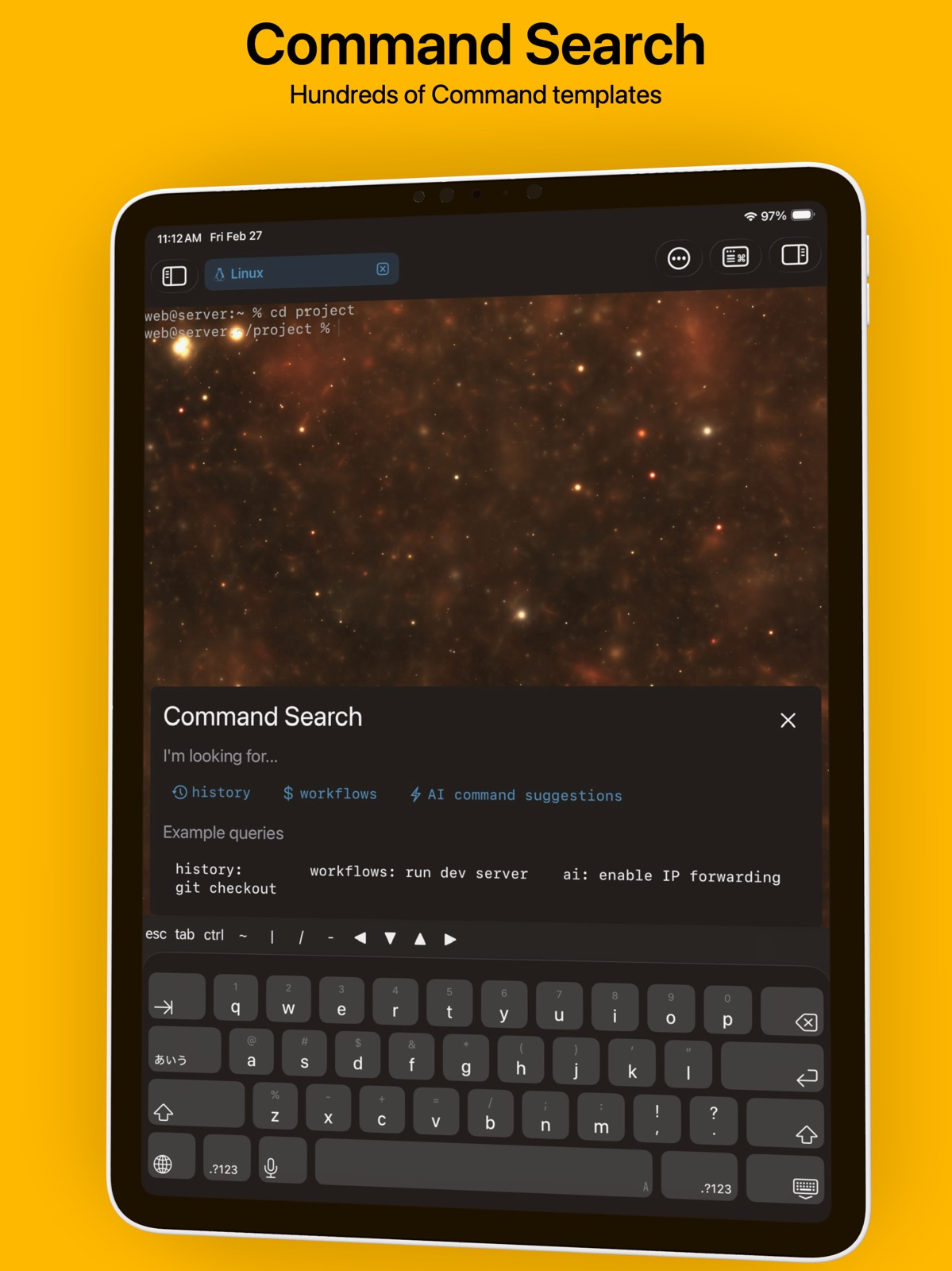
Command Search - Quickly find the right command We have supercharged La Terminal’s Snippets and AI Suggestions with a new Command Search feature. Search your own command history and our comprehensive Workflow gallery, or simply describe the command you want to execute in plain English to have AI suggest a command for you.
-
1.8.1
Command Search - Quickly find the right command We have supercharged La Terminal’s Snippets and AI Suggestions with a new Command Search feature. Search your own command history and our comprehensive Workflow gallery, or simply describe the command you want to execute in plain English to have AI suggest a command for you.
-
1.8.10
Fixes the connection reliability and memory usage when using native session preservation
-
1.8.11
The keyboard no longer shows up in the sessions display, where it prevented navigation. Fixes an important stability issue with Native Keep Alive session preservation.
-
1.8.12
- Improves the reliability to Windows hosts, where it would previously not resume a dead connection. - Terminal output no longer scrolls out of view when going to Sessions, and you do not need to scroll back when resuming a session. - Fixes a problem with resuming connections to remote hosts - Fixes a problem that cut connections with lots of output - No longer automatically launches monitoring on first use on iPad - Small usability improvements to the cube session switcher. - Sessions stay around when they are closed, so you can look at any diagnostics output. - Fixes the use case where users could not access remote SFTP servers via Files if they were using SSH keys for that host
-
1.8.13
Network reliability and performance improvements
-
1.8.14
- Fixes a connection issue that would prevent restoration of tmux sessions - Adds a setting to disable bright colors and instead use bold fonts to show bright text - Made it easier to open additional connections to the same host in an existing window using the "+" at the top of any open session
-
1.8.16
- Increased contrast of selected text in some themes to improve readability - Addresses issue where the onscreen keyboard would cover the bottom screen of the terminal on some configurations - Other minor bug fixes
-
1.8.17
- Addresses issue where the onscreen keyboard would cover the bottom screen of the terminal on some configurations - More clear presentation of Custom Appearance settings in host configuration - Improved multitasking support on iPad
-
1.8.2
Command Search - Quickly find the right command. We have supercharged La Terminal’s Snippets and AI Suggestions with a new Command Search feature. Search your own command history and our comprehensive Workflow gallery, or simply describe the command you want to execute in plain English to have AI suggest a command for you. This release includes additional fixes for some crash reports.
-
1.8.3
Command Search - Quickly find the right command. We have supercharged La Terminal’s Snippets and AI Suggestions with a new Command Search feature. Search your own command history and our comprehensive Workflow gallery, or simply describe the command you want to execute in plain English to have AI suggest a command for you. This release includes additional fixes for some crash reports.
-
1.8.6
Improves the performance of file transfers on the built-in file manager.
-
1.8.7
The Files extension should now scale to an unlimited number of files on the remote end. Previously, it would fail to access directories with large number of files.
-
1.8.8
- Fixed issue where rounded corners where clipping session text at the top and bottom of the screen on visionOS - Improved Files App support for large directories - Added support for creating ed25519 keys
-
1.9
This release fixes some hangs that would occur on sessions when a lot of data was being displayed. It also addresses an issue where the AI Assistant would fail to open when detecting the host OS. SSH agent now only requires a private key and no longer requires also providing the public key.
-
1.9.1
Addresses issues with network reliability.
-
2.0
* Mosh support: you can now use Mosh for session preservation. Unlike native preservation, it survives device reboots or app termination, but with lower terminal fidelity * Keyboard shortcuts now let you navigate between tabs * You can now configure scrollback size * Easier custom terminal fonts — no third‑party app required * File Manager supports Quick Look previews of remote files and local editing * Various community-reported bug fixes
-
2.0.2
· 13 Apr 2026
* Mosh protocol improvements
Alternatives
- Secure Terminal — Same category + similar ratings
- Docker Server Admin — Same category + similar ratings
Availability by market
- US
Data quality & evidence
- Page completeness
- Live store listing
- Last verified
- 31 Jul 2026
- Sources
- App Store
- Apoku editorial summary has not been published yet.