
Quick verdict
- What it is
- Store information collected; independent summary not yet available.
- At a glance
-
- From $3.99/mo
- Free to download
- In-app purchases
Categories and search queries
Official categories
- Photo & Video
- Utilities
AppCorpus categories
Key functions
| Function | Availability | Access | Scope | Evidence |
|---|---|---|---|---|
| Free app | Yes | Free | — | Store published |
| In-app purchases | Yes | Limited free | — | Store published |
Screens
App Store
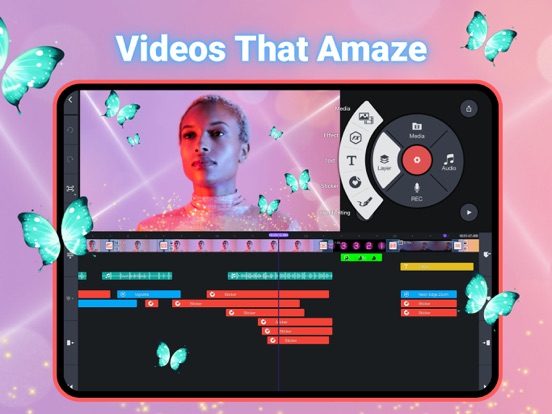
27 store screenshots



Pricing & paywalls
App Store
- Premium (Quarterly) — $3.99/month
- Premium (Quarterly) — $10.49/quarter
- Premium (Quarterly) — $22.99/year ($1.91/mo)
- M&R Festive Animal Friends — $1.99
- M&R School Life — $1.99
- M&R Vivid Borders — $1.99
- Paint-Talking Tom and Friends — $1.99
- Spring & Summer Vibe — $1.99
Ratings & reviews
App Store
-
5/5Love this App!
Overall, this app is literally AMAZING! But I have this little problem(I mean that this is probably only on my iPad, I don’t think anyone can really relate to this, but I am still gonna share this anyways), okay so, like it’s probably because I don’t have enough storage or something because I use Gacha club a lot and stuff but when I don’t use kinemaster for like 1 week or something I literally have to install the app again and today I had to install it again but it said something like “account in ITunes and App Store is disabled” or whatever I think I’m the only one who has ever had this problem because it only happens on my iPad but not anyone else’s.Like I can’t even install this app again! It just makes me very sad that I can’t use my favorite editing app so that basically means that I have to find a new one. The developer can’t fix this problem, I know they can’t but I’m just here like basically annoying everyone- I mean I just don’t want to let go if kinemaster and delete it cus I’ve made videos in there and intros that I made with hard work so im just really sad :( Also there is this little bug that like when I don’t use the app for like a few weeks or something, when I come back and use kinemaster again it becomes laggy and it glitches. Like everything stops! So take this, for example, I want to change the fonts but then when I press the thing, everything just glitches and lags. I hope you can fix this one. But I still love the app!!!!! I would DEFINITELY recommend this to friends :)
Ꭵᔕ ✞ℍᎥᔕ ᏰƎ✞✞ƎЯ · 30 Aug 2026
-
5/5The opening creation was ok but I don’t even say that
I create videos to The Finger Movie because I know I type on the font to choose from Helvetica. The font that is used is Chalkboard SE and made the text purple. I added a Cute Cut video I made just for fun. I used a handwriting tool to draw. I duplicate those icons to three and animating it. However, I add my screen recording video I saved. I had to split this video because the title is not permitted. But whatsoever, I make this decision to save the Hippo character from Baby Einstein. I saved this. When I closed the multitasking app of Safari, I go back to the KineMaster app where I’m working on right now, but then all of a sudden, the videos started missing. I need these videos to replace them because when I tried to close and reopen the project again, it wouldn’t appear. I had to restart my iPad and try that again to wait for Wi-fi. I know I’m almost finishing my KineMaster project and the clips appear back and don’t have any lines anymore, so then I tried to export that. The next thing is that it would just not have enough storage anymore to save the video and starts to have a “1” badge for Settings. I had to free up space but (I had this problem for KineMaster) when I export it again, it said “Not enough space on device” and then the saving would view. I tried 1080P again or 720P again or whatsoever I think. Enjoy this app and fix this problem!
jacksonsock · 30 Aug 2026
-
5/5Great! But one thing is...
Overall this app is AMAZING. I’m very used to this app and use it for my animating. There’s only 1 or 2 things I’d really appreciate, if you could fix them. 1) This is the only thing the frustrates me,(animating) while I’m animating I can only move that piece so far one direction or it will spin. That’s my only main issue for this app. 2) This one is not as important as my first one, but it would be helpful. I don’t know if it happens to other but, sometimes I. The beginning, I forget to put in my intro, BIIIIIGGGGG mistake. I don’t want to export it without my intro so I thought of what to do. I have a bunch of feature and photos and way more. When I add it in, I try to put it right before a bunch of stuff...and the features stay In the SAME spot...while ALL the videos and photos move further down. I then try to fix it but there was to much stuff to line it up. So I get rid of the intro and export it as it was. This isn’t as important but I would appreciate the effort! Thank you! Overall, if you are considering downloading this app I highly recommend it. It’s an amazing app and I use very often. Unfortunately, I just accidentally deleted it and have come to the lord of the apps to download it back. While I was here, I thought I might a well share the things that might need to be tweaked with and how much I love this app. I HIGHLY RECOMMEND you download this app. Thanks for reading, have a great day!
83839247462939474 · 30 Aug 2026
-
5/5Suggestions,
I have been using KineMaster for ever. Like since the old KineMaster water mark. Ya long. So ya I want to talk about the KineMaster water mark, so ya you know the water mark u have to deal with without paying yesh ya u know that one. So I like overlapping KineMaster videos andddd when I do I have so many KineMaster water marks on it and it’s bugging me. So my idea is to keep the KineMaster water mark buttt when u put on a KineMaster video u have already imported the KineMaster water mark disappears on the video but stays get what I mean? I am kinda confusing but the KineMaster water mark disappears on the video u already imported when u put it in another project. But when u import it again the water mark stays but it does overlay. Get it now? Ok I know it might be impossible but it’s an idea, (I just thought of) i hope u guys consider it but either way u should totally get the app it’s amazing! Edit: okay I have an ish to report. Okay so when I use the key thinging so you can move layers ya that. So I use gacha (not a surprise because a lot of people that use KineMaster use gacha :P) anywayyyyy I like using layers to make people walk so ya....mmh ō-ō okay anywayyyyy (why do I keep saying anywayyyyyy?) When I make them start walking then they stop then start walking away I make them walk and then 4 how long they stop they start moving and 8 don’t want em toooo. Anywayyyyy (I’m doing it again. I’m doing it again. I need to stopppppp) I Hope I made sense and that you guys can fix that issue
😀😍😘😻👌🏻👍🏻✋🏻 · 30 Aug 2026
-
5/5It’s good but…
Okay, hi. KineMaster is an amazing app and it lets you do so many things with it even without the premium subscription which I really like, but there are a few bugs I’d like to talk about. The first bug is that whenever I add lots of 0.1 second screenshots/photos it gets really laggy. It’s really annoying sometimes because I have to make multiple projects and export all of them so that the app doesn’t lag. I don’t have a lot of storage which also means that I may not be able to export the full project as well. Another thing about the lag is when I’m lip-syncing the audio glitches as well, so the lip-syncing is very inconsistent. The last thing I want to talk about is a big problem for me, and to fix it I have to delete other apps that I have. Although I’m not sure if my low storage is causing this. What happens is: I have enough storage to export a project but then when it’s done exporting it says: “There was a problem while saving” or something like that. No matter what I tried: lowering the quality, the birate, and the frame rate but nothing worked. I tried looking for tutorials but they were all in different languages with English titles. Sometimes it was easy enough to see, so I could follow it, but it didn’t work. I need help :( Thank you for reading and I’m sorry for the bad grammar
Gachagirl72829 · 30 Aug 2026
Privacy & accessibility
App Store
Privacy
- Data Not Linked to You — Analytics — Diagnostics — Crash Data Developer declared
- Data Not Linked to You — Analytics — Identifiers — Device ID Developer declared
- Data Not Linked to You — Analytics — Location — Coarse Location Developer declared
- Data Not Linked to You — Analytics — Purchases — Purchase History Developer declared
- Data Not Linked to You — Analytics — Usage Data — Other Usage Data Developer declared
- Data Not Linked to You — App Functionality — Contact Info — Email Address Developer declared
- Data Not Linked to You — App Functionality — Diagnostics — Crash Data Developer declared
- Data Not Linked to You — App Functionality — Diagnostics — Other Diagnostic Data Developer declared
- Data Not Linked to You — App Functionality — Diagnostics — Performance Data Developer declared
- Data Not Linked to You — App Functionality — Identifiers — Device ID Developer declared
- Data Not Linked to You — App Functionality — Identifiers — User ID Developer declared
- Data Not Linked to You — App Functionality — Location — Coarse Location Developer declared
- Data Not Linked to You — App Functionality — Purchases — Purchase History Developer declared
- Data Not Linked to You — App Functionality — Usage Data — Other Usage Data Developer declared
- Data Not Linked to You — App Functionality — User Content — Customer Support Developer declared
- Data Not Linked to You — Developer’s Advertising or Marketing — Identifiers — Device ID Developer declared
- Data Not Linked to You — Developer’s Advertising or Marketing — Other Data — Other Data Types Developer declared
- Data Not Linked to You — Developer’s Advertising or Marketing — Purchases — Purchase History Developer declared
- Data Not Linked to You — Developer’s Advertising or Marketing — Usage Data — Other Usage Data Developer declared
- Data Not Linked to You — Third-Party Advertising — Identifiers — Device ID Developer declared
- Data Not Linked to You — Third-Party Advertising — Location — Coarse Location Developer declared
- Data Not Linked to You — Third-Party Advertising — Usage Data — Advertising Data Developer declared
- Data Not Linked to You — Contact Info Developer declared
- Data Not Linked to You — Diagnostics Developer declared
- Data Not Linked to You — Identifiers Developer declared
- Data Not Linked to You — Location Developer declared
- Data Not Linked to You — Other Data Developer declared
- Data Not Linked to You — Purchases Developer declared
- Data Not Linked to You — Usage Data Developer declared
- Data Not Linked to You — User Content Developer declared
Accessibility
No accessibility labels collected yet.
Versions
App Store
-
5.0.5 (1283)
Feature Updates: 1. Adds full-screen preview and editing on the editing screen with a long-press on the preview button 2. Adds support to download and re-edit projects in the Get Projects screen UX/UI changes: 1. Changes "Export" to "Save as Video" to distinguish it from "Export Project (.kine)" 2. Supports a long press on project thumbnails inside the My Projects screen, accessed via the See All button
-
5.0.6
Feature Updates: 1. Adds full-screen preview and editing on the editing screen with a long-press on the preview button 2. Adds support to download and re-edit projects in the Get Projects screen UX/UI changes: 1. Changes "Export" to "Save as Video" to distinguish it from "Export Project (.kine)" 2. Supports a long press on project thumbnails inside the My Projects screen, accessed via the See All button
-
5.0.7(1284)
Feature Updates: 1. Adds full-screen preview and editing on the editing screen with a long-press on the preview button 2. Adds support to download and re-edit projects in the Get Projects screen UX/UI changes: 1. Changes "Export" to "Save as Video" to distinguish it from "Export Project (.kine)" 2. Supports a long press on project thumbnails inside the My Projects screen, accessed via the See All button
-
5.1.0(1292)
Feature Updates: 1. Adds the Slip tool to adjust a video's start and end positions within a fixed video duration 2. Adds support to save as animated GIF, in addition to MP4 3. Supports snapping of layers to guidelines and square cropping 4. Supports replacement of layer assets 5. Supports text sticker assets UX/UI Changes: 1. Supports adding multiple audio files at once 2. Supports setting the default transition duration when creating a new project
-
5.1.1(1294)
Feature Updates: 1. Adds the Slip tool to adjust a video's start and end positions within a fixed video duration 2. Adds support to save as animated GIF, in addition to MP4 3. Supports snapping of layers to guidelines and square cropping 4. Supports replacement of layer assets 5. Supports text sticker assets UX/UI Changes: 1. Supports adding multiple audio files at once 2. Supports setting the default transition duration when creating a new project
-
5.1.4(1297)
Feature Updates: 1. Adds the Slip tool to adjust a video's start and end positions within a fixed video duration 2. Adds support to save as animated GIF, in addition to MP4 3. Supports snapping of layers to guidelines and square cropping 4. Supports replacement of layer assets 5. Supports text sticker assets UX/UI Changes: 1. Supports adding multiple audio files at once 2. Supports setting the default transition duration when creating a new project
-
5.1.5(1299)
1. Bug fixes and app stability improvements
-
5.1.6(1301)
1. Bug fixes and app stability improvements
-
5.2.1
Feature Updates: 1. Supports category-wide Asset Store search 2. Supports applying previously used font to newly added text 3. Supports resetting color adjustments 4. Supports transcoding imported videos to a lower resolution 5. Supports keeping the original copies of media and audio files inside the app after being added to the timeline UX/UI Changes: 1. Moves the Replace button to the Options menu panel 2. Extends trimming area to include transitions
-
5.2.10(1319)
Feature Updates: 1. Supports category-wide Asset Store search 2. Supports applying previously used font to newly added text 3. Supports resetting color adjustments 4. Supports transcoding imported videos to a lower resolution 5. Supports keeping the original copies of media and audio files inside the app after being added to the timeline UX/UI Changes: 1. Moves the Replace button to the Options menu panel 2. Extends trimming area to include transitions
-
5.2.11(1320)
Update to KineMaster 6.0 for an incredible video editing experience! • It's easy! Just search for KineMaster 6 on the App Store Learn more at kinemaster.com
-
5.2.12(1322)
Update to KineMaster 6.0 for an incredible video editing experience! • It's easy! Just search for KineMaster 6 on the App Store Learn more at kinemaster.com
-
5.2.13(1324)
• UX changes
-
5.2.14(1325)
Update to KineMaster 6.0 for an incredible video editing experience! • It's easy! Just search for KineMaster 6 on the App Store Learn more at kinemaster.com
-
5.2.15(1327)
Update to KineMaster 6.0 for an incredible video editing experience! • It's easy! Just search for KineMaster 6 on the App Store Learn more at kinemaster.com
-
5.2.16(1328)
Update to KineMaster 6.0 for an incredible video editing experience! • It's easy! Just search for KineMaster 6 on the App Store Learn more at kinemaster.com
-
5.2.17(1329)
· 8 Sep 2025
Get the full KineMaster experience for the latest video editing tools! • It's easy! Just search for KineMaster on the App Store • Learn more at kinemaster.com
-
5.2.2(1307)
Feature Updates: 1. Supports category-wide Asset Store search 2. Supports applying previously used font to newly added text 3. Supports resetting color adjustments 4. Supports transcoding imported videos to a lower resolution 5. Supports keeping the original copies of media and audio files inside the app after being added to the timeline UX/UI Changes: 1. Moves the Replace button to the Options menu panel 2. Extends trimming area to include transitions
-
5.2.3(1308)
Feature Updates: 1. Supports category-wide Asset Store search 2. Supports applying previously used font to newly added text 3. Supports resetting color adjustments 4. Supports transcoding imported videos to a lower resolution 5. Supports keeping the original copies of media and audio files inside the app after being added to the timeline UX/UI Changes: 1. Moves the Replace button to the Options menu panel 2. Extends trimming area to include transitions
-
5.2.4(1310)
Feature Updates: 1. Supports category-wide Asset Store search 2. Supports applying previously used font to newly added text 3. Supports resetting color adjustments 4. Supports transcoding imported videos to a lower resolution 5. Supports keeping the original copies of media and audio files inside the app after being added to the timeline UX/UI Changes: 1. Moves the Replace button to the Options menu panel 2. Extends trimming area to include transitions
-
5.2.5(1311)
Feature Updates: 1. Supports category-wide Asset Store search 2. Supports applying previously used font to newly added text 3. Supports resetting color adjustments 4. Supports transcoding imported videos to a lower resolution 5. Supports direct exporting to and re-importing from SpeedRamp 6. Supports keeping the original copies of media and audio files inside the app after being added to the timeline UX/UI Changes: 1. Moves the Replace button to the Options menu panel 2. Extends trimming area to include transitions
-
5.2.6(1315)
Feature Updates: 1. Supports category-wide Asset Store search 2. Supports applying previously used font to newly added text 3. Supports resetting color adjustments 4. Supports transcoding imported videos to a lower resolution 5. Supports keeping the original copies of media and audio files inside the app after being added to the timeline UX/UI Changes: 1. Moves the Replace button to the Options menu panel 2. Extends trimming area to include transitions
-
5.2.7(1316)
Feature Updates: 1. Supports category-wide Asset Store search 2. Supports applying previously used font to newly added text 3. Supports resetting color adjustments 4. Supports transcoding imported videos to a lower resolution 5. Supports keeping the original copies of media and audio files inside the app after being added to the timeline UX/UI Changes: 1. Moves the Replace button to the Options menu panel 2. Extends trimming area to include transitions
-
5.2.8(1317)
Feature Updates: 1. Supports category-wide Asset Store search 2. Supports applying previously used font to newly added text 3. Supports resetting color adjustments 4. Supports transcoding imported videos to a lower resolution 5. Supports keeping the original copies of media and audio files inside the app after being added to the timeline UX/UI Changes: 1. Moves the Replace button to the Options menu panel 2. Extends trimming area to include transitions
-
5.2.9(1318)
Feature Updates: 1. Supports category-wide Asset Store search 2. Supports applying previously used font to newly added text 3. Supports resetting color adjustments 4. Supports transcoding imported videos to a lower resolution 5. Supports keeping the original copies of media and audio files inside the app after being added to the timeline UX/UI Changes: 1. Moves the Replace button to the Options menu panel 2. Extends trimming area to include transitions
Alternatives
- KineMaster - Video Editor — Same category + similar ratings
Availability by market
- US
Data quality & evidence
- Page completeness
- Live store listing
- Last verified
- 30 Aug 2026
- Sources
- App Store
- Independent summary has not been published yet.