
Quick verdict
- What it is
- Store information collected; an Apoku editorial summary is not yet published.
- At a glance
-
- $5.99
- In-app purchases
Categories and search queries
Official categories
- Productivity
- Lifestyle
Apoku categories
Key functions
| Function | Availability | Access | Scope | Evidence |
|---|---|---|---|---|
| In-app purchases | Yes | Limited free | Context-specific | Store published |
| Family Sharing | Unknown | Unknown | Scope unknown | Store published |
Screens
App Store
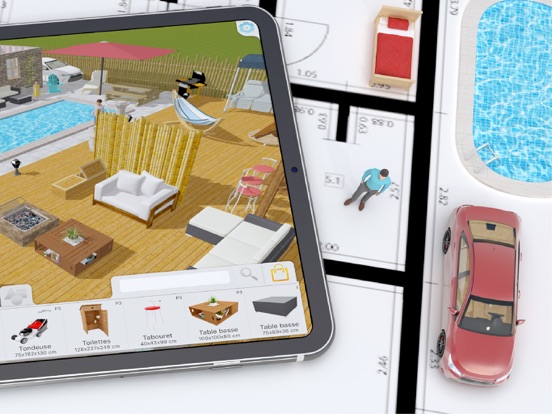
15 store screenshots


Pricing & paywalls
App Store
- Price: $5.99
- Asia pack — $5.99
- Children pack — $5.99
- Countryside pack — $5.99
- Kitchen — $5.99
- Living room pack — $5.99
- Music Pack — $5.99
- Nature Pack — $5.99
- Outdoor — $5.99
- People Pack — $5.99
- Starter Pack — $5.99
Ratings & reviews
App Store
-
5/5Easy to use!
Very easy to use while having a lot of design features. I was up and running almost immediately on my iPad. Every item including walls is easy to move, resize, etc. My only complaint is the exterior options are limited and you can’t change colors or flooring, but I’m taking no stars off for that because the app is so intuitive and easy to use it makes up for those minor flaws. We are building a home, and this app has already saved us money by enabling us to see some necessary changes. ****HINT-in 3D mode if you gently keep zooming in the perspective changes to you standing in the room.****
Teeandcee · 7 Aug 2026
-
4/5Decent!
I downloaded the app since we’re building a new home, and I wanted to be able to visualize the space but didn’t have the patience for long learning curve since I don’t have any background in graphic design. Super easy to learn, and satisfied by the basic paid subscription. My biggest issue is the lack of customizable colors, and lack of being able to put hanging pendants. The basic library is pretty limited, but I could make it work if I could at least change the colors more specifically. I emailed suggesting they add a color wheel option, but never heard back. I also emailed since I'm having issues syncing my iPhone and iPad, and am waiting to hear back. I know they probably aren’t a big company so trying to be patient. Will update if I hear back!
IWorkOut! · 7 Aug 2026
-
3/5Very easy, but very basic
The good: The app is very easy to use. Everything is drag and drop and sizes can be adjusted with the “Edit” option. The bad: The number of objects to select from are very limited. You can buy more templates with more options for a relatively low cost. I tried to find an electrical template, but had no success. There is zero technical support for this app. When you try to access FAQ’s or their website, you are taken to a completely different website that has nothing to do with Keyplan 3D. Their is also very limited information online to help you with any of your questions. I want to give this app a higher rating, but without any technical support or a functioning website, I will have to leave it at a 3. If you just want the basics, it’s a good app for only $5.99.
CJ5574 · 7 Aug 2026
-
2/5Good beginning, but needs to be finished
Very easy to use and makes a nice start for a floor plan, but is missing many features: no roof capability; walls can vary in thickness but not in height, no pony walls; no sidewalk or driveway capability; minimal fence options but no gate options; limited vehicle options, no pickup trucks/oversized/RVs; serious problem when modifying window sizes has a floating “void” or white space that overlays the images, it varies in size depending the window that was modified and will come and go as it pleases, it carries over to the image/PDF of the detailed floor plan and the 3D image but does not appear on the blue print image - extremely annoying; no option for A/C units, propane tanks, telephone poles - all require trying to use customized geometric objects; very limited HVAC objects and appear to be based only on European designs; overall it is a good beginning but is very far from a finished product.
Ragnar in Texas · 7 Aug 2026
-
5/5More robust than predicted
We purchased a rental house needing to remodel, tear out walls, entire kitchen and build an additional master bed and bath. Since it's a vacation rental we also are required to furnish the house. All the above were made extremely easy to prepare and plan. The app took a little getting used to due to how robust it is. Advice tip one: play first. Learn how to manipulate the sizes of walls (length & thickness of studs), furniture, placement and facade. Only then get to serious business. Most tasks are tap, drag then drop (even when painting or texturing.) We loved the edit feature of the furniture and cabinets. Resize to the inch and the cabinet and countertop installers knew exactly what to do. So much more to share about this app saved us big money because we able to show our subs a picture and dimensions. One needs a bit of imagination for finish work but for 6 bucks this app got us there and then some with the workers complete understanding of our final intent. This app is a fabulous tool and great fun also.
HAVitTV · 7 Aug 2026
Privacy & accessibility
App Store
Privacy
- Data Linked to You — App Functionality — Diagnostics — Crash Data Developer declared
- Data Linked to You — Diagnostics Developer declared
Accessibility
No accessibility labels collected yet.
Versions
App Store
-
1.7.3
- Various bug fixes and performance improvements - Rare crash on startup is now fixed with missing pack purchased
-
1.7.4
New exciting features are now available with this new version ! - You can now create folders and reorganize your plans according to your need. The folders can be dragged and dropped to create complex folder hierarchy Copy / Paste any folder group to copy an entire set of plans. It is now possible to reorder your plans according to alphabetical or creation date order. The creation date information is now displayed under the plan name. - New wall edition algorithm. Much more flexible and robust, you will feel much more freedom when editing your walls. - iPhone and iPad project menu interfaces are now identical and much more ergonomic. Since Keyplan 3D is a universal App available on both iPhone and iPad, we merged both menu interfaces into a single and simple one.
-
1.7.5
New exciting features are now available with this new version ! - Hotfix update - You can now create folders and reorganize your plans according to your need. The folders can be dragged and dropped to create complex folder hierarchy Copy / Paste any folder group to copy an entire set of plans. It is now possible to reorder your plans according to alphabetical or creation date order. The creation date information is now displayed under the plan name. - New wall edition algorithm. Much more flexible and robust, you will feel much more freedom when editing your walls. - iPhone and iPad project menu interfaces are now identical and much more ergonomic. Since Keyplan 3D is a universal App available on both iPhone and iPad, we merged both menu interfaces into a single and simple one.
-
1.7.6
Welcome to our users from China. Keyplan 3D is now fully translated in Chinese. - Fix when new user don't get a new plan to edit freely with the Lite version. - Deeper zoom allowed for better precision - Magnet is now adapting with better precision - More robust with complex room shape - Empty project menu is no more causing trouble - Code cleaning
-
1.7.8
In App purchase is been completely reworked. Each user will get a reliable information about purchases and restorable content. New download method, much more robust and fast. Low disk space warning added. Project record is now safer and faster. Corrupted plan are safely managed while sharing a pdf version. Updating Image picker for plan import option. Fixed erasing a custom furniture while using the search option. Various code improvements.
-
1.7.9
A brand new pack for your child room is now available ! Many choices are available to you with 60 new objects and many wallpapers, offering them, in that one room, all the comfort they need to sleep, play, work and receive their friends. - Missing object during loading is now correctly managed - Incorrect custom furnitures are now fixed. - Fixed crash when undo button is pressend while camera is animating. - Not enough storage warning is now available. - Various bug fixes and improvements.
-
1.8.0
Fixed reversed cotations with upside down values. Custom object will keep being displayed first even after new pack addition. Fixed crash on startup in some very rare cases. Fixed illegal characters added to folder name. Improving overall performances. For our Keyplan 3D Lite version users, please be patient, the new version is coming very soon with all the described improvements and features available with the paid version.
-
1.8.1
The in app shop will update according to customers previous purchases. Downloading a pack is now faster. Special characters in folder names are now correctly managed. Height from ground unit is now in centimeters for metric system. Various bug fixes.
-
1.8.2
Improved selection with a single plan. Added more descriptive error message when loading a project Previews are now updated in real-time Fixed error when both iCloud and users updates their project numbers. Various code optimisations.
-
1.8.3
Hotfix. Improved selection with a single plan. Added more descriptive error message when loading a project Previews are now updated in real-time Fixed error when both iCloud and users updates their project numbers. Various code optimisations.
-
1.8.4
Various bug fixes and improvements.
-
1.8.5
New asset file model with improved loading and reduced size Fixed various In App objects with improved texture and geometry Small translation corrections In App packs are now available with lightning fast download 3d engine improved Fix last opened plan selection when a different folder is opened Fix cotation kwall displayed on top of room's cotations iCloud connection improved Added new mouse interactions for ipadOs and MacOS Kpl file sharing improved
-
1.8.6
Quick bug fix for plan image importation. Several bugs and performance improvements.
-
1.8.7
A new major update for Keyplan 3D. What's new A complete new color tool, adding many features to paint your dream Home. - You can now create your own color using a color wheel including millions of colors - It is now possible to paint a single object or every wall of a selected room - Create a custom palette and record your favorite colors - Check your painting history to quickly find a previous color - A new page collect every textures and colors applied in your project to be reused if needed. - An eyedropper allow you to collect precisely any colors in your plan. - The interface is now wider, more colorful and easy to read. Bug fixes We fixed and improved the In App loading system. Your purchases are now correclty displayed in real-time. Some readability improvements. Already purchase message is now fixed
-
1.8.8
Small hotfix for our new major update. What's new A complete new color tool, adding many features to paint your dream Home. - You can now create your own color using a color wheel including millions of colors - It is now possible to paint a single object or every wall of a selected room - Create a custom palette and record your favorite colors - Check your painting history to quickly find a previous color - A new page collect every textures and colors applied in your project to be reused if needed. - An eyedropper allow you to collect precisely any colors in your plan. - The interface is now wider, more colorful and easy to read. Bug fixes We fixed and improved the In App loading system. Your purchases are now correclty displayed in real-time. Some readability improvements. Already purchase message is now fixed
-
1.8.9
A brand new object pack is now available ! - New nature pack - Missing packs check for favorited items. - Updated for iOS 18 - The shop now displays images in HD - Various fixes and improvements
-
1.9.0
This month discover the new nature pack, its trees, its stone decorations and many other things. - The purchases update is now faster and more robust - Sharing plans on Mac is now possible in KPL format
-
1.9.1
This month discover the new nature pack, its trees, its stone decorations and many other things. HotFix : unedited plan from previous version could be locked if edited in subsequent versions.
-
1.9.2
Fixed unlocking geometric shape pack
-
1.9.3
Code cleaning with latest iOS version update Unicode is now fully supported for room name and cotation display Crash fix on returning to main referral page Removed pop up with object templates are not correctly initialized Added Chinese missing translations Crash fixed for pdf generation with broken room shape Magnifier is now back in the object browser to search for a specific object using names.
-
1.9.4
Improved speed and overall stability Code updated with latest ios version Fixed inverted furniture dimensions in 2D view Objects fix and optimisation Fixed few translations
-
1.9.5
- Countryside Pack — Now Even Better! Our Countryside Pack just got a free update for all existing owners! If you haven’t grabbed it yet, the price stays the same, so now’s the perfect time. Discover four brand-new items — two silos, a wind turbine, and a cart — to bring even more life, charm, and creative options to your farm. Don’t forget to explore our updated In-App Shop for the latest additions! - iCloud or Local? You Choose. By popular demand, we’ve added a new button right inside the app that lets you easily switch between iCloud and local storage. Your feedback drives our updates, and we’re thrilled to bring you this much-requested feature! - A Fresh, Modern Look Keyplan 3D now shines with a modernized interface, inspired by Apple’s elegant Liquid Glass design. Smoother, sleeker, and more delightful than ever. - Faster. Stronger. Better. We’ve fine-tuned performance across the board — enjoy a faster, more stable experience every time you create.
-
1.9.6
- New Music Pack Create your own recording studio! Instruments, turntables, concert gear… and more! - Improved visibility of new content - Minor bug fixes
-
1.9.7
A new Starter Pack is now available! You can purchase a complete bundle with over 1,000 elements—all refreshed and optimized—at a 20% discount, including the full version pack. It’s the perfect way to start your journey into creating plans and stunning interior design projects. We’ve also upgraded our bug reporting system with a new automated tool. This allows us to gain better insights and provide you with a smoother experience if you encounter any issues in the app. We’re constantly working to improve Keyplan 3D in every possible way. We’ve doubled the number of walls and furniture items you can add to your plans. You can now create much larger projects with thousands of objects. We’ve also improved file handling: Keyplan 3D can now open previously corrupted projects and will attempt to repair any issues within the file.
-
1.9.8
· 17 Apr 2026
Hotfix A new Starter Pack is now available! You can purchase a complete bundle with over 1,000 elements—all refreshed and optimized—at a 20% discount, including the full version pack. It’s the perfect way to start your journey into creating plans and stunning interior design projects. We’ve also upgraded our bug reporting system with a new automated tool. This allows us to gain better insights and provide you with a smoother experience if you encounter any issues in the app. We’re constantly working to improve Keyplan 3D in every possible way. We’ve doubled the number of walls and furniture items you can add to your plans. You can now create much larger projects with thousands of objects. We’ve also improved file handling: Keyplan 3D can now open previously corrupted projects and will attempt to repair any issues within the file.
Alternatives
- Planit2d — Same category + similar ratings
- Home Design 3D Outdoor&Garden — Same category + similar ratings
- Home Design 3D: Draw & Plan — Same category + similar ratings
Availability by market
- US
Data quality & evidence
- Page completeness
- Live store listing
- Last verified
- 7 Aug 2026
- Sources
- App Store
- Apoku editorial summary has not been published yet.