
Quick verdict
- What it is
- Store information collected; an Apoku editorial summary is not yet published.
- At a glance
-
- Free to download
Categories and search queries
Official categories
- Books & Reference
- Reference
- Education
Apoku categories
Key functions
| Function | Availability | Access | Scope | Evidence |
|---|---|---|---|---|
| Free app | Yes | Free | Context-specific | Store published |
Screens
18 store screenshots


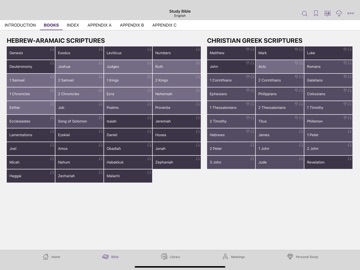
18 store screenshots


Pricing & paywalls
- Free to download
- Free to download
Ratings & reviews
-
5/5Playlists & Notes…& Crashes 💥
As always, the benefits of this app far outnumber any issues with using it. However, lately, my app has been crashing multiple times. This makes personal study and meeting preparation more difficult. My patience sure was tested during convention as I did my best to catch up when all of the crashes continued both on my iPad and my iPhone. 🥴🤭 The crashes seemed to happen more frequently as I was following a link to a scripture and then highlighting that scripture and making a note. I tried backing up the app on my phone and then sharing to my iPad since the crashes seemed more frequent on my phone…only to lose a whole day of notes from the convention in the process. 🤦♀️ Thankfully, I live in an area that made it possible for me to make up that day and take notes again! 🥳 The playlist feature has made listening to original songs and morning worship programs so much easier! 🎶🎼🎥No more searching through favorites and playing one thing at a time!! 🎉I never had a problem with the app crashing before the playlist feature was added. Could it be related? I am exceedingly grateful for this feature and I know that bugs will occur and that they will be worked out. I thank you all for the hard work involved in developing the software that makes our daily lives more enjoyable in these times that we live.
Jay Double Yew · 29 Sep 2026
-
5/5Absolutely love this app…..
….there have been some annoying problems. Thank Jehovah for the wonderful convention on patience. I’ve been having problems with the app crashing. I’m in the middle of taking notes during a meeting, personal study, or just listening to the Bible reading and then it crashes. Also, the items in my favorites seem to duplicate itself and rearrange itself. I try to put things in the order that I need it to be in and, next thing you know, it’s back to being completely disorganized. We all know that Jehovah’s Witnesses are the most organized people in the world. So having things disorganized can mess with one’s patience….especially for someone like me with mild ADD. One more thing…. I have so many books. But I don’t have space for them in my house so I rely on the books in the app for information. Some of the books have charts that I’d love to be able to view on my iPad, but can’t. We were just looking up the prophecies about the Messiah. The digital “All Scriptures” book had the [chart] or timeline we were looking for, but with no way to view it. Will there be a way to view that chart and similar charts or maps like that in the future? I greatly appreciate all the hard work and self-sacrificing love from my brothers and sisters. I will have eternity to meet you all soon.
AntiSarah · 29 Sep 2026
-
5/5I love my family!
Thank you to all of my brothers and sisters who have put endless efforts into forming this app to what it is today, and thank you Jehovah for blessing and supporting us. I have used it forever and never thought about a review until now! I am grateful for the easy access to my bible, publications, music, quick and easy videos! Having these options make a lot of obstacles easier in the ministry but primarily helps to keep the faith of the main users strong. I will not speak of the bugs here and there because restarting the app has always worked for me but I will speak on something I am passionate about and that is the highlight colors! I noticed we got more options for speeding up the audio and that is awesome! I normally can’t listen to the bible reading unless it’s at a 1.5x but I do go back a lot so it’s nice to have slower and faster options! Now for the colors.. very passionate about how I highlight certain texts. I can use Psalms for example, which is where I am right now, I feel a lot of pink when reading what David will say he feels about Jehovah but the pinkish red color I am already using as a “Stop, Wrong” and orange as a “Danger, Warning” just to give a feel of what I mean. So the best I have are green and yellow which correlate but differentiate in their own uses. I don’t know if a color wheel would be possible but it would be nice to have a baby pink.. as it is a rare occasion & very special type of text, like David and Jonathan’s brotherhood or a strong emotion. Thank you anyway!
Miriosan · 29 Sep 2026
-
5/5Love this APP
I appreciate so much that Jehovah‘s organization has given us an app that helps feed us spiritually. There are some things that I wish you that would allow for an easier and more personal experience with this app. I would love for there to be a color wheel where we can choose a color that we wish to use. I think that being able to put certain fonts would be great for when we write our notes to have that choice would be nice. I also think that underlining would be a great option to also have and when morning worship comes out I think it would be such a great feature to be able to add that to the scripture that they’re explaining for example if a morning worship has to do with Genesis 315 I would love the idea of being able to just have it where when I read that scripture I can maybe put a link that will take me to that morning worship if I choose to. I would also love for there to be an option to separate my notes within one book according to language, for example, if I studied something in Spanish, I write my notes, but within that same publication if I look forward in English, my Spanish notes still appear I think that if there can be an option where I can choose to just separate it, my English notes stay with my English publication and my Spanish notes with my Spanish publication.. but then if I wanna see both notes, I can also choose that option.
Anitapioneer · 29 Sep 2026
-
5/5Awesome, but one thing that I want to suggest
I love JW Library, for the meetings, bible reading, studying, and videos. It’s certainly a blessing from Jehovah. One thing that I think you could add, and I think you maybe have in the past on certain devices, but Apple and Samsung don’t have it. So, this is mostly about music videos, but could be used for other things as well: A shuffle button. The original music that you provide is amazing, but it would be nice if we could tap that shuffle button and do everyday things. Like for example, when driving, especially to meetings and service, it would be really nice to just be able to click shuffle and have random songs play for as long as you want. I don’t know if this is done in other places, but here in the middle of Wisconsin, some congregations public witness in Flea Markets, and we usually have an open tent with a table with literature on it. We also play Become Jehovah’s Friend videos on the table to attract people to the carts. A shuffle button would be pretty handy in that situation. Sure, you can just click on a video and then the videos following it will play, but especially with the songs, it’d be nice to have a way to shuffle them. So, just a suggestion, and there are others ways of doing this on different devices; I don’t know if you even look at the reviews, but if you do, there are people out in Wisconsin that might find this useful.
stormfur1 · 29 Sep 2026
No store reviews collected for Google Play · US
Privacy & accessibility
Privacy
- Data Not Linked to You — Analytics — Diagnostics — Crash Data Developer declared
- Data Not Linked to You — Analytics — Identifiers — Device ID Developer declared
- Data Not Linked to You — Analytics — Search History Developer declared
- Data Not Linked to You — Analytics — Usage Data — Product Interaction Developer declared
- Data Not Linked to You — Diagnostics Developer declared
- Data Not Linked to You — Identifiers Developer declared
- Data Not Linked to You — Search History Developer declared
- Data Not Linked to You — Usage Data Developer declared
Accessibility
No accessibility labels collected yet.
Privacy
- Data collected — Analytics — App activity — App interactions Developer declared
- Data collected — Analytics — App activity — In-app search history Developer declared
- Data collected — Analytics — App info and performance — Crash logs Developer declared
- Data collected — Analytics — App info and performance — Diagnostics Developer declared
- Data collected — Analytics — Device or other IDs Developer declared
- Security practices — The developer has committed to follow the Play Families Policy for this app. See the policy — Committed to follow the Play Families Policy Developer declared
- Security practices — The developer doesn’t provide a way for you to request that your data be deleted — Data can’t be deleted Developer declared
- Security practices — Your data is transferred over a secure connection — Data is encrypted in transit Developer declared
Accessibility
No accessibility labels collected yet.
Versions
App Store
-
14.1.1
- Fixed issue where pictures in the 2024 Meeting Workbooks did not display on the Meetings tab.
-
14.1.2
Fixed issue for Japanese publications with Furigana, where highlights moved to a different position.
-
14.2
- In a playlist, use the Trim feature to play a selected portion of a larger video or audio file. - Fixed several issues with Backup and Restore of personal study data.
-
14.3
- In the Bible, use the gem icon on the context menu to view all study content for a single verse, including Research Guide references. - Personal notes appear before other content in the study pane. - Fixed an issue with trimmed items in playlists; these items will need to be re-trimmed.
-
14.3.1
- Several issues with video playback are fixed. - Several other issues are fixed, including some causing the app to crash.
-
14.3.2
Several issues are fixed, including some causing the app to crash.
-
15.0
- Sign language publications are available. - Table of Contents pages show the cover artwork for the publication when available. - Highlights created in the Bible and other publications display in the study pane. Highlights cannot be edited in the study pane. - The current Watchtower study article displays directly on the Meetings tab.
-
15.0.1
- In the text view of a sign language publication, selecting a Bible citation now displays parallel translations in the study pane. - Several issues are fixed, including some causing the app to crash.
-
15.0.2
- Fixed some issues with restoring backup files from JW Library Sign Language. - Fixed issue playing audio where some articles would be skipped. - Fixed issue where the Download Media dialog would incorrectly report that there was no Internet Connection in some Bibles. - Fixed issue with restoring a picture-in-picture window to its original tab. - Several issues are fixed, including some causing the app to crash.
-
15.0.3
- Fixed issue where videos for certain sign language publications would fail to download or stream. - Fixed issue where certain Japanese text appeared below all the other characters on the line.
-
15.0.4
Fixes issue where notes were limited to four lines on iOS 18.
-
15.1
- Word-based search is enabled for sign-language publications. - Additional playback speeds are available for video and audio.
-
15.2
Notes created in the Bible and other publications display in the study pane. (Notes cannot be created in the study pane.)
-
15.3
Research Guide references are available in sign-language Bibles.
-
15.3.1
- Fixed issue with number ordering in scripture citations for certain right-to-left languages. - Fixed several issues, including some that were causing the app to crash.
-
15.4
- The Meetings tab has been redesigned to show links to material for the Life and Ministry meeting and the Watchtower Study on the same page. Links to other meeting publications are also included for easy access. - Several issues are fixed, including some that were causing the app to crash.
-
15.4.1
- The "More Songs" button has been restored to the Show Media page on the Meetings tab. - Fixed issue where it was not possible to replace or delete Bookmarks when the screen reader was active. - Several issues are fixed, including some that were causing the app to crash.
-
15.4.2
Fixed issues with cut off text in full screen notes on the latest version of the operating system.
-
15.5
- Playback speed for video and audio is remembered after restarting the app. - When videos are opened, the heads-up display is hidden. To show it, tap the video. - Several issues are fixed, including some that were causing the app to crash.
-
15.5.1
Several issues are fixed, including some that were causing the app to crash.
-
15.6
- Use the Search button on the Library tab to find publications, videos, or audio by title. - Several issues are fixed, including some that were causing the app to crash.
-
15.7
- The study pane in the Bible displays distinct scene images for clips from The Good News According to Jesus. - Several issues are fixed, including some that were causing the app to crash.
-
15.8
- The "Watch Now" feature on the Video page of the Library tab shuffles and plays all videos. - When watching a video, you can use the language selector to choose a different language. - Several issues are fixed, including some that were causing the app to crash.
-
15.8.1
Several issues are fixed, including some that were causing the app to crash.
-
15.9
· 2 Jul 2026
- You can open multiple JW Library windows at the same time on devices running iPadOS® 15 or macOS® 11 and later. - Several issues have been fixed, including some that were causing the app to crash.
-
15.9.1
· 24 Sep 2026
Several issues have been fixed, including some that were causing the app to crash.
Alternatives
- Blood Sugar Tracker-AI Health — Same category + similar ratings
- Bible Study - Manna — Same category + similar ratings
Availability by market
- US
Data quality & evidence
- Page completeness
- Live store listing
- Last verified
- 29 Sep 2026
- Sources
- App Store, Google Play
- Apoku editorial summary has not been published yet.