
Quick verdict
- What it is
- Store information collected; independent summary not yet available.
- At a glance
-
- Free to download
- In-app purchases
Categories and search queries
Official categories
- Lifestyle
- Productivity
AppCorpus categories
Key functions
| Function | Availability | Access | Scope | Evidence |
|---|---|---|---|---|
| Free app | Yes | Free | — | Store published |
| In-app purchases | Yes | Limited free | — | Store published |
Screens
30 store screenshots


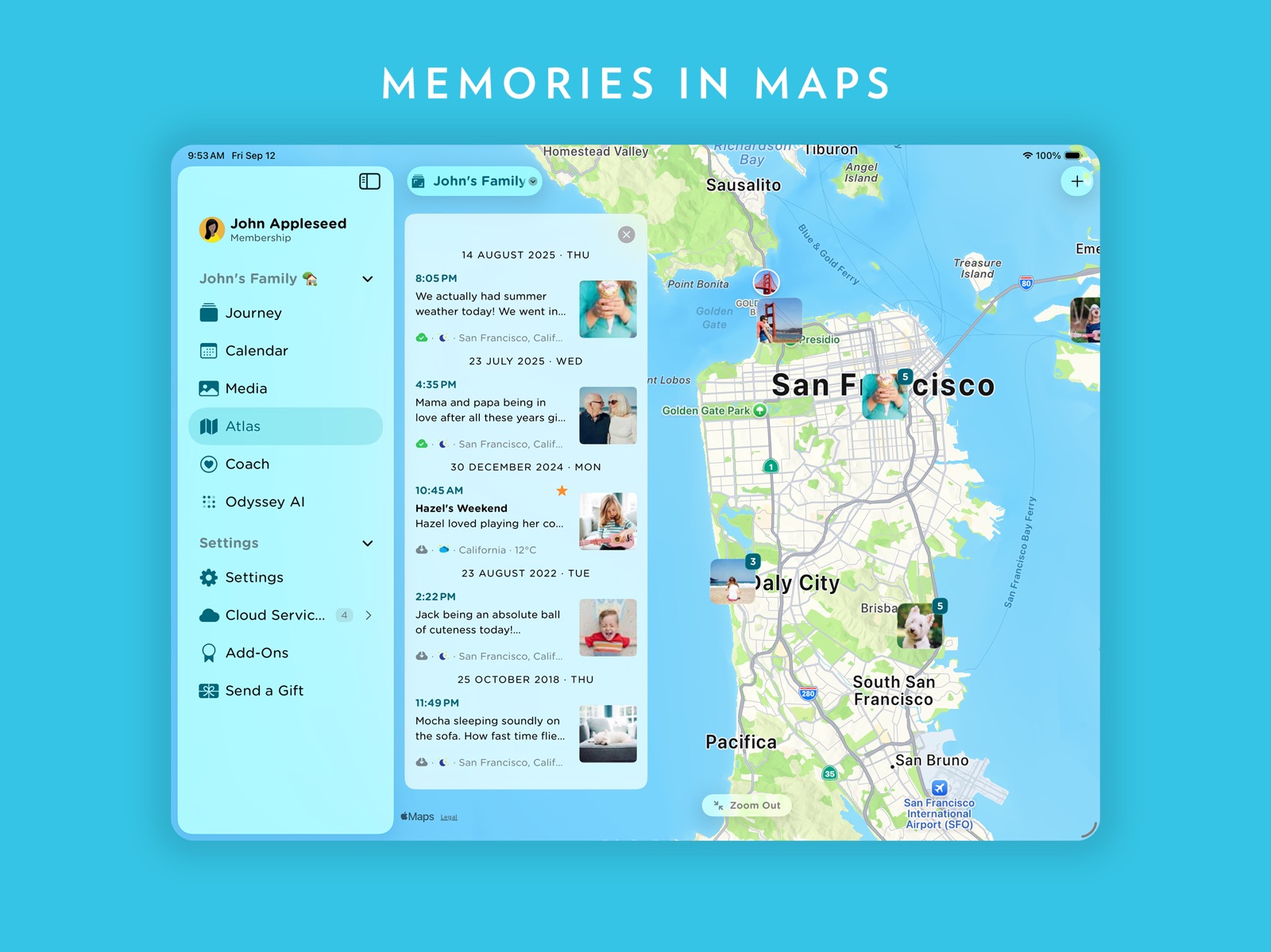
31 store screenshots


Pricing & paywalls
- Premium — $17.99
- Free to download
- In-app purchases: $0.99 - $199.99 per item
Ratings & reviews
-
4/5Fantastic Journal App
I love this app. It is absolutely fantastic and honestly I can't give any reason why not to use it. With that said I do think that the journey cloud is super limited. The web app is super nice but you can really only use the features if you connect to the journey cloud storage. However, the cloud storage has limited space and journal entries so the web app version is very limiting. There is a workaround the the bove issue, that is you can just download the app on any device rather than use the web app and connect it to google drive and you are able to do everything that the web app didn't let you do without the cloud storage.
zarlo265 · 5 Aug 2026
-
1/5Not worth it
I've had a frustrating experience with this app for a few years now. I started journeling on the free version to see if I wanted to eventually upgrade. I entered 20 or so times and decided to export my entries to make sure I have a copy. For this feature you must pay (you can basically say this for any of the functional features). After lots of research, and waiting for a person to chat with that never arrived (despite being during the so called hours of opperation), I realized I could export my entries one at a time. They intentionally make it hard so that you must upgrade, but I would not give them the privelage. I mannually exported each one and am deleting this app. This is the Spirit Airlines of journal app LOL. Want to add your location? You must pay. Export entries? You must pay. Oh, you want to use Google as your cloud? Nope. Want to move your entries from Google to their cloud? You must download your entries (one at a time mind you) to your computer THEN upload them back to their server. Shouldn't it be easy to do it in the app? Yes. Do they offer this? No. I really don't see the difference in the app and entering doc files into google drive in a folder called "journal entries." Please don't give you money to this company.
DCmusicvet · 5 Aug 2026
-
4/5Enjoying it so far
Despite some minor glitches when I use apostrophes in words while typing on a laptop it's been great. I like the images on the calendar view. The photo location feature is kind of nice. The overall user interface is easy to navigate so I'm happy with it.
ArisPublishingGroup · 5 Aug 2026
-
5/55 star rating
just want the developer team pay more effort in system maintenance and development. There some times appear some bugs on my ipad, or syncing issue, overall I very like the app. Been using for 5 years. I hope the developer team continuning the dedication so I can expect not to loose my entries and stwitch platforms in the long run.
cupcake88888 · 5 Aug 2026
-
5/5LOVE THIS APP!
I can journal anywhere and everywhere. The templates are great for when I want/need them. I like that I can upload photos, voice memos, text, etc - and that if I edit something it saves it as the date I originally wrote it. I also like that I can tag entires so when I want to look back or search for something it's very easy to do.
Mika1223 · 5 Aug 2026
No store reviews collected for Google Play · US
Privacy & accessibility
Privacy
- Data Linked to You — App Functionality — Contact Info — Email Address Developer declared
- Data Linked to You — App Functionality — Contact Info — Name Developer declared
- Data Linked to You — App Functionality — Identifiers — User ID Developer declared
- Data Linked to You — App Functionality — Purchases — Purchase History Developer declared
- Data Linked to You — App Functionality — User Content — Customer Support Developer declared
- Data Linked to You — Contact Info Developer declared
- Data Linked to You — Identifiers Developer declared
- Data Linked to You — Purchases Developer declared
- Data Linked to You — User Content Developer declared
- Data Not Linked to You — App Functionality — Diagnostics — Crash Data Developer declared
- Data Not Linked to You — App Functionality — Diagnostics — Other Diagnostic Data Developer declared
- Data Not Linked to You — App Functionality — Diagnostics — Performance Data Developer declared
- Data Not Linked to You — Diagnostics Developer declared
Accessibility
No accessibility labels collected yet.
Privacy
- Data collected — Account management — Personal info — Email address Developer declared
- Data collected — Account management — Personal info — Name Developer declared
- Data collected — Account management — Personal info — User IDs Developer declared
- Data collected — Analytics — App activity — App interactions Developer declared
- Data collected — Analytics — App info and performance — Crash logs Developer declared
- Data collected — Analytics — App info and performance — Diagnostics Developer declared
- Data collected — Analytics — App info and performance — Other app performance data Developer declared
- Data collected — Analytics, Developer communications, Advertising or marketing, Personalization — Device or other IDs Developer declared
- Data collected — App functionality — Audio — Other audio files Developer declared
- Data collected — App functionality — Location — Precise location Developer declared
- Data collected — App functionality — Photos and videos — Photos Developer declared
- Data collected — App functionality — Photos and videos — Videos Developer declared
- Data shared — Analytics — App activity — App interactions Developer declared
- Data shared — Analytics, Developer communications, Advertising or marketing, Personalization — Device or other IDs Developer declared
- Security practices — Your data is transferred over a secure connection — Data is encrypted in transit Developer declared
- Security practices — The developer provides a way for you to request that your data be deleted — You can request that data be deleted Developer declared
Accessibility
No accessibility labels collected yet.
Versions
-
5.4.10
Thanks for using Journey! * iOS 18: Supports new Journling suggestions - Reflection, State of Mind, Generic Media. * Media Files: Search, Smart Photo Organization. * Export entries to EPub & Docx. (Journey Cloud Sync) * Cloud print & backup your entries. (Journey Cloud Sync) * Sign in with E-mail * Self-Hosted Journey Sync Drive: Sync journal stored in your server. * Cloud Sync/Self-Hosted Sync: Upload up to 4 or 10 mixed media files. * Fixed Editor crash on iPadOS 17 If you have any feedback regarding this update, please head to the forum at https://forum.journey.cloud or write to us at [email protected].
-
5.4.11
Thanks for using Journey! * iOS 18: Supports new Journling suggestions - Reflection, State of Mind, Generic Media. * Media Files: Search, Smart Photo Organization. * Export entries to EPub & Docx. (Journey Cloud Sync) * Cloud print & backup your entries. (Journey Cloud Sync) * Sign in with E-mail * Self-Hosted Journey Sync Drive: Sync journal stored in your server. * Cloud Sync/Self-Hosted Sync: Upload up to 4 or 10 mixed media files. * Fixed Editor crash on iPadOS 17 If you have any feedback regarding this update, please head to the forum at https://forum.journey.cloud or write to us at [email protected].
-
5.4.12
Thanks for using Journey! * iOS 18: Supports new Journaling suggestions - Reflection, State of Mind, Generic Media. * Media Files: Add up to 20 image, video and audio files for Membership or Premium users. * Media Files: Able to mix media files in Google Drive. If you have any feedback regarding this update, please head to the forum at https://forum.journey.cloud or write to us at [email protected].
-
5.4.13
Thanks for using Journey! * iOS 18: Supports new Journaling suggestions - Reflection, State of Mind, Generic Media. * Media Files: Add up to 20 image, video and audio files for Membership or Premium users. * Media Files: Able to mix media files in Google Drive. * Media Preview: Error in seek bar. If you have any feedback regarding this update, please head to the forum at https://forum.journey.cloud or write to us at [email protected].
-
5.4.3
Thanks for using Journey! * Sign in with E-mail and password. * Journey Cloud Sync Drive, Self-Hosted Sync Drive: Attach up to 10 media files (membership user) or 4 media files (free user) without restrictions. * Self-Hosted Drive: Add a journal stored in your server. * New Locales: Arabic, Hebrew, Indonesian, Thai. * Right-to-Left layout support. * Journey Odyssey AI: AI that sifts through your past journal entries to provide a response that reflects your own recorded experiences and journey (Available on Journey Cloud Sync). * Web Link: Share entries by sending web links to friends & family (Available on Journey Cloud Sync). * Bug fix: Dairo Import If you have any feedback regarding this update, please head to the forum at https://forum.journey.cloud or write to us at [email protected].
-
5.4.4
Thanks for using Journey! * Sign in with E-mail and password. * Journey Cloud Sync Drive: Cloud Print & Backup. * Journey Cloud Sync Drive, Self-Hosted Sync Drive: Attach up to 10 media files (membership user) or 4 media files (free user) without restrictions. * Self-Hosted Drive: Add a journal stored in your server. * Right-to-Left layout support. * Journey Odyssey AI: AI that sifts through your past journal entries to provide a response that reflects your own recorded experiences and journey (Available on Journey Cloud Sync). * Web Link: Share entries by sending web links to friends & family (Available on Journey Cloud Sync). * Bug fix: Dairo Import If you have any feedback regarding this update, please head to the forum at https://forum.journey.cloud or write to us at [email protected].
-
5.4.5
Thanks for using Journey! * Sign in with E-mail and password. * Journey Cloud Sync Drive: Cloud Print & Backup. * Journey Cloud Sync Drive, Self-Hosted Sync Drive: Attach up to 10 media files (membership user) or 4 media files (free user) without restrictions. * Self-Hosted Drive: Add a journal stored in your server. * Right-to-Left layout support. * Journey Odyssey AI: AI that sifts through your past journal entries to provide a response that reflects your own recorded experiences and journey (Available on Journey Cloud Sync). * Web Link: Share entries by sending web links to friends & family (Available on Journey Cloud Sync). * Bug fix: Dairo Import If you have any feedback regarding this update, please head to the forum at https://forum.journey.cloud or write to us at [email protected].
-
5.4.6
Thanks for using Journey! * Media Files: Search, Smart Photo Organization. * Export entries to EPub & Docx. (Journey Cloud Sync) * Cloud print & backup your entries. (Journey Cloud Sync) * Sign in with E-mail * Self-Hosted Journey Sync Drive: Sync journal stored in your server. * Cloud Sync/Self-Hosted Sync: Upload up to 4 or 10 mixed media files. If you have any feedback regarding this update, please head to the forum at https://forum.journey.cloud or write to us at [email protected].
-
5.4.8
Thanks for using Journey! * Media Files: Search, Smart Photo Organization. * Export entries to EPub & Docx. (Journey Cloud Sync) * Cloud print & backup your entries. (Journey Cloud Sync) * Sign in with E-mail * Self-Hosted Journey Sync Drive: Sync journal stored in your server. * Cloud Sync/Self-Hosted Sync: Upload up to 4 or 10 mixed media files. If you have any feedback regarding this update, please head to the forum at https://forum.journey.cloud or write to us at [email protected].
-
5.4.9
Thanks for using Journey! * iOS 18: Supports new Journling suggestions - Reflection, State of Mind, Generic Media. * Media Files: Search, Smart Photo Organization. * Export entries to EPub & Docx. (Journey Cloud Sync) * Cloud print & backup your entries. (Journey Cloud Sync) * Sign in with E-mail * Self-Hosted Journey Sync Drive: Sync journal stored in your server. * Cloud Sync/Self-Hosted Sync: Upload up to 4 or 10 mixed media files. If you have any feedback regarding this update, please head to the forum at https://forum.journey.cloud or write to us at [email protected].
-
5.5.0
Thanks for using Journey! * Quick Switching Of Cloud drives from app bar. * Redesigned “Stories” carousel. * Sort entries by journal date in ascending or descending order. * iOS 18: Supports new Journaling suggestions - Reflection, State of Mind, Generic Media. * Media Files: Add up to 20 image, video and audio files for Membership or Premium users. * Bug fixes: Today chart.
-
5.5.1
Thanks for using Journey! * Quick Switching Of Cloud drives from app bar. * Redesigned “Stories” carousel. * Sort entries by journal date in ascending or descending order. * iOS 18: Supports new Journaling suggestions - Reflection, State of Mind, Generic Media. * Media Files: Add up to 20 image, video and audio files for Membership or Premium users. * Bug fixes: Today chart.
-
5.5.2
Thanks for using Journey! * Quick Switching Of Cloud drives from app bar. * Redesigned “Stories” carousel. * Sort entries by journal date in ascending or descending order. * iOS 18: Supports new Journaling suggestions - Reflection, State of Mind, Generic Media. * Media Files: Add up to 20 image, video and audio files for Membership or Premium users. * Bug fixes: Today chart, Popover not showing on iPad
-
5.5.3
Thanks for using Journey! * Quick Switching Of Cloud drives from app bar. * Redesigned “Stories” carousel. * Sort entries by journal date in ascending or descending order. * iOS 18: Supports new Journaling suggestions - Reflection, State of Mind, Generic Media. * Media Files: Add up to 20 image, video and audio files for Membership or Premium users. * Bug fixes: Today chart, Popover not showing on iPad, Time format option not respected
-
5.5.5
Thanks for using Journey! * Quick Switching Of Cloud drives from app bar. * Redesigned “Stories” carousel. * Sort entries by journal date in ascending or descending order. * iOS 18: Supports new Journaling suggestions - Reflection, State of Mind, Generic Media. * Media Files: Add up to 20 image, video and audio files for Membership or Premium users. * Bug fixes: Today chart, Popover not showing on iPad, Time format option not respected, Coach story reload when keyboard is opened.
-
5.5.6
Thanks for using Journey! * New theme: White * Fixed location picker font size
-
5.5.7
Thanks for using Journey! * New theme: White * Fixed location picker font size * Fixed Google Drive journal entries print
-
5.5.8
Thanks for using Journey! Journey Meets Apple Intelligence: * Create image from Image Playground * Supports Genmoji * Shortcut to Writing Tools These features are available on devices supporting Apple Intelligence. For more, read our blog article https://blog.journey.cloud/journey-meets-apple-intelligence-express-yourself-in-a-journal-using-genmoji-writing-tools-and-image-playground/ If you have any feedback regarding this update, please head to the forum at https://forum.journey.cloud or write to us at [email protected].
-
5.5.9
Thanks for using Journey! Journey Meets Apple Intelligence: * Create image from Image Playground * Supports Genmoji * Shortcut to Writing Tools These features are available on devices supporting Apple Intelligence. For more, read our blog article https://blog.journey.cloud/journey-meets-apple-intelligence-express-yourself-in-a-journal-using-genmoji-writing-tools-and-image-playground/ If you have any feedback regarding this update, please head to the forum at https://forum.journey.cloud or write to us at [email protected].
-
5.6.0
Thanks for using Journey! * Liquid Glass Experience (iOS 26, iPad OS 26): Enjoy a fluid, immersive interface designed with Apple’s new Liquid Glass design language. From icons to buttons, and across Atlas, Story, Coach, and Editor pages — everything has been beautifully refreshed. * Reflections: Ask follow-up questions on your recent or current journal entries to inspire deeper writing. Powered by on-device, offline artificial intelligence. (Requires iOS 26 or iPad OS with Apple Intelligence enabled.) * Moments: In addition to iPhone, iPad devices can now receive journaling suggestions. (Requires iPadOS 26.) If you have any feedback regarding this update, please head to the forum at https://forum.journey.cloud or write to us at [email protected].
-
5.6.1
Thanks for using Journey! * Liquid Glass Experience (iOS 26, iPad OS 26): Enjoy a fluid, immersive interface designed with Apple’s new Liquid Glass design language. From icons to buttons, and across Atlas, Story, Coach, and Editor pages — everything has been beautifully refreshed. * Reflections: Ask follow-up questions on your recent or current journal entries to inspire deeper writing. Powered by on-device, offline artificial intelligence. (Requires iOS 26 or iPad OS with Apple Intelligence enabled.) * Moments: In addition to iPhone, iPad devices can now receive journaling suggestions. (Requires iPadOS 26.) If you have any feedback regarding this update, please head to the forum at https://forum.journey.cloud or write to us at [email protected].
-
5.6.2
Thanks for using Journey! * Liquid Glass Experience (iOS 26, iPad OS 26): Enjoy a fluid, immersive interface designed with Apple’s new Liquid Glass design language. From icons to buttons, and across Atlas, Story, Coach, and Editor pages — everything has been beautifully refreshed. * Reflections: Ask follow-up questions on your recent or current journal entries to inspire deeper writing. Powered by on-device, offline artificial intelligence. (Requires iOS 26 or iPad OS with Apple Intelligence enabled.) * Moments: In addition to iPhone, iPad devices can now receive journaling suggestions. (Requires iPadOS 26.) If you have any feedback regarding this update, please head to the forum at https://forum.journey.cloud or write to us at [email protected].
-
5.6.3
Thanks for using Journey! * Liquid Glass Experience (iOS 26, iPad OS 26): Enjoy a fluid, immersive interface designed with Apple’s new Liquid Glass design language. From icons to buttons, and across Atlas, Story, Coach, and Editor pages — everything has been beautifully refreshed. * Reflections: Ask follow-up questions on your recent or current journal entries to inspire deeper writing. Powered by on-device, offline artificial intelligence. (Requires iOS 26 or iPad OS with Apple Intelligence enabled.) * Moments: In addition to iPhone, iPad devices can now receive journaling suggestions. (Requires iPadOS 26.) * Bug fixes: Help desk and live chat. If you have any feedback regarding this update, please head to the forum at https://forum.journey.cloud or talk to us at https://support.journey.cloud.
-
5.6.4
Thanks for using Journey! * Liquid Glass Experience: Enjoy a fluid, immersive interface designed with the new Liquid Glass design language. From icons to buttons, and across Atlas, Story, Coach, and Editor pages — everything has been beautifully refreshed. * Reflections: Ask follow-up questions on your recent or current journal entries to inspire deeper writing. Powered by on-device, offline artificial intelligence. * Moments: In addition to iPhone, iPad devices can now receive journaling suggestions. * Bug fixes: Help desk and live chat. If you have any feedback regarding this update, please head to the forum at https://forum.journey.cloud or talk to us at https://support.journey.cloud.
-
5.6.6
· 27 Apr 2026
Thanks for using Journey! * We did bug fixes in this update. If you have any feedback regarding this update, please head to the forum at https://forum.journey.cloud or talk to us at https://support.journey.cloud.
- 5.7.0B-play · 20 Apr 2026
Availability by market
- US
Data quality & evidence
- Page completeness
- Live store listing
- Last verified
- 7 Aug 2026
- Sources
- App Store, Google Play
- Independent summary has not been published yet.