
Quick verdict
- What it is
- Store information collected; independent summary not yet available.
- At a glance
-
- From $0.66/mo
- Free to download
- In-app purchases
Categories and search queries
Official categories
- Utilities
- Photo & Video
AppCorpus categories
Key functions
| Function | Availability | Access | Scope | Evidence |
|---|---|---|---|---|
| Family Sharing | Yes | Unknown | App Store | Store published |
| Free app | Yes | Free | — | Store published |
| In-app purchases | Yes | Limited free | — | Store published |
Screens
App Store
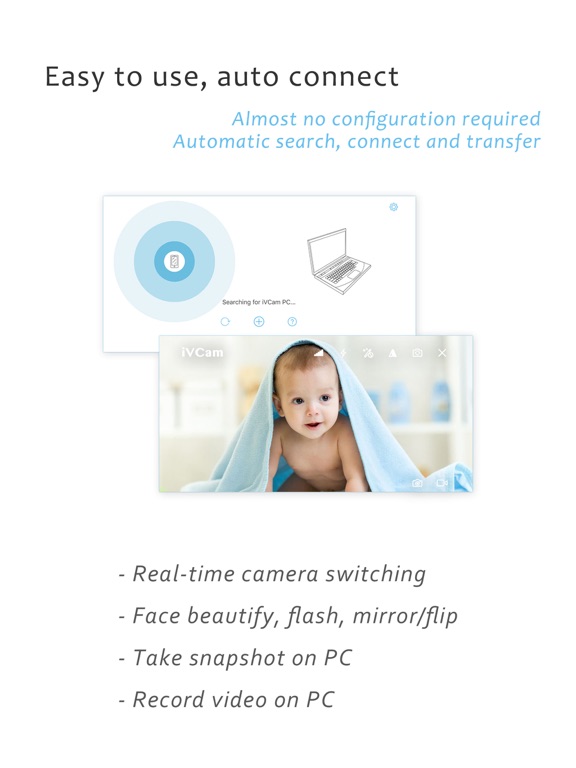
15 store screenshots


Pricing & paywalls
App Store
- BASIC ANNUAL — $7.99/year ($0.66/mo)
- PREMIUM ANNUAL — $12.99/year ($1.08/mo)
- PERMANENT — $24.99
Ratings & reviews
App Store
-
4/5I really liked the app, but!!
Like the headline says. I really liked the app. Very responsive. Good quality of video. Although, I would recommend good lighting to improve the quality of the white balance and light capture. I was streaming out of the batt I’m 1080pm using OBS with two cameras (phones). Computer app was working flawlessly. I really like it and will continue using it. The down side here and the reason I don’t give 5 stars is related to the payment. I paid the 9.99 full version. Based on the information here. This app is compatible with family sharing. Meaning that I should not have to pay 9.99 for each device as long as they are under my family sharing. I would restore the purchase but, but still get the ads and watermark. I had to pay an extra 9.99 for it to go away on my other iCloud account. So that is already 20$ dollars. The only reason I paid it. Is because it is a fraction of the price of a good webcam or digital camera. Still you get the quality. I would say it is even better. Lots of things can be done with it. The app does what it promises. It is a good one to use and easy. I recommend it.
brosnet · 6 Sep 2026
-
5/5Best webcam software for Windows users!
After trying out other webcam programs, I found the features and quality on iVCam to be the best. I use an iPhone 11 clamped to my monitor with a Smartrig multifunctional clamp, smartphone mount and ring light and it blows away my Logitech C922 in image quality. I get up to 4K 60 frames video with excellent low light performance. You can use iVCam with multiple devices which EpocCam will charge you extra for and I’ve found the latency to be much better than NDI HX Camera which is a $20 app. It is also the only app I found that allows you to use the mouse wheel or keyboard keys to control zoom in/out. This is a great convenience when you want to size yourself in a screen or crop out edges of a green screen without having to reach around a mounted iPhone to pinch and zoom on a tiny screen that is facing away from you when using the better rear camera lenses. I tried a lot of demos of these apps and finally bought the full version of iVCam and feel it’s maybe the best $10 I’ve spent on an app. If you’re a Windows user with an iPhone that you can spare during web calls then you already have a better webcam than most of the dedicated ones out there that are scarce and/or over-priced during these work-from-home times. This is frankly a no-brainer.
MoonMusic NYC · 6 Sep 2026
-
4/5Good replacement for built-in webcam...
I got this app because I wanted a better webcam than what was integrated in my laptop (I.e., I wanted a 1080p one, not a 720p one), and the Logitech webcam that was recommended by a friend had tripled in price. So I thought about using my iPhone with a webcam app. I looked at reviews, downloaded a few trial version apps from the App Store, and this one had the best video. I started to use it as a 1080p web cam and was initially very disappointed that the video and computer’s mic audio pickup were not synchronized - there was a significant delay in video from the audio. The PC app had an option for GPU acceleration of video decoding that I hoped would help, but in trying it out, it was not working. So I could only get decent synchronization at the lowest video resolution settings. I was about to give up and accept that I wasted $10 when I noticed the help email address on the website. So I sent the log of the app operation and my issues to the developer. The developer responded in a couple of days and we went back and forth a few times. But their suggestions didn’t seem to help. However after a few more days, a new version of the IOS and the Windows apps came out. The GPU acceleration option was now working, and HEVC (H.265) encoding was now included as an option. Using both HEVC and GPU acceleration, I am getting good audio syncing up to 720p at the medium quality setting. Though this is less than I had hoped for, it is so much better than the built in webcam that I am giving the app 4 stars. Also, my experience may be related to my particular laptop because I got much less delay when I tried the app with my desktop. So your results will probably be better than mine. Overall this is a good app and the developer provides good support.
Steve.Sc · 6 Sep 2026
-
5/5Great app! - some multi cam advice here!
I was tasked with streaming a small outdoor wedding to 200 people who couldn’t come because of the pandemic. Never did anything like it before but determined to make it great, despite no ability to have additional helpers. Installed 3 instances of ivCam. Mounted 2 in strategic positions. Set up one attentive guest with it for a different vantage. (Added a wired in DSLR for a great main view) and fed it all into OBS. Some smooth transitions between all the views and the finished product got rave reviews. One confusing point for me. You have great control over the camera from the ivCam application on the pc - quality, exposure, etc. and an all important setting for hardware decoding. But I could not figure out how to get to each camera instance. Sometimes I got instance #1. Sometimes #2. It was all working in OBS, but couldn’t find the ivCam controls for each of the 3 cams. Turns out that I’d you just keep launching the ivCam application, it will load the additional instances. You don’t specify which instance - just keep launching and eventually you get them all.
Too many countries · 6 Sep 2026
-
5/5Nearly almost perfect but HELP...!
Okay so I gave this a 5 start review because it is basically perfect! I’m so happy that added USB support because I can not trust my WiFi connection. However the issue comes in (atleast for me) when I try to record from the client app on PC. I figured with the USB stability I wouldn’t have lagginess of audio and video and it would be all synced up, but boy was I wrong. This really needs to be fixed because at times it would buffer and chop up on a USB CONNECTION! Which doesn’t make much sense to me because it’s connected my USB 3.0 port. I wanted to use this to make video production easier but this is a major problem. I could understand if this happened under a WiFi connection but USB is just unforgivable. However that’s the only glitch/bug that I have had a problem with. If I use OBS just to pick up ivCam as my webcam there is no lag or stutter. The problem only comes from recording within the app! Other than that I love the app and has really helped me step up my video production!
OJGaming · 6 Sep 2026
Privacy & accessibility
App Store
Privacy
- Data Not Linked to You — Analytics — Identifiers — Device ID Developer declared
- Data Not Linked to You — Analytics — Identifiers — User ID Developer declared
- Data Not Linked to You — Analytics — Usage Data — Advertising Data Developer declared
- Data Not Linked to You — Analytics — Usage Data — Other Usage Data Developer declared
- Data Not Linked to You — Analytics — Usage Data — Product Interaction Developer declared
- Data Not Linked to You — App Functionality — Diagnostics — Crash Data Developer declared
- Data Not Linked to You — App Functionality — Diagnostics — Other Diagnostic Data Developer declared
- Data Not Linked to You — App Functionality — Diagnostics — Performance Data Developer declared
- Data Not Linked to You — Developer’s Advertising or Marketing — Identifiers — Device ID Developer declared
- Data Not Linked to You — Developer’s Advertising or Marketing — Usage Data — Other Usage Data Developer declared
- Data Not Linked to You — Third-Party Advertising — Identifiers — Device ID Developer declared
- Data Not Linked to You — Third-Party Advertising — Identifiers — User ID Developer declared
- Data Not Linked to You — Third-Party Advertising — Usage Data — Advertising Data Developer declared
- Data Not Linked to You — Third-Party Advertising — Usage Data — Other Usage Data Developer declared
- Data Not Linked to You — Diagnostics Developer declared
- Data Not Linked to You — Identifiers Developer declared
- Data Not Linked to You — Usage Data Developer declared
Accessibility
No accessibility labels collected yet.
Versions
App Store
-
6.1.4
- Bug fixes and performance improvements.
-
6.1.6
- Fixed the video flipping issue after ads; - Performance improvements.
-
6.1.8
- Some UI bug fixes; - Performance improvements.
-
6.2
- Add advanced camera settings; - Remove trial limitation of microphone feature; - Add two 4:3 video sizes; - Many bug fixes and improvements.
-
6.2.1
- Fixed the disconnection problem when the ad appeared; - Allow camera settings for previous "BASIC ANNUAL" subscriptions; - Other minor bug fixes.
-
6.2.2
- iOS 9 crash bug fix.
-
6.2.3
- iOS 9/10 crash bug fix.
-
6.2.4
- Fixed the bug when switching cameras failed; - Improvements for the 4:3 video; - Other minor bug fixes.
-
6.2.5
- Add 2K support.
-
7.0
- Background removal; - Disconnect and reconnect from the PC side; - Improved detection and connection methods; - Multi-instance improvement; - iOS 15 adaptation; - Many optimizations and bug fixes.
-
7.0.1
- Ad related bug fixes.
-
7.0.2
- Crash bug fix; - Support for iOS 10.
-
7.0.3
- Legacy device support; - Watch reward ads to use more; - Fixed some minor bugs.
-
7.0.4
- Network connection improvements; - Share with friends via email; - Fixed some minor bugs.
-
7.0.5
- Multi-instances connection improvements; - Subscription improvements; - Input the instance number when connecting via IP address; - Purchase related bug fixes.
-
7.0.6
- Use P3 D65 wide color space by default; - Use the volume keys to take pictures; - Fixed some bugs that could cause crashes.
-
7.0.7
- Add AE/AF support for PC side; - Bug fixes and performance improvements.
-
7.1
- iOS 17 adaptation; - Combination cameras support; - Optimization of adaptive bit rate feature; - Front camera focus bug fix; - Screen rotation related bug fixes; - Network discovery related bug fixes; - Set default video format to 1280x720 30fps.
-
7.1.1
- Fixed crash issue on iOS versions prior to 17.
-
7.1.2
- Do not use combined camera by default; - Added back camera type selection; - Adaptive bitrate related bug fixes.
-
7.1.3
- Encoding bitrate bug fix; - Colorspace bug fix.
-
7.2
- 120/240 FPS support; - USB transfer bug fix; - Improved performance of PC client.
-
7.2.1
- Auto-connect option to automatically connect to the most recently connected PC client; - Added the ability to display the grid; - Some bug fixes and minor tweaks to the UI.
-
7.3.0
- Fixed the issue of reddish skin tone; - Fixed the problem where closing an ad would trigger photo capture; - Resolved a bug in the settings view; - Added echo cancellation support if available; - Implemented the ability to select specific cameras via hotkeys on the PC.
-
7.3.2
· 12 Nov 2025
- iOS 26 adaptation; - Fixed issues in the Settings.
Alternatives
- Camo Camera — Same category + similar ratings
- NDI HX Camera - Stream Capture — Same category + similar ratings
Availability by market
- US
Data quality & evidence
- Page completeness
- Live store listing
- Last verified
- 6 Sep 2026
- Sources
- App Store
- Independent summary has not been published yet.