
Island Widgets
by Tianjin Nankai Xuewei Technology Studio (Individually Owned Business)
iPhone · iPad
Quick verdict
- What it is
- Store information collected; an Apoku editorial summary is not yet published.
- At a glance
-
- From $0.33/mo
- Free to download
- In-app purchases
Categories and search queries
Official categories
- Graphics & Design
- Productivity
Apoku categories
Key functions
| Function | Availability | Access | Scope | Evidence |
|---|---|---|---|---|
| Free app | Yes | Free | Context-specific | Store published |
| In-app purchases | Yes | Limited free | Context-specific | Store published |
| Family Sharing | Unknown | Unknown | Scope unknown | Store published |
Screens
App Store
21 store screenshots
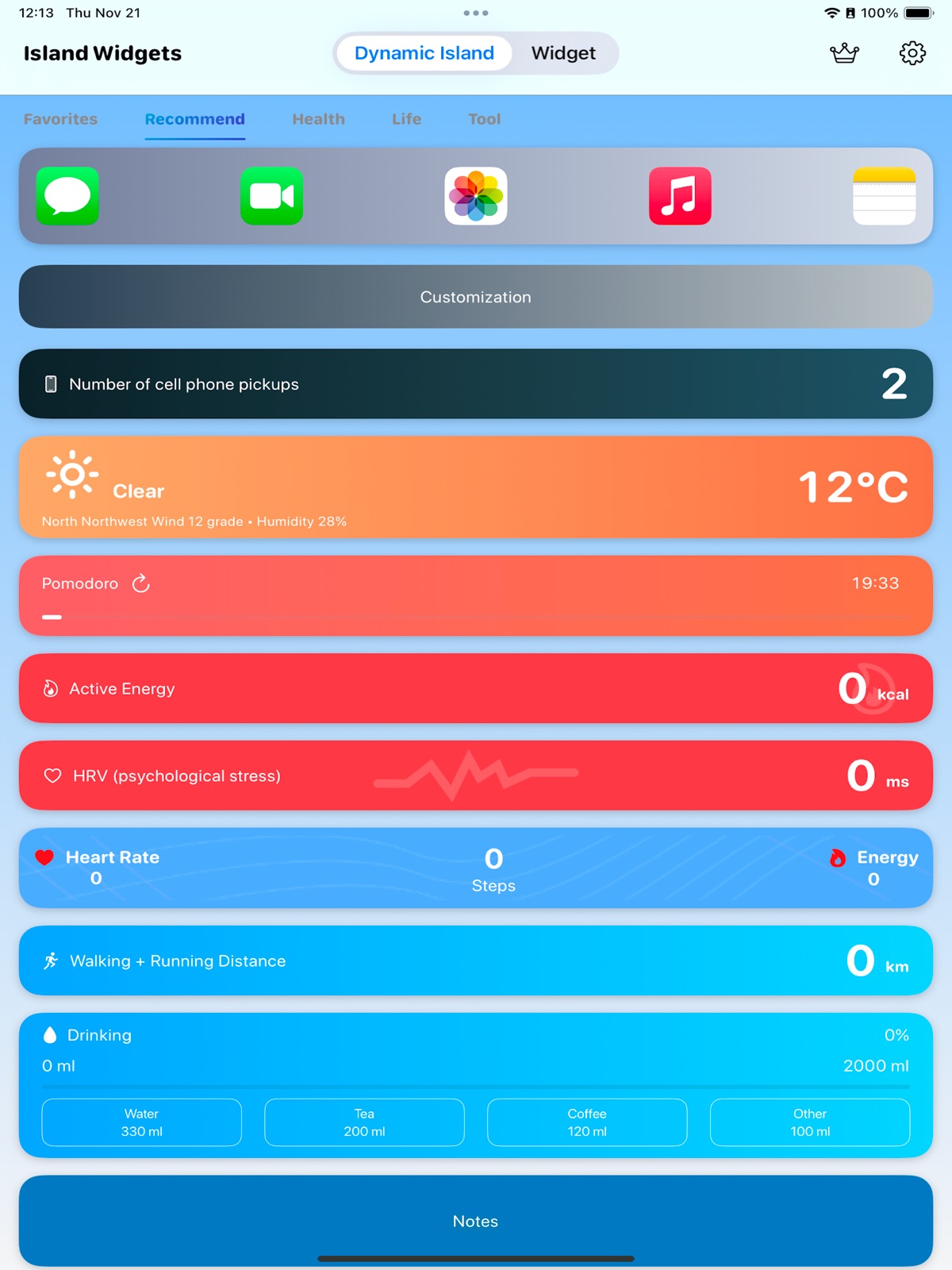

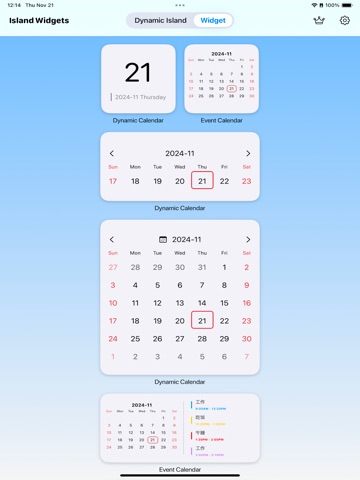
Pricing & paywalls
App Store
- Annual VIP Member — $3.99/year ($0.33/mo)
- Lifetime VIP membership — $6.99
Ratings & reviews
App Store
-
4/5Lock screen
The app is so close to being perfect but I don’t want to have something for my lock screen only my Dynamic Island so please make it an option so I don’t have to have something on my lock screen 🙏
Thebestgoatoat · 7 Aug 2026
-
5/5Wish list
Love the app 2 wish list items, please. I mainly use the dynamic island function with gps speed as Apple Maps has not included a current speed option. I rely on third-party. The problem I have with your current app is that the dynamic island does not work if Apple Maps is horizontal. I am not sure if that function would work with the GPS Speed part. If that is not an option, I know you also have a setting to hover widget. I have a shortcut whenever I open Apple Maps it automatically opens your app in the background, but again, unfortunately, the hover option does not activate automatically. If potentially update with both those functions or at least one that would be awesome thanks.
Chaos for Eternity · 7 Aug 2026
-
5/5Thank you for this amazing app!
Could you make it compatible with the Shortcuts app, allowing me to input text through it? Also, why not add a screen recording feature that translates text automatically and displays it in the pop-up window simultaneously, without the need to take a screenshot every time? I believe it would be absolutely amazing if you implemented such a feature, as there is a significant number of users who want to translate games. This is something Apple doesn’t currently offer—translating the screen during video recording and displaying it simultaneously.
نوارNoir · 7 Aug 2026
-
2/5Good ideas, but…
I foolishly bought the app thinking it was a finished product. The current app feels like an alpha ( not even a beta) build. Most widgets and island widgets don’t work (iOS 26/iPhone 16 pro) like the decibels, altitude, etc. The ones that do display anything aren’t interactive. Touching any widget leads to the settings of Island Widget, not the actual app. Touching the calendar widget should open my calendar; instead, it opens IW settings. How useful is that! The battery widget is inaccurate. Always 2% lower than actual. The app is beautiful eye candy. For that, I’ll give it two stars. That’s all. $7 wasted.
PSG9001 · 7 Aug 2026
-
5/5Function Wish
Great use of the Dynamic Island loving the extra usage I can get out of it. It’d like to see an option to add battery percentage as a Dynamic Island option or a toggle between percentage or the cylinder, also at least on my iPhone 17 the battery cylinders could be resized a bit smaller as a part of it get cut out by the camera module and sensor depending on which side you have it on.
Hiram238 · 7 Aug 2026
Privacy & accessibility
App Store
Privacy
- Data Not Linked to You — Analytics — Diagnostics — Crash Data Developer declared
- Data Not Linked to You — Diagnostics Developer declared
Accessibility
No accessibility labels collected yet.
Versions
App Store
-
2.1.1
1. Added desktop Widget: [Work]| View today's income on the desktop, 2. Added Dynamic Island and desktop Widget:[Masterpiece]| Appreciate world-famous paintings on Dynamic Island and the desktop, 3. Continuously optimize features to enhance user experience,
-
2.1.2
Continuously optimize features to enhance user experience
-
2.1.3
1. Added desktop Widget: [Weather B]'[Steps C]'[Time C]| to give you a unique personalized desktop. 2. Continuously optimize features to enhance user experience.
-
2.1.4
1. Added desktop Widget: [Love]'[LoveB] | Cherish every day together, 2. Optimized [Quick Launch]Widget If the launch icon displays abnormally, re-add the Widget, 3. Continuously optimized features to enhance user experience.
-
2.1.5
1. Added desktop Widget: [Music] | May beautiful melodies always accompany you, 2. Continuously optimizing functions to enhance user experience,
-
2.1.6
1. Added desktop Widget: [Year Progress]| Visually display the days passed this year using a dot matrix, 2. Continuously optimize features to enhance user experience,
-
2.1.7
1. Added desktop Widget: [Music Calendar]| Sunset Music Calendar Battery Health, 2. Continuously optimize functions to enhance user experience,
-
2.1.8
1. Added desktop Widget: [iPod]| Put an iPod in your phone, 2. Continuously optimize functions to enhance user experience,
-
2.1.9
1. New desktop Widget: [Polaroid] | Cherish every beautiful moment, 2. Continuously optimize functions to enhance user experience,
-
2.2.0
1. New desktop Widget: [Today]] | Aggregates what matters to you today, 2. New desktop Widget: [Calendar C] | Sunrise-themed calendar, 3. New desktop Widget: [Calendar D] | Sunset-themed calendar, 4. Continuous optimization to enhance user experience,
-
2.2.1
1. Added Dynamic Island and desktop Widget: [Work B]| Display current income in real time on Dynamic Island and desktop, 2. Added desktop Widget: [Reminder B]| Never forget important things again, 3. Continuously optimize features to enhance user experience,
-
2.2.2
1. Added Dynamic Island and desktop Widget: [Weather C]| One Widget contains all weather information, 2. Added desktop Widget: [Work C]| Let's start the weekend countdown, 3. Continuously optimize features to enhance user experience.
-
2.2.3
1. New desktop Widget: [Today B]| Aggregates what matters to you today, 2. New desktop Widget: [Clock B]| Have a minimalist clock on your desktop, 3. New desktop Widget: [Clock C]| Add another minimalist clock with a different style on your screen, 4. Continuously optimize features to enhance user experience,
-
2.2.4
1. Added desktop Widget: [Course Schedule] | Accompanying you on the journey of hard work, 2. Continuously optimizing features to enhance user experience,
-
2.2.5
1. Added Dynamic Island and desktop Widget: [Flip Clock B] | A beautiful desktop clock is ready. 2. Continuously optimizing features to enhance user experience.
-
2.2.6
1. Added Dynamic Island and desktop Widget: [Mac Theme Panel C] | Better-looking Mac theme Widget for quick launching any app from the Dock, 2. Continuously optimized features to enhance user experience,
-
2.2.7
1. Added desktop Widget: [Daily Record]| Record daily progress on the desktop, 2. Added desktop Widget: [Four Quadrant To-Do]| Categorize daily tasks by importance and urgency, 3. Added desktop Widget: [Vinyl Record]| Let beautiful melodies play anytime, 4. Continuously optimize features to enhance user experience,
-
2.2.8
1. New desktop Widget: [Sleep]| Sleep is the best rest, 2. New desktop Widget: [Health Trends]| Health is the most important, 3. Continuously optimize functions to enhance user experience,
-
2.2.9
1. Added desktop Widget: [Sleep]| Sleep is the best rest, 2. Continuously optimize functions to enhance user experience,
-
2.3.0
1. Added desktop Widget: [Dynamic Island E]| Dynamic Island-style weather Widget, 2. Added desktop Widget: [Calendar E]| Exquisitely designed calendar Widget, 3. Added desktop Widget: [Weather D]| Exquisitely designed weather Widget, 4. Added desktop Widget: [Flip Photos]| Auto-flipping photo Widget, 5. Added desktop Widget: [Photos C]| Cherish beautiful moments, 6. Added desktop Widget: [Today C]| Free weather Widget, 7. Dynamic Island added [In Progress] tab to support quick extension and closure of active Dynamic Island, 8. Continuously optimize features to enhance user experience.
-
2.3.1
1. Dynamic Island and Widget homepage supports search to quickly find your favorite Widget, 2. Continuously optimize features to enhance user experience,
-
2.3.2
1. Added Dynamic Island and desktop Widget: [Weekly Calendar] | Display weekly calendar in Dynamic Island, 2. Added desktop Widget: [Reminders C] | Supports page turning, beautifully designed to-do list Widget, 3. Added desktop Widget: [Quick Launch D] | Beautifully designed quick launch Widget, 4. Added desktop Widget: [Weather E] | Better-looking weather Widget, 5. Added desktop Widget: [Time C] | Minimalist time Widget, 6. Added desktop Widget: [Health B] | Display more health information on the desktop, 7. [Anniversary] Dynamic Island and desktop Widget now support past dates, 8. [Reminders B] supports adding more to-do items, 9. Fixed an issue where [Custom] Dynamic Island Widget might not start properly the next day, 10. Dynamic Island [In Progress] list supports one-click extension of all active Dynamic Island Widget, 11. Continuously optimize features to enhance user experience.
-
2.3.3
1. The active Dynamic Island Widget supports one-click renewal and closure of all items. 2. Continuously optimize features to enhance user experience.
-
2.3.4
1. Added Control Center Widget support to enable Dynamic Island in the Control Center. 2. Added 100 lock screen Widget options, supporting weather, stock prices, to-do items, health information, etc., on the lock screen. 3. Continuously optimized features to enhance user experience.
-
2.3.5
· 4 Aug 2026
1. Added desktop Widget: [Flip Clock Calendar] | A more beautiful desktop calendar/weather Widget, 2. Continuously optimizing features to enhance user experience,
Alternatives
- Dynamic X - Live Activity Tool — Same category + similar ratings
- Wallpapers for Dynamic Island — Same category + similar ratings
- Lock Launcher - Launch Apps — Same category + similar ratings
Availability by market
- US
Data quality & evidence
- Page completeness
- Live store listing
- Last verified
- 7 Aug 2026
- Sources
- App Store
- Apoku editorial summary has not been published yet.