
Quick verdict
- What it is
- Store information collected; independent summary not yet available.
- At a glance
-
- $7.99
- In-app purchases
Categories and search queries
Official categories
- Business
- Productivity
AppCorpus categories
Key functions
| Function | Availability | Access | Scope | Evidence |
|---|---|---|---|---|
| In-app purchases | Yes | Limited free | — | Store published |
Screens
App Store
21 store screenshots


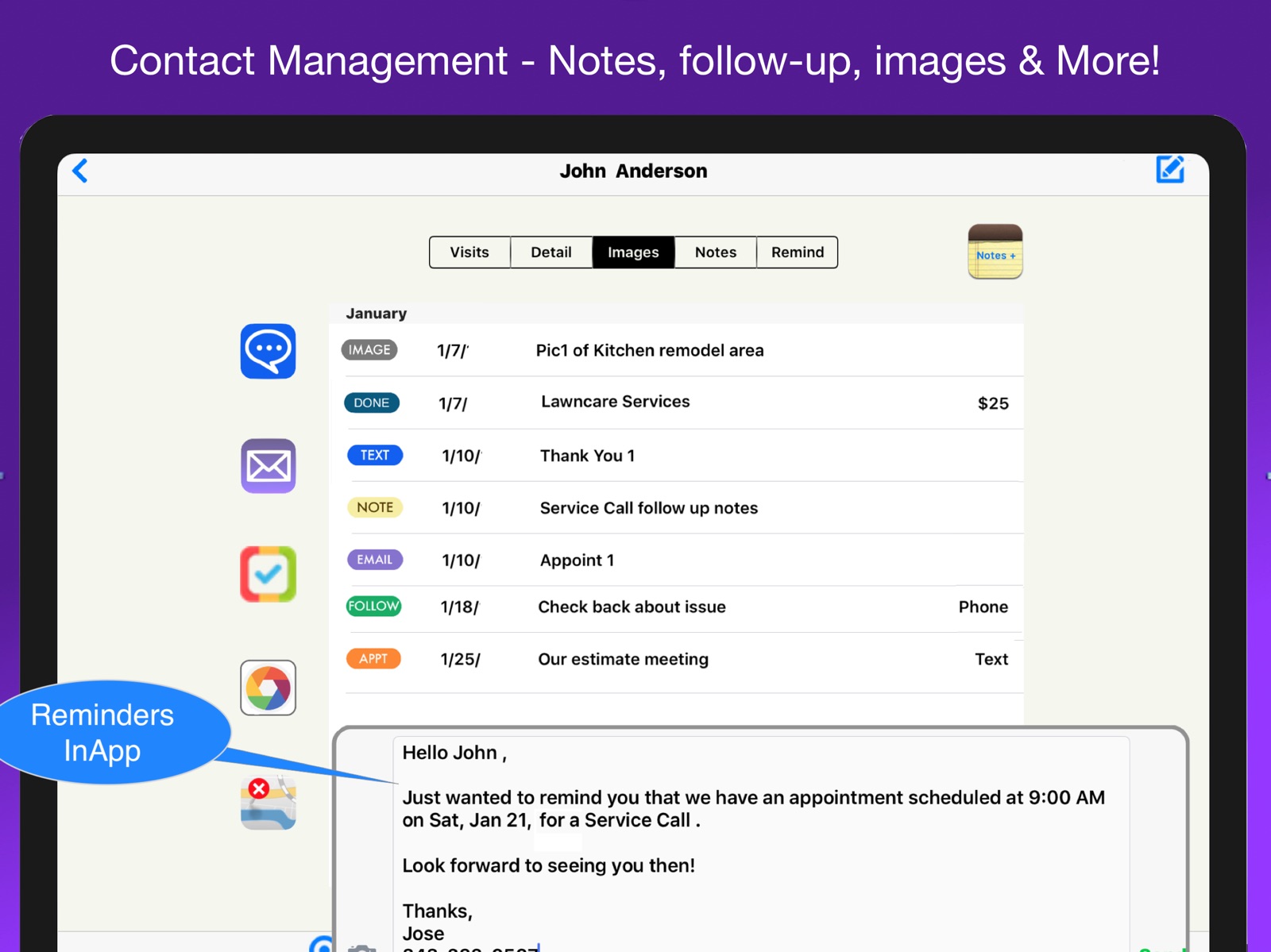

Pricing & paywalls
App Store
- Price: $7.99
- In-app purchases
Ratings & reviews
App Store
-
5/5Easy to setup and use
I hate change and a new app like this was a big change for me. Fortunately the app contains some useful sample data to let you see how it works. In addition there is a lot of well organized help and even a handful of movies. Reviewing this info and watching the movies made it super easy to get started. The app uses your existing contacts and calendar so there is no extra work there, service and products can be added on the fly and you’re good to go!
bbrown987 · 31 Jul 2026
-
5/5The right tool for the job
I absolutely love using this app for my business. It is very essential to have the right tools to do the right job. Invoicing Pro is by far the best app out there to get this accomplished I can’t say enough for the staff for when there’s an issue they help you take care of it. I highly recommend this app for anyone who’s in the service industry.. Thanks to the staff once again..
oliveraz · 31 Jul 2026
-
5/5New Version is nice
Have been successfully using this this app for a while and have just downloaded the new version. We have some unique need on our invoice and the new Document Manager should help us further customize the documents. Need to call about some of the new features and support was very helpful. We have some unique needs on our invoice and the new Document Manager should help us further customize the documents.
discodenver · 31 Jul 2026
-
5/5Great App and Support & No monthly fees either.
We recently installed and started using this app and are really impressed so far. Quick setup, handles our exceptions and has provides detailed financial info about our business. Support staff is responsive and has really helped us get everything setup right. Most "Free" apps require a monthly fee after the free period so this is a very Good Deal!
evane33 · 31 Jul 2026
-
5/5Clean App. Great functionality!
A lot of these apps are just too basic to handle a real business. This app does much more than invoicing. Scheduling, inventory, profitability, you name it. It has a clean design that makes it easy to do a lot in one view. Would recommend.
lomanl77 · 31 Jul 2026
Privacy & accessibility
App Store
Privacy
- Data Not Collected Developer declared
Accessibility
No accessibility labels collected yet.
Versions
App Store
-
10.10
iPhone X and iOS 11 Support. Enhancements & Improvements.
-
10.10.1
Stability and performance improvements.
-
10.10.2
Stability & performance improvements.
-
10.2.1
Just a few more goodies!
-
10.2.2
Fine tuning and optimization of 10.2.1
-
11.05.2
What’s New in Version 11.05 ? View & Send Documents New Estimates, Invoices and Cost Reports - Three different client formats at viewing time showing varying levels of detail. Show with or without descriptions. Three new cost reports. Cost overview, labor report and material report. Access Document manger from show view. Also, text message invoices and estimates. Separate Terms & Conditions page for legal verbiage. 15,000 characters with signature blocks. Doc Images Multiple images from the camera or photo library can be saved with the project and presented with documents including descriptions. Images may be either printed or saved internally and the images can be easily resequenced. Expandable Cells for Admin and Item Entry Slide open cells are used to simplify data entry while offering more options Entry is faster and easy! Transaction Entry Enhancements: Show entry with or without header and footer information. Provides for more space to enter and view transactions. Design Trans View offers the ability to reorganize entry buttons. Discount by fixed amount or percentage. Specify cost markup by transaction. Sequence items by drag and drop, or show in entry order. Additional Enhancements Highlights: Text invoices and estimates. Discount by fixed amount or percentage. Unique view layouts for the larger 12” iPad devices. Swipe guides, tutorial movie library. Scheduler Enhancements: Services Entry - Many additional features Service Entry from Service Items - Multiple services may be selected from your services list for each appointment. No limit to the number of service available or added to individual appointments. Services added and priced automatically at checkout. No need to reenter and price services that are entered with the appointment. Ending Time Calculation from selected Services based on minutes entered for each item in services list. Manual Notes in Schedule Entries. In addition to multiple services you can now enter any amount of descriptive text with your appointments. The notes display in the Scheduler day and week view depending on the size of your device. Calendars/Colors for Primary Service Appointment. Services can be assigned a Calendar so the calendar and corresponding color is automatically shown in the Scheduler letting you see at a glance what type of service is scheduled. Overlapping Appointment Display - Multiple appointments with overlapping times are displayed in daily and weekly views. Repeating Appointments - Full support for Weekly, Monthly & Daily repeating appointments. can specify ending date or never. Completing completing appointments does not alter future appointment. Entry is simplified compared to the devices Calendar app. Calendar Admin & Maintenance in Scheduler - Full ability to add, edit and delete your Calendars within the app. Conflicts between like named local/iCloud Calendars resolved automatically. Simplified & Improved Navigation - Scheduler, reminders and invoice views more easily accessible from new navigation bar buttons. App starts in Calendar view and remember which view you were last using. The Admin view has a new interface to make it easy to access items you use frequently and hide those rarely used, including the In App Purchases. Service and Product Enhancements - In addition to the ability to add appointment times and calendars to service times we have added the Copy Item function to Copy Items - You can copy service, product or supply items to a new item, then make change the Name and other unique info in the copied item. Sequence Items - The list of services & products may now be viewed in either alphabetical order or a custom order that makes it easier for you to find. An easy to use drag and drop feature is used to sequence.
-
11.05.4
Update to correct service item entry and other enhancements.
-
12.1
What’s New in Version 12 Profits and Expenses - InApp Purchase (previously Profits & Reports) Expenses & Receipts Management of all of your business expenses and purchases. All business expenses from rent to salaries and all of your material and product purchases. Payment Method and Expense/Asset type is tracked for all transactions. Two credit cards, two checking accounts and cash are the possible payment types. Supplier info has a Contact Management view to easily keep track of transaction, notes, images and more. Text messages or emails can formatted and sent from documents library. Accounts Accounts is part of the Profits & Expenses, General Ledger Accounts for your app. Your app comes with a chart of general ledger accounts. These may be edited with unique account descriptions. Also, the monthly trend of balances in each account my be viewed or shown in a chart. App prompts at monthly-end to update current and balance forward. Profits Dashboard A chart of sales by day is now included in the Profits Dashboard. Depending on device size from 5 to 12 last days with sales are displayed.
-
12.1.1
Stability & performance enhancements.
-
12.3
Enhancements & improvements. Save receipt image with expenses. Frequently asked questions and more!
-
12.3.1
Enhancements & updates to More function on iPad, FAQ & Sales Tax Help.
-
12.3.2
Update Sales Tax Edit in Client Edit and several additional enhancements.
-
13
Expanded spreadsheet and auto backup capabilities. Enhancements to sales tax setup and processing.
-
14
Dark Mode Support
-
14.1
The Cloud Sync Technology has been replaced with a new technology called Ensembles. This is a proven technology that dramatically enhances the reliability of our Sync. In addition, it provides the means to sync your information between different iCloud Accounts. Ultimately, you will be able to sync data from Mac, Web and other platforms. This will be available in future releases. Sync Data in Cloud AND on the Device Business information is saved both on your device and in the Cloud. If there is a problem with the Cloud your data is always maintained and backed up on your device. This is a huge advantage over the prior technology that could only view the Cloud data after the device was synced. Sync Devices on Different iCloud/Apple Accounts Now it is possible to use Cloud Services that can sync information on devices using different iCloud/Apple accounts. This is another major advantage over the previous sync technology which would only sync devices using the same iCloud account. Dropbox and CloudKit Sync Services Both of these services are available to sync information between devices using different iCloud accounts. A Dropbox free Dropbox account must be setup prior to using this service. If the devices are using different Apple accounts then the app may need to purchased by the other users. However, the one-time fee is a much better value than the monthly fees other apps charge. Privileges Privileges are used to establish different types of access to your business data when you have employees or others using your app. Privilege types range from full access for owners, partners and financial managers, to limited access for those employees that are making service calls and completing work. For example employees can be restricted to only their transactions and you can allow only the viewing to changing of invoices and estimates. Dark Mode Support Color schemes and icons have been redesigned in iPhone and iPad views to now support dark mode . Check it out!
-
14.2
New Cloud Sync Technology The Cloud Sync Technology has been replaced with a new technology called Ensembles. This is a proven technology that dramatically enhances the reliability of our Sync. In addition, it provides the means to sync your information between different iCloud Accounts. Ultimately, you will be able to sync data from Mac, Web and other platforms. This will be available in future releases. Sync Data in Cloud AND on the Device Business information is saved both on your device and in the Cloud. If there is a problem with the Cloud your data is always maintained and backed up on your device. This is a huge advantage over the prior technology that could only view the Cloud data after the device was synced. Sync Devices on Different iCloud/Apple Accounts Now it is possible to use Cloud Services that can sync information on devices using different iCloud/Apple accounts. This is another major advantage over the previous sync technology which would only sync devices using the same iCloud account. Dropbox and CloudKit Sync Services Both of these services are available to sync information between devices using different iCloud accounts. A Dropbox free Dropbox account must be setup prior to using this service. If the devices are using different Apple accounts then the app may need to purchased by the other users. However, the one-time fee is a much better value than the monthly fees other apps charge. Privileges Privileges are used to establish different types of access to your business data when you have employees or others using your app. Privilege types range from full access for owners, partners and financial managers, to limited access for those employees that are making service calls and completing work. For example employees can be restricted to only their transactions and you can allow only the viewing to changing of invoices and estimates. Dark Mode Support Color schemes and icons have been redesigned in iPhone and iPad views to now support dark mode . Check it out!
-
14.5.2
New iMac Version! - Sync with your desktop machine.
-
15
Version 15 Enhancements: New Mac Version enhancements. Help Update for text and image sizes. UI Improvement. Scheduler Update for date format and repeat events Date Entry views have been simplified and enhanced. Equipment and Tree Updates (for specific apps) GPS Coordinates. Reminder Update for entry format. Expenses Update for Image capture. Expenses added to Data Export Spreadsheet. Enhancements to Dark Mode views. Cloud Sync Admin and Help Updates to simplify install.
-
15.3
Performance & user experience enhancements.
-
16
Version 16 is now available by monthly or annual subscription plans. After a 14 day Free Trial you can continue with a value priced monthly or annual subscription. Legacy users may continue to use the App and In-Apps that they had previously purchased.
-
16.2
New User Guides to help initial training and installation process. Enhancements to Cloud Sync and Spreadsheet Export. Reasonable One-Time Price.
-
17
Enhancements to performance and user experience.
-
17.1
Performance and user experience enhancements.
-
18.1
Performance enhancements and corrections.
-
26
· 6 Nov 2025
Update to ensure iOS 26 and Artificial Intelligence compatibility.
Availability by market
- US
Data quality & evidence
- Page completeness
- Live store listing
- Last verified
- 31 Jul 2026
- Sources
- App Store
- Independent summary has not been published yet.