
Quick verdict
- What it is
- Store information collected; independent summary not yet available.
- At a glance
-
- Free to download
- In-app purchases
Categories and search queries
Official categories
- Health & Fitness
- Sports
AppCorpus categories
Key functions
| Function | Availability | Access | Scope | Evidence |
|---|---|---|---|---|
| Free app | Yes | Free | — | Store published |
| In-app purchases | Yes | Limited free | — | Store published |
Screens
App Store
22 store screenshots



Pricing & paywalls
App Store
- Free to download
- In-app purchases
Ratings & reviews
App Store
-
5/5A friendly request
I have been using this app for a week now and I absolutely love it. This app gives you detailed information about your workouts and offers comprehensive analysis of your performance. So far there is one issue that bothers me. I currently live in China, the Chinese government requires all domestic mapping services to use a coordinate system called GCJ-02, which differs from WGS-84. This results in a fixed offset of workout routes displayed in the app. I wonder if you could look into it and come up with a transformation of the two coordinate systems, so that I can see my workout route clean and neat. Much appreciated.
clatosklisto · 31 Jul 2026
-
5/5You need this if you Zwift
This app is amazing if you use Zwift and have an Apple Watch. It provides all the data you could ever need in an easy to use format and uploads it to Apple Workouts. It gives me all the data my Apple Watch cannot provide.
Runner Kenwood · 31 Jul 2026
-
5/5goated app
Honestly everything I was looking for in terms of an iphone app for this niche, just an extra bonus in that it actually has widgets and apple specific stuff that’s useful.
SovietBear462 · 31 Jul 2026
-
5/5Incredible App
Wow, this is an amazing app. Much better interface than the official website. Ps, I also ride the PMC! For almost 20 years.
Prophotog10000 · 31 Jul 2026
-
5/5Amazing app!
This app is amazing it takes all of my fitness needs into one app! Love this app so much definitely recommend it!
bsbsggsgsg · 31 Jul 2026
Privacy & accessibility
App Store
Privacy
- Data Not Collected Developer declared
Accessibility
No accessibility labels collected yet.
Versions
App Store
-
1.2
* During login, the intervals.icu form display user settings are looked up and synchronized with the app settings, so the form graph will match how it's displayed on the website. You can still change it independently after login. Other logged-in clients, like Apple Watch and iPad, will still need to be updated manually. * Added new options to change the line style of all graphs: smooth, stepped, or sharp. * Added a new option to show the ramp rate on the fitness screen. Disabled by default, enable it in settings.
-
1.3
* better graph size logic on macOS * Internal refactoring to support future Apple Health integrations * Sync Garmin activites from Intervals.icu to Apple Health
-
1.4
* Redesigned activity details screen with: - Time spent in power and HR zones - Interactive HR, power, speed, cadence and elevation graphs. - Option in settings to use your resting HR as the HR graph lower bound with signal drop detection - Power vs HR charts - Activity map with standard, hybrid, and 3d satellite imagery views - Edit activity names and descriptions. (enable in settings) * HRV trend can be added to the fitness screen or as an iOS widget. The graphic shows the 60 day HRV average as a range +/- the standard deviation. The most recent single day and 7 day HRV average is shown within the range. Options to use rMSSD or SDNN measurements on the widget and on the fitness screen. * Fitness graph performance enhancements
-
1.4.1
Added a pace chart to the activity details screen for walking, running, and hiking activities Fixed missing power zones when viewing activity details
-
1.5
1.5 (let's keep the party rolling) * Redesigned activity list screen with filtering, better organization, and improved data retrieval * Added custom date range pickers to fitness, vitals, activities and totals screens * Added display of gear (settings -> gear ) * Updated settings screen layout * Added open water swimming activity type * Additional activity editing options: type, gear, trainer flag, tags, sub type (race, commute, warmup, cooldown), ignore data fields, download links for FIT and GPX files, delete * Activity icons are now color coded to indicate their subtype (race = red, commute = purple, warmup = orange, cooldown = blue) * Minor bug and crash fixes. * Updated donation popup timer. Huge thank you to those who have contributed!
-
1.5.1
* Fixed zone labels on activity details screen * Minor bug fixes
-
1.5.2
* Fixed activity details data retrieval * Power zone labels and power ranges match user defined zone configuration
-
1.6
* Rearrangeable and collapsable activity details sections * Activity details graph performance enhancements and bug fixes * New activity details graphs for temp, skin temp, core temp, and respiration * New activity settings screen: * New option to drag all graph markers in sync at the same time * Options to disable individual activity details sections * Set default map display type (standard, hybrid, 3D) * Option to detect pauses in the data streams * New Vitals setting screen to disabled invividual vitals graphs * New Totals setting screen to disable individual totals graphs and set zone priority * Totals screen updates: * New Zone display for HR and Power for activities within the selected time range * New All option on activity selection screen * Collapse/Expand button for the selected activity list * New circular fitness and fatigue watchOS widgets, updated form widget * Fixed issue with gear not showing when reminders were set * Adjusted drag and drop behavior of vitals and totals graphs * Reminders added to gear view
-
1.6.1
* Rearranged totals screen to accommodate new week to date and month to date time ranges * Totals screen bug fixes: day range calculation, custom date pickers, and zone totals (all correctly use ignore HR and ignore power options) * Consistent loading spinner placement on screen toolbar titles * Added heat strain index graph to activity details * Added gear reminder reset button to gear settings screen. You must logout and back in again to grant settings:write permissions to the app. * WatchOS background task and push notification bug fixes * Fixed totals and activities screen layout bugs on iOS 26. * Other minor bug and crash fixes
-
1.6.2
Fixed Apple Health permissions to allow syncing Garmin running and swimming activities (toggle Garmin off and back on again in Apple Health Sync Settings menu)
-
1.7
New Features • Customizable Tabs: Rearrange or hide tabs to fit your needs. Head to Settings → Customize Tabs to try it out. • Apple Health Sync: Now supports all Garmin activity types — including multisport workouts. • Activity Editing: You can now set RPE and Feel when editing an activity. Fixes & Improvements • Smoother login and data loading experience. • Fixed elevation and speed graph issues when using metric units. • Resolved a gear data parsing bug related to time-based reminders. • Fixed a crash caused by invalid FIT file event sequences. • Patched an issue with bad achievement data from the API.
-
1.7.1
Bug fixes: * Fixed HIIT activities not showing correctly in totals view * Made fitness and fatigue data optional so that vitals will load when no activities exist
-
1.8
- Built for iOS 26 - A more glassy app icon with light, dark, and clear variants - Multi Graph - A new activity details chart that overlays multiple activity metrics onto a single graph. You’ll find it at the bottom of the activity details screen — and can move it wherever you like - Double-tap and pinch to zoom - Swipe to pan - Long-press for half a second to place and drag a marker to inspect values - All activity detail graphs support the same Multi Graph gestures - Dragging updates a placement marker on the route map and a marker on the intervals graph - Other Activity Graphs - All graphs support using either time or distance as the x-axis - Substantial performance improvements - Route Updates - Gradient line options for speed, power, cadence, or heart rate - Simplified map type options - Full-screen map controls - Achievements - Added achievements to activity details - Achievement filtering and indicators on the activities list - New Sport Summary Widget Options - Time range options: this week, last 7 days, and today - Option to include all activity types - Other - Improved activity list display: - Added MTD (Month to Date) and WTD (Week to Date) options - Better date formatting - Support for syncing MyWhoosh activities from Intervals.icu to Apple Health - What's New popup and menu - Help menu item with FAQs - Tip jar - User-selectable icons (in case you liked the old one!) - Support for syncing Rouvy and Hammerhead workouts to Apple Health - Fixed average cycling power in activities synced to Apple Health - Added L/R power balance to power graphs - Fixed Apple Watch form widgets showing % when using absolute display option
-
1.8.1
- Lock Screen widgets. Most Apple Watch widgets are now available on iOS and iPadOS. - A new Zone Summary widget with options for power or heart rate, date range, sport types, and goals per zone. - Improved route maps with higher-density gradient colors, smoother transitions, and a new gradient % option. - Wahoo and TrainingPeaks Virtual activities can now be synced to Apple Health. - Fixed several issues with Power vs HR, HRV, and elevation charts. - Improved performance with faster startup and data stream caching for faster activity reloading. - Improved error handling for 403 responses from the data streams API. - Garmin device attribution and brand guidelines.
-
1.8.2
- Workouts! A new workouts tab and list view for upcoming workouts. - Search for activities by name and description. - Added activity name, device name, and activity subtype badges to activity lists. - Apple Health sync reliability improvements. - Performance enhancements to application startup and data refresh. - Fixed zone chart layout bug on wider-screen devices. - New weekly average line option on HRV and Heart Rate charts and widgets.
-
1.9
- Option to show map previews on the activities screen. - Workout descriptions render as styled Markdown. Basic HTML elements are also converted to Markdown. - Vitals settings option to specify weight as lbs or kg. - Added load to the activity edit screen. - Added mark as done button to workout details screen. - Minor tweak to form as percent calculation to eliminate rounding differences. - Strava activities show as an empty stub with a link to the FAQ on the details screen. - Bug fixes for the weekly average line option.
-
2.0
- Followed athletes - Athlete profiles - Followed Athlete activity feed - Private chat and activity chat (options to disable in settings) - Weather forcasts for workouts. Option in settings to update your current location - Device language support for French, Spanish, German, Italian, Dutch and Danish. This is "beta" and can be enabled in settings. Feedback welcomed. - Updated tip jar with in app purchase option - API backend moved to more reliable cloud hosting - Other small bug fixes and improvements
-
2.1
- Best efforts view! - The You tab is now called Home, showing your Athlete profile summary with links to Activities, Vitals, and Athletes you follow. If the Activities, Vitals, or Athletes you follow tabs are enabled (Settings -> Customize Tabs), you will jump to the appropriate tab. If they are disabled, you will navigate to the screen with a back arrow to return. The intention here is to optionally reduce the number of tabs and still allow for navigation to the specific screens. This allows Home to be a single point to navigate from. - Gear reminder alerts. Gear is checked when the app opens and for any item with a percent >= 100, a notification is shown. This will show once every 24 hours. Option to disable in settings. - Initial support for Shortcuts. Get wellness data by field and date. - Changed activity data stream logic to convert nil values to 0 rather than dropping. - Minor adjustment to form calculation (round ctl and atl first before more math is done) to better match the website values. - New option in settings to hide Strava activities. Disabled by default, but if your activities often show the empty ones from Strava, this will hide them. - Bug fixes to chat data parsing that was causing chats to fail to load. - Added Apple Health sync support for icTrainer. - Initial support to make the UI more accessible by leveraging Apple's differentiate without color accessibility option.
-
2.1.1
Fixed chat and gear loading bugs
-
3.0
• Two-way Apple Health sync: Push workouts from Apple Watch/iPhone to Intervals.icu and sync daily health metrics like HRV, sleep, and readiness • Send planned workouts to Apple Watch for structured training sessions • Custom metrics charts and widgets for any fitness or health data field • Import FIT files to Intervals.icu and/or Apple Health • Library: browse and schedule workouts from your Intervals.icu library • Distance splits and pace zone charts on activity details
-
3.1
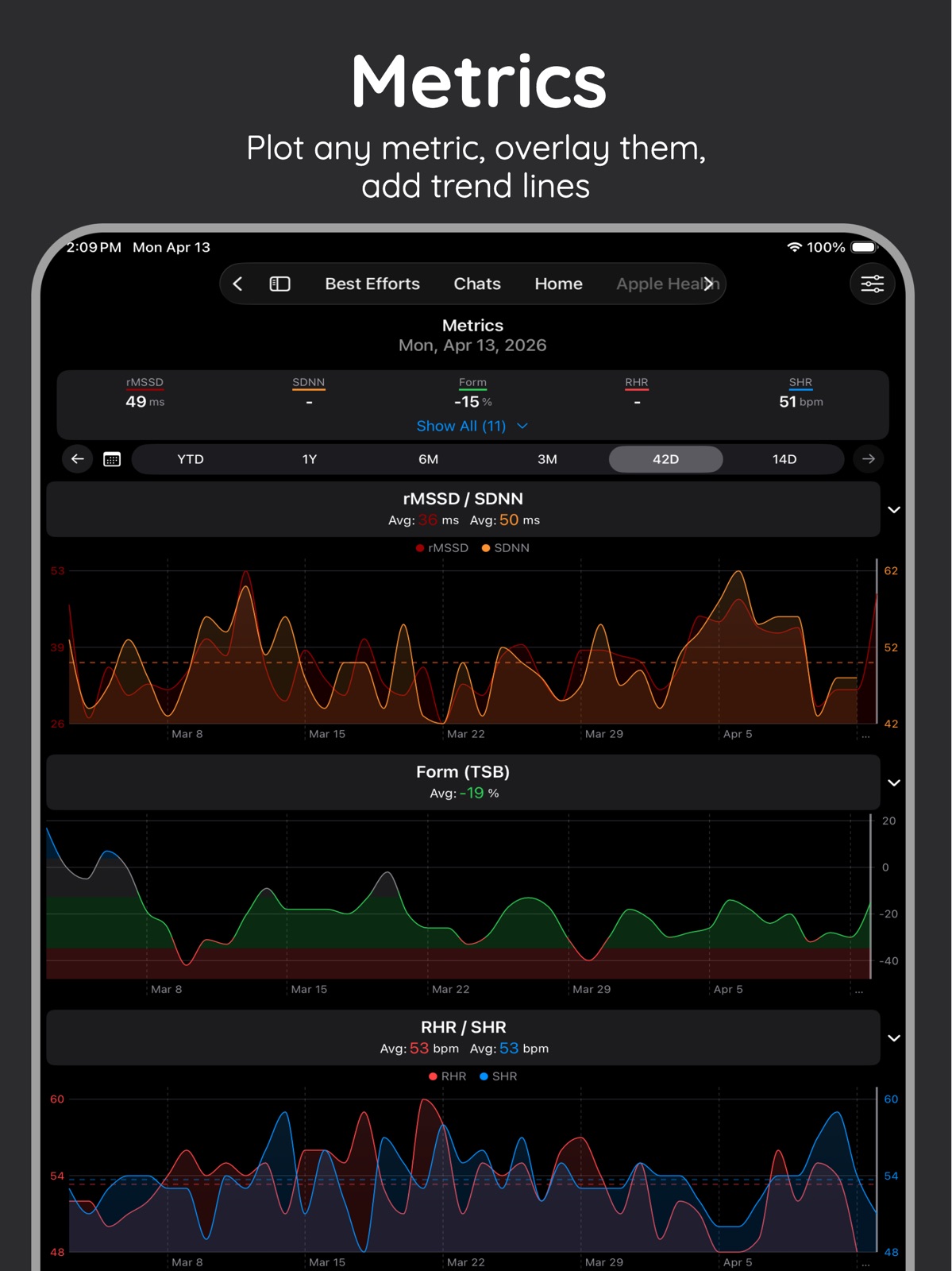
- New "Resync Multiple Days" option for Daily Metrics Sync — automatically resyncs a configurable number of recent days on each sync cycle - New Avg option for overnight HRV rMSSD calculation, alongside the existing RMS and Max methods - Readiness score now uses a 7-day trend for more consistent results - New "Shared Y Axis" option for dual-metric charts - New option to disable area fill shading beneath metric chart lines - Overnight charts are now individual toggles on the metrics config screen - The Metrics tab remembers and restores the expanded/collapsed state of the "show more" section - New setting to override the light or dark appearance of widgets independently of system settings - Small size option now available for metrics widgets - Minor watch widget size and color refinements - Fixed Baevsky SI display being truncated on the Metrics screen - Fixed a bug where values on the Metrics tab didn't always refresh when switching to it - Improved blood glucose unit handling and conversion between mg/dL and mmol/L - Added Brazilian Portuguese and European Portuguese translations
-
3.2
New Features - (Beta) New FIT Import screen. Add iCloud or Dropbox folders (requires Dropbox app). Choose how many days of history to scan and whether to import into intervals.icu, Apple Health, or both. Directories are scanned automatically at app launch or manually. The manual FIT file import sheet has moved here from the Apple Health screen. Import toggle options now remember prior state. Activities manually uploaded to intervals as FIT files can now be synced to Apple Health later via Apple Health screen. - (Beta) Quick edit screen for daily metrics. Tap the new icon in the header on the Metrics screen. - HRV Trend indicator and home screen widget on iOS. Enable on the Fitness screen settings, tap the graphic for a detail sheet. Includes a new 7-day trend line plus calculation tweaks and bug fixes. HRV Trend also added to watchOS. - Best efforts screen configuration options and new spider chart and widget. - Auto sync options for workouts sent to Apple Watch (Settings → Workout Settings). - Support for lean body mass as a custom metric (Apple Health sync, Metrics, etc.). Improvements - Notifications now deep link to the relevant screen when tapped. - Metrics screen and widgets cleanup. Added a readiness chart option for Polar devices using values on the -10 to +10 scale. The (i) icon for readiness/sleep score explanation is now hidden when this app didn't calculate the score. - Sleep score core logic updates. - watchOS date range options updated to match iOS. - "Resync Multiple Days" is now limited to 2–7 days to discourage daily bulk backfill; use the history days option with auto sync toggled off/on instead. Fixes - Apple workout import now waits for GPS data to finish syncing. Fixes outdoor workouts being miscategorized as "indoor" when GPS routes or HR were slow to transfer from Apple Watch to iPhone. - Workouts with custom zones now display (custom zones still aren't fully supported, but basic info shows). Removed - Pulled the Apple Intelligence explanation features for readiness and sleep scores. On-device AI didn't work well for this use case. It may return later. - Workouts with custom zones now display (custom zones still aren't fully supported, but basic info shows).
-
3.2.1
- Apple Watch workout sync fixes: Missing pace when using Z1. Crash when building workouts that have unsupported alert types (swimming pace, rowing cadence, etc) - Fixed display of today's HRV value on HRV widget. - Totals view charts are now reordered by dragging the handle in the header and not the chart itself.
-
3.2.2
- Updated FIT file lap detection logic from structured workouts and manually created Apple Watch segments - Updated Apple Watch workout step display labels
-
3.2.3
· 16 Jun 2026
- Bug fixes to chat data load, athlete lookup, and feed display.
Alternatives
- HealthFit — Same category + similar ratings
Availability by market
- US
Data quality & evidence
- Page completeness
- Live store listing
- Last verified
- 31 Jul 2026
- Sources
- App Store
- Independent summary has not been published yet.