
Quick verdict
- What it is
- Store information collected; an Apoku editorial summary is not yet published.
- At a glance
-
- Free to download
- In-app purchases
Categories and search queries
Official categories
- Productivity
- Lifestyle
Apoku categories
Key functions
| Function | Availability | Access | Scope | Evidence |
|---|---|---|---|---|
| Free app | Yes | Free | Context-specific | Store published |
| In-app purchases | Yes | Limited free | Context-specific | Store published |
Screens
App Store
19 store screenshots


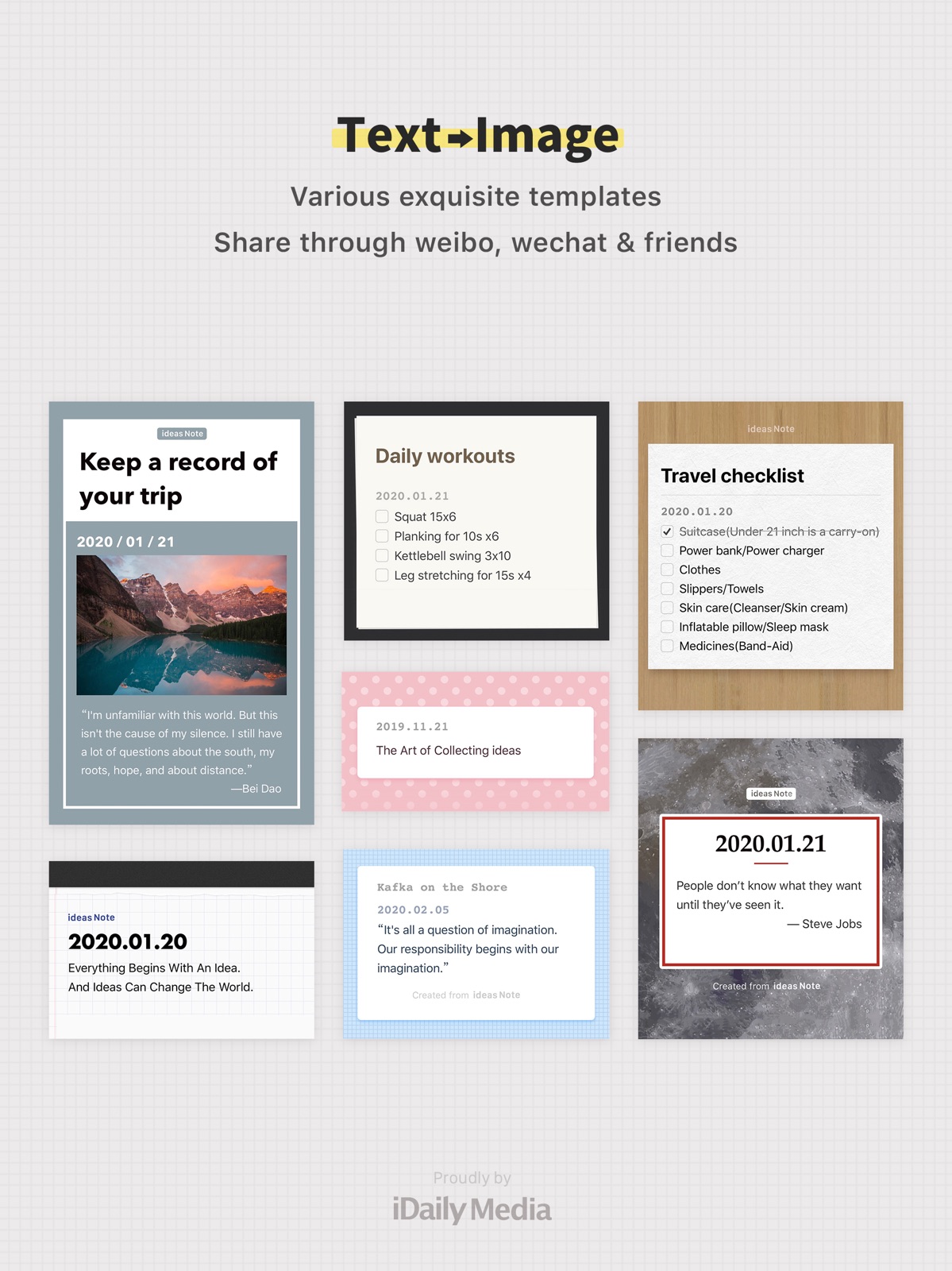
Pricing & paywalls
App Store
- iNote Pro — $3.99
Ratings & reviews
App Store
-
4/5Review
Great app you have invented. Love the daily prompt to write your idea . Kindly work around how you can synchronize with other device. And online log in and view
SammmyKG · 31 Jul 2026
-
5/5Hidden Gem
This is a very handy app and it's free tier is awesome (pro tier is also surprisingly cheap)! Fantastic note taking app with keyboard (I use apple pencil with notability and goodnotes), the tools this one provides are very comprehensive with visually minimum learning curve. I would say they provide all the essential tools and I personally find that's all I need. I like how simple, clean, but handy it is. Compare to other note taking apps that comes with all the fancy functionality but requires finding tutorials online to learn using it and keeping a cheatsheet for just note taking, I definitely prefer this one. I've been using products from this developer for years. All the productivity tools are very handy with cute UI's.
啊qiu · 31 Jul 2026
-
5/5Excellent Note Taking App
I was hesitant at first when I started using this app fearing that it, along with so many others before, would not provide me with a presentation or search ability I require. This app did a great job.
PawsLaws#1 · 31 Jul 2026
-
5/5Add voice option
Great and easy app for writing any kind of note .. thanks a lot; i use it everyday🙏💚 Please add an option that we can RECORD A VOICE on notes Good luck for this team🌱👍🤝
mel.g6 · 31 Jul 2026
-
3/5Great Notes App But…..
This app is great for taking notes, however, the iCloud sync doesn’t work as seamlessly because it doesn’t sync automatically. Hopefully the developers improve this feature, at the moment you have to manually restore your data to other devices. If you use different devices often then you’ll find this very annoying.
Leonel Apple · 31 Jul 2026
Privacy & accessibility
App Store
Privacy
- Data Not Linked to You — Analytics — Usage Data — Product Interaction Developer declared
- Data Not Linked to You — App Functionality — Diagnostics — Crash Data Developer declared
- Data Not Linked to You — Diagnostics Developer declared
- Data Not Linked to You — Usage Data Developer declared
Accessibility
No accessibility labels collected yet.
Versions
App Store
-
3.1
iNote Search Enhancements: Search Results Optimization, Notebook Search, Search & Replace - Search results show title, notebook, and other details. - Search for notes in notebooks. - Search and Replace: Search and replace text. = Recent Updates = iNote 3.0 Major Update: Note Templates is now available! - Note Templates: Weekly planner, reading notes, movie recording, travel diary and more. - Customizable templates: Add your own templates freely. - Picture sizes: 4 kinds of picture sizes.
-
3.1.1
iNote Search Enhancements: Search Results Optimization, Notebook Search, Search & Replace - Search results show title, notebook, and other details. - Search for notes in notebooks. - Search and Replace: Search and replace text. = Recent Updates = iNote 3.0 Major Update: Note Templates is now available! - Note Templates: Weekly planner, reading notes, movie recording, travel diary and more. - Customizable templates: Add your own templates freely. - Picture sizes: 4 kinds of picture sizes.
-
3.2
iNote 3.2 New "All Photos" Notebook - "All Photos" notebook, note pictures at a glance, support a variety of views, filtering display. - Fix the issue that "Select All" is not displayed in the notebook list management mode. = Recent Updates = iNote 3.1 Search Enhancements: Search Results Optimization, Notebook Search, Search & Replace - Search results show title, notebook, and other details. - Search for notes in notebooks. - Search and Replace: Search and replace text. iNote 3.0 Major Update: Note Templates is now available! - Note Templates: Weekly planner, reading notes, movie recording, travel diary and more. - Customizable templates: Add your own templates freely. - Picture sizes: 4 kinds of picture sizes.
-
3.2.1
iNote 3.2 New "All Photos" Notebook - "All Photos" notebook, note pictures at a glance, support a variety of views, filtering display. - Fix the issue that "Select All" is not displayed in the notebook list management mode. = Recent Updates = iNote 3.1 Search Enhancements: Search Results Optimization, Notebook Search, Search & Replace - Search results show title, notebook, and other details. - Search for notes in notebooks. - Search and Replace: Search and replace text. iNote 3.0 Major Update: Note Templates is now available! - Note Templates: Weekly planner, reading notes, movie recording, travel diary and more. - Customizable templates: Add your own templates freely. - Picture sizes: 4 kinds of picture sizes.
-
3.2.2
iNote 3.2 New "All Photos" Notebook - "All Photos" notebook, note pictures at a glance, support a variety of views, filtering display. - Fix the issue that "Select All" is not displayed in the notebook list management mode. = Recent Updates = iNote 3.1 Search Enhancements: Search Results Optimization, Notebook Search, Search & Replace - Search results show title, notebook, and other details. - Search for notes in notebooks. - Search and Replace: Search and replace text. iNote 3.0 Major Update: Note Templates is now available! - Note Templates: Weekly planner, reading notes, movie recording, travel diary and more. - Customizable templates: Add your own templates freely. - Picture sizes: 4 kinds of picture sizes.
-
3.2.3
iNote 3.2 New "All Photos" Notebook - "All Photos" notebook, note pictures at a glance, support a variety of views, filtering display. - Fix the issue that "Select All" is not displayed in the notebook list management mode. = Recent Updates = iNote 3.1 Search Enhancements: Search Results Optimization, Notebook Search, Search & Replace - Search results show title, notebook, and other details. - Search for notes in notebooks. - Search and Replace: Search and replace text. iNote 3.0 Major Update: Note Templates is now available! - Note Templates: Weekly planner, reading notes, movie recording, travel diary and more. - Customizable templates: Add your own templates freely. - Picture sizes: 4 kinds of picture sizes.
-
3.2.4
iNote 3.2 New "All Photos" Notebook - "All Photos" notebook, note pictures at a glance, support a variety of views, filtering display. = Recent Updates = - iNote 3.1 Search Enhancements: Search Results Optimization, Notebook Search, Search & Replace - iNote 3.0 Note Templates: Weekly planner, reading notes, movie recording, travel diary and more.
-
3.2.5
iNote 3.2 New "All Photos" Notebook - "All Photos" notebook, note pictures at a glance, support a variety of views, filtering display. = Recent Updates = - iNote 3.1 Search Enhancements: Search Results Optimization, Notebook Search, Search & Replace - iNote 3.0 Note Templates: Weekly planner, reading notes, movie recording, travel diary and more.
-
3.2.7
iNote 3.2 New "All Photos" Notebook - "All Photos" notebook, note pictures at a glance, support a variety of views, filtering display. = Recent Updates = - iNote 3.1 Search Enhancements: Search Results Optimization, Notebook Search, Search & Replace - iNote 3.0 Note Templates: Weekly planner, reading notes, movie recording, travel diary and more.
-
3.3
- Optimize the preview display of notes list, you can also enable the compact mode of list preview in "Settings" - "Note Settings". - New "Compact" display mode for notebook list - All Notes - "Manage" supports moving notes to different notebooks. - Other details improvements = Recent Updates = - iNote 3.2 New "All Photos" Notebook - iNote 3.1 Search Enhancements: Search Results Optimization, Notebook Search, Search & Replace - iNote 3.0 Note Templates: Weekly planner, reading notes, movie recording, travel diary and more.
-
3.4
- Icons and Widgets now supports dark and tinted theme in coming iOS version. - New Control Center Action Buttons: New Note, New To-Do, New Photo. = Recent Updates = - Optimize the preview display of notes list, you can also enable the compact mode of list preview in "Settings" - "Note Settings". - New "Compact" display mode for notebook list - All Notes - "Manage" supports moving notes to different notebooks. - Other details improvements
-
3.4.1
- Icons and Widgets now supports iOS 18 dark and tinted theme mode - New iOS 18 Control Center Action Buttons: New Note, New To-Do, New Photo = Recent Updates = - Optimize the preview display of notes list, you can also enable the compact mode of list preview in "Settings" - "Note Settings" - New "Compact" display mode for notebook list - All Notes - "Manage" supports moving notes to different notebooks - Other details improvements
-
3.4.2
- Icons and Widgets now supports iOS 18 dark and tinted theme mode - New iOS 18 Control Center Action Buttons: New Note, New To-Do, New Photo = Recent Updates = - Optimize the preview display of notes list, you can also enable the compact mode of list preview in "Settings" - "Note Settings" - New "Compact" display mode for notebook list - All Notes - "Manage" supports moving notes to different notebooks - Other details improvements
-
3.5
- New Feature: Note Icons, better looking - New Feature: 100+ super beautiful subject icons - New Highlight Color: "Purple" is added - New Templates: 5 new inspirations - New Notebook Covers
-
3.5.1
- New Feature: Note Icons, better looking - New Feature: 100+ super beautiful subject icons - New Highlight Color: "Purple" is added - New Templates: 5 new inspirations - New Notebook Covers
-
3.5.2
- New Feature: Note Icons, better looking - New Feature: 100+ super beautiful subject icons - New Highlight Color: "Purple" is added - New Templates: 5 new inspirations - New Notebook Covers
-
3.6
iNote v3.6 now supports multi-tab note-taking on iPad and Mac, providing a brand new multi-tab writing experience. Long press on list notes or the top right button of the note to activate multi-tab mode.
-
3.6.1
iNote v3.6 now supports multi-tab note-taking on iPad and Mac, providing a brand new multi-tab writing experience. Long press on list notes or the top right button of the note to activate multi-tab mode.
-
4.0
iNote 4.0 Brand New "Memory Card" Feature: 1. Quick Start: Add note content as Memory Cards 2. Scientific & Efficient: Brain ergonomics–based enhanced memory mode 3. Daily Reminders: 5-minute intensive reviews to easily achieve your memory goals 4. More Subject Icons Added More Feature Updates: - New rich-text Code Block with easy copy functionality - Batch export notes as a compressed package in iNote / DOCX / TXT / PDF formats - Improved preview experience when importing iNote files - Optimized PDF export styles and settings
-
4.0.1
iNote 4.0 Brand New "Memory Card" Feature: 1. Quick Start: Add note content as Memory Cards 2. Scientific & Efficient: Brain ergonomics–based enhanced memory mode 3. Daily Reminders: 5-minute intensive reviews to easily achieve your memory goals 4. More Subject Icons Added More Feature Updates: - New rich-text Code Block with easy copy functionality - Batch export notes as a compressed package in iNote / DOCX / TXT / PDF formats - Improved preview experience when importing iNote files - Optimized PDF export styles and settings
-
4.0.2
iNote 4.0 Brand New "Memory Card" Feature: 1. Quick Start: Add note content as Memory Cards 2. Scientific & Efficient: Brain ergonomics–based enhanced memory mode 3. Daily Reminders: 5-minute intensive reviews to easily achieve your memory goals 4. More Subject Icons Added More Feature Updates: - New rich-text Code Block with easy copy functionality - Batch export notes as a compressed package in iNote / DOCX / TXT / PDF formats - Improved preview experience when importing iNote files - Optimized PDF export styles and settings
-
4.1
- Brand-new List Folding: You can now "fold" notes in the list view, making frequently used notes easier to access. - Export Note now supports hiding the title. - Strikethrough display optimized, with adjustable options in Advanced Note Settings. - Refined the note toolbar interface on Mac. - Additional improvements and refinements.
-
4.1.2
- Brand-new List Folding: You can now "fold" notes in the list view, making frequently used notes easier to access. - Export Note now supports hiding the title. - Strikethrough display optimized, with adjustable options in Advanced Note Settings. - Refined the note toolbar interface on Mac. - Additional improvements and refinements.
-
4.2
- Brand-new List Folding: You can now "fold" notes in the list view, making frequently used notes easier to access. - Export Note now supports hiding the title. - Strikethrough display optimized, with adjustable options in Advanced Note Settings. - Refined the note toolbar interface on Mac. - Additional improvements and refinements.
-
4.2.1
· 29 Jul 2026
- Brand-new List Folding: You can now "fold" notes in the list view, making frequently used notes easier to access. - Export Note now supports hiding the title. - Strikethrough display optimized, with adjustable options in Advanced Note Settings. - Refined the note toolbar interface on Mac. - Additional improvements and refinements.
Alternatives
- MWeb - Markdown Writing, Notes — Same category + similar ratings
Availability by market
- US
Data quality & evidence
- Page completeness
- Live store listing
- Last verified
- 31 Jul 2026
- Sources
- App Store
- Apoku editorial summary has not been published yet.