
Quick verdict
- What it is
- Store information collected; independent summary not yet available.
- At a glance
-
- Free to download
Categories and search queries
Official categories
- Navigation
- Utilities
AppCorpus categories
Key functions
| Function | Availability | Access | Scope | Evidence |
|---|---|---|---|---|
| Free app | Yes | Free | — | Store published |
Screens
App Store
7 store screenshots



Pricing & paywalls
App Store
- Free
Ratings & reviews
App Store
-
5/5I love it! Thank you!
this app is one of the best math apps I've used yet. I hope that it remains available for a long time. I love being able to get directions to a place, and being able to set way points along the way if I choose. I can't really think of anything else that I wish this app would have, I just hope that it doesn't go away like other map apps in the past that work good like this have.
kev5688 · 31 Jul 2026
-
5/5Considering adjust text size
Sure, here's the revised version: I would like to express my sincere appreciation for the way Good Map developers cater to those with low vision, like myself. I highly value the high contrast mode and the large labels on the screen to guide me while navigating. Keep up the excellent work!
Nini9714 · 31 Jul 2026
-
3/5Good app with great potential
I will say before I write this that I haven’t used this app in a few months because of the issue I’m about to talk about… That being said this app is a good app with great potential. However, a major issue that I was having with this while working with an orientation and mobility instructor, was that when putting in addresses and locations, POI’s. When it was giving me directions, it seemed to be several hundred feet off base when getting near the location. For example, if I tried to go to the library and put in that address, it would take me 2 to 300 feet away from the library when I got close and I wouldn’t actually get to the library. This was pretty consistent. It least in my area. This is kind of a big deal but if this could be fixed and again it may be I haven’t used it in a few months, then this app can do great things. I’m in northeastern PA for context.
KHarvickfan429 · 31 Jul 2026
-
4/5GREAT APP! Just 2 wishes...
Great app, very nostalgic as I used to use my Braille Note with Sendero GPS for many many years! I only wish that upcoming intersections could be described with clock face or orientation rather than cardinal directions. Also would love if heading information in degrees could be included in more info. This will be very fun on airplanes.
GianniP46 · 31 Jul 2026
-
5/5My favorite GPS App
Whether it's hearing street names as I walk a new route, finding a place to have dinner with friends or learning more about the route my Uber driver takes, theres not a better tool than Seeing Eye GPS XT. In addition to the helpful information most GPS apps provide this one is taylored to give me information that I can't access easily any other way as a blind person.
Amatney · 31 Jul 2026
Privacy & accessibility
App Store
Privacy
- Data Not Collected Developer declared
Accessibility
No accessibility labels collected yet.
Versions
App Store
-
3.2
1. New indoo.rs beacon source integration. Now when you select the Beacons button on the POI screen, you will be presented with 2 options, Loud Steps and indoo.rs. Currently the only building offered in this source is the Lighthouse for the Blind and Visually Impaired in San Francisco, CA. We are working on providing more buildings in the future. 2.Updated Boni Loud Steps software to include latest developments, including step-by-step directions at some locations. 3. Solved the intersection issues in Spanish language. 4. Added Argentina to the list of available maps. 5. Added iPhone X compatibility.
-
3.2.1
Minor bug fixes.
-
3.2.2
Improved Spanish translation.
-
3.2.3
Minor bug fixes.
-
3.3
Upgraded User Interface underlying platform to Swift to ensure for future compatibility.
-
3.3.1
Minor bug fixes
-
3.4
While this release has multiple bug fixes for the LookAround mode, it also brings significant changes to one of the app's POI sources. We have been using the Google Maps and POIs without limitation for over four years now. This has been a great gift from Google, one which we have come to count on. However, Google recently announced a price change effective June 11, that caused us to remove Google POIs from our apps. Current users of the app, it is imperative that you update to the latest version to make sure the app continues to function properly.
-
3.5
Added a new source of POIs, OpenStreetMaps POIs. Changed the "beacons" button to "indoor" to reflect the variety of indoor wayfinding support available. Offering Loud Steps and Ningo for indoor wayfinding in buildings where location positioning is available. Loud Steps is a WiFi based indoor wayfinding system, which allows for turn-by-turn directions. Available building are San Francisco Lighthouse, Envision (Wichita), Chicago Lighthouse, Merchandise Mart and 1871 Chicago in Chicago, National Federation of the Blind (Baltimore), and other international locations. Stay tuned for more buildings as they are added. Ningo is an open source beacon database consisting of thousands of beacons. When you load Ningo for the first time, you will see a list of all the available beacons in your vicinity. Don't worry if your list is blank for now. We are regularly adding to it and have an online interface to make it easy for anyone to add more beacons. See https://ningo-api.herokuapp.com/ for information on how to become a contributor. The Ningo database includes the OSM indoor beacons. You can create a "getting warmer" route to any of the beacons listed. Updated Ningo and Loud Steps SDK. Serbian translation.
-
3.6
The Seeing Eye GPS XT continues to evolve with new features and improvements thanks to Aira Tech Corp. The improvements in this release are only the beginning of what is yet to come. Bug fixes and performance improvements 1. Improved Address and POI searches. Implemented Smart Search fields on the Address and POI search screens to minimize the need for entering information. Now you can enter the entire search in one search field and the app offers suggested matches, so there is no need to type the whole address or POI name. 2. Added automatic announcement for heading changes over 50 degrees. The default is set to announce Under 15 MPH. 3. Beta feature: Added automatic announcement for street changes after you have traveled 50 feet or 15 meters on the new street. Since this is an experimental feature aimed at pedestrian use only, the default is set to OFF. If you choose to enable this feature within Lookaround settings, we ask that you provide feedback to [email protected] about your experience. 4. View restaurant menus on Foursquare POIs. If the POI has a menu stored in the database, the app will link to it. 5. Updated indoor navigation SDKs for LoudSteps and Ningo.
-
3.7
The Seeing Eye GPS XT continues to evolve with new features and improvements thanks to Aira Tech Corp. The improvements in this release are only the beginning of what is yet to come. Bug fixes and performance improvements: 1. Added a Call Aira Agent button on the location and active route screens. The Aira app can connect you with a trained professional agent to provide instant access to visual information. This can be especially helpful in situations if you have become disoriented while on route or where GPS can't assist, such as locating the front door, the elevator, or products in a store. 2. Added POI category: Aira Access Points. You can search nearby POIs that have Aira's free service Access Points. 3. Aira Access Point automatic detection and notification. Now when you approach one of Aira's free Access Points, you will receive a notification. If you already have the Aira app installed on your phone and activate that notification, it will automatically load so that you can call an Aira agent. If you do not have the Aira app installed, you will be redirected to the App Store to download the Aira app. After creating a guest account, you will enjoy free assistance from the Aira agents at locations with Aira Access Points. If you find that you do not want these notifications, you can turn this off in General Settings under the heading Notifications. 4. Fixed issues with User POI keyboard and headset button controls. The main issue was with the app opening when the play/pause button is pressed on the a Bluetooth headset. 5. Updated Google Maps SDK.
-
3.7.1
Seeing Eye GPS XT continues to evolve with new features and improvements thanks to Aira Tech Corp. This release includes some Bug fixes and performance improvements.
-
3.7.2
Seeing Eye GPS XT continues to evolve with new features and improvements thanks to Aira Tech Corp. This release includes: iOS 13 compatibility. Fixes for call Aira agent availability in supported countries. Other bug fixes and performance improvements.
-
3.7.3
Seeing Eye GPS XT continues to evolve with new features and improvements thanks to Aira Tech Corp. This release includes: iOS 13.2 compatibility.
-
3.7.4
The Seeing Eye GPS XT continues to evolve with new features and improvements thanks to Aira Tech Corp. This release includes: Fixed an issue where users could not create routes to Aira Access Points.
-
4.0.0
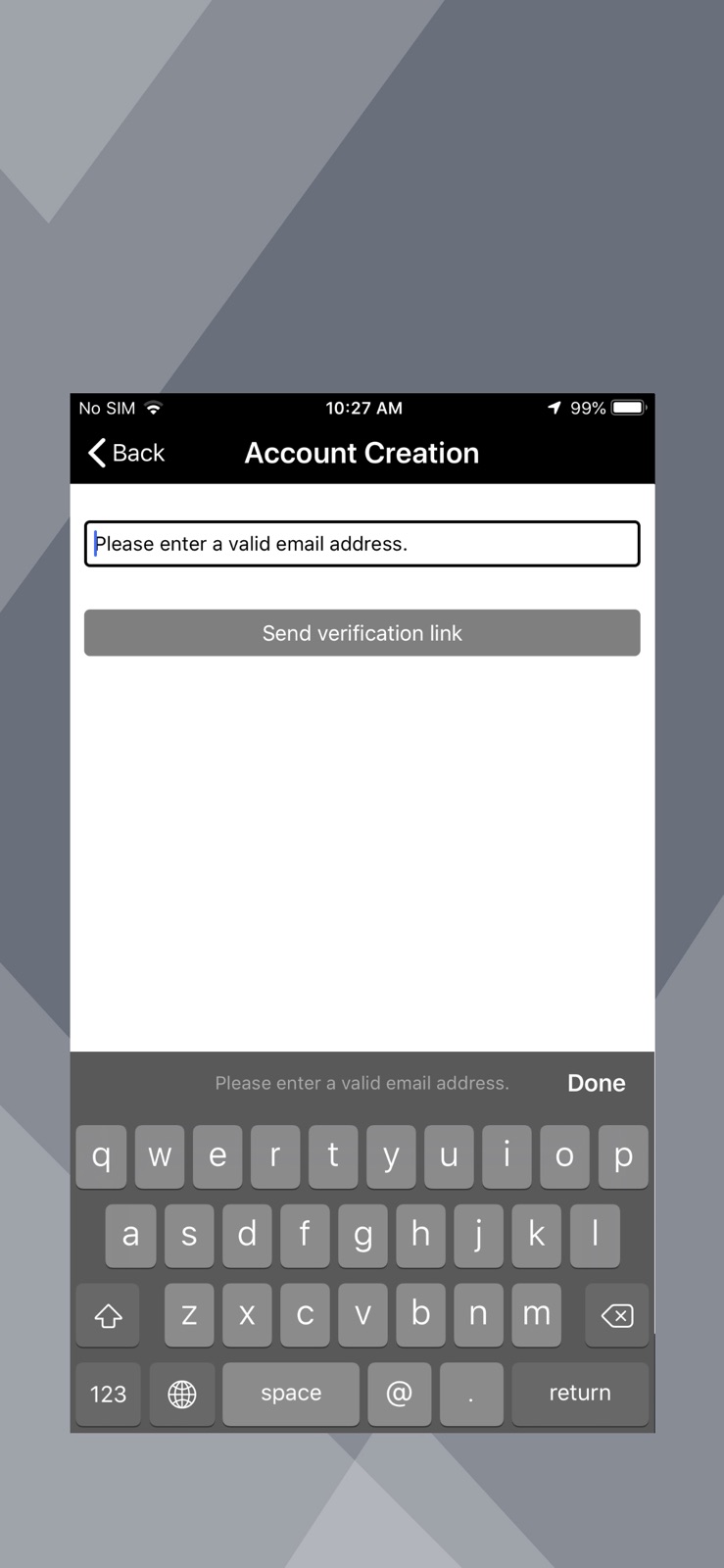
New and current Seeing Eye GPS XT users, meet GoodMaps Outdoors. Same app, new name, no charge. The version improvements include: 1. Added account creation/login page to securely back up your User POIs, route history and waypoint routes. When you launch the GoodMaps Outdoors app for the first time, it will require you to create an account linked with either your phone number or email. If using your phone number, select the "Phone number" button, then enter your phone number. Select the Submit button and you will receive a text with your verification code. Enter this code to create your account. If you prefer to login via email then select the "E-mail address" button, then enter your email address. Select the "Send verification link" button and check your email for the verification link. Once you select the link from the same device you will be redirected to the application and account creation will be completed. The benefit of creating an account is that you will never have to worry about losing your saved information, such as your User POIs, route history, and waypoint routes. These files will be securely stored on the server and linked to your account. 2. Added ability to create a route to a Free Aira Access Point 3. Added Dark Mode Support 4. Removed OSM POIs
-
4.0.1
Minor bug fixes.
-
4.0.2
Updated Spanish Translation. Added option to delete account.
-
5.0.0
• GoodMaps Outdoors now has 3D audio announcements to enhance POI and route directions. • There are now Siri shortcuts so you can verbally create routes to POIs and contacts. • GPS precision has been improved slightly.
-
5.0.2
Summary: A few highlights of this release include an enhanced user experience for incorporating a preferred method of travel into routes now available on iOS Siri. Improvements have also been made to the announcement feature, specifically when utilizing the shake for the announcements function with voiceover enabled. Stay tuned for future releases with additional enhancements and optimizations!
-
5.1.1
Summary Access Aira venue support in more locations beyond the US, Canada, Australia, and New Zealand, expanding coverage. Stay tuned for future updates! New Features * Enhanced Aira Venue Support: Expanded to include more locations. * Navigate GoodMaps Supported Buildings: Find and navigate supported buildings. * Deep Link Enablement: Easily launch between GoodMaps and Outdoors apps.
-
5.1.2
With this release, there are no longer interruption issues with route announcements. Facing/heading announcements, location, and turn announcements continue if they are interrupted by apps, phone calls, or music.
-
6.0.2
1. Rebranding to Indigo 2. Virtual Location Mode: Allows users to set any POI or address as a virtual location. This temporarily replaces the real-time GPS position, enabling users to simulate navigation from the selected location. 3. Deep link to GoodMaps Indoor venues: Automatically triggers GoodMaps Indoors buildings when the user is in close proximity. 4. Transit Routing: Helps users find the nearest transit stops and plan routes to a specific POI or address, with transit included as one of the routing options. 5. Improved LookAround Wand: Point the phone in a given direction to hear nearby POIs and intersections. 6. Morse Code-Inspired Haptic Patterns: Introduces haptic feedback patterns based on Morse code to enhance accessibility and navigation feedback. 7. Improved intersection announcements: Automatic and user-activated intersection announcements including orientation 8. Enhanced Route Waypoint mode: This unique automatic and user-triggered breadcrumb mode is improved for creating custom paths off the grid. 9. Bug fixes and performance improvements 10. Improved Aira Access: Direct connection to a human agent
-
6.0.3
Foursquare POI fix.
-
6.1.0
1.Upgraded routing system to Google Routes API for more reliable route guidance and improved overall navigation performance. 2.Improved maneuver guidance with an updated maneuver set, including new/updated turn types and refreshed icons. 3.Introduced new Speech Settings for Indigo announcements, giving users more control over voice selection, speaking rate, pitch, and volume. 4.Added options to send feedback to remove or flag Foursquare points of interest. 5.Updated key labels and navigation wording across the app, including: Route heading title changed to “Choose Mode” on Route screen. Vehicle / Pedestrian mode renamed to Drive / Walk 6.Added intersection data support for new countries, improving navigation guidance in: Denmark, Slovakia, Ukraine, Panama, South Africa, and Romania
-
6.2.0
· 1 Jul 2026
Indigo Nav 6.2 New Features, June 26, 2026 Find the free Indigo Nav in the app stores. Make sure to use both words, Indigo Nav when searching. There are several improvements in Indigo under the hood in addition to the following new features: You now have a choice of Google Places for Points of Interest. Foursquare POIs is the default. You can change to Google POIs in the Settings LookAround menu. In addition to calling Aira for visual assistance, you now have the option to call a Be My Eyes volunteer. These buttons are at the top of the Routes screen. When Indigo gets you near your final destination, you have both services for visual assistance to pinpoint your destination. Location, intersection and turn-around announcements have been improved. You will get one intersection announcement when approaching an intersection and another when you are near it. You can shake the phone to trigger the Location screen announcements. You can “favorite” a point of interest by flicking up on the action list. You also have “set as Virtual Position” and Activate in this action list. There is now a Favorite POIs category where these favorites can be found. Tap on Favorite to add it to the list. When you create a User point of interest, the city where you are located is automatically added to that User POI name. A few reminders: You can find the Indigo User Guide and Audio Tutorial in English and Spanish at http://www.APH.org/Indigo under the downloads section. Links in English are also under Indigo Settings, Help in the app. You can launch Indigo routes using Siri. It is essential to use exact language in your prompt based on the Siri Configuration under Settings. Important! If you check your Settings Siri Configuration and the shortcuts refer to GoodMaps Outdoors, remove those old versions , close and reopen Indigo and check that the shortcuts now say Indigo. The shortcut to create a User POI is to double tap and hold with one finger on the Location screen Info button. The shortcut to generate a full list of nearby POIs in all categories is double tap and hold with one finger on the POI Tab. To contact Customer Service about Indigo, Email [email protected]
Availability by market
- US
Data quality & evidence
- Page completeness
- Live store listing
- Last verified
- 31 Jul 2026
- Sources
- App Store
- Independent summary has not been published yet.