
Quick verdict
- What it is
- Store information collected; an Apoku editorial summary is not yet published.
- At a glance
-
- Free to download
Categories and search queries
Official categories
- Photo & Video
- Lifestyle
Apoku categories
Key functions
| Function | Availability | Access | Scope | Evidence |
|---|---|---|---|---|
| Free app | Yes | Free | Context-specific | Store published |
Screens
App Store
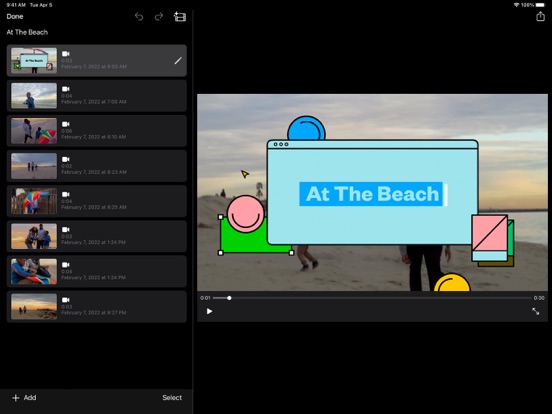
25 store screenshots



Pricing & paywalls
App Store
- Free to download
Ratings & reviews
App Store
-
4/5Almost great!
I like iMovie. It's a good and simple editing system that is really fun to use. But, there are a few things that I wish would change. First of all, the space it takes up. I don't know if there is anything you can do about this, but whenever I record little snippets for a movie, they save to my photos. And I hate that! And to make it worse, when I delete them, I can't watch that part I filmed in the movie cause I deleted it. And yes, I know. There is something you can do about it. You finish the movie, save to photos, then you can delete all the snippets from your photos. But I wish I didn't have to do that. I just wish it didn't add it to my photos in general. Second, the trailers. I wish there was a bit more freedom to the trailers. The app chooses everything for you. You get to pick the topic and everything, but I wish there was more. I don't like how iMovie chooses the music, how long the clips have to be, and how long the trailer is in the first place. I don't usually write reviews, but this app deserved one. Other than some of my complaints, this was a really good app. Everything is free and available, there are more editing possibilities, and it looks very professional. Again, if there's anything you can do about my complaints, I would do it. I feel like these are common complaints and you would get more buyers if you fixed or changed them. Thanks!
Mydawg_Mydawg · 29 Sep 2026
-
5/5Long time user
I’ve been editing my videos with iMovie for years. It’s such a great editing software. It truly has helped me kickstart my filmmaking from a young age. I used to use it to make videos with my barbies, and here I am now still using it many many years later. It’s pretty expensive to get pro software, but it’s been totally fine sticking with iMovie. On multiple occasions when I’ve shown people my videos they’re shocked when I tell them I used iMovie. You truly can make professional looking videos with this. That’s what so great about it, it’s so easy to navigate. A beginner or a professional would only need about five minutes or so to figure it out. I’m so glad they added the features on the iMac version like backgrounds to the mobile version. Although there needs to be more sound effects like the iMac has. As well as adding the music from the clips app, which has a huge amount of fantastic royalty free music. The trailer templates are brilliant. When I first got iMovie I was obsessed with making trailers. They’re so fun, and teach a lot about filmmaking. My only complaint is the glitches on the mobile version. They’ve corrected a lot of these glitches over the years, but it can be some what glitchy. This may be because I have thousands of videos and pictures on my phone. Also I wish you could move the text where you want it to be on your frame, and some other font options would be nice. But overall this is a fantastic editing software. Highly recommend, especially to anyone looking to start editing or making videos.
LilyPadLegend · 29 Sep 2026
-
5/5Perfect For Everyone.❤️ But one recommendation.
So I love this app. I’ve been using it for a few weeks and I can create some really cool stuff. I’ve been getting more advanced with the editing, and I love everything it can do. You can put text, backgrounds, photos, you name it. My only problem is the music. I have seen some awesome clips and they all have good music. The songs on here don’t have words (from what I’ve seen) and I’ve been really wanting to create a clip with popular songs. This app is much better then other editing apps I’ve seen, it’s simple and easy to use, beginners won’t find it confusing. (I didn’t.) Just play around a little bit, and you’ll soon figure it out. It also has more advanced stuff. So many different options here, and it’s all easy to use! I’m on an IPhone, and I haven’t had the storage or lag problems other people talk about. On a computer it is a bit more complicated, but if you are looking for complex editing I recommend using that. The trailers are also amazing. You have so many different options, and it looks so cool and professional! Overall, super simple and easy to use, perfect for anything! Hope this review helped you, and it would be amazing if the developers could add more to the music! If you are an expert editor or you just want to experiment, this app is perfect for everyone!!
elra11 · 29 Sep 2026
-
4/5Read this before buying!
So overall I think iMovie is a pretty good editing software. I love how it's one of the only editing apps I've downloaded that don't bombard you with "IMOVIE PLUS" or "GET IMOVIE PREMIUM FOR BLAH BLAH BLAH" idk but it's clearly not money hungry lol. Other apps load you with ads every time you press a button. My only problems are... 1. Lack of freedom. There aren't many things you can do in iMovie besides mess with volume, duration, filters, etc. There are definitely other editing apps that I like better (like KineMaster and CapCut) because of their variety. 2. Low quality exportation. You can't choose the quality that it exports in. I'd say it's around 480P or 720P, while other apps (that I mentioned before) allow you not only 4K 2,160P quality max, but they allow you to choose (both quality and fps). 3. No overlay. You can only have 1 clip playing per section, and you can't add any overlays/other clips. I love to be able to do this and most apps provide it. Number 2 is the biggest problem for me because I actually end up just screen recording my videos instead of downloading them. This doubles my editing process. I think it's just inconvenient, especially when there are apps that provide better quality and more freedom/variety. Other than that, I really like this app! Being completely honest though, I don't use it. I definitely prefer other apps ase they are more convenient and efficient. However, I would recommend it to anyone new to editing who needs a nice, simple editing software! This was my first editing software ever, and I absolutely enjoyed it before I found other softwares!
someonerereEE · 29 Sep 2026
-
2/5Won’t allow me to select clip
With the new update you guys have a bug or something going on. I been using this app for over a year now to edit my videos but with this new update I struggle to select a clip to create. It won’t allow me to select it. I have to repeatedly restart the app to fix this, sometimes even restart my phone. I’ve even tried uninstalling the app and reinstalling it, done that twice so far. Still same issue. This is the worst issue I’ve ran across but there is more. Please fix this issue! This app I would be a five star for me but I can’t give it that with this issue that has been ongoing for about two months now or so. Usually it has a select clip option and highlights blue when it selects the clip But now it highlights a gold looking color when you tap the clip you want and it don’t give the option to select and create movie clip. This is so frustrating I have no idea what you guys did in this new update but this was never a issue until about two months ago. How can I create my movie clips if it’s not giving me the option to select and create the movie? I found the best way past this is tapping the select all option in which will select all videos in that column which can be up to 3 to 5 different recent videos, so I’ve been having to do that then go back through when it creates it into the editing table and delete the clips I did not want. Wow! Can you see how frustrating and time consuming this bug can be!? Very frustrating! Please fix it!
Dreamscape82 · 29 Sep 2026
Privacy & accessibility
App Store
Privacy
- Data Linked to You — App Functionality — Identifiers — User ID Developer declared
- Data Linked to You — App Functionality — User Content — Audio Data Developer declared
- Data Linked to You — App Functionality — User Content — Other User Content Developer declared
- Data Linked to You — App Functionality — User Content — Photos or Videos Developer declared
- Data Linked to You — Identifiers Developer declared
- Data Linked to You — User Content Developer declared
- Data Not Linked to You — Analytics — Usage Data — Other Usage Data Developer declared
- Data Not Linked to You — Analytics — Usage Data — Product Interaction Developer declared
- Data Not Linked to You — App Functionality — Location — Precise Location Developer declared
- Data Not Linked to You — Location Developer declared
- Data Not Linked to You — Usage Data Developer declared
Accessibility
No accessibility labels collected yet.
Versions
App Store
-
2.0
• All-new, streamlined design • Share clips, movies, and trailers to iMovie Theater and watch them anywhere • Full-screen Video browser with quick clip sharing • Adjustments Bar for easy access to audio and video controls • 16 new title styles • Three new transitions — Slide, Wipe, and Fade through black or white • Two new trailers — Indie and Family • Slow motion • Cutaway, picture-in-picture, and split-screen effects • Add just the audio portion of video clips to a movie • Detach audio from video in the timeline • Duplicate audio or video clips • Trim, split, and reposition music and sound effects • Adjustable audio fade-in and fade-out • High-frame-rate video recording • Share via Mail and Messages • Use AirDrop to send video clips and iMovie projects • Import media via iTunes File Sharing • 64-bit support
-
2.1
What’s New in Version 2.1 • Support for iOS 8 • Enhance video clips in the Photos app using the iMovie extension • Choose from 10 Apple-designed filters to stylize a video clip or an entire movie • Slow down, freeze, or speed up a portion of a clip* • Save videos and iMovie project files to iCloud Drive • Send videos to other apps on your iOS device • Create titles using bi-directional text • Support for Arabic, Australian English, Hebrew, and Mexican Spanish * 2x speed-up is available on iPhone 5s, iPad Air, iPad mini with Retina display, and later devices.
-
2.1.1
• Support for iCloud Photo Library • Share videos with iCloud Photo Sharing • Resolves issues that could occur when rotating a device while in the Video browser • Performance and stability improvements Introduced in Version 2.1 • Support for iOS 8 • Enhance video clips in the Photos app using the iMovie extension • Choose from 10 Apple-designed filters to stylize a video clip or an entire movie • Slow down, freeze, or speed up a portion of a clip* • Save videos and iMovie project files to iCloud Drive • Send videos to other apps on your iOS device • Create titles using bi-directional text • Support for Arabic, Australian English, Hebrew, and Mexican Spanish 2x speed-up is available on iPhone 5s, iPad Air, iPad mini 2, and later devices.
-
2.1.2
• Addresses issue in which portrait photos may be cropped incorrectly when added to a project • Updates compatibility with sharing to YouTube
-
2.2
• Create and share movies at stunning 4K resolution (3840 x 2160) on compatible iOS devices * • Create and share movies with 1080p HD video at 60 frames per second for smoother, more true-to-life action • Use 3D Touch on iPhone 6s and iPhone 6s Plus to quickly start a new movie right from the Home Screen • Desktop-class performance on iPad Pro with the ability to edit multiple streams of 4K video and use shortcuts with the Smart Keyboard • Enhanced interface on iPad Pro with full-height Media Browser and pixel-for-pixel 1080 HD Viewer • Connect a keyboard and use simple shortcuts to edit movies quickly • Option to hide Media Browser while editing a movie • Option to disable Ken Burns animation on a photo • Redesigned Project Details view lets you watch movies and trailers before opening them • Redesigned Video view lets you see more of your library while browsing videos and photos on iPad • Improved Inspector controls with easy-to-read text labels on iPad • Support for Slide Over and Split View when multitasking with the iMovie Extension for Photos • Redesigned Audio browser in the iMovie Extension lets you easily browse and hear music • Performance and stability improvements • Support for Canadian French, Hindi, and Traditional Chinese (Hong Kong) * 4K support is available on iPhone 6s, iPhone 6s Plus, and iPad Pro
-
2.2.1
• Create and share movies at 4K resolution on iPad Air 2 with iOS 9.1* • Fixes an issue that could prevent users from creating new trailers in some languages • Resolves issues importing and removing projects from iCloud Drive • Addresses interface issues that could appear in some right-to-left languages • Addresses interface issues that could appear in iMovie extension for Photos • Performance and stability improvements * iMovie supports 4K on iPhone 6s, iPhone 6s Plus, iPad Air 2, and iPad Pro
-
2.2.10
• Give your videos a hand-drawn look with 3 new filters: Comic, Comic Mono and Ink • Choose from 25 new soundtracks — in genres including action, chill, and sentimental — that automatically adjust to match the length of your movie • Addresses an issue that could prevent the viewer from updating after duplicating a photo in the timeline • Improves reliability of Redo when editing a trailer • Includes performance and stability improvements
-
2.2.2
• Resolves a stability issue when using Display Zoom on iPad Pro • Stability improvements
-
2.2.3
• Start projects quickly by selecting multiple photos and videos • Share to Facebook and Vimeo using the standard iOS share interface • Support for Shared iPad in iOS 9.3 or later • Stability and performance improvements
-
2.2.4
• Improves compatibility when sharing to YouTube
-
2.2.5
• Updated for Super Retina display on iPhone X • Adopts Metal for graphics processing • Improves localization for Simplified Chinese • Improves overall stability This version of iMovie requires iOS 11.2
-
2.2.6
• Connect an external display to your iPad or iPhone and choose to mirror the iPad display or preview your video fullscreen while you edit* — with support for uncompressed 4K video output on iPad Pro 11-inch or iPad Pro 12.9-inch (3rd generation) • Resolves issues which could cause video distortion when editing a vertical video clip with the iMovie edit extension in the Photos app • Addresses an issue which could prevent sharing videos through a cellular connection on iPhone or iPad • Improves stability including an issue which could occur after adding speed change effects to clips in your movie * Fullscreen video preview while editing requires iPhone 7 or later, iPad (6th generation) or iPad Pro (2017) or later
-
2.2.7
•Transform your video with the new green screen effect that lets you instantly remove the background of clips shot in front of a green or blue screen • Adjust the green screen effect with a 4-point mask and strength slider • Choose from 80 new soundtracks in genres including pop, chill, and sentimental that automatically adjust to match the length of your movie •Drop in still images with transparent backgrounds to use as logos or custom graphics on top of your video • Add photos as overlays to create picture-in-picture and split-screen effects • Choose to hide the border that surrounds picture-in-picture and split-screen effects • Instantly return to the edit screen of your project when switching back to iMovie from other applications • ClassKit support lets students deliver video assignments to teachers using the Schoolwork app • For users with videos in iMovie Theater, the Theater window is now accessible from the ••• menu at the bottom of the Projects screen • Sharing to iMovie Theater is no longer supported; save your movies and trailers to iCloud Photos to watch them on other devices including Apple TV • Resolves an issue that could lead to a black viewer when previewing your video fullscreen on an external display
-
2.2.8
• Access files from external hard drives, SD card readers, and USB drives • Support for Dark Mode and new Share sheet in iOS 13 • When adding theme music in project settings, the soundtrack automatically adjusts to match the length of your movie • Provides performance and stability improvements
-
2.2.9
• Use iMovie on iPad with Magic Keyboard, a mouse, or a trackpad for a new way to create movies and trailers (requires iPadOS 13.4) • Use keyboard shortcuts to toggle between the five inspector modes when a clip is selected: Action, Speed adjustments, Volume, Titles, and Filters • Use keyboard shortcuts to quickly rotate video 90-degrees clockwise or counterclockwise • Tap the Download All button at the top of the soundtracks list to download all bundled soundtracks at once • Add PNG, GIF, TIFF, and BMP files to your movie • Performance and stability improvements
-
2.3
• Customize any title by selecting from dozens of built-in fonts • Adjust the color of any title by selecting from a grid or spectrum of presets, adjusting numerical sliders, or using the eyedropper in the viewer • Quickly change a title’s default style, capitalization and duration • Pinch and drag to adjust the size and location of any title • Choose from three new animated titles: Slide, Split and dual-color Chromatic • Add solid, gradient, and patterned backgrounds to your movie • Use the color picker to customize the colors of any background • Drag the slider to change the intensity of any filter applied to your photos and videos • Import and share 4K videos at 60 frames per second* • View, edit, and share High Dynamic Range (HDR) videos from your Photos library** • Tap the new options button at the top of the Share sheet to share a project or video file and choose properties including resolution, frame rate, and HDR** * 4K at 60 frames per second requires iPod touch (7th generation), iPhone SE (2nd generation), iPhone 7 or later, iPad (6th generation) or later, iPad mini (5th generation), iPad Air 3 or later, 10.5-inch iPad Pro or later ** Editing and sharing HDR video requires iPhone SE (2nd generation), iPhone 8 Plus, iPhone X or later, iPad mini (5th generation), iPad (7th generation) or later, iPad Air 3 or later, 10.5-inch iPad Pro or later
-
2.3.1
• Fixes an issue which could cause titles created in prior versions of iMovie to appear with a different font • Fixes an issue which could cause long titles created in prior versions of iMovie to change from one line to two lines • Retains drop shadow and uppercase style of titles created in prior versions of iMovie
-
2.3.2
• Fixes an issue in which text disappears after resetting a title or changing the font • Fixes issues in which title text scales incorrectly or becomes uneditable after changing the title style • Fixes an issue in which Undo becomes unavailable after changing the color of title text • Fixes an issue in which some lines of title text cannot be deleted • Fixes an issue in which the Expand title animation does not play
-
2.3.3
• Import and edit video captured in Cinematic mode on iPhone 13 • Add, adjust, and delete focus points and modify the depth of field effect in video recorded in Cinematic mode* • Import and edit ProRes video** • Add ProRAW images to your movies and trailers • Stability updates and improvements * Requires iPhone XS or later, iPad mini (5th generation or later), iPad Air (3rd generation or later), iPad Pro 11-inch or iPad Pro 12.9-inch (3rd generation or later) ** Requires iPhone 13, iPad mini (6th generation), iPad Pro 11-inch or iPad Pro 12.9-inch (3rd generation or later)
-
3.0
• Get started, learn, and be inspired by two brand-new types of video projects: Magic Movie and Storyboards • Create a Magic Movie to instantly make and share custom videos with titles, transitions, and music in just a few taps • Select an album of photos and videos, and Magic Movie will create a polished video using your media • Start with a Storyboard project to improve your storytelling skills using a template that guides you through the video-making process • Choose from 20 Storyboards for common video projects like Cooking, DIY, Q&A, Product Review, and Book Report • Customize and organize your storyboard video by adding, reordering, and grouping shots within the flexible shot list • Learn different types of video framing and storytelling techniques with the shot tips provided in each type of storyboard • Record video or take photos right into each Storyboard placeholder clip, or add media from your Photos library • Enhance your Magic Movie or Storyboard video with 20 dynamic styles that include title layouts, fonts, filters, color palettes, and music • Go further by editing clips with tools like trim, split, and clip speed • Apply title treatments, record voiceover narration, or adjust the depth-of-field effect in Cinematic mode video clips* to further customize your videos • Import Magic Movie and Storyboard projects into a timeline in iMovie for Mac or Final Cut Pro** to take your project further • Save Magic Movie and Storyboard videos to your Photos library, send to friends and family via Messages or Mail, or share with your followers on social media * Requires iPhone 13, iPad mini (6th generation), iPad Pro 11-inch or iPad Pro 12.9-inch (3rd generation or later) ** Requires iMovie for Mac version 10.3.2 or Final Cut Pro version 10.6.2
-
3.0.1
• Apply four new dynamic styles that include title layouts, fonts, filters, color palettes and music to Magic Movie or Storyboard movies • Fixes an issue where media from a Photos album would be placed in non-chronological order in a Magic Movie project • Fixes an issue in which Magic Movie and Storyboard movies in the viewer would not appear on external displays during playback • Includes stability and performance improvements
-
3.0.2
iMovie 3.0.2 includes the following enhancements and bug fixes: • Easily open your iMovie project in Final Cut Pro for iPad and take advantage of advanced editing and effects. • Adds support for log-encoded video recorded with iPhone 15 Pro. • Fixes an issue where selecting an iMovie project in the Files app would sometimes result in the project not opening. • Fixes an issue where exporting a video would sometimes result in displaying an incorrect “Storage Almost Full” error.
-
3.0.3
• Improved access to replacing and editing clips in Magic Movie and Storyboard projects • Fixed an issue where tapping Edit Clip on a selected clip would open a different clip • Includes stability and performance improvements
-
3.0.4
• A new onboarding experience guides users through setting appropriate permissions for music library and photo library access. • Includes stability and performance improvements
-
3.0.5
· 16 Dec 2024
• Fixes an issue where setting permissions for Photos library access could freeze iMovie.
Availability by market
- US
Data quality & evidence
- Page completeness
- Live store listing
- Last verified
- 29 Sep 2026
- Sources
- App Store
- Apoku editorial summary has not been published yet.