
Quick verdict
- What it is
- Store information collected; an Apoku editorial summary is not yet published.
- At a glance
-
- From $0.49/mo
- Free download · core features require a paid plan
- In-app purchases
Categories and search queries
Official categories
- Productivity
- Social Networking
Apoku categories
Key functions
| Function | Availability | Access | Scope | Evidence |
|---|---|---|---|---|
| Free app | Yes | Free | Context-specific | Store published |
| In-app purchases | Yes | Limited free | Context-specific | Store published |
| Subscription | Yes | Paid | Context-specific | Store published |
Screens
App Store
23 store screenshots

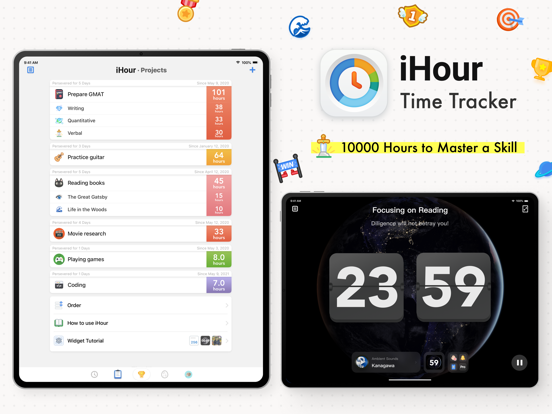

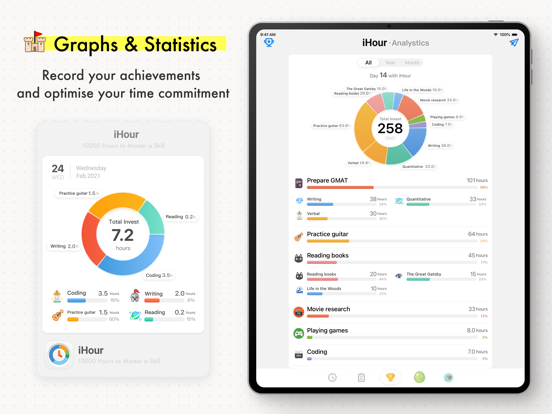
Pricing & paywalls
App Store
- iHour Pro - Membership — $0.49/month (derived from the IAP title)
Ratings & reviews
App Store
-
5/5素晴らしい
The best app. I can’t seem to do time blocking management, and I can’t seem to follow schedule. This app is the only app that I could rely to on my daily routine, so I can keep track of my focus and help me to know how much time do I spend on anything really. This app really helps! The latest update was also very good, I get to give myself a little reward for some time I’ve spent focusing on certain activities. It’s honestly a very thoughtful update. Thank you developers for making this app. I hope you continue to make awesome and helpful app. Thank you very much! I’m very grateful
itstigerhere · 6 Aug 2026
-
5/5Best purchase for someone who can’t stay focused like me
I can’t stay focus, and I can’t do time block on schedule. This app help me navigate my day, and make me less crazy. I now know that I do or do not waste my time, and know when I’m busy doing chores, work, or study that day. I’m happy to stumble into this app. I recommend this to anyone that just wanna track how they spend their time, and those who cannot do time block or time management but still wanna track their activities 💕
wiejeyn · 6 Aug 2026
-
5/5Quirky, cute, highly functional, actually motivating
I started using this app when I wanted to increase the hours per day I was studying. I like that it can be used in different ways for the same goal. I’m addicted to working in focus mode count-up with the ocean sounds. Hatching creatures from eggs is a delightful quirky bonus to the app’s many functional features.
xcxc · 6 Aug 2026
-
5/5Definitely enjoy this habit tracking app.
The best I’ve used so far: better than level me up, epic win, and a few others I have used. The focus timer is quite helpful. And the incentive to hatch eggs is cool. Having sub projects is quite an excellent feature also although I haven’t taken advantage of it quite yet.
jeevanmd2 · 6 Aug 2026
-
5/5Best time tracking app
Have tried almost all the time tracking apps like promo todo series and atracker, this one works best for me with delightful design and practical fonctions, can’t understand why so few comments. A must try especially after they integrate iPad, iPhone, I watch ! Great job and keep going!
I wish I could give a 0 · 6 Aug 2026
Privacy & accessibility
App Store
Privacy
- Data Not Linked to You — Analytics — Usage Data — Product Interaction Developer declared
- Data Not Linked to You — App Functionality — Diagnostics — Crash Data Developer declared
- Data Not Linked to You — Diagnostics Developer declared
- Data Not Linked to You — Usage Data Developer declared
Accessibility
No accessibility labels collected yet.
Versions
App Store
-
6.5.1
The Space Time News agent was given a copy of the development document: = iHour 6.5 Development Plan (Not Confidential) = - Support new standby display modes for FocusOS 17 - Interactive focus timer widget for FocusOS 17 OS to turn on timer at any time. - Support the new lock screen widget of FocusPadOS 17 . That's all from this Space Time News, we'll see you next time.
-
6.5.2
The Space Time News agent was given a copy of the development document: = iHour 6.5 Development Plan (Not Confidential) = - Support new standby display modes for FocusOS 17 - Interactive focus timer widget for FocusOS 17 OS to turn on timer at any time. - Support the new lock screen widget of FocusPadOS 17 . That's all from this Space Time News, we'll see you next time.
-
6.5.3
The Space Time News agent was given a copy of the development document: = iHour 6.5 Development Plan (Not Confidential) = - Support new standby display modes for FocusOS 17 - Interactive focus timer widget for FocusOS 17 OS to turn on timer at any time - Support the new lock screen widget of FocusPadOS 17 - Add newly discovered space-time monsters That's all from this Space Time News, we'll see you next time.
-
7.0
Introducing the new upgrade to Focuser 7.0: Equipped with cutting-edge technology, it brings an immersive focusing experience. Exquisite scenes, as if you were in Tomorrowland. Lifelike dynamic effects and fully renovated animation. Thoughtful accompaniment, so that your concentration efficiency 100 times. Focus, START! That's all from this Space Time News, we'll see you next time.
-
7.1
The host has gone home for the New Year, This newsletter was updated by the R&D team: The Focuser 7.1 Statistics Time Machine is now available: - Record history can modify the project to which it belongs - Project statistics support customized time ranges - Main project detail page now supports sub-project statistics - Focus Timetable shows focus details by tap on it - List widget shows project total time That's all from this Space Time News, we'll see you next time.
-
7.1.1
The host has gone home for the New Year, This newsletter was updated by the R&D team. The Focuser 7.1 Statistics Time Machine is now available: - Project statistics support customized time ranges - Focus Timetable shows focus details by tap on it. - Main project detail page now supports sub-project statistics - Record history can modify the project to which it belongs - List widget shows project total time That's all from this Space Time News, we'll see you next time.
-
7.2
The immersive focus scene has now been updated, with the developers visiting secret places and climbing to the peaks to capture the moments of stunning clouds and mountains. That's all from this Space Time News, we'll see you next time.
-
7.3
The immersive focus scene has now been updated, with the developers visiting secret places and climbing to the peaks to capture the moments of stunning clouds and mountains. That's all from this Space Time News, we'll see you next time. =7.3= - Pro Focuser can now enable "Accurate Time Unit to 1 Minute" in app settings - Minor bug fixes
-
7.3.1
The immersive focus scene has now been updated, with the developers visiting secret places and climbing to the peaks to capture the moments of stunning clouds and mountains.
-
7.4
The immersive focus scene has now been updated, with the developers visiting secret places and climbing to the peaks to capture the moments of stunning clouds and mountains.
-
7.5
Each year, the development team time travels to bring forward numerous system-level feature adaptations that Focusers will be able to experience this year: - Icons and Widgets now supports dark and tinted mode in coming OS version - New Control Center Action Buttons: Start Focus in one touch - Supports the wearable OS showing focus live activity That's all from this Space Time News, we'll see you next time.
-
7.6
Focusers travel through time, look back, time is behind them. Introducing - My Achievement Record. The new grid chart visualizes the time record of Focusers, reviewing your every focus. That's all from this Space Time News, we'll see you next time.
-
7.6.1
Focusers travel through time, look back, time is behind them. Introducing - My Achievement Record. The new grid chart visualizes the time record of Focusers, reviewing your every focus. That's all from this Space Time News, we'll see you next time.
-
7.6.2
Focusers travel through time, look back, time is behind them. Introducing - My Achievement Record. The new grid chart visualizes the time record of Focusers, reviewing your every focus. That's all from this Space Time News, we'll see you next time.
-
7.7
The Time-Space Archaeology Bureau has scoured through history, meticulously hand-carving hundreds of "Knowledge Icons" to deliver a transcendent focus experience for focusers, bridging ancient wisdom and modern dedication.
-
8.0
The R&D team discovered the inter-dimensional phenomenon while exploring the NGC 5457 galaxy rift. After days of research, the gear is now equipped with a new "Float Window" feature, which allows Focusers to place the timer anywhere on the screen. That's all from this Space Time News, we'll see you next time.
-
8.0.1
The R&D team discovered the inter-dimensional phenomenon while exploring the NGC 5457 galaxy rift. After days of research, the gear is now equipped with a new "Float Window" feature, which allows Focusers to place the timer anywhere on the screen. That's all from this Space Time News, we'll see you next time.
-
8.1
- Brand New Focus Scene: "Mew Bookstore" - The Spacetime Agriculture Bureau has discovered several new spacetime eggs
-
8.1.1
- Brand New Focus Scene: "Mew Bookstore" - The Spacetime Agriculture Bureau has discovered several new spacetime eggs
-
8.2
- Brand-new iOS 26 Liquid Glass Focus Panel - New Feature: Project Calendar Mode / Hourly Statistics - Added: Focus Theme Decoration Elements - Added: 15 Beautiful Project Icons - Newly Captured: 14 Spacetime Monsters - Other Detail Improvements
-
8.2.1
- Brand-new iOS 26 Liquid Glass Focus Timer - New Feature: Project Calendar Mode / Hourly Statistics - Added: Focus Theme Decoration Elements - Added: 15 Beautiful Project Icons - Newly Captured: 14 Spacetime Monsters - Other Detail Improvements
-
8.2.2
- Brand-new iOS 26 Liquid Glass Focus Timer - New Feature: Project Calendar Mode / Hourly Statistics - Added: Focus Theme Decoration Elements - Added: 15 Beautiful Project Icons - Newly Captured: 14 Spacetime Monsters - Other Detail Improvements
-
8.3
- New Widgets: Daily Focus Time and Monthly Focus Time - The Space-Time Forestry Bureau has captured 11 new Space-Time Eggs - Minor improvements and optimizations
-
8.4
- Focus duration can now be synced to iOS Health (Mindfulness). You can enable this in the app’s Settings - Focus records can now be synced to the iOS Calendar. You can enable this in the app’s Settings =Recent Updates= - New Widgets: Daily Focus Time and Monthly Focus Time - The Space-Time Forestry Bureau has captured 11 new Space-Time Eggs - Minor improvements and optimizations
-
8.5
· 3 Jun 2026
From now on, you can add a "Daily Focus Goal" to new projects, allowing you to enter Focus with a single tap and say goodbye to procrastination. - New Feature: "Daily Focus Goal" — start Focus directly from the Home list with one tap - New Feature: "Focus Timer Quick Start Module" — count-up timer / 10 minutes / 15 minutes / 20 minutes / 30 minutes / 1 hour. You can also set your preferred duration. - Improvement: Added support for “Do Not Disturb Mode” - Improvement: Count-up timer now supports “hourly reminders” - Improvement: Optimized the Focus Timer completion sound
Alternatives
- aTimeLogger - Personal Tracker — Same category + similar ratings
- 番茄ToDo-极简高效自律番茄钟 — Same category + similar ratings
- ShineDay: Habit Tracker — Same category + similar ratings
Availability by market
- US
Data quality & evidence
- Page completeness
- Live store listing
- Last verified
- 6 Aug 2026
- Sources
- App Store
- Apoku editorial summary has not been published yet.