
Quick verdict
- What it is
- Store information collected; independent summary not yet available.
- At a glance
-
- Free to download
- In-app purchases
Categories and search queries
Official categories
- Books
- Entertainment
AppCorpus categories
Key functions
| Function | Availability | Access | Scope | Evidence |
|---|---|---|---|---|
| Family Sharing | Yes | Unknown | App Store | Store published |
| Free app | Yes | Free | — | Store published |
| In-app purchases | Yes | Limited free | — | Store published |
Screens
App Store
11 store screenshots


Pricing & paywalls
App Store
Shown for US
- Free to download
- In-app purchases
Ratings & reviews
App Store
Shown for US
-
5/5Definitely recommended!
I've been using i2Reader Cloud for a few months now, and I'm really happy with it. It's a great ebook reader that's easy to use and has a lot of features. One of the things I like most about i2Reader Cloud is that it supports a wide variety of ebook formats. I can read my books in EPUB, MOBI, PDF, and a few other formats. This means that I can read all of my books in one app, without having to switch between different readers. Another thing I like about i2Reader Cloud is that it has a lot of customization options. I can change the font size, line spacing, and margins to my liking. I can also choose from a variety of themes, and I can even create my own. i2Reader Cloud also has a few features that I find really useful. For example, it has a built-in dictionary and thesaurus. This is great for when I come across a word that I don't know. I can also highlight text and add notes to my books. Overall, I'm really happy with i2Reader Cloud. It's a great ebook reader that's easy to use and has a lot of features. I would definitely recommend it to anyone who's looking for a new ebook reader.
Ru3456sho · 31 Jul 2026
-
5/5Best translating ebook app, minor bug with workaround
After about three minutes of reading, and a dozen or so one-word translations, the screen goes dim and doesn’t respond to anything except screen rotation. I really loved using this app for a long time and hope that it can be fixed soon! UPDATE: I found exactly what causes this, and a temporary remedy. It happens whenever I press and release the 3D Touch to summon Google Translate very quickly. It doesn’t happen if I do it more carefully. I can also unfreeze it by swiping to the menu. Hope this helps!
BuddhaStalin · 31 Jul 2026
-
3/5Great customization, a couple fundamental issues.
Hello, hope you are still developing this. I think the way you allow customization is brilliant. There are two fundamental issues. One, the first few pages of all epuba are mangled together without respect for pagebreaks and cover layout. I’m talking about the cover, copyright, title and table of contents that come preformatted in commercials pubs, your reader floats all the content together with the cover appearing as a small picture in a page of out of order text. Secondly, you are using the old Dropbox api where the access requests are made in blanket fashion asking for access to everything. That is unacceptable to ask to be able to see people’s private folders. Use the new api and Dropbox let users choose what folders to allow access to.
DarrenWuglar · 31 Jul 2026
-
5/5This app is phenomenal!
Holy crap this app is amazing! Full customization options. If you’ve ever thought one of your E-reader apps needed a small change, but it wasn’t customizable? This app can customize it. Change the background? Change the font? Open both ePub’s and Mobi’s? This one will do it!
Entropy Reversed · 31 Jul 2026
-
1/5They stole my books
Long ago I’ve bought i2reader, and paid for it , it wasn’t for free, you know. Then this developer decided that he want more money from the same people, why not? So he just created “a new” product and force you to transfer your books there, except, you can’t use your own book because now you have to pay! Wow ! So cool! Such a thouthful man! Can took your books from here and just leave it? No! That would be too easy, we want money and your books are hostages! So no, I do not pay thief and I advise you not to do that too. Thank a lot for that “service”!
Dzdz7dz · 31 Jul 2026
Privacy & accessibility
App Store
Privacy
- Data Not Linked to You — Analytics — Usage Data — Product Interaction Developer declared
- Data Not Linked to You — Usage Data Developer declared
Accessibility
No accessibility labels collected yet.
Versions
App Store
-
1.5.5
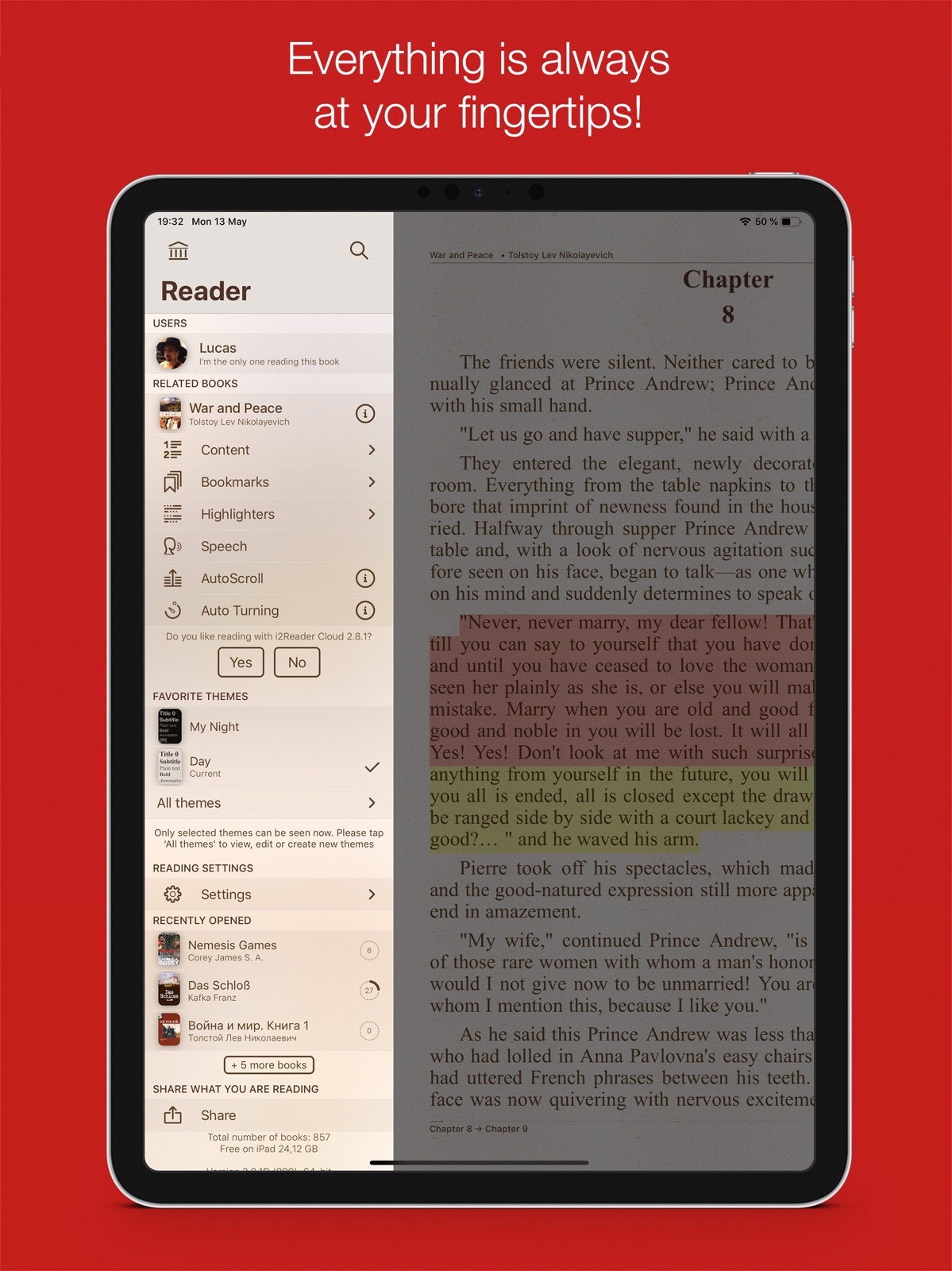
Dear friends! In this update I added support for multitasking Side Over and Split View for iPad Pro, iPad Air 2 and iPad mini 4. What's new in 1.5.x: • Full support of 3D Touch: - press on i2Reader Cloud icon to peek and pop into content without actually opening the app, open your favourite books with just one gesture; - in a library: to peek at a book info, press slightly on it; swipe up to bring up a context menu for this book; - when reading, you can assign 3D Touch to one of these options: Wikipedia, online translator or dictionaries. Press on a word and the assigned option will run right away, bypassing context menu. • Spotlight for iOS9 support: now you can look up and open books more quickly using the proactive Spotlight search page of your iPhone/iPad; • Many users asked for AutoScroll feature: now you’ve got it, with an easy speed adjusting by horizontal swipe; • All themes for reading are now stored in iCloud, together with your books. In addition, all themes are device-dependent, meaning that the same theme can be used for reading on both iPad and iPhone: i2Reader Cloud will keep text borders and background settings for each device. And moreover, I’ve added many new seamless textures for your custom themes. They fit perfectly to any device with any screen size. To get the most of them, I recommend to use these textures with vertical scroll or autoscroll; • If you’ve made a cool custom theme and want to share it with your friends, send it via e-mail or AirDrop; • In case you use iCloud to store books, I’ve added a couple of useful features, like automatic download of local copies of the new books (to be able to read them with no Internet access) and deletion of all local copies to increase free space on your devices; • A couple of lists have been added: “To read”, “Already read” for a better navigation in the app; • For iPad users I made a bigger window with the info about a book; • And many other minor but nice improvements of the interface, which, of course, include fixes of small bugs you wrote me about – than you so much for all your letters! :) Please do not hesitate to share your ideas, complaints and suggestions at [email protected] And, as always, thank you very much for taking your time and rating the app or writing a review on the App Store!
-
2.0
Dear friends, I am happy to present a major update of i2Reader Cloud! What’s new and interesting in 2.0 version? • Fully revised 3D paging, especially for horizontal orientation; • For the newcomers I've added an interactive guide to introduce features of the app; • Some of you asked to add auto turning/flipping pages – i.e. flipping pages with a certain interval, so I did; • Adjustable bottom status line now transformed into header and footer; • Added the ability to configure context menu while reading - leave yourself only what you use; • The shape and color of the text highlighting is now also possible to set up; • I readjusted Google translator, and added the possibility of voicing the translated text; • If you’ve got Lingvo dictionary installed, now it can be invoked with the context menu while reading; • In theme editor, you can now customize the appearance of a broadside of the book in horizontal orientation (for example, to make the book back stitched with thread); • The shelves can now be password protected (no one but who knows the password will be able to read books from such shelves); • Added Yandex disk (popular cloud storage in Russia) to download books. • I also worked over interface and added a lot of small but useful and pleasant features :) Please do not hesitate to share your ideas, complaints and suggestions at [email protected] And, as always, thank you very much for taking your time and rating the app or writing a review on the App Store!
-
2.0.1
Dear friends, I am happy to present a major update of i2Reader Cloud! What’s new and interesting in 2.0.x version? • Fully revised 3D paging, especially for horizontal orientation; • For the newcomers I've added an interactive guide to introduce features of the app; • Some of you asked to add auto turning/flipping pages – i.e. flipping pages with a certain interval, so I did; • Adjustable bottom status line now transformed into header and footer; • Added the ability to configure context menu while reading - leave yourself only what you use; • The shape and color of the text highlighting is now also possible to set up; • I readjusted Google translator, and added the possibility of voicing the translated text; • If you’ve got Lingvo dictionary installed, now it can be invoked with the context menu while reading; • In theme editor, you can now customize the appearance of a broadside of the book in horizontal orientation (for example, to make the book back stitched with thread); • The shelves can now be password protected (no one but who knows the password will be able to read books from such shelves); • Added Yandex disk (popular cloud storage in Russia) to download books. • I also worked over interface and added a lot of small but useful and pleasant features :) • Minor bugs fixed (2.0.1). Please do not hesitate to share your ideas, complaints and suggestions at [email protected] And, as always, thank you very much for taking your time and rating the app or writing a review on the App Store!
-
2.0.2
Dear friends, I spent a a lot of work on the bugs in this version, as well as I added some useful interface improvements. Also you can add books fbz format to your library. What’s new and interesting in 2.0.x version? • Fully revised 3D paging, especially for horizontal orientation; • For the newcomers I've added an interactive guide to introduce features of the app; • Some of you asked to add auto turning/flipping pages – i.e. flipping pages with a certain interval, so I did; • Adjustable bottom status line now transformed into header and footer; • Added the ability to configure context menu while reading - leave yourself only what you use; • The shape and color of the text highlighting is now also possible to set up; • I readjusted Google translator, and added the possibility of voicing the translated text; • If you’ve got Lingvo dictionary installed, now it can be invoked with the context menu while reading; • In theme editor, you can now customize the appearance of a broadside of the book in horizontal orientation (for example, to make the book back stitched with thread); • The shelves can now be password protected (no one but who knows the password will be able to read books from such shelves); • Added Yandex disk (popular cloud storage in Russia) to download books. • I also worked over interface and added a lot of small but useful and pleasant features :) Please do not hesitate to share your ideas, complaints and suggestions at [email protected] And, as always, thank you very much for taking your time and rating the app or writing a review on the App Store!
-
2.1
Hey friends, Please meet an update of i2Reader Cloud and its new features: • yet another step to get an impression of reading a real book: now you don’t have to tap on a footnote! Discover all footnotes displayed at the bottom of the page; • all quotes and highlights can now be exported to Evernote; • support of in-built iOS dictionaries has been added. And, of course, a huge job has been done on bug fixing – as always, I appreciate your help here. Thank you so much for your support, letters and comments! Please do not hesitate to share your ideas, complaints and suggestions at [email protected]
-
2.2
Hey friends, This update is not that huge, but I’ve spent a lot of time to make the app work better, faster and stabler. The main progress concerns compatibility of Mac version of i2Reader Cloud (yes, I did it, since many of you asked me about it – look it up in Mac App Store :)) It also supports iCloud for storing, reading and synchronizing of all your library. Like I said before, I am always ready to respond to your wishes and meet your requests, if any – I think many of you have already noticed that ;) just don’t hesitate to drop me a line at [email protected] I will also appreciate it if you find time to renew your rate in the App Store :)
-
2.2.2
Hey friends, iOS 10 compatibility added and minor bugs fixed in this update. What's new in 2.2: This update is not that huge, but I’ve spent a lot of time to make the app work better, faster and stabler. The main progress concerns compatibility of Mac version of i2Reader Cloud (yes, I did it, since many of you asked me about it – look it up in Mac App Store :)) It also supports iCloud for storing, reading and synchronizing of all your library.
-
2.3
Friends, I’m happy to introduce a new version of i2Reader Cloud! What’s new: • A huge work has been done to make it even more compatible with Mac version; • Evernote notes can now be saved offline; • Page navigation (an option to move on a certain page) has been added; • Text highlights can now be exported to various messengers and Notes app; • Sleep timer has been added to prevent iPhone/iPad from going into sleep mode automatically. Of course I did my best in fixing all bugs that you’ve pointed out. I will appreciate it if you could refresh your reviews on the app: your feedback and accolades always give me a reason for further development of the app :) In case of any bugs, questions and comments please do not hesitate to write me at [email protected]. I am always happy to reply :)
-
2.3.1
Friends, I’m happy to introduce a new version of i2Reader Cloud! Shelves bug has been fixed in 2.3.1. What’s new in 2.3: • A huge work has been done to make it even more compatible with Mac version; • Evernote notes can now be saved offline; • Page navigation (an option to move on a certain page) has been added; • Text highlights can now be exported to various messengers and Notes app; • Sleep timer has been added to prevent iPhone/iPad from going into sleep mode automatically. Of course I did my best in fixing all bugs that you’ve pointed out. I will appreciate it if you could refresh your reviews on the app: your feedback and accolades always give me a reason for further development of the app :) In case of any bugs, questions and comments please do not hesitate to write me at [email protected]. I am always happy to reply :)
-
2.3.2
Friends, I’m happy to introduce a new version of i2Reader Cloud! The work to improve stability in the 2.3.2 version has been done. What’s new in 2.3: • A huge work has been done to make it even more compatible with Mac version; • Evernote notes can now be saved offline; • Page navigation (an option to move on a certain page) has been added; • Text highlights can now be exported to various messengers and Notes app; • Sleep timer has been added to prevent iPhone/iPad from going into sleep mode automatically. Of course I did my best in fixing all bugs that you’ve pointed out. I will appreciate it if you could refresh your reviews on the app: your feedback and accolades always give me a reason for further development of the app :) In case of any bugs, questions and comments please do not hesitate to write me at [email protected]. I am always happy to reply :)
-
2.5
Hey friends, I’m happy to introduce a new release of i2Reader Cloud! What’s new: • Support of iPhone X and iPad Pro 10.5”; • I brought back full support of multitasking on iPad (in exchange for screen rotation lock) and added Drag and Drop support. Now you can move books, highlighted text, quotes or covers; • I upgraded About the Book info window, now it’s even more handy; • Rebuilt the work with Dropbox and Google Drive; I’ve also made some minor amendments that will hopefully improve your experience of using the app. And, last but not the least, I fixed all the bugs you told me about – thanks for that! As always, I am ready to help with all the questions and issues regarding the app, if any, and try to implement all your suggestions – I think many of you cannot but agree here :) Please feel free to write me at [email protected]. Also, I will appreciate it if you could take time and rate i2Reader Cloud in the App Store :)
-
2.6
Hi guys, I am happy to release a new version of the app. It hasn’t got many new features, but I hope you’ll enjoy its new interface for iOS 11. I have also fixed all the bugs you wrote me about. As always, I am ready to help with all the questions and issues regarding the app, if any, and try to implement all your suggestions – I think many of you cannot but agree here :) Please feel free to write me at [email protected]. Also, I will appreciate it if you could take time and rate i2Reader Cloud in the App Store :)
-
2.7
Hi friends, I'm happy to release another update for you! In this version I mainly focused on stability and performance of the app and also added some new features: • you can now select multiple books and either put them on a shelf, add to a list to read or remove the selected books from the library; • compatible with all the new devices: iPhone Xs/Xs Max/Xr, iPad Pro 11” and iPad Pro 12.9”; • some minor features are added, some menu positions are reorganized for your convenience. Thank you for using i2Reader Cloud! I'm always happy to answer to all your questions and hear your suggestions at [email protected]
-
2.7.1
Hi friends, I'm happy to release another update for you! In this version I mainly focused on stability and performance of the app and also added some new features: 2.7.1 • minor bugs fixed 2.7 • you can now select multiple books and either put them on a shelf, add to a list to read or remove the selected books from the library; • compatible with all the new devices: iPhone Xs/Xs Max/Xr, iPad Pro 11” and iPad Pro 12.9”; • some minor features are added, some menu positions are reorganized for your convenience. Thank you for using i2Reader Cloud! I'm always happy to answer to all your questions and hear your suggestions at [email protected]
-
2.8
Hey friends, I’m happy to introduce a new version of the app to you. With each version, I am constantly improving stability and operating speed of the app, also fixing bugs you report me about. New features are being added as well, I have added support of open source XDXF dictionaries in this release. Thank you for sharing your thousands ideas on the app with me, please do not hesitate to contact me at [email protected].
-
2.8.1
Hey friends, v2.8.1 I fixed minor bugs in this release. v2.8 I’m happy to introduce a new version of the app to you. With each version, I am constantly improving stability and operating speed of the app, also fixing bugs you report me about. New features are being added as well, I have added support of open source XDXF dictionaries in this release. Thank you for sharing your thousands ideas on the app with me, please do not hesitate to contact me at [email protected].
-
2.9
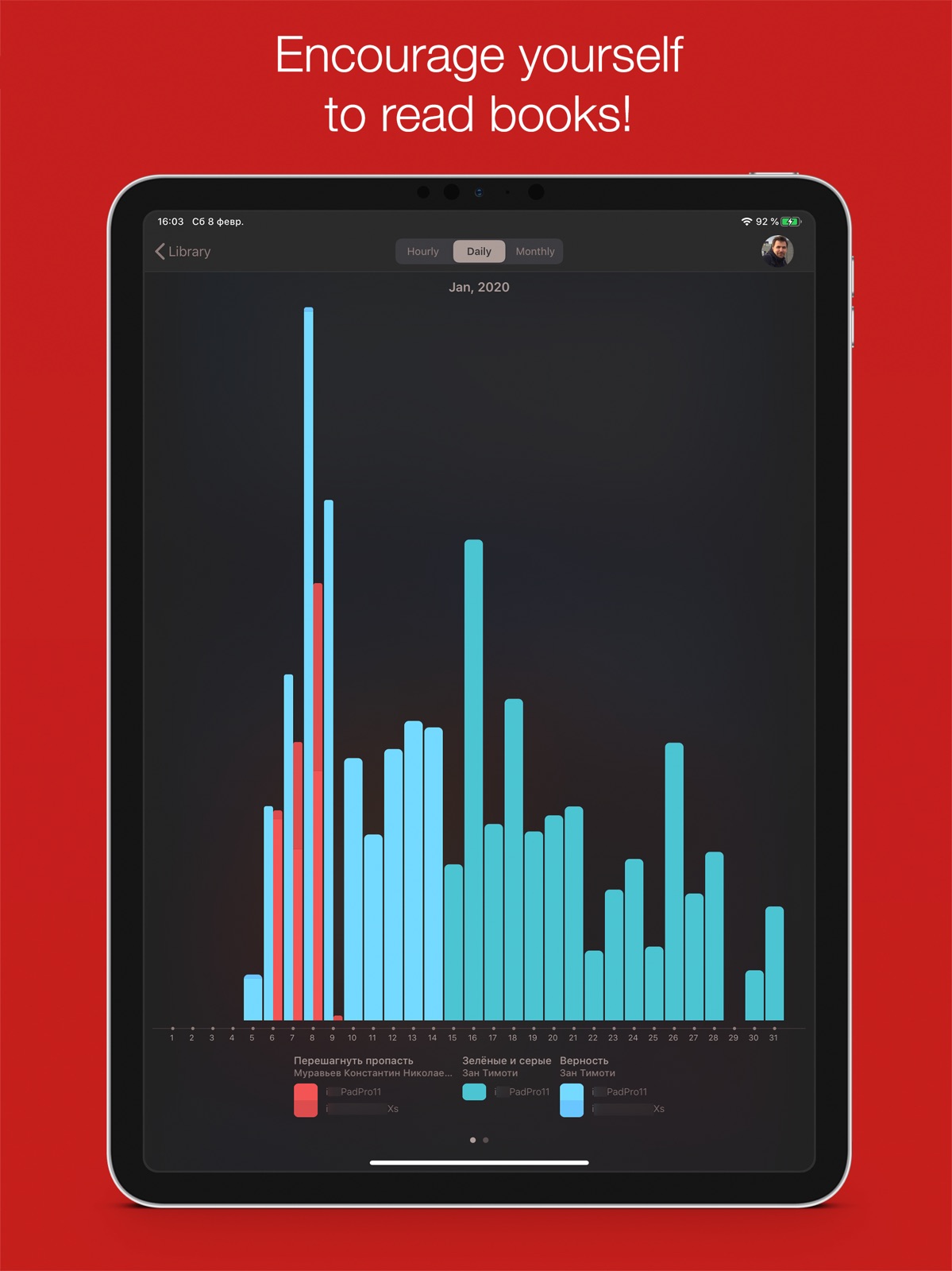
Hey friends, Finally! I’m releasing an update to support new features of ios 13, among them: • automatic change of themes for light/dark appearances; • support of external third-party fonts; • an option to check reading statistics for particular books and individual library users; • other minor but not useful additions. Thank you for using i2Reader Cloud! Please feel free to share your thoughts and ask questions to [email protected] - i'm always happy to get a message from you!
-
2.9.5
Dear friends, I am pleased to introduce a new version of i2Reader Cloud app. What’s new: • OpenGL is now replaced with Metal in 3D paging – meaningless memory and power consumption with improved performance; • iOS 14 support; • Updated reading statistics; • Ability to change the red line in themes is added; • Many bugs fixed; • A lot of minor improvements. If you have any comments or suggestions, please feel free to drop me a line at [email protected] Thanks for using my reader :)
-
2.9.6
Dear friends, I am pleased to introduce a new version of i2Reader Cloud app. What’s new 2.9.6: • Bugs fixed; What’s new 2.9.5: • OpenGL is now replaced with Metal in 3D paging – meaningless memory and power consumption with improved performance; • iOS 14 support; • Updated reading statistics; • Ability to change the red line in themes is added; • Many bugs fixed; • A lot of minor improvements. If you have any comments or suggestions, please feel free to drop me a line at [email protected] Thanks for using my reader :)
-
2.9.7
Dear friends, I am pleased to introduce a new version of i2Reader Cloud app. What’s new 2.9.7: • Bugs fixed; What’s new 2.9.5: • OpenGL is now replaced with Metal in 3D paging – meaningless memory and power consumption with improved performance; • iOS 14 support; • Updated reading statistics; • Ability to change the red line in themes is added; • Many bugs fixed; • A lot of minor improvements. If you have any comments or suggestions, please feel free to drop me a line at [email protected] Thanks for using my reader :)
-
2.9.8
Dear friends, I am pleased to introduce a new version of i2Reader Cloud app. What’s new 2.9.8: • Bugs fixed; What’s new 2.9.5: • OpenGL is now replaced with Metal in 3D paging – meaningless memory and power consumption with improved performance; • iOS 14 support; • Updated reading statistics; • Ability to change the red line in themes is added; • Many bugs fixed; • A lot of minor improvements. If you have any comments or suggestions, please feel free to drop me a line at [email protected] Thanks for using my reader :)
-
2.9.9
What's new: • support of new devices and recent iOS versions; • small additions and changes in the user interface; • Minor bugs fixes. If you have any comments or suggestions, please feel free to drop me a line at [email protected] Thanks for using my reader :)
-
2.9.92
What's new: • support of new devices and recent iOS versions; • small additions and changes in the user interface; • Minor bugs fixes. If you have any comments or suggestions, please feel free to drop me a line at [email protected] Thanks for using my reader :)
-
2.9.93
- Supports new devices and iOS/ipadOS 26; - Minor UI/UX improvements; - Some bugs fixed.
-
2.9.94
· 6 Feb 2026
Unable to add books from iCloud drive issue fixed.
Alternatives
- Inkwell - Customizable Ebooks — Same category + similar ratings
Availability by market
- US
Data quality & evidence
- Page completeness
- Live store listing
- Last verified
- 31 Jul 2026
- Sources
- App Store
- Independent summary has not been published yet.