
Quick verdict
- What it is
- Store information collected; an Apoku editorial summary is not yet published.
- At a glance
-
- Free to download
Categories and search queries
Official categories
- Weather
- Utilities
Apoku categories
Key functions
| Function | Availability | Access | Scope | Evidence |
|---|---|---|---|---|
| Free app | Yes | Free | Context-specific | Store published |
Screens
App Store
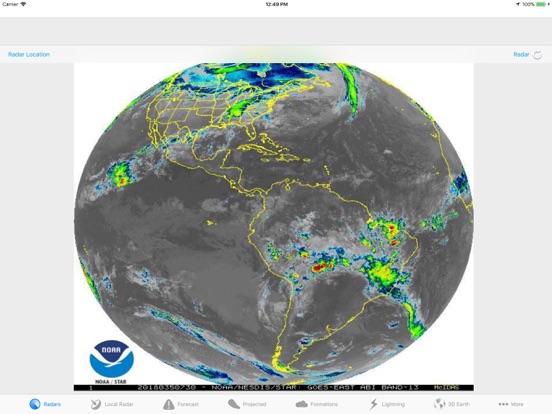
15 store screenshots


Pricing & paywalls
App Store
- Free to download
Ratings & reviews
App Store
-
4/5Gabi in PR
As a permanent coastline resident of an island centered on tropical hurricane alley, I've been using this App for years .. have relied on it as a primary tool: a valuable well-positioned high-in-the-sky observation platform. Therefore, I gladly exalt its merits, and express my sincere and deep gratitude to the developer for his enduring efforts; yet, I would welcome a reasonable one-time fee to remove the ads, useless nuisance which now mostly block the menu buttons
linda7276 · 6 Aug 2026
-
5/5Great app
I am quick to give negative reviews, so I thought it high time to give credit where credit is due. This is a great free weather app. The looping for the satellite and radar is longer than any weather app on the store. The variety of satellite enhancement curves is great. Lighting is also provided. All this for free, it is one of my go to apps. Thanks so much guys for this wonderful app and all the dedication and hard work you have put into it. Again thanks so much for the long loops, this is so advantageous for seeing storms in a fluid motion.
Brainal · 6 Aug 2026
-
4/5Hurricane Tracker
You must fix the lighting tab because when you click on the tab the app goes off. That is not supposed to happen. I just downloaded this app and I give it four stars. Can you also have in the radar maps Atlantic and Pacific areas. Can you also go through the entire app and see what tabs are work and which one are not working and fix then all. Make the app more realistic on everything that is in it and possibly add new features.
Black and Gold Attack · 6 Aug 2026
-
5/5Best hurricane app out there!
I love this app it is good at tracking the Hurricanes and tropical storms I love it because it gives you warnings and watches if there's a hurricane near it gives you satellite that's really acurite and cool and it Evan gives you weather radar for your area and forcast and it comes with every thing no in app purchase and if there is any invest around its so nice to have best hurricane app around very recommended
Jomikcro · 6 Aug 2026
-
5/5Hurricane Track for IOS: Best so far
I need to keep track of tropical systems because I live in an area that's prone to them. Hurricane Track for IOS is the best app so far, and I have quite a few hurricane apps. HT allows users to view 8 different radars that show tropical system movement in a variety of colors. My favorite one is the Rainbow radar. Also, HT provides current up-to-date information.
naumatam · 6 Aug 2026
Privacy & accessibility
App Store
Privacy
- Data Not Linked to You — Analytics — Diagnostics — Crash Data Developer declared
- Data Not Linked to You — Analytics — Diagnostics — Performance Data Developer declared
- Data Not Linked to You — Analytics — Identifiers — Device ID Developer declared
- Data Not Linked to You — Analytics — Usage Data — Advertising Data Developer declared
- Data Not Linked to You — Third-Party Advertising — Diagnostics — Crash Data Developer declared
- Data Not Linked to You — Third-Party Advertising — Diagnostics — Performance Data Developer declared
- Data Not Linked to You — Third-Party Advertising — Identifiers — Device ID Developer declared
- Data Not Linked to You — Third-Party Advertising — Location — Coarse Location Developer declared
- Data Not Linked to You — Third-Party Advertising — Usage Data — Advertising Data Developer declared
- Data Not Linked to You — Third-Party Advertising — Usage Data — Product Interaction Developer declared
- Data Not Linked to You — Diagnostics Developer declared
- Data Not Linked to You — Identifiers Developer declared
- Data Not Linked to You — Location Developer declared
- Data Not Linked to You — Usage Data Developer declared
- Data Used to Track You — Location — Coarse Location Developer declared
- Data Used to Track You — Location Developer declared
Accessibility
No accessibility labels collected yet.
Versions
App Store
-
3.0.2
- Fixed various bugs throughout the application
-
3.0.3
- Added Reload Buttons for Radar, Local Radar, and Projected Paths - Various other bug fixes and improvements
-
3.1.2
- Updated Future Projected Hurricane Paths with latest NOAA infrastructure - Fixed various other bugs throughout the application
-
3.1.3
- Added "Northwestern Hemisphere" and "Central America" live animations to "Radars" view; to provide a more comprehensive view of the Pacific basin - Fixed an issue on iPhone devices for "Projected Paths" that prevented One Finger-Pan, Two Finger-Pinch, and Two-Finger Rotate from functioning properly - Fixed the "Layers" interface where some Switches were not aligning correctly for "Local Radar" View - Various other bug fixes throughout the application
-
3.1.4
- Updated for iOS 11 - Higher contrast Back/Forward buttons in "Projected Paths" View - Fixed various bugs throughout the application
-
3.2
- Main Radar feature updated with new the GOES-16 NOAA/NASA Satellite Imagery for Full-Color and Advanced Radar Features - Fixed various bugs throughout the application
-
3.2.1
- Various bug fixes for Main Radar feature
-
3.2.2
- Fixes an issue with certain Main Radars not loading correctly (NOAA periodically changes the way they format certain data especially with new satellites)
-
3.2.3
- Fixes an issue with the World Radar feature (due to change on NOAA's server) - New World Radars including wide view of entire Atlantic Ocean
-
3.2.4
- Main Radar feature updated with customizable Time Frame; from past 4 hours up to the past three days - Minor Interface Tweaks
-
3.2.5
Major Changes to the Main "Radars" Feature: - Newly operational GOES-17 (GOES-West) Satellite Animations now implemented, covering the Pacific and much of the Western hemisphere - Added an Animation Controller at the bottom, simply swipe your finger back and forth to control the Animation (Includes Haptic Feedback for iPhone 7 and later) - Added Canada, Mexico, Central America, and South America (GOES-East) - Improved Buttons - Fixed various bugs throughout the application
-
3.2.6
- Now requires iOS 11 or later - Maps Feature redesigned from the ground up in Swift - Maps now features Animated Precipitation Radar (U.S. only), as well as Tropical Cyclones and Earthquakes - Improved Tropical Cyclone/Earthquake graphics and responsiveness - Fixed various bugs throughout the application
-
3.2.7
- Fixes an issue that may have caused the app to crash when launching in Landscape Orientation
-
3.2.8
- Main Radar feature now displays Time in the Timeline - Maps fix: Fixes an issue that may have caused Tropical Cyclone Name/Wind not to display - Fixed various bugs throughout the application
-
3.2.9
- Map Bug fixes
-
3.3.0
- Fixes an issue that may have caused Lightning Intensity Feature to crash due a new Server change
-
3.3.1
- Updated User Interface - Fixed various bugs throughout the application
-
3.3.2
- Updated Google Ads with iOS 14's App Tracking Transparency
-
3.3.3
- Redesigned "Local Radar" feature makes it easier to view Precipitation in your area - Redesigned "Regional" feature shows the most up-to-date current weather event, or hazards, in your area - Fixed an issue that may have caused the app to crash when touching the Local Radar feature - Fixed various bugs throughout the application
-
3.3.4
- Fixes an issue of the Local Radar not loading properly (due to a change on the server side of weather.gov)
-
3.3.5
- Fixes an issue with Pacific Satellites not loading correctly do to a change on NOAA's servers - *If you currently have a Pacific Satellite selected, you will have to reselect the Satellite for it to load again, you only have to do this once* - Updated to latest Google Ads SDK
-
3.3.6
- Fixed an issue that may have caused the app to crash when choosing "Regional" Tab Item
-
3.4.0
- Fixed an issue where Satellites may not have loaded correctly due to a change on NOAA's servers - Changed "Gulf of Mexico" Satellite name to "Gulf of America" - Fixed various bugs throughout the application
-
3.5.0
- Updated for iOS 26/iPadOS 26 - New Liquid Glass Icon - Renamed "Radars" View to "Satellites" - Satellites View now loads all Images and generates a video for improved performance and frame rate - Timeline at the bottom of the Satellites View now updates as the video plays - 3D Earth View rewritten in Swift for improved performance and appearance - Maps View now shows Real-time Image of Worldwide Clouds; updates every 3 hours - Fixed various bugs throughout the application
-
3.5.1
· 13 May 2026
- UI Improvements
Alternatives
- Atlantic Hurricane Tracker — Same category + similar ratings
- Gulf Hurricane Tracker — Same category + similar ratings
- Hurricane Tracker US — Same category + similar ratings
- Cyclone - hurricane tracker — Same category + similar ratings
- OBX Hurricane Tracker — Same category + similar ratings
- Florida Hurricane Tracker — Same category + similar ratings
Availability by market
- US
Data quality & evidence
- Page completeness
- Live store listing
- Last verified
- 6 Aug 2026
- Sources
- App Store
- Apoku editorial summary has not been published yet.