
Quick verdict
- What it is
- Store information collected; an Apoku editorial summary is not yet published.
- At a glance
-
- Free to download
- In-app purchases
Categories and search queries
Official categories
- Social Networking
- Productivity
Apoku categories
Key functions
| Function | Availability | Access | Scope | Evidence |
|---|---|---|---|---|
| Free app | Yes | Free | Context-specific | Store published |
| In-app purchases | Yes | Limited free | Context-specific | Store published |
Screens
App Store
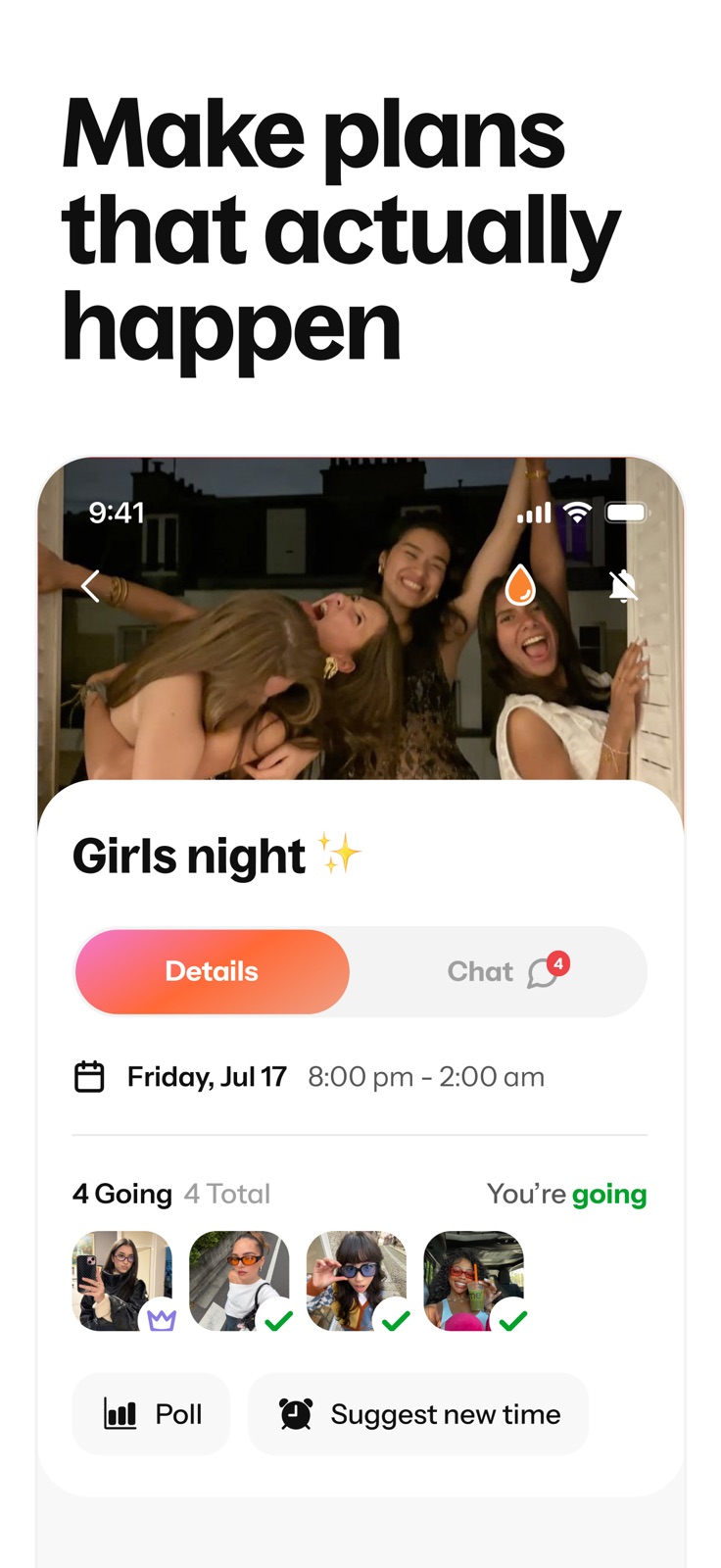
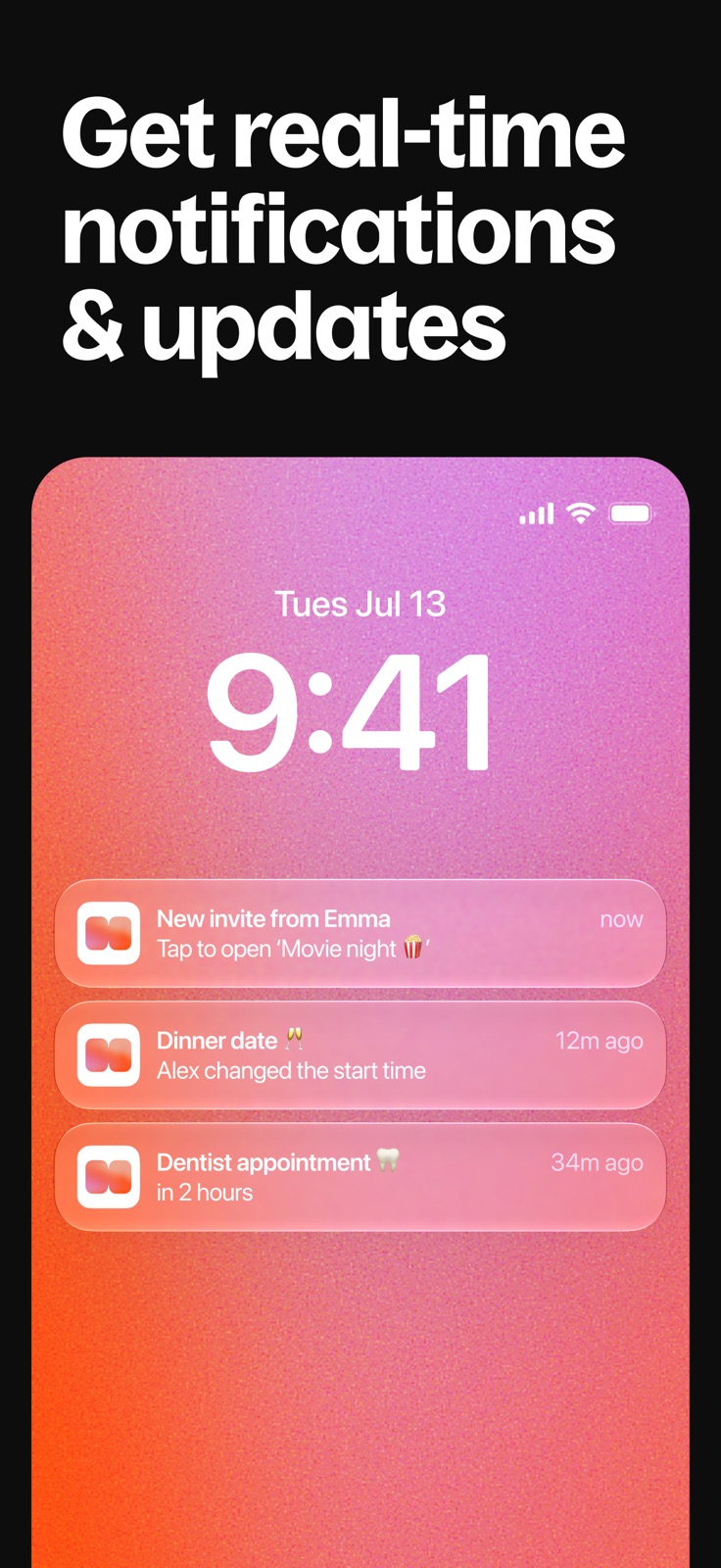
7 store screenshots


Pricing & paywalls
App Store
Shown for US
- Howbout+ Monthly
Ratings & reviews
App Store
Shown for US
-
4/5Changes made within the app
I have been using this app for about 3 threes and it has overall been great! It has really helped me with planning with my friends and staying more organized. This app is very helpful no matter what reason you may download it for. However, with this new update came the removing of the colors of my plans. I do not appreciate this update. This update has caused the original purpose of organization to fade. I understand that it was likely to try and help people become more organized by adding categories which I think is a great idea. I do feel though that this would be a better idea if it was more optional for the user and we were able to select from more categories. Before this update I was using over 8 different colors to symbolize different categories and now I am only able to select from 5 broad categories which is hindering my ability to stay organized within the app. I hope that those in development take this into consideration. Thank you.
Leo Eswine · 12 Oct 2026
-
1/5New App Update Makes App Pay To Use!!
I’ve been using Howbout for months now and never in my life have I felt the need to write a review about an app until now. Howbout normally allows you to customize your events with certain free colors without limitations. Without different colors, your calendar starts to look overwhelming. I just logged into the app today to find all my events have been changed back to one color and I can’t change them until I use Howbout’s new categories feature. This feature ONLY gives you 5 free categories (which you can’t change) of events to choose from and the custom one is PAID. On top of that, if you considered “self” and “social” to be one color, you can’t make them both the same color. I’m very disappointed because once again it’s about “how do we make the most money”. And if any developer sees this, I hope you consider that some users are just broke college students trying to get by with one small win as simple as managing their time for FREE. If color coordination and personal organization doesn’t bother you, then this review isn’t for you but I actually liked being in control of my time management.
xoxoluvperiot · 12 Oct 2026
-
3/5Loved This App, But This Update Ruined It
I loved this app until recently. My favorite feature was being able to color-code my calendar, but now custom color categories are locked behind a subscription. I have 4 different jobs, plus PT, appointments, and other things I need to keep track of. Each job used to have its own color so I could open my calendar and immediately know where I needed to be. The free version now basically expects me to put all 4 jobs under one “Work” category, which completely defeats the purpose of color-coding for me. I don’t need every premium feature—I just want to organize my schedule the way I could before. It’s really disappointing to see such a basic and useful customization feature put behind a paywall. I loved this app, but I’ll probably start looking for another calendar app that lets me actually organize my schedule without paying just to use different colors.
Gorgina1017 · 12 Oct 2026
-
5/5please fix this or tell me how I can avoid this
I would put a five but there’s some things this app needs work on. Love it but wish it just had more options. Okay cus this feature is starting to get me really mad. I’m going to explain this as best as I can. When you click on a date then click on a time let’s use an example 4pm you can create a note on how long it will be and what it is right? Let’s say you put the time first before you put in the tittle , let’s say 4pm-8pm right? then you go click the color blue then click a tittle and type in work but by doing that it automatically goes to a color then it changed your time since it was originally 4:00pm - 8:00pm now it’s 4:00pm-8:30pm. Now when that starts doing that it makes me furious cus I be quick with my notes and sometimes don’t double check CUS I ALREADY SET THE DANG TIME. Why do I need to change it again? it genuinely makes this so much harder now I have to look back at all my notes to make sure it didn’t change the times on it. It Unfortunately made me late to work thinking I had the TIME right. But no it for some reason added 30 mins on the time I already set.
Jinxx_x · 12 Oct 2026
-
5/5This app is mad clever and FREEEE
My friends and I always have trouble finding a time to hangout and this app helps a lot. You can pin events which count down the days for the events, you can hav bucket lists, the plans are color coordinated to each person so you can tell who is free or not, you can invite people to see who is going to the same event you are, you can add details to the plan explaining what you are doing, add a location, you can mark your plans as busy, maybe busy, or free, alert everyone when the event is starting and if it’s a day or a week away (even more times available), you can set an event for multiple days without individually adding it, you can add multiple events on a day, and you can add memories to the app, and pictures to your plans. If you only want to look at your schedule or a certain amount of people you can press on the people to limit the viability of whose plans you want to see. Very great and useful.
Keichanln · 31 Jul 2026
Privacy & accessibility
App Store
Privacy
- Data Linked to You — Analytics — Identifiers — Device ID Developer declared
- Data Linked to You — Analytics — Purchases — Purchase History Developer declared
- Data Linked to You — Analytics — Usage Data — Advertising Data Developer declared
- Data Linked to You — Analytics — Usage Data — Product Interaction Developer declared
- Data Linked to You — App Functionality — Contact Info — Email Address Developer declared
- Data Linked to You — App Functionality — Contact Info — Name Developer declared
- Data Linked to You — App Functionality — Contact Info — Phone Number Developer declared
- Data Linked to You — App Functionality — Diagnostics — Crash Data Developer declared
- Data Linked to You — App Functionality — Diagnostics — Performance Data Developer declared
- Data Linked to You — App Functionality — Identifiers — Device ID Developer declared
- Data Linked to You — App Functionality — Purchases — Purchase History Developer declared
- Data Linked to You — Developer’s Advertising or Marketing — Contact Info — Email Address Developer declared
- Data Linked to You — Contact Info Developer declared
- Data Linked to You — Diagnostics Developer declared
- Data Linked to You — Identifiers Developer declared
- Data Linked to You — Purchases Developer declared
- Data Linked to You — Usage Data Developer declared
- Data Not Linked to You — App Functionality — Diagnostics — Other Diagnostic Data Developer declared
- Data Not Linked to You — Diagnostics Developer declared
- Data Used to Track You — Usage Data — Advertising Data Developer declared
- Data Used to Track You — Usage Data Developer declared
Accessibility
No accessibility labels collected yet.
Versions
App Store
-
13.10.0
A couple of small tweaks here to keep Howbout going strong, including bug fixes and some performance improvements!
-
13.10.1
A couple of small tweaks here to keep Howbout going strong, including bug fixes and some performance improvements!
-
13.11.0
A little bug exterminating in this build to keep your app speedy!
-
13.12.0
A couple of new changes in this build... We've made some small but mighty improvements to Day View! We now show full event titles, and you can drag and add events to 15 minute increments rather than just 30! Plus, a couple of general fixes to keep things running smoothly!
-
13.13.0
We’ve updated the app with a few performance improvements and bug fixes.
-
13.4.1
In this latest build, we have a couple of bug fixes and performance boosts coming your way!
-
13.4.3
In this latest build, we have a couple of bug fixes and performance boosts coming your way!
-
13.5.0
No new features to report! Just some routine fixes to keep the app healthy.
-
13.6.0
Improvements under the hood for this new update to keep your app racing ready, kachow! You can now add events even quicker from your calendar on month view! Just press and hold on a day, or press & drag to create a multi-day event! Let us know any feedback over at [email protected]
-
13.7.0
There's a Valentine's Day gift waiting for you in our latest update, head to the app to claim it! Also, you can now add events even quicker from your calendar on month view! Just press and hold on a day, or press & drag to create a multi-day event!
-
13.8.0
Nothing too crazy this time! Just some bug fixes and performance boosts to keep your app running smoothly.
-
13.9.2
Just a regularly scheduled Howbout clean-up, with bug fixes and performance improvements coming your way.
-
14.0.0
Our latest build introduces more meaningful colors, making it easier than ever for you and your friends to stay organized and track your events at a glance!
-
14.1.0
We’ve made some behind-the-scenes improvements this build…
-
14.1.1
We’ve made some behind-the-scenes improvements this build…
-
14.2.0
Recurring events just got an upgrade; it’s now quicker and easier to add or edit repeating events!
-
15.0.0
Improvements under the hood for this new update to keep your app racing ready, kachow!
-
15.0.1
Improvements under the hood for this new update to keep your app racing ready, kachow!
-
15.0.2
Improvements under the hood for this new update to keep your app racing ready, kachow!
-
15.1.0
Big things are coming in this latest build! You can now add week numbers for the calendar view to make planning easier. Our widget just got more social! Now, you can see friends' upcoming plans on our home screen widget as well as your own You might see some more rectangle edges on profile pictures and calendar events that are just the beginning of some new exciting changes to come!
-
15.1.1
Big things are coming in this latest build! You can now add week numbers for the calendar view to make planning easier. Our widget just got more social! Now, you can see friends' upcoming plans on our home screen widget as well as your own You might see some more rectangle edges on profile pictures and calendar events that are just the beginning of some new exciting changes to come!
-
15.1.2
Big things are coming in this latest build! You can now add week numbers for the calendar view to make planning easier. Our widget just got more social! Now, you can see friends' upcoming plans on our home screen widget as well as your own You might see some more rectangle edges on profile pictures and calendar events that are just the beginning of some new exciting changes to come!
-
15.2.0
Nothing to see here: just some minor improvements and bug fixes
-
15.3.0
We’ve made it even easier to get your home screen looking aesthetic. You can now find a brand new widget entry point right inside your Settings, making it quicker than ever to discover and set up your Howbout widgets!
-
16.0.0
· 27 Jul 2026
You know at the end of Grease when Sandy goes from being the cute girl-next-door to… hot? Well, we’ve gone and done it again. Howbout has officially had a complete glow-up! We’ve completely refreshed the app with a brand new look, updated fonts, and a total overhaul of our theme, event, and friend colours. It’s cleaner, sleeker, and looking better than ever. And because we know you love to keep your life in sync, we’ve got another massive update for you: you can now directly sync your Google Calendar to Howbout! No more switching back and forth between apps to see when you’re actually free.
-
16.0.1
You know at the end of Grease when Sandy goes from being the cute girl-next-door to… hot? Well, we’ve gone and done it again. Howbout has officially had a complete glow-up! We’ve completely refreshed the app with a brand new look, updated fonts, and a total overhaul of our theme, event, and friend colours. It’s cleaner, sleeker, and looking better than ever. And because we know you love to keep your life in sync, we’ve got another massive update for you: you can now directly sync your Google Calendar to Howbout! No more switching back and forth between apps to see when you’re actually free.
-
16.0.2
· 30 Jul 2026
You know at the end of Grease when Sandy goes from being the cute girl-next-door to… hot? Well, we’ve gone and done it again. Howbout has officially had a complete glow-up! We’ve completely refreshed the app with a brand new look, updated fonts, and a total overhaul of our theme, event, and friend colours. It’s cleaner, sleeker, and looking better than ever. And because we know you love to keep your life in sync, we’ve got another massive update for you: you can now directly sync your Google Calendar to Howbout! No more switching back and forth between apps to see when you’re actually free.
-
16.0.3
You know at the end of Grease when Sandy goes from being the cute girl-next-door to… hot? Well, we’ve gone and done it again. Howbout has officially had a complete glow-up! We’ve completely refreshed the app with a brand new look, updated fonts, and a total overhaul of our theme, event, and friend colours. It’s cleaner, sleeker, and looking better than ever. And because we know you love to keep your life in sync, we’ve got another massive update for you: you can now directly sync your Google Calendar to Howbout! No more switching back and forth between apps to see when you’re actually free.
-
16.1.0
Never miss a plan again, even when your phone is locked. We’ve brought Live Activities to Howbout! Now, you can get real-time updates for your upcoming plan invites right on your lock screen and Dynamic Island.
-
16.2.0
· 25 Aug 2026
We’ve made some small but mighty tweaks in this build to keep your app looking clean and consistent.
-
16.3.0
We’ve made some behind-the-scenes improvements this build… Let us know any feedback over at [email protected]
-
16.4.0
Countdown widgets are here! Count down to concerts, calls, and anything else you can't wait for, right from your homescreen. Go to Settings > Add Widget to try one out.
-
16.4.1
Countdown widgets are here! Count down to concerts, calls, and anything else you can't wait for, right from your homescreen. Go to Settings > Add Widget to try one out.
-
16.5.0
We’ve been working on some serious under-the-bonnet speed boosts to make your app launch faster than ever. No more waiting around to see what plans you’ve got coming up! You can now also change your app language directly in your app settings. And we’ve swept away some pesky bugs to keep everything running smoothly.
-
16.5.1
We’ve been working on some serious under-the-bonnet speed boosts to make your app launch faster than ever. No more waiting around to see what plans you’ve got coming up! You can now also change your app language directly in your app settings. And we’ve swept away some pesky bugs to keep everything running smoothly.
-
16.5.2
We’ve been working on some serious under-the-bonnet speed boosts to make your app launch faster than ever. No more waiting around to see what plans you’ve got coming up! You can now also change your app language directly in your app settings. And we’ve swept away some pesky bugs to keep everything running smoothly.
-
16.5.3
· 30 Sep 2026
We’ve been working on some serious under-the-bonnet speed boosts to make your app launch faster than ever. No more waiting around to see what plans you’ve got coming up! You can now also change your app language directly in your app settings. And we’ve swept away some pesky bugs to keep everything running smoothly.
Availability by market
- US
Data quality & evidence
- Page completeness
- Live store listing
- Last verified
- 12 Oct 2026
- Sources
- App Store
- Apoku editorial summary has not been published yet.