
Quick verdict
- What it is
- Store information collected; independent summary not yet available.
- At a glance
-
- $8.99
- In-app purchases
Categories and search queries
Official categories
- Sports
- Navigation
AppCorpus categories
Key functions
| Function | Availability | Access | Scope | Evidence |
|---|---|---|---|---|
| In-app purchases | Yes | Limited free | — | Store published |
Screens
App Store
21 store screenshots

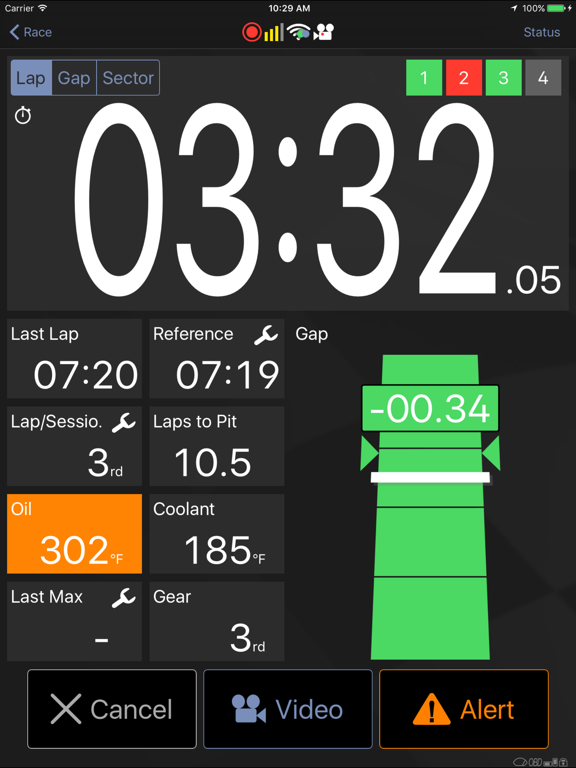
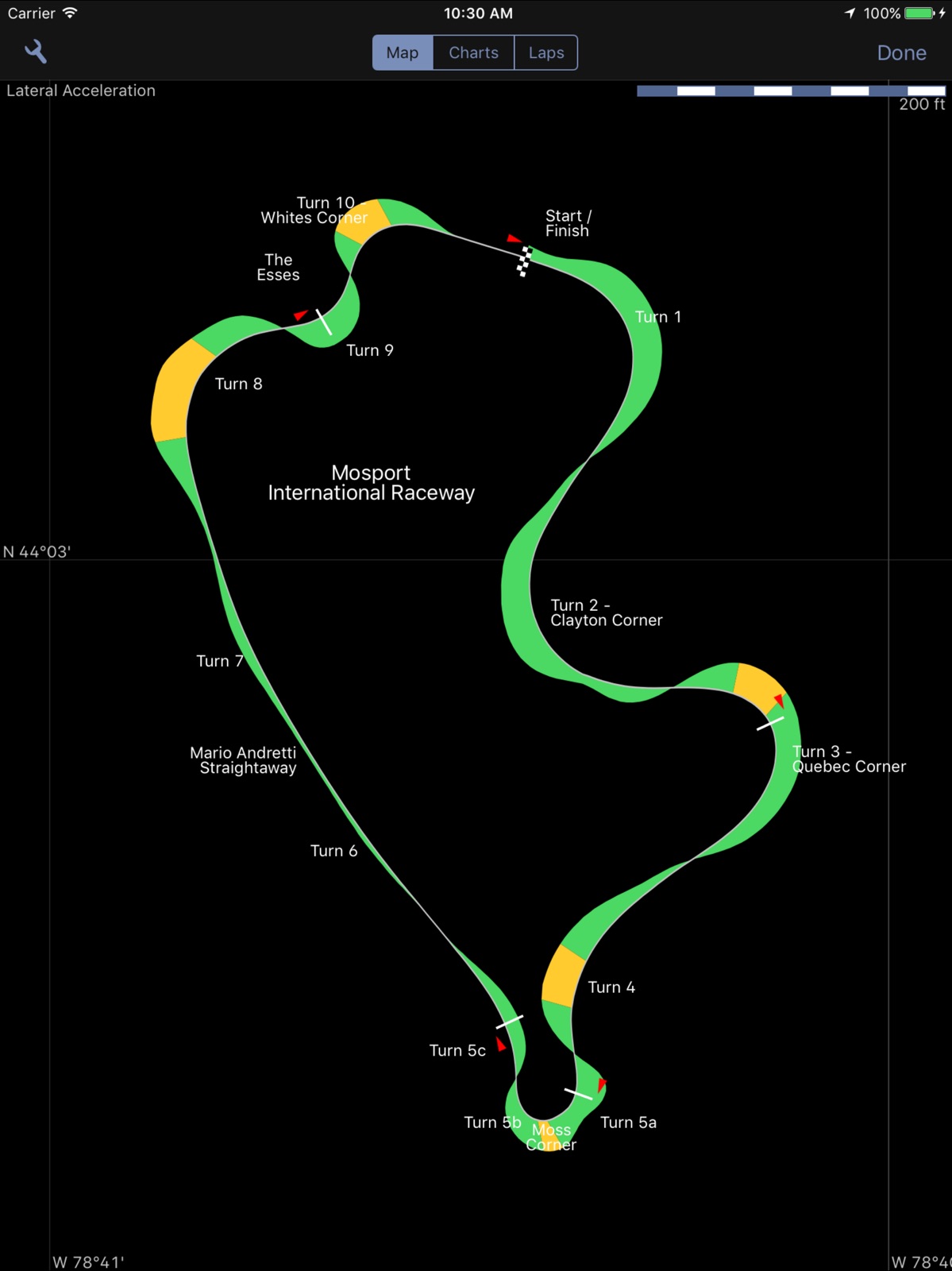
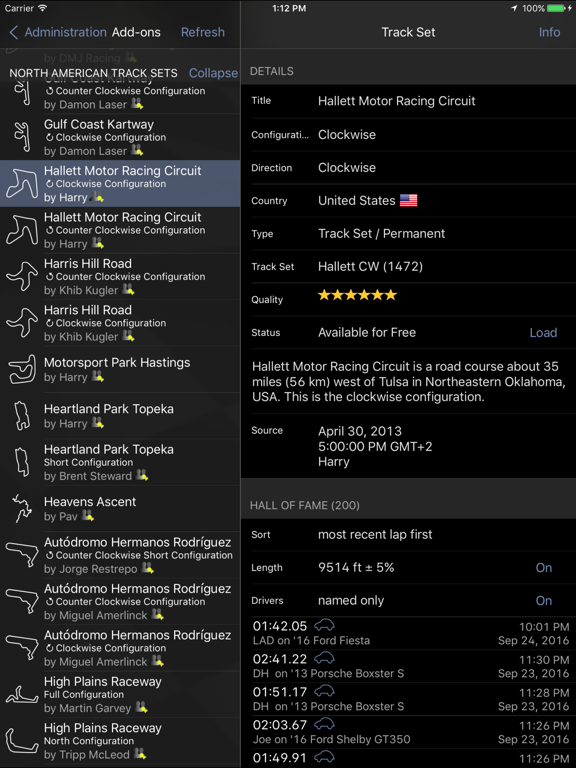
Pricing & paywalls
App Store
- Price: $8.99
- Grand Prix Upgrade — $9.99
- Petrolhead Upgrade — $12.99
Ratings & reviews
App Store
-
3/5Quit giving me times.
I loved it for the last 5 years but it quit registering. Never started going past start finish. No time.
racebuck · 6 Aug 2026
-
1/5Terrible interface. It won’t work when you need it
Cons: - laps/race don’t start automatically. Nor is it obvious how to turn the race on. You have to go to the Race section, set up a driver, then the car, and then figure that the app will be waiting until you drive off. Extremely unintuitive. - finding your results is impossible. You have to go to the Analysis -> Lap Times, and locate a green dop next to the time (which indicates it’s you 🤦🏼♂️) - it gets worse, each time you go out for a new session, the Race needs to be manually triggered by setting the previous run as reference. - but what is the worst is the deception that a new session is recoding and working. You think you have triggered a new session and have put your phone away. Only to return to the pit to realize that app has silently produced some hidden alerts after you’ve triggered the new session and put the phone away! IMO this defeats the whole purpose. Pros: - when it does work the stats are well presented In summary, out of 5 sessions, I was only able to record 1. Terrible. Save your money.
Passanya · 6 Aug 2026
-
1/5Finicky, legacy, doesn’t work well
This app is not easy to use and even if you learn how to use it, it doesn’t function properly most of the time. I did 50 laps at Laguna Seca last weekend with my phone connected to my GoPro and my OBDLinkMX+ and neither the GoPro footage nor the OBD data was recorded for even a single lap. At the beginning of each session I carefully made sure everything was configured correctly, thinking “maybe it will work this time”, but no. This app does not work well at all. It is a legacy app that hasn’t been updated very well over time and is lacking in reliability/ease of use. I do not recommend wasting nearly $30 on it. If you are just looking to time your laps, the super basic version might be okay to use. Personally I wish I had listened to the reviews before wasting my money on this app. Do not make the same mistake I did.
mccluure · 6 Aug 2026
-
1/5Absolute garbage
I downloaded this app last year for a DE weekend. At the time, I found it very user in friendly and annoying, but at least it saved my videos and times. Yesterday I used it again for the second time: it froze in the middle of data transfer to my phone, crashed, and then proceeded to delete an entire day worth of lap videos. And then it did it to me again today. RIP video of COTA PR time. Harold and his developers should be ashamed to be selling this app. It is absolute rubbish.
Totally confused @98765 · 6 Aug 2026
-
4/5great app, but still needs some work
I am really impressed by this app, as it fills a need for the right price. I have wanted a GPS/accelerometer logger for HPDE events for the last several years, but have not been willing to fork up the $600 -$1000 this would cost. Although this app does not give the same precision and reliable performance as such a dedicated unit, it is functional enough to do what I want: compare laptimes and analyze sectors where I can improve, as well as provide data for later video overlay. I looked at several other apps, but they seemed more expensive and less functional that this one. pros: nice realtime accelerometer view, useful GPS status information, easy export of data in a usable format, and nice viewing of individual laps. cons: still needs work in some areas (for example, I have not been able to get the accelerometer calibration to work as intended... it never finishes the last two steps for the "drive in a straight line" and "linear braking/acceleration" component. "Force calibration" does not seem to do anything useful. My workaround has been to position the phone uncalibrated using a swivel ball mount such that both axis are zero when level and at rest, oriented pretty much vertically in portrait orientation), and it would be good if the intermediate accelerometer data was used to augment the slow GPS update rate, or at least was logged so that I could provide this correction myself. It seems from the development plan on Harry's website that this is in the works, so I am looking forward to the next update. Keep up the good work!
kkiger · 6 Aug 2026
Privacy & accessibility
App Store
Privacy
- Data Linked to You — App Functionality — Contact Info — Name Developer declared
- Data Linked to You — App Functionality — Contact Info — Physical Address Developer declared
- Data Linked to You — App Functionality — Identifiers — User ID Developer declared
- Data Linked to You — App Functionality — Location — Precise Location Developer declared
- Data Linked to You — App Functionality — User Content — Other User Content Developer declared
- Data Linked to You — Contact Info Developer declared
- Data Linked to You — Identifiers Developer declared
- Data Linked to You — Location Developer declared
- Data Linked to You — User Content Developer declared
Accessibility
No accessibility labels collected yet.
Versions
App Store
-
22.1.3
Changes: - fixed manual recording operations including Video Preview and incomplete laps - fixed an issue with custom PID expressions
-
22.1.4
Changes in v22.1.4 - Improved sync point maintenance for multi lap overlays - Expanded usable parameter range to A .. AZ for custom PIDs - Fixed an issue with ECU addressing - Improved Sensor Information display for OBD adapters - Improved message showing import results
-
23.0.0
Changes in LapTimer v23: Video / Overlay - Added tire gadget to video overlays; support for both measured and simulated temperatures [GrandPrix] New Functionality - Editing of recordings at fix level - Laps can be marked as Incomplete manually - Recordings can be joined into one lap - Replaced Dropbox integration by general purpose sharing of data (iOS / Android distribute function) - Added weather information - Added reference lap plot to Map View - New Tires View showing temperatures, pressures, battery, tx level, with intelligent warnings [GrandPrix] - Customizable fuel tank empty and warning levels - Tire temperature simulation from acceleration and vehicle properties Improvements - Various new Expert Settings to tweak LapTimer for your requirements - Improved Chart coloring; added more temperatures to Temperature Chart, added new chart showing tire temperatures [GrandPrix] - Sensor List is showing accessory types disabled - Avg. speed calculation shows calculation source (standard or measured distance) - Trigger detection corridor width can be specified by trigger - More information on databases, improved recovery routines - Modernized build environments to iOS12 and Android Oreo - Improved sensor fusion, made it more robust for dropping connections Sensors - Added support for indoor positioning systems (e.g. indoor karts) - Added support for TPMS sensors: VC601 and RejsaRubberTrack (more to come) - General support for tire sensors with up to 16 temperatures per tire - Included tire configuration (assign sensor or tire) - Generalized engine sensor support to fully support non OBD systems - Added support for VEEPEAK OBD BTLE adapters - Added 50 Hz storage rate (experimental) Plus dozens of smaller fixes, improvements, and refactoring
-
23.0.1
- Improved same session detection - Use recording date for "File created..." in VBO exports - Added a message to Video Preview that this should not be used while driving - Added a workaround for iPhone apps running on an iPad in compatibility mode - Updated RaceHF sensor script
-
23.0.10
- Optimized Light / Dark skinning for web and help views - Optimized sizing of iPad user interface, font sizes and gadget heights in particular - Improved Bluetooth handling for iOS 13: LapTimer can be operated with BT disabled again - Fixed Video Preview landscape orientation when starting it from a portrait view (Classic, Speedo, Racer's) - Removed OBD24U sensor support - Fixed a bug in reading NMEA from external GPS accessorties - Improved NMEA handling to handle GPS, GLONASS, Galileo, BeiDou sentences better - Enriched NMEA sentence display in Satellites View and Sensor Information to report on GNSSes used - Fixed problem with missed satellites in Satellites View - Added support for sensor configuration dialogs using scripting - Refactored VBOX, ASL, BadElf configurators to use the new sensor configuration feature - Code sanitizing and modernization
-
23.0.11
- Maintenance release addressing some intermittent issues - Reworked document type declarations again, should work around issued with iOS13 and file opening - Improved error message when import fails - Fixed a crash that could occur on external sensor disconnects - Fixed crash when opening files using iOS13.2 - Fixed a crash when loading an Add-on from Add-ons while on an iPad in landscape
-
23.0.3
- Added a backup reminder in case the latest backup is older than the last recording - Disabled pausing and snap to road for iOS location service - Some performance tuning on session grouping - Fixed rotation issue reported for Lap List on iPad; fixed Add-ons and Lap List views - Removed a bunch of now unused alerts - Fixed switching temperature gauge and gadget in Engine View
-
23.0.5
Changes in 23.0.4 - Optimized tracing - Added both the current track for manual recordings, and the list of automatic track sets available to Status - Clarified meaning of current track Changes in 23.0.5 - Added support for Nonda ZUS TPMS - Added support for signed distances (TPMS sensors) - Tires View memorizes range selection - Fixed bug in tire fix storage - Tire pressure changes from temperature development are taken into account for warnings - Changed GPS View to show satellite number and differential status for non-NMEA sensors if available
-
23.0.6
Changes in v23.0.6 - Updated Compatibility List: VC601, RejsaRubberTrack, Texys, Pozyx, Nonda TPMS, APEXpro - Allows third parties to add TPMS sensor integrations - Added support for APEXpro sensor - Added satellites number to GPS View for non-NMEA sensors with sat num available - Made Dyno minimal speed (30 km/h) configurable in Expert Settings - Added a Re-Link button to the error dialog shown for OFFLINE videos - Improved Kiwi4 stability by adding a workaround for default protocol pre-selection (ATSPA) - Refactoring / Modernization of several code areas
-
23.0.7
This bugfix release is bringing back fluent real time videos! We discovered an issue for both real time video overlays and the use of Video Preview while racing lately. This problem is fixed now. You will see lag-free overlays for video with up to 120fps. :-) [Petrolhead or GrandPrix upgraded editions only]
-
23.0.8
- Full support for iOS13 Dark Mode - Made custom PID settings more robust - Fixed exporting overlaid videos (truncated min/max speeds, POI labels, and missing lap / sector times) [Petrolhead] - Updated RaceHF sensor script - Fine tuned iPhone 11 screen layouts - Fixed zoomed ticks size in Timer View (most models) - Fixed selection of search categories (Kart etc) - Updated list of iOS devices - Several optimizations for iOS13 - Flipped sign for lateral acceleration in VBO imports and exports - Fixed a bug in Add-on section counts - Added a workaround for missing file associations - Fixed battery level retrieval for BT LE sensors - Fixed video resolution selection range for iPads [Petrolhead]
-
24.0
This is our next major release. It is free for all existing users! - Reworked all logging format importers (VBO, GPX, NMEA), added support for as-is imports (VBO, NMEA) - Refactor all dialogs, fixed dead locks - Fixed VEEPEAK OBD adapter recognition - Fixed a bug in track set conflict resolving - Modernized launch screen for late iOS versions - Modernized media handling and access to videos in particular - Modernized various user interface areas for late iOS versions - Renamed Camera Roll to Photos - Changed OBD gauges in video overlays to appear if any lap has OBD, not only if all have it - Added a health check for disconnected external sensors - Allow manual track selection in Status if either Manual Timing is enabled or Performance View is selected - Fast speed range selection for Performance View - Fixed delta display of temperatures when using Fahrenheit - Fixed a crash when returning from Video Preview - Added sector and lap time display to video overlays again - Added setting for HERO8 - Added support for the airVentDisplay (BMW e46 m3 GNSS and engine adapter) - Added track subtype for Water (for Jetski, motorboat, sailing competition) - Fixed crash when restoring a database - Updated traditional Chinese translation - Added build number to system information - Massive refactoring in several areas
-
24.5
- added support for multi-lens cams, new selection x0.5, x1.0, x2.0, x2.5 in Video Preview [Petrolhead] - added a feature to auto-shift recordings to tracks (minimize overall gap) - updated RaceHF Bean integration - added AirVent / racingIOTengine option with no GPS - several improvements and fixes for iPads (crashes, layout, data transfers) - ampersands in vehicle names made imports fail, improved escaping in XML exports - removed export of invalid intermediate times - in case storage reported by iOS is too small for overlays, user gets an option to ignore and proceed [Petrolhead] - updated iPhone/iPad name mappings in Contact mail
-
24.6
- Fixed import of log files - the last and second last lap imported has been purged accidentally - Fixed a crash that occurred when tapping image preview to show a bigger version - Fixed switches between Fill and Fit screen layouts for videos in landscape - Startup sound muted during night (not in 9 to 9) - Added support for RaceboxMini GPS sensor - Added support for OBDLink CX OBD sensor - Added support for Wiveltracker GPS/OBD sensor - Fixed overrun in power calculation (seen in power chart) - Added experimental support for Alsense TPMS sensors For those who upgraded to Petrolhead or GrandPrix: we had a hard time to fix the media library corruption that occurred when overlaying videos. This problem has been reported since iOS15. In case you use iOS15, make sure it is updated to 15.4.1 or higher and use this app version. In case you run into issues, please contact us.
-
24.6.1
- Fixed a problem in Racebox Mini integration resulting in 1Hz instead of 25Hz recordings - Fixed a few bugs in Alsense TPMS scripting - Updated iOS device list to latest release - Set Playback audio mode allowing video playbacks while muted - Fixed OBD field indentation in hlptrl exports
-
24.6.3
- Fixed 25 Hz storage rate for Racebox Mini - Added support for the Columbus P-7 Pro GNSS
-
24.7
- Updated Alsense TPMS sensors support to v3 - Added option to enable / disable individual sensors - Video List gets sorted by date / time - Added support for iPhone14 screen resolutions and completed iPhone type list - Increased minimum supported iOS version to iOS12
-
24.7.1
- Fixed crashes in System, Contact, Export
-
24.8.0
- Added full SQL export of databases - Add support for vLinker FS OBD sensor - Added support for Columbus P-9 Race GPS sensor - Increased version for Racebox Mini integration - Rechecked memory testing, added an Expert Setting to mute warnings - Fixed a few bugs in low level data handling after stress tests - Refactored iOS version specific code - Worked around a crash when overlaying video with tire information [Petrolhead + GP] - Fixed a crash when importing .hlptrl files with tire information
-
24.8.2
- Added support for Racebox Mini S - Added an Expert Setting to adjust the number of minutes recent fixes are displayed in Map View
-
24.9.0
- fixed a bug in gear calculation - replaced deprecated acceleration framework - added support for Vgate vLinker FD+/MC+/BM+ OBD adapters - fixed and improved VBO import - rechecked Racebox integration to deliver high update rates
-
24.9.1
- reworked routines checking available storage - use expert setting "Low Memory" to remove all storage checkings
-
25.0.0
- new: support for Apple CarPlay added - reimplemented support for RaceBox Mini, Mini S and added RaceBox Micro - added support for RTK GNSS sensors - added support for Columbus P-70 Ultra sensor - change accuracy precision to centimeters / inches - added support for NetRTK / NTRIP casters - completely new and full localizations for Japanese, Chinese (traditional, simplified), Spanisch, French, Italian - made NMEA parser more resilient to changing sentence pattern - updated list of iPad/iPhone models (M4 iPad, iPhone 16) - fixed a bug in day / night weather icons - fixed a problem that positioned forward / backward buttons wrongly in Lap Details - fixed order of parameters in Sensor Configuration dialogs - improved BTLE write operations - improved NMEA sentence displays - dozens of minor fixes, improvements, features
-
25.0.1
- redesigned CarPlay startup - fixed a bug crashing LapTimer when started with CarPlay connected - some minor interface changes and fixes - switched to Inches for very precise accuracy displays
-
25.1.0
· 25 Jun 2026
User Interface - fixed dragging POIs in Map - added option to scroll buttons in case available buttons do not fit screen width - fixed misplaced sector indicator in Timer View CarPlay - fixed crash when app is started from CarPlay - fixed negative height display in CarPlay Sensor support - added support for Haze GNSS sensors - added OBD support for Hybrid battery SoC plus tank gadget allowing to toggle between tank and battery level - added heading support for NMEA sensors w/o RMC (like Columbus) - fixed a scripting error in RaceboxMini sensor implementation - made hundreds seconds handling for Racebox Mini more robust - fixed a bug in CSV headers
Alternatives
- APEX Pro (New) — Same category + similar ratings
- RaceChrono Pro — Same category + similar ratings
- TrackAddict Pro — Same category + similar ratings
- Porsche Track Precision — Same category + similar ratings
- TrackAddict — Same category + similar ratings
- Garmin Catalyst™ — Same category + similar ratings
Availability by market
- US
Data quality & evidence
- Page completeness
- Live store listing
- Last verified
- 6 Aug 2026
- Sources
- App Store
- Independent summary has not been published yet.