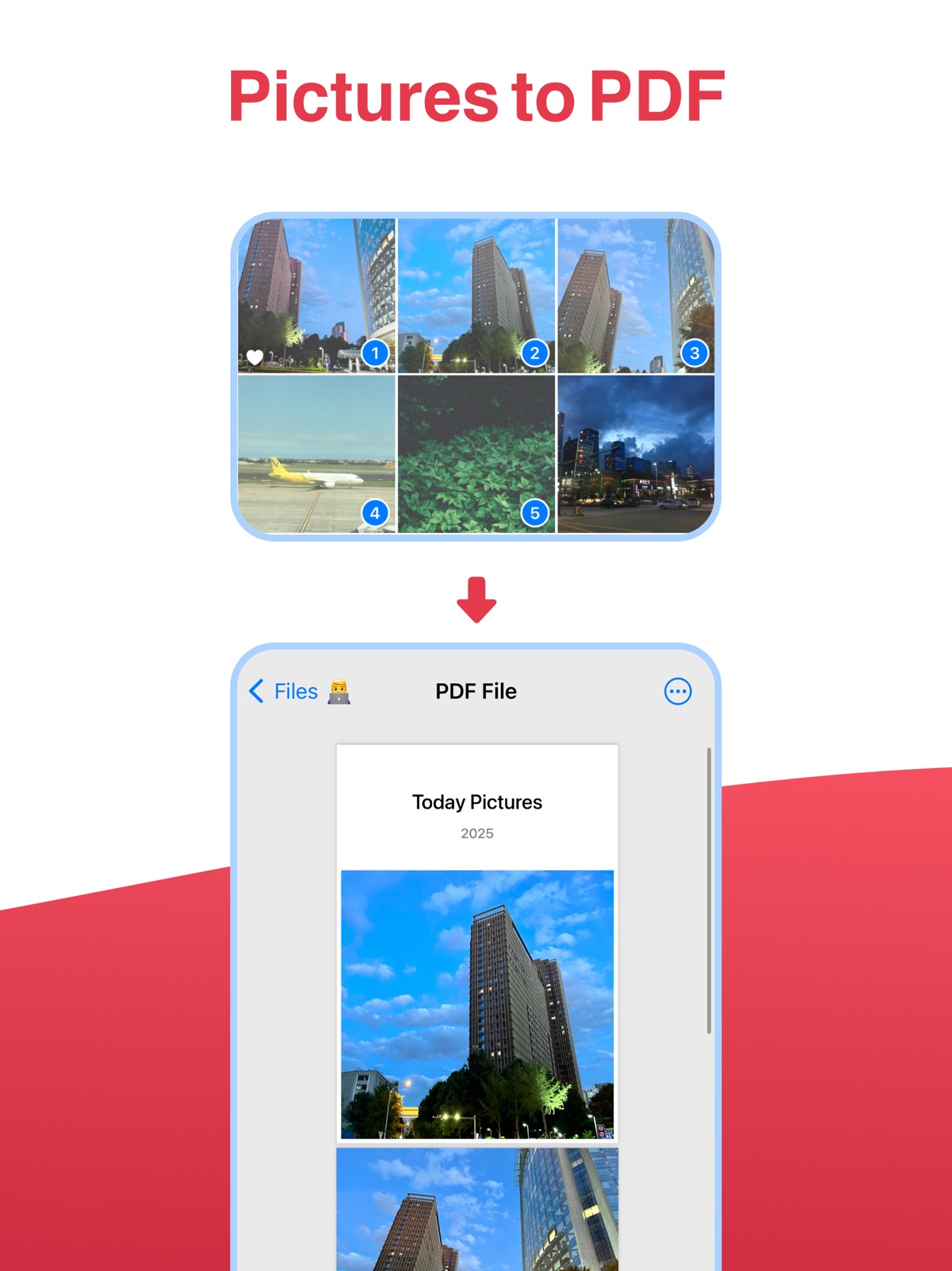
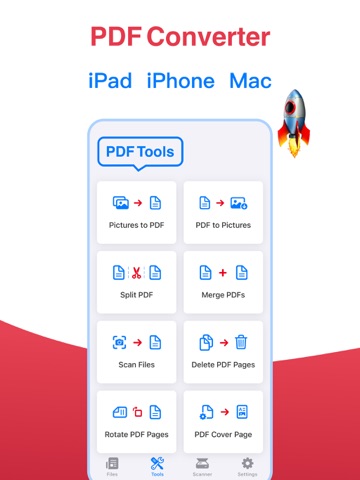
AppCorpus MCP gives your agent current app data, prices, screens, features and sources.
View JSON
GET /api/v3/apps/1484021134
{
  "app_id": 1484021134,
  "canonical_url": "https://appcorpus.com/apps/halo-pdf-pdf-editor-scan-1484021134",
  "identity": {
    "name": "Halo PDF - PDF Editor & Scan",
    "slug": "halo-pdf-pdf-editor-scan",
    "developer": {
      "name": "志强 王",
      "url": "https://appcorpus.com/developers/developer-689-developer_bbc3fe105b90ebf7922351f6f6381d0b"
    },
    "icon_url": "https://is1-ssl.mzstatic.com/image/thumb/Purple221/v4/14/a7/43/14a74398-56a0-359b-29d8-86aefbe36ce2/AppIcon-0-1x_U007emarketing-0-8-0-sRGB-85-220-0.png/512x512bb.jpg",
    "stores": [
      "apple"
    ],
    "platforms": [
      "iphone",
      "ipad"
    ],
    "status": {
      "state": "active",
      "label": "Active",
      "last_checked": "2026-08-06",
      "last_checked_label": "6 Aug 2026",
      "banner": null,
      "region_note": null
    }
  },
  "listings": [
    {
      "store": "apple",
      "status": "ACTIVE",
      "url": "https://apps.apple.com/us/app/halo-pdf-pdf-editor-scan/id1484021134?uo=4",
      "rating": 4.7,
      "rating_count": 943,
      "formatted_price": "Free",
      "is_free": true,
      "has_iap": true,
      "has_subscription": false,
      "version": "2.5",
      "updated": "2025-01-07",
      "currency": "USD"
    }
  ],
  "summary": {
    "one_liner": null,
    "summary": null,
    "best_for": [],
    "not_for": [],
    "status": "fallback",
    "at_a_glance": [
      "From $2.99/mo",
      "Free to download",
      "In-app purchases"
    ]
  },
  "categories": {
    "official": [
      "Business",
      "Productivity"
    ],
    "appcorpus": [
      {
        "category_id": "business",
        "label": "Business",
        "url": "https://appcorpus.com/categories/business"
      },
      {
        "category_id": "productivity",
        "label": "Productivity",
        "url": "https://appcorpus.com/categories/productivity"
      }
    ]
  },
  "use_cases": [],
  "features": [
    {
      "capability_id": "free_app",
      "label": "Free app",
      "availability": "yes",
      "access_level": "free",
      "scope": null,
      "evidence": "Store published"
    },
    {
      "capability_id": "in_app_purchases",
      "label": "In-app purchases",
      "availability": "yes",
      "access_level": "free_limited",
      "scope": null,
      "evidence": "Store published"
    }
  ],
  "pricing": [
    {
      "store": "apple",
      "formatted_price": "Free",
      "is_free": true,
      "has_iap": true,
      "has_subscription": false,
      "currency": "USD",
      "market": "us",
      "last_verified": "2026-08-06",
      "rows": [
        "Monthly — $2.99/month",
        "Monthly — $7.00/year ($0.58/mo)",
        "Lifetime — $9.99"
      ]
    }
  ],
  "screens": [
    {
      "url": "https://is1-ssl.mzstatic.com/image/thumb/PurpleSource221/v4/b7/b6/81/b7b681a9-4afa-8a9b-d860-d53f6f533b03/[email protected]/1600x1600bb.jpg",
      "store": "apple",
      "platform": "ipad",
      "alt": "Halo PDF - PDF Editor & Scan ipad screenshot 1"
    },
    {
      "url": "https://is1-ssl.mzstatic.com/image/thumb/PurpleSource211/v4/a2/8a/ce/a28ace8d-bdc6-40d8-22f6-367bd33c98c8/[email protected]/1600x1600bb.jpg",
      "store": "apple",
      "platform": "ipad",
      "alt": "Halo PDF - PDF Editor & Scan ipad screenshot 2"
    },
    {
      "url": "https://is1-ssl.mzstatic.com/image/thumb/PurpleSource221/v4/b7/b6/81/b7b681a9-4afa-8a9b-d860-d53f6f533b03/[email protected]/360x480bb.jpg",
      "store": "apple",
      "platform": "ipad",
      "alt": "Halo PDF - PDF Editor & Scan ipad screenshot 3"
    },
    {
      "url": "https://is1-ssl.mzstatic.com/image/thumb/PurpleSource211/v4/a2/8a/ce/a28ace8d-bdc6-40d8-22f6-367bd33c98c8/[email protected]/360x480bb.jpg",
      "store": "apple",
      "platform": "ipad",
      "alt": "Halo PDF - PDF Editor & Scan ipad screenshot 4"
    },
    {
      "url": "https://is1-ssl.mzstatic.com/image/thumb/PurpleSource221/v4/bc/f3/bc/bcf3bcff-36bb-7c35-61d6-1e2eb5cdee79/[email protected]/1600x1600bb.jpg",
      "store": "apple",
      "platform": "ipad",
      "alt": "Halo PDF - PDF Editor & Scan ipad screenshot 5"
    },
    {
      "url": "https://is1-ssl.mzstatic.com/image/thumb/PurpleSource221/v4/55/18/8d/55188dd8-58c1-459b-7a47-a30c020fda11/[email protected]/1600x1600bb.jpg",
      "store": "apple",
      "platform": "ipad",
      "alt": "Halo PDF - PDF Editor & Scan ipad screenshot 6"
    },
    {
      "url": "https://is1-ssl.mzstatic.com/image/thumb/PurpleSource221/v4/bc/f3/bc/bcf3bcff-36bb-7c35-61d6-1e2eb5cdee79/[email protected]/360x480bb.jpg",
      "store": "apple",
      "platform": "ipad",
      "alt": "Halo PDF - PDF Editor & Scan ipad screenshot 7"
    },
    {
      "url": "https://is1-ssl.mzstatic.com/image/thumb/PurpleSource211/v4/f0/12/78/f012785b-adf2-1a64-704b-78f96619f34d/[email protected]/1600x1600bb.jpg",
      "store": "apple",
      "platform": "ipad",
      "alt": "Halo PDF - PDF Editor & Scan ipad screenshot 8"
    },
    {
      "url": "https://is1-ssl.mzstatic.com/image/thumb/PurpleSource221/v4/55/18/8d/55188dd8-58c1-459b-7a47-a30c020fda11/[email protected]/360x480bb.jpg",
      "store": "apple",
      "platform": "ipad",
      "alt": "Halo PDF - PDF Editor & Scan ipad screenshot 9"
    },
    {
      "url": "https://is1-ssl.mzstatic.com/image/thumb/PurpleSource211/v4/f0/12/78/f012785b-adf2-1a64-704b-78f96619f34d/[email protected]/360x480bb.jpg",
      "store": "apple",
      "platform": "ipad",
      "alt": "Halo PDF - PDF Editor & Scan ipad screenshot 10"
    },
    {
      "url": "https://is1-ssl.mzstatic.com/image/thumb/PurpleSource221/v4/7d/90/3e/7d903eff-ef01-813f-971d-51f1effdff44/[email protected]/1600x1600bb.jpg",
      "store": "apple",
      "platform": "ipad",
      "alt": "Halo PDF - PDF Editor & Scan ipad screenshot 11"
    },
    {
      "url": "https://is1-ssl.mzstatic.com/image/thumb/PurpleSource211/v4/b0/c3/6b/b0c36b1c-41cc-30f9-ea6a-5e33a3dea63e/[email protected]/1600x1600bb.jpg",
      "store": "apple",
      "platform": "ipad",
      "alt": "Halo PDF - PDF Editor & Scan ipad screenshot 12"
    },
    {
      "url": "https://is1-ssl.mzstatic.com/image/thumb/PurpleSource221/v4/7d/90/3e/7d903eff-ef01-813f-971d-51f1effdff44/[email protected]/360x480bb.jpg",
      "store": "apple",
      "platform": "ipad",
      "alt": "Halo PDF - PDF Editor & Scan ipad screenshot 13"
    },
    {
      "url": "https://is1-ssl.mzstatic.com/image/thumb/PurpleSource211/v4/b0/c3/6b/b0c36b1c-41cc-30f9-ea6a-5e33a3dea63e/[email protected]/360x480bb.jpg",
      "store": "apple",
      "platform": "ipad",
      "alt": "Halo PDF - PDF Editor & Scan ipad screenshot 14"
    },
    {
      "url": "https://is1-ssl.mzstatic.com/image/thumb/PurpleSource221/v4/14/33/95/1433958a-dadc-ea5e-3baf-e95e12f38294/[email protected]/1600x1600bb.jpg",
      "store": "apple",
      "platform": "ipad",
      "alt": "Halo PDF - PDF Editor & Scan ipad screenshot 15"
    },
    {
      "url": "https://is1-ssl.mzstatic.com/image/thumb/PurpleSource211/v4/c5/06/af/c506afff-b706-606c-c2e9-2866f019f458/[email protected]/1600x1600bb.jpg",
      "store": "apple",
      "platform": "ipad",
      "alt": "Halo PDF - PDF Editor & Scan ipad screenshot 16"
    },
    {
      "url": "https://is1-ssl.mzstatic.com/image/thumb/PurpleSource221/v4/14/33/95/1433958a-dadc-ea5e-3baf-e95e12f38294/[email protected]/360x480bb.jpg",
      "store": "apple",
      "platform": "ipad",
      "alt": "Halo PDF - PDF Editor & Scan ipad screenshot 17"
    },
    {
      "url": "https://is1-ssl.mzstatic.com/image/thumb/PurpleSource211/v4/3f/99/a1/3f99a137-a304-2d43-4325-e52807c2bf4f/[email protected]/1600x1600bb.jpg",
      "store": "apple",
      "platform": "ipad",
      "alt": "Halo PDF - PDF Editor & Scan ipad screenshot 18"
    },
    {
      "url": "https://is1-ssl.mzstatic.com/image/thumb/PurpleSource211/v4/c5/06/af/c506afff-b706-606c-c2e9-2866f019f458/[email protected]/360x480bb.jpg",
      "store": "apple",
      "platform": "ipad",
      "alt": "Halo PDF - PDF Editor & Scan ipad screenshot 19"
    },
    {
      "url": "https://is1-ssl.mzstatic.com/image/thumb/PurpleSource211/v4/3f/99/a1/3f99a137-a304-2d43-4325-e52807c2bf4f/[email protected]/360x480bb.jpg",
      "store": "apple",
      "platform": "ipad",
      "alt": "Halo PDF - PDF Editor & Scan ipad screenshot 20"
    },
    {
      "url": "https://is1-ssl.mzstatic.com/image/thumb/PurpleSource221/v4/8d/df/03/8ddf03d8-af33-2f5b-fb49-442a7879a49e/[email protected]/1242x1600bb.jpg",
      "store": "apple",
      "platform": "iphone",
      "alt": "Halo PDF - PDF Editor & Scan iphone screenshot 21"
    },
    {
      "url": "https://is1-ssl.mzstatic.com/image/thumb/PurpleSource221/v4/f9/18/ee/f918ee5c-2bf9-4331-2ad4-4017978a92ec/[email protected]/1242x1600bb.jpg",
      "store": "apple",
      "platform": "iphone",
      "alt": "Halo PDF - PDF Editor & Scan iphone screenshot 22"
    },
    {
      "url": "https://is1-ssl.mzstatic.com/image/thumb/PurpleSource221/v4/14/f0/00/14f000fd-15b3-a868-9f1f-ab7f632f5678/[email protected]/1242x1600bb.jpg",
      "store": "apple",
      "platform": "iphone",
      "alt": "Halo PDF - PDF Editor & Scan iphone screenshot 23"
    },
    {
      "url": "https://is1-ssl.mzstatic.com/image/thumb/PurpleSource221/v4/28/23/ae/2823ae4a-9a7a-a36b-3aeb-afe32399deb9/[email protected]/1242x1600bb.jpg",
      "store": "apple",
      "platform": "iphone",
      "alt": "Halo PDF - PDF Editor & Scan iphone screenshot 24"
    },
    {
      "url": "https://is1-ssl.mzstatic.com/image/thumb/PurpleSource221/v4/0a/ef/64/0aef649f-e6e2-1e39-df9d-f69f260e22e7/[email protected]/1242x1600bb.jpg",
      "store": "apple",
      "platform": "iphone",
      "alt": "Halo PDF - PDF Editor & Scan iphone screenshot 25"
    },
    {
      "url": "https://is1-ssl.mzstatic.com/image/thumb/PurpleSource221/v4/62/ec/ac/62ecacf8-46c0-ec28-af0b-147c9ebe6990/[email protected]/1242x1600bb.jpg",
      "store": "apple",
      "platform": "iphone",
      "alt": "Halo PDF - PDF Editor & Scan iphone screenshot 26"
    },
    {
      "url": "https://is1-ssl.mzstatic.com/image/thumb/PurpleSource211/v4/b8/53/79/b8537951-a7b9-8a51-d6b3-b91d789e8ea6/[email protected]/1242x1600bb.jpg",
      "store": "apple",
      "platform": "iphone",
      "alt": "Halo PDF - PDF Editor & Scan iphone screenshot 27"
    },
    {
      "url": "https://is1-ssl.mzstatic.com/image/thumb/PurpleSource221/v4/51/3f/6e/513f6ecc-4abe-7658-e3cd-e9e45145be88/[email protected]/1242x1600bb.jpg",
      "store": "apple",
      "platform": "iphone",
      "alt": "Halo PDF - PDF Editor & Scan iphone screenshot 28"
    },
    {
      "url": "https://is1-ssl.mzstatic.com/image/thumb/PurpleSource211/v4/02/ac/e0/02ace092-4c7e-1e03-b150-b20db61ee0d5/[email protected]/1242x1600bb.jpg",
      "store": "apple",
      "platform": "iphone",
      "alt": "Halo PDF - PDF Editor & Scan iphone screenshot 29"
    },
    {
      "url": "https://is1-ssl.mzstatic.com/image/thumb/PurpleSource221/v4/e0/36/1c/e0361c71-4646-fe91-df64-13ea9b43046c/[email protected]/1242x1600bb.jpg",
      "store": "apple",
      "platform": "iphone",
      "alt": "Halo PDF - PDF Editor & Scan iphone screenshot 30"
    }
  ],
  "ratings": [
    {
      "store": "apple",
      "average": 4.7,
      "count": 943,
      "market": "us",
      "observed_at": "2026-08-06",
      "reviews": [
        {
          "rating": 5,
          "title": "Amazing app",
          "body": "Easy to use right away to finish your job in seconds, that’s the app I am looking for . Thank you guys .",
          "author": "Alkiswani",
          "date": "6 Aug 2026"
        },
        {
          "rating": 5,
          "title": "ms99n",
          "body": "Great and wonderful Thank you 🙏 for this application, Really it is funny 😁 and useful,,",
          "author": "The loyalfriend",
          "date": "6 Aug 2026"
        },
        {
          "rating": 4,
          "title": "How to turn on English",
          "body": "Is there any way to have everything in English? When I go to Settings -> HaloPDF -> all I see is \"ALLOW HALOPDF TO ACCESS.\" There is no mention of English. What am I doing wrong?",
          "author": "DeeElJay",
          "date": "6 Aug 2026"
        },
        {
          "rating": 3,
          "title": "App is not intuitive",
          "body": "My download is in Chinese, but I don’t read Chinese. In Os13.3.1 the app has a mix of English and Chinese. The “Delete” button is in Chinese. It was quick to convert and easy to send",
          "author": "Billp69",
          "date": "6 Aug 2026"
        },
        {
          "rating": 5,
          "title": "Good",
          "body": "Very good app",
          "author": "kordy44",
          "date": "6 Aug 2026"
        }
      ]
    }
  ],
  "privacy": [
    {
      "store": "apple",
      "declarations": [
        {
          "title": "Data Not Linked to You",
          "detail": "App Functionality — Diagnostics — Crash Data",
          "source": "Developer declared"
        },
        {
          "title": "Data Not Linked to You",
          "detail": "Diagnostics",
          "source": "Developer declared"
        }
      ],
      "accessibility": []
    }
  ],
  "changes": [
    {
      "store": "apple",
      "version": "1.0",
      "released_at": null,
      "notes": ""
    },
    {
      "store": "apple",
      "version": "1.01",
      "released_at": null,
      "notes": "fixed bug"
    },
    {
      "store": "apple",
      "version": "1.02",
      "released_at": null,
      "notes": "1. Output higher quality pictures 2. Fix sharing failure"
    },
    {
      "store": "apple",
      "version": "1.03",
      "released_at": null,
      "notes": "change content display"
    },
    {
      "store": "apple",
      "version": "1.5",
      "released_at": null,
      "notes": "1:Optimize user experience 2:Support search files"
    },
    {
      "store": "apple",
      "version": "1.6",
      "released_at": null,
      "notes": "New: Scanner function (scanning paper documents) New: Adjust the page order by \"finger drag\" when making PDF New: batch rotation and batch deletion of pictures New: Modify PDF file name New: Call the printer to print PDF Optimization: More convenient when deleting PDF files"
    },
    {
      "store": "apple",
      "version": "1.7",
      "released_at": null,
      "notes": "Feature update. New: scanner function (scanning paper documents). New: Adjust the page order by \"finger drag\" when making PDF. New: batch rotation and batch deletion of pictures. New: Modify PDF file name. New: Call the printer to print PDF. Optimization: More convenient when deleting PDF files."
    },
    {
      "store": "apple",
      "version": "2.0",
      "released_at": null,
      "notes": "* Batch merge PDF files * Batch export pages to albums * Insert PDFs between pages at will * Manage, sort, delete pages * Add cover, rotate PDF * Support iCloud images and PDFs * Optimize user experience"
    },
    {
      "store": "apple",
      "version": "2.1",
      "released_at": null,
      "notes": "* Fixed bugs * Batch merge PDF files * Batch export pages to albums * Insert PDFs between pages at will * Manage, sort, delete pages * Add cover, rotate PDF * Support iCloud images and PDFs * Optimize user experience"
    },
    {
      "store": "apple",
      "version": "2.2",
      "released_at": null,
      "notes": "Fixed some bugs"
    },
    {
      "store": "apple",
      "version": "2.3",
      "released_at": null,
      "notes": "Add \"Scanner\" function module"
    },
    {
      "store": "apple",
      "version": "2.4",
      "released_at": null,
      "notes": "Fixed some problems"
    },
    {
      "store": "apple",
      "version": "2.5",
      "released_at": "2025-01-07",
      "notes": "Supports: Split PDF Supports: Merge Multiple PDFs Fixes: Some Bugs"
    }
  ],
  "alternatives": [
    {
      "app_id": 651952889,
      "name": "PDF Splitter + PDF Merge",
      "url": "https://appcorpus.com/apps/pdf-splitter-pdf-merge-651952889",
      "reason": "Same category + similar ratings"
    }
  ],
  "evidence_summary": {
    "index_state": "S1",
    "evidence_level": 1,
    "level_label": "Live store listing",
    "indexable": true,
    "last_verified_at": "2026-08-06",
    "unknown_fields": [
      "Independent summary has not been published yet."
    ],
    "sources": [
      "App Store"
    ]
  },
  "availability_markets": {
    "live": [
      "us"
    ],
    "selected": "us",
    "note": null
  },
  "feature_events": {
    "events": []
  },
  "features_slice": {
    "plans": [
      {
        "code": "plan",
        "label": "Monthly",
        "kind": "subscription",
        "status": "store_listed",
        "prices": [
          {
            "storefront": "us",
            "formatted": "$2.99",
            "billing_period": "monthly"
          },
          {
            "storefront": "us",
            "formatted": "$7.00",
            "billing_period": "yearly"
          }
        ],
        "trial": null
      },
      {
        "code": "lifetime",
        "label": "Lifetime",
        "kind": "unknown",
        "status": "store_listed",
        "prices": [
          {
            "storefront": "us",
            "formatted": "$9.99",
            "billing_period": "one_time"
          }
        ],
        "trial": null
      }
    ],
    "features": [],
    "unknown_features": [],
    "data_cutoff": "6 Aug 2026"
  }
}