
Quick verdict
- What it is
- Store information collected; independent summary not yet available.
- At a glance
-
- $4.99
Categories and search queries
Official categories
- Productivity
- Business
AppCorpus categories
Key functions
| Function | Availability | Access | Scope | Evidence |
|---|---|---|---|---|
| Family Sharing | Yes | Unknown | App Store | Store published |
Screens
App Store
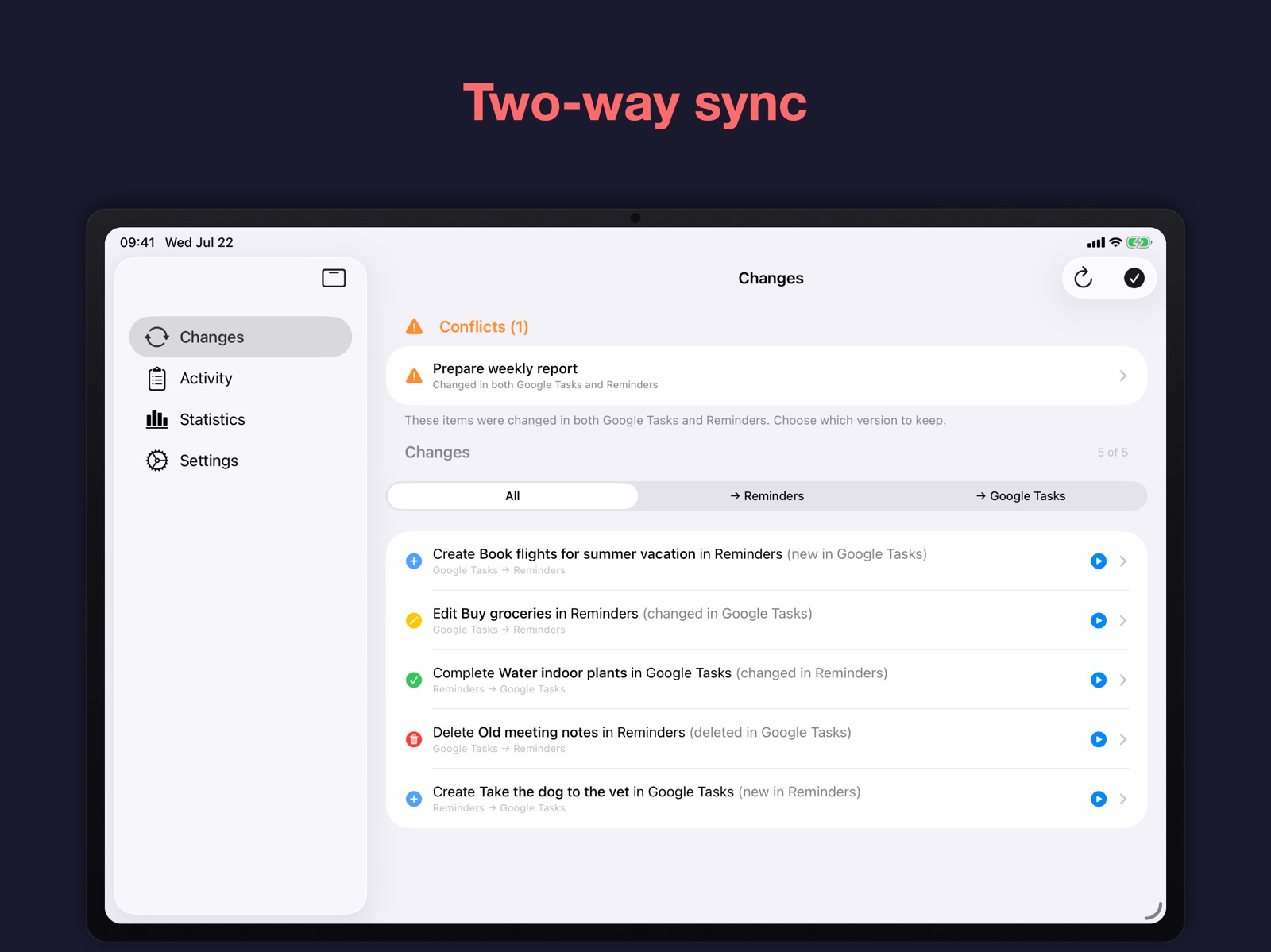
14 store screenshots


Pricing & paywalls
App Store
- Price: $4.99
Ratings & reviews
App Store
-
5/5Works great
This does exactly what I want it to do with minimal fuss. I use an iPhone so Siri uses Apple Reminders, but I also use a Chromebook and want to sync my tasks to Google Tasks. This allows the best of both worlds. I can manage tasks in either application and they are synced across platforms. I originally attempted to automate via IFTTT but this is so much cleaner and simple. Well worth the very reasonable price
BurtonJ87 · 31 Jul 2026
Privacy & accessibility
App Store
Privacy
- Data Not Linked to You — Analytics — Diagnostics — Crash Data Developer declared
- Data Not Linked to You — Analytics — Diagnostics — Performance Data Developer declared
- Data Not Linked to You — Analytics — Usage Data — Product Interaction Developer declared
- Data Not Linked to You — Diagnostics Developer declared
- Data Not Linked to You — Usage Data Developer declared
Accessibility
No accessibility labels collected yet.
Versions
App Store
- 1.0
-
1.1
New features: • Pick which Apple Reminders account new lists are created in, both during onboarding and later in Settings. • New Siri Shortcuts setup guide with step-by-step screenshots, reachable from Settings under Background Sync. • Cancel a backup restore while it's still in the safe phase. • New app icon. Improvements: • Sync-lock retry button renamed to "Retry Without Taking Over" when a takeover is possible, making the choice explicit. • Daily backups fall back to alternate destinations when the preferred destination is unavailable, instead of silently failing. • Activity-log retention now defaults to on for new users, so the activity log self-prunes by default. • Backups settings warn clearly when daily backups are off, when storage is set to Local only, and when reminders sync via iCloud (where backups can duplicate items on a fresh device). • The Activity log view loads quickly even with very long histories. • Backup imports accept both compressed and plain JSON files. • The backup-action spinner now appears on the button you actually tapped. • Restore overlay shows the current step (Preparing, Safety backup, Restoring, Finalizing), with the Cancel button emphasized and reliably tappable. • The tab bar is hidden while a backup restore is in progress, so the restore can't be interrupted by switching tabs. • Apple Reminders authorization refreshes when returning to onboarding or Settings from System Settings. • The Apple Reminders source picker is hidden when only one source is available, and the wording around the "Automatic" option is clearer. • Google sign-in stays valid longer near token expiry edges. • Google Tasks list collection caches across launches, so list changes are detected faster on the next sync. • Backup creation cleans up its temporary files even when it fails partway. • Apple Reminders source picker stays visible when the previously selected account is temporarily missing, so it can be reselected. • Google sign-in screen now explains why signing in with Google is necessary. Bug fixes: • Restoring a Google Drive backup during onboarding now creates the pre-restore safety backup it was supposed to create. • Background sync no longer reads from the keychain when background sync is disabled. • The activity log retention cutoff no longer drifts away from the user's chosen retention window. • Backup app-version field shows "unknown" instead of a misleading "1.0" when it can't be read from the backup.
-
1.2
Improvements: • A trailing ⋯ button on each backup row in Settings → Backups opens the row's Restore / Export / Delete actions on a short tap, so the actions are reachable without long-pressing. • Long-pressing a backup row on iPhone / iPad opens the same Restore / Export / Delete actions, matching how the row already responded to long-press in the context menu. • "Take Over Sync" now turns off Background Sync on this device before claiming the lock, with a rewritten confirmation dialog that names the other device, warns about duplicates from parallel iCloud-synced Apple Reminders, suggests creating a backup and restoring it as a migration path, and explains the Background Sync side effect (omitted when Background Sync is already off). Cancel is the default button. • Backup retention now considers backups across all storages together, so an old local backup is no longer kept indefinitely just because every other backup for the same device happens to live in Google Drive or iCloud. • Brief Google Tasks or Google Drive throttling is absorbed silently rather than surfacing as a sync error, and longer bursts are retried on the next scheduled sync instead of failing terminally. • Sync error messages now include Google's own description of what failed instead of just the HTTP code. • The cross-device sync lock refreshes once per day instead of on every sync, and remembers where the lock lives so most syncs skip an extra Google Drive lookup. Both reduce the load this app puts on Google Drive. • Cross-device lock takeover is now always manual — through the "Take Over Sync" button on the sync dashboard — instead of being taken over silently after one hour. An older device that comes back online overnight no longer claims the lock from the device that's actively syncing. Bug fixes: • The cross-device sync lock no longer skips its daily refresh when it happens to run right at local midnight in your time zone. • Sync recovers automatically when the app's local notes about the cross-device lock have gone stale (e.g. another user manually cleared the app's Google Drive folder). • Tapping Export Backup… on iPad no longer crashes the app; the share sheet now appears as an arrow-less popover anchored to the screen center. • The exported backup file is removed from the temporary directory after the share sheet dismisses, so it no longer accumulates there between exports.
-
1.3
New features: • New "Send Errors as Notifications" option for the "Sync Tasks" Siri Shortcut: when on, a sync problem that needs your attention (like an expired sign-in, or a sync paused because too many changes are pending) is reported as a notification and the shortcut still finishes successfully; when off, the error is returned to Shortcuts so an automation can react to it. Improvements: • On iPad in full screen, the Changes, Activity, and Settings tabs now appear as a side list instead of a bottom tab bar. • Tapping a notification now opens the relevant screen — sync issues open the Changes screen, and backup notifications open the Backups screen — instead of just opening the app. • Notification wording is clearer and more consistent, and notifications no longer tack on raw technical error text. • "Sync Conflicts" notifications are no longer shown while you have the app open (the conflicts are already listed on the Changes screen). • The "Sync Tasks" shortcut's "Ignore Network Errors" option now skips only temporary problems (being offline, timeouts, an unstable connection, a busy server, or a sync lock that can't be reached) and never hides an expired sign-in. • When a sync is paused because too many changes are pending, the "Sync Tasks" shortcut now reports a failure instead of silently succeeding, so an automation can notice. • A cancelled "Sync Tasks" run is now reported to Shortcuts as cancelled rather than as a failure. • When a daily backup falls back from one cloud to another, it no longer posts a push notification (your data is still safely off-device); a backup that can only be saved locally still notifies you with "Backup Saved Locally". • Updated the Siri Shortcuts setup guide: a single automation can trigger on several apps, the walkthrough is simpler, and it now suggests Reminders, Tasks, Calendar, and Google Calendar as trigger apps. • The Settings screen title is now compact, matching the other tabs.
-
1.4
Improvements: • The activity-log auto-delete setting is now a picker with more choices — keep history for 7 days, 1 month, 3 months, 6 months, or 1 year — replacing the previous on/off "delete after 60 days" toggle. Bug fixes: • When an item was deleted in Google Tasks or Apple Reminders while it was edited on the other side, the edit is no longer silently discarded — it's now surfaced as a conflict and your edit is kept by default.
-
1.5
New features: • Running the "Sync Tasks" shortcut now returns a result you can read in an automation — whether it succeeded, a status, a message, and how many items were created, updated, deleted, and synced, plus how many conflicts remain. Improvements: • The Changes screen and Settings now show a "Reminders Access Required" message, with a shortcut to open Settings, when access to Reminders is turned off. Bug fixes: • Fixed sync recreating all of your tasks after Reminders access was turned off and then granted again — your existing sync links are now kept. • The "Sync Tasks" shortcut no longer reports success when Reminders access is denied; it now fails (or reports a "Reminders Access Denied" status), and background sync now notifies you when it's blocked for the same reason.
-
1.6
New features: • Added a Notifications section to Settings showing whether notifications are enabled, with a button to turn them on or a link to System Settings if they're off. Improvements: • Daily backups now also run after a manual sync or after a Sync Tasks shortcut run that gets paused rather than skipped, so backups stay current even if you rely on manual or Shortcuts-triggered syncs. • "Sync Failed" and "Sign-In Required" notifications from background sync now appear at most once a day instead of repeating on every failed attempt. • When another device is already syncing, background and Shortcuts-triggered sync attempts now show a "Sync Active on Another Device" notification naming that device, instead of a generic "Sync Failed" message. Bug fixes: • Fixed "Sync All" on the Changes screen silently doing nothing when syncing is blocked — it now shows an inline error like other sync failures. • The Sync Tasks shortcut now reports a clear error (or fails quietly, depending on "Send Errors as Notifications") if its local data can't be opened, instead of failing unpredictably.
-
1.7
· 22 Jul 2026
New features: • New Statistics tab shows your sync activity by Day, Week, or Month, with summary tiles, an activity chart, and breakdowns by direction, action type, list, and issues — swipe or jump to a date to browse other periods, and tap a breakdown to see the matching entries in the Activity log. Improvements: • Sync action colors (create, update, complete, uncomplete, and delete/error) are now distinct and consistent across Changes, Activity, and Statistics.
Availability by market
- US
Data quality & evidence
- Page completeness
- Live store listing
- Last verified
- 31 Jul 2026
- Sources
- App Store
- Independent summary has not been published yet.