
Quick verdict
- What it is
- Store information collected; independent summary not yet available.
- At a glance
-
- From $4.99/mo
- Free to download
- In-app purchases
Categories and search queries
Official categories
- Food & Drink
- Lifestyle
AppCorpus categories
Key functions
| Function | Availability | Access | Scope | Evidence |
|---|---|---|---|---|
| Family Sharing | Yes | Unknown | App Store | Store published |
| Free app | Yes | Free | — | Store published |
| In-app purchases | Yes | Limited free | — | Store published |
Screens
43 store screenshots
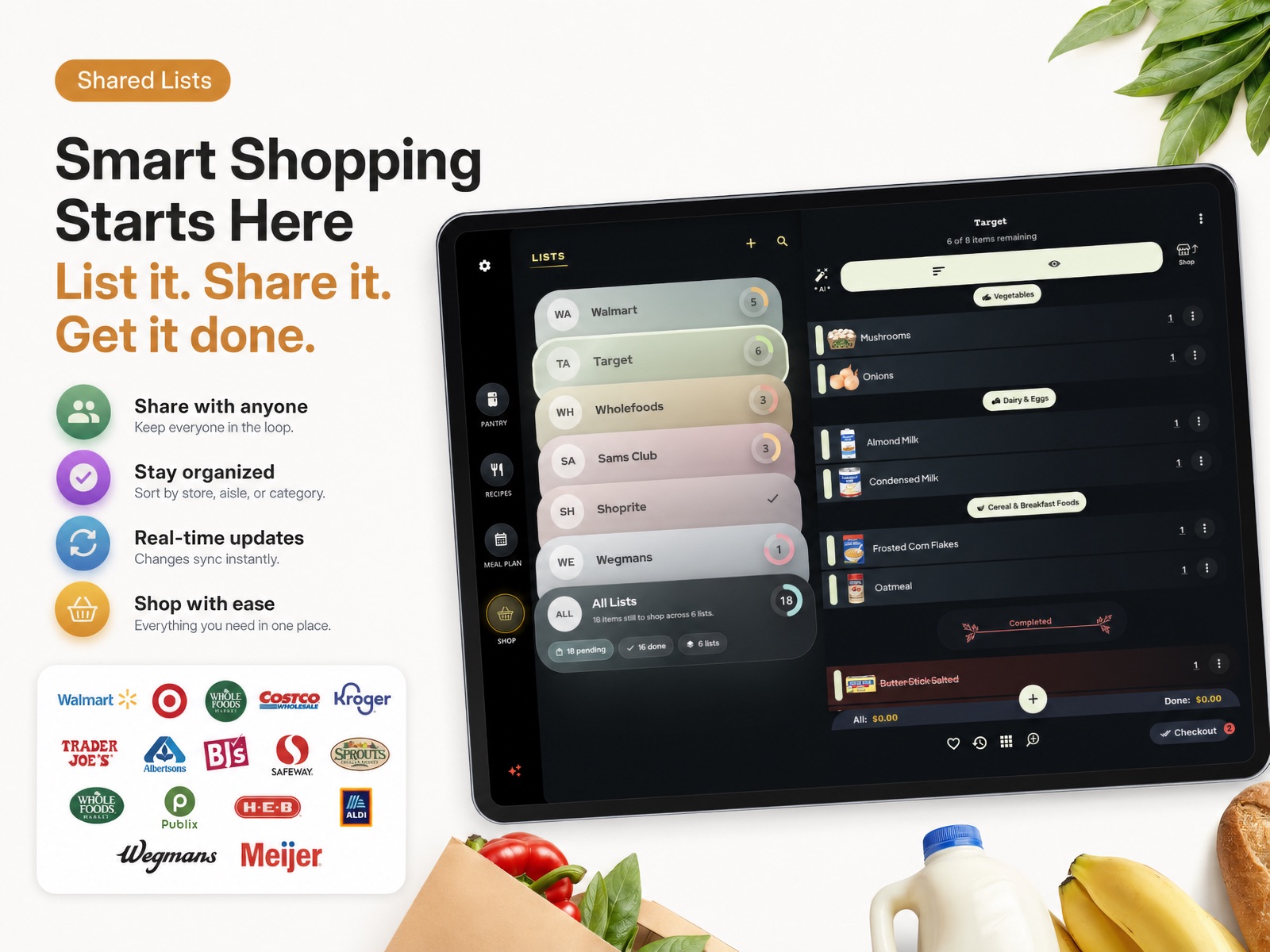
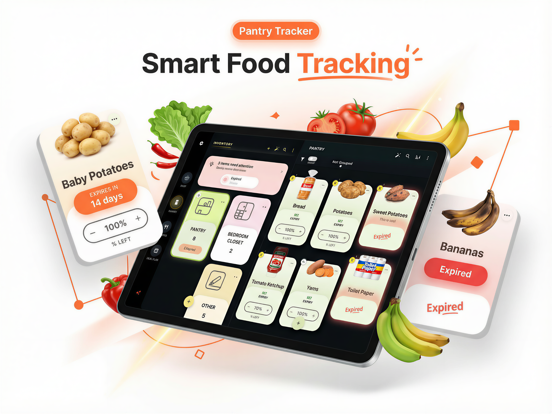

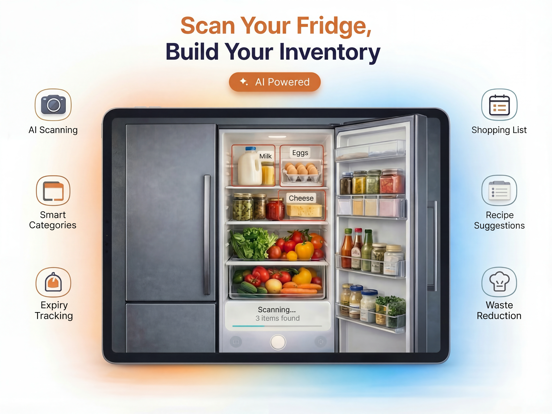
24 store screenshots


Pricing & paywalls
- GK Premium - 1 Year — $59.99/year ($4.99/mo)
- GroceryAI Premium - Yearly — $59.99/year ($4.99/mo)
- Grocery AI Monthly — $6.99/month
- GK Premium - Monthly Plan — $9.99/month
- Free to download
- In-app purchases: $6.99 - $59.99 per item
Ratings & reviews
-
3/5Good Start but A Long Way to GO
I emailed them today for the 3rd time…Lets see if they answer. I have emailed you 3 times and have not gotten a response yet. I paid good money for this app and at least deserve the courtesy of a response. This app is a very good attempt, but you have a myriad of bugs in it. I switched to your app from the best cooking/recipe app ever Paprika 3 because of your AI use. Let’s get it right people. 1. Whenever you scale a recipe, the amounts it scales to are often incorrectly applied. 2. When a recipe is scaled, it should also scale the ingredients in the directions! 3. The way this application syncs between devices is often confusing. It should let you know when it is synching. OH, and don’t have the “synch” button buried all the way at the bottom of the settings menu. 4. Quite often whenever you apply a scale (2x, 3x, 4x. Etc) you have to take the focus off of the page you're looking at and come back for it to be applied. 5. And PLEASE provide a setting option for IMPERIAL measurements!!!!! We are American and aren't in England. 6. And finally (for now) PLEASE ANSWER YOUR SUPPORT EMAILS!!!!!! OMG!! I just changed my password on macOS Sequoia 15.5 and ALL of my RECIPES except the ones that came with the app DISAPPEARED! That along with all my shopping lists, HUNDREDS of list ITEMS and list CATEGORIES, and EVERYTHING in my store shopping lists, including all of the stores that I had lists for. ARGHHHH. The good news is that I found a setting buried in the gear > Sync Settings > Push All Data On This Device and it restored everything, but I had to spend a half hour arranging everything back to where I had it before I changed my password. Save yourself some grief and not a little bit of panic and don’t change your password.
PaulAchuffSr · 7 Aug 2026
-
2/5Good idea, but not there yet…
I was waiting on the pantry feature, which transforms shopping lists and recipes/meal plans in something intelligent and more useful. It seemed the latest update brought just that: making meal plans based on what you have in the pantry; the pantry would update as you made recipes. Too bad that the pantry cannot be filled with product you already have, but only with items you put in a shopping list. There is no database for common products available in the USA market (let alone other ones). There is no crowdsource database either (like in the Pantry Check app), so you need to put in by hand each and every product you buy or have, and if you want to restock, the only way is via the shopping list, not also through the pantry. Clipping of recipes is only possible on the iOS app, not on the Mac. Changing from metric to standard us is not possibile on the Mac app, and the app has seemingly no logic for recipes that support both. Ingredients such as lemon juice are a single unit (1 pack) which make no sense, and doesn’t want allow you to put a quantity in a recipe. You cannot import recipes from a .pdf or a .doc file. So you can forget about importing quickly all your recipes. Long story short: it seems the app was never tested by somebody who actually cooks and manages recipes and a pantry in a home. Waiting for improvements… Ps: did a month subscription to try, but asked for a refund.
Pakitt · 7 Aug 2026
-
5/5Great App with amazing customer service
I have been using grocery king for several years. I was using the old app and like others realized it was crashing all the time. I went to the App Store and realized there was an entirely new version of the app available. I spoke with customer service and I downloaded the new version and they helped me get reimbursed for the old version. The new app is even better than the old one.
Kate6571_5158 · 7 Aug 2026
-
2/5UPDATE: They promised “fast updates” 8 months ago. What a joke! Get with the program developers!!
UI emailed them today for the 3rd time…Lets see if they answer. I have emailed you 3 times and have not gotten a response yet. I paid good money for this app and at least deserve the courtesy of a response. This app is a very good attempt, but you have a myriad of bugs in it. I switched to your app from the best cooking/recipe app ever Paprika 3 because of your AI use. Let’s get it right people. 1. Whenever you scale a recipe, the amounts it scales to are often incorrectly applied. 2. When a recipe is scaled, it should also scale the ingredients in the directions! 3. The way this application syncs between devices is often confusing. It should let you know when it is synching. OH, and don’t have the “synch” button buried all the way at the bottom of the settings menu. 4. Quite often whenever you apply a scale (2x, 3x, 4x. Etc) you have to take the focus off of the page you're looking at and come back for it to be applied. 5. And PLEASE provide a setting option for IMPERIAL measurements!!!!! We are American and aren't in England. 6. And finally (for now) PLEASE ANSWER YOUR SUPPORT EMAILS!!!!!! OMG!! I just changed my password on macOS Sequoia 15.5 and ALL of my RECIPES except the ones that came with the app DISAPPEARED! That along with all my shopping lists, HUNDREDS of list ITEMS and list CATEGORIES, and EVERYTHING in my store shopping lists, including all of the stores that I had lists for. ARGHHHH. The good news is that I found a setting buried in the gear > Sync Settings > Push All Data On This Device and it restored everything, but I had to spend a half hour arranging everything back to where I had it before I changed my password. Save yourself some grief and not a little bit of panic and don’t change your password.
PaulAchuffSr · 7 Aug 2026
-
5/5Great App!!
This app is AWESOME!!! It’s perfect for all my shopping needs. I like how I can customize my categories to my liking, and have multiple list at different stores at once. But most of all, customer support has been great!! They have worked with me on any issues and questions. They are very prompt and have supported all suggestion and comments I may have had. Totally recommend this app. WELL WORTH THE MONEY!!
Aaaassaa · 7 Aug 2026
No store reviews collected for Google Play · US
Privacy & accessibility
Privacy
- Data Linked to You — Analytics — Identifiers — User ID Developer declared
- Data Linked to You — Analytics — Purchases — Purchase History Developer declared
- Data Linked to You — Analytics — Usage Data — Product Interaction Developer declared
- Data Linked to You — Analytics — User Content — Other User Content Developer declared
- Data Linked to You — App Functionality — Contact Info — Email Address Developer declared
- Data Linked to You — App Functionality — Contact Info — Name Developer declared
- Data Linked to You — App Functionality — Identifiers — User ID Developer declared
- Data Linked to You — App Functionality — Purchases — Purchase History Developer declared
- Data Linked to You — App Functionality — Usage Data — Product Interaction Developer declared
- Data Linked to You — App Functionality — User Content — Customer Support Developer declared
- Data Linked to You — App Functionality — User Content — Other User Content Developer declared
- Data Linked to You — Product Personalization — Contact Info — Email Address Developer declared
- Data Linked to You — Product Personalization — Identifiers — User ID Developer declared
- Data Linked to You — Product Personalization — Purchases — Purchase History Developer declared
- Data Linked to You — Product Personalization — Usage Data — Product Interaction Developer declared
- Data Linked to You — Product Personalization — User Content — Customer Support Developer declared
- Data Linked to You — Product Personalization — User Content — Other User Content Developer declared
- Data Linked to You — Product Personalization — User Content — Photos or Videos Developer declared
- Data Linked to You — Contact Info Developer declared
- Data Linked to You — Identifiers Developer declared
- Data Linked to You — Purchases Developer declared
- Data Linked to You — Usage Data Developer declared
- Data Linked to You — User Content Developer declared
- Data Not Linked to You — Analytics — Diagnostics — Crash Data Developer declared
- Data Not Linked to You — Analytics — Diagnostics — Other Diagnostic Data Developer declared
- Data Not Linked to You — Analytics — Diagnostics — Performance Data Developer declared
- Data Not Linked to You — App Functionality — Diagnostics — Crash Data Developer declared
- Data Not Linked to You — App Functionality — Diagnostics — Performance Data Developer declared
- Data Not Linked to You — Product Personalization — Diagnostics — Other Diagnostic Data Developer declared
- Data Not Linked to You — Diagnostics Developer declared
Accessibility
No accessibility labels collected yet.
Privacy
- Data collected — Analytics, Fraud prevention, security, and compliance, Personalization — App activity — App interactions Developer declared
- Data collected — App functionality — Audio — Voice or sound recordings Developer declared
- Data collected — App functionality — Photos and videos — Photos Developer declared
- Data collected — App functionality, Account management — Device or other IDs Developer declared
- Data collected — App functionality, Account management — Personal info — User IDs Developer declared
- Data collected — App functionality, Analytics, Developer communications, Fraud prevention, security, and compliance, Account management — Financial info — Purchase history Developer declared
- Data collected — App functionality, Analytics, Personalization — App activity — In-app search history Developer declared
- Data collected — App functionality, Analytics, Personalization — App activity — Other actions Developer declared
- Data collected — App functionality, Analytics, Personalization — App activity — Other user-generated content Developer declared
- Data collected — App functionality, Developer communications, Fraud prevention, security, and compliance, Account management — Personal info — Email address Developer declared
- Data collected — Personalization — Personal info — Name Developer declared
- Data shared — Analytics — App info and performance — Crash logs Developer declared
- Data shared — Analytics, Fraud prevention, security, and compliance — App info and performance — Diagnostics Developer declared
- Data shared — Analytics, Fraud prevention, security, and compliance — App info and performance — Other app performance data Developer declared
- Security practices — Your data is transferred over a secure connection — Data is encrypted in transit Developer declared
- Security practices — The developer provides a way for you to request that your data be deleted — You can request that data be deleted Developer declared
Accessibility
No accessibility labels collected yet.
Versions
-
2.2.6
Bug fixes and minor UX enhancements.
-
2.2.7
v2.2.7 We've made some behind-the-scenes improvements to make your experience smoother and more reliable. In this update, we've squashed some pesky bugs and boosted performance to keep everything running seamlessly. You might not see any obvious changes, but trust us—your app just got better! As always, we're grateful for your ideas and feedback! Got something to share? Write to us at: [email protected] Happy shopping, The Grocery AI Team
-
2.2.9
v2.2.9 We've made some behind-the-scenes improvements to enhance your experience even further. In this update, we've addressed a few minor bugs and boosted performance to ensure everything runs more smoothly and reliably.
-
2.3.0
v2.3.0 We've made some behind-the-scenes improvements to enhance your experience even further. In this update, we've addressed a few minor bugs and boosted performance to ensure everything runs more smoothly and reliably.
-
2.4.2
What's new in v2.4.2: * **Supercharged Barcode Scanning:** Access details on 1.4 billion+ products! Scan to add items with photos, average prices, expiry info, and auto-categorization to your lists or pantry. * **Integrated Online Shopping:** Search for items on your shopping list and add them directly to your online cart at major retailers. * **Track Units & Sizes:** Manage inventory more accurately by specifying different units and sizes for the same product type. * **Improved Recipe Clipper:** Enjoy a faster and more reliable experience saving recipes from websites. * **UI Polish & Bug Fixes:** Numerous small improvements and fixes for a smoother overall app experience.
-
2.4.4
What's new in v2.4.4: ◆ Supercharged Barcode Scanning: Access details on 1.4 billion+ products! Scan to add items with photos, average prices, expiry info, and auto-categorization to your lists or pantry. ◆ Integrated Online Shopping: Search for items on your shopping list and add them directly to your online cart at major retailers. ◆ Track Units & Sizes: Manage inventory more accurately by specifying different units and sizes for the same product type. ◆ Improved Recipe Clipper: Enjoy a faster and more reliable experience saving recipes from websites. ◆ Fix for Inventory / Pantry duplicates. ◆ Fix for some recipe folders not displaying recipes inside them ◆ UI Polish & Bug Fixes: Numerous small improvements and fixes for a smoother overall app experience.
-
2.4.6
What's new in v2.4.6: ◆ Revamped Mac App Experience. Major improvements to the user interface and performance for a smoother, faster, and more intuitive experience on the Mac desktop app. ◆ Clip Recipes Directly Within the Mac App. You can now clip and download recipes directly from websites using the browser built right into the Mac desktop app. No more switching apps! ◆ Shop Your List Without Leaving the App (Mac). Use the new in-app browser on the Mac app to shop for items on your grocery list directly from online retailers, all within the app. ◆ Integrated Online Shopping: Search for items on your shopping list and add them directly to your online cart at major retailers. ◆ Track Units & Sizes: Manage inventory more accurately by specifying different units and sizes for the same product type. ◆ Improved Recipe Clipper: Enjoy a faster and more reliable experience saving recipes from websites. ◆ Fix for Inventory / Pantry duplicates. ◆ Fix for some recipe folders not displaying recipes inside them ◆ UI Polish & Bug Fixes: Numerous small improvements and fixes for a smoother overall app experience.
-
2.4.7
What's new in v2.4.7: ◆ Instacart integration is here! You can now shop your grocery list directly from Instacart. Just tap the 'Shop' button on your list and get your groceries delivered to your door. ◆ Revamped Mac App Experience. Major improvements to the user interface and performance for a smoother, faster, and more intuitive experience on the Mac desktop app. ◆ Clip Recipes Directly Within the Mac App. You can now clip and download recipes directly from websites using the browser built right into the Mac desktop app. No more switching apps! ◆ Shop Your List Without Leaving the App (Mac). Use the new in-app browser on the Mac app to shop for items on your grocery list directly from online retailers, all within the app. ◆ Integrated Online Shopping: Search for items on your shopping list and add them directly to your online cart at major retailers. ◆ Track Units & Sizes: Manage inventory more accurately by specifying different units and sizes for the same product type. ◆ Improved Recipe Clipper: Enjoy a faster and more reliable experience saving recipes from websites. ◆ Fix for Inventory / Pantry duplicates. ◆ Fix for some recipe folders not displaying recipes inside them ◆ UI Polish & Bug Fixes: Numerous small improvements and fixes for a smoother overall app experience.
-
3.0.0
What’s New in Grocery AI v3.0.0 One of our biggest updates yet, with major improvements across Shopping Lists, Inventory, Recipes, Meal Planning, Widgets, Apple Watch, onboarding, and big-screen experiences. ◆ Smarter Shopping List imports Build lists faster with barcode scanning, receipt import, note import, and photo-based item detection. We also improved the review flow so imported items are easier to confirm before saving. ◆ Voice Add 2.0 Capture an entire grocery run hands-free. Voice Add now better understands natural speech and turns it into structured items with quantities, sizes, units, brands, and notes. ◆ Better barcode and scan flows Scanning is now more polished across lists and inventory, with clearer processing states, stronger feedback, and better fallback handling when a code or product isn’t recognized. ◆ Apple Watch support Browse lists, check off items from your wrist, and glance at inventory alerts like low stock, expiring soon, expired, and out-of-stock items. We also added watch complications and Smart Stack support. ◆ Smarter iOS widgets Shopping list, inventory, recipe, and meal plan widgets refresh more reliably, support faster interactions, and deep link more smoothly into the app. Widget data also stays more aligned with Apple Watch snapshots. ◆ Recipes Hub refresh Recipes got a major upgrade with a more modern hub, richer explore experience, improved navigation, better caching, and easier transitions between Explore, My Recipes, and collections. ◆ Pantry-aware Chef AI You can now chat with Chef AI for meal suggestions and cooking help grounded in the inventory items you already have. ◆ Better AI recipe tools We expanded recipe generation and import flows, including generating recipes from a dish name, your ingredients, cookbook pages, and food photos. Recipe clipping and website import were also refined. ◆ Improved cooking mode and timers Cooking is easier with stronger recipe playback, better step navigation, and multiple timers that can stay active in the background and notify you when they finish. ◆ Stronger inventory tools Inventory received major upgrades across editing, browsing, and importing. Work more efficiently with receipts, notes, shelf photos, and Excel/CSV imports, while keeping quantities, units, and expiry tracking more accurate. ◆ Expiry and pantry tracking improvements Expiry handling, stock logic, and inventory item data are more reliable, with better signals for what is low, expiring soon, expired, or out of stock. ◆ Meal Planner improvements Meal Planning now feels more connected to the rest of the app. Scheduling meals, marking them as eaten, checking pantry status, printing plans, and emailing plans have all been improved. ◆ Better tablet and desktop layouts The iPad, tablet, and macOS experience now makes better use of split views, resizable layouts, grids, keyboard-friendly flows, and side-by-side browsing. ◆ macOS enhancements The Mac app now has stronger in-app workflows, including better recipe clipping, email/print handling, and menu integration for faster keyboard-driven actions. ◆ New guides center We added a richer in-app Guides experience covering Shopping Lists, Inventory, Recipes, Meal Planner, Family Sync, iOS Widgets, and Apple Watch. ◆ Better sync visibility and account controls Account Settings now give you more control over signed-in devices, including device details, device removal, and clearer sync guardrails. ◆ Sign-in and onboarding improvements Onboarding was rebuilt across many steps to better introduce AI imports, pantry tools, nutrition scanning, widgets, watch features, retailers, and recipes. ◆ Visual polish everywhere You’ll notice a cleaner dark theme, more frosted-glass surfaces, smoother animations, better accessibility, improved keyboard support, and more consistent layouts across phone, tablet, and desktop.
-
3.0.1
What’s New in Grocery AI v3.0.0 One of our biggest updates yet, with major improvements across Shopping Lists, Inventory, Recipes, Meal Planning, Widgets, Apple Watch, onboarding, and big-screen experiences. ◆ Smarter Shopping List imports Build lists faster with barcode scanning, receipt import, note import, and photo-based item detection. We also improved the review flow so imported items are easier to confirm before saving. ◆ Voice Add 2.0 Capture an entire grocery run hands-free. Voice Add now better understands natural speech and turns it into structured items with quantities, sizes, units, brands, and notes. ◆ Better barcode and scan flows Scanning is now more polished across lists and inventory, with clearer processing states, stronger feedback, and better fallback handling when a code or product isn’t recognized. ◆ Apple Watch support Browse lists, check off items from your wrist, and glance at inventory alerts like low stock, expiring soon, expired, and out-of-stock items. We also added watch complications and Smart Stack support. ◆ Smarter iOS widgets Shopping list, inventory, recipe, and meal plan widgets refresh more reliably, support faster interactions, and deep link more smoothly into the app. Widget data also stays more aligned with Apple Watch snapshots. ◆ Recipes Hub refresh Recipes got a major upgrade with a more modern hub, richer explore experience, improved navigation, better caching, and easier transitions between Explore, My Recipes, and collections. ◆ Pantry-aware Chef AI You can now chat with Chef AI for meal suggestions and cooking help grounded in the inventory items you already have. ◆ Better AI recipe tools We expanded recipe generation and import flows, including generating recipes from a dish name, your ingredients, cookbook pages, and food photos. Recipe clipping and website import were also refined. ◆ Improved cooking mode and timers Cooking is easier with stronger recipe playback, better step navigation, and multiple timers that can stay active in the background and notify you when they finish. ◆ Stronger inventory tools Inventory received major upgrades across editing, browsing, and importing. Work more efficiently with receipts, notes, shelf photos, and Excel/CSV imports, while keeping quantities, units, and expiry tracking more accurate. ◆ Expiry and pantry tracking improvements Expiry handling, stock logic, and inventory item data are more reliable, with better signals for what is low, expiring soon, expired, or out of stock. ◆ Meal Planner improvements Meal Planning now feels more connected to the rest of the app. Scheduling meals, marking them as eaten, checking pantry status, printing plans, and emailing plans have all been improved. ◆ Better tablet and desktop layouts The iPad, tablet, and macOS experience now makes better use of split views, resizable layouts, grids, keyboard-friendly flows, and side-by-side browsing. ◆ macOS enhancements The Mac app now has stronger in-app workflows, including better recipe clipping, email/print handling, and menu integration for faster keyboard-driven actions. ◆ New guides center We added a richer in-app Guides experience covering Shopping Lists, Inventory, Recipes, Meal Planner, Family Sync, iOS Widgets, and Apple Watch. ◆ Better sync visibility and account controls Account Settings now give you more control over signed-in devices, including device details, device removal, and clearer sync guardrails. ◆ Sign-in and onboarding improvements Onboarding was rebuilt across many steps to better introduce AI imports, pantry tools, nutrition scanning, widgets, watch features, retailers, and recipes. ◆ Visual polish everywhere You’ll notice a cleaner dark theme, more frosted-glass surfaces, smoother animations, better accessibility, improved keyboard support, and more consistent layouts across phone, tablet, and desktop.
-
3.0.24
What’s New in Grocery AI v3.0.0 One of our biggest updates yet, with major improvements across Shopping Lists, Inventory, Recipes, Meal Planning, Widgets, Apple Watch, onboarding, and big-screen experiences. ◆ Smarter Shopping List imports Build lists faster with barcode scanning, receipt import, note import, and photo-based item detection. We also improved the review flow so imported items are easier to confirm before saving. ◆ Voice Add 2.0 Capture an entire grocery run hands-free. Voice Add now better understands natural speech and turns it into structured items with quantities, sizes, units, brands, and notes. ◆ Better barcode and scan flows Scanning is now more polished across lists and inventory, with clearer processing states, stronger feedback, and better fallback handling when a code or product isn’t recognized. ◆ Apple Watch support Browse lists, check off items from your wrist, and glance at inventory alerts like low stock, expiring soon, expired, and out-of-stock items. We also added watch complications and Smart Stack support. ◆ Smarter iOS widgets Shopping list, inventory, recipe, and meal plan widgets refresh more reliably, support faster interactions, and deep link more smoothly into the app. Widget data also stays more aligned with Apple Watch snapshots. ◆ Recipes Hub refresh Recipes got a major upgrade with a more modern hub, richer explore experience, improved navigation, better caching, and easier transitions between Explore, My Recipes, and collections. ◆ Pantry-aware Chef AI You can now chat with Chef AI for meal suggestions and cooking help grounded in the inventory items you already have. ◆ Better AI recipe tools We expanded recipe generation and import flows, including generating recipes from a dish name, your ingredients, cookbook pages, and food photos. Recipe clipping and website import were also refined. ◆ Improved cooking mode and timers Cooking is easier with stronger recipe playback, better step navigation, and multiple timers that can stay active in the background and notify you when they finish. ◆ Stronger inventory tools Inventory received major upgrades across editing, browsing, and importing. Work more efficiently with receipts, notes, shelf photos, and Excel/CSV imports, while keeping quantities, units, and expiry tracking more accurate. ◆ Expiry and pantry tracking improvements Expiry handling, stock logic, and inventory item data are more reliable, with better signals for what is low, expiring soon, expired, or out of stock. ◆ Meal Planner improvements Meal Planning now feels more connected to the rest of the app. Scheduling meals, marking them as eaten, checking pantry status, printing plans, and emailing plans have all been improved. ◆ Better tablet and desktop layouts The iPad, tablet, and macOS experience now makes better use of split views, resizable layouts, grids, keyboard-friendly flows, and side-by-side browsing. ◆ macOS enhancements The Mac app now has stronger in-app workflows, including better recipe clipping, email/print handling, and menu integration for faster keyboard-driven actions. ◆ New guides center We added a richer in-app Guides experience covering Shopping Lists, Inventory, Recipes, Meal Planner, Family Sync, iOS Widgets, and Apple Watch. ◆ Better sync visibility and account controls Account Settings now give you more control over signed-in devices, including device details, device removal, and clearer sync guardrails. ◆ Sign-in and onboarding improvements Onboarding was rebuilt across many steps to better introduce AI imports, pantry tools, nutrition scanning, widgets, watch features, retailers, and recipes. ◆ Visual polish everywhere You’ll notice a cleaner dark theme, more frosted-glass surfaces, smoother animations, better accessibility, improved keyboard support, and more consistent layouts across phone, tablet, and desktop.
-
3.0.25
What’s New in Grocery AI v3.0.0 One of our biggest updates yet, with major improvements across Shopping Lists, Inventory, Recipes, Meal Planning, Widgets, Apple Watch, onboarding, and big-screen experiences. ◆ Smarter Shopping List imports Build lists faster with barcode scanning, receipt import, note import, and photo-based item detection. We also improved the review flow so imported items are easier to confirm before saving. ◆ Voice Add 2.0 Capture an entire grocery run hands-free. Voice Add now better understands natural speech and turns it into structured items with quantities, sizes, units, brands, and notes. ◆ Better barcode and scan flows Scanning is now more polished across lists and inventory, with clearer processing states, stronger feedback, and better fallback handling when a code or product isn’t recognized. ◆ Apple Watch support Browse lists, check off items from your wrist, and glance at inventory alerts like low stock, expiring soon, expired, and out-of-stock items. We also added watch complications and Smart Stack support. ◆ Smarter iOS widgets Shopping list, inventory, recipe, and meal plan widgets refresh more reliably, support faster interactions, and deep link more smoothly into the app. Widget data also stays more aligned with Apple Watch snapshots. ◆ Recipes Hub refresh Recipes got a major upgrade with a more modern hub, richer explore experience, improved navigation, better caching, and easier transitions between Explore, My Recipes, and collections. ◆ Pantry-aware Chef AI You can now chat with Chef AI for meal suggestions and cooking help grounded in the inventory items you already have. ◆ Better AI recipe tools We expanded recipe generation and import flows, including generating recipes from a dish name, your ingredients, cookbook pages, and food photos. Recipe clipping and website import were also refined. ◆ Improved cooking mode and timers Cooking is easier with stronger recipe playback, better step navigation, and multiple timers that can stay active in the background and notify you when they finish. ◆ Stronger inventory tools Inventory received major upgrades across editing, browsing, and importing. Work more efficiently with receipts, notes, shelf photos, and Excel/CSV imports, while keeping quantities, units, and expiry tracking more accurate. ◆ Expiry and pantry tracking improvements Expiry handling, stock logic, and inventory item data are more reliable, with better signals for what is low, expiring soon, expired, or out of stock. ◆ Meal Planner improvements Meal Planning now feels more connected to the rest of the app. Scheduling meals, marking them as eaten, checking pantry status, printing plans, and emailing plans have all been improved. ◆ Better tablet and desktop layouts The iPad, tablet, and macOS experience now makes better use of split views, resizable layouts, grids, keyboard-friendly flows, and side-by-side browsing. ◆ macOS enhancements The Mac app now has stronger in-app workflows, including better recipe clipping, email/print handling, and menu integration for faster keyboard-driven actions. ◆ New guides center We added a richer in-app Guides experience covering Shopping Lists, Inventory, Recipes, Meal Planner, Family Sync, iOS Widgets, and Apple Watch. ◆ Better sync visibility and account controls Account Settings now give you more control over signed-in devices, including device details, device removal, and clearer sync guardrails. ◆ Sign-in and onboarding improvements Onboarding was rebuilt across many steps to better introduce AI imports, pantry tools, nutrition scanning, widgets, watch features, retailers, and recipes. ◆ Visual polish everywhere You’ll notice a cleaner dark theme, more frosted-glass surfaces, smoother animations, better accessibility, improved keyboard support, and more consistent layouts across phone, tablet, and desktop.
-
3.0.26
What’s New in Grocery AI v3.0.0 One of our biggest updates yet, with major improvements across Shopping Lists, Inventory, Recipes, Meal Planning, Widgets, Apple Watch, onboarding, and big-screen experiences. ◆ Smarter Shopping List imports Build lists faster with barcode scanning, receipt import, note import, and photo-based item detection. We also improved the review flow so imported items are easier to confirm before saving. ◆ Voice Add 2.0 Capture an entire grocery run hands-free. Voice Add now better understands natural speech and turns it into structured items with quantities, sizes, units, brands, and notes. ◆ Better barcode and scan flows Scanning is now more polished across lists and inventory, with clearer processing states, stronger feedback, and better fallback handling when a code or product isn’t recognized. ◆ Apple Watch support Browse lists, check off items from your wrist, and glance at inventory alerts like low stock, expiring soon, expired, and out-of-stock items. We also added watch complications and Smart Stack support. ◆ Smarter iOS widgets Shopping list, inventory, recipe, and meal plan widgets refresh more reliably, support faster interactions, and deep link more smoothly into the app. Widget data also stays more aligned with Apple Watch snapshots. ◆ Recipes Hub refresh Recipes got a major upgrade with a more modern hub, richer explore experience, improved navigation, better caching, and easier transitions between Explore, My Recipes, and collections. ◆ Pantry-aware Chef AI You can now chat with Chef AI for meal suggestions and cooking help grounded in the inventory items you already have. ◆ Better AI recipe tools We expanded recipe generation and import flows, including generating recipes from a dish name, your ingredients, cookbook pages, and food photos. Recipe clipping and website import were also refined. ◆ Improved cooking mode and timers Cooking is easier with stronger recipe playback, better step navigation, and multiple timers that can stay active in the background and notify you when they finish. ◆ Stronger inventory tools Inventory received major upgrades across editing, browsing, and importing. Work more efficiently with receipts, notes, shelf photos, and Excel/CSV imports, while keeping quantities, units, and expiry tracking more accurate. ◆ Expiry and pantry tracking improvements Expiry handling, stock logic, and inventory item data are more reliable, with better signals for what is low, expiring soon, expired, or out of stock. ◆ Meal Planner improvements Meal Planning now feels more connected to the rest of the app. Scheduling meals, marking them as eaten, checking pantry status, printing plans, and emailing plans have all been improved. ◆ Better tablet and desktop layouts The iPad, tablet, and macOS experience now makes better use of split views, resizable layouts, grids, keyboard-friendly flows, and side-by-side browsing. ◆ macOS enhancements The Mac app now has stronger in-app workflows, including better recipe clipping, email/print handling, and menu integration for faster keyboard-driven actions. ◆ New guides center We added a richer in-app Guides experience covering Shopping Lists, Inventory, Recipes, Meal Planner, Family Sync, iOS Widgets, and Apple Watch. ◆ Better sync visibility and account controls Account Settings now give you more control over signed-in devices, including device details, device removal, and clearer sync guardrails. ◆ Sign-in and onboarding improvements Onboarding was rebuilt across many steps to better introduce AI imports, pantry tools, nutrition scanning, widgets, watch features, retailers, and recipes. ◆ Visual polish everywhere You’ll notice a cleaner dark theme, more frosted-glass surfaces, smoother animations, better accessibility, improved keyboard support, and more consistent layouts across phone, tablet, and desktop.
-
3.0.32
What’s New ◆ Added a faster way to send all recipe ingredients to one or more shopping lists. ◆ Improved onboarding with clearer plan options, smarter free trial handling, and better promo / offer support. ◆ Polished shopping lists with cleaner layouts, smoother scrolling, steadier search behavior, and better item feedback. ◆ Added inventory location reordering and improved inventory organization and reminder reliability. ◆ Refined recipe browsing, coupon handling, and item editing for a cleaner day-to-day experience.
-
3.0.33
What’s New ◆ Added a faster way to send all recipe ingredients to your shopping list. ◆ Grocery King now remembers your past list choices for recipe ingredients to make repeat shopping quicker. ◆ Improved hands-free recipe navigation with a smoother setup and clearer activation flow. ◆ Added support for reordering inventory locations. ◆ Improved shopping list stability so lists hold position better when checking off items or working from search. ◆ Refined the home screen, search experience, app startup, and reminder reliability.
-
3.1.4
What’s New in v3.1.4 Pantry Improvements ◆ Grocery AI is now more pantry-first, making it easier to cook and shop from what you already have. ◆ Refreshed navigation makes it faster to move between Pantry, Recipes, Meal Plan, Shop, and Settings. ◆ Track pantry items by exact quantity or percentage remaining. ◆ See clearer alerts for items that are low, empty, expiring soon, or expired. Recipe Improvements ◆ Cooking AI Chat can use selected pantry items to suggest more useful meal ideas. ◆ AI-generated recipes from AI Chat can now be imported directly into My Recipes. Meal Planning improvements ◆ Mark meals as eaten and Grocery AI can help update matching pantry inventory. ◆ Meal plan cards now show pantry availability so you know what you have before cooking. Shopping list improvements ◆ Shopping lists hold their place better while checking off, searching, or editing items. ◆ Receipt and pantry scan flows are clearer, with better handling for duplicates and empty scans. Miscellaneous ◆ Recipe timers, reminders, startup, and notifications are more reliable. ◆ light-mode search, onboarding, and tablet/desktop layouts were polished.
-
3.1.5
What’s New in v3.1.5 ◆ Bug fixes and some UI tweaks. What’s New in v3.1.4 Pantry Improvements ◆ Grocery AI is now more pantry-first, making it easier to cook and shop from what you already have. ◆ Refreshed navigation makes it faster to move between Pantry, Recipes, Meal Plan, Shop, and Settings. ◆ Track pantry items by exact quantity or percentage remaining. ◆ See clearer alerts for items that are low, empty, expiring soon, or expired. Recipe Improvements ◆ Cooking AI Chat can use selected pantry items to suggest more useful meal ideas. ◆ AI-generated recipes from AI Chat can now be imported directly into My Recipes. Meal Planning improvements ◆ Mark meals as eaten and Grocery AI can help update matching pantry inventory. ◆ Meal plan cards now show pantry availability so you know what you have before cooking. Shopping list improvements ◆ Shopping lists hold their place better while checking off, searching, or editing items. ◆ Receipt and pantry scan flows are clearer, with better handling for duplicates and empty scans. Miscellaneous ◆ Recipe timers, reminders, startup, and notifications are more reliable. ◆ light-mode search, onboarding, and tablet/desktop layouts were polished.
-
3.1.7
What’s New in v3.1.7 ◆ Bug fixes and some UI tweaks. What’s New in v3.1.4 Pantry Improvements ◆ Grocery AI is now more pantry-first, making it easier to cook and shop from what you already have. ◆ Refreshed navigation makes it faster to move between Pantry, Recipes, Meal Plan, Shop, and Settings. ◆ Track pantry items by exact quantity or percentage remaining. ◆ See clearer alerts for items that are low, empty, expiring soon, or expired. Recipe Improvements ◆ Cooking AI Chat can use selected pantry items to suggest more useful meal ideas. ◆ AI-generated recipes from AI Chat can now be imported directly into My Recipes. Meal Planning improvements ◆ Mark meals as eaten and Grocery AI can help update matching pantry inventory. ◆ Meal plan cards now show pantry availability so you know what you have before cooking. Shopping list improvements ◆ Shopping lists hold their place better while checking off, searching, or editing items. ◆ Receipt and pantry scan flows are clearer, with better handling for duplicates and empty scans. Miscellaneous ◆ Recipe timers, reminders, startup, and notifications are more reliable. ◆ light-mode search, onboarding, and tablet/desktop layouts were polished.
-
3.1.9
What’s New in v3.1.9 ◆ New setting to change the default home screen between Pantry and Lists. ◆ Bug fixes and some UI tweaks. What’s New in v3.1.4 Pantry Improvements ◆ Grocery AI is now more pantry-first, making it easier to cook and shop from what you already have. ◆ Refreshed navigation makes it faster to move between Pantry, Recipes, Meal Plan, Shop, and Settings. ◆ Track pantry items by exact quantity or percentage remaining. ◆ See clearer alerts for items that are low, empty, expiring soon, or expired. Recipe Improvements ◆ Cooking AI Chat can use selected pantry items to suggest more useful meal ideas. ◆ AI-generated recipes from AI Chat can now be imported directly into My Recipes. Meal Planning improvements ◆ Mark meals as eaten and Grocery AI can help update matching pantry inventory. ◆ Meal plan cards now show pantry availability so you know what you have before cooking. Shopping list improvements ◆ Shopping lists hold their place better while checking off, searching, or editing items. ◆ Receipt and pantry scan flows are clearer, with better handling for duplicates and empty scans. Miscellaneous ◆ Recipe timers, reminders, startup, and notifications are more reliable. ◆ light-mode search, onboarding, and tablet/desktop layouts were polished.
-
3.2.0
New in v3.2.0 : Default home tab ◆ Users can now choose whether Grocery AI opens to Pantry or Shop by default. Pantry / Inventory ◆ Improved stock tracking for items that use quantity or percentage remaining. ◆ Users can now add catalog items directly into inventory more smoothly. ◆ Expiry reminders for inventory items were improved. ◆ Added a faster way to remove all items from an inventory location. ◆ Inventory screens got small readability and dark mode improvements. Recipes ◆ Recipe ingredient import is smarter across saved recipes, clipped recipes, and pasted ingredient lists. ◆ Ingredient category matching was improved, so imported ingredients are more likely to land in the right place. ◆ Pantry-based recipe suggestions during onboarding were improved. Sign-in ◆ Google Sign-In support was improved, especially on Apple platforms. General polish ◆ Better dark mode consistency across a few screens. ◆ Navigation behavior on tablet/desktop was refined.
-
3.2.3
What’s New in v3.2.3 === New AI Inventory Assistant ◆ You can now run an AI review inside an inventory location to get suggestions for where items should be organized. ◆ Recommended moves can be reviewed, adjusted, and applied in bulk. === Better duplicate pantry cleanup ◆ The app now does a better job spotting duplicate pantry items with the same name across locations. ◆ There’s a dedicated cleanup flow to review duplicates, edit them, adjust stock, or delete extras more easily. === Faster pantry item management ◆ You can now duplicate an inventory item to create a separate stock entry faster. ◆ Pantry item editing was improved with clearer duplicate warnings and better handling when moving items between inventory locations. === Smarter inventory search ◆ Search now matches items more accurately using alternate names, plural forms, and keywords. ◆ Results also show clearer size details and better visibility into where items may already exist. === Shopping list improvements ◆ Shopping list items can now be duplicated directly from category and subcategory views. ◆ Newly duplicated items are easier to spot right after saving. === General polish ◆ Inventory screens got readability and layout improvements. ◆ Tablet inventory behavior and a few recipe/category details were also refined.
-
3.2.4
=== What’s New in v3.2.4 ◆ Improved the meal planning flow, with a smoother date picker and better navigation into Meal Plan from recipes, especially on tablet. ◆ Improved the recipe collection picker with a clearer Save/Cancel flow and better saving feedback. ◆ Enhanced duplicate pantry cleanup with more item details and a cleaner review experience. === What’s New in v3.2.3 New AI Inventory Assistant ◆ You can now run an AI review inside an inventory location to get suggestions for where items should be organized. ◆ Recommended moves can be reviewed, adjusted, and applied in bulk. === Better duplicate pantry cleanup ◆ The app now does a better job spotting duplicate pantry items with the same name across locations. ◆ There’s a dedicated cleanup flow to review duplicates, edit them, adjust stock, or delete extras more easily. === Faster pantry item management ◆ You can now duplicate an inventory item to create a separate stock entry faster. ◆ Pantry item editing was improved with clearer duplicate warnings and better handling when moving items between inventory locations. === Smarter inventory search ◆ Search now matches items more accurately using alternate names, plural forms, and keywords. ◆ Results also show clearer size details and better visibility into where items may already exist. === Shopping list improvements ◆ Shopping list items can now be duplicated directly from category and subcategory views. ◆ Newly duplicated items are easier to spot right after saving. === General polish ◆ Inventory screens got readability and layout improvements. ◆ Tablet inventory behavior and a few recipe/category details were also refined.
-
3.2.5
What's New in v3.2.5: ◆ Improved onboarding and upgrade screens with clearer monthly subscription options. ◆ Added better Google Sign-In error messages when login does not complete. ◆ Improved recipe search with clearer active search styling and better ingredient-match results. ◆ Made recipe notes easier to add, edit, and read. ◆ Improved pantry sorting for more predictable inventory lists.
-
3.2.6
What's New in v3.2.6 ◆ Smoother onboarding with better recipe website setup and finalizing flow. ◆ Recipe suggestions selected during onboarding can now save in the background. ◆ AI import tips are clearer and less repetitive. ◆ Hands-free recipe navigation is more stable when switching apps. ◆ Added a new Sounds setting for app sound effects. ◆ Improved shopping list search, photo upload reliability, and background refresh behavior.
-
3.3.1
· 30 Jun 2026
What's New in v3.3.1 ◆ Dark / Light mode now works for all screens now, including Recipes, Inventory, Meal Planner, Settings, and shopping screens. ◆ Checkout checked items from All Lists in one flow, with history and inventory updates. ◆ New Inventory Assistant and duplicate cleanup improvements. ◆ Faster quantity/price edits while shopping. ◆ Smoother onboarding, recipe saving, sync, alerts, and keep-screen-awake reliability.
- 3.3.0 · 29 Jun 2026
Alternatives
- NoWaste: Food Inventory List — Same category + similar ratings
- Grocery And Shopping List — Same category + similar ratings
- ChefApp - AI Recipe Creator — Same category + similar ratings
- FoodShiner: Pantry Companion — Same category + similar ratings
- MealMasterPlan: Meal Planner — Same category + similar ratings
- Pantry Inventory Tracker — Same category + similar ratings
Availability by market
- US
Data quality & evidence
- Page completeness
- Live store listing
- Last verified
- 7 Aug 2026
- Sources
- App Store, Google Play
- Independent summary has not been published yet.