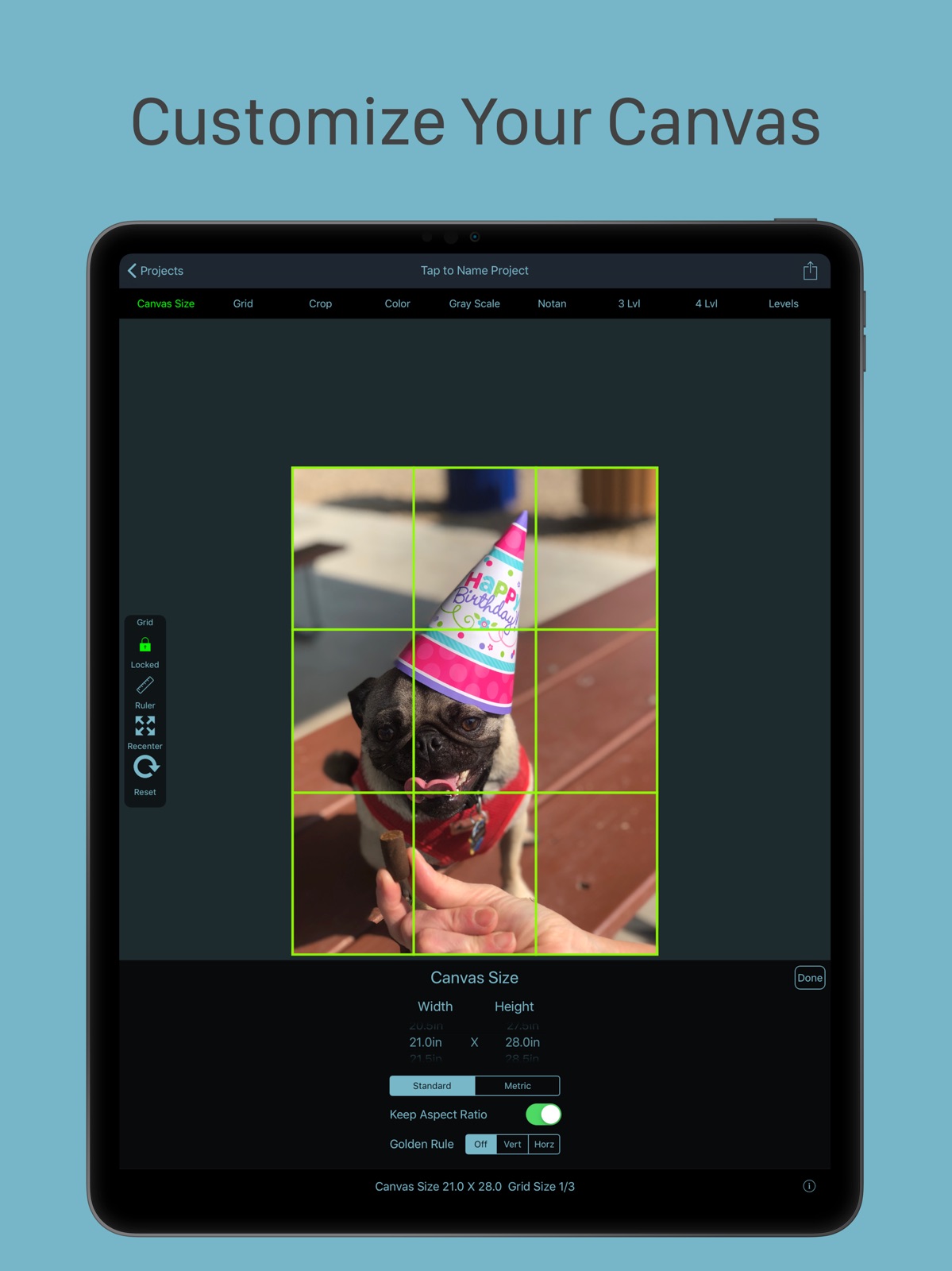
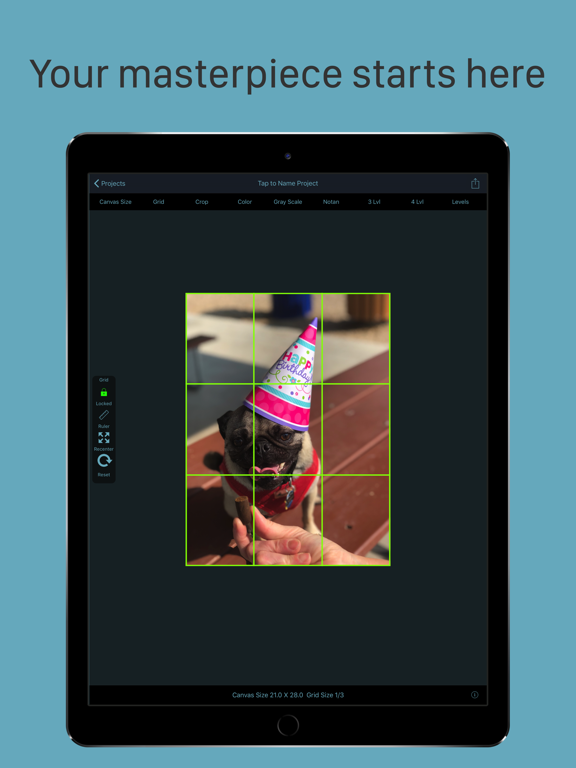
Apoku MCP provides app discovery, detailed cards, evidence, sources and screenshots where available. Unknown or conflicting prices stay explicit.
View JSON
GET /api/v3/apps/1089049611
{
  "app_id": 1089049611,
  "canonical_url": "https://appcorpus.com/apps/grid-painter-1089049611",
  "identity": {
    "name": "Grid Painter",
    "slug": "grid-painter",
    "developer": {
      "name": "bigpantsgroup LLC",
      "url": "https://appcorpus.com/developers/bigpantsgroup-llc-developer_8dcbd538ea53a56a0901f0a353fb8afb"
    },
    "icon_url": "https://is1-ssl.mzstatic.com/image/thumb/Purple116/v4/c4/33/f4/c433f4e1-f5dc-3664-9246-124a56eaf9f7/AppIcon1-0-1x_U007emarketing-0-9-0-85-220.png/512x512bb.jpg",
    "stores": [
      "apple"
    ],
    "platforms": [
      "iphone",
      "ipad"
    ],
    "status": {
      "state": "abandoned-risk",
      "label": "Abandoned risk",
      "last_checked": "2026-08-06",
      "last_checked_label": "6 Aug 2026",
      "banner": null,
      "region_note": null,
      "data_state": "stale",
      "data_state_label": "Some store data may be out of date"
    }
  },
  "listings": [
    {
      "store": "apple",
      "status": "ACTIVE",
      "url": "https://apps.apple.com/us/app/grid-painter/id1089049611?uo=4",
      "rating": 4.8,
      "rating_count": 393,
      "formatted_price": "$2.99",
      "is_free": false,
      "has_iap": false,
      "has_subscription": null,
      "version": "2.79",
      "updated": "2026-08-06",
      "currency": "USD"
    }
  ],
  "summary": {
    "one_liner": null,
    "summary": null,
    "best_for": [],
    "not_for": [],
    "status": "fallback",
    "at_a_glance": [
      "$2.99"
    ]
  },
  "categories": {
    "official": [
      "Photo & Video",
      "Education"
    ],
    "appcorpus": [
      {
        "category_id": "photo-video",
        "label": "Photo & video",
        "url": "https://appcorpus.com/categories/photo-video"
      },
      {
        "category_id": "education",
        "label": "Education",
        "url": "https://appcorpus.com/categories/education"
      }
    ]
  },
  "use_cases": [],
  "features": [
    {
      "capability_id": "family_sharing",
      "label": "Family Sharing",
      "availability": "unknown",
      "access_level": "unknown",
      "scope": null,
      "evidence": "Store published"
    }
  ],
  "pricing": [
    {
      "store": "apple",
      "formatted_price": "$2.99",
      "is_free": false,
      "has_iap": false,
      "has_subscription": null,
      "currency": "USD",
      "market": "es",
      "last_verified": "2026-08-06",
      "rows": [
        "Price: $2.99"
      ],
      "state": "current"
    }
  ],
  "screens": [
    {
      "url": "https://is1-ssl.mzstatic.com/image/thumb/Purple113/v4/f5/e9/80/f5e9803d-a067-c33c-7962-4401821a4250/pr_source.png/1600x1600bb.jpg",
      "store": "apple",
      "platform": "ipad",
      "alt": "Grid Painter ipad screenshot 1"
    },
    {
      "url": "https://is1-ssl.mzstatic.com/image/thumb/Purple113/v4/f7/ed/2d/f7ed2da1-9dd2-ffe6-b186-34564267a7f0/pr_source.png/1600x1600bb.jpg",
      "store": "apple",
      "platform": "ipad",
      "alt": "Grid Painter ipad screenshot 2"
    },
    {
      "url": "https://is1-ssl.mzstatic.com/image/thumb/Purple113/v4/5d/3f/03/5d3f033b-7649-b4fd-3169-6c99561b7efd/pr_source.png/576x768bb.png",
      "store": "apple",
      "platform": "ipad",
      "alt": "Grid Painter ipad screenshot 3"
    },
    {
      "url": "https://is1-ssl.mzstatic.com/image/thumb/Purple123/v4/e2/20/02/e2200273-a1a3-fccf-008f-c5270c8c510d/pr_source.png/1600x1600bb.jpg",
      "store": "apple",
      "platform": "ipad",
      "alt": "Grid Painter ipad screenshot 4"
    },
    {
      "url": "https://is1-ssl.mzstatic.com/image/thumb/Purple123/v4/95/ef/27/95ef2756-ffd9-a202-055e-2d39c944a2a2/pr_source.png/576x768bb.png",
      "store": "apple",
      "platform": "ipad",
      "alt": "Grid Painter ipad screenshot 5"
    },
    {
      "url": "https://is1-ssl.mzstatic.com/image/thumb/Purple123/v4/c7/c9/87/c7c98737-8dec-2def-6f33-e5cff400988c/pr_source.png/1600x1600bb.jpg",
      "store": "apple",
      "platform": "ipad",
      "alt": "Grid Painter ipad screenshot 6"
    },
    {
      "url": "https://is1-ssl.mzstatic.com/image/thumb/Purple123/v4/b5/58/8d/b5588ddf-5d3f-2dc7-2b92-c4023d2574b6/pr_source.png/576x768bb.png",
      "store": "apple",
      "platform": "ipad",
      "alt": "Grid Painter ipad screenshot 7"
    },
    {
      "url": "https://is1-ssl.mzstatic.com/image/thumb/Purple123/v4/27/ea/76/27ea76bd-e4dc-60ca-0431-d0b09da1a29e/pr_source.png/1600x1600bb.jpg",
      "store": "apple",
      "platform": "ipad",
      "alt": "Grid Painter ipad screenshot 8"
    },
    {
      "url": "https://is1-ssl.mzstatic.com/image/thumb/Purple123/v4/0d/54/8a/0d548ade-1b0c-5dd6-2c47-d79b19387188/pr_source.png/576x768bb.png",
      "store": "apple",
      "platform": "ipad",
      "alt": "Grid Painter ipad screenshot 9"
    },
    {
      "url": "https://is1-ssl.mzstatic.com/image/thumb/Purple113/v4/44/c8/24/44c8240a-4933-e7d6-9412-dc47fd67c4e4/pr_source.png/1600x1600bb.jpg",
      "store": "apple",
      "platform": "ipad",
      "alt": "Grid Painter ipad screenshot 10"
    },
    {
      "url": "https://is1-ssl.mzstatic.com/image/thumb/Purple123/v4/e5/66/be/e566be01-ecf7-e4bc-e8a0-08a26a08384a/pr_source.png/576x768bb.png",
      "store": "apple",
      "platform": "ipad",
      "alt": "Grid Painter ipad screenshot 11"
    },
    {
      "url": "https://is1-ssl.mzstatic.com/image/thumb/Purple123/v4/f0/d8/62/f0d862ca-0007-cffa-5bef-d25c2bf1e9e6/pr_source.png/1600x1600bb.jpg",
      "store": "apple",
      "platform": "ipad",
      "alt": "Grid Painter ipad screenshot 12"
    },
    {
      "url": "https://is1-ssl.mzstatic.com/image/thumb/Purple123/v4/8d/8d/be/8d8dbe7d-3ac4-4392-a184-2fe6170f60fa/pr_source.png/576x768bb.png",
      "store": "apple",
      "platform": "ipad",
      "alt": "Grid Painter ipad screenshot 13"
    },
    {
      "url": "https://is1-ssl.mzstatic.com/image/thumb/Purple113/v4/21/60/f9/2160f9b5-9231-cd95-8677-6e103eaa7256/pr_source.png/1600x1600bb.jpg",
      "store": "apple",
      "platform": "ipad",
      "alt": "Grid Painter ipad screenshot 14"
    },
    {
      "url": "https://is1-ssl.mzstatic.com/image/thumb/Purple113/v4/97/6b/d1/976bd133-c1a3-a215-6033-452a2930c7cf/pr_source.png/576x768bb.png",
      "store": "apple",
      "platform": "ipad",
      "alt": "Grid Painter ipad screenshot 15"
    },
    {
      "url": "https://is1-ssl.mzstatic.com/image/thumb/Purple123/v4/41/9f/4a/419f4a98-3eb4-9e33-822d-ee253206a39d/pr_source.png/1600x1600bb.jpg",
      "store": "apple",
      "platform": "ipad",
      "alt": "Grid Painter ipad screenshot 16"
    },
    {
      "url": "https://is1-ssl.mzstatic.com/image/thumb/Purple123/v4/e6/8c/2f/e68c2f40-6ad6-88a0-9e88-ce6a96e0ae16/pr_source.png/576x768bb.png",
      "store": "apple",
      "platform": "ipad",
      "alt": "Grid Painter ipad screenshot 17"
    },
    {
      "url": "https://is1-ssl.mzstatic.com/image/thumb/Purple113/v4/95/ca/51/95ca5153-dca3-b26e-8628-b4e629dc5a80/pr_source.png/1600x1600bb.jpg",
      "store": "apple",
      "platform": "ipad",
      "alt": "Grid Painter ipad screenshot 18"
    },
    {
      "url": "https://is1-ssl.mzstatic.com/image/thumb/Purple123/v4/35/2d/39/352d3901-ffa5-76a5-4bcf-3dbd8a0394da/pr_source.png/576x768bb.png",
      "store": "apple",
      "platform": "ipad",
      "alt": "Grid Painter ipad screenshot 19"
    },
    {
      "url": "https://is1-ssl.mzstatic.com/image/thumb/Purple113/v4/7c/bd/5f/7cbd5fa7-a3f4-17cc-7586-6e467d8810cc/pr_source.png/576x768bb.png",
      "store": "apple",
      "platform": "ipad",
      "alt": "Grid Painter ipad screenshot 20"
    },
    {
      "url": "https://is1-ssl.mzstatic.com/image/thumb/Purple113/v4/62/e8/ad/62e8ad8e-8aef-f706-0f14-0e01696ba53a/pr_source.png/1242x1600bb.jpg",
      "store": "apple",
      "platform": "iphone",
      "alt": "Grid Painter iphone screenshot 21"
    },
    {
      "url": "https://is1-ssl.mzstatic.com/image/thumb/Purple113/v4/12/ab/2c/12ab2caf-af61-72c4-653d-dec9179307db/pr_source.png/1242x1600bb.jpg",
      "store": "apple",
      "platform": "iphone",
      "alt": "Grid Painter iphone screenshot 22"
    },
    {
      "url": "https://is1-ssl.mzstatic.com/image/thumb/Purple113/v4/92/c7/f7/92c7f762-2be6-298a-fa93-38461a633c97/pr_source.png/1242x1600bb.jpg",
      "store": "apple",
      "platform": "iphone",
      "alt": "Grid Painter iphone screenshot 23"
    },
    {
      "url": "https://is1-ssl.mzstatic.com/image/thumb/Purple113/v4/4e/9d/1e/4e9d1e82-3bda-56d9-b46b-ded4f7dd6927/pr_source.png/1242x1600bb.jpg",
      "store": "apple",
      "platform": "iphone",
      "alt": "Grid Painter iphone screenshot 24"
    },
    {
      "url": "https://is1-ssl.mzstatic.com/image/thumb/Purple113/v4/24/a6/95/24a695a3-ffd9-42ec-d21d-40fe86e3b06e/pr_source.png/1242x1600bb.jpg",
      "store": "apple",
      "platform": "iphone",
      "alt": "Grid Painter iphone screenshot 25"
    },
    {
      "url": "https://is1-ssl.mzstatic.com/image/thumb/Purple113/v4/eb/94/db/eb94dba4-e0a4-5365-42c3-9e0a0a0e6f9c/pr_source.png/1242x1600bb.jpg",
      "store": "apple",
      "platform": "iphone",
      "alt": "Grid Painter iphone screenshot 26"
    },
    {
      "url": "https://is1-ssl.mzstatic.com/image/thumb/Purple123/v4/67/34/c7/6734c78f-4117-af33-14f5-f96564dcce8d/pr_source.png/1242x1600bb.jpg",
      "store": "apple",
      "platform": "iphone",
      "alt": "Grid Painter iphone screenshot 27"
    },
    {
      "url": "https://is1-ssl.mzstatic.com/image/thumb/Purple123/v4/85/ee/63/85ee6336-d0a6-c888-16d6-3ffa2efa678e/pr_source.png/1242x1600bb.jpg",
      "store": "apple",
      "platform": "iphone",
      "alt": "Grid Painter iphone screenshot 28"
    },
    {
      "url": "https://is1-ssl.mzstatic.com/image/thumb/Purple123/v4/e9/e7/e3/e9e7e3e1-3da0-3624-98de-2ccdc66bdfd0/pr_source.png/1242x1600bb.jpg",
      "store": "apple",
      "platform": "iphone",
      "alt": "Grid Painter iphone screenshot 29"
    },
    {
      "url": "https://is1-ssl.mzstatic.com/image/thumb/Purple113/v4/c1/10/42/c11042e7-9ebf-6aa0-57af-bf04a4a25aee/pr_source.png/1242x1600bb.jpg",
      "store": "apple",
      "platform": "iphone",
      "alt": "Grid Painter iphone screenshot 30"
    },
    {
      "url": "https://is1-ssl.mzstatic.com/image/thumb/PurpleSource115/v4/47/18/1f/47181f66-c3be-91c0-5bb8-2cbd8705a379/ff344df8-473c-44ff-bf8b-a3d4eb93d8ee_Screen_Shot_2021-05-25_at_22.05.46.png/1600x1600bb.jpg",
      "store": "apple",
      "platform": "mac",
      "alt": "Grid Painter mac screenshot 31"
    },
    {
      "url": "https://is1-ssl.mzstatic.com/image/thumb/PurpleSource115/v4/98/da/17/98da17d0-63a7-81e1-1ec2-a1374b471176/90debe78-db5c-41c4-90e7-bd78afbebfb8_Screen_Shot_2021-05-25_at_22.08.25.png/1600x1600bb.jpg",
      "store": "apple",
      "platform": "mac",
      "alt": "Grid Painter mac screenshot 32"
    },
    {
      "url": "https://is1-ssl.mzstatic.com/image/thumb/PurpleSource125/v4/2b/5d/20/2b5d205a-90e4-66c9-8bef-d28eac40e836/df810c00-b46c-40a3-9b79-a147138c3b2d_Screen_Shot_2021-05-25_at_22.08.52.png/1600x1600bb.jpg",
      "store": "apple",
      "platform": "mac",
      "alt": "Grid Painter mac screenshot 33"
    },
    {
      "url": "https://is1-ssl.mzstatic.com/image/thumb/PurpleSource115/v4/e8/da/3f/e8da3fd6-1bb3-fe61-de49-e219a0f9f164/c746d289-b2b0-45f6-a7cf-0053c6fa7515_Screen_Shot_2021-05-25_at_22.09.54.png/1600x1600bb.jpg",
      "store": "apple",
      "platform": "mac",
      "alt": "Grid Painter mac screenshot 34"
    }
  ],
  "data_states": {
    "screens": "current"
  },
  "ratings": [
    {
      "store": "apple",
      "average": 4.8,
      "count": 393,
      "market": "es",
      "observed_at": "2026-08-06",
      "state": "current",
      "reviews": [
        {
          "rating": 5,
          "title": "Perfect",
          "body": "Ever since Value Viewer went away years ago I’ve been looking for an app for making grids, notan, and value plans of photo references for painting. I’ve downloaded and paid for so many that ended up unusable for various reasons. This works perfectly, is elegantly simple to use and does everything I need it to do. It allows you to adjust value levels, number of values, overlay a grid, etc., and the functions are brilliantly easy to figure out. Thank you so much.",
          "author": "LoydC91362",
          "date": "6 Aug 2026"
        },
        {
          "rating": 3,
          "title": "Not ideal",
          "body": "I was hoping that the custom grid feature would allow for truly customizable grids but it does not. It would be great if the user could combine multiple grids without taking a screenshot in app and applying a second grid over the screenshot image. It would also be nice if it had a feature where the user could select the number of rows and columns instead of merely adjusting the size of the grid squares. It would also be nice if the user could add movable lines to customize it further. The art school I graduated from taught the method of drawing an x through the canvas from opposing corners and then a cross through the center and further refinement by doing the same within the smaller shapes generated which end in rectangles of the same ratio as the canvas. Geometrically this makes more sense than breaking the grid out into squares, especially if using a non standard ratio canvas. It is also easier than carrying around a ruler to measure out squares on the canvas. Overall it was a bit disappointing and I would have been willing to pay more if it were compatible with the way i use grids.",
          "author": "M. Thom",
          "date": "6 Aug 2026"
        },
        {
          "rating": 2,
          "title": "Has annoying bug; disappointing cropping feature",
          "body": "I decided to purchase this app primarily for the notan and grayscale features (there are free grid apps available) as well as its apparent ability to crop an image to custom sizes. Unfortunately, I quickly discovered a really annoying issue that makes the notan and grayscale feature pretty much worthless to me (and thus the app): for no reason whatsoever, it always rotates any square format photo when either of these filters is applied. Since I work in square format a lot, this is clearly a significant issue. There is no button or anything that I could see that would allow for me to un-rotate the image. The crop feature is also next to useless in that it only allows for absolute values - in inches - instead of ratios, like 1:2 or 3:4, etc. You plug in the size in inches and the crop borders remain fixed; there is no way I can figure out to expand or contract either the image or the crop grid to actually resize the picture. It is not a vector scaled cropping feature, in other words. Which is inexcusable: why would it be necessary to define an image on an iPad with actual inches vs. simple customizable and standard ratios? Answer: it isn’t. I wrote to the developers, waited a week, and heard nothing. Maybe seeing a poor public review will prompt a response and maybe some action to fix the rotation issue and poor cropping feature. At this point, I’d say if you are looking for an app with good functionality in terms of cropping, and especially if you’re ever trying to apply the non-grid features to your square format images, definitely skip this one 🙄.",
          "author": "knit-fanatic",
          "date": "6 Aug 2026"
        },
        {
          "rating": 1,
          "title": "Does not work",
          "body": "The crop feature does not work. The page freezes and does not let you crop OR cancel out of it. I have to shut the app down, reopen it and start over. I can use the grid, but I need the cropping feature I paid for. Also, when sending an email to the developers from the app regarding this issue I discovered that the contact page with my composed email also just stayed open after I hit Send. There is no way to know if the email was sent or not. The only choices on the page are to hit Send or Cancel. Hit Send and you get nothing, hit Cancel and it asks if you want to delete your draft - implying that the email did not send. (However I had cc myself and found I had an email in my inbox for every time I had hit send!) Again, the only way to leave this page is to close the app, then open again to get to the main page. Totally frustrating. This app does not do what it claims it can and has been a waste of my time and money.",
          "author": "THuley",
          "date": "6 Aug 2026"
        },
        {
          "rating": 5,
          "title": "4 Artists who need grids laid on source images",
          "body": "I haven’t used any other apps for this so it’s not a comparison but it’s nice to have an app where I can lay a custom grid on an image. The performance or interface of touch and adjustments between screen isn’t user friendly but eventually you figure it out. Using over life drawing figure study reference photos to help as training wheels with learning artist’s figure drawing anatomy.",
          "author": "Just Discovered Bollywood!",
          "date": "6 Aug 2026"
        }
      ]
    }
  ],
  "privacy": [
    {
      "store": "apple",
      "declarations": [
        {
          "title": "Data Not Linked to You",
          "detail": "App Functionality — Diagnostics — Crash Data",
          "source": "Developer declared"
        },
        {
          "title": "Data Not Linked to You",
          "detail": "App Functionality — Diagnostics — Other Diagnostic Data",
          "source": "Developer declared"
        },
        {
          "title": "Data Not Linked to You",
          "detail": "App Functionality — Diagnostics — Performance Data",
          "source": "Developer declared"
        },
        {
          "title": "Data Not Linked to You",
          "detail": "Diagnostics",
          "source": "Developer declared"
        }
      ],
      "accessibility": []
    }
  ],
  "changes": [
    {
      "store": "apple",
      "version": "1.3",
      "released_at": null,
      "notes": "Fixed an issue affecting older devices. Restored a detail label showing current project settings. Added a short directions page and a way to directly contact us for support."
    },
    {
      "store": "apple",
      "version": "1.4",
      "released_at": null,
      "notes": "Completely new layout engine Bug fixes for IOS 11 Thanks for being patient with us as we worked our way through this update!"
    },
    {
      "store": "apple",
      "version": "1.41",
      "released_at": null,
      "notes": "Fixed an occasional crash when setting canvas size"
    },
    {
      "store": "apple",
      "version": "1.50",
      "released_at": null,
      "notes": "Optimized for iPhone X Better memory management."
    },
    {
      "store": "apple",
      "version": "2.0",
      "released_at": null,
      "notes": "Redesigned controls. Now even easier to use with easy to find controls with more options. Added many Golden Rule principles. Introducing our innovative Notan functions pioneered in our sister app NotanIzer"
    },
    {
      "store": "apple",
      "version": "2.1",
      "released_at": null,
      "notes": "Fixed a bug where the custom control grid size shows up on the wrong control. Tools along the top stay put now when opening or closing any not an control"
    },
    {
      "store": "apple",
      "version": "2.2",
      "released_at": null,
      "notes": "Now set the width of the line drawn for the grid. Cleaned up some touch handling."
    },
    {
      "store": "apple",
      "version": "2.3",
      "released_at": null,
      "notes": "-Fixed a crash that can occur when an image no longer is in your photo library -Adjusted some layout items"
    },
    {
      "store": "apple",
      "version": "2.3.1",
      "released_at": null,
      "notes": "Fixed broken zoom function. Pinch and Expand the image by putting two fingers on it to zoom in and out of the image to see greater detail."
    },
    {
      "store": "apple",
      "version": "2.3.2",
      "released_at": null,
      "notes": "Cleaned up touch handling"
    },
    {
      "store": "apple",
      "version": "2.4",
      "released_at": null,
      "notes": "We added a ruler now to help you recreate your grid on your canvas. When selecting Thirds, Phi Grid, etc just tap the new ruler button on the left to show your dimensions between lines so you can easily measure that our out. And..Full Implementation of our NotanIzer functions!"
    },
    {
      "store": "apple",
      "version": "2.5",
      "released_at": null,
      "notes": "Cleaned up some buttons and their behavior. Fixed a bug related to setting a custom size canvas."
    },
    {
      "store": "apple",
      "version": "2.51",
      "released_at": null,
      "notes": "Making sure we support as broad a range of devices as possible we went back and looked at IOS 9 devices and fixed a few bugs affecting the Notan Filters as well as layout issues."
    },
    {
      "store": "apple",
      "version": "2.60",
      "released_at": null,
      "notes": "Fixed a bug related to storing information about your current projects. Added a different kind of pattern for the Focal Grid. Check it out!"
    },
    {
      "store": "apple",
      "version": "2.61",
      "released_at": null,
      "notes": "Fixed some unruly behavior in the view when manipulating the image. Adjusted the ruler labels"
    },
    {
      "store": "apple",
      "version": "2.62",
      "released_at": null,
      "notes": "Cleaned up some bad behavior when resizing images inside the Grid Changed the way Levels control works"
    },
    {
      "store": "apple",
      "version": "2.63",
      "released_at": null,
      "notes": "Fixed a bug that didn't allow you to resize the canvas when in normal mode."
    },
    {
      "store": "apple",
      "version": "2.7",
      "released_at": null,
      "notes": "Added a new grid pattern called \"Fourths\" which auto divides the height and width by 4 just like the thirds function. Fixed an issue in which images that were not oriented vertically would show up sideways in any of the Notan functions."
    },
    {
      "store": "apple",
      "version": "2.71",
      "released_at": null,
      "notes": "Fixed a bug that occurred sometimes when trying to name a project. Fixed a bug that would indicate a photo failed to initialize when it was still in iCloud and not downloaded to the device. Changed the behavior of adding a new photo. Previously the image was sized and set with the aspect ratio locked on so that when you changed one side of the canvas size, the other would size itself maintaining the aspect ration of the image. It now no longer defaults to that behavior but you can turn it on of you wish."
    },
    {
      "store": "apple",
      "version": "2.72",
      "released_at": null,
      "notes": "Bug fixes"
    }
  ],
  "alternatives": [
    {
      "app_id": 1406085029,
      "name": "Wise Photos",
      "url": "https://appcorpus.com/apps/wise-photos-1406085029",
      "reason": "Same category + similar ratings"
    },
    {
      "app_id": 652964538,
      "name": "Poster Shine Pro - posterize",
      "url": "https://appcorpus.com/apps/poster-shine-pro-posterize-652964538",
      "reason": "Same category + similar ratings"
    },
    {
      "app_id": 1529850456,
      "name": "Draw Grid on Image",
      "url": "https://appcorpus.com/apps/draw-grid-on-image-1529850456",
      "reason": "Same category + similar ratings"
    },
    {
      "app_id": 1406085025,
      "name": "Wise Camera",
      "url": "https://appcorpus.com/apps/wise-camera-1406085025",
      "reason": "Same category + similar ratings"
    },
    {
      "app_id": 985497767,
      "name": "Oilist",
      "url": "https://appcorpus.com/apps/oilist-985497767",
      "reason": "Same category + similar ratings"
    },
    {
      "app_id": 6450679069,
      "name": "Brushstroke Pro for iPad",
      "url": "https://appcorpus.com/apps/brushstroke-pro-for-ipad-6450679069",
      "reason": "Same category + similar ratings"
    }
  ],
  "evidence_summary": {
    "index_state": "S1",
    "evidence_level": 1,
    "level_label": "Live store listing",
    "indexable": true,
    "last_verified_at": "2026-08-06",
    "unknown_fields": [
      "Apoku editorial summary has not been published yet."
    ],
    "sources": [
      "App Store"
    ]
  },
  "availability_markets": {
    "live": [
      "us"
    ],
    "selected": "es",
    "note": "No LIVE observation for ES yet."
  },
  "feature_events": {
    "events": []
  },
  "features_slice": {
    "plans": [],
    "features": [],
    "unknown_features": [],
    "data_cutoff": "6 Aug 2026"
  }
}