
Quick verdict
- What it is
- Store information collected; independent summary not yet available.
- At a glance
-
- $12.99
Categories and search queries
Official categories
- Education
- Utilities
AppCorpus categories
Key functions
| Function | Availability | Access | Scope | Evidence |
|---|---|---|---|---|
| Family Sharing | Yes | Unknown | App Store | Store published |
Screens
App Store
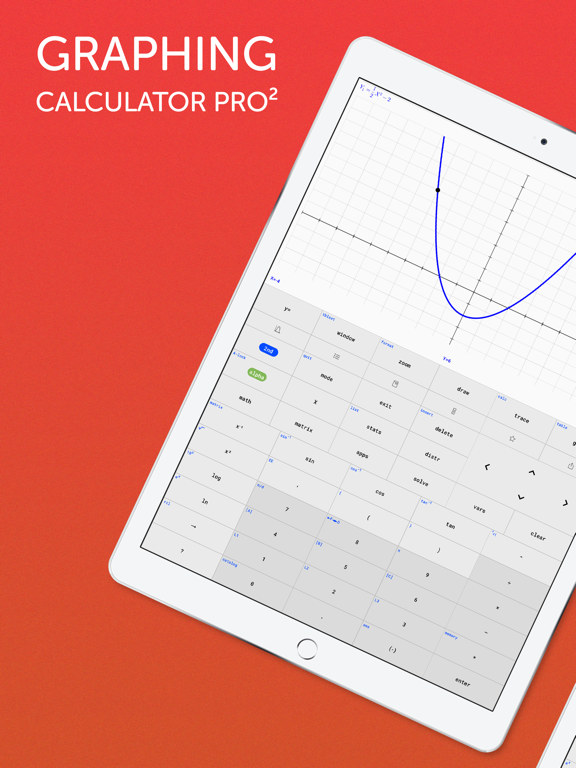
24 store screenshots



Pricing & paywalls
App Store
- Price: $12.99
Ratings & reviews
App Store
-
3/5Almost great
When I first downloaded this app it was just like my TI-84 which I liked because I was already used to the button layout, but now things have changed with the recent updates. For example, when I want to enter a fraction, I used to be able to click math, right,up, then enter (D:n/d) but in the app it’s different which is annoying because I already have that muscle memorized. Also, one of the huge downsides is the lack of iPad integration. Especially since the page on the App Store only shows the app being used on an iPad, which makes one believe that this is tailored for the iPad. Sadly, that isn’t the case. I would really like to see landscape viewing as well as multitasking features (side by side viewing). Last thing, can I change the x values when pressing 2nd graph. I know on the TI-84 you can change this by pressing the + sign.
Josh142006 · 6 Aug 2026
-
1/5DO NOT GET, NOT WORTH EVEN A PENNY
I am currently a college student, and bought this app when I was heading to class and realized I left my actual TI-84 at home. I went to use the stat menu to access some key functions for my statistics class, and it told me the it was still under development. Why did they release an app for over 3$ if it’s not even complete?? Well, Texas Instruments holds a monopoly on graphing calculator and took down the previous completely working graphing calculator apps so you are forced to buy their actual calculators. It is absurd that my phone is more powerful than a laptop computer was 10 years ago, yet I am stuck paying the same price for a graphing calculator that is fully functional that I would have paid over a decade ago. There is no reason this app is not complete, besides the fact they want you to spend your money on this app, just to realize you are stuck lying over 75$ for a fully functional one. The app keeps saying the stat function menu and other ones not functioning will be added next update, but it never is. Do not purchase this app, and do not purchase an actual Texas instrument calculator if you do not have to. If you are needing it just for graphing, there are many other apps that do just the graphing aspect of a graphing calculator. It is a shame to admit that if you need to use certain functions you will be spending over 75$ for it.
Boycott Texas Intruments. · 6 Aug 2026
-
1/5Poor functionality
You want TI 84 functionality? Your phone is more than capable of providing that, this app is not. Your phone has many, many, many times the processing, memory & graphics requirements needed to emulate a TI 84 calculator. So, why is this app a piece of junk? It appears to be a work in progress. In very slow progress. It doesn’t even approach the functionality of a TI 83 or 84 calculator. No statistics, NO PROGRAMMING! The entire point of this purchase was programming equations so I could quickly & easily plug in my variables & repeatedly get solutions. At the current level of functionality this app has, for my requirements, I could have just flipped my phone into landscape mode & used the native Apple calculator. It’s absurd that this app is priced above $3. To price it at $.99 would be a stretch. And that’s not even approaching why they just updated the look of the icon while the UI is still out of the Stone Age. They update the icon everyone sees to make it look more flashy & attractive (more worth what they’re charging for the app) while the graphics within the app look like something drawn up on MS DOS & the functionality is nowhere near the TI 84 their app is named after. There’s nothing wrong with starting somewhere on an app & releasing it in an attempt to fund the future of the app. But that should be made clear to those purchasing the app. And it should be priced based on current functionality, not on what the finished product might be in a year or two.
Budmc121 · 6 Aug 2026
-
3/5It’s a good calculator but without all the calculator parts
I was using this calculator because the price of a ti 84 plus calculator would have been 100$ so this was a cheaper alternative. One of the reasons I bought this was for finding the roots and max. And min. Of functions, it does this exactly like a TI-84 would. The only problem is that it cannot graph a scatter plot or find an equation for that scatter plot. While it says that it will be out in in a new update, the reason I bought it was specifically for scatter plots and quadratic function graphing. All In all it is the closest calculator to the TI-84 and a cheaper alternative to the calculator minus the scatter plot.
no scatter plot function!! · 6 Aug 2026
-
1/5DON’T BUY!!!!!
does anyone know of a way to get refunded on apps that lie about calculator functionality??? in the app description it says that it is ‘perfect for high school and college students’ and that it aids app-users with calculus (which is the lie). after PAYING for the app and trying to utilize it for my stats/calc college course, like the app claimed it was capable of, the calculator’s ‘stats’ and ‘vars’ button options NEEDED for the essential coursework for problem solving in statistics AND calculus, don’t even work. so i either want to find out how to get a full reimbursement, or im suing for false advertisement bc now i can’t do my homework. the whole point of Texas instrument GRAPHING CALCULATORS is to be able to graph unlike a scientific calculator can, which is another reason i also bought this app and another reason why i bought this one instead of using my satisfactory calculator app preinstalled on my phone. what a waste of money x
nia.t · 6 Aug 2026
Privacy & accessibility
App Store
Privacy
- Data Not Linked to You — Analytics — Diagnostics — Performance Data Developer declared
- Data Not Linked to You — Analytics — Usage Data — Product Interaction Developer declared
- Data Not Linked to You — Diagnostics Developer declared
- Data Not Linked to You — Usage Data Developer declared
- Data Used to Track You — Diagnostics — Performance Data Developer declared
- Data Used to Track You — Diagnostics Developer declared
- Data Used to Track You — Usage Data — Product Interaction Developer declared
- Data Used to Track You — Usage Data Developer declared
Accessibility
No accessibility labels collected yet.
Versions
App Store
-
1.0.9
We are constantly improving the TI-84 Graphing Calculator app to provide you with the best user experience possible. In this update, we fixed a bug which caused matrices to use old values even if you edit them. In this version, you can edit all matrices, and the new values will be used!
-
1.0.91
We are constantly improving the TI-84 Graphing Calculator app to provide you with the best user experience possible. In this update, we completely redesigned our app icon, so it looks even better on your home screen.
-
1.1.0
We are constantly improving the TI-84 Graphing Calculator app to provide you with the best user experience possible. + Fixed wrong answers for arcsin, arccos, arctan. + Updated the keyboard layout for different iPad models to make everything look better. + Tutorial screen updated. Now you can send us feedback about the app or report problems directly from the Tutorial page (press question mark button to access it). + Optimised for iOS 12 and the new iPhone Xs Max, Xr and new iPad Pro display sizes.
-
1.1.1
We are constantly improving the TI-84 Graphing Calculator app to provide you with the best user experience possible. + Font size of the menu headers increased. + Fixed wrong answers for arcsin, arccos, arctan. + Updated the keyboard layout for different iPad models to make everything look better. + Tutorial screen updated. Now you can send us feedback about the app or report problems directly from the Tutorial page (press question mark button to access it). + Optimised for iOS 12 and the new iPhone Xs Max, Xr and new iPad Pro display sizes.
-
1.1.3
We are constantly improving the TI-84 Graphing Calculator app to provide you with the best user experience possible. + In the Table menu it is now possible to scroll up to see negative x-values. + Font size of the menu headers increased. + Fixed wrong answers for arcsin, arccos, arctan. + Updated the keyboard layout for different iPad models to make everything look better. + Tutorial screen updated. Now you can send us feedback about the app or report problems directly from the Tutorial page (press question mark button to access it). + Optimised for iOS 12 and the new iPhone Xs Max, Xr and new iPad Pro display sizes.
-
1.1.4
We are constantly improving the TI-84 Graphing Calculator app to provide you with the best user experience possible. + In the Table menu it is now possible to scroll up to see negative x-values. + Font size of the menu headers increased. + Fixed wrong answers for arcsin, arccos, arctan. + Updated the keyboard layout for different iPad models to make everything look better. + Tutorial screen updated. Now you can send us feedback about the app or report problems directly from the Tutorial page (press question mark button to access it). + Optimised for iOS 12 and the new iPhone Xs Max, Xr and new iPad Pro display sizes.
-
1.2.0
Lists Update: + Enter lists using the Statistics List Editor or with curly brackets on the main screen + Use lists for all of your basic and trigonometric calculations + Use lists for Math and Num operations More functions from the List and Stat menu are coming soon! Happy New Year!
-
1.2.1
List Update & Bug Fixes: + Fixed a bug that displayed all values at the right edge of the screen in Window and Ttblset menu + New List functions available: 1. cumSum: Returns cumulative sums of a list or matrix. 2. mean: Returns the mean value of a list. 3. sum: Returns the sum of the elements in a list. 4. prod: Returns the product of the elements in a list. Previous Update: + Enter lists using the Statistics List Editor or with curly brackets on the main screen + Use lists for all of your basic and trigonometric calculations + Use lists for Math and Num operations More functions from the List and Stat menu are coming soon!
-
1.2.2
+ New List functions available: 1. stdDev: Returns the sample standard deviation of the elements of a list. 2. variance: Returns the variance of a list. + Added haptic feedback after pressing a button Previous Update: + New List functions: cumSum(, mean(, sum( and prod(. + Enter lists using the Statistics List Editor or with curly brackets on the main screen + Use lists for all of your basic and trigonometric calculations + Use lists for Math and Num operations More functions from the List and Stat menu are coming soon!
-
1.2.3
+ New List functions available: 1. dim: Finds the size of an existing list or matrix. 2. median: Returns the median of a list. + New quick access buttons available to navigate to useful menus even faster Previous Update: + New List functions: cumSum(, mean(, sum(, prod(, stdDev( and variance(. + Enter lists using the Statistics List Editor or with curly brackets on the main screen + Use lists for all of your basic and trigonometric calculations + Use lists for Math and Num operations + Added haptic feedback after pressing a button More functions from the List and Stat menu are coming soon!
-
1.2.4
+ New Stats functions available: 1-Variable Stats Previous Update: + New List functions: cumSum(, mean(, median(, sum(, prod(, stdDev( and variance(. + Enter lists using the Statistics List Editor or with curly brackets on the main screen + Use lists for all of your basic and trigonometric calculations + Use lists for Math and Num operations + Added haptic feedback after pressing a button More functions from the List and Stat menu are coming soon!
-
1.2.5
+ New Stats functions available: 1-Variable Stats 2-Variable Stats + Use statistical variables from the Vars menu. Previous Update: + New List functions: cumSum(, mean(, median(, sum(, prod(, stdDev( and variance(. + Enter lists using the Statistics List Editor or with curly brackets on the main screen + Use lists for all of your basic and trigonometric calculations + Use lists for Math and Num operations More functions from the Statistics menu are coming soon!
-
1.2.6
In this huge update, we have a lot of new calculator functions for you: ++ Regressions are now available in Stats > Calc menu: + LinReg(ax+b) + QuadReg + CubicReg + QuartReg + LinReg(a+bx) + ExpReg ++ Distr menu is now available with the following distributions: + normalpdf + normalcdf + poissonpdf + poissoncdf + binompdf + binomcdf ++We added several new functions to Math menu: + round + iPart + fPart + int + lcm + gcd + remainder + randInt + randIntNoRep Previous Update: + 1-Variable Stats + 2-Variable Stats + Use statistical variables from the Vars menu. + List functions: cumSum(, mean(, median(, sum(, prod(, stdDev( and variance(
-
1.2.7
In this huge update, we have a lot of new calculator functions for you: ++ Regressions are now available in Stats > Calc menu: + LinReg(ax+b) + QuadReg + CubicReg + QuartReg + LinReg(a+bx) + ExpReg ++ Distr menu is now available with the following distributions: + normalpdf + normalcdf + poissonpdf + poissoncdf + binompdf + binomcdf ++We added several new functions to Math menu: + round + iPart + fPart + int + lcm + gcd + remainder + randInt + randIntNoRep Previous Update: + 1-Variable Stats + 2-Variable Stats + Use statistical variables from the Vars menu. + List functions: cumSum(, mean(, median(, sum(, prod(, stdDev( and variance(
-
1.2.8
In this huge update, we have a lot of new calculator functions for you: ++ Regressions are now available in Stats > Calc menu: + LinReg(ax+b) + QuadReg + CubicReg + QuartReg + LinReg(a+bx) + ExpReg ++ Distr menu is now available with the following distributions: + normalpdf + normalcdf + poissonpdf + poissoncdf + binompdf + binomcdf ++We added several new functions to Math menu: + round + iPart + fPart + int + lcm + gcd + remainder + randInt + randIntNoRep Previous Update: + 1-Variable Stats + 2-Variable Stats + Use statistical variables from the Vars menu. + List functions: cumSum(, mean(, median(, sum(, prod(, stdDev( and variance(
-
1.2.9
++ New Share Feature + Share Y= functions, equations, matrices and lists with your friends. + Now you can send them a link via any messenger and they will be able to paste it into the app and use it for calculations. + For sharing, click on an expression in Home menu or use the share button (top right corner). In this huge update, we have a lot of new calculator functions for you: ++ Regressions are now available in Stats > Calc menu: + LinReg(ax+b) + QuadReg + CubicReg + QuartReg + LinReg(a+bx) + ExpReg ++ Distr menu is now available with the following distributions: + normalpdf + normalcdf + poissonpdf + poissoncdf + binompdf + binomcdf ++We added several new functions to Math menu: + round + iPart + fPart + int + lcm + gcd + remainder + randInt + randIntNoRep Previous Update: + 1-Variable Stats + 2-Variable Stats + Use statistical variables from the Vars menu. + List functions: cumSum(, mean(, median(, sum(, prod(, stdDev( and variance(
-
1.3.0
++ New Share Feature + Share Y= functions, equations, matrices and lists with your friends. + Now you can send them a link via any messenger and they will be able to paste it into the app and use it for calculations. + For sharing, click on an expression in Home menu or use the share button (top right corner). In this huge update, we have a lot of new calculator functions for you: ++ Regressions are now available in Stats > Calc menu: + LinReg(ax+b) + QuadReg + CubicReg + QuartReg + LinReg(a+bx) + ExpReg ++ Distr menu is now available with the following distributions: + normalpdf + normalcdf + poissonpdf + poissoncdf + binompdf + binomcdf ++We added several new functions to Math menu: + round + iPart + fPart + int + lcm + gcd + remainder + randInt + randIntNoRep Previous Update: + 1-Variable Stats + 2-Variable Stats + Use statistical variables from the Vars menu. + List functions: cumSum(, mean(, median(, sum(, prod(, stdDev( and variance(
-
1.3.1
++ New Share Feature + Share Y= functions, equations, matrices and lists with your friends. + Now you can send them a link via any messenger and they will be able to paste it into the app and use it for calculations. + For sharing, click on an expression in Home menu or use the share button (top right corner). In this huge update, we have a lot of new calculator functions for you: ++ Regressions are now available in Stats > Calc menu: + LinReg(ax+b) + QuadReg + CubicReg + QuartReg + LinReg(a+bx) + ExpReg ++ Distr menu is now available with the following distributions: + normalpdf + normalcdf + poissonpdf + poissoncdf + binompdf + binomcdf ++We added several new functions to Math menu: + round + iPart + fPart + int + lcm + gcd + remainder + randInt + randIntNoRep Previous Update: + 1-Variable Stats + 2-Variable Stats + Use statistical variables from the Vars menu. + List functions: cumSum(, mean(, median(, sum(, prod(, stdDev( and variance(
-
1.3.3
++ New Full Screen Mode + Explore your graphs in detail + Zoom and trace graphs in full screen mode ++ New Share Feature + Share Y= functions, equations, matrices and lists with your friends. + Now you can send them a link via any messenger and they will be able to paste it into the app and use it for calculations. + For sharing, click on an expression in Home menu or use the share button (top right corner). In this huge update, we have a lot of new calculator functions for you: ++ Regressions are now available in Stats > Calc menu: + LinReg(ax+b) + QuadReg + CubicReg + QuartReg + LinReg(a+bx) + ExpReg ++ Distr menu is now available with the following distributions: + normalpdf + normalcdf + poissonpdf + poissoncdf + binompdf + binomcdf ++We added several new functions to Math menu: + round + iPart + fPart + int + lcm + gcd + remainder + randInt + randIntNoRep
-
1.3.4
++ New Full Screen Mode + Explore your graphs in detail + Zoom and trace graphs in full screen mode ++ New Share Feature + Share Y= functions, equations, matrices and lists with your friends. + Now you can send them a link via any messenger and they will be able to paste it into the app and use it for calculations. + For sharing, click on an expression in Home menu or use the share button (top right corner). In this huge update, we have a lot of new calculator functions for you: ++ Regressions are now available in Stats > Calc menu: + LinReg(ax+b) + QuadReg + CubicReg + QuartReg + LinReg(a+bx) + ExpReg ++ Distr menu is now available with the following distributions: + normalpdf + normalcdf + poissonpdf + poissoncdf + binompdf + binomcdf ++We added several new functions to Math menu: + round + iPart + fPart + int + lcm + gcd + remainder + randInt + randIntNoRep
-
1.3.5
Big update in 2020. We got a ton of new features and calculator commands for you. + Use commands of the completely new menus Angle and Test. + The calculator now supports complex numbers and we added respective commands to the Math menu. + Use your lists to perform statistical tests: Z-Test, T-test, ZInterval, and TInterval. + 8 new commands added to the Distribution menu. Let us know how you like the new functions and leave a review :)
-
1.4
+ With this update you can export your graphing window as an image or PDF and share it with your friends or save it for yourself. Press the "Graph" key and you will see a new small icon on the right side. You can also save or share a full-screen chart. + Use different History Tabs for your calculations. To add a new History tab, scroll down in the home menu and click the "+" button. This will create a new History tab. This feature is ideal if you are working on several math problems at the same time, or if you want to save your last calculations but start with a new screen. + iPad users can now enjoy the app in landscape mode and multitask with a split-screen. This way you can use your calculator together with another app. + Press and hold any key to access the second function behind it. For example, if you want to use sin-1, you can press "shift" -> "sin" or now just hold "sin" down until you see that shift commands are highlighted. Below are even more useful and new calculator commands. + Draw circles with specified radius and x- and y-value. + seconds " key now available. Press the shift key and the " + " key to use them. + New angle commands for converting coordinates from Polar to Cartesian coordinates and vice versa: R►Pr(, R►Pθ(, P►Rx(, P►Ry( + New matrix commands: Fill (fill a list or matrix with numbers) and randM (create a random number matrix). + A set of new statistical tests: 2-SampZTest, 2-SampTTest, 1-PropZTest, 2-PropZTest, 2-SampZInt, 2-SampTInt, 1-PropZInt. + New regressions added to the STATS menu: LnReg, PwrReg, Logistic, SinReg. + geometpdf and geometcdf have been added to the distribution menu.
-
1.4.2
+ New side menu that makes it easier for you to quickly access links. Open it by swiping left to right in the calculations menu. + Redesigned Y= menu. Give the graphs your favorite colors. + Support for piecewise functions. New commands are available! + Med-Med + randNorm + randBin + Matrix-List + List-Matrix + DrawInv + 2-PropZ-Interval + Chi²-Test + Chi²GOF-Test + LinRegT-Test + LinRegT-Interval + ANOVA
-
1.4.3
+ Fixed a bug that table didn't work. + New side menu that makes it easier for you to quickly access links. Open it by swiping left to right in the calculations menu. + Redesigned Y= menu. Give the graphs your favorite colors. + Support for piecewise functions. New commands are available! + Med-Med + randNorm + randBin + Matrix-List + List-Matrix + DrawInv + 2-PropZ-Interval + Chi²-Test + Chi²GOF-Test + LinRegT-Test + LinRegT-Interval + ANOVA
-
1.5.0
· 27 Apr 2026
General bug fixes and improvements.
Alternatives
- Graphing Calculator Plus AI — Same category + similar ratings
- Ncalc - Graphing Calculator 84 — Same category + similar ratings
- Graphing Calculator X84 — Same category + similar ratings
- MathPapa - Algebra Calculator — Same category + similar ratings
- PhotoMath Solver AI: MathBox — Same category + similar ratings
- Desmos Graphing Calculator — Same category + similar ratings
Availability by market
- US
Data quality & evidence
- Page completeness
- Live store listing
- Last verified
- 6 Aug 2026
- Sources
- App Store
- Independent summary has not been published yet.