
Quick verdict
- What it is
- Store information collected; independent summary not yet available.
- At a glance
-
- Free to download
- In-app purchases
Categories and search queries
Official categories
- Music
- Utilities
AppCorpus categories
Key functions
| Function | Availability | Access | Scope | Evidence |
|---|---|---|---|---|
| Family Sharing | Yes | Unknown | App Store | Store published |
| Free app | Yes | Free | — | Store published |
| In-app purchases | Yes | Limited free | — | Store published |
Screens
App Store
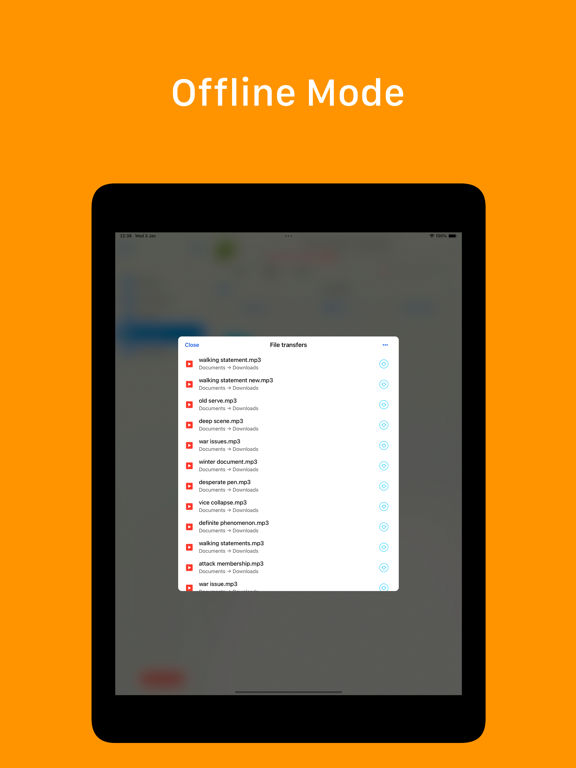
15 store screenshots


Pricing & paywalls
App Store
- GoPlayer Premium — $9.99
Ratings & reviews
App Store
-
4/5Great but could use some metadata fixes
I’m really enjoying the app as a way to manage my Google Drive music library. Being able to play ALAC files in particular is great. The only area where I’d like to see some improvements is the way it handles a few metadata features. It doesn’t seem to manage multi-disc albums very well. Instead of sorting songs by disc and then by track, the entire set is sequenced by track. For example, the tracks will show up as D1-T1, D2-T1, D1-T2, D2-T2, etc. instead of D1-T1, D1-T2, D1-T3, etc. Another thing that would be nice to see is the option to group compilation artists together rather than having to scroll past artists with only one or two songs in my library.
heehawthebook · 6 Aug 2026
-
5/5The ultimate app for mp3s!
I don’t normally pay for apps, but $2.99 is a fair price to unlock GoPlayer’s full functionality. I am a Gen X music lover with a lot of CDs I am working on digitizing so I can enjoy my entire music collection anytime, anywhere. I certainly couldn’t afford to buy all those albums all over again in digital format. I’m using iTunes on an old laptop to rip the CDs to mp3 format and then uploading them to my Google Drive. GoPlayer makes it easy to create unlimited playlists and organize my music on my iPhone how I want. I don’t have to take up space on my phone to download the songs to listen to them unless I want to play them somewhere where there’s no WiFi, like in my car, through the Bluetooth stereo. I really like that the app somehow knows and automatically displays the song title, artist name, and album cover artwork for each song. This is a great feature that other apps don’t have. If the artwork is incorrect or you want to change it, which happens about 5% of the time, just upload the image you want to use on your Google Drive and you can access it on the app. The only thing that would make this app perfect is if you could order your playlists how you want. I would order mine alphabetically by artist name. Right now, they are listed in order of their creation or modification, from most to least recent, and you can’t change it. Overall, I would recommend this app. ***Edit: Someone must have read my review and modified the app accordingly because I noticed the other day that now my playlists are automatically alphabetized, which is fantastic, because it makes it easy to find what I want instead of aimlessly scrolling. Now the app is basically perfect so I’m upgrading my rating from 4 to 5 stars. ;) ***
Stef J. · 6 Aug 2026
-
1/5Horrible for local music files
I’m surprised by the glowing reviews. I bought this to be able to synch my mp3s with google drive as well as have a library of local mp3s. Every time I open the player it goes through a very lengthy process that seems to involve removing the track number from each song’s title, e.g., “01 I can’t get no satisfaction” becomes “I can’t get no satisfaction.” Attempting to play any song having the track number in its title (before it’s been removed) causes it to freeze, with an “X” inside of a circle displayed over the title that won’t go away. Also, every time I open it most songs (all local) are grayed out and can’t be played until the process completes. The UI presents the choice of showing “online files” “local files” and “on my IPhone.” What is the difference between “local files” and “on my IPhone?” When I click the latter and browse to what is an mp3 on my iPhone, the “add to library” option does nothing, and there is no way to select the file or folder. This is unusable!
Trizzle002 · 6 Aug 2026
-
3/5Passable for Large Collections of 100k+ songs
I will start by saying I haven’t found anything better for the size of my collection. Apple and Google/YouTube both cap at 100,000 songs for their cloud music player and I got tired of the limit. This app solved my problem, at least in small part by lifting the cap. That said, it took over a week to process the metadata for all of my files and I eventually had to delete all of the album artwork because it was filling up my phone even at the smallest image size. If your collection is smaller and loads faster/fits with album art, this is a great player. If you are searching because you are over the 100k songs iTunes Match allows, give it a try but you’ll want to keep looking at the same time.
JimmySchnickens · 6 Aug 2026
-
5/5Good app for taking back full control if one’s music collection
After some annoying design choices by streaming services, I decided it was time to bail on internet streaming and get back to owning/playing my own music. This app is the best I’ve found to allow me to do that from my collection of mp3 files stored on Google drive. 4 stars because it works well in general, but a little buggy. *edit - they updated the app! Works excellently again! Good by streaming services. Back to old school mp3 of my own music for me.
hrockstar · 6 Aug 2026
Privacy & accessibility
App Store
Privacy
- Data Linked to You — Analytics — Diagnostics — Performance Data Developer declared
- Data Linked to You — Analytics — Identifiers — Device ID Developer declared
- Data Linked to You — Analytics — Location — Coarse Location Developer declared
- Data Linked to You — Analytics — Usage Data — Advertising Data Developer declared
- Data Linked to You — Analytics — Usage Data — Product Interaction Developer declared
- Data Linked to You — Third-Party Advertising — Diagnostics — Performance Data Developer declared
- Data Linked to You — Third-Party Advertising — Identifiers — Device ID Developer declared
- Data Linked to You — Third-Party Advertising — Location — Coarse Location Developer declared
- Data Linked to You — Third-Party Advertising — Usage Data — Advertising Data Developer declared
- Data Linked to You — Third-Party Advertising — Usage Data — Product Interaction Developer declared
- Data Linked to You — Diagnostics Developer declared
- Data Linked to You — Identifiers Developer declared
- Data Linked to You — Location Developer declared
- Data Linked to You — Usage Data Developer declared
- Data Not Linked to You — Analytics — Diagnostics — Crash Data Developer declared
- Data Not Linked to You — Third-Party Advertising — Diagnostics — Crash Data Developer declared
- Data Not Linked to You — Diagnostics Developer declared
- Data Used to Track You — Diagnostics — Crash Data Developer declared
- Data Used to Track You — Diagnostics — Performance Data Developer declared
- Data Used to Track You — Diagnostics Developer declared
- Data Used to Track You — Identifiers — Device ID Developer declared
- Data Used to Track You — Identifiers Developer declared
- Data Used to Track You — Location — Coarse Location Developer declared
- Data Used to Track You — Location Developer declared
- Data Used to Track You — Usage Data — Advertising Data Developer declared
- Data Used to Track You — Usage Data — Product Interaction Developer declared
- Data Used to Track You — Usage Data Developer declared
Accessibility
No accessibility labels collected yet.
Versions
App Store
- 1.0
-
1.1
- Equalizer; - UI fixes; - Performance fixes; - Fixed Airplay;
-
1.2
- playback fixes; - new player screen ui; - new auth flow; - perfomance improvements;
-
1.3
New Features: iPad full screen player view; Repeat stop option; Passcode protection; Player queue; Open in for online files; Rewind and fast forward timeout; Fixes: Removed full screen banner; Fixed equalizer issues; Fixed performance; Fixed player buffering; Fixed music library scanning; Fixed songs sorting in music library; Confirmation alert for all files delete operations;
-
1.4
- Audio player queue. - Night mode. - Tracks sorting. - Fixed application performance and user interface.
-
1.5
Fixed Google Drive authorization Fixed application crash when you activate passcode Fixed use file names instead of audio tags Perfomance fixes User Interface fixes
-
1.6
Fixed FLAC files playback. Fixed Wi-Fi Drive upload issues. Added playback speed control for Google Chromecast. Fixed streaming to Google Chromecast devices. Improved Airplay streaming. Added SONOS support via AirPlay2. Added audio equalizer and playback speed control for AirPlay. Fixed audio volume slider. Fixed user interface for devices with large screen size. Fixed localization issues.
-
1.7
Fixed playback for FLAC files; Fixed audio player queue; General performance improvements; User interface fixes;
-
1.8
We constantly update GOPLAYER to provide the best user experience for you. In this version we fixed issues you reported in emails and updated user interface. We also fixed playback issues and improved application performance.
-
1.9
We constantly update application to provide the best user experience for you. In this version we fixed issues you reported in emails. We also updated user interface.
-
2.0
We constantly update application to provide the best user experience for you. In this version we fixed playback issue in mixed mode. We also fixed localization issues.
-
2.1
We constantly update application to provide the best user experience for you. In this version we fixed app performance. We also fixed user interface issues.
-
2.2
We constantly update application to provide the best user experience for you. In this version we fixed user interface issues. We added M3U playlists support. We added external files support.
-
2.3
We constantly update application to provide the best user experience for you. We added mini player. We fixed user interface issues.
-
2.4
We constantly update application to provide the best user experience for you. In this version we fixed user interface issues.
-
2.5
In this version, we fixed issues from your feedback. We improved application performance. Fixed user interface issues.
-
2.6
We regularly update the application to fix issues and improve performance.
-
2.7
We regularly update the application to fix issues and improve performance.
-
2.8
Ensuring your app experience is top-notch, we regularly roll out updates to fix issues and boost performance. In this version, we've fixed incorrect duration calculation for large files. Appreciate your feedback!
-
2.9
Hey there! We're always working to make your app experience awesome. In this update, we fixed some issues with how things look and work. Let us know what you think!
-
3.0
· 8 Sep 2025
Hello everyone! In this update we fixed music playback issues. We also improved cloud storage connections. New widgets are now available. We fixed some crashes, polished the interface, and made the app run faster and smoother.
Alternatives
- Music Player – MP3 Audio — Same category + similar ratings
- CloudBeats Offline Music — Same category + similar ratings
- Music player: Folder Music+ — Same category + similar ratings
- Offline Music Player - Mix — Same category + similar ratings
- Cloud Music Offline Listening — Same category + similar ratings
- Evermusic: Cloud Music Player — Same category + similar ratings
Availability by market
- US
Data quality & evidence
- Page completeness
- Live store listing
- Last verified
- 6 Aug 2026
- Sources
- App Store
- Independent summary has not been published yet.