
Quick verdict
- What it is
- Store information collected; independent summary not yet available.
- At a glance
-
- Free to download
Categories and search queries
Official categories
- Productivity
- Business
AppCorpus categories
Key functions
| Function | Availability | Access | Scope | Evidence |
|---|---|---|---|---|
| Free app | Yes | Free | — | Store published |
Screens
7 store screenshots

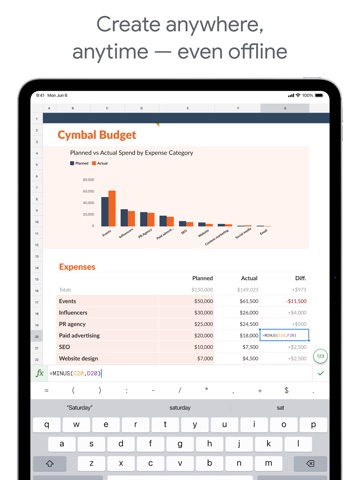


13 store screenshots


Pricing & paywalls
- Free
- Free to download
Ratings & reviews
-
5/5Great, but still needs features
Okay— it’s not ready for five stars I’m leaving my original review below, but the reason I am upgrading from 4 to 5 stars is that google continues to improve Sheets so much that it really is starting to compete with Microsoft Excel. I still think the Microsoft VBA capabilities are superior to the scripting in sheets (few realize how much you can do with the VBA), but I have to admit you can do some pretty cool things with google’s scripting. Also must be admitted that Microsoft has allowed Excel to become bloated and slower compared to the simple snappy interface it had years ago. I hope Sheets avoids that fate. ====== original review ======= Very nice in terms of collaboration, but it's not Excel by any means. Since it's in development there are some obvious "seams" -- ie it's not seamless!! Examples: The mobile app has separate interfaces for viewing and editing, when you're in the editing app you can't chat with the others you're collaborating with, and since it's not Excel you can't work with Excel docs unless its the simplest of spreadsheets -- and even then you're forced to convert in order to be able to collaborate. Hopefully one day there really will be something as powerful as (the Windows version of) Excel (including macros of course!!!) and then that will be incredibly useful with all the collaboration features Google offers. By then however Microsoft might be smart enough to move into that territory to take this away from Google. Either way I'm waiting for that day to give up my five stars!!
discerning learner · 30 Aug 2026
-
2/5Google Sheets for IPad - Fundamentally Flawed
Google Sheets and other programs like it are flexible, able to be used for multiple purpose across many different fields. As such Google Sheets for IPAD may work fine for you but for my job and how I use it I spend more time hitting roadblocks and having to open my computer to accomplish tasks than I should. It leads to the essential question of why even have an app if it will be missing so many core features and have many more that are broken or flawed. The most recent examples include freezing vertical columns doing the opposite of the intended function, the complete lack of in cell text formatting, the lack of advanced sorting features and the inability to open two windows of google sheets at the same time. These are just the broken or missing features that have interrupted my workflow today, I am sure that more will occur in the future. With an app this unfinished I would look to Excel or Apple’s Numbers as alternatives if my work didn’t rely on GSuite for the sharing functionality. If the only reason a user continues to use an app is being locked into the ecosystem, it is not a good app. If you are able avoid Google Sheets and all other Google apps to avoid getting trapped in their ecosystem, especially if you plan to try and use your IPAD as a main work device.
Darklink99 · 30 Aug 2026
-
2/5The Google Sheets app should be a full workforce version, instead of a fancy app which lacks major f
Google Sheets on the desktop is an absolute powerhouse for productivity, but the mobile app feels like a "lite" version designed only for viewing, not for actual heavy lifting. If Google wants this to be a serious workforce tool, they need to stop prioritizing the "fancy," minimalist mobile UI and actually port over the functional power of the desktop version. • Missing Core Features: You can’t bulk-add rows or columns efficiently, and major data tools like Pivot Table editing, Conditional Formatting rules, and Data Validation (dropdown) management are either hidden or completely non-existent. • Poor Navigation: Navigating frozen columns or large datasets is a nightmare compared to the desktop experience. The "fancy" touch interface often gets in the way of precision when selecting specific cell ranges. • No Apps Script Support: For a "workforce" app, the lack of ability to run or even view basic scripts on mobile is a huge bottleneck. I shouldn't have to wait until I’m back at a computer to trigger a simple automation. • Formatting Limitations: Basic things like custom fill colors or advanced chart customization are stripped out. It makes the app feel like a toy rather than a professional spreadsheet tool.
WhiteNight2023 · 30 Aug 2026
-
3/5Unable to Edit Shared Sheets
I try to go as mobile as possible, because opening up a computer all the time sometimes is just too much of a hassle or takes way too much time for something that should be done so quickly, such as signing up for a meeting time. Whenever I try to edit a spreadsheet for something like signing up, there’s always an annoying pop-up that says I need to download the app in order to edit at all. And even when I already have it downloaded, I still have to press the only “accept” button on that pop-up, which says “get the app”. It takes me back to the app store, where I then have to press “open”, and opens up to the Google Sheets app, but the sheets I would be trying to edit wouldn’t automatically come up. Checking the “Shared with Me” tab doesn’t do anything, trying the process over again doesn’t do anything, and nor does completely closing the App Store or Google Sheets app then starting the process over again do anything. This practically makes the Sheets app useless for me, because this is pretty much the only reason I need it. When using Sheets, I’m usually just trying to open someone else’s Sheets page, which they linked somewhere, and edit it rather than creating one myself.
Cristyjewelry · 30 Aug 2026
-
1/5Not mobile-friendly at all
I hate this app so much. I have been using it for more than two years, 2-3 hours a day to track my training, and it is always one of my largest headaches of the day. The offline mode is completely unreliable. I can be disconnected from wifi, using the app, lock my phone to do a set, unlock my phone, try to return to the app, and be unable to edit the worksheet I was just editing because I'm offline. 5 minutes later, it might magically work again. The selecting and editing tool, ugh. 4/5 times I edit a cell, I confirm the edit, then somehow the cell highlight gets dragged over additional cells and I have to make my edit again. This happens at least 2-3 times a training session depending on how closely I am tracking my session. Maybe this is a mobile memory limitation, but if I open 2 other apps, sheets completely loses which project I had open and which sheet. This is specifically annoying for my use case given I have separate sheets for each training week, which means they all look the same. When this happens, it's not unusual for me to forget to switch to the correct sheet after re-selecting my project, and update my session tracking numbers there. This means I often overwrite the wrong week, which means at least one week isn't accurate in tracking my program progress. Alternating between the alphabet keyboard and number keypad does not work. You can click the bubble to switch, but the keyboard will not switch until you've begun typing. I need to find another app, plainly. This app is not mobile-friendly on any account, and I find that for every operation I need to do in the app, there is something that makes it incredibly annoying with a high chance of having to redo it.
mckennaak · 30 Aug 2026
-
4/5
very easy to handle... very good
Hitesh Thorat · 29 Jul 2026
-
5/5
I love love this app
Wusu Mary Senami · 29 Jul 2026
-
5/5
it's good and easy to operate. don't need a laptop or desktop computer to work.
Mohammed Jilal · 29 Jul 2026
-
1/5
0 usability, i feel like no one has ever tested this product internally
Thomas Meixner · 29 Jul 2026
-
5/5
Amazing
Bernard Borg · 29 Jul 2026
Privacy & accessibility
Privacy
- Data Linked to You — Analytics — Contact Info — Email Address Developer declared
- Data Linked to You — Analytics — Contacts Developer declared
- Data Linked to You — Analytics — Diagnostics — Crash Data Developer declared
- Data Linked to You — Analytics — Diagnostics — Other Diagnostic Data Developer declared
- Data Linked to You — Analytics — Diagnostics — Performance Data Developer declared
- Data Linked to You — Analytics — Identifiers — Device ID Developer declared
- Data Linked to You — Analytics — Identifiers — User ID Developer declared
- Data Linked to You — Analytics — Location — Coarse Location Developer declared
- Data Linked to You — Analytics — Other Data — Other Data Types Developer declared
- Data Linked to You — Analytics — Search History Developer declared
- Data Linked to You — Analytics — Usage Data — Product Interaction Developer declared
- Data Linked to You — Analytics — User Content — Customer Support Developer declared
- Data Linked to You — Analytics — User Content — Other User Content Developer declared
- Data Linked to You — Analytics — User Content — Photos or Videos Developer declared
- Data Linked to You — App Functionality — Contact Info — Email Address Developer declared
- Data Linked to You — App Functionality — Contact Info — Name Developer declared
- Data Linked to You — App Functionality — Contact Info — Phone Number Developer declared
- Data Linked to You — App Functionality — Contact Info — Physical Address Developer declared
- Data Linked to You — App Functionality — Contacts Developer declared
- Data Linked to You — App Functionality — Diagnostics — Crash Data Developer declared
- Data Linked to You — App Functionality — Diagnostics — Other Diagnostic Data Developer declared
- Data Linked to You — App Functionality — Diagnostics — Performance Data Developer declared
- Data Linked to You — App Functionality — Identifiers — Device ID Developer declared
- Data Linked to You — App Functionality — Identifiers — User ID Developer declared
- Data Linked to You — App Functionality — Location — Coarse Location Developer declared
- Data Linked to You — App Functionality — Other Data — Other Data Types Developer declared
- Data Linked to You — App Functionality — Search History Developer declared
- Data Linked to You — App Functionality — Usage Data — Product Interaction Developer declared
- Data Linked to You — App Functionality — User Content — Customer Support Developer declared
- Data Linked to You — App Functionality — User Content — Other User Content Developer declared
- Data Linked to You — App Functionality — User Content — Photos or Videos Developer declared
- Data Linked to You — Product Personalization — Contacts Developer declared
- Data Linked to You — Product Personalization — Identifiers — Device ID Developer declared
- Data Linked to You — Product Personalization — Identifiers — User ID Developer declared
- Data Linked to You — Product Personalization — Search History Developer declared
- Data Linked to You — Product Personalization — Usage Data — Product Interaction Developer declared
- Data Linked to You — Product Personalization — User Content — Other User Content Developer declared
- Data Linked to You — Contact Info Developer declared
- Data Linked to You — Contacts Developer declared
- Data Linked to You — Diagnostics Developer declared
- Data Linked to You — Identifiers Developer declared
- Data Linked to You — Location Developer declared
- Data Linked to You — Other Data Developer declared
- Data Linked to You — Search History Developer declared
- Data Linked to You — Usage Data Developer declared
- Data Linked to You — User Content Developer declared
Accessibility
No accessibility labels collected yet.
Privacy
- Data collected — Account management — Audio — Voice or sound recordings Developer declared
- Data collected — Account management — Personal info — Address Developer declared
- Data collected — Account management — Personal info — Other info Developer declared
- Data collected — Account management — Personal info — Phone number Developer declared
- Data collected — Analytics — App info and performance — Crash logs Developer declared
- Data collected — Analytics — App info and performance — Diagnostics Developer declared
- Data collected — Analytics — App info and performance — Other app performance data Developer declared
- Data collected — Analytics, Fraud prevention, security, and compliance — App activity — Installed apps Developer declared
- Data collected — App functionality — Messages — Other in-app messages Developer declared
- Data collected — App functionality, Analytics — Files and docs Developer declared
- Data collected — App functionality, Analytics — Location — Approximate location Developer declared
- Data collected — App functionality, Analytics, Account management — Photos and videos — Photos Developer declared
- Data collected — App functionality, Analytics, Developer communications, Account management — Personal info — Email address Developer declared
- Data collected — App functionality, Analytics, Developer communications, Fraud prevention, security, and compliance, Personalization — App activity — App interactions Developer declared
- Data collected — App functionality, Analytics, Developer communications, Fraud prevention, security, and compliance, Personalization, Account management — Personal info — User IDs Developer declared
- Data collected — App functionality, Analytics, Fraud prevention, security, and compliance, Account management — Device or other IDs Developer declared
- Data collected — App functionality, Analytics, Personalization — App activity — In-app search history Developer declared
- Data collected — App functionality, Analytics, Personalization — App activity — Other user-generated content Developer declared
- Data collected — App functionality, Analytics, Personalization, Account management — Contacts Developer declared
- Data collected — App functionality, Developer communications, Account management — Personal info — Name Developer declared
- Data collected — App functionality, Fraud prevention, security, and compliance — App activity — Other actions Developer declared
- Security practices — Your data is transferred over a secure connection — Data is encrypted in transit Developer declared
- Security practices — This app has been independently validated against a global security standard. See details — Independent security review Developer declared
- Security practices — The developer provides a way for you to request that your data be deleted — You can request that data be deleted Developer declared
Accessibility
No accessibility labels collected yet.
Versions
App Store
-
1.2026.07100
* Security improvements, bug fixes, and performance improvements.
-
1.2026.07501
* Security improvements, bug fixes, and performance improvements.
-
1.2026.09100
* Security improvements, bug fixes, and performance improvements.
-
1.2026.10101
* Security improvements, bug fixes, and performance improvements.
-
1.2026.11102
* Security improvements, bug fixes, and performance improvements.
-
1.2026.12100
* Security improvements, bug fixes, and performance improvements.
-
1.2026.13102
* Security improvements, bug fixes, and performance improvements.
-
1.2026.14100
* Security improvements, bug fixes, and performance improvements.
-
1.2026.15101
* Security improvements, bug fixes, and performance improvements.
-
1.2026.16101
* Security improvements, bug fixes, and performance improvements.
-
1.2026.18100
* Security improvements, bug fixes, and performance improvements.
-
1.2026.19100
* Security improvements, bug fixes, and performance improvements.
-
1.2026.20103
* Security improvements, bug fixes, and performance improvements.
-
1.2026.21100
* Security improvements, bug fixes, and performance improvements.
-
1.2026.22200
* Security improvements, bug fixes, and performance improvements.
-
1.2026.22202
* Security improvements, bug fixes, and performance improvements.
-
1.2026.23102
* Security improvements, bug fixes, and performance improvements.
-
1.2026.24101
* Security improvements, bug fixes, and performance improvements.
-
1.2026.25101
* Security improvements, bug fixes, and performance improvements.
-
1.2026.26101
* Security improvements, bug fixes, and performance improvements.
-
1.2026.27101
* Security improvements, bug fixes, and performance improvements.
-
1.2026.28100
* Security improvements, bug fixes, and performance improvements.
-
1.2026.29102
* Security improvements, bug fixes, and performance improvements.
-
1.2026.30101
· 27 Jul 2026
* Security improvements, bug fixes, and performance improvements.
-
1.2026.30102
· 29 Jul 2026
* Security improvements, bug fixes, and performance improvements.
-
1.2026.31102
* Security improvements, bug fixes, and performance improvements.
-
1.2026.32101
* Security improvements, bug fixes, and performance improvements.
-
1.2026.33101
* Security improvements, bug fixes, and performance improvements.
-
1.2026.34100
· 24 Aug 2026
* Security improvements, bug fixes, and performance improvements.
Alternatives
- XLSX Sheets: Edit Spreadsheet — Same category + similar ratings
- Microsoft Excel — Same category + similar ratings
- Forms for Google Docs — Same category + similar ratings
- Spreadsheet-xlsx&csv editor — Same category + similar ratings
- Miro: your visual workspace — Same category + similar ratings
- Microsoft PowerPoint — Same category + similar ratings
Availability by market
- US
Data quality & evidence
- Page completeness
- Live store listing
- Last verified
- 31 Aug 2026
- Sources
- App Store, Google Play
- Independent summary has not been published yet.