
Quick verdict
- What it is
- Store information collected; an Apoku editorial summary is not yet published.
- At a glance
-
- Free to download
Categories and search queries
Official categories
- Productivity
- Business
Apoku categories
Key functions
| Function | Availability | Access | Scope | Evidence |
|---|---|---|---|---|
| Free app | Yes | Free | Context-specific | Store published |
Screens
14 store screenshots


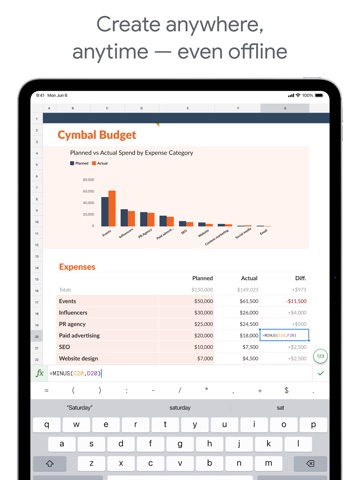

13 store screenshots


Pricing & paywalls
Shown for US
- Free to download
Shown for US
- Free to download
Ratings & reviews
Shown for US
-
2/5Why can’t I make a table here?????
To preface, I am an Excel girly so I’m already biased. I have to use Sheets for work, hence the move. Since college, I had to sell my laptop and only use an iPad. Works pretty well for most things except some mobile apps… including, you guessed it, this one. Scene: I log into Google Sheets and click ‘New Spreadsheet’. Simple. I write in my heading. Done. Then I go to search for the ‘Table’ tab. You know, the one that pretty much every spreadsheet platform has since that’s what spreadsheets are built for. Well, apparently this spreadsheet platform has decided to skimp out on those tables because I cannot find it ANYWHERE. I google “how to make tables in Google Sheets app”. All the results say to highlight the cell, make the border bigger, set fill color to yada yada- MANUALLY making the table. Sir, if I wanted to manually make a table I would write it out on my notepad from ECON 1010. No one has manually made a table since before Britney was free. I long for the ‘Table’ tab. Please bring her back. Until then, I will be manually making tables like the indentured servant I apparently am.
abjaaksm · 29 Sep 2026
-
1/5#1 Must-Delete app from iPad
After using Google Sheets in a desktop browser for years, I thought it would be simple to migrate to an iPad. Well, if you have super-simple sheets, maybe. All of the most powerful features are gone. Conditional formatting? Gone. Selecting disjoint ranges? Hah. Copy then Paste values, formulas, or formats only? Nope. Find and replace in formulas with RE2 regular expressions? No chance. Macros and functions? Triggers? Haha, what even are those? Keyboard shortcuts? Sigh. (And yes, iPad folks do use external keyboards.) Adding insult to injury, it’s nearly impossible to open a sheet in any browser on iPad (clearly Google hates Safari) and if you try…it keeps jumping you to the app. Deleted the app? Sends you to the App Store. Almost lying that the app is “better” when it is so fundamentally deficient. And if you manage to open the sheet in a browser, which you HAVE TO for all the stuff I listed above, then you’ll lose a 2-3 rows of your sheet to a message telling you to switch to the app. Good grief. If you have stupidly simple tabular data, go ahead, use this app. Or just use the Notes app, since it’s probably just as good.
zztopher · 31 Jul 2026
-
2/5The Google Sheets app should be a full workforce version, instead of a fancy app which lacks major f
Google Sheets on the desktop is an absolute powerhouse for productivity, but the mobile app feels like a "lite" version designed only for viewing, not for actual heavy lifting. If Google wants this to be a serious workforce tool, they need to stop prioritizing the "fancy," minimalist mobile UI and actually port over the functional power of the desktop version. • Missing Core Features: You can’t bulk-add rows or columns efficiently, and major data tools like Pivot Table editing, Conditional Formatting rules, and Data Validation (dropdown) management are either hidden or completely non-existent. • Poor Navigation: Navigating frozen columns or large datasets is a nightmare compared to the desktop experience. The "fancy" touch interface often gets in the way of precision when selecting specific cell ranges. • No Apps Script Support: For a "workforce" app, the lack of ability to run or even view basic scripts on mobile is a huge bottleneck. I shouldn't have to wait until I’m back at a computer to trigger a simple automation. • Formatting Limitations: Basic things like custom fill colors or advanced chart customization are stripped out. It makes the app feel like a toy rather than a professional spreadsheet tool.
WhiteNight2023 · 29 Sep 2026
-
2/5day 1000 of no paint format button. + fix these bugs, mobile UX can be better than this
1 - when typing in a cell, if u touch any other cell on the screen and the keyboard disappears, everything in the cell you were typing is gone and it reverts to how it was before you were typing. fix this, i type things because i want them there. they shouldn’t disappear like this. if i wanted to delete what i wrote thats what the backspace key is for. 2 - after the sheet is open for a while or if u lock ur phone and reopen it a couple times, the zoom sheet gets stuck, and you can no longer zoom in and out, move around at all, or edit anything. when this happens, the little gray box that shows the zoom % which appears in the middle of ur screen while ur zooming in and out gets permanently stuck in the middle of the screen, and whenever u tap to select a cell, it selects a totally different cell like 6 rows below what i tapped. the only way to fix this is to completely restart the app and reopen the sheet. — also please add format painter button. it’s just missing on mobile. a box to type in hex color codes is also missing for setting cell/text colors.
megalodab · 29 Sep 2026
-
3/5Unable to Edit Shared Sheets
I try to go as mobile as possible, because opening up a computer all the time sometimes is just too much of a hassle or takes way too much time for something that should be done so quickly, such as signing up for a meeting time. Whenever I try to edit a spreadsheet for something like signing up, there’s always an annoying pop-up that says I need to download the app in order to edit at all. And even when I already have it downloaded, I still have to press the only “accept” button on that pop-up, which says “get the app”. It takes me back to the app store, where I then have to press “open”, and opens up to the Google Sheets app, but the sheets I would be trying to edit wouldn’t automatically come up. Checking the “Shared with Me” tab doesn’t do anything, trying the process over again doesn’t do anything, and nor does completely closing the App Store or Google Sheets app then starting the process over again do anything. This practically makes the Sheets app useless for me, because this is pretty much the only reason I need it. When using Sheets, I’m usually just trying to open someone else’s Sheets page, which they linked somewhere, and edit it rather than creating one myself.
Cristyjewelry · 29 Sep 2026
Shown for US
-
4/5
very easy to handle... very good
Hitesh Thorat · 29 Jul 2026
-
5/5
I love love this app
Wusu Mary Senami · 29 Jul 2026
-
5/5
it's good and easy to operate. don't need a laptop or desktop computer to work.
Mohammed Jilal · 29 Jul 2026
-
1/5
0 usability, i feel like no one has ever tested this product internally
Thomas Meixner · 29 Jul 2026
-
5/5
Amazing
Bernard Borg · 29 Jul 2026
Privacy & accessibility
Privacy
- Data Linked to You — Analytics — Contact Info — Email Address Developer declared
- Data Linked to You — Analytics — Contacts Developer declared
- Data Linked to You — Analytics — Diagnostics — Crash Data Developer declared
- Data Linked to You — Analytics — Diagnostics — Other Diagnostic Data Developer declared
- Data Linked to You — Analytics — Diagnostics — Performance Data Developer declared
- Data Linked to You — Analytics — Identifiers — Device ID Developer declared
- Data Linked to You — Analytics — Identifiers — User ID Developer declared
- Data Linked to You — Analytics — Location — Coarse Location Developer declared
- Data Linked to You — Analytics — Other Data — Other Data Types Developer declared
- Data Linked to You — Analytics — Search History Developer declared
- Data Linked to You — Analytics — Usage Data — Product Interaction Developer declared
- Data Linked to You — Analytics — User Content — Customer Support Developer declared
- Data Linked to You — Analytics — User Content — Other User Content Developer declared
- Data Linked to You — Analytics — User Content — Photos or Videos Developer declared
- Data Linked to You — App Functionality — Contact Info — Email Address Developer declared
- Data Linked to You — App Functionality — Contact Info — Name Developer declared
- Data Linked to You — App Functionality — Contact Info — Phone Number Developer declared
- Data Linked to You — App Functionality — Contact Info — Physical Address Developer declared
- Data Linked to You — App Functionality — Contacts Developer declared
- Data Linked to You — App Functionality — Diagnostics — Crash Data Developer declared
- Data Linked to You — App Functionality — Diagnostics — Other Diagnostic Data Developer declared
- Data Linked to You — App Functionality — Diagnostics — Performance Data Developer declared
- Data Linked to You — App Functionality — Identifiers — Device ID Developer declared
- Data Linked to You — App Functionality — Identifiers — User ID Developer declared
- Data Linked to You — App Functionality — Location — Coarse Location Developer declared
- Data Linked to You — App Functionality — Other Data — Other Data Types Developer declared
- Data Linked to You — App Functionality — Search History Developer declared
- Data Linked to You — App Functionality — Usage Data — Product Interaction Developer declared
- Data Linked to You — App Functionality — User Content — Customer Support Developer declared
- Data Linked to You — App Functionality — User Content — Other User Content Developer declared
- Data Linked to You — App Functionality — User Content — Photos or Videos Developer declared
- Data Linked to You — Product Personalization — Contacts Developer declared
- Data Linked to You — Product Personalization — Identifiers — Device ID Developer declared
- Data Linked to You — Product Personalization — Identifiers — User ID Developer declared
- Data Linked to You — Product Personalization — Search History Developer declared
- Data Linked to You — Product Personalization — Usage Data — Product Interaction Developer declared
- Data Linked to You — Product Personalization — User Content — Other User Content Developer declared
- Data Linked to You — Contact Info Developer declared
- Data Linked to You — Contacts Developer declared
- Data Linked to You — Diagnostics Developer declared
- Data Linked to You — Identifiers Developer declared
- Data Linked to You — Location Developer declared
- Data Linked to You — Other Data Developer declared
- Data Linked to You — Search History Developer declared
- Data Linked to You — Usage Data Developer declared
- Data Linked to You — User Content Developer declared
Accessibility
No accessibility labels collected yet.
Privacy
- Data collected — Account management — Audio — Voice or sound recordings Developer declared
- Data collected — Account management — Personal info — Address Developer declared
- Data collected — Account management — Personal info — Other info Developer declared
- Data collected — Account management — Personal info — Phone number Developer declared
- Data collected — Analytics — App info and performance — Crash logs Developer declared
- Data collected — Analytics — App info and performance — Diagnostics Developer declared
- Data collected — Analytics — App info and performance — Other app performance data Developer declared
- Data collected — Analytics, Fraud prevention, security, and compliance — App activity — Installed apps Developer declared
- Data collected — App functionality — Messages — Other in-app messages Developer declared
- Data collected — App functionality, Analytics — Files and docs Developer declared
- Data collected — App functionality, Analytics — Location — Approximate location Developer declared
- Data collected — App functionality, Analytics, Account management — Photos and videos — Photos Developer declared
- Data collected — App functionality, Analytics, Developer communications, Account management — Personal info — Email address Developer declared
- Data collected — App functionality, Analytics, Developer communications, Fraud prevention, security, and compliance, Personalization — App activity — App interactions Developer declared
- Data collected — App functionality, Analytics, Developer communications, Fraud prevention, security, and compliance, Personalization, Account management — Personal info — User IDs Developer declared
- Data collected — App functionality, Analytics, Fraud prevention, security, and compliance, Account management — Device or other IDs Developer declared
- Data collected — App functionality, Analytics, Personalization — App activity — In-app search history Developer declared
- Data collected — App functionality, Analytics, Personalization — App activity — Other user-generated content Developer declared
- Data collected — App functionality, Analytics, Personalization, Account management — Contacts Developer declared
- Data collected — App functionality, Developer communications, Account management — Personal info — Name Developer declared
- Data collected — App functionality, Fraud prevention, security, and compliance — App activity — Other actions Developer declared
- Security practices — Your data is transferred over a secure connection — Data is encrypted in transit Developer declared
- Security practices — This app has been independently validated against a global security standard. See details — Independent security review Developer declared
- Security practices — The developer provides a way for you to request that your data be deleted — You can request that data be deleted Developer declared
Accessibility
No accessibility labels collected yet.
Versions
App Store
-
1.2026.07100
* Security improvements, bug fixes, and performance improvements.
-
1.2026.07501
* Security improvements, bug fixes, and performance improvements.
-
1.2026.09100
* Security improvements, bug fixes, and performance improvements.
-
1.2026.10101
* Security improvements, bug fixes, and performance improvements.
-
1.2026.11102
* Security improvements, bug fixes, and performance improvements.
-
1.2026.12100
* Security improvements, bug fixes, and performance improvements.
-
1.2026.13102
* Security improvements, bug fixes, and performance improvements.
-
1.2026.14100
* Security improvements, bug fixes, and performance improvements.
-
1.2026.15101
* Security improvements, bug fixes, and performance improvements.
-
1.2026.16101
* Security improvements, bug fixes, and performance improvements.
-
1.2026.18100
* Security improvements, bug fixes, and performance improvements.
-
1.2026.19100
* Security improvements, bug fixes, and performance improvements.
-
1.2026.20103
* Security improvements, bug fixes, and performance improvements.
-
1.2026.21100
* Security improvements, bug fixes, and performance improvements.
-
1.2026.22200
* Security improvements, bug fixes, and performance improvements.
-
1.2026.22202
* Security improvements, bug fixes, and performance improvements.
-
1.2026.23102
* Security improvements, bug fixes, and performance improvements.
-
1.2026.24101
* Security improvements, bug fixes, and performance improvements.
-
1.2026.25101
* Security improvements, bug fixes, and performance improvements.
-
1.2026.26101
* Security improvements, bug fixes, and performance improvements.
-
1.2026.27101
* Security improvements, bug fixes, and performance improvements.
-
1.2026.28100
* Security improvements, bug fixes, and performance improvements.
-
1.2026.29102
* Security improvements, bug fixes, and performance improvements.
-
1.2026.30101
· 27 Jul 2026
* Security improvements, bug fixes, and performance improvements.
-
1.2026.30102
· 29 Jul 2026
* Security improvements, bug fixes, and performance improvements.
-
1.2026.31102
* Security improvements, bug fixes, and performance improvements.
-
1.2026.32101
* Security improvements, bug fixes, and performance improvements.
-
1.2026.33101
* Security improvements, bug fixes, and performance improvements.
-
1.2026.34100
· 24 Aug 2026
* Security improvements, bug fixes, and performance improvements.
-
1.2026.35100
* Security improvements, bug fixes, and performance improvements.
-
1.2026.36100
* Security improvements, bug fixes, and performance improvements.
-
1.2026.36500
* Security improvements, bug fixes, and performance improvements.
-
1.2026.38102
· 21 Sep 2026
* Security improvements, bug fixes, and performance improvements.
-
1.2026.39101
· 28 Sep 2026
* Security improvements, bug fixes, and performance improvements.
Alternatives
- XLSX Sheets: Edit Spreadsheet — Same category + similar ratings
- Microsoft Excel — Same category + similar ratings
- Forms for Google Docs — Same category + similar ratings
- Spreadsheet-xlsx&csv editor — Same category + similar ratings
- Miro: your visual workspace — Same category + similar ratings
- Microsoft PowerPoint — Same category + similar ratings
Availability by market
- US
Data quality & evidence
- Page completeness
- Live store listing
- Last verified
- 30 Sep 2026
- Sources
- App Store, Google Play
- Apoku editorial summary has not been published yet.