
Quick verdict
- What it is
- Store information collected; independent summary not yet available.
- At a glance
-
- $79.99
Categories and search queries
Official categories
- Productivity
- Business
AppCorpus categories
Key functions
| Function | Availability | Access | Scope | Evidence |
|---|---|---|---|---|
| Family Sharing | Yes | Unknown | App Store | Store published |
Screens
App Store
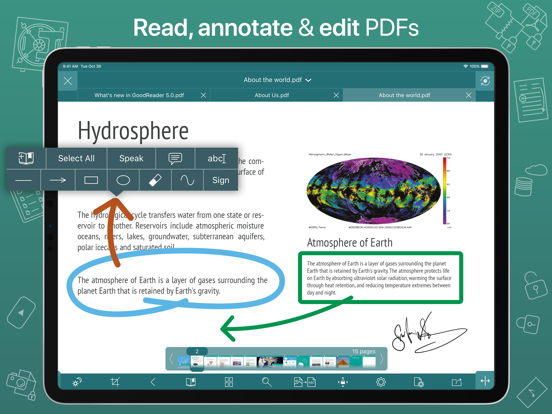
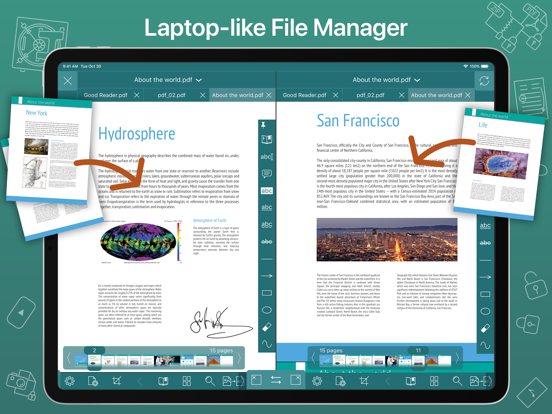
9 store screenshots


Pricing & paywalls
App Store
Shown for US
- Price: $79.99
Ratings & reviews
App Store
Shown for US
-
5/5I use it almost every day
I am able to download into the app by printing recipes, then use fingers to expand, it goes into a pdf and opens in GoodReader. Thank you soooo much for the excellent app. I have both the Pro version and the older version. I use both and have many folders in each. I download and keep a copy of different manuals of my appliances and such. Then when I need one I can search in GoodReader and fine it easily.
missyouMaxi · 6 Aug 2026
-
1/5PAY ATTENTION TO THR NEGATIVE REVIEWS‼️
This is a pricy app, and it used to be a USEFUL app back in the early days of iPhone. No longer. Most of the functions can be accomplished on the stock Files app now and frankly most of the formerly useful functions are broken in the expensive digital paper weight. The worse thing about this app? The customer service! Snarky, unprofessional and brainless. I asked a simple question: how come iCloud no longer seamlessly integrates with the app? I can no longer see my iCloud files without a time wasting workaround. I sent an email to support. Got an email 2 days later saying they’d received my email and would get back to me. No one got back to me. I emailed a couple weeks later (after switching to the superior Readdle app!) and said “hey, thanks for the help!” Some ******* named “Yuri” emailed me back saying “I emailed you back in 2 days, that seems reasonable to me!” Yeah, the time frame is reasonable; but they only emailed me to let me know they’d “get back to me” and NEVER addressed my problem. Well, I’m done. Don’t flush your money like I did, this app is a shadow of it’s former self; not only that, there have been no innovations added to the app in a long time. The competition has sonned this app thoroughly! Check out Readdle Documents, PDF Expert or even just the stock Files app and see if they meet your needs. If you must, use the free version. Wish I could get my money back but I’m certain the company lacks the integrity. Anyway, it’s probably already been spent on a Soy Latte! Mealymouthed response from the dev incoming!!
Darth Kahless · 6 Aug 2026
-
4/5GoodReader Pro
Well it is a great app. I paid for the pro version as a good gesture of support. It was tedious moving data from old Godreader to the pro version. There was not a lot of room left on the iPad. This was very disappointing, as I thought GoodReader would simply upgrade to the new version without having to transfer data. I also see very little difference between the regular and pro version. I thank the developer for adding a one time pay option as I do not subscribe to software, but I am glad to support developers with a one time fee. However, as far as features are concerned, it feels like throwing away money. Again, it really is a five star app. I use it daily. I gave it four stars only because, I don’t see much of any advanced features.
KING SOLOMON I · 6 Aug 2026
-
2/5Was 4.5 stars till today!
I have been using GoodReader Pro for about a year now for my crosstitch patterns. I have loved it. Suddenly today, it is VERY glitchy…to the point that it is unusable. It will not respond to or responds very very slowly to using the highlighter & eraser. I then downloaded the update and closed down/restarted my iPad. But it’s continuing to act up. Do you have any suggestions? I am frustrated especially because I am in the midst of a pattern. And, it doesn’t keep my pattern up when I close & reopen the program. It used to open to the pattern and to exactly where I left off when I closed down. In fact, when I placed the program in the background while I wrote this review, it shut the file down. HELP!
E-merging · 6 Aug 2026
-
1/5Disappointing
I got this app with the intent of going paperless utilizing my iPad Pro when out in the field on assignments. I condensed/combined documents for each day’s work into a pdf, then imported it into Good Reader Pro. Some of the pdf’ s had to have annotations made as I went along. I discovered during the first day that after annotating a pdf, then entire document would freeze up and not allow me to go to the next page. Long story short - I had duplicate back-up pdf’s in the Apple Books app. It worked like a charm - annotations and all, so I abandoned Good Reader Pro for the rest of the assignment. I also ran into a couple of bugs and had a couple of questions right after I purchased this app. It took the developer nearly two weeks to respond without really helping to resolve another issue.
Dry-n-Dusty · 6 Aug 2026
Privacy & accessibility
App Store
Privacy
- Data Not Linked to You — Analytics — Usage Data — Product Interaction Developer declared
- Data Not Linked to You — App Functionality — Diagnostics — Crash Data Developer declared
- Data Not Linked to You — App Functionality — Usage Data — Product Interaction Developer declared
- Data Not Linked to You — Diagnostics Developer declared
- Data Not Linked to You — Usage Data Developer declared
Accessibility
No accessibility labels collected yet.
Versions
App Store
-
5.10.1149
With this update, we'll be asking you to agree to a new EULA, and it's a good thing! We're now asking for much fewer permissions from you to collect analytics data. We've modified Section 2 of the EULA by removing references to third parties collecting data. For quite a while, we were using a certain big-name 3rd-party analytics software. But being privacy advocates we are, we never liked the idea of having some software that we have no control of linked to our code. So we've finally written our own super-lightweight and non-intrusive analytics package that only collects the absolute minimum of the information we need - which buttons you pressed, and which you didn't - stuff like that. And now we can guarantee it. Because we wrote every single line of that code ourselves! So please kindly press Accept EULA after installing this update and rest assured that your privacy will always be our priority!
-
5.10.1151
- fixed the bug that was affecting many of our iOS 12 users
-
5.11.1154
New Features: - SMB 2 & 3 support. - SMB 3 Encryption support, including the latest AES-256 encryption introduced in Windows 11. Bug Fixes: - fixed the SFTP connectivity issue with new macOS 12 - fixed the annoying crash that was sometimes occuring when using the PDF Annotation Side Panel.
-
5.11.1161
New Features: - SMB 2 & 3 support. - SMB 3 Encryption support, including the latest AES-256 encryption introduced in Windows 11. Bug Fixes: - fixed the SFTP connectivity issue with new macOS 12 - fixed the annoying crash that was sometimes occuring when using the PDF Annotation Side Panel.
-
5.11.1163
Bug Fixes: - SMB message signing conflict for Guest connections. - Multiple SMB downloads bug. - SMB packet length bug. Previously: - SMB 2 & 3 support. - SMB 3 Encryption support, including the latest AES-256 encryption introduced in Windows 11.
-
5.12.1167
- support for new photo formats: RAW, RW2, ORF, DXO.
-
5.12.1169
- support for new photo formats: RAW, RW2, ORF, DXO.
-
5.12.1172
- fixed the issue when Dropbox users couldn't authenticate with Google credentials.
-
5.13.1178
- custom OneDrive / SharePoint repositories
-
5.13.1183
By popular request, the "Flash Page Number" switch is back in PDF Settings.
-
5.14.1185
- support for Dropbox Team Space (Dropbox Business).
-
5.15.1187
- iOS/iPadOS 17 compatibility fix. - Fixed the bug that was causing false "File Modified On Another Device" alerts for iCloud files.
-
5.15.1189
- iOS/iPadOS 17 compatibility fix. - Fixed the bug that was causing false "File Modified On Another Device" alerts for iCloud files.
-
5.16.1191
• Disable navigational tap zones for PDF & TXT in settings. • Support for Shortcuts app (iOS 16 or later). • Support for Home Screen Quick Actions.
-
5.17.1193
• Support for Bates Numbering in PDF.
-
5.18.1196
• Video Player: multiple taps at the screen's edge are now recognized as Skip Forward or Rewind.
-
5.19.1200
• Updated Dropbox Team Space support.
-
5.19.1203
• Updated Dropbox Team Space support.
-
5.19.1205
• minor improvements and bug fixes
-
5.19.1212
• Fixed a OneDrive upload bug.
-
5.19.1216
• New way of adding OneDrive shares. • Fixed a Widgets bug.
-
5.19.1221
· 29 Nov 2025
• New way of adding OneDrive shares. • Fixed a Widgets bug.
-
5.8.1140
minor bug fixes and improvements
-
5.9.1144
- support for Dropbox's scope-based authentication and short-lived access tokens
-
5.9.1146
- improved compatibility with newer versions of iOS and iPadOS
Alternatives
- Mil Fuel Check — Same category + similar ratings
- iAnnotate 4 — PDFs & more — Same category + similar ratings
- iA Writer — Same category + similar ratings
- UpNote - notes, diary, journal — Same category + similar ratings
- PDF Pro - Reader Editor Forms — Same category + similar ratings
Availability by market
- US
Data quality & evidence
- Page completeness
- Live store listing
- Last verified
- 6 Aug 2026
- Sources
- App Store
- Independent summary has not been published yet.