
Quick verdict
- What it is
- Store information collected; independent summary not yet available.
- At a glance
-
- $5.99
- In-app purchases
- From $5.99/mo
Categories and search queries
Official categories
- Productivity
- Business
AppCorpus categories
Key functions
| Function | Availability | Access | Scope | Evidence |
|---|---|---|---|---|
| In-app purchases | Yes | Limited free | — | Store published |
| Subscription | Yes | Paid | — | Store published |
Screens
App Store
9 store screenshots

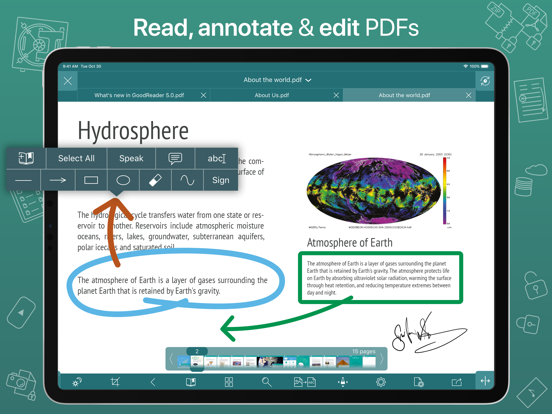


Pricing & paywalls
App Store
- Price: $5.99
- Pro Pack ( ) — $5.99/month (derived from the IAP title)
Ratings & reviews
App Store
-
5/5Best PDF Tool Out There
As the title states, this is the best PDF tool available. It’s better than any PC/Mac PDF editors and it’s by far the best mobile PDF editor. I’ve been using GoodReader for many years and I cannot think of a single feature it’s missing. It’s super easy to edit PDFs, transfer files to the cloud or other devices, and do whatever else you need to do with them. The built-in web server is extremely useful for quick transfers to or from my phone or iPad without having to access iCloud, Dropbox, OneDrive, or any other cloud storage service. When editing a PDF for the first time the app will alert you that it might be wise to make an annotated copy for markups without changing the master file then makes creating the copy extremely easy. Honestly, the developer has thought of everything. I chose to write this review after using the app for so many years because it occurred to me that any app that’s been with me for so long and still gets constant use is an app worth giving praise and encouraging others to try. Another fantastic feature of GoodReader is the fact that there are no subscriptions necessary to use the full version. You pay once and that’s it. I know that there is a subscription based add-on for the app but it’s not necessary to use the base app with all its features. If I’m being honest, I don’t even know what the subscription service is for. I do know that if you need a full featured PDF reader / editor there is no better option than GoodReader!
23 Martinis · 2 Sep 2026
-
5/5OUTSTANDING
I have had this app on my iPad for several years now and would be lost without it! I use it primarily for knitting--as a collection place for my many patterns. It is particularly useful when I am knitting from a CHART. I place lines, vertically, that are the same color as my stitch markers about every 5-10 stitches and then create a horizontal line to move up or down in the direction that the pattern is to be read. If needed you can make notes to yourself about where you left off either in the line or a message bubble on how you did something a little bit different. I recently created a lace shawl that I would have never been able to create without it. Another thing I like about GoodReader is that you can access your stored patterns even if you are away from internet access. Being able to organize patterns by creating folders and mark patterns with different colored star--those patterns that you want to create for some little person soon or the Fair next summer. There are so many pieces to this app, that I am sure I don't use them all, but absolutely love what I have found. Even though one can only give 5 stars, I'd give 10 if I could. Amazing app❣
RobbieRobeen · 2 Sep 2026
-
3/5Annual fixes or subscription
I believe I’ve used this app for nearly 15 years or more, ever since I moved from Blackberry to iPhone. GoodReader once set the standard for file management (far beyond what iOS Files offers, even today) and still better than the top selling app. I don’t have much skin in the game…I purchased the app once and bought an in-app for something. Reviews complaining of greed or having paid etc are misplaced…all the best apps today are subscription, and that makes them sustainable. That said, I would support this developer if he offered a subscription that provided more than 1x/year updates…but I’ll take the annual optiom if that’s all he can do. Most people don’t realize many apps were written by sole proprietors and sustainability is achieved with annual subs. Our employer doesn’t expect us to redo projects for free, nor should we expect this from developers. Communication or a note on the app would be helpful. There was a time when I thought the app had become abandonware. It went ~ 2 years or more without being updated and I suspected it was the end. Suddenly it returned and things looked promising. I was happy to purchase the upgrade with the hope of re-commercializing a valuable app. Now it appears its going dark again. t.
LAX20531 · 2 Sep 2026
-
3/5going backwards
I’m using goodreader for several years now. It used to be 5 star without doubt. but the developers got greedy and instead of adding features to new versions, started to demand money for the same features over yearly subscription IN AN ALREADY PAID APP. This is rip off. Subscription based sales should be for somethings like magazines and so on. Not apps like pdf readers. I’m going to reduce 2 stars and if it does not get new features in regular update I will reduce other stars too, because I consider it outdated app. re: 15 oct 2020 I didn’t say that the previous features are not available. I said that the app basically didn’t get any new feature outside the subscription which is an irrational business model for offline features. If you wanted to sell new features you could just introduce new version besides this one. Or make them one time in app purchase. Having a subscription for something that basically runs offline on user’s device and is an offline feature is not acceptable as you are not truly providing an ongoing service but an offline product. To me the last true update this app received was a long time ago and it’s getting out of date as something like new iOS file system and multi-window support don’t work properly or are completely unavailable.
5433d · 2 Sep 2026
-
5/5Wonderful App, but a little fix needed...
Its been part of my everyday reading and studying since my first iPad back in 2011. The new version (5) is outstanding specially since finally we are able to sync multiple iOS devices via iCloud. Well done!!! Yet there is a minor issue, that affects regular use of the app, specially in the annotation process. If you are working on a document on the iCloud File, and you are using any of the annotation tools, you will find that you can’t change tools by simply clicking the Tool Menu Bar on the top of the screen. This still can be done in documents not in the iCloud File, but for some reason, with these documents it kind of crashes, and it make you go to the main menu in search of the Annotation Tool’s menu bar on the right side of the screen. Currently Im using two iPad pros (not the last generation, the one before), with apple pencil first generation. It does not ruin the app, but it definitely make it less efficient. Hope to see an upgrade soon addressing this matter. Other than that, great work people, you have produced an outstanding APP !!!
DDR717 · 2 Sep 2026
Privacy & accessibility
App Store
Privacy
- Data Not Linked to You — Analytics — Usage Data — Product Interaction Developer declared
- Data Not Linked to You — App Functionality — Diagnostics — Crash Data Developer declared
- Data Not Linked to You — App Functionality — Usage Data — Product Interaction Developer declared
- Data Not Linked to You — Diagnostics Developer declared
- Data Not Linked to You — Usage Data Developer declared
Accessibility
No accessibility labels collected yet.
Versions
App Store
-
5.10.1148
With this update, we'll be asking you to agree to a new EULA, and it's a good thing! We're now asking for much fewer permissions from you to collect analytics data. We've modified Section 2 of the EULA by removing references to third parties collecting data. For quite a while, we were using a certain big-name 3rd-party analytics software. But being privacy advocates we are, we never liked the idea of having some software that we have no control of linked to our code. So we've finally written our own super-lightweight and non-intrusive analytics package that only collects the absolute minimum of the information we need - which buttons you pressed, and which you didn't - stuff like that. And now we can guarantee it. Because we wrote every single line of that code ourselves! So please kindly press Accept EULA after installing this update and rest assured that your privacy will always be our priority!
-
5.10.1150
- fixed the bug that was affecting many of our iOS 12 users
-
5.11.1153
New Features: - SMB 2 & 3 support. - SMB 3 Encryption* support, including the latest AES-256 encryption introduced in Windows 11. Bug Fixes: - fixed the SFTP connectivity issue with new macOS 12 - fixed the annoying crash that was sometimes occuring when using the PDF Annotation Side Panel. (*): this feature requires Pro Pack, a paid add-on, sold separately from inside the app, as an in-app purchase.
-
5.11.1160
New Features: - SMB 2 & 3 support. - SMB 3 Encryption* support, including the latest AES-256 encryption introduced in Windows 11. Bug Fixes: - fixed the SFTP connectivity issue with new macOS 12 - fixed the annoying crash that was sometimes occuring when using the PDF Annotation Side Panel. (*): this feature requires Pro Pack, a paid add-on, sold separately from inside the app, as an in-app purchase.
-
5.11.1162
Bug Fixes: - SMB message signing conflict for Guest connections. - Multiple SMB downloads bug. - SMB packet length bug. Previously: - SMB 2 & 3 support. - SMB 3 Encryption* support, including the latest AES-256 encryption introduced in Windows 11. (*): this feature requires Pro Pack, a paid add-on, sold separately from inside the app, as an in-app purchase.
-
5.11.1165
- minor bug fixes
-
5.12.1166
- support for new photo formats: RAW, RW2, ORF, DXO.
-
5.12.1168
- support for new photo formats: RAW, RW2, ORF, DXO.
-
5.12.1171
- fixed the issue when Dropbox users couldn't authenticate with Google credentials.
-
5.13.1177
- custom OneDrive / SharePoint repositories* (*): this feature requires Pro Pack, a paid add-on, sold separately from inside the app, as an in-app purchase.
-
5.13.1182
By popular request, the "Flash Page Number" switch is back in PDF Settings.
-
5.14.1184
- support for Dropbox Team Space (Dropbox Business)* (*): this feature requires Pro Pack, a paid add-on, sold separately from inside the app, as an in-app purchase.
-
5.15.1186
- iOS/iPadOS 17 compatibility fix. - Fixed the bug that was causing false "File Modified On Another Device" alerts for iCloud files.
-
5.15.1188
- iOS/iPadOS 17 compatibility fix. - Fixed the bug that was causing false "File Modified On Another Device" alerts for iCloud files.
-
5.16.1190
• Disable navigational tap zones for PDF & TXT in settings. • Support for Shortcuts app (iOS 16 or later). • Support for Home Screen Quick Actions.
-
5.17.1192
• Support for Bates Numbering in PDF.
-
5.18.1195
• Video Player: multiple taps at the screen's edge are now recognized as Skip Forward or Rewind.
-
5.19.1199
• Updated Dropbox Team Space support.
-
5.19.1201
• Updated Dropbox Team Space support.
-
5.19.1202
• Updated Dropbox Team Space support.
-
5.19.1204
• minor improvements and bug fixes
-
5.19.1211
• Fixed a OneDrive upload bug.
-
5.19.1215
• New way of adding OneDrive shares. • Fixed a Widgets bug.
-
5.19.1220
· 29 Nov 2025
• New way of adding OneDrive shares. • Fixed a Widgets bug.
-
5.9.1145
- improved compatibility with newer versions of iOS and iPadOS
-
6.0.1225
GoodReader 6 is here! Explore our powerful new features and workflow enhancements: • MULTI-WINDOW SUPPORT: Seamlessly view and manage multiple files simultaneously on iPad. • INTUITIVE DRAG-AND-DROP: Move files and folders into and out of the app instantly. Skip the Import from Files dialog—just drag a downloaded file directly into GoodReader. • MAC COMPATIBILITY: Enjoy the full GoodReader experience on your Mac. • PDF ANNOTATIONS: Undo/Redo and Copy/Paste capabilities for effortless editing. • INTRODUCING NOTES: Capture ideas and comments instantly without ever leaving your document. Organize your thoughts into categories, and use Widgets or Shortcuts for instant, one-tap access. • TEXT FORMAT STRIPPER: Automatically strip rich text formatting from Pasteboard. Turn web clips into plain text suitable for emails. • PDF HYPERLINKS: Create tappable PDF links to web pages or local files. Supports standard URL schemes (http, https, mailto, file). • GOOGLE DRIVE UPGRADES: Sync files and folders directly from your "Shared with Me" section. • ENHANCED FILE TABS: Starred files now display their specific color tags on your tabs. • BOOKMARK & OUTLINE SEARCH: Quickly find exactly what you need within your Bookmarks and PDF Outlines. We’ve also included countless minor improvements and performance optimizations. Enjoy! (Note: Some features require a Pro Pack® subscription.)
-
6.0.1226
UPDATE: By popular request, we will be bringing Split Screen back in the next update, expected soon! GoodReader 6 is here! Explore our powerful new features and workflow enhancements: • MULTI-WINDOW SUPPORT: Seamlessly view and manage multiple files simultaneously on iPad. • INTUITIVE DRAG-AND-DROP: Move files and folders into and out of the app instantly. Skip the Import from Files dialog—just drag a downloaded file directly into GoodReader. • MAC COMPATIBILITY: Enjoy the full GoodReader experience on your Mac. • PDF ANNOTATIONS: Undo/Redo and Copy/Paste capabilities for effortless editing. • INTRODUCING NOTES: Capture ideas and comments instantly without ever leaving your document. Organize your thoughts into categories, and use Widgets or Shortcuts for instant, one-tap access. • TEXT FORMAT STRIPPER: Automatically strip rich text formatting from Pasteboard. Turn web clips into plain text suitable for emails. • PDF HYPERLINKS: Create tappable PDF links to web pages or local files. Supports standard URL schemes (http, https, mailto, file). • GOOGLE DRIVE UPGRADES: Sync files and folders directly from your "Shared with Me" section. • ENHANCED FILE TABS: Starred files now display their specific color tags on your tabs. • BOOKMARK & OUTLINE SEARCH: Quickly find exactly what you need within your Bookmarks and PDF Outlines. We’ve also included countless minor improvements and performance optimizations. Enjoy! (Note: Some features require a Pro Pack® subscription.)
-
6.0.1227
UPDATE: Split Screen is back!!! GoodReader 6 is here! Explore our powerful new features and workflow enhancements: • MULTI-WINDOW SUPPORT: Seamlessly view and manage multiple files simultaneously on iPad. • INTUITIVE DRAG-AND-DROP: Move files and folders into and out of the app instantly. Skip the Import from Files dialog—just drag a downloaded file directly into GoodReader. • MAC COMPATIBILITY: Enjoy the full GoodReader experience on your Mac. • PDF ANNOTATIONS: Undo/Redo and Copy/Paste capabilities for effortless editing. • INTRODUCING NOTES: Capture ideas and comments instantly without ever leaving your document. Organize your thoughts into categories, and use Widgets or Shortcuts for instant, one-tap access. • TEXT FORMAT STRIPPER: Automatically strip rich text formatting from Pasteboard. Turn web clips into plain text suitable for emails. • PDF HYPERLINKS: Create tappable PDF links to web pages or local files. Supports standard URL schemes (http, https, mailto, file). • GOOGLE DRIVE UPGRADES: Sync files and folders directly from your "Shared with Me" section. • ENHANCED FILE TABS: Starred files now display their specific color tags on your tabs. • BOOKMARK & OUTLINE SEARCH: Quickly find exactly what you need within your Bookmarks and PDF Outlines. We’ve also included countless minor improvements and performance optimizations. Enjoy! (Note: Some features require a Pro Pack® subscription.)
-
6.0.1229
· 25 Aug 2026
UPDATE: Split Screen is back!!! GoodReader 6 is here! Explore our powerful new features and workflow enhancements: • MULTI-WINDOW SUPPORT: Seamlessly view and manage multiple files simultaneously on iPad. • INTUITIVE DRAG-AND-DROP: Move files and folders into and out of the app instantly. Skip the Import from Files dialog—just drag a downloaded file directly into GoodReader. • MAC COMPATIBILITY: Enjoy the full GoodReader experience on your Mac. • PDF ANNOTATIONS: Undo/Redo and Copy/Paste capabilities for effortless editing. • INTRODUCING NOTES: Capture ideas and comments instantly without ever leaving your document. Organize your thoughts into categories, and use Widgets or Shortcuts for instant, one-tap access. • TEXT FORMAT STRIPPER: Automatically strip rich text formatting from Pasteboard. Turn web clips into plain text suitable for emails. • PDF HYPERLINKS: Create tappable PDF links to web pages or local files. Supports standard URL schemes (http, https, mailto, file). • GOOGLE DRIVE UPGRADES: Sync files and folders directly from your "Shared with Me" section. • ENHANCED FILE TABS: Starred files now display their specific color tags on your tabs. • BOOKMARK & OUTLINE SEARCH: Quickly find exactly what you need within your Bookmarks and PDF Outlines. We’ve also included countless minor improvements and performance optimizations. Enjoy! (Note: Some features require a Pro Pack® subscription.)
-
6.0.1230
UPDATE: Split Screen is back!!! GoodReader 6 is here! Explore our powerful new features and workflow enhancements: • MULTI-WINDOW SUPPORT: Seamlessly view and manage multiple files simultaneously on iPad. • INTUITIVE DRAG-AND-DROP: Move files and folders into and out of the app instantly. Skip the Import from Files dialog—just drag a downloaded file directly into GoodReader. • MAC COMPATIBILITY: Enjoy the full GoodReader experience on your Mac. • PDF ANNOTATIONS: Undo/Redo and Copy/Paste capabilities for effortless editing. • INTRODUCING NOTES: Capture ideas and comments instantly without ever leaving your document. Organize your thoughts into categories, and use Widgets or Shortcuts for instant, one-tap access. • TEXT FORMAT STRIPPER: Automatically strip rich text formatting from Pasteboard. Turn web clips into plain text suitable for emails. • PDF HYPERLINKS: Create tappable PDF links to web pages or local files. Supports standard URL schemes (http, https, mailto, file). • GOOGLE DRIVE UPGRADES: Sync files and folders directly from your "Shared with Me" section. • ENHANCED FILE TABS: Starred files now display their specific color tags on your tabs. • BOOKMARK & OUTLINE SEARCH: Quickly find exactly what you need within your Bookmarks and PDF Outlines. We’ve also included countless minor improvements and performance optimizations. Enjoy! (Note: Some features require a Pro Pack® subscription.)
Alternatives
- Mil Fuel Check — Same category + similar ratings
- iAnnotate 4 — PDFs & more — Same category + similar ratings
- PDF Viewer by Nutrient — Same category + similar ratings
- AWS WickrGov — Same category + similar ratings
Availability by market
- US
Data quality & evidence
- Page completeness
- Live store listing
- Last verified
- 2 Sep 2026
- Sources
- App Store
- Independent summary has not been published yet.