
Quick verdict
- What it is
- Store information collected; independent summary not yet available.
- At a glance
-
- Free to download
Categories and search queries
Official categories
- Sports
- Utilities
AppCorpus categories
Key functions
| Function | Availability | Access | Scope | Evidence |
|---|---|---|---|---|
| Free app | Yes | Free | — | Store published |
Screens
App Store
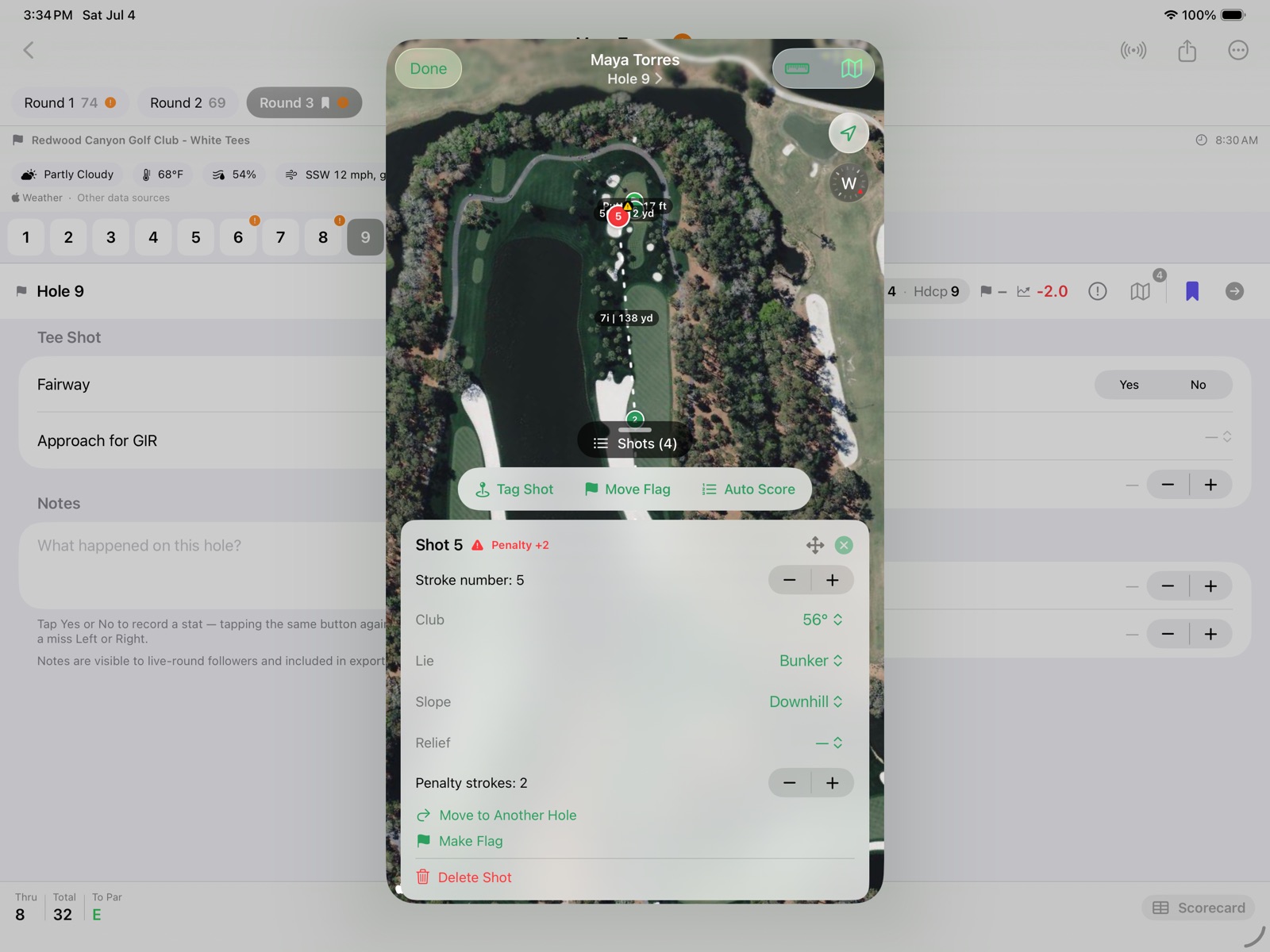
32 store screenshots


Pricing & paywalls
App Store
- Free
Ratings & reviews
App Store
No store reviews collected for App Store · US
Privacy & accessibility
App Store
Privacy
- Data Not Collected Developer declared
Accessibility
No accessibility labels collected yet.
Versions
App Store
- 1.2.2
-
1.2.3
GolfStats is built with guidance from PGA Professional John Riley, who helped shape the stats it tracks so junior and improving golfers can spot clear opportunities to shoot lower scores. This update adds that credit. Everything you already rely on — hole-by-hole stats, running and final round summaries, tournament totals, exports, and optional live sharing — stays exactly the same.
-
2.0.0
New: map your round shot by shot with the Shot Map, plays-like distances on the Shot Map. Flip the new per-hole toggle and Golf Stats adjusts each distance for elevation — uphill plays longer, downhill plays shorter, and the adjustment scales with the shot — so you see how far the shot really plays. Adjusted distances are marked with an up/down arrow and carry through to your club-distance summary, PDF export, and live followers. It's off by default and your choice on every hole. Everything you already rely on — hole-by-hole stats, running and final round summaries, tournament totals, exports, and optional live sharing — stays exactly the same.
-
2.1.0
NEW — Apple Watch companion. Connect a round on your iPhone and the watch gives you four quick actions — Drop (mark a shot's spot by GPS), Voice (dictate a shot's club, lie, and slope), Set Hole (drop the flag/green pin), and Score (fill the hole from your tracked shots). Change holes with the Digital Crown or a swipe — the current hole stays in sync with your phone — and your running total and score-to-par are a scroll away. NEW — Strokes gained. Off the tee, on approach, around the green, and putting, computed from your shots and shown both as a round total and per hole — on the round summary, the scorecard, the PDF, the spreadsheet, and the live follower view. Measured against a baseline you choose: PGA Tour, scratch, a 5/10/15 handicap, or bogey golfer. SHOT MAP • A pull-up shot list on every hole — tap a row to zoom to its pin, drag to reorder, swipe to delete, set each shot's club and lie inline, and turn a ball into the hole pin (or back) • A new Center Crosshair mode drops pins precisely by panning the map under a fixed reticle • Each shot's lie is auto-tagged from the course map, and a hole's score and putts fill straight from your pins — no typing SCORECARDS & SUMMARIES • The scorecard gains a per-hole +/- (to-par) row with OUT/IN/TOTAL subtotals and scrolls so no column is ever clipped • A new score-distribution chart shows how your holes broke down, eagles through others • Live followers get a per-hole strokes-gained column and a tap-to-open shot map FIXES • Scorecards now colour each hole's +/- (to-par) figure — red under par, green at even par — so birdies and pars stand out at a glance Everything you already rely on — hole-by-hole stats, the Shot Map, running and final round summaries, tournament totals, exports, and optional live sharing — stays exactly the same.
-
2.2.0
NEW — AI Round Analysis. When every hole has a score, tap Ask AI for an instant coaching read on your round. On-device Apple Intelligence looks over your full scorecard — score, putts, fairways, greens in regulation, penalties, and strokes gained — and tells you what went well, the one or two things costing you the most strokes, and a concrete practice focus for next time. It runs right on your iPhone, so nothing leaves your device. • Share the AI's coaching notes with a tap • Prefer a different assistant? "Ask Another AI" hands the same round summary to ChatGPT or Claude — and it's there even on iPhones without Apple Intelligence • The round summary handed to the AI now includes each hole's yardage, stroke index, and strokes gained • On the Apple Watch, a quick confirmation banner now flashes after you Drop a shot, dictate by Voice, set the hole, or fill a score — so you always know the wrist registered your tap • Fixed: a hole that ends on a relief drop no longer counts that penalty twice — scoring from your tracked shots, and the shot-count check, are now correct instead of reading one stroke high JUST CAUGHT UP? Here's what arrived in 2.1.0, in case you missed it: • Apple Watch companion — connect a round on your iPhone and score from your wrist with four quick actions: Drop a GPS shot, dictate one by Voice, Set the hole, and fill the score from your tracked shots. Change holes with the Digital Crown or a swipe, in sync with your phone. • Strokes gained — off the tee, on approach, around the green, and putting, shown as a round total and per hole across the summary, scorecard, PDF, spreadsheet, and live follower view, measured against a baseline you choose. • A richer Shot Map — a pull-up shot list with inline club and lie, Center Crosshair pin placement, and auto-detected lies — plus a score-distribution chart and per-hole to-par figures on the scorecard. Everything you already rely on — hole-by-hole stats, the Shot Map, the Apple Watch companion, running and final round summaries, strokes gained, tournament totals, exports, and optional live sharing — stays exactly the same.
-
2.2.1
Fixed: Find Course works again after OpenGolfAPI changed its course data format — picking a tee no longer stops with a "Lookup Failed" error, and par, distance, and handicap index import as before JUST CAUGHT UP? Here's what arrived in 2.2.0, in case you missed it: NEW — AI Round Analysis. When every hole has a score, tap Ask AI for an instant coaching read on your round. On-device Apple Intelligence looks over your full scorecard — score, putts, fairways, greens in regulation, penalties, and strokes gained — and tells you what went well, the one or two things costing you the most strokes, and a concrete practice focus for next time. It runs right on your iPhone, so nothing leaves your device. • Share the AI's coaching notes with a tap • Prefer a different assistant? "Ask Another AI" hands the same round summary to ChatGPT or Claude — and it's there even on iPhones without Apple Intelligence • The round summary handed to the AI now includes each hole's yardage, stroke index, and strokes gained • On the Apple Watch, a quick confirmation banner now flashes after you Drop a shot, dictate by Voice, set the hole, or fill a score — so you always know the wrist registered your tap • Fixed: a hole that ends on a relief drop no longer counts that penalty twice — scoring from your tracked shots, and the shot-count check, are now correct instead of reading one stroke high Here's what arrived in 2.1.0, in case you missed it: • Apple Watch companion — connect a round on your iPhone and score from your wrist with four quick actions: Drop a GPS shot, dictate one by Voice, Set the hole, and fill the score from your tracked shots. Change holes with the Digital Crown or a swipe, in sync with your phone. • Strokes gained — off the tee, on approach, around the green, and putting, shown as a round total and per hole across the summary, scorecard, PDF, spreadsheet, and live follower view, measured against a baseline you choose. • A richer Shot Map — a pull-up shot list with inline club and lie, Center Crosshair pin placement, and auto-detected lies — plus a score-distribution chart and per-hole to-par figures on the scorecard. Everything you already rely on — hole-by-hole stats, the Shot Map, the Apple Watch companion, running and final round summaries, strokes gained, tournament totals, exports, and optional live sharing — stays exactly the same.
-
2.2.2
UPDATED — clearer names for two actions you use on every hole, on the Shot Map and the Apple Watch: • "Drop" is now "Tag" — tag a shot's location as you play • "Set Hole" / "Move Hole" is now "Set Flag" / "Move Flag" — for placing the green's flag pin Same actions, names that read better at a glance. Your saved rounds, backups, and live-shared rounds are unaffected. JUST CAUGHT UP? Here's what arrived in 2.2.1, in case you missed it: Fixed: Find Course works again after OpenGolfAPI changed its course data format — picking a tee no longer stops with a "Lookup Failed" error, and par, distance, and handicap index import as before Here's what arrived in 2.2.0, in case you missed it: NEW — AI Round Analysis. When every hole has a score, tap Ask AI for an instant coaching read on your round. On-device Apple Intelligence looks over your full scorecard — score, putts, fairways, greens in regulation, penalties, and strokes gained — and tells you what went well, the one or two things costing you the most strokes, and a concrete practice focus for next time. It runs right on your iPhone, so nothing leaves your device. • Share the AI's coaching notes with a tap • Prefer a different assistant? "Ask Another AI" hands the same round summary to ChatGPT or Claude — and it's there even on iPhones without Apple Intelligence • The round summary handed to the AI now includes each hole's yardage, stroke index, and strokes gained • On the Apple Watch, a quick confirmation banner now flashes after you Tag a shot, dictate by Voice, set the Flag, or fill a score — so you always know the wrist registered your tap • Fixed: a hole that ends on a relief drop no longer counts that penalty twice — scoring from your tracked shots, and the shot-count check, are now correct instead of reading one stroke high Here's what arrived in 2.1.0, in case you missed it: • Apple Watch companion — connect a round on your iPhone and score from your wrist with four quick actions: Tag a GPS shot, dictate one by Voice, Set the Flag, and fill the score from your tracked shots. Change holes with the Digital Crown or a swipe, in sync with your phone. • Strokes gained — off the tee, on approach, around the green, and putting, shown as a round total and per hole across the summary, scorecard, PDF, spreadsheet, and live follower view, measured against a baseline you choose. • A richer Shot Map — a pull-up shot list with inline club and lie, Center Crosshair pin placement, and auto-detected lies — plus a score-distribution chart and per-hole to-par figures on the scorecard. Everything you already rely on — hole-by-hole stats, the Shot Map, the Apple Watch companion, running and final round summaries, strokes gained, tournament totals, exports, and optional live sharing — stays exactly the same.
-
2.2.3
NEW — a friendlier start, and clearer help while you score: • A first-launch welcome card points the way — especially if a coach or family member just sent you a live-score link, it shows you where to enter the share code • A new How to Score a Round guide, linked from the welcome card and from About • Tee times now show the date too — on live scores, the round summary, the scorecard PDF, and the spreadsheet — so it's clear which day each round was played Fixed: • Apple Watch shot locations are faster and more accurate — the watch now keeps its GPS warm through a connected round instead of cold-starting on every tap, so tagging a shot, setting the flag, or dictating by Voice lands a sharp fix right away • Auto Score (Score from Shots) now records penalty strokes, so the scorecard's penalty column, your round totals, the AI read, and the Excel export all match the score • Strokes gained is now calculated on holes where you took relief (for example a tee shot replayed out of bounds), instead of asking for a lie the app never let you set JUST CAUGHT UP? Here's what arrived in 2.2.2, in case you missed it: Clearer names for two actions you use on every hole, on the Shot Map and the Apple Watch: • "Drop" is now "Tag" — tag a shot's location as you play • "Set Hole" / "Move Hole" is now "Set Flag" / "Move Flag" — for placing the green's flag pin Same actions, names that read better at a glance. Your saved rounds, backups, and live-shared rounds are unaffected. Here's what arrived in 2.2.1, in case you missed it: Fixed: Find Course works again after OpenGolfAPI changed its course data format — picking a tee no longer stops with a "Lookup Failed" error, and par, distance, and handicap index import as before Here's what arrived in 2.2.0, in case you missed it: NEW — AI Round Analysis. When every hole has a score, tap Ask AI for an instant coaching read on your round. On-device Apple Intelligence looks over your full scorecard — score, putts, fairways, greens in regulation, penalties, and strokes gained — and tells you what went well, the one or two things costing you the most strokes, and a concrete practice focus for next time. It runs right on your iPhone, so nothing leaves your device. • Share the AI's coaching notes with a tap • Prefer a different assistant? "Ask Another AI" hands the same round summary to ChatGPT or Claude — and it's there even on iPhones without Apple Intelligence • The round summary handed to the AI now includes each hole's yardage, stroke index, and strokes gained • On the Apple Watch, a quick confirmation banner now flashes after you Tag a shot, dictate by Voice, set the Flag, or fill a score — so you always know the wrist registered your tap • Fixed: a hole that ends on a relief drop no longer counts that penalty twice — scoring from your tracked shots, and the shot-count check, are now correct instead of reading one stroke high Here's what arrived in 2.1.0, in case you missed it: • Apple Watch companion — connect a round on your iPhone and score from your wrist with four quick actions: Tag a GPS shot, dictate one by Voice, Set the Flag, and fill the score from your tracked shots. Change holes with the Digital Crown or a swipe, in sync with your phone. • Strokes gained — off the tee, on approach, around the green, and putting, shown as a round total and per hole across the summary, scorecard, PDF, spreadsheet, and live follower view, measured against a baseline you choose. • A richer Shot Map — a pull-up shot list with inline club and lie, Center Crosshair pin placement, and auto-detected lies — plus a score-distribution chart and per-hole to-par figures on the scorecard. Everything you already rely on — hole-by-hole stats, the Shot Map, the Apple Watch companion, running and final round summaries, strokes gained, tournament totals, exports, and optional live sharing — stays exactly the same.
-
2.3.0
NEW — score without picking up your phone: • Siri & the Action Button — say "Tag a shot in Golf Stats", or assign Tag a Shot to the Action Button, to drop a GPS pin with one press. Score a hole, jump to a hole, set the flag, or enter a score the same way — on iPhone and Apple Watch • Shortcuts — build any of the five actions (Score This Hole, Go to Hole, Tag a Shot, Set the Flag, Set Score) into your own shortcuts • Control Center & Lock Screen — add Tag a Shot, Set the Flag, and Score This Hole as controls • Widgets — keep the hole you're on (with to-par, shots, and your total) and the live standings of the players you follow on your Home Screen, Lock Screen, and Apple Watch face • Live Activity — pin the players you follow to the Lock Screen and Dynamic Island: one live card lists everyone, leader first, with thru and to-par updating as they score Also in this release: • The tee picker now shows each tee's gender and Course/Slope Rating, so tees are easier to tell apart • "Plays-like" elevation distances are now more accurate on uphill and downhill shots • Fetch Weather now uses Apple Weather for current conditions No sign-in, no Siri setup, and nothing leaves your device. Everything you already rely on — hole-by-hole stats, the Shot Map, the Apple Watch companion, strokes gained, AI round analysis, exports, and optional live sharing — stays exactly the same.
-
2.3.1
A few improvements to following rounds live: • Show on Lock Screen is now a single switch in the menu — turn it on (Live Round → Show on Lock Screen) and every round you follow appears on the Lock Screen and Dynamic Island, no longer one round at a time • On Apple Watch, the live card now shows the player's name • Fixed hole yardages not appearing for some tees As always, no sign-in and nothing leaves your device.
-
2.4.0
This update refreshes the hole entry screen and polishes live scores: • A cleaner hole screen — your score-to-par, strokes gained, and quick actions (shot map, review, next hole) share one compact bar, with the hole's distance, par, and handicap tucked into a tap-to-edit header • Scores on the Lock Screen, Dynamic Island, and widgets now use the same colours as your scorecard — red under par, green at even par, and no colour over par • Small refinements to the followed-round card on Apple Watch • Fixed a "Fetch Weather" hiccup that could show a cryptic location error — it now retries and explains itself As always, no sign-in and nothing leaves your device.
-
2.5.0
NEW — plan the hole before you swing: • Hole Strategy — a Strategy button on the Shot Map plans the hole shot by shot: where to aim, what club, which side to miss on, and the score to expect, drawn right on the satellite map • Sized to your game — pick a Baseline Player skill level and the plan models where your shots actually scatter against the real fairways, bunkers, and water, keeping the big number out of play instead of aiming at every flag • Set your average carries — give each club a typical carry in Settings → Clubs and the planner recommends real clubs before you've tracked a single shot (tracked distances refine it as you play) • Your pins win — set the flag and the plan aims at the actual pin; a tagged tee shot plus a set flag plan a hole even on an unmapped course • Honest about data — when a course isn't fully mapped, the plan says so and gives centre-line guidance instead of guessing Also in this release: • Smarter short game — the plan pitches to the flag from inside your shortest club instead of forcing a full swing • Better course detection at multi-course clubs — your played tee shots pin down which course's holes you're on, and each hole's mapped line is checked against the real tee boxes and greens so plans start from the actual tee • Tune the planner — choose a Quick or Thorough planning depth, and plan at a different skill level than you measure strokes gained against • Reorganized Settings — preferences, clubs, and notifications live under one Settings screen, and backup, restore, and clear-all move to a new Manage Data screen No sign-in, and the planning runs entirely on your device. Everything you already rely on — hole-by-hole stats, the Shot Map, the Apple Watch companion, strokes gained, AI round analysis, exports, and optional live sharing — stays exactly the same.
-
2.5.1
· 20 Jul 2026
This update fixes two things golfers hit on the course: • Relief, recorded where you take it — mark relief on the ball that landed in trouble (a cart path, water, an unplayable spot…) instead of on the drop. The Shot Map keeps the real shot's line and distance into that spot, and no longer draws your hand-carry to the drop as if it were a shot. Existing rounds and shared files convert automatically — scores, penalties, and strokes gained don't change. • No more half-black screen — switching to another app and back could leave the bottom half of the screen dark and unresponsive (an iOS 26 quirk, most visible with the Shot Map open). Golf Stats now restores the screen the moment you return.
Availability by market
- US
Data quality & evidence
- Page completeness
- Live store listing
- Last verified
- 6 Aug 2026
- Sources
- App Store
- Independent summary has not been published yet.