
Quick verdict
- What it is
- Store information collected; independent summary not yet available.
- At a glance
-
- $6.99
Categories and search queries
Official categories
- Medical
- Lifestyle
AppCorpus categories
Key functions
| Function | Availability | Access | Scope | Evidence |
|---|---|---|---|---|
| Family Sharing | Yes | Unknown | App Store | Store published |
Screens
App Store
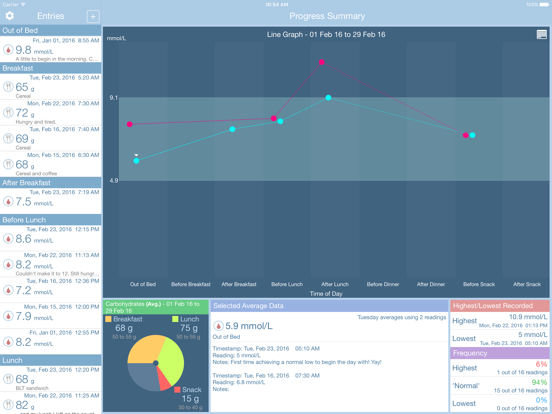
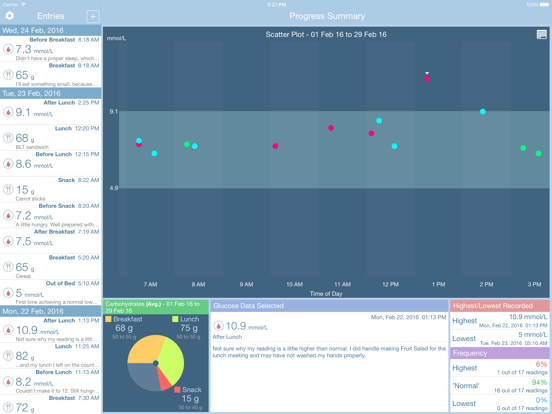
15 store screenshots


Pricing & paywalls
App Store
- Price: $6.99
Ratings & reviews
App Store
-
4/5Needs a phone app
This tracking application works wonderfully. Simple easy to use. However, the drawback is that it only works on my iPhone and there is no application that would allow me to enter my readings on my iwatch. if there was a Watch app that coordinated between my phone and my watch, this would’ve been a five star rating.
LenM204 · 7 Aug 2026
-
5/5Meets medical objectives; from a well-establish developer
My physician recently asked me to begin monitoring my blood glucose, recording the values on paper. (Most blood glucose readers also save these values on the meter, to be downloaded at the doctor's office.) Assuming there must be an App for that, I surveyed all the ones available on the iOS and OS X App stores. Only GlucoSweet offers iCloud-synched Apps on both platforms. I was also drawn to GlucoSweet for two other reasons. First, data collection is organized precisely as my physician asked: before and after meals, and other significant events. Second, I've used another App from the same developer, Capture 365 Journal, since its first version, and have been impressed with its flawless iCloud synching, and general usefulness as a daily photo journal. Finally, the developer has proven to be extremely responsive. His responses have been useful, and to the point. I have the impression he is answering my specific question, rather than pasting boilerplate.
cssfan · 7 Aug 2026
-
1/5App is a disaster
Run away from this app. It is non intuitive, each day you have to re figure out how the features work
somosrf · 7 Aug 2026
-
5/5Best!
Simple to use, easy to read, yet very thorough with tracking. I've been a diabetic for 47 years and this is the best system I've ever had to watch everything! At a glance I can see blood sugars, medication dosage, times of day, and trends. I can personalize it in any way that I want to see these things and it's comfortable. Simple and intuitive!! Thank you!!
Mimicam · 7 Aug 2026
-
2/5Off to a Good Start but Fails to Deliver
The display is nice and the app uses some "Apple style" input interfaces that make it relatively easy to get the glucose readings into the database. At a basic level, this app lets you track your progress and will display it on the graph in single-day, one week, two week, etc., chunks. From there however, the app fails to live up to its potential: - The app does not synch across iTunes as advertised (there is a setting to turn this on and off but nothing seems to actually happen) - The app does not display averages, only the high and low across the selected range - The graph width is set and extends beyond the screen edges on both the iPhone and the iPad, requiring you to scroll over to see the data and significantly reducing is usability for tracking trends - The numerical interface for entering values requires you to add a trailing "0" (past the decimal point) - Otherwise you wind up with "12.5" instead of "125" Overall, the graphics are nice and the app seems very stable on both iPad and iPhone but it does not offer much in the way of additional functionality. Hoping for much more with an update...
Fix-it 17 · 7 Aug 2026
Privacy & accessibility
App Store
Privacy
- Data Not Linked to You — App Functionality — Diagnostics — Crash Data Developer declared
- Data Not Linked to You — Diagnostics Developer declared
Accessibility
No accessibility labels collected yet.
Versions
App Store
-
1.0.1
★ New Feature - A better way in entering past blood glucose readings with the addition of a year field. ☂ Fixes and Improvements - Limited entries display for performance reasons - Minor bug fixes and general housekeeping
-
1.0.2
New Features ★ Ability to switch between 12-hour and 24-hour time formats. ★ For those who only record their readings a few times a month or less, we've added in a custom date range feature. Simply swipe to the left - on the yellow ribbon - for the ability to graph within your specified date ranges. Fixes and Improvements ☂ Minor bug fixes ☂ General housekeeping
-
1.0.3
☂ Minor bug fixes and general housekeeping - Glucose exported CSV data sorted by entry date in a descending chronological order
-
1.0.4
NEW - Option in app Settings to switch the graph display to either Scatter Plot or Line Graph. Note: The Line Graph will only display averages. - Selecting an average display point in Line Graph mode will show the following information: average value for that point, the time of day and day of the week the averages were taken, the count of glucose readings used for this averaged calculation and the list of all readings for your reference. Bug Fixes and Improvements - Better memory management and optimisations for performance reasons - CSV export sorted by ascending order for a more logical reference - Provided better data encoding for exporting to MS Excel - Format of the AirPrint PDF display enhanced to look better - Other minor bug fixes and general housekeeping Thank you for all of your support and feedback so far. We hope you enjoy this update. If there are any features you want to see in GlucoSweet, please let us know - we would love to hear from you!
-
1.0.5
GlucoSweet - Diabetes Management is now available on Mac! NEW - Backup and restore feature so you can safely store your data offsite. Improvements and Bug Fixes - iCloud sync feedback - Minor bug fixes and general housekeeping
-
1.0.6
GlucoSweet - Diabetes Management is now available on Mac AppStore! - Minor bug fixes
-
1.0.7
GlucoSweet - Diabetes Management is now available on the Mac AppStore! - Minor UI bug fixes
-
2.0.0
New Features - New UI for iOS 7 - New icon - Added carbohydrate tracking Bug Fixes and Improvements - General bug fixes
-
2.0.1
Bug fixes and improvements - Improved usability when adding new entries. - Fixed crashes for iOS 6 users when attempting to edit existing entries or customise the normal range in settings - Other minor bug fixes and general housekeeping
-
2.0.2
Bug fixes and improvements - Fixed entry reading defaulting back to '0.0'. This ONLY affected users with language/region device settings, such as Netherlands, where the device did not recognise the decimal point. - Minor UI changes to make the text size more clear and readable. - Other minor bug fixes We are currently working very hard to get the Mac version of GlucoSweet to be compatible with the latest carbohydrate tracking iOS version. Please be patient and keep an eye out! Interested in GlucoSweet Mac? Please visit our website for more information or via the link https://itunes.apple.com/us/app/glucosweet-diabetes-management/id687177810?ls=1&mt=12 ----------------------------------------------------- Thank you for all your feedback and support so far. Please let us know what you think of the newest update and/or how we can improve it further to better suit your needs.
-
2.0.3
- Minor UI fixes
-
2.0.4
Bug Fixes and Improvements - Due to feedback from users, have now added in an 'Other' category to cater for any glucose readings taken in-between Before Bed and Out of Bed. - Detects and appropriately ignores any blank readings (e.g. 0 value) in Add Entry - Fixed duplicated display labels in the graph x-axis when switching between scatter and line graphs. - When display averages using Line Graph, the selected display is now sorted in descending order with the most recent reading at the top. - Consistently uses the same time display format chosen in app settings for GlucoSweet exported files. - Due to user feedback, exported files now include carbohydrate intake data as well as the glucose readings. - Exporting adopts the same time of day and chronological descending order as displayed in the Entries Table. - Improved iCloud syncing to appropriately and intelligently merge conflicting databases. - Fixed up the view shifting bug when using external keyboards. - Other minor bug fixes and general housekeeping. Due to popular user feedback, we are currently working on including insulin tracking in the next major update. Bear with us, we're working to better improve GlucoSweet for you! Thank you and please support us by giving us a good review on the AppStore.
-
2.1.0
NEW - Due to very popular requests, we have been working extremely hard to incorporate and support medication/insulin tracking. We are proud to announce that GlucoSweet now supports medication/insulin tracking. - GlucoSweet has been developed to remember all of the 'unique' medication/insulin entered. Our aim is to make entering medication intake the next time around more efficient and user friendly! - We've even added other options of sorting the entries table - Time of Day, Entry Type and Calendar Date. This option is available in app Settings. - We have added in additional time of day categories, e.g. During Activity, During Night and After Bed. Bug Fixes and Improvements - Optimised database for performance reasons - Fixes the add/edit entry shifting bug - Other bug fixes and general housekeeping Please show us some love and let us know what you think of this latest update with a positive review on the AppStore! For any bug reports or help, please email us directly as we cannot, no matter how much we wish we could, respond to users who post reviews! We hope you the latest update and continue to enjoy using GlucoSweet! Wishing you all a lovely day!
-
2.1.1
Bug Fixes and Improvements - Enhanced Carb Intake Pie Graph to show Daily Totals for a selected day. - Averaged carb intake improved to show a more accurate average amounts for each meal time when the date specified is across multiple days and only based on relevant days for that meal time. - Increased the calendar display date to show about ~6 months history of data - Other minor bug fixes and general housekeeping
-
2.1.2
minor bug fixes and general housekeeping
-
2.2.3
NEW - Due to popular requests and feedback from users, we have added in an alternative 'Time Graph' view where it plots the blood glucose level readings in a 24-hr chronological time period format. The option to switch x-axis display between 24-hr and time of day categories is available in the application Preferences. Both scatter plot and line graph plots are available in both graphs. - The Time Graph view also has an additional option to display an overview average of combined readings within the 24-hr period discarding the 'weekday' analysis. This means that any reading that falls within that particular time period will be taken in the average. This option is only applicable when 'Line Graph' and the 24-hr chronological time period format is selected for graph display. - Due to popular requests and feedback from users, we have implemented the ability to add your own customised time of day categories to the list of default categories and re-arrange to suit your lifestyle. - iPhone 6 and iPhone 6 Plus ready! - iOS 8 ready and compatible! Bug Fixes and Improvements - Exporting the database now follows the same format option as the sort chosen for Entries display. - iPhone version now supports landscape orientation! Note: Landscape support will make the graphs look even more gorgeous on the iPhone 6 and iPhone 6 Plus displays! - Other minor bug fixes Glucosweet never prompts you for a review, but if you feel generous, please leave us a review. It will make a big difference for us! Thank you and we hope you enjoy the updates.
-
2.2.4
Bug fixes and improvements - Fixed entry crashes associated with customising the categories on the iPad. iPhone version not affected. - Fixed customised category changes syncing to other devices when iCloud option is ON. - Other minor bug fixes and general housekeeping.
-
2.2.5
Bug Fixes and Improvements - Fixed any editing issues, accidentally introduced in v2.2.4, which prevents time of day category changes for existing entries. - Medication/Insulin intake reading value changed to display to two (2) decimal points for better display accuracy. - Other minor bug fixes and general housekeeping.
-
2.2.6
Bug Fixes and Improvements - iPad Pro ready - iOS 9 compatible - Fixed units selection for oral medication - Fixed display bug where the legend is always hidden for the graph - Ability to remove medications added. - Other minor bug fixes and general housekeeping
-
2.2.7
Minor bug fixes and general housekeeping
-
2.2.8
Bug Fixes and Improvements - Improved syncing issues - databases will attempt to merge if a conflict is detected. - Other minor bug fixes and general housekeeping.
-
2.3.0
- iPhone X display support - iOS 11 tested - Minor bug fixes and general housekeeping.
-
2.3.1
This update from Apple will improve the functionality of this app. No new features are included. Minor bug fixes.
-
2.4.0
Bug fixes and compatibility update.
-
2.4.1
· 18 May 2025
Minor bug fixes
Alternatives
- Pill Reminder ◐ Med Tracker — Same category + similar ratings
Availability by market
- US
Data quality & evidence
- Page completeness
- Live store listing
- Last verified
- 7 Aug 2026
- Sources
- App Store
- Independent summary has not been published yet.