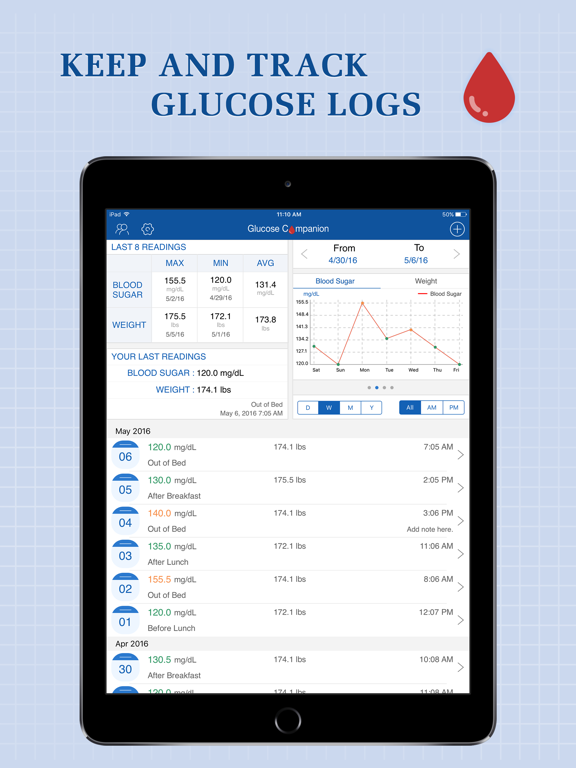
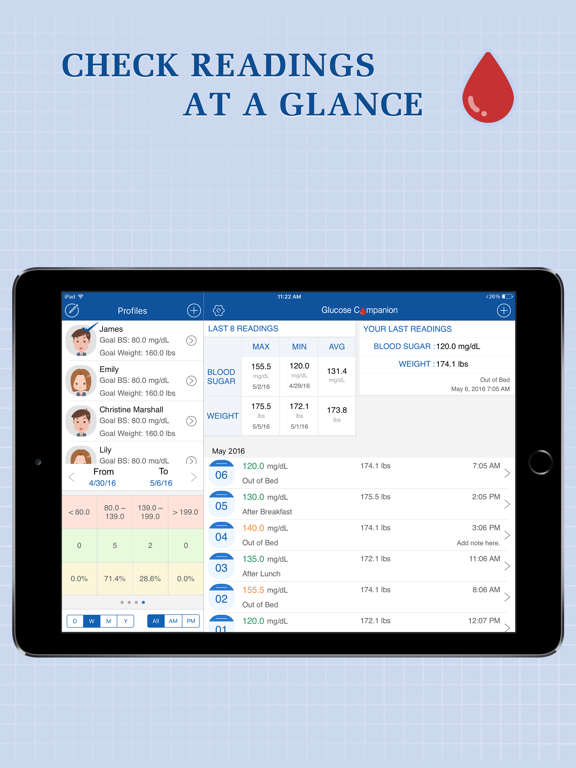
Apoku MCP provides app discovery, detailed cards, evidence, sources and screenshots where available. Unknown or conflicting prices stay explicit.
View JSON
GET /api/v3/apps/456218638
{
  "app_id": 456218638,
  "canonical_url": "https://appcorpus.com/apps/glucose-companion-pro-456218638",
  "identity": {
    "name": "Glucose Companion Pro",
    "slug": "glucose-companion-pro",
    "developer": {
      "name": "倩 赵",
      "url": "https://appcorpus.com/developers/developer-91-developer_636aac83180f11303720b3b55fd1a6e4"
    },
    "icon_url": "https://is1-ssl.mzstatic.com/image/thumb/Purple221/v4/a0/0a/99/a00a999d-fa2c-10b2-cb38-7d74e6fd726c/AppIcon-0-0-1x_U007epad-0-1-0-0-85-220.png/512x512bb.jpg",
    "stores": [
      "apple"
    ],
    "platforms": [
      "iphone",
      "ipad"
    ],
    "status": {
      "state": "active",
      "label": "Active",
      "last_checked": "2026-08-06",
      "last_checked_label": "6 Aug 2026",
      "banner": null,
      "region_note": null,
      "data_state": "stale",
      "data_state_label": "Some store data may be out of date"
    }
  },
  "listings": [
    {
      "store": "apple",
      "status": "ACTIVE",
      "url": "https://apps.apple.com/us/app/glucose-companion-pro/id456218638?uo=4",
      "rating": 4.6,
      "rating_count": 791,
      "formatted_price": "$1.99",
      "is_free": false,
      "has_iap": true,
      "has_subscription": null,
      "version": "10.0",
      "updated": "2026-08-06",
      "currency": "USD"
    }
  ],
  "summary": {
    "one_liner": null,
    "summary": null,
    "best_for": [],
    "not_for": [],
    "status": "fallback",
    "at_a_glance": [
      "From $0.83/mo",
      "$1.99",
      "In-app purchases"
    ]
  },
  "categories": {
    "official": [
      "Medical",
      "Health & Fitness"
    ],
    "appcorpus": [
      {
        "category_id": "medical",
        "label": "Medical",
        "url": "https://appcorpus.com/categories/medical"
      },
      {
        "category_id": "health-fitness",
        "label": "Health & fitness",
        "url": "https://appcorpus.com/categories/health-fitness"
      }
    ]
  },
  "use_cases": [],
  "features": [
    {
      "capability_id": "in_app_purchases",
      "label": "In-app purchases",
      "availability": "yes",
      "access_level": "free_limited",
      "scope": null,
      "evidence": "Store published"
    },
    {
      "capability_id": "family_sharing",
      "label": "Family Sharing",
      "availability": "unknown",
      "access_level": "unknown",
      "scope": null,
      "evidence": "Store published"
    }
  ],
  "pricing": [
    {
      "store": "apple",
      "formatted_price": "$1.99",
      "is_free": false,
      "has_iap": true,
      "has_subscription": null,
      "currency": "USD",
      "market": "us",
      "last_verified": "2026-08-06",
      "rows": [
        "Price: $1.99",
        "Premium - 6 months — $0.99/month",
        "Premium - 6 months — $9.99/year ($0.83/mo)",
        "Premium - 6 months — $5.49"
      ],
      "state": "current"
    }
  ],
  "screens": [
    {
      "url": "https://is1-ssl.mzstatic.com/image/thumb/Purple116/v4/7b/a6/72/7ba672cd-8fa5-ff22-6881-3afd05aab738/21394e1c-2801-4c85-be40-7cf88da743da_YQ_039_ipadpro3_Scr_1.png/1600x1600bb.jpg",
      "store": "apple",
      "platform": "ipad",
      "alt": "Glucose Companion Pro ipad screenshot 1"
    },
    {
      "url": "https://is1-ssl.mzstatic.com/image/thumb/Purple116/v4/b7/19/d9/b719d95b-df32-9d92-52eb-59dc297eebfe/a9ed6f5e-0df6-41e8-8b20-3851faf331f1_YQ_039_ipadpro_Scr_1.png/576x768bb.png",
      "store": "apple",
      "platform": "ipad",
      "alt": "Glucose Companion Pro ipad screenshot 2"
    },
    {
      "url": "https://is1-ssl.mzstatic.com/image/thumb/Purple116/v4/1c/19/1e/1c191e41-8754-39ec-7e11-6ef07dde7006/203b71cf-0341-40da-8a93-8d8029daaf91_YQ_039_ipadpro3_Scr_2.png/1600x1600bb.jpg",
      "store": "apple",
      "platform": "ipad",
      "alt": "Glucose Companion Pro ipad screenshot 3"
    },
    {
      "url": "https://is1-ssl.mzstatic.com/image/thumb/Purple126/v4/a8/08/2c/a8082c9a-0d2f-0036-dab5-4fda05d6f56f/37dfc974-9dd0-4f86-9648-42bec014bc20_YQ_039_ipadpro_Scr_2.png/576x768bb.png",
      "store": "apple",
      "platform": "ipad",
      "alt": "Glucose Companion Pro ipad screenshot 4"
    },
    {
      "url": "https://is1-ssl.mzstatic.com/image/thumb/Purple126/v4/76/94/a4/7694a433-5b1f-9d1e-d09c-e5f67f8eb254/efdf618b-d33b-49fa-8406-a35967977444_YQ_039_ipadpro3_Scr_3.png/1600x1600bb.jpg",
      "store": "apple",
      "platform": "ipad",
      "alt": "Glucose Companion Pro ipad screenshot 5"
    },
    {
      "url": "https://is1-ssl.mzstatic.com/image/thumb/Purple116/v4/6a/53/f5/6a53f548-df41-46f9-b690-1059346e1033/fb318c33-721c-452c-82e2-6637ddb36ea8_YQ_039_ipadpro_Scr_3.png/576x768bb.png",
      "store": "apple",
      "platform": "ipad",
      "alt": "Glucose Companion Pro ipad screenshot 6"
    },
    {
      "url": "https://is1-ssl.mzstatic.com/image/thumb/Purple116/v4/ae/ff/e9/aeffe9ab-b2d9-9444-ba12-0a474cc3ffb5/47b3b11d-ddf9-4b96-b281-7dc274611a2b_YQ_039_ipadpro3_Scr_4.png/1600x1600bb.jpg",
      "store": "apple",
      "platform": "ipad",
      "alt": "Glucose Companion Pro ipad screenshot 7"
    },
    {
      "url": "https://is1-ssl.mzstatic.com/image/thumb/Purple126/v4/94/7e/bb/947ebbbe-7324-1083-ce5c-e91b49c1188b/ed25d602-b10b-4069-9c7d-cb012e01ad79_YQ_039_ipadpro_Scr_4.png/576x768bb.png",
      "store": "apple",
      "platform": "ipad",
      "alt": "Glucose Companion Pro ipad screenshot 8"
    },
    {
      "url": "https://is1-ssl.mzstatic.com/image/thumb/Purple116/v4/e3/00/93/e3009373-f143-5085-8c0b-7a29d7f0613c/4da76930-a3ab-4eb8-8ced-9b7fa547be27_YQ_039_ipadpro3_Scr_5.png/1600x1600bb.jpg",
      "store": "apple",
      "platform": "ipad",
      "alt": "Glucose Companion Pro ipad screenshot 9"
    },
    {
      "url": "https://is1-ssl.mzstatic.com/image/thumb/Purple116/v4/3d/91/b3/3d91b376-df40-e1f0-1182-6cf1eef19d39/17bf3090-7302-4a65-89fe-dacf1e998759_YQ_039_ipadpro_Scr_5.png/576x768bb.png",
      "store": "apple",
      "platform": "ipad",
      "alt": "Glucose Companion Pro ipad screenshot 10"
    },
    {
      "url": "https://is1-ssl.mzstatic.com/image/thumb/Purple116/v4/57/6f/65/576f655a-d05d-433f-838e-9936a3587ed4/pr_source.png/1242x1600bb.jpg",
      "store": "apple",
      "platform": "iphone",
      "alt": "Glucose Companion Pro iphone screenshot 11"
    },
    {
      "url": "https://is1-ssl.mzstatic.com/image/thumb/Purple126/v4/bd/f3/28/bdf328f7-c745-89c8-c987-f2dfec1c3ba3/pr_source.png/1242x1600bb.jpg",
      "store": "apple",
      "platform": "iphone",
      "alt": "Glucose Companion Pro iphone screenshot 12"
    },
    {
      "url": "https://is1-ssl.mzstatic.com/image/thumb/Purple126/v4/ac/f9/a2/acf9a20b-ed1d-23f1-0a5d-0c38872d6f94/pr_source.png/1242x1600bb.jpg",
      "store": "apple",
      "platform": "iphone",
      "alt": "Glucose Companion Pro iphone screenshot 13"
    },
    {
      "url": "https://is1-ssl.mzstatic.com/image/thumb/Purple126/v4/c6/bf/f7/c6bff708-9630-52c5-a157-f26ccd33d76b/pr_source.png/1242x1600bb.jpg",
      "store": "apple",
      "platform": "iphone",
      "alt": "Glucose Companion Pro iphone screenshot 14"
    },
    {
      "url": "https://is1-ssl.mzstatic.com/image/thumb/Purple126/v4/23/93/1b/23931b62-5a41-6d37-7d37-3ab80be9b0cd/pr_source.png/1242x1600bb.jpg",
      "store": "apple",
      "platform": "iphone",
      "alt": "Glucose Companion Pro iphone screenshot 15"
    },
    {
      "url": "https://is1-ssl.mzstatic.com/image/thumb/PurpleSource116/v4/ed/50/b5/ed50b5fc-c80b-54dc-188c-126303e856cc/f9fc6a33-9bea-48b1-82cb-2a2e95095906_1.png/368x448bb.jpg",
      "store": "apple",
      "platform": "watch",
      "alt": "Glucose Companion Pro watch screenshot 16"
    },
    {
      "url": "https://is1-ssl.mzstatic.com/image/thumb/PurpleSource116/v4/f1/f9/8f/f1f98ffa-e89d-717e-225d-85b5ce1fc190/13bcbf95-e576-4ea1-8266-281ccf626360_2.png/368x448bb.jpg",
      "store": "apple",
      "platform": "watch",
      "alt": "Glucose Companion Pro watch screenshot 17"
    },
    {
      "url": "https://is1-ssl.mzstatic.com/image/thumb/PurpleSource126/v4/86/9d/f0/869df04c-244d-5465-66e2-094792fb83c0/aa638cfc-76c7-426b-b81a-f71c2a4a2c39_4.png/368x448bb.jpg",
      "store": "apple",
      "platform": "watch",
      "alt": "Glucose Companion Pro watch screenshot 18"
    },
    {
      "url": "https://is1-ssl.mzstatic.com/image/thumb/PurpleSource116/v4/41/bc/79/41bc79d0-d1b4-c099-1b7b-1531b85846f6/2d2eaf31-12b0-4024-83f6-05496f06e5ca_3.png/368x448bb.jpg",
      "store": "apple",
      "platform": "watch",
      "alt": "Glucose Companion Pro watch screenshot 19"
    },
    {
      "url": "https://is1-ssl.mzstatic.com/image/thumb/PurpleSource116/v4/ff/37/a1/ff37a1cb-bb1d-787e-a488-28c246aea21f/2cef6edf-595d-4ac7-ad5b-a8943642fc32_5.png/368x448bb.jpg",
      "store": "apple",
      "platform": "watch",
      "alt": "Glucose Companion Pro watch screenshot 20"
    }
  ],
  "data_states": {
    "screens": "current"
  },
  "ratings": [
    {
      "store": "apple",
      "average": 4.6,
      "count": 791,
      "market": "us",
      "observed_at": "2026-08-06",
      "state": "current",
      "reviews": [
        {
          "rating": 5,
          "title": "Outstanding App!",
          "body": "I am using this for my newly diagnosed dog with type I DM. This app is perfect for daily home monitoring, as well as for doing a blood glucose curve using a glucometer made for pets. We are not able to pay the extraordinary sums of money needed for an over night hospital stay for serial glucose monitoring needed for the blood glucose curve. Also, frequent office visit is cost prohibitive. Veterinarians all agree that this study is mandatory to help get & keep your pet’s blood sugar under control, as well as twice daily monitoring. On my wish list for this excellent app is to include on the blood sugar graft when a meal is given and when the insulin (in units) is given. This would yield more useful info for even more accurate blood sugar monitoring. Again, thank you very much for this “Top-flight” app! Good luck to all who must depend upon it. Gene D",
          "author": "Mooned by WU Associates",
          "date": "6 Aug 2026"
        },
        {
          "rating": 3,
          "title": "Used to love it",
          "body": "I love the convenience of this app. The reminders are helpful and I like being able to choose the entry details I’m regarding my glucose readings. However, lately I’ve noticed that the app doesn’t update my weight accurately. I’m on a weight loss regimen and I enter my weight weekly. The app was accurately storing this data daily and then would continue to update it after I entered my new weight at the end of the week. Unfortunately, I have to manually adjust my weight to my current weight each time I enter my new glucose readings. The weight entry used to stay the same during each glucose entry until I entered the new one. It doesn’t do this now, instead it goes back to the weight entered a week prior. I attempted to get this resolved with support but not only did they not understand my problem, after explaining it several times, it’s still not resolved. Very frustrated with App Support! I would expect Support to know how their app works and fix any glitches.",
          "author": "MizzYo",
          "date": "6 Aug 2026"
        },
        {
          "rating": 3,
          "title": "It's OK",
          "body": "I have to change from an older glucose (and other data) app because it is no longer maintained and is 32-bit - which means it won't work with IOS 11+. Glucose Companion Pro is just OK. It allows you to record glucose data. The reports are a major disappointment. Charts appear to be averaged over the interval on the y-axis. I'd rather see ALL readings in the specified range in order to see variability and trends - a feature the older glucose app had. Glucose Companion Pro has an import feature, but sadly it doesn't work properly. I exported the data from my old app, reformatted to match the format required by the Glucose Companion Pro, and imported the data. Many of the imported period values (eg, 'before breakfast', 'after dinner', etc) were WRONG after the import. I cleared the profile, created a new one and manually added a few test entries. I then exported the test entries and then imported the exported data. Glucose Companion couldn't even import its own data at all (it didn't like the date/time fields)! I modified the date/time fields and imported the data ... and many of the period values were WRONG. I reported the import problems to the developer, but I received NO RESPONSE after 2 attempts in over 2 weeks. I will probably use the app to record data and use it for nothing else. Instead, I will export data and maintain a repository in Excel, so that I can graph the data in more useful ways than the app allows. Based on my experience, don't expect support if you run into problems.",
          "author": "Tx Hawkeye",
          "date": "6 Aug 2026"
        },
        {
          "rating": 5,
          "title": "Update 2021: Diagnosed w/diabetes July 2017, using tracker since.",
          "body": "I've been very satisfied with the tracker and it's ease of use. I use it daily and it has helped me tremendously. Changed my diet, used tracker to log readings, and my A1c went down to a normal level. I recommend it to anyone who needs an app to log in data with easy access. Btw, for it to keep track of weight accurately you need to change weight in tracker, as well as health app and Apple Watch app. I’ve continued using the tracker and it is a helpful tool. I have times when I forget to update it for a few days and entering the information reminds me how I’m doing and whether I need to be more diligent. I’ll keep using it! 2024: still use the app daily, very useful tool!",
          "author": "hm1time",
          "date": "6 Aug 2026"
        },
        {
          "rating": 5,
          "title": "Fantastic",
          "body": "There is only one word to describe this App and that is Fantastic. I have been using this App for the last couple of years. It is so easy to use and when I go to the Doctors Office I always print out a report for the Doctor. I am a retired military veteran and my Doctor has told all of her patients about this App and now a lot of them are using it. I have shared this App with every veteran I know from the local VA Hospital and the feedback is that everyone thinks the App is Outstanding. Thank you Maxwell for helping our Military Veterans. In addition I would also like to recommend to everyone your Blood Pressure App. That App is also Fantastic. I would like Maxwell to consider this App for free to all Military and First Responders.",
          "author": "Knuddy4140",
          "date": "6 Aug 2026"
        }
      ]
    }
  ],
  "privacy": [
    {
      "store": "apple",
      "declarations": [
        {
          "title": "Data Not Linked to You",
          "detail": "App Functionality — Health & Fitness — Health",
          "source": "Developer declared"
        },
        {
          "title": "Data Not Linked to You",
          "detail": "App Functionality — User Content — Photos or Videos",
          "source": "Developer declared"
        },
        {
          "title": "Data Not Linked to You",
          "detail": "Health & Fitness",
          "source": "Developer declared"
        },
        {
          "title": "Data Not Linked to You",
          "detail": "User Content",
          "source": "Developer declared"
        }
      ],
      "accessibility": []
    }
  ],
  "changes": [
    {
      "store": "apple",
      "version": "10.0",
      "released_at": "2025-11-18",
      "notes": "⁃ Compatible with iOS 26. ⁃ Adds Catalan, Danish, Hebrew, Hungarian, Romanian, Slovak, Swedish and Vietnamese. ⁃ Other minor bugs fixed."
    },
    {
      "store": "apple",
      "version": "4.0",
      "released_at": null,
      "notes": "⁃ Compatible with iOS 8. ⁃ Supports screen of iPhone 6 and iPhone 6 Plus. ⁃ Supports Touch ID as passcode. ⁃ User interface improved. ⁃ Fixes the overlap problem when exporting data by PDF with note. ⁃ Other minor bugs fixed."
    },
    {
      "store": "apple",
      "version": "4.1",
      "released_at": null,
      "notes": "⁃ Improves color appearance of entries. ⁃ Fixes the chart reports problem. ⁃ Fixes the pie chart problem in PDF file. ⁃ Other minor bugs fixed."
    },
    {
      "store": "apple",
      "version": "4.1.2",
      "released_at": null,
      "notes": "⁃ Fixes the reminder time setting problem. ⁃ Minor bug fixed."
    },
    {
      "store": "apple",
      "version": "4.2",
      "released_at": null,
      "notes": "⁃ Supports transferring data to HealthKit. ⁃ Other minor bugs fixed."
    },
    {
      "store": "apple",
      "version": "4.2.1",
      "released_at": null,
      "notes": "Fixes the connection problem with Health app."
    },
    {
      "store": "apple",
      "version": "4.2.2",
      "released_at": null,
      "notes": "Minor bug fixed."
    },
    {
      "store": "apple",
      "version": "4.3",
      "released_at": null,
      "notes": "⁃ Fixes the PDF crash problem. ⁃ Fixes the problem that Done button doesn't response in Insulin Calc page. ⁃ Other minor bugs fixed."
    },
    {
      "store": "apple",
      "version": "4.4",
      "released_at": null,
      "notes": "⁃ Fixes the notification problem in iOS 9. ⁃ Fixes the unit appearance problem after iCloud restore. ⁃ Other minor bugs fixed."
    },
    {
      "store": "apple",
      "version": "5.0",
      "released_at": null,
      "notes": "⁃ Supports Apple Watch version. ⁃ Supports Dropbox backup and restore. ⁃ Adds 3D Touch function. ⁃ Other minor bugs fixed."
    },
    {
      "store": "apple",
      "version": "5.1",
      "released_at": null,
      "notes": "⁃ Compatible with iOS 10. ⁃ Minor bugs fixed."
    },
    {
      "store": "apple",
      "version": "5.1.1",
      "released_at": null,
      "notes": "Minor bugs fixed."
    },
    {
      "store": "apple",
      "version": "5.1.2",
      "released_at": null,
      "notes": "Minor bugs fixed."
    },
    {
      "store": "apple",
      "version": "5.2",
      "released_at": null,
      "notes": "⁃ Fixes the shadow problem in PDF file. ⁃ Minor bug fixed."
    },
    {
      "store": "apple",
      "version": "6.0",
      "released_at": null,
      "notes": "⁃ Be compatible with iOS 11. ⁃ Fits iPhone X's screen. ⁃ Supports importing data into app. ⁃ Supports 9 languages. Adds French, German, Italian, Japanese, Portuguese, Russian, Simplified Chinese and Spanish localizations. ⁃ Minor bugs fixed."
    },
    {
      "store": "apple",
      "version": "6.0.1",
      "released_at": null,
      "notes": "Minor bugs fixed."
    },
    {
      "store": "apple",
      "version": "7.0",
      "released_at": null,
      "notes": "⁃ Compatible with iOS 12. ⁃ Supports screen of iPhone XS Max and iPhone XR. ⁃ Supports custom date range in reports module. ⁃ Supports batch deletion of entries. ⁃ Adds Turkish localization. ⁃ Other minor bugs fixed."
    },
    {
      "store": "apple",
      "version": "7.0.1",
      "released_at": null,
      "notes": "Fixed an issue that blood glucose can't be entered decimals in some countries/regions."
    },
    {
      "store": "apple",
      "version": "7.0.2",
      "released_at": null,
      "notes": "Minor bugs fixed."
    },
    {
      "store": "apple",
      "version": "7.1",
      "released_at": null,
      "notes": "⁃ Compatible with iOS 13. ⁃ Fixes the crashing problem when switch to the third report. ⁃ Other minor bugs fixed."
    }
  ],
  "alternatives": [
    {
      "app_id": 533299240,
      "name": "Glucose Buddy+ for Diabetes",
      "url": "https://appcorpus.com/apps/glucose-buddy-for-diabetes-533299240",
      "reason": "Same category + similar ratings"
    },
    {
      "app_id": 1568059086,
      "name": "Blood Sugar Monitor SugarNote",
      "url": "https://appcorpus.com/apps/blood-sugar-monitor-sugarnote-1568059086",
      "reason": "Same category + similar ratings"
    },
    {
      "app_id": 1457798191,
      "name": "Glucose tracker++",
      "url": "https://appcorpus.com/apps/glucose-tracker-1457798191",
      "reason": "Same category + similar ratings"
    },
    {
      "app_id": 736631625,
      "name": "DiabetesPal",
      "url": "https://appcorpus.com/apps/diabetespal-736631625",
      "reason": "Same category + similar ratings"
    }
  ],
  "evidence_summary": {
    "index_state": "S1",
    "evidence_level": 1,
    "level_label": "Live store listing",
    "indexable": true,
    "last_verified_at": "2026-08-06",
    "unknown_fields": [
      "Apoku editorial summary has not been published yet."
    ],
    "sources": [
      "App Store"
    ]
  },
  "availability_markets": {
    "live": [
      "us"
    ],
    "selected": "us",
    "note": null
  },
  "feature_events": {
    "events": []
  },
  "features_slice": {
    "plans": [
      {
        "code": "premium",
        "label": "Premium - 6 months",
        "kind": "subscription",
        "status": "store_listed",
        "prices": [
          {
            "storefront": "us",
            "formatted": "$5.49",
            "billing_period": null,
            "scope_status": "scoped",
            "market_mismatch": false,
            "source_market": "us",
            "observed_at": "2026-08-06 18:51:09.313224+00:00"
          },
          {
            "storefront": "us",
            "formatted": "$0.99",
            "billing_period": "monthly",
            "scope_status": "scoped",
            "market_mismatch": false,
            "source_market": "us",
            "observed_at": "2026-08-06 18:51:09.313224+00:00"
          },
          {
            "storefront": "us",
            "formatted": "$9.99",
            "billing_period": "yearly",
            "scope_status": "scoped",
            "market_mismatch": false,
            "source_market": "us",
            "observed_at": "2026-08-06 18:51:09.313224+00:00"
          }
        ],
        "trial": null
      }
    ],
    "features": [],
    "unknown_features": [],
    "data_cutoff": "6 Aug 2026"
  }
}