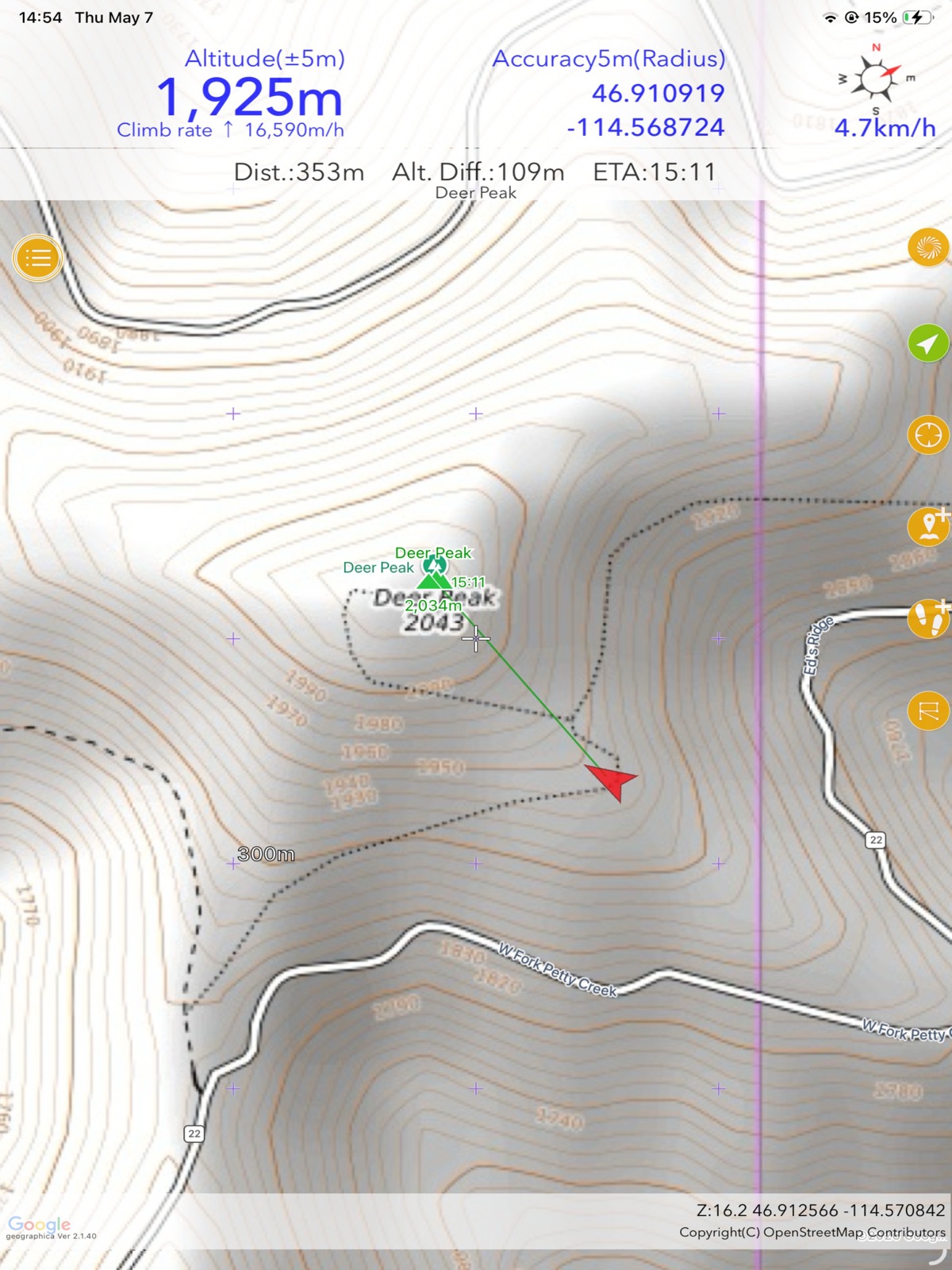
Apoku MCP provides app discovery, detailed cards, evidence, sources and screenshots where available. Unknown or conflicting prices stay explicit.
View JSON
GET /api/v3/apps/887734855
{
  "app_id": 887734855,
  "canonical_url": "https://appcorpus.com/apps/geographica-offline-map-887734855",
  "identity": {
    "name": "Geographica | offline map",
    "slug": "geographica-offline-map",
    "developer": {
      "name": "keiji matsumoto",
      "url": "https://appcorpus.com/developers/keiji-matsumoto-developer_a001a870b06d64003c4a130a348a3638"
    },
    "icon_url": "https://is1-ssl.mzstatic.com/image/thumb/Purple221/v4/d9/17/68/d91768b2-9765-df27-e119-fd0ac8190497/AppIcon-0-0-1x_U007emarketing-0-8-0-85-220.png/512x512bb.jpg",
    "stores": [
      "apple"
    ],
    "platforms": [
      "iphone",
      "ipad"
    ],
    "status": {
      "state": "active",
      "label": "Active",
      "last_checked": "2026-08-06",
      "last_checked_label": "6 Aug 2026",
      "banner": null,
      "region_note": null,
      "data_state": "stale",
      "data_state_label": "Some store data may be out of date"
    }
  },
  "listings": [
    {
      "store": "apple",
      "status": "ACTIVE",
      "url": "https://apps.apple.com/us/app/geographica-offline-map/id887734855?uo=4",
      "rating": 5.0,
      "rating_count": 4,
      "formatted_price": "Free",
      "is_free": true,
      "has_iap": true,
      "has_subscription": null,
      "version": "2.1.52",
      "updated": "2026-08-06",
      "currency": "USD"
    }
  ],
  "summary": {
    "one_liner": null,
    "summary": null,
    "best_for": [],
    "not_for": [],
    "status": "fallback",
    "at_a_glance": [
      "Free to download",
      "In-app purchases"
    ]
  },
  "categories": {
    "official": [
      "Navigation",
      "Sports"
    ],
    "appcorpus": [
      {
        "category_id": "navigation",
        "label": "Navigation",
        "url": "https://appcorpus.com/categories/navigation"
      },
      {
        "category_id": "sports",
        "label": "Sports",
        "url": "https://appcorpus.com/categories/sports"
      }
    ]
  },
  "use_cases": [],
  "features": [
    {
      "capability_id": "free_app",
      "label": "Free app",
      "availability": "yes",
      "access_level": "free",
      "scope": null,
      "evidence": "Store published"
    },
    {
      "capability_id": "in_app_purchases",
      "label": "In-app purchases",
      "availability": "yes",
      "access_level": "free_limited",
      "scope": null,
      "evidence": "Store published"
    }
  ],
  "pricing": [
    {
      "store": "apple",
      "formatted_price": "Free",
      "is_free": true,
      "has_iap": true,
      "has_subscription": null,
      "currency": "USD",
      "market": "us",
      "last_verified": "2026-08-06",
      "rows": [
        "Unlock — $14.99"
      ],
      "state": "current"
    }
  ],
  "screens": [
    {
      "url": "https://is1-ssl.mzstatic.com/image/thumb/PurpleSource221/v4/09/e2/b2/09e2b26b-e635-0d49-03cb-a171fde98f53/IMG_0429.jpeg/1600x1600bb.jpg",
      "store": "apple",
      "platform": "ipad",
      "alt": "Geographica | offline map ipad screenshot 1"
    },
    {
      "url": "https://is1-ssl.mzstatic.com/image/thumb/PurpleSource221/v4/4f/48/63/4f486376-15af-8e43-e9f7-c98111a2d624/0x0ss_converted.jpeg/360x480bb.jpg",
      "store": "apple",
      "platform": "ipad",
      "alt": "Geographica | offline map ipad screenshot 2"
    },
    {
      "url": "https://is1-ssl.mzstatic.com/image/thumb/PurpleSource221/v4/c7/20/c7/c720c772-1899-778c-d934-ad8d27f04db4/IMG_0424.jpeg/1600x1600bb.jpg",
      "store": "apple",
      "platform": "ipad",
      "alt": "Geographica | offline map ipad screenshot 3"
    },
    {
      "url": "https://is1-ssl.mzstatic.com/image/thumb/PurpleSource211/v4/c7/f9/87/c7f98753-f3e1-0270-dc56-a9d36490fa9d/0x0ss__U00281_U0029_converted.jpeg/360x480bb.jpg",
      "store": "apple",
      "platform": "ipad",
      "alt": "Geographica | offline map ipad screenshot 4"
    },
    {
      "url": "https://is1-ssl.mzstatic.com/image/thumb/PurpleSource211/v4/29/22/29/292229f3-a2c8-bb36-a53a-d57cf5999cd3/IMG_0427.jpeg/1600x1600bb.jpg",
      "store": "apple",
      "platform": "ipad",
      "alt": "Geographica | offline map ipad screenshot 5"
    },
    {
      "url": "https://is1-ssl.mzstatic.com/image/thumb/PurpleSource221/v4/f4/3d/28/f43d284e-5022-73f1-fe5b-0fe86bc1bfee/0x0ss__U00282_U0029_converted.jpeg/360x480bb.jpg",
      "store": "apple",
      "platform": "ipad",
      "alt": "Geographica | offline map ipad screenshot 6"
    },
    {
      "url": "https://is1-ssl.mzstatic.com/image/thumb/PurpleSource221/v4/77/eb/db/77ebdb0e-c355-32e1-377a-a930ae11c401/IMG_0426.jpeg/1600x1600bb.jpg",
      "store": "apple",
      "platform": "ipad",
      "alt": "Geographica | offline map ipad screenshot 7"
    },
    {
      "url": "https://is1-ssl.mzstatic.com/image/thumb/PurpleSource221/v4/02/1c/ef/021cefbb-52d5-d45a-8437-9fd274f8dd8d/0x0ss__U00283_U0029_converted.jpeg/360x480bb.jpg",
      "store": "apple",
      "platform": "ipad",
      "alt": "Geographica | offline map ipad screenshot 8"
    },
    {
      "url": "https://is1-ssl.mzstatic.com/image/thumb/PurpleSource211/v4/b8/26/12/b8261233-9c41-2771-8efd-ebc77a1a4b9f/IMG_0428.jpeg/1600x1600bb.jpg",
      "store": "apple",
      "platform": "ipad",
      "alt": "Geographica | offline map ipad screenshot 9"
    },
    {
      "url": "https://is1-ssl.mzstatic.com/image/thumb/PurpleSource221/v4/ab/8a/c1/ab8ac147-c58d-efd4-1872-9b5664dc5ebd/0x0ss__U00284_U0029_converted.jpeg/360x480bb.jpg",
      "store": "apple",
      "platform": "ipad",
      "alt": "Geographica | offline map ipad screenshot 10"
    },
    {
      "url": "https://is1-ssl.mzstatic.com/image/thumb/PurpleSource221/v4/e5/2e/0a/e52e0a02-599d-586d-0ccc-467275fdebc4/IMG_0425.jpeg/1600x1600bb.jpg",
      "store": "apple",
      "platform": "ipad",
      "alt": "Geographica | offline map ipad screenshot 11"
    },
    {
      "url": "https://is1-ssl.mzstatic.com/image/thumb/PurpleSource221/v4/7a/83/d2/7a83d2c0-df20-b5eb-b42d-af507c50a677/0x0ss__U00285_U0029_converted.jpeg/360x480bb.jpg",
      "store": "apple",
      "platform": "ipad",
      "alt": "Geographica | offline map ipad screenshot 12"
    },
    {
      "url": "https://is1-ssl.mzstatic.com/image/thumb/PurpleSource221/v4/38/1f/fe/381ffeb7-3a20-a4af-d5bb-671a61127c56/0x0ss_converted__U00281_U0029.jpeg/1125x1600bb.jpg",
      "store": "apple",
      "platform": "iphone",
      "alt": "Geographica | offline map iphone screenshot 13"
    },
    {
      "url": "https://is1-ssl.mzstatic.com/image/thumb/PurpleSource211/v4/d5/82/78/d58278b7-c5f4-21b9-7ecc-61b3eebe3ce9/0x0ss__U00281_U0029_converted__U00281_U0029.jpeg/1125x1600bb.jpg",
      "store": "apple",
      "platform": "iphone",
      "alt": "Geographica | offline map iphone screenshot 14"
    },
    {
      "url": "https://is1-ssl.mzstatic.com/image/thumb/PurpleSource221/v4/0f/ec/41/0fec41c1-c5fd-f015-1480-8b0dfd13e2df/0x0ss__U00282_U0029_converted__U00281_U0029.jpeg/1125x1600bb.jpg",
      "store": "apple",
      "platform": "iphone",
      "alt": "Geographica | offline map iphone screenshot 15"
    },
    {
      "url": "https://is1-ssl.mzstatic.com/image/thumb/PurpleSource221/v4/7b/2d/43/7b2d4360-92db-5b7a-ca0a-160f2cd9af50/0x0ss__U00283_U0029_converted__U00281_U0029.jpeg/1125x1600bb.jpg",
      "store": "apple",
      "platform": "iphone",
      "alt": "Geographica | offline map iphone screenshot 16"
    },
    {
      "url": "https://is1-ssl.mzstatic.com/image/thumb/PurpleSource221/v4/5b/f8/4c/5bf84c60-371e-a916-4a9e-3106576ebcd4/0x0ss__U00284_U0029_converted__U00281_U0029.jpeg/1125x1600bb.jpg",
      "store": "apple",
      "platform": "iphone",
      "alt": "Geographica | offline map iphone screenshot 17"
    },
    {
      "url": "https://is1-ssl.mzstatic.com/image/thumb/PurpleSource221/v4/d8/8e/86/d88e86c0-860f-a360-d93b-6a860cbb2644/incoming-F03222FF-F862-4789-961A-5541301E803F.jpeg/416x496bb.jpg",
      "store": "apple",
      "platform": "watch",
      "alt": "Geographica | offline map watch screenshot 18"
    },
    {
      "url": "https://is1-ssl.mzstatic.com/image/thumb/PurpleSource211/v4/8e/2c/08/8e2c0836-62d4-7d86-aff0-d2d509f1c63b/incoming-0CE493DC-4ACD-4410-913B-92843435D4AC.jpeg/416x496bb.jpg",
      "store": "apple",
      "platform": "watch",
      "alt": "Geographica | offline map watch screenshot 19"
    },
    {
      "url": "https://is1-ssl.mzstatic.com/image/thumb/PurpleSource221/v4/d5/f0/84/d5f084fc-ae00-c86d-fceb-99e9e37979d3/incoming-C8805C8C-2567-49A6-99B9-9A8A6E4ACA25.jpeg/416x496bb.jpg",
      "store": "apple",
      "platform": "watch",
      "alt": "Geographica | offline map watch screenshot 20"
    },
    {
      "url": "https://is1-ssl.mzstatic.com/image/thumb/PurpleSource221/v4/71/b8/0c/71b80c11-e527-dfb6-0ace-4f66d32afec2/incoming-3F1FBC12-E2F4-4BDC-A597-E9483902FD71.jpeg/416x496bb.jpg",
      "store": "apple",
      "platform": "watch",
      "alt": "Geographica | offline map watch screenshot 21"
    },
    {
      "url": "https://is1-ssl.mzstatic.com/image/thumb/PurpleSource221/v4/ad/fe/e8/adfee80e-0d7a-54d9-bdd6-f3fa438373a8/incoming-934B8B99-4F8E-413A-B284-3E30AA1272B4.jpeg/416x496bb.jpg",
      "store": "apple",
      "platform": "watch",
      "alt": "Geographica | offline map watch screenshot 22"
    },
    {
      "url": "https://is1-ssl.mzstatic.com/image/thumb/PurpleSource221/v4/0e/b9/e0/0eb9e0be-fd93-7aa0-02a6-288a13c6135f/incoming-5183DC8F-8F22-462B-A84B-C6AC06EE5314.jpeg/416x496bb.jpg",
      "store": "apple",
      "platform": "watch",
      "alt": "Geographica | offline map watch screenshot 23"
    }
  ],
  "data_states": {
    "screens": "current"
  },
  "ratings": [
    {
      "store": "apple",
      "average": 5.0,
      "count": 4,
      "market": "us",
      "observed_at": "2026-08-06",
      "state": "current",
      "reviews": [
        {
          "rating": 5,
          "title": "Offline topo maps! Japan GPS GSI",
          "body": "Best app for hiking in Japan I've found. Downloads maps offline automatically as you scroll around! Pay for more storage. Google maps plus topo overlay.",
          "author": "ekoger",
          "date": "6 Aug 2026"
        },
        {
          "rating": 5,
          "title": "Similar oruxmap",
          "body": "Good for iphone",
          "author": "apneateo",
          "date": "6 Aug 2026"
        }
      ]
    }
  ],
  "privacy": [
    {
      "store": "apple",
      "declarations": [
        {
          "title": "Data Linked to You",
          "detail": "Third-Party Advertising — Usage Data — Advertising Data",
          "source": "Developer declared"
        },
        {
          "title": "Data Linked to You",
          "detail": "Usage Data",
          "source": "Developer declared"
        },
        {
          "title": "Data Not Linked to You",
          "detail": "Analytics — Diagnostics — Other Diagnostic Data",
          "source": "Developer declared"
        },
        {
          "title": "Data Not Linked to You",
          "detail": "App Functionality — Diagnostics — Crash Data",
          "source": "Developer declared"
        },
        {
          "title": "Data Not Linked to You",
          "detail": "Third-Party Advertising — Diagnostics — Other Diagnostic Data",
          "source": "Developer declared"
        },
        {
          "title": "Data Not Linked to You",
          "detail": "Third-Party Advertising — Location — Coarse Location",
          "source": "Developer declared"
        },
        {
          "title": "Data Not Linked to You",
          "detail": "Diagnostics",
          "source": "Developer declared"
        },
        {
          "title": "Data Not Linked to You",
          "detail": "Location",
          "source": "Developer declared"
        },
        {
          "title": "Data Used to Track You",
          "detail": "Usage Data — Advertising Data",
          "source": "Developer declared"
        },
        {
          "title": "Data Used to Track You",
          "detail": "Usage Data",
          "source": "Developer declared"
        }
      ],
      "accessibility": []
    }
  ],
  "changes": [
    {
      "store": "apple",
      "version": "2.1.27",
      "released_at": null,
      "notes": "- Added \"Open with Is it RainCheck\" to the menu that appears when you press and hold the center mark (the + mark in the center of the screen). The sister app Is it RainCheck will display the rain cloud radar for the same location."
    },
    {
      "store": "apple",
      "version": "2.1.28",
      "released_at": null,
      "notes": "- Added \"Show Measurement Information Labels\" to the display settings. This allows you to turn the measurement function pop-up display on or off. - Fixed an issue that could prevent custom maps from being imported. - Fixed an issue that prevented custom maps from being displayed immediately after importing."
    },
    {
      "store": "apple",
      "version": "2.1.29",
      "released_at": null,
      "notes": "Version 2.1.29 - Fixed an issue that could cause the screen layout to become distorted or measurement lines to become distorted when using the measurement function during route guidance. Version 2.1.28 - Added \"Show Measurement Information Labels\" to the display settings. This allows you to turn the measurement function pop-up display on or off. - Fixed an issue that could prevent custom maps from being imported. - Fixed an issue that could prevent custom maps from being displayed immediately after importing."
    },
    {
      "store": "apple",
      "version": "2.1.30",
      "released_at": null,
      "notes": "- Fixed a bug where the app would crash when performing operations that involve clearing the screen, such as pressing the clear screen button or using the measurement function."
    },
    {
      "store": "apple",
      "version": "2.1.31",
      "released_at": null,
      "notes": "- Fixed the behavior of route guidance. - Fixed an issue where the track would stop even if the automatic stopping setting was canceled when route guidance ended. - Adjusted the types of track that appear as candidates when adding a track."
    },
    {
      "store": "apple",
      "version": "2.1.32",
      "released_at": null,
      "notes": "- Adjusted the screen layout. - Fixed an issue where custom maps would not load correctly when importing a backup file. - Fixed an issue where photos would not display immediately when scanned from a QR code. - Fixed an issue where the line settings screen would not open when tapping the scale line settings row."
    },
    {
      "store": "apple",
      "version": "2.1.33",
      "released_at": null,
      "notes": "- Added \"Show measurement information labels\" to the measurement control panel. The same setting can also be found in Settings → Display."
    },
    {
      "store": "apple",
      "version": "2.1.34",
      "released_at": null,
      "notes": "-Related libraries have been updated."
    },
    {
      "store": "apple",
      "version": "2.1.35",
      "released_at": null,
      "notes": "* Apple Watch support has been added. For instructions, please search for \"Apple Watch Geographica\" and read the explanation. * Track logging now stops if the battery capacity drops below 5% while recording and the battery is not being charged. * \"Show MGRS Grid\" has been added to the display settings. Turning this on will display the MGRS grid on the map. Currently, the line color is fixed to red. * \"Disable Automatic Sleep\" has been added to the operation settings. You can choose from three types: Never, Only While Charging, Always. * Workout support has been added. You can select the type of workout when starting track logging. However, access permission to health care information is required to use workouts. * Labels contained within shapes can now be displayed in the shape view."
    },
    {
      "store": "apple",
      "version": "2.1.36",
      "released_at": null,
      "notes": "- Added a display of ascent speed (the rate of altitude gain/loss per hour) below the elevation on the coordinate banner. - Added a menu that allows you to create a Geographica marker at the same location by tapping a Google Maps marker (a marker with a name displayed to the left of the icon). - Disabled automatic zooming when pressing the current location button at speeds above 20 km/h."
    },
    {
      "store": "apple",
      "version": "2.1.37",
      "released_at": null,
      "notes": "-Fixed a bug where point edits in the track log editor were not being saved -Improved Apple Watch communication (we'll continue to make improvements going forward) -Overhauled custom map import processing. Large KMZ files (30MB) can now be displayed reliably with minimal quality loss. Also added support for KMZ files with internally split images. -Added a custom map opacity setting to Display Settings. You can now display custom maps with semi-transparency. Note that this is a global setting only — opacity cannot be set per individual custom map (and we don't plan to add this in the future). -Bug fixes"
    },
    {
      "store": "apple",
      "version": "2.1.38",
      "released_at": null,
      "notes": "-Bug fixes."
    },
    {
      "store": "apple",
      "version": "2.1.39",
      "released_at": null,
      "notes": "-Fixed an issue where the map's heading-up mode would rotate based on the electronic compass even when \"Cursor Direction\" in General Settings was set to \"GPS\"."
    },
    {
      "store": "apple",
      "version": "2.1.40",
      "released_at": null,
      "notes": "- Updated the UI with rounded corners. - Long-press the compass on the right side of the screen to toggle the cursor direction between compass heading and GPS bearing. Tap the compass to test the speech feature. - You can now change the blend mode for overlays. Go to Display Settings then \"Overlay Blend Mode\" to choose between Alpha and Multiply. Multiply is the default. Contour lines on maps such as the Red Relief Image Map are now noticeably sharper than before. - Adjusted the generation algorithm for the high-precision Red Relief Image Map. Tiles not yet cached will be generated using the new algorithm. - Overlay opacity can now be set individually for each overlay. Tap the gear icon to the right of each overlay in the overlay menu to adjust it."
    },
    {
      "store": "apple",
      "version": "2.1.41",
      "released_at": null,
      "notes": "-Fixed a bug where the track elevation graph was not displayed."
    },
    {
      "store": "apple",
      "version": "2.1.42",
      "released_at": null,
      "notes": "- Bug fixes"
    },
    {
      "store": "apple",
      "version": "2.1.43",
      "released_at": null,
      "notes": "- Reduced the file size of track images generated after recording a track log. The size is now approximately one-fifth of what it was before. - The marker name auto-fill now runs when the OK button is tapped and the marker name field is empty. - Bug fixes."
    },
    {
      "store": "apple",
      "version": "2.1.45",
      "released_at": null,
      "notes": "- Addressed issues reported in crash reports."
    },
    {
      "store": "apple",
      "version": "2.1.46",
      "released_at": null,
      "notes": "- Improved the thinning process when importing track logs with a large number of points. The process now balances data size reduction with preserving the track shape. If you do not want tracks to be thinned, turn off “Settings → Track → Thin out on import”."
    },
    {
      "store": "apple",
      "version": "2.1.47",
      "released_at": null,
      "notes": "・Shape files imported from CollaboMap ZIP files now update automatically when changed in CollaboMap. ・Added “Generate Itinerary” to the menu when selecting one track. It creates text from track times and markers."
    }
  ],
  "alternatives": [
    {
      "app_id": 1381040242,
      "name": "Michi Japan Road Guide Offline",
      "url": "https://appcorpus.com/apps/michi-japan-road-guide-offline-1381040242",
      "reason": "Same category + similar ratings"
    },
    {
      "app_id": 994054184,
      "name": "GSI Map++",
      "url": "https://appcorpus.com/apps/gsi-map-994054184",
      "reason": "Same category + similar ratings"
    },
    {
      "app_id": 605676156,
      "name": "NZ Topo50 South Island",
      "url": "https://appcorpus.com/apps/nz-topo50-south-island-605676156",
      "reason": "Same category + similar ratings"
    }
  ],
  "evidence_summary": {
    "index_state": "S1",
    "evidence_level": 1,
    "level_label": "Live store listing",
    "indexable": true,
    "last_verified_at": "2026-08-06",
    "unknown_fields": [
      "Apoku editorial summary has not been published yet."
    ],
    "sources": [
      "App Store"
    ]
  },
  "availability_markets": {
    "live": [
      "us"
    ],
    "selected": "us",
    "note": null
  },
  "feature_events": {
    "events": []
  },
  "features_slice": {
    "plans": [
      {
        "code": "unlock",
        "label": "Unlock",
        "kind": "unknown",
        "status": "store_listed",
        "prices": [
          {
            "storefront": "us",
            "formatted": "$14.99",
            "billing_period": null,
            "scope_status": "scoped",
            "market_mismatch": false,
            "source_market": "us",
            "observed_at": "2026-08-06 22:46:06.517332+00:00"
          }
        ],
        "trial": null
      }
    ],
    "features": [],
    "unknown_features": [],
    "data_cutoff": "6 Aug 2026"
  }
}