AppCorpus MCP gives your agent current app data, prices, screens, features and sources.
View JSON
GET /api/v3/apps/1056649790
{
  "app_id": 1056649790,
  "canonical_url": "https://appcorpus.com/apps/gauges-speedometer-sensors-1056649790",
  "identity": {
    "name": "Gauges: Speedometer & Sensors",
    "slug": "gauges-speedometer-sensors",
    "developer": {
      "name": "Boluga",
      "url": "https://appcorpus.com/developers/boluga-developer_f80df7ed7cd587259649254b109e9787"
    },
    "icon_url": "https://is1-ssl.mzstatic.com/image/thumb/Purple221/v4/f3/32/0a/f3320a85-142e-cb88-e02f-98b35cf7de02/AppIcon-0-0-1x_U007epad-0-1-85-220.png/512x512bb.jpg",
    "stores": [
      "apple"
    ],
    "platforms": [
      "iphone",
      "ipad"
    ],
    "status": {
      "state": "active",
      "label": "Active",
      "last_checked": "2026-08-06",
      "last_checked_label": "6 Aug 2026",
      "banner": null,
      "region_note": null
    }
  },
  "listings": [
    {
      "store": "apple",
      "status": "ACTIVE",
      "url": "https://apps.apple.com/us/app/gauges-speedometer-sensors/id1056649790?uo=4",
      "rating": 4.6,
      "rating_count": 3048,
      "formatted_price": "Free",
      "is_free": true,
      "has_iap": true,
      "has_subscription": false,
      "version": "5.1",
      "updated": "2026-07-28",
      "currency": "USD"
    }
  ],
  "summary": {
    "one_liner": null,
    "summary": null,
    "best_for": [],
    "not_for": [],
    "status": "fallback",
    "at_a_glance": [
      "From $2.99/mo",
      "Free to download",
      "In-app purchases"
    ]
  },
  "categories": {
    "official": [
      "Utilities",
      "Navigation"
    ],
    "appcorpus": [
      {
        "category_id": "utilities",
        "label": "Utilities",
        "url": "https://appcorpus.com/categories/utilities"
      },
      {
        "category_id": "navigation",
        "label": "Navigation",
        "url": "https://appcorpus.com/categories/navigation"
      }
    ]
  },
  "use_cases": [],
  "features": [
    {
      "capability_id": "free_app",
      "label": "Free app",
      "availability": "yes",
      "access_level": "free",
      "scope": null,
      "evidence": "Store published"
    },
    {
      "capability_id": "in_app_purchases",
      "label": "In-app purchases",
      "availability": "yes",
      "access_level": "free_limited",
      "scope": null,
      "evidence": "Store published"
    }
  ],
  "pricing": [
    {
      "store": "apple",
      "formatted_price": "Free",
      "is_free": true,
      "has_iap": true,
      "has_subscription": false,
      "currency": "USD",
      "market": "us",
      "last_verified": "2026-08-06",
      "rows": [
        "Monthly — $0.99/week",
        "Monthly — $2.99/month",
        "Monthly — $14.99/year ($1.24/mo)"
      ]
    }
  ],
  "screens": [
    {
      "url": "https://is1-ssl.mzstatic.com/image/thumb/PurpleSource211/v4/25/6f/d4/256fd431-26a9-a030-f7ff-a2944a9a7433/01-home.png/1600x1600bb.jpg",
      "store": "apple",
      "platform": "ipad",
      "alt": "Gauges: Speedometer & Sensors ipad screenshot 1"
    },
    {
      "url": "https://is1-ssl.mzstatic.com/image/thumb/PurpleSource211/v4/25/6f/d4/256fd431-26a9-a030-f7ff-a2944a9a7433/01-home.png/360x480bb.jpg",
      "store": "apple",
      "platform": "ipad",
      "alt": "Gauges: Speedometer & Sensors ipad screenshot 2"
    },
    {
      "url": "https://is1-ssl.mzstatic.com/image/thumb/PurpleSource211/v4/36/db/e0/36dbe06d-1045-6130-ffbf-c7b38ef4bad8/03-speedometer.png/1600x1600bb.jpg",
      "store": "apple",
      "platform": "ipad",
      "alt": "Gauges: Speedometer & Sensors ipad screenshot 3"
    },
    {
      "url": "https://is1-ssl.mzstatic.com/image/thumb/PurpleSource211/v4/36/db/e0/36dbe06d-1045-6130-ffbf-c7b38ef4bad8/03-speedometer.png/360x480bb.jpg",
      "store": "apple",
      "platform": "ipad",
      "alt": "Gauges: Speedometer & Sensors ipad screenshot 4"
    },
    {
      "url": "https://is1-ssl.mzstatic.com/image/thumb/PurpleSource211/v4/b4/7f/22/b47f22b1-bef2-92fe-c5a7-5c89dc1d7240/04-compass-map.png/1600x1600bb.jpg",
      "store": "apple",
      "platform": "ipad",
      "alt": "Gauges: Speedometer & Sensors ipad screenshot 5"
    },
    {
      "url": "https://is1-ssl.mzstatic.com/image/thumb/PurpleSource211/v4/b4/7f/22/b47f22b1-bef2-92fe-c5a7-5c89dc1d7240/04-compass-map.png/360x480bb.jpg",
      "store": "apple",
      "platform": "ipad",
      "alt": "Gauges: Speedometer & Sensors ipad screenshot 6"
    },
    {
      "url": "https://is1-ssl.mzstatic.com/image/thumb/PurpleSource211/v4/19/36/a6/1936a68e-0914-7cac-d2e2-086a835a488c/02-all-instruments.png/1600x1600bb.jpg",
      "store": "apple",
      "platform": "ipad",
      "alt": "Gauges: Speedometer & Sensors ipad screenshot 7"
    },
    {
      "url": "https://is1-ssl.mzstatic.com/image/thumb/PurpleSource211/v4/19/36/a6/1936a68e-0914-7cac-d2e2-086a835a488c/02-all-instruments.png/360x480bb.jpg",
      "store": "apple",
      "platform": "ipad",
      "alt": "Gauges: Speedometer & Sensors ipad screenshot 8"
    },
    {
      "url": "https://is1-ssl.mzstatic.com/image/thumb/PurpleSource211/v4/46/9e/90/469e903d-f784-27ae-762b-dc9e95f2d940/05-barometer.png/1600x1600bb.jpg",
      "store": "apple",
      "platform": "ipad",
      "alt": "Gauges: Speedometer & Sensors ipad screenshot 9"
    },
    {
      "url": "https://is1-ssl.mzstatic.com/image/thumb/PurpleSource211/v4/46/9e/90/469e903d-f784-27ae-762b-dc9e95f2d940/05-barometer.png/360x480bb.jpg",
      "store": "apple",
      "platform": "ipad",
      "alt": "Gauges: Speedometer & Sensors ipad screenshot 10"
    },
    {
      "url": "https://is1-ssl.mzstatic.com/image/thumb/PurpleSource211/v4/d4/9a/f4/d49af46d-ad2b-e2bf-7ee8-6433cc78e3e3/06-sound-level.png/1600x1600bb.jpg",
      "store": "apple",
      "platform": "ipad",
      "alt": "Gauges: Speedometer & Sensors ipad screenshot 11"
    },
    {
      "url": "https://is1-ssl.mzstatic.com/image/thumb/PurpleSource211/v4/d4/9a/f4/d49af46d-ad2b-e2bf-7ee8-6433cc78e3e3/06-sound-level.png/360x480bb.jpg",
      "store": "apple",
      "platform": "ipad",
      "alt": "Gauges: Speedometer & Sensors ipad screenshot 12"
    },
    {
      "url": "https://is1-ssl.mzstatic.com/image/thumb/PurpleSource221/v4/63/87/9f/63879f4d-cc47-618b-c20f-2d925a2b6e32/01-home.png/1320x1600bb.jpg",
      "store": "apple",
      "platform": "iphone",
      "alt": "Gauges: Speedometer & Sensors iphone screenshot 13"
    },
    {
      "url": "https://is1-ssl.mzstatic.com/image/thumb/PurpleSource211/v4/38/aa/ee/38aaee26-61f0-6663-72e6-4f61b8a55351/03-speedometer.png/1320x1600bb.jpg",
      "store": "apple",
      "platform": "iphone",
      "alt": "Gauges: Speedometer & Sensors iphone screenshot 14"
    },
    {
      "url": "https://is1-ssl.mzstatic.com/image/thumb/PurpleSource221/v4/78/bd/5f/78bd5f7f-96fe-360a-a484-f3fdf26e34e8/04-compass-map.png/1320x1600bb.jpg",
      "store": "apple",
      "platform": "iphone",
      "alt": "Gauges: Speedometer & Sensors iphone screenshot 15"
    },
    {
      "url": "https://is1-ssl.mzstatic.com/image/thumb/PurpleSource221/v4/b4/cb/16/b4cb16b5-8476-67e9-7445-6803873e7802/02-all-instruments.png/1320x1600bb.jpg",
      "store": "apple",
      "platform": "iphone",
      "alt": "Gauges: Speedometer & Sensors iphone screenshot 16"
    },
    {
      "url": "https://is1-ssl.mzstatic.com/image/thumb/PurpleSource221/v4/7d/cd/59/7dcd593a-a8a6-239a-b1c2-93dc3a8bfd3c/05-barometer.png/1320x1600bb.jpg",
      "store": "apple",
      "platform": "iphone",
      "alt": "Gauges: Speedometer & Sensors iphone screenshot 17"
    },
    {
      "url": "https://is1-ssl.mzstatic.com/image/thumb/PurpleSource221/v4/7c/f9/a7/7cf9a72a-9bd6-e145-ab68-f095759c72c9/06-sound-level.png/1320x1600bb.jpg",
      "store": "apple",
      "platform": "iphone",
      "alt": "Gauges: Speedometer & Sensors iphone screenshot 18"
    },
    {
      "url": "https://is1-ssl.mzstatic.com/image/thumb/PurpleSource211/v4/dc/a0/e7/dca0e74c-78e3-d6f3-eb30-ccda61e3dcf2/04-pressure-altitude.png/422x514bb.jpg",
      "store": "apple",
      "platform": "watch",
      "alt": "Gauges: Speedometer & Sensors watch screenshot 19"
    },
    {
      "url": "https://is1-ssl.mzstatic.com/image/thumb/PurpleSource221/v4/f4/ea/0d/f4ea0d88-da0a-527c-77f2-c726a01d373a/02-speed.png/422x514bb.jpg",
      "store": "apple",
      "platform": "watch",
      "alt": "Gauges: Speedometer & Sensors watch screenshot 20"
    },
    {
      "url": "https://is1-ssl.mzstatic.com/image/thumb/PurpleSource221/v4/c6/ea/39/c6ea3998-d93f-36ef-f92a-36f4795840b0/03-barometer.png/422x514bb.jpg",
      "store": "apple",
      "platform": "watch",
      "alt": "Gauges: Speedometer & Sensors watch screenshot 21"
    },
    {
      "url": "https://is1-ssl.mzstatic.com/image/thumb/PurpleSource211/v4/17/e2/42/17e242f2-152f-ebbb-16a2-4f6fa05e42b2/01-gps-altitude.png/422x514bb.jpg",
      "store": "apple",
      "platform": "watch",
      "alt": "Gauges: Speedometer & Sensors watch screenshot 22"
    },
    {
      "url": "https://is1-ssl.mzstatic.com/image/thumb/PurpleSource211/v4/bf/49/0d/bf490daf-5198-2c06-c68e-cb38d54f5206/05-gforce.png/422x514bb.jpg",
      "store": "apple",
      "platform": "watch",
      "alt": "Gauges: Speedometer & Sensors watch screenshot 23"
    },
    {
      "url": "https://is1-ssl.mzstatic.com/image/thumb/PurpleSource221/v4/10/09/6d/10096d83-8458-fa5a-fe4d-4fcc83006e03/06-qnh.png/422x514bb.jpg",
      "store": "apple",
      "platform": "watch",
      "alt": "Gauges: Speedometer & Sensors watch screenshot 24"
    }
  ],
  "ratings": [
    {
      "store": "apple",
      "average": 4.6,
      "count": 3048,
      "market": "us",
      "observed_at": "2026-08-06",
      "reviews": [
        {
          "rating": 5,
          "title": "Very cool app, but some suggestions",
          "body": "This app is amazing I have never seen an app in the App Store that either wasn’t a cheap knockoff that doesn’t work at all, or just crashed once you opened it. This app is really accurate (not super accurate, but it still works good). I noticed it works better when you are holding the phone for some reason. I also like that it has a lot many tools and gauges, along with measuring units too. Definitely a 4.4out of 5. But I have some suggestions too. Could you add more gauges like a thermometer, or humidity sensor, ot light types and radiation index or even electricity sensors too (if possible, I mean there are limits to devices of course.) another thing would be make it bit more accurate (if possible).",
          "author": "WitherSlayer650",
          "date": "6 Aug 2026"
        },
        {
          "rating": 5,
          "title": "Really great app it is so interesting and fun as well as Scientific",
          "body": "Thank you for your gauges app and makings of a way to teach children as well as Adults, knowledge is fundamental to Learning Wisdom to be a well rounded individual as a student of Sciences as well as other Educational apps, and Other teachings of study... Could you please see if other sensory equipment could be utilized such as a SIRI that has a Evolving Learning Knowledge base like Encyclopedia derived from the Library of Congress... It would be great to see DATA from NASA INCLUDING ASTROLOGICAL ARRYS, NOAA, ENVIRONMENTAL, AND HEALTH... I HOPE THAT IT IS HELPFUL FOR FUTURE REFERENCE AND THANK YOU FOR YOUR TIME...",
          "author": "Andrew1:1",
          "date": "6 Aug 2026"
        },
        {
          "rating": 5,
          "title": "Apple Watch complication!",
          "body": "Please and thank you! It would be amazing to have the functionality of the app always just a quick glance away. With the release of watchOS 6, and the larger screens of the Series 4 & 5 full functionality is within reach. One can hope right?",
          "author": "Abel151",
          "date": "6 Aug 2026"
        },
        {
          "rating": 2,
          "title": "Some charting errors",
          "body": "It’s a neat ap at face value, but very basic charting/sensor errors make it easy to assume there are other errors behind the scenes. - Accelerometer charting is fine in magnitude, X, and Y, but Z axis charting biases the chart to the bottom of the chart. The value in the table is correct, but the chart is biased to the bottom. - Sound level is outright incorrect, says its -70dB while I’m sitting in my quiet house. I’d believe it if the kids were up. I’ve never had a problem with the mic, and my phone is only about a month old.",
          "author": "Sp2k",
          "date": "6 Aug 2026"
        },
        {
          "rating": 2,
          "title": "What is the point?",
          "body": "I understand that these show several different things that are built into our phones like altimeters and barometers, but what is the point of paying for a subscription to view them all? What is the use? I spend maybe 20 seconds in the app and that’s all. It has little to offer, and the information provided doesn’t help because there is little to explain the charts.",
          "author": "KallistaMetro",
          "date": "6 Aug 2026"
        }
      ]
    }
  ],
  "privacy": [
    {
      "store": "apple",
      "declarations": [
        {
          "title": "Data Not Collected",
          "detail": "",
          "source": "Developer declared"
        }
      ],
      "accessibility": []
    }
  ],
  "changes": [
    {
      "store": "apple",
      "version": "3.3.2",
      "released_at": null,
      "notes": "** Improvements for large files generated by longer recordings **"
    },
    {
      "store": "apple",
      "version": "3.4",
      "released_at": null,
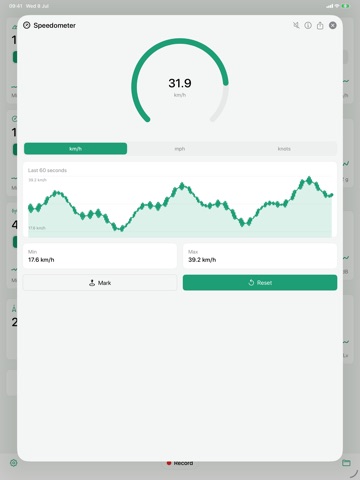
      "notes": "* Added minimum and maximum lines to graphics * * Added a way to mark a value for future comparison, useful for values that tend to vary slowly with time, like barometric pressure! *"
    },
    {
      "store": "apple",
      "version": "3.4.1",
      "released_at": null,
      "notes": "** Fixed some crashes when Barometer is not available, such as in some iPad models **"
    },
    {
      "store": "apple",
      "version": "3.5",
      "released_at": null,
      "notes": "New features based on feedback ******************************** - Tap the all screen instrument to jump to instrument screen - Minumum & Maximum values reset fix (tap the min/max) - New details focus screen by tapping the instrument name"
    },
    {
      "store": "apple",
      "version": "3.5.1",
      "released_at": null,
      "notes": "• Minimum and Maximum values now reset per instrument • All Gauges screen correctly displays the units selected in each instrument • Fixed crash situation where speech was enabled on a disabled instrument ▷▷ Special thanks to the anonymous user that provided excellent feedback!"
    },
    {
      "store": "apple",
      "version": "3.5.2",
      "released_at": null,
      "notes": "* Copy bug fix * Multiple session delete, export *"
    },
    {
      "store": "apple",
      "version": "3.5.3",
      "released_at": null,
      "notes": "** Disabled instruments will not be displayed (Available only after Unlocked) ** ** Small improvements dealing with calibration and sensor accuracy ** ** Better update interval up to 1 ms **"
    },
    {
      "store": "apple",
      "version": "3.5.6",
      "released_at": null,
      "notes": "** Improvements **"
    },
    {
      "store": "apple",
      "version": "3.5.7",
      "released_at": null,
      "notes": "** Location improvements, such as latitude and longitude display in degrees, minutes and seconds ** ** Other small refinements **"
    },
    {
      "store": "apple",
      "version": "3.5.8",
      "released_at": null,
      "notes": "* A couple of crashing bugs fixed * * Privacy concerns addressed, by stopping sensitive sensors when the app is not being used (or recording) * * 1 ms recordings ensured by stopping UI updates *"
    },
    {
      "store": "apple",
      "version": "3.5.9",
      "released_at": null,
      "notes": "** Related to Ads - New GDPR privacy controls for EU and EEA specific countries **"
    },
    {
      "store": "apple",
      "version": "3.6",
      "released_at": null,
      "notes": "** Improved rate of accelerometer recordings ** ** Added QNH setting for barometer altimeter **"
    },
    {
      "store": "apple",
      "version": "3.7",
      "released_at": null,
      "notes": "** Fixed: Copy/Paste problem when one or more instruments were disabled **"
    },
    {
      "store": "apple",
      "version": "3.8",
      "released_at": null,
      "notes": "** Fixed realtime pressure altitude graph **"
    },
    {
      "store": "apple",
      "version": "4.0",
      "released_at": null,
      "notes": "* Unit selection is no longer a circular, but rather a precise tap to select * * Refined UI to show the instrument dedicated full screen button * * Fixed some issues with graphics, mainly negative values in case of altitude (Hello Netherlands) * * Stand alone Apple Watch App - It will show the Watch sensor values, it is not a companion app that relays your phone's data * * Some updates related to the latest iOS versions, such as dark mode *"
    },
    {
      "store": "apple",
      "version": "4.0.1",
      "released_at": null,
      "notes": "* Fixed a crash involving disabling some instruments and selecting a different unit * * Fixed a font sizing issue in the All Instruments page *"
    },
    {
      "store": "apple",
      "version": "4.0.2",
      "released_at": null,
      "notes": "* Permissions welcome screen changes, to stop accidental dismiss *"
    },
    {
      "store": "apple",
      "version": "4.0.3",
      "released_at": null,
      "notes": "** Fixed a bug that caused sessions to include previous session data **"
    },
    {
      "store": "apple",
      "version": "4.0.4",
      "released_at": null,
      "notes": "* Fixed a crash bug caused by tapping in an empty label *"
    },
    {
      "store": "apple",
      "version": "4.1",
      "released_at": null,
      "notes": "** Small bug fixes **"
    }
  ],
  "alternatives": [],
  "evidence_summary": {
    "index_state": "S1",
    "evidence_level": 1,
    "level_label": "Live store listing",
    "indexable": true,
    "last_verified_at": "2026-08-06",
    "unknown_fields": [
      "Independent summary has not been published yet."
    ],
    "sources": [
      "App Store"
    ]
  },
  "availability_markets": {
    "live": [
      "us"
    ],
    "selected": "us",
    "note": null
  },
  "feature_events": {
    "events": []
  },
  "features_slice": {
    "plans": [
      {
        "code": "plan",
        "label": "Monthly",
        "kind": "subscription",
        "status": "store_listed",
        "prices": [
          {
            "storefront": "us",
            "formatted": "$2.99",
            "billing_period": "monthly"
          },
          {
            "storefront": "us",
            "formatted": "$0.99",
            "billing_period": "weekly"
          },
          {
            "storefront": "us",
            "formatted": "$14.99",
            "billing_period": "yearly"
          }
        ],
        "trial": null
      }
    ],
    "features": [],
    "unknown_features": [],
    "data_cutoff": "6 Aug 2026"
  }
}