
Quick verdict
- What it is
- GarageBand is a music creation app that turns your device into a collection of Touch Instruments and a full-featured recording studio. It allows you to make music anywhere, with features like Live Loops, Multi-Touch gestures, and a Sound Library.
- Best for
-
- someone who wants to create music
- a musician on the go
- At a glance
-
- Free to download
Categories and search queries
Official categories
- Music
- Lifestyle
Apoku categories
Key functions
| Function | Availability | Access | Scope | Evidence |
|---|---|---|---|---|
| Free app | Yes | Free | Context-specific | Store published |
Screens
App Store
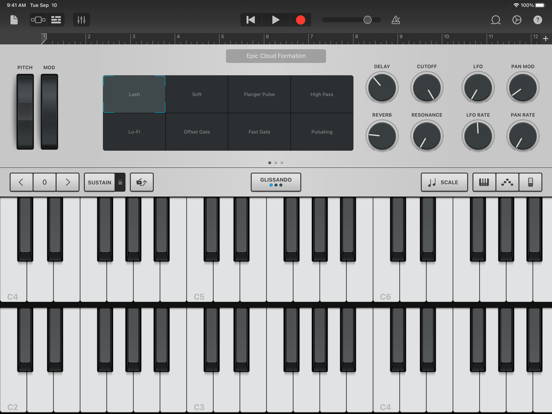
16 store screenshots


Pricing & paywalls
App Store
- Free to download
Ratings & reviews
App Store
-
4/5Long time user, but needs more and bugs need to be fixed
First of all, I’d like to address a bug I’ve run into. Whenever I have a large number of tracks in a song, it’s common for the “Optimizing Performace” bar to come up. Sometimes, after it’s done, the track I was working on will be silent and I need to restart the app. Can we also please have a custom time signature option? When I’m making anything in another time signatures, it’s difficult to try to fit it into a 4/4, 3/4, or 6/8 grid. Also, can we please get more options when we are editing chords? I’d recommend a system where you choose the root, type of chord (like you have been doing), bass, and extensions (i.e. #9, #11, b13, etc.). We need more than 33 tracks as well. It would be nice to not have to merge recordings and have to commit to certain volume relationships with the merged recordings. Could we also get a parabolic automation option along with a loop for it? Also, it would be helpful if there could be a sample button on each synth option. Thank you so much. I stress the time signature point the most. I’ve been using this software for a long time and I love how user friendly the interface is. The fact that it’s free is difficult to comprehend. For real, thank you for all the hard work your team puts into it. (I’m loving the vintage drum machine and use them in almost every song, and the vision and verse drums have been amazing as well) We need individual brass instruments as well. Saxophone, trumpet trombone, etc. It'd be cool if we got some mutes too but that’s not necessary.
BD29 · 29 Sep 2026
-
5/5Love it
I have everything I need to make music professionally, but I find myself using GarageBand iOS for most of the music I make. My best inspiration usually comes to me when I’m away from my studio, so it’s good to have something to get it down when I’m out, like writing down a note. I can transfer it all to the computer when I’m finished and touch it up there, but I like using the touchscreen over a mouse for editing. Many songs need very little work by the time I move them over. Studio software, like LXP and FL, have so many options, I find myself getting distracted looking for the perfect sounds for so long that I forget what I wanted to create. GarageBand iOS has a lot of instruments to choose from, but not enough to feel lost in. There are some things on my wishlist that I’d love to see in a future update: • If you want to make the length of your notes even, you have to do it individually. It would be nice if I could select all of the notes, or at least all of them on the same key, and snap them to the line at the same time. I can select all to change their length, but when they’re all different lengths, I’m still stuck selecting them individually. • More quality vocal tracks would help. Currently, there are some really odd choices. • A sidechain plug in would be ideal. • Automation needs a looping option instead of just copy and paste. • If you change the octave/semi octave of a note, it still sounds like the original octave when selecting the noteine editing. Thanks for the all the hard work!
Chrish62704 · 29 Sep 2026
-
5/5Let’s Do It!
This is a fabulous app that is an absolute Must for writers/arrangers who get stuck alone (not good) at airports, parking lots, Etc .. The sounds are absolutely fabulous! I could pick nits and say that on cannot press the drum-stick into the drumhead depressing just enough to tighten the next strike to a different semi-tone ... but I won’t. It is great for mapping out numerous tracks of a song in your head with symphonic strings or Japanese instruments (of which I had never heard) but which sound very Celtic. It is a candy store with invisible, one -way lids: they keep the candy clean but you can reach right through and grab whatever you need for the next part of your song! It is absolutely almost all of the “Jetson-type“ musical things about which I dreamt as a child. Everything for a complete rainy afternoon at my fingertips! If you can imagine it, most likely you can write it on this with the use of myriad tools. It’s learning curve is practically idiot proof – as attested to buy my ability to use it with such ease. Get this wonderful app and open up all the windows you can find As You Need and use them: choose a few at the beginning and find out how incredibly wonderful it is as you add on to your knowledge and your abilities. I am waiting to hear that someone has used this for an entire movie score ... it will not be long in coming – if it hasn’t already happened! Thank you for presenting this app to all of us to use it! It is almost God-given!
Roctor11 · 29 Sep 2026
-
5/5Garage Band
I’ve heard of this app before from teachers, friends, and family, and I decided that I would give it a shot! When I first downloaded the app, I wasn’t sure what it was going to be like, but now that I have it, I am highly impressed! This app is so cool in so many different ways! Let me tell you about this app! Garage Band has many different styles of music and different instruments. You can download different styles of music for free! This will give you access to more instruments, sounds, and more! My personal favorites were 8-bit Legends, Trak Girl, Soulection, Tom Misch, Oak Fedler, and Chinese Modern. When you choose one, you can play around with the sounds and instruments and pick which ones you would like to play in your song. When you hit the record button, you can click which sounds you want to play at that moment and the tune. You can get a little creative and play around with the tones, tempo and more! I am a dancer, and I liked having the opportunity to make some fun songs to dance to! All of your Garage Band Songs will be saved in files. Another good thing about this is that you can share your songs with other people through iMessage, email, Airdrop, Notability, Notes, Freeform, and more! This app is really cool and fun! You should give it a try and let your inner music maker shine! ☺️ Look for more reliable review at ⭐️five star reviews⭐️
⭐️fivestarreviews⭐️ · 29 Sep 2026
-
5/5Garage band
GarageBand is an app that profoundly influenced not just my appreciation for music, but my creative process and approach to music production. When I first downloaded it, I had no idea how deeply it would affect my life. I used it on my iPhone to dabble with some loops and sounds, never imagining it would become a central tool in my music-making journey. Now, looking back, GarageBand didn’t just provide a platform for creating music—it opened up possibilities that once seemed inaccessible to me. One of the first things that struck me about GarageBand was its intuitive interface. I had dabbled with other Digital Audio Workstations (DAWs) before, but they often left me feeling overwhelmed. GarageBand, however, made me feel comfortable from the start. Whether I was creating a beat or experimenting with virtual instruments, everything was right where I expected it to be. The design is simple yet powerful, allowing even beginners to feel like professionals. This accessibility was crucial in helping me build confidence in my abilities. At the time, I had a basic knowledge of music theory, but GarageBand encouraged me to push my limits. The app’s pre-recorded loops and virtual instruments were an instant way to create soundscapes without needing advanced skills. I found myself exploring genres I hadn’t previously considered, from electronic to jazz.
BestCobra1337 · 29 Sep 2026
Privacy & accessibility
App Store
Privacy
- Data Linked to You — App Functionality — Identifiers — Device ID Developer declared
- Data Linked to You — App Functionality — User Content — Audio Data Developer declared
- Data Linked to You — Product Personalization — Identifiers — Device ID Developer declared
- Data Linked to You — Identifiers Developer declared
- Data Linked to You — User Content Developer declared
Accessibility
- Captions — SUPPORTED Store published
- Dark Interface — SUPPORTED Store published
- Differentiate Without Color Alone — SUPPORTED Store published
- Voice Control — SUPPORTED Store published
- VoiceOver — SUPPORTED Store published
Versions
App Store
-
2.1
• Use Live Loops to create music by triggering instrument loops and DJ-style effects in real time using Multi-Touch gestures* • Add a virtual Drummer to your song who takes direction and performs realistic acoustic & electronic drum grooves • Record adjustments of any Touch Instrument control knob in real time • Create and edit automation curves to control the volume of any track • Shape the sound of a Touch Instrument or audio recording using Simple EQ and Compressor • Plug in a bass guitar and play through vintage and modern bass amp rigs • Adds over 1,200 new Apple Loops and sounds • Record up to 32 tracks simultaneously** • Use third-party instrument apps in your song with Audio Unit Extensions*** • Directly import or export GarageBand projects using iCloud Drive • Use 3D Touch to play keyboard sounds with polyphonic aftertouch**** * Live Loops is available on iPhone 5, iPhone 5c, iPad (4th generation), or later devices. ** 32 tracks is available on iPhone 5s, iPad Air, iPad mini 2, or later devices. Multi-track recording requires compatible third party audio interface. *** Requires compatible third-party Audio Unit Extension instruments apps from the App Store. **** Polyphonic aftertouch is available on iPhone 6s and iPhone 6s Plus.
-
2.1.1
• Quickly navigate long lists of Apple Loops using a new alphabetical sidebar • Use Multi-Touch to select multiple regions simultaneously in the Tracks area • Send songs as an audio file using AirDrop • Share GarageBand songs via Mail as uncompressed audio • Apply your own custom images to songs shared to YouTube and Facebook • Support for Shared iPad in iOS 9.3
-
2.1.2
• Stability improvements and bug fixes
-
2.2
• Play and record using the new Alchemy Touch Instrument with over 150 synth patches* • Quickly find Touch Instruments and patches with a redesigned sound browser • Capture your voice or instrument and apply studio-class effects like pitch correction, distortion and delay with the new Audio Recorder • Use new mixing effects, including Visual EQ, Bitcrusher, and Overdrive • Add third-party effects using Audio Unit Extensions** • Record multiple times over any song section and choose your favorite using Multi-Take Recording • Perform with Chord Strips from any keyboard instrument • Add comments or lyric ideas to your song with an integrated notepad • Remotely add new tracks to your Logic Pro X project from your iPhone or iPad via iCloud • Stability improvements and bug fixes * The Alchemy synth is available on iPhone 6 or later, iPad Pro, iPad Air 2, and iPad mini 4. ** Requires compatible third-party Audio Unit Extension instruments apps from the App Store.
-
2.2.1
• Stability improvements and bug fixes Introduced in Version 2.2 • Play and record using the new Alchemy Touch Instrument with over 150 synth patches* • Quickly find Touch Instruments and patches with a redesigned sound browser • Capture your voice or instrument and apply studio-class effects like pitch correction, distortion and delay with the new Audio Recorder • Use new mixing effects, including Visual EQ, Bitcrusher, and Overdrive • Add third-party effects using Audio Unit Extensions** • Record multiple times over any song section and choose your favorite using Multi-Take Recording • Perform with Chord Strips from any keyboard instrument • Add comments or lyric ideas to your song with an integrated notepad • Remotely add new tracks to your Logic Pro X project from your iPhone or iPad via iCloud • Stability improvements and bug fixes * The Alchemy synth is available on iPhone 6 or later, iPad Pro, iPad Air 2, and iPad mini 4. ** Requires compatible third-party Audio Unit Extension instruments apps from the App Store.
-
2.2.2
This update contains stability improvements and bug fixes.
-
2.3
• Updated for Super Retina display on iPhone X • Use the new Sound Library to download additional free instruments, loops and sound packs • Adds 3 Drummers who play percussion in the styles of Pop, Songwriter, and Latin* • Play and record using traditional instruments from China and Japan, including the Guzheng, Koto and Taiko drums* • Build grooves inspired by classic electronic drum machines with the Beat Sequencer • Support for expanded sharing and storage options with the Files app in iOS 11 • Enables a larger Audio Unit Extensions view for compatible third-party instruments and effects • Recording, mixing and exporting a song can be done at 24-bit audio resolution • Includes iMessage sticker pack that adds GarageBand instrument icons • Provides stability improvements and bug fixes * Requires free download from GarageBand Sound Library
-
2.3.1
This update contains stability improvements and bug fixes. Introduced in Version 2.3 • Updated for Super Retina display on iPhone X • Use the new Sound Library to download additional free instruments, loops and sound packs • Adds 3 Drummers who play percussion in the styles of Pop, Songwriter, and Latin* • Play and record using traditional instruments from China and Japan, including the Guzheng, Koto and Taiko drums* • Build grooves inspired by classic electronic drum machines with the Beat Sequencer • Support for expanded sharing and storage options with the Files app in iOS 11 • Enables a larger Audio Unit Extensions view for compatible third-party instruments and effects • Recording, mixing and exporting a song can be done at 24-bit audio resolution • Includes iMessage sticker pack that adds GarageBand instrument icons • Provides stability improvements and bug fixes * Requires free download from GarageBand Sound Library
-
2.3.10
This update contains stability improvements and bug fixes
-
2.3.11
This update contains stability improvements and bug fixes
-
2.3.12
• Stability improvements and bug fixes • Contains multiple enhancements to Accessibility
-
2.3.13
• New downloadable “Beat Tape” sound pack with a collection of over 200 new Hip Hop loops and 5 drum kits • Provides performance and stability improvements
-
2.3.14
This update includes stability improvements and bug fixes
-
2.3.15
This update includes stability improvements and bug fixes
-
2.3.16
This update includes stability improvements and bug fixes
-
2.3.17
This update includes stability improvements and bug fixes
-
2.3.18
· 3 Nov 2025
This update includes stability improvements and bug fixes
-
2.3.19
· 13 Aug 2026
This update includes stability improvements and bug fixes
-
2.3.2
This update contains stability improvements and bug fixes.
-
2.3.3
• New downloadable “Toy Box” sound pack with free educational sound effects, including animals, vehicles, and counting to ten in different languages • Use facial expressions and the TrueDepth camera for hands-free control over musical effects like guitar wah and synth parameters* • Adds Modern Wah guitar stompbox effect • Provides stability improvements and bug fixes * Requires iPhone X. GarageBand uses ARKit face tracking features to translate your facial expressions into instrument effect controls. Your face information is processed on device, and only music is captured during your performance.
-
2.3.4
• Adds support for Schoolwork including Handouts, app activities, and the ability for students to submit completed assignments as a GarageBand project • Allows you to view note labels on any Touch Instrument's music keyboard • Provides stability improvements and bug fixes
-
2.3.5
This update contains stability improvements and bug fixes.
-
2.3.6
• Includes a collection of Touch Instrument and Drummer Apple Loops, which allow you to continue shaping their sound and performance after adding them to your project • Supports import and playback of MIDI files • This update contains stability improvements and bug fixes
-
2.3.7
• Supports keyboard commands when using a Smart Keyboard or Bluetooth keyboard • Adds the Wah stompbox pedal and Face Control to Smart Guitar • Provides stability improvements and bug fixes
-
2.3.8
• Support for Dark Mode and new Share sheet in iOS 13 • Access files from external hard drives, SD card readers, and USB drives • Improves audio fidelity of Apple Loops when making tempo and key changes • New downloadable “Skyline Heat” sound pack with a collection of over 350 new Hip Hop loops and 6 drum kits • Search for Apple Loops by Sound Library pack name • Provides performance and stability improvements
-
2.3.9
• New audio recordings can be quickly started from the Home screen by touching and holding the GarageBand app icon • Maximum song length at default tempo has been increased from 23 to 72 minutes • The ruler now offers an option to switch from musical bars and beats to minutes and seconds • New downloadable "Keyboard Collection" sound pack includes over 150 keyboard loops and 50 instrument patches like pianos, organs, and electric pianos
Availability by market
- US
Data quality & evidence
- Page completeness
- Apoku summary published
- Last verified
- 29 Sep 2026
- Sources
- App Store