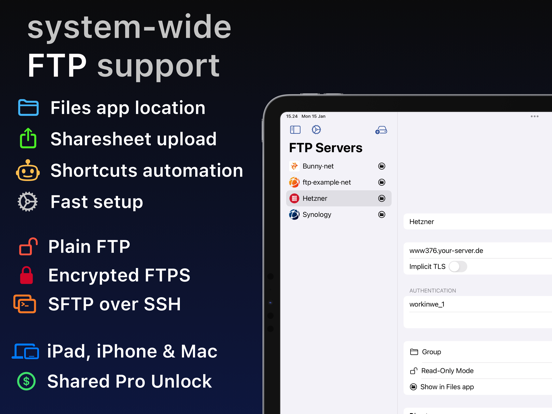
Apoku MCP provides app discovery, detailed cards, evidence, sources and screenshots where available. Unknown or conflicting prices stay explicit.
View JSON
GET /api/v3/apps/6448847832
{
  "app_id": 6448847832,
  "canonical_url": "https://appcorpus.com/apps/ftp-client-files-location-6448847832",
  "identity": {
    "name": "FTP Client - Files location",
    "slug": "ftp-client-files-location",
    "developer": {
      "name": "Anders Borum ApS",
      "url": "https://appcorpus.com/developers/anders-borum-aps-developer_4d2db3e3c4248c5859b72d27ca585ca9"
    },
    "icon_url": "https://is1-ssl.mzstatic.com/image/thumb/Purple221/v4/ba/21/df/ba21dff9-2c8d-3d76-06df-34dff60c72e2/AppIcon-0-0-1x_U007epad-0-0-0-1-0-0-sRGB-85-220.png/512x512bb.jpg",
    "stores": [
      "apple"
    ],
    "platforms": [
      "iphone",
      "ipad"
    ],
    "status": {
      "state": "active",
      "label": "Active",
      "last_checked": "2026-08-07",
      "last_checked_label": "7 Aug 2026",
      "banner": null,
      "region_note": null,
      "data_state": "stale",
      "data_state_label": "Some store data may be out of date"
    }
  },
  "listings": [
    {
      "store": "apple",
      "status": "ACTIVE",
      "url": "https://apps.apple.com/us/app/ftp-client-files-location/id6448847832?uo=4",
      "rating": 4.5,
      "rating_count": 34,
      "formatted_price": "Free",
      "is_free": true,
      "has_iap": true,
      "has_subscription": null,
      "version": "2026.32",
      "updated": "2026-08-07",
      "currency": "USD"
    }
  ],
  "summary": {
    "one_liner": null,
    "summary": null,
    "best_for": [],
    "not_for": [],
    "status": "fallback",
    "at_a_glance": [
      "From $2.49/mo",
      "Free to download",
      "In-app purchases"
    ]
  },
  "categories": {
    "official": [
      "Productivity",
      "Developer Tools"
    ],
    "appcorpus": [
      {
        "category_id": "productivity",
        "label": "Productivity",
        "url": "https://appcorpus.com/categories/productivity"
      },
      {
        "category_id": "developer-tools",
        "label": "Developer tools",
        "url": "https://appcorpus.com/categories/developer-tools"
      }
    ]
  },
  "use_cases": [],
  "features": [
    {
      "capability_id": "free_app",
      "label": "Free app",
      "availability": "yes",
      "access_level": "free",
      "scope": null,
      "evidence": "Store published"
    },
    {
      "capability_id": "in_app_purchases",
      "label": "In-app purchases",
      "availability": "yes",
      "access_level": "free_limited",
      "scope": null,
      "evidence": "Store published"
    },
    {
      "capability_id": "family_sharing",
      "label": "Family Sharing",
      "availability": "unknown",
      "access_level": "unknown",
      "scope": null,
      "evidence": "Store published"
    }
  ],
  "pricing": [
    {
      "store": "apple",
      "formatted_price": "Free",
      "is_free": true,
      "has_iap": true,
      "has_subscription": null,
      "currency": "USD",
      "market": "us",
      "last_verified": "2026-08-07",
      "rows": [
        "FTP Files Monthly — $2.49/month",
        "Lifetime FTP Pro — $14.99"
      ],
      "state": "current"
    }
  ],
  "screens": [
    {
      "url": "https://is1-ssl.mzstatic.com/image/thumb/PurpleSource122/v4/e9/11/1c/e9111c29-100f-4343-8270-5b22ec284acb/3b6456e9-0360-45e1-8b51-cb8c0aef1c6a_ftp_ipad-pro.png/1600x1600bb.jpg",
      "store": "apple",
      "platform": "ipad",
      "alt": "FTP Client - Files location ipad screenshot 1"
    },
    {
      "url": "https://is1-ssl.mzstatic.com/image/thumb/PurpleSource112/v4/a6/9c/11/a69c111f-ba84-77ba-4e8b-d368c96e5d94/9b2caf55-e88f-437f-8d38-a8a5acd87947_ftp_ipad-pro.png/552x414bb.png",
      "store": "apple",
      "platform": "ipad",
      "alt": "FTP Client - Files location ipad screenshot 2"
    },
    {
      "url": "https://is1-ssl.mzstatic.com/image/thumb/PurpleSource122/v4/e4/66/2d/e4662d40-8058-dc48-317a-6e1832da1ae3/12222b5c-90c4-458a-ae2c-9016ff1cdc7c_iPad-1.png/1600x1600bb.jpg",
      "store": "apple",
      "platform": "ipad",
      "alt": "FTP Client - Files location ipad screenshot 3"
    },
    {
      "url": "https://is1-ssl.mzstatic.com/image/thumb/PurpleSource122/v4/22/7f/c8/227fc860-737c-9686-c696-3073be1dfcd9/d69f3e85-9276-441c-8309-9ff7b780cb80_iPad-1.png/552x414bb.png",
      "store": "apple",
      "platform": "ipad",
      "alt": "FTP Client - Files location ipad screenshot 4"
    },
    {
      "url": "https://is1-ssl.mzstatic.com/image/thumb/PurpleSource112/v4/bc/b7/29/bcb7294c-8763-299c-e6c1-57cdc1e459ca/63f207e3-2d01-4972-8873-586a67b9ba9d_iPad-2.png/1600x1600bb.jpg",
      "store": "apple",
      "platform": "ipad",
      "alt": "FTP Client - Files location ipad screenshot 5"
    },
    {
      "url": "https://is1-ssl.mzstatic.com/image/thumb/PurpleSource122/v4/29/07/a8/2907a86b-783b-af96-8815-3c4e9201bbe1/8411932c-84cb-4fcf-a1f7-549ac8311948_iPad-2.png/552x414bb.png",
      "store": "apple",
      "platform": "ipad",
      "alt": "FTP Client - Files location ipad screenshot 6"
    },
    {
      "url": "https://is1-ssl.mzstatic.com/image/thumb/PurpleSource112/v4/f6/2c/0e/f62c0e8c-89fa-2d23-a06a-80920b3d9ea2/ba247054-5df3-4d3a-878c-3a1afed65160_iPad-3.png/1600x1600bb.jpg",
      "store": "apple",
      "platform": "ipad",
      "alt": "FTP Client - Files location ipad screenshot 7"
    },
    {
      "url": "https://is1-ssl.mzstatic.com/image/thumb/PurpleSource112/v4/cf/ab/a9/cfaba9a5-af0c-ea7e-bcbf-63bfc2e0e6e7/4f98cb43-f158-41ef-99e9-4c780b447129_iPad-3.png/552x414bb.png",
      "store": "apple",
      "platform": "ipad",
      "alt": "FTP Client - Files location ipad screenshot 8"
    },
    {
      "url": "https://is1-ssl.mzstatic.com/image/thumb/PurpleSource112/v4/c9/74/bc/c974bc4f-613a-f961-cbed-e45eb6a1bc5b/ead2a717-5c28-4c98-8471-22d5425a57a8_iPad-4.png/1600x1600bb.jpg",
      "store": "apple",
      "platform": "ipad",
      "alt": "FTP Client - Files location ipad screenshot 9"
    },
    {
      "url": "https://is1-ssl.mzstatic.com/image/thumb/PurpleSource112/v4/17/20/79/17207912-6c7f-7b80-c740-c94d4d43693b/284d6d35-ce76-424c-8e1d-8931fffcd484_iPad-4.png/552x414bb.png",
      "store": "apple",
      "platform": "ipad",
      "alt": "FTP Client - Files location ipad screenshot 10"
    },
    {
      "url": "https://is1-ssl.mzstatic.com/image/thumb/PurpleSource122/v4/35/5e/7b/355e7bdf-ec3f-392f-d894-787f93ae9e27/8d0cfeab-06a4-43d6-b263-8792b61f1387_ftp_6.5.png/1242x1600bb.jpg",
      "store": "apple",
      "platform": "iphone",
      "alt": "FTP Client - Files location iphone screenshot 11"
    },
    {
      "url": "https://is1-ssl.mzstatic.com/image/thumb/PurpleSource122/v4/6d/86/37/6d86371f-3aa3-676f-70a5-2ac73ff560c4/8d300725-9450-426d-aea9-5e395b016c0b_iPhone-6.5-1.png/1284x1600bb.jpg",
      "store": "apple",
      "platform": "iphone",
      "alt": "FTP Client - Files location iphone screenshot 12"
    },
    {
      "url": "https://is1-ssl.mzstatic.com/image/thumb/PurpleSource112/v4/b6/9e/e7/b69ee76c-3c06-67a3-4bcb-3b29bfbc76a7/916d83b2-029a-47c4-9ae8-7b0f91a8aab5_iPhone-6.5-2.png/1284x1600bb.jpg",
      "store": "apple",
      "platform": "iphone",
      "alt": "FTP Client - Files location iphone screenshot 13"
    },
    {
      "url": "https://is1-ssl.mzstatic.com/image/thumb/PurpleSource112/v4/e8/0e/40/e80e4024-3f4a-108b-c9aa-9af4680ae7df/f05fb534-e89f-4347-8e3f-8d07e924f337_iPhone-6.5-3.png/1284x1600bb.jpg",
      "store": "apple",
      "platform": "iphone",
      "alt": "FTP Client - Files location iphone screenshot 14"
    },
    {
      "url": "https://is1-ssl.mzstatic.com/image/thumb/PurpleSource112/v4/ce/db/a6/cedba608-c048-85b0-1374-9fbeae4b1974/921ba95a-9639-4253-8b68-986bd94642c7_iPhone-6.5-4.png/1284x1600bb.jpg",
      "store": "apple",
      "platform": "iphone",
      "alt": "FTP Client - Files location iphone screenshot 15"
    },
    {
      "url": "https://is1-ssl.mzstatic.com/image/thumb/PurpleSource221/v4/07/bf/b5/07bfb578-7fe7-038b-9e1c-8ba88018bb92/9ebe4672-e9c3-4c6f-b115-30f1673a85aa_ftp_mac.png/1600x1600bb.jpg",
      "store": "apple",
      "platform": "mac",
      "alt": "FTP Client - Files location mac screenshot 16"
    },
    {
      "url": "https://is1-ssl.mzstatic.com/image/thumb/PurpleSource211/v4/54/d6/de/54d6de43-5c16-865c-c9d7-865d13986fdb/97816907-dbd9-41ed-ab7d-168d9e8dd369_Mac-1.png/1600x1600bb.jpg",
      "store": "apple",
      "platform": "mac",
      "alt": "FTP Client - Files location mac screenshot 17"
    },
    {
      "url": "https://is1-ssl.mzstatic.com/image/thumb/PurpleSource211/v4/01/d9/fa/01d9fac1-8174-fbc6-d6b5-a6047f59bc67/ed4ece21-4752-4240-b67b-4c67ac2c5c13_Mac-4.png/1600x1600bb.jpg",
      "store": "apple",
      "platform": "mac",
      "alt": "FTP Client - Files location mac screenshot 18"
    },
    {
      "url": "https://is1-ssl.mzstatic.com/image/thumb/PurpleSource211/v4/e7/c6/1e/e7c61e26-df4a-cf47-24f5-03067f0d0547/2bc13996-9df4-46a3-8a6d-98cf54716067_Mac-3.png/1600x1600bb.jpg",
      "store": "apple",
      "platform": "mac",
      "alt": "FTP Client - Files location mac screenshot 19"
    }
  ],
  "data_states": {
    "screens": "current"
  },
  "ratings": [
    {
      "store": "apple",
      "average": 4.5,
      "count": 34,
      "market": "us",
      "observed_at": "2026-08-07",
      "state": "current",
      "reviews": [
        {
          "rating": 4,
          "title": "Update: bug in the app caused read and write problem",
          "body": "Working with the developer, they determined that there was a bug in the app that was not allowing to read and write with a single server set up. That has been fixed. App now works as intended and seems to be a very useful tool now. Thanks.",
          "author": "JustJimAgain",
          "date": "7 Aug 2026"
        },
        {
          "rating": 5,
          "title": "Good.",
          "body": "Many thanks. It is perfectly working for fresh installed iOS 18.7. But there is a few suggestions. Please, add an option to to copy files with their original time stamp. And there is a bug. When you share a photo from the Share Sheet menu, the rename file option does not work properly.",
          "author": "isam@to",
          "date": "7 Aug 2026"
        },
        {
          "rating": 5,
          "title": "Great support",
          "body": "I purchased the lifetime license, installed the app on my iPad, and found that it did not display files correctly when connecting to the FTP service in Microsoft Server 2022. I contacted Anders by email; he responded immediately, and within 48 hours released an update that solved the problem. Amazing customer service. I enthusiastically recommend this app!",
          "author": "joejaynes",
          "date": "7 Aug 2026"
        },
        {
          "rating": 5,
          "title": "Awesome Idea",
          "body": "It’s genius to put your SFTP servers directly in Finder, accessible alongside your other files on your Mac and files in iCloud, and even in the Files app on iOS. No more drag and drop into another app to upload, confirm the overwrite, and close the transfer — just edit it directly. Super excited about this.",
          "author": "(: ME :)",
          "date": "7 Aug 2026"
        },
        {
          "rating": 4,
          "title": "Works Great, love having local FTP file access",
          "body": "Very good FTP client. I use it to receive audio files from a provider and it works well. Wish there was a refresh button to check for new files, but reopening the folder in finder does the trick.",
          "author": "Mataber",
          "date": "7 Aug 2026"
        }
      ]
    }
  ],
  "privacy": [
    {
      "store": "apple",
      "declarations": [
        {
          "title": "Data Not Linked to You",
          "detail": "Analytics — Purchases — Purchase History",
          "source": "Developer declared"
        },
        {
          "title": "Data Not Linked to You",
          "detail": "Analytics — Usage Data — Product Interaction",
          "source": "Developer declared"
        },
        {
          "title": "Data Not Linked to You",
          "detail": "Purchases",
          "source": "Developer declared"
        },
        {
          "title": "Data Not Linked to You",
          "detail": "Usage Data",
          "source": "Developer declared"
        }
      ],
      "accessibility": []
    }
  ],
  "changes": [
    {
      "store": "apple",
      "version": "2026.10",
      "released_at": null,
      "notes": "Search/Replace when editing text from in-app browser."
    },
    {
      "store": "apple",
      "version": "2026.11",
      "released_at": null,
      "notes": "Resume interrupted downloads: partial data is now saved on failure and reused on retry after verifying the remote file hasn't changed."
    },
    {
      "store": "apple",
      "version": "2026.12",
      "released_at": null,
      "notes": "Improved translations"
    },
    {
      "store": "apple",
      "version": "2026.13",
      "released_at": null,
      "notes": "Background refresh of recently browsed directories keeps file listings up to date without manually re-opening folders. Improved handling of tags in Finder/Files app."
    },
    {
      "store": "apple",
      "version": "2026.14",
      "released_at": null,
      "notes": "fixes bug that could influence the features available to non-paying users"
    },
    {
      "store": "apple",
      "version": "2026.15",
      "released_at": null,
      "notes": "Upload Files in the in-app browser now allows selecting multiple files at once."
    },
    {
      "store": "apple",
      "version": "2026.16",
      "released_at": null,
      "notes": "Text editor now keeps your scroll position when you tap Edit or Save, and reopens recently edited files where you left off."
    },
    {
      "store": "apple",
      "version": "2026.17",
      "released_at": null,
      "notes": "Improvements to in-app Browse feature"
    },
    {
      "store": "apple",
      "version": "2026.18",
      "released_at": null,
      "notes": "Fix issue from last update that could cause editor from in-app browser to freeze."
    },
    {
      "store": "apple",
      "version": "2026.19",
      "released_at": null,
      "notes": "Tap and hold a folder in Files or right-click in Finder to open Manage, where you can toggle Keep Downloaded to automatically download all contents and keep them up to date. Requires Pro Unlock."
    },
    {
      "store": "apple",
      "version": "2026.20",
      "released_at": null,
      "notes": "Small improvements and adjustments."
    },
    {
      "store": "apple",
      "version": "2026.21",
      "released_at": null,
      "notes": "Fixes issue where Finder/Files app location would sometimes switch to Paused state."
    },
    {
      "store": "apple",
      "version": "2026.22",
      "released_at": null,
      "notes": "Tap \"Scan clipboard\" on a new FTP server to pull connection details out of a screenshot or text. Processing happens entirely on device making it exclusive to newer iPads, iPhones & Macs. New pro feature to sync folders on FTP with folders in the Finder / Files app configured in Settings → Sync. Sync happens on a schedule or can be triggered from Shortcuts particularly useful for automation when launching or leaving apps."
    },
    {
      "store": "apple",
      "version": "2026.23",
      "released_at": null,
      "notes": "Adjustments to how FTP location handles cancelled uploads. Includes improvements from last update: Tap \"Scan clipboard\" on a new FTP server to pull connection details out of a screenshot or text. Processing happens entirely on device making it exclusive to newer iPads, iPhones & Macs. New pro feature to sync folders on FTP with folders in the Finder / Files app configured in Settings → Sync. Sync happens on a schedule or can be triggered from Shortcuts particularly useful for automation when launching or leaving apps."
    },
    {
      "store": "apple",
      "version": "2026.24",
      "released_at": null,
      "notes": "Server configuration is easier and no longer requires you to pick the protocol that will be auto-detected as the server is tested. Includes improvements from last update: Tap \"Scan clipboard\" on a new FTP server to pull connection details out of a screenshot or text. Processing happens entirely on device making it exclusive to newer iPads, iPhones & Macs. New pro feature to sync folders on FTP with folders in the Finder / Files app configured in Settings → Sync. Sync happens on a schedule or can be triggered from Shortcuts particularly useful for automation when launching or leaving apps."
    },
    {
      "store": "apple",
      "version": "2026.25",
      "released_at": null,
      "notes": "Nicer configuration of servers and sync folders. Includes improvements from last update: Tap \"Scan clipboard\" on a new FTP server to pull connection details out of a screenshot or text. Processing happens entirely on device making it exclusive to newer iPads, iPhones & Macs. New pro feature to sync folders on FTP with folders in the Finder / Files app configured in Settings → Sync. Sync happens on a schedule or can be triggered from Shortcuts particularly useful for automation when launching or leaving apps."
    },
    {
      "store": "apple",
      "version": "2026.26",
      "released_at": null,
      "notes": "Testing a server now captures a full verbose log, shown in that server's Log view, making connection problems easier to diagnose. Fixed a false \"Server does not support explicit FTPS\" error when testing that could mask the real cause, such as a self-signed certificate."
    },
    {
      "store": "apple",
      "version": "2026.27",
      "released_at": null,
      "notes": "Faster and more reliable directory sync, especially for SFTP over SSH. Directory syncs started in the app now show progress as you switch to other apps. (iOS 26) New Sync Status widget for the Home Screen and StandBy. Check a synced folder at a glance."
    },
    {
      "store": "apple",
      "version": "2026.28",
      "released_at": null,
      "notes": "Copy Link and Share Link from in-app browser work on folders, not just files. Includes improvements from last update: Faster and more reliable directory sync, especially for SFTP over SSH. Directory syncs started in the app now show progress as you switch to other apps. (iOS 26) New Sync Status widget for the Home Screen and StandBy. Check a synced folder at a glance."
    },
    {
      "store": "apple",
      "version": "2026.29",
      "released_at": null,
      "notes": "Deleting a folder in the in-app browser no longer fails partway on unreliable servers. The folder delete confirmation appears immediately and counts its contents in the background. Faster recursive folder listing."
    }
  ],
  "alternatives": [
    {
      "app_id": 510282524,
      "name": "Owlfiles - File Manager",
      "url": "https://appcorpus.com/apps/owlfiles-file-manager-510282524",
      "reason": "Same category + similar ratings"
    },
    {
      "app_id": 335493278,
      "name": "FileBrowserGO: File Manager",
      "url": "https://appcorpus.com/apps/filebrowsergo-file-manager-335493278",
      "reason": "Same category + similar ratings"
    },
    {
      "app_id": 1606340771,
      "name": "Extended File Info",
      "url": "https://appcorpus.com/apps/extended-file-info-1606340771",
      "reason": "Same category + similar ratings"
    },
    {
      "app_id": 434342171,
      "name": "Phone Drive: File Storage",
      "url": "https://appcorpus.com/apps/phone-drive-file-storage-434342171",
      "reason": "Same category + similar ratings"
    },
    {
      "app_id": 827431041,
      "name": "FSharing - Files, File Manager",
      "url": "https://appcorpus.com/apps/fsharing-files-file-manager-827431041",
      "reason": "Same category + similar ratings"
    },
    {
      "app_id": 6477965455,
      "name": "Simple Scan • Quick Scanner",
      "url": "https://appcorpus.com/apps/simple-scan-quick-scanner-6477965455",
      "reason": "Same category + similar ratings"
    }
  ],
  "evidence_summary": {
    "index_state": "S1",
    "evidence_level": 1,
    "level_label": "Live store listing",
    "indexable": true,
    "last_verified_at": "2026-08-07",
    "unknown_fields": [
      "Apoku editorial summary has not been published yet."
    ],
    "sources": [
      "App Store"
    ]
  },
  "availability_markets": {
    "live": [
      "us"
    ],
    "selected": "us",
    "note": null
  },
  "feature_events": {
    "events": []
  },
  "features_slice": {
    "plans": [
      {
        "code": "files",
        "label": "FTP Files Monthly",
        "kind": "subscription",
        "status": "store_listed",
        "prices": [
          {
            "storefront": "us",
            "formatted": "$2.49",
            "billing_period": "monthly",
            "scope_status": "scoped",
            "market_mismatch": false,
            "source_market": "us",
            "observed_at": "2026-08-07 01:10:25.243220+00:00"
          }
        ],
        "trial": null
      },
      {
        "code": "lifetime-ftp-pro",
        "label": "Lifetime FTP Pro",
        "kind": "unknown",
        "status": "store_listed",
        "prices": [
          {
            "storefront": "us",
            "formatted": "$14.99",
            "billing_period": "one_time",
            "scope_status": "scoped",
            "market_mismatch": false,
            "source_market": "us",
            "observed_at": "2026-08-07 01:10:25.243220+00:00"
          }
        ],
        "trial": null
      }
    ],
    "features": [],
    "unknown_features": [],
    "data_cutoff": "7 Aug 2026"
  }
}