
Quick verdict
- What it is
- Store information collected; independent summary not yet available.
- At a glance
-
- Free to download
- In-app purchases
Categories and search queries
Official categories
- Food & Drink
- Utilities
AppCorpus categories
Key functions
| Function | Availability | Access | Scope | Evidence |
|---|---|---|---|---|
| Family Sharing | Yes | Unknown | App Store | Store published |
| Free app | Yes | Free | — | Store published |
| In-app purchases | Yes | Limited free | — | Store published |
Screens
App Store
5 store screenshots


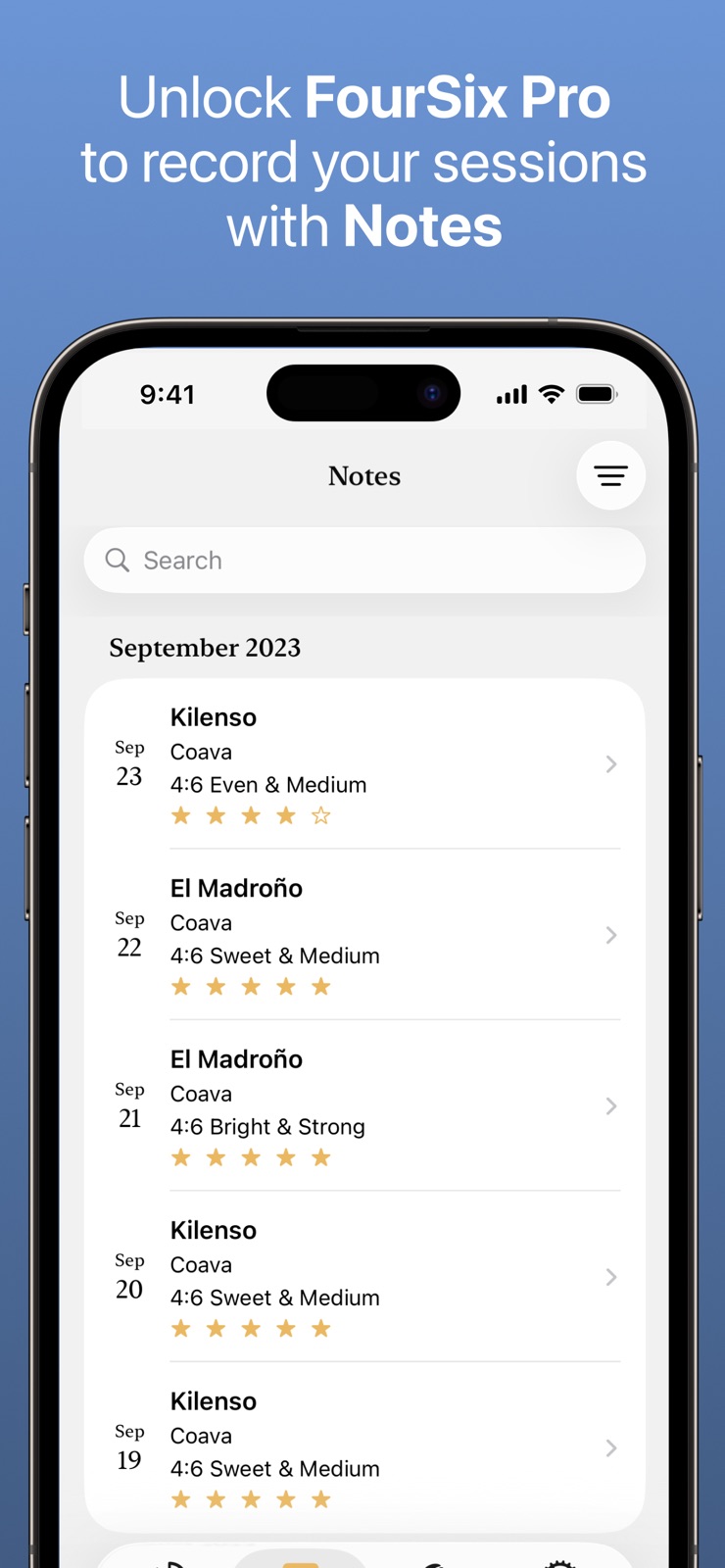

Pricing & paywalls
App Store
- Free to download
- In-app purchases
Ratings & reviews
App Store
-
5/5Truly Helpful App!
This is a great app and is truly helpful to get exactly what you’re looking for in that cup of coffee. It takes the guess work and the math out and does the work for you. It’s also a lot of fun changing the settings around to try different outcomes to find the way you like your coffee best. Easy with effective results! Must have.
Joey.a · 31 Jul 2026
-
5/5I recommend this app to all my friends
It has been a while since I have used this app as I have been doing a Gabi Master A instead of a more traditional dripper. For pour over. But I am in Puebla Mexico, and having some amazing coffee at specialty coffee shops here, and I was showing the app to one of the baristas. And that is how I discovered the subtle changes. But I quickly realize that all I needed to do was to click the PRO option, and all of the details I would need for programming would be there. I learned the app very quickly, and am very pleased with it still and I highly recommend it. It is worth the price. If you are a coffee aficionado like I am.
Jay Francis · 31 Jul 2026
-
5/5v2 is a major improvement
I’ve been using the app for years now and was initially confused by the v2 redesign. After figuring out how to enter “pro” mode with the help of the friendly developer/owner of the app (hit the tiny dropdown arrow at the top of the screen), I can say that v2 provides more and better options for controlling my brew and it delights me to use!
concraten · 31 Jul 2026
-
5/5Lightweight, functional, tweakable
Everything I could ask for. Always happier to support home brew projects than corporate ones. If it weren’t for this app I probably could never be bothered to try the 4:6 method. Also, the developer is an incredibly awesome human being. Went out of their way to accommodate me, despite my objections due to my use case being very narrow.
Chris1100101001010110 · 31 Jul 2026
-
5/5Master the 4:6 Method with Ease!
Based on your prompt, here is a polished version of the review you can use for the app store. I’ve structured it to highlight how the app translates complex coffee theory into practical skills. ## Master the 4:6 Method with Ease! ★★★★★ **The ultimate companion for your morning brew.** This coffee app has increased my brew skills and coffee knowledge by tenfold! Before using this, trying to track the math and timing for Tetsu Kasuya’s 4:6 method was a headache, but this app makes it completely effortless. **What I love:** * **Instant Calculations:** You just pick your coffee weight and flavor preference (sweet vs. bright), and it handles all the math for the 4:6 split automatically. * **Perfect Timing:** The built-in timer tells you exactly when to pour and how much water to add, which has made my consistency skyrocket. * **Worth Every Penny:** This app is absolutely worth the money I spent on it. It’s rare to find a tool that actually makes you better at your hobby this quickly. If you’re serious about pour-over and want to dial in your brews like a pro, get this app—you won’t regret it! Since you've been using the app to master the 4:6 method, have you started keeping notes on your different coffee bags in the app, or are you mostly using it for the timer and ratio help?
Love PetSmart · 31 Jul 2026
Privacy & accessibility
App Store
Privacy
- Data Not Linked to You — Analytics — Purchases — Purchase History Developer declared
- Data Not Linked to You — App Functionality — Identifiers — User ID Developer declared
- Data Not Linked to You — App Functionality — Purchases — Purchase History Developer declared
- Data Not Linked to You — Identifiers Developer declared
- Data Not Linked to You — Purchases Developer declared
Accessibility
- Dark Interface — SUPPORTED Store published
- Larger Text — SUPPORTED Store published
- Sufficient Contrast — SUPPORTED Store published
Versions
App Store
-
2.2.2
- Fixed an issue when updating FourSix from an older version to version 2.2.0 or newer with iCloud syncing. If you previously encountered crashes or the "Error Loading Data" screen on app launch, this should hopefully resolve that while retaining your old data (unless you already deleted the app). - Fixed a lag when starting the Timer countdown.
-
2.2.3
- Updated UI on Settings - Added link to follow on Threads and Mastodon. Check them out to see previews of new coming features.
-
2.3.0
It's finally here. SEARCH & FILTER. Want to find that one Note you made about a brew that really stood out, but scrolling weeks or months worth of Notes just to find it is a pain? Or maybe you just wish you could see all the Notes about your favorite coffee? Or all the Notes where you brewed a coffee from Ethiopia that you rated 5 stars? Well now you can! • On the Notes tab, there is now a filter button that allows you to sort and filter your Notes based on things like ratings or date. • Combine filter and sort with the new search bar where you can search for details about your Notes and find all the matches, and you've got a really powerful search feature. • Start typing and immediately see search suggestions. Just tap a suggestion to autocomplete. • Combine search tokens to take your search up a notch. Search for all Notes matching a specific coffee name, brewer, origin, and the text you added to your "Session Notes" and "Additional Notes" fields. • In addition to searching Notes, you can now also search and sort your tracked Coffee Bags! Use the same powerful search features as Notes. Search based on coffee name, roaster, or origin. This update also includes some more minor additions: • A new "What's New In FourSix" view that gets shown on app launch after an update to help users learn about new features if you're not the type to read these App Store release notes. • Added the coffee's origin to the list of information displayed on the Coffee tab. • Moved the "Add" button on the Coffee tab up to the top toolbar to be more in line with the UI of the rest of the app and Apple's suggested design language. • Some other small UI adjustments here and there.
-
2.3.1
• Fixes a bug where all new Note entries were being filtered out by default. • Moved the Step Interval setting to the Brew Pro screen to help clarify this setting only applied to Pro brews. Guided brews (even if you paid for Pro) are not affected. • Small UI fix to the What's New View for iPhones that still have the home button. ---- Changes from 2.3.0 ----- It's finally here. SEARCH & FILTER. Want to find that one Note you made about a brew that really stood out, but scrolling weeks or months worth of Notes just to find it is a pain? Or maybe you just wish you could see all the Notes about your favorite coffee? Or all the Notes where you brewed a coffee from Ethiopia that you rated 5 stars? Well now you can! • On the Notes tab, there is now a filter button that allows you to sort and filter your Notes based on things like ratings or date. • Combine filter and sort with the new search bar where you can search for details about your Notes and find all the matches, and you've got a really powerful search feature. • Start typing and immediately see search suggestions. Just tap a suggestion to autocomplete. • Combine search tokens to take your search up a notch. Search for all Notes matching a specific coffee name, brewer, origin, and the text you added to your "Session Notes" and "Additional Notes" fields. • In addition to searching Notes, you can now also search and sort your tracked Coffee Bags! Use the same powerful search features as Notes. Search based on coffee name, roaster, or origin. This update also includes some more minor additions: • A new "What's New In FourSix" view that gets shown on app launch after an update to help users learn about new features if you're not the type to read these App Store release notes. • Added the coffee's origin to the list of information displayed on the Coffee tab. • Moved the "Add" button on the Coffee tab up to the top toolbar to be more in line with the UI of the rest of the app and Apple's suggested design language. • Some other small UI adjustments here and there.
-
2.3.2
- Fixed missing search, sort, and add button when selecting a coffee bag from the session summery screen after completing a timer.
-
2.3.3
- Fixed a crash for users who updated FourSix from v2.0 to v2.3 or later with iOS 17.4 - Some changes behind the scenes to prepare for new upcoming features
-
2.4.0
- Added a new home screen. See all the important info at a glance when starting your next brew. Choose between simple and pro modes, see how much coffee you have left in your current open bags and what coffee you have on deck, and check what your last brew was like so you know whether you want to make changes or keep it consistent. - New cleaner design for Notes. They're also organized into categories based on how you have them sorted. - A lot of changes under the hood to prepare for some exciting updates to come - Squashed some bugs and added some additional small refinements.
-
2.5.0
The Pro guide just got its glow up. This update introduces a ton of user experience improvements. - All new design for the 4:6 Pro guide that makes it even more powerful. - Editing coffee and water values is quicker and easier. No more stepper as the primary method for editing, just tap and type. - By popular demand, you can now set coffee and water values to a tenth of a gram precision. The calculated pours will still be rounded, but this allows you to get more accurate calculations. For example, half a gram difference could equate to as much as 8-9 grams difference in water. - Redesigned charts, including a timeline chart to see how the water increases over time. - Set your water temperature, grind size, and selected coffee beans directly from the 4:6 Pro guide. No more having to set these values AFTER brewing. Now you can set them closer to when you're actually making those decisions. - Also, these values will now persist between brews and app launches, so if you've already got your brew dialed in and are using all the exact same settings, you no longer have to type them in all over again. - And finally, experimental coffee process options have been added. You can now record when you brew with coffee processed with anaerobic fermentation, thermal shock, co-fermentation, and more. If I'm missing any options you'd like to see, send feedback! More fields for coffee will be coming soon as well for people who love to record every detail on their specialty coffees.
-
2.5.1
- Brought back stepper controls for quickly making small changes to coffee and water on the Pro guide. You can still tap the value to type in the amount if you'd prefer. - The fonts used for headers are more consistent - Small performance improvement for the timer As always, please reach out with any feedback you have!
-
2.5.2
Added a new "Customer Center" that lets you easily see and manage your FourSix Pro status.
-
2.5.3
- Fixed a bug with the home screen greeting not updating - Added a "Contact Support" link in Settings that attaches device logs to the email when possible
-
2.5.4
Fixed a potential crash when trying to fetch a coffee or note that had been previously deleted from storage
-
2.6.0
- A new timer face is here! It's called "Rings", and it is minimal and clean, while still providing valuable information at a glance. Current and next step are immediately visible, and every other step is just a scroll away. Optionally show total time and get an additional progress ring showing your total progress. Requires iOS 18+. If you prefer the previous timer face, you can always switch back to "Classic" in Settings. - Note details and the brew summary now have a real-time graph of your pours right at the top. The timeline reflects how long each step lasted. Best paired with auto-advance steps turned off so manually advancing steps tracks exactly how long each step lasted. - iCloud sync status has been added to Settings. You'll know when your data is syncing, when it's done, and if there are any issues or errors that need to be resolved. - Also made some small UI/UX changes along with some bug fixes and some more work towards new features coming soon.
-
2.6.1
- A new timer face is here! It's called "Rings", and it is minimal and clean, while still providing valuable information at a glance. Current and next step are immediately visible, and every other step is just a scroll away. Optionally show total time and get an additional progress ring showing your total progress. Requires iOS 18+. If you prefer the previous timer face, you can always switch back to "Classic" in Settings. - Note details and the brew summary now have a real-time graph of your pours right at the top. The timeline reflects how long each step lasted. Best paired with auto-advance steps turned off so manually advancing steps tracks exactly how long each step lasted. - iCloud sync status has been added to Settings. You'll know when your data is syncing, when it's done, and if there are any issues or errors that need to be resolved. - Also made some small UI/UX changes along with some bug fixes and some more work towards new features coming soon.
-
2.6.2
- Added auto-save functionality to the coffee bag editor - changes are now saved automatically as you type - Text fields in the coffee tracker now select all text when focused for easier editing - Your selected water chart preference now persists between app launches - Added read-only access to data for users whose Pro subscription has expired - you can still view all your existing notes and coffee data, but editing and adding new items requires an active subscription - Fixed an issue where the Done button in the Pro guide wasn't working reliably - Fixed text truncation issue in the Rings timer face - Improved focus handling throughout the notes interface for better text editing experience - Minor bug fixes and improvements
-
2.7.0
iOS 26 Support & Liquid Glass Design - Full compatibility with iOS 26's new Liquid Glass visual effects - Updated UI components to use Apple's dynamic glass material throughout the app - Modernized interface with refined buttons, improved spacing, and enhanced visual consistency Guided Pour Speed (Pro) - New pour speed guidance feature for Pro users to help maintain consistent pour rates - Set target pour speeds with pours divided into "pour" and "wait" phases - Toggle pour speed guidance directly from the timer interface
-
2.7.1
Fixes some UI animation issues
-
2.7.2
Fixed some UI issues in iOS 26
-
2.7.3
- Fixed a potential crash that could happen when syncing with iCloud - Some small bug fixes and UI improvements Have an issue? Feedback? Ideas for improving the app? You can always reach out via email to [email protected]
-
2.8.0
- Added the ability to submit "feature requests". Submit your feature ideas, vote on requests from other users, and track progress as features move from planned to completed. Shape the future of FourSix Coffee Timer!
-
2.8.1
- Brew settings are now remembered per coffee bag, so grind setting and water temperature restore when you switch bags. - Added a new Duplicate action for coffee bags to quickly create a new bag from an existing one. - Fixed an issue where Feature Request vote counts could appear incorrect. - Deleting notes and coffee bags is now available for all users if you let your Pro subscription expire and want to delete data created when you had Pro. - Improved reliability when restoring your selected coffee bag during brew setup.
-
2.8.2
- The "Rings" timer face now shows the previous step alongside the current and upcoming ones, so you can always see where you've been in the brew. - Total brew time is now tracked independently from individual step times. Pausing or navigating between steps no longer affects the total time, and the accurate total is now saved with your brew notes. - Timer start countdown animations now respect the Reduce Motion accessibility setting. - Improved performance, made some UI refinements, and fixed some bugs
-
2.8.3
Added a link in Settings to join the beta testing program via TestFlight.
-
2.9.0
- Live Activity support is here! Track your brew's progress right from the Lock Screen or Dynamic Island, so you don't need to keep the app open while you brew. - Get a live cooldown countdown after your brew finishes, so you'll know exactly when your coffee is ready to drink. - Minor bug fixes and improvements.
-
2.9.1
· 26 Jul 2026
- Feature requests are now shown in random order, so newer and less popular requests get a fair chance to be seen - Fixed the cooldown timer sometimes counting past the set time in Live Activities
Alternatives
- iBrewCoffee - Coffee Journal — Same category + similar ratings
- Best Brew Guide: Filtru Coffee — Same category + similar ratings
Availability by market
- US
Data quality & evidence
- Page completeness
- Live store listing
- Last verified
- 31 Jul 2026
- Sources
- App Store
- Independent summary has not been published yet.