
Quick verdict
- What it is
- Store information collected; an Apoku editorial summary is not yet published.
- At a glance
-
- Free to download
- In-app purchases
Categories and search queries
Official categories
- Weather
- Utilities
Apoku categories
Key functions
| Function | Availability | Access | Scope | Evidence |
|---|---|---|---|---|
| Free app | Yes | Free | Context-specific | Store published |
| In-app purchases | Yes | Limited free | Context-specific | Store published |
| Family Sharing | Unknown | Unknown | Scope unknown | Store published |
Screens
App Store
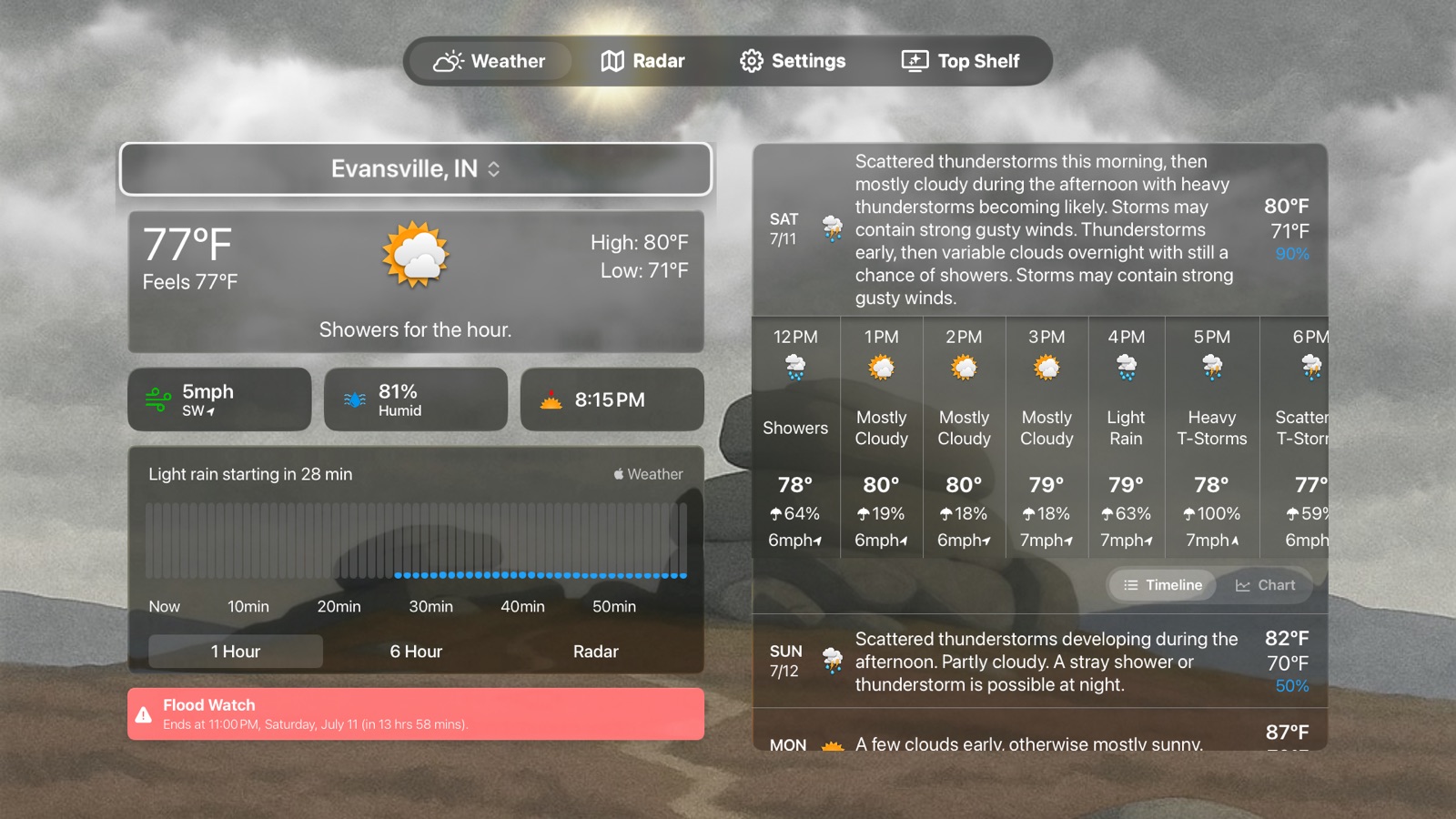
36 store screenshots


Pricing & paywalls
App Store
- Free to download
- In-app purchases
Ratings & reviews
App Store
-
5/5Best Weather App Yet!
I was a long time user of another app that decided to mess up a good thing a couple of years ago and completely change their UI and UX, and offer no support when queried, which lost them this customer. Since then, I’ve been looking for a new app. I work in public safety, and it’s beyond being a weather geek that I know what the weather is somewhere in my jurisdiction, and what it is predicted to do. And I like to use my watch to do it. (I never said I wasn’t a weather geek...). After two years of looking for something that updated reliably and proved to be accurate, with a customizable UI so that I’m looking at data that is relevant to me, I found it. Forecast Bar. As far as support - I’ve emailed Derek and Jason a few times with questions about how to do something, or since the latest UI and UX update, suggestions or requests going forward to make it more of what *I* want (self serving, I know) and have received responses within minutes - and from a real person, not a bot. Better yet, they e incorporated a couple of the suggestions! If you’re looking for an all’s round great weather app, spend the money, get Forecast Bar - you will not be disappointed.
MCIAD4 · 31 Jul 2026
-
5/5Updated review. Watch app still unreliable
Had updated my review because I started using the watch complications again due to the developer giving a response to my review saying that a recent update had fixed the issue. I updated my review too soon because I am having the same issue again. Back to the normal weather for my watch Original review: “Love all the customization his app lets you do and I’ve decided it’s my favorite looking weather app and I’d love to use it for along time. With that being said every 2 or so days when I remove my Apple Watch for charging and then put it back on the watch can’t receive anything from the app..? But then when I click the empty bars it makes on my watch face under “fore cast bar” it will try to open the app for about 3-5 seconds and crash no matter how many times I try it and the main face of my watch still only says “forecast bar” and lots of lines. Please update to get around this issue because everything else about the app I love but I won’t be able to continue using it if I have to power off and restart my watch every time I get done charging it which honestly sometimes doesn’t even fix it. Will Change to 5 stars if fixed”
dsummers99 · 31 Jul 2026
-
5/5The most accurate
I have used this app for over a year and absolutely satisfied it rarely is wrong. Better than a app at local tv stations. I have used app for a year now and I don’t like the change right now maybe later if I don’t change my mind I might delete and go to another weather app. N I have had the updated app a couple days. It won’t let me put my actual location permanently. Keeps going to whatever location is at the top of location screen in settings which is wrong and it needs to be eliminated and only what the user puts in like the old app did. Also needs too have the background color preferences put back instead of light gray or dark gray !!!!!!! Update on the above post. The developer has already made some much needed improvements. The issues I mentioned have been for the most part fixed and the app is now working much better than before. I am going to recommend keeping it now because the problem’s that I mentioned that gave information seep about weather conditions are more accurate to location i’m in. Thanks developer for your help.
redneckteck · 31 Jul 2026
-
5/5This app reminds me of the one snapped up by Apple!
Remember the weather app that was snapped up by Apple? Well, if this app keeps going Apple will snap it up too! It’s just that good! The many ways you can customize it keeps growing with every update so you can make it your own and it’s organized to make it pleasing to the eyes. Plus it does a fantastic job of giving you so many weather points, your friends will swear you’re a meteorologist! Really! When I say it will be snapped up by Apple like Dark Sky was is because when Dark Sky kept getting better and better, Apple took notice and bought it! I was just beginning to enjoy Dark Sky too! I won’t say whether Apple’s integration was good or bad but Forecast Bar is my favorite weather app and I hope it gets better and better for awhile before it gets eaten up by a bigger entity! The app for the iMac is amazing too! Thanks for working on this app guys!
Komputergod1 · 31 Jul 2026
-
5/5Highly customizable, clean interface, accurate data
Key points; highly customizable, accurate data, great customer service from devs. Great app. I love this app because it can be tailored to suit your own taste. The interface is clean in general, and you can add or remove fields on information if you want more or less to be visible from a glance. I think this app is worth the subscription, though many people want everything for free. Most weather apps have a boring or gaudy UI, are somewhat accurate, and have ads, with an option to pay to remove ads... that’s all. ForecastBar has served me perfectly. I’ve used Accuweather, The Weather Channel app, and the Apple Weather app, among others. Forecast Bar beats them all hands-down. The developers even went above and beyond for me with a recent update: I have my version of the app customized to avoid affecting my night vision (light discipline. red text on black) but a prior update made the phone go bright white while loading, which defeated my purposes. I emailed the developers, and they made the screen go black on startup instead of white. Problem solved, and most other people probably didn’t realize, or necessarily care, but it made a huge difference for me. Forecast Bar has never given me much of a reason to complain. Even when I did have an issue, though minor, it was fixed within days. Definitely a satisfied customer!
Doc Hardware · 31 Jul 2026
Privacy & accessibility
App Store
Privacy
- Data Not Linked to You — Analytics — Diagnostics — Crash Data Developer declared
- Data Not Linked to You — Analytics — Diagnostics — Other Diagnostic Data Developer declared
- Data Not Linked to You — Analytics — Diagnostics — Performance Data Developer declared
- Data Not Linked to You — Analytics — Usage Data — Product Interaction Developer declared
- Data Not Linked to You — App Functionality — Identifiers — User ID Developer declared
- Data Not Linked to You — App Functionality — Location — Coarse Location Developer declared
- Data Not Linked to You — App Functionality — Location — Precise Location Developer declared
- Data Not Linked to You — Product Personalization — Identifiers — User ID Developer declared
- Data Not Linked to You — Diagnostics Developer declared
- Data Not Linked to You — Identifiers Developer declared
- Data Not Linked to You — Location Developer declared
- Data Not Linked to You — Usage Data Developer declared
Accessibility
No accessibility labels collected yet.
Versions
App Store
-
10.0.6
- Added ability to dismiss all tutorial cards - Added ability to dismiss severe alerts - Added option to display severe alerts in the toolbar rather than main screen (Settings > General) - Added ability to swipe cards on main screen to dismiss - Added a new Compact side list style to show more locations (Settings > Appearance) - Added option in Home Screen widgets to change overlay opacity - Fix for widget not displaying properly - Fix for invalid metric units in some cases (cm vs. mm) - Updated to new radar icon for clarity Version 10.0.5: - Fixed an issue where visibility charts in metric units were inaccurate - Fixed a crash in reverse geocoding - Fixed an issue where black and white icon sets would show colored data point icons - Fixed an issue where the Watch app loses it's subscription on occasion Version 10.0.4 - Now powered by ChatGPT! Set any question to ChatGPT about the weather to automatically appear for each forecast! - Improved way to set background styles Version 10.0.3 - Added a variety of icon packs - Added a compact daily forecast style that is entirely customizable - Added ability to show or hide icons in the timeline view Version 10.0.2 - Added precipitation chance to temperature graphs - Improved efficiency with location updates. Version 10.0.1 - Added several new background styles including custom color, custom animated gradients, images, black & white, and the ability to use your own image. - Added ability to customize font and font size throughout the app. - Added ability to change forecast summary language in over 60 languages. - Added option to select a location to load by default when opening app. - Added 'Feels Like' as an option in Timeline customization. - Added ability to set a custom radar URL to load instead of the built-in radar. - Improved support for Apple Watch Ultra. Version 10.0: Forecast Bar has been entirely rewritten to be faster, better and more powerful! Here are some highlights and new capabilities: - Forecast Bar AI allows you to ask any question about the day's weather--from the practical to the ridiculous - Fully customizable detailed forecast views - Interactive charts to view and compare many data points across the full forecast - Gorgeous animated weather backgrounds We'll be continuing to update Forecast Bar to add more and more powerful capabilities. Let us know what you'd like to see at [email protected]!
-
10.1
New in Version 10.1: * iOS 17 Compatibility - Fully optimized and ready for iOS 17 to ensure smooth performance. * StandBy Widgets - Freshly introduced! All small/compact widgets are now available in StandBy Mode. * Interactive Widgets - Explore a dynamic experience with our latest interactive widget; simply tap the (i) icon to reveal more details. * Compact Smart Weather Widget - Stay updated with the weather effortlessly using our newly released compact-sized smart weather widget. Upgrade now and experience the advancements firsthand!" * Customizable Smart Widget - The Smart Weather Widget is now even more customizable. Select which data point you would like to see each hour.
-
10.1.1
New in Version 10.1: * iOS 17 Compatibility - Fully optimized and ready for iOS 17 to ensure smooth performance. * StandBy Widgets - Freshly introduced! All small/compact widgets are now available in StandBy Mode. * Interactive Widgets - Explore a dynamic experience with our latest interactive widget; simply tap the (i) icon to reveal more details. * Compact Smart Weather Widget - Stay updated with the weather effortlessly using our newly released compact-sized smart weather widget. Upgrade now and experience the advancements firsthand!" * Customizable Smart Widget - The Smart Weather Widget is now even more customizable. Select which data point you would like to see each hour.
-
10.1.2
Version 10.1.2 * Smart Widget layout fixes New in Version 10.1: * iOS 17 Compatibility - Fully optimized and ready for iOS 17 to ensure smooth performance. * StandBy Widgets - Freshly introduced! All small/compact widgets are now available in StandBy Mode. * Interactive Widgets - Explore a dynamic experience with our latest interactive widget; simply tap the (i) icon to reveal more details. * Compact Smart Weather Widget - Stay updated with the weather effortlessly using our newly released compact-sized smart weather widget. Upgrade now and experience the advancements firsthand!" * Customizable Smart Widget - The Smart Weather Widget is now even more customizable. Select which data point you would like to see each hour.
-
10.2
- iPhone 16 support - Updated AI to gpt4.o-mini
-
10.3
• iOS 26 Liquid Glass Design - Completely redesigned interface with beautiful liquid glass effects throughout the app for a modern, premium look - Glass Effect Controls - Choose between Glass, Frosted Glass, or disable glass effects entirely for a familiar iOS18 look. • iPhone 17 series / iPhone Air support • Enhanced Weather Animations - New cartoon and flat style weather modes with improved realistic sun, moon, and cloud animations • Smart Weather Alerts - Get notified when weather conditions change significantly with customizable thresholds • AI Weather Analysis - GPT-5 powered weather insights and summaries with web search integration • Improved Notifications - Temperature comparison alerts, enhanced sunrise/sunset notifications, and earthquake detection improvements • Widget Enhancements - New sizes with glass backgrounds and improved data accuracy • Bug Fixes - Fixed a reliability issue impacting push notifications for some users - Fixed moon phase animations, weather condition mapping, and various UI improvements
-
10.3.1
• iOS 26 Liquid Glass Design - Completely redesigned interface with beautiful liquid glass effects throughout the app for a modern, premium look - Glass Effect Controls - Choose between Glass, Frosted Glass, or disable glass effects entirely for a familiar iOS18 look. • iPhone 17 series / iPhone Air support • Enhanced Weather Animations - New cartoon and flat style weather modes with improved realistic sun, moon, and cloud animations • Smart Weather Alerts - Get notified when weather conditions change significantly with customizable thresholds • AI Weather Analysis - GPT-5 powered weather insights and summaries with web search integration • Improved Notifications - Temperature comparison alerts, enhanced sunrise/sunset notifications, and earthquake detection improvements • Widget Enhancements - New sizes with glass backgrounds and improved data accuracy • Bug Fixes - Fixed a reliability issue impacting push notifications for some users - Fixed weather condition mapping, and various UI improvements - Fixed watch text color for various complications on watchOS 26
-
10.3.2
• iOS 26 Liquid Glass Design - Completely redesigned interface with beautiful liquid glass effects throughout the app for a modern, premium look - Glass Effect Controls - Choose between Glass, Frosted Glass, or disable glass effects entirely for a familiar iOS18 look. • iPhone 17 series / iPhone Air support • Enhanced Weather Animations - New cartoon and flat style weather modes with improved realistic sun, moon, and cloud animations • Smart Weather Alerts - Get notified when weather conditions change significantly with customizable thresholds • AI Weather Analysis - GPT-5 powered weather insights and summaries with web search integration • Improved Notifications - Temperature comparison alerts, enhanced sunrise/sunset notifications, and earthquake detection improvements • Widget Enhancements - New sizes with glass backgrounds and improved data accuracy • Bug Fixes - Fixed a reliability issue impacting push notifications for some users - Fixed weather condition mapping, and various UI improvements - Fixed watch text color for various complications on watchOS 26
-
10.3.3
• iOS 26 Liquid Glass Design - Completely redesigned interface with beautiful liquid glass effects throughout the app for a modern, premium look - Glass Effect Controls - Choose between Glass, Frosted Glass, or disable glass effects entirely for a familiar iOS18 look. • iPhone 17 series / iPhone Air support • Enhanced Weather Animations - New cartoon and flat style weather modes with improved realistic sun, moon, and cloud animations • Smart Weather Alerts - Get notified when weather conditions change significantly with customizable thresholds • AI Weather Analysis - GPT-5 powered weather insights and summaries with web search integration • Improved Notifications - Temperature comparison alerts, enhanced sunrise/sunset notifications, and earthquake detection improvements • Widget Enhancements - New sizes with glass backgrounds and improved data accuracy • Bug Fixes - Updated the AI forecast suggestions to be more concise - Fixed an issue causing small and large widgets to not always show up properly - Fixed an issue with the Feels Like + Condition watch complication - Fixed an issue causing repeated severe weather alert notifications - Fixed a reliability issue impacting push notifications for some users - Fixed weather condition mapping, and various UI improvements - Fixed watch text color for various complications on watchOS 26
-
10.3.4
• Improved pollen tracking with multiple visualization options and severity color coding • Enhanced air quality display with gradient bars and better color contrast • Redesigned moon rendering with realistic look • Improved AI weather summaries • Enhanced radar map with glass effects • Various bug fixes and performance improvements
-
10.3.5
- Fix issue causing certain widgets not to load on iPad - Adjustments to realistic moon rendering - Updates to moonrise moonset times - Adjustments to heavy clouds - Bug fixes and other performance enhancements
-
11.0
Brand New Radar - Experience our completely rebuilt radar powered by NOAA data: - Multiple weather layers - Toggle between radar, temperature, clouds, wind, precipitation views and more. - Lightning strikes - See live lightning activity overlaid on the radar map - Marine and offshore warnings - Comprehensive coverage for coastal and maritime areas - Aurora forecast layer - Track aurora visibility with alerts when conditions are favorable - 2-hour and 18-hour modes - Choose between detailed short-term radar or extended forecast coverage - Tap-to-hide controls - Double-tap the map for an immersive full-screen experience - Interactive timeline - Scrub through historical data and future forecasts with smooth playback controls Precipitation Live Activity - Track rain, snow, and storms in real-time right from your Lock Screen and Dynamic Island: - Live countdown timers showing when precipitation starts and ends - Dynamic precipitation chart that updates every minute - Current temperature, wind speed, and wind direction at a glance - Automatically appears when precipitation is approaching and dismisses when it ends New Features - Smart Weather Stories - AI-powered personalized summaries. Optionally integrate with your calendar to provide context-aware forecasts for upcoming events - Home location indicator - Your home location appears at the top of the side menu for quick comparisons when traveling - Celestial event notifications - Get notified for sunrise, sunset, moonrise, moonset, and lunar phase changes - Aurora visibility alerts - Receive notifications when aurora activity is visible in your area - AQI Apple Watch complication - Monitor air quality from your watch face using EPA color scales Design & Interface - iOS 26 Liquid Glass design - Beautiful translucent glass effects with customizable Glass/Frosted Glass options - Redesigned widget layouts with improved color contrast and readability - Better navigation bar colors that adapt to animated weather backgrounds - More realistic moon phase visualization with accurate lighting and textures - Enhanced iPad interface with smoother scrolling and improved layout Improvements - Improved wintry precipitation styling for snow, sleet, and mixed precipitation - Optimized widget backgrounds for better performance on older devices Bug Fixes - Improved widget and app data consistency - Resolved widget crashes on low-memory devices - Corrected moon visibility calculations to better match astronomical conditions - Numerous performance optimizations and stability improvements
-
11.0.1
New in 11.0.1 - Astronomy alerts - Get notified for lunar eclipses, solar eclipses, supermoons, and solstices & equinoxes - Master mixed conditions - Instantly distinguish rain, snow, sleet, freezing rain, and mixed precipitation across all widgets and Live Activities - Redesigned Dynamic Island - Weather icon and temperature now flank the cutout with taller precipitation charts - Wind direction arrows - See wind direction at a glance in Live Activities and Dynamic Island - Smarter settings sync - New restore screen detects your situation and recommends the best sync option - Significantly faster radar loading - Refreshed sign-in and subscription screens with modern glass card styling Brand New Radar - Experience our completely rebuilt radar powered by NOAA data: - Multiple weather layers - Toggle between radar, temperature, clouds, wind, precipitation views and more - Lightning strikes - See live lightning activity overlaid on the radar map - Marine and offshore warnings - Comprehensive coverage for coastal and maritime areas - Aurora forecast layer - Track aurora visibility with alerts when conditions are favorable - 2-hour and 18-hour modes - Choose between detailed short-term radar or extended forecast coverage - Tap-to-hide controls - Double-tap the map for an immersive full-screen experience - Interactive timeline - Scrub through historical data and future forecasts with smooth playback controls Precipitation Live Activity - Track rain, snow, and storms in real-time right from your Lock Screen and Dynamic Island: - Live countdown timers showing when precipitation starts and ends - Dynamic precipitation chart that updates every minute - Current temperature, wind speed, and wind direction at a glance - Automatically appears when precipitation is approaching and dismisses when it ends New Features - Smart Weather Stories - AI-powered personalized summaries. Optionally integrate with your calendar to provide context-aware forecasts for upcoming events - Home location indicator - Your home location appears at the top of the side menu for quick comparisons when traveling - Celestial event notifications - Get notified for sunrise, sunset, moonrise, moonset, and lunar phase changes - Aurora visibility alerts - Receive notifications when aurora activity is visible in your area - AQI Apple Watch complication - Monitor air quality from your watch face using EPA color scales Design & Interface - iOS 26 Liquid Glass design - Beautiful translucent glass effects with customizable Glass/Frosted Glass options - Redesigned widget layouts with improved color contrast and readability - Better navigation bar colors that adapt to animated weather backgrounds - More realistic moon phase visualization with accurate lighting and textures - Enhanced iPad interface with smoother scrolling and improved layout Improvements - Improved wintry precipitation styling for snow, sleet, and mixed precipitation - Optimized widget backgrounds for better performance on older devices Bug Fixes - Improved widget and app data consistency - Resolved widget crashes on low-memory devices - Corrected moon visibility calculations to better match astronomical conditions - Numerous performance optimizations and stability improvements
-
11.0.12
A True iPad App - Forecast Bar has been completely rebuilt for iPad - Full portrait and landscape support with layouts that scale to your screen - Refined large-screen typography and spacing throughout Reimagined Apple Watch App - All-new widget and complication system across every watch face - New "Smart Weather" widget combining the Smart Summary and Hourly Forecast into one - Hourly widget with a hybrid hour-by-hour and daily mode - Per-widget "Use Feels Like" toggle - Refreshed corner gauges, circular gauges, and rectangular widgets with bigger, clearer typography - New "Show High First" option for the Infograph Modular complication (on by default) - Faster complication refresh after launching the app - Precipitation Live Activity now available on watchOS (Gold) New Features - Today Graph Hours — pick how many hours of detail to show (6–24, default 12) - Animation style for AI summaries — Fade or Typewriter - Knots added as a wind speed unit - Screenshot sharing - Offer code support — redeem promotional subscription codes - New data point icons — Feels Like, Heat Index, and Wind Chill now have their own unique icons instead of sharing one - New humidity icon (droplet with wavy lines) - AI weather summaries now respect your unit preferences - Reorganized main screen sections for easier scanning - Faster launch — no more "Loading location…" screen when your location is already known Smarter AI Summaries - Faster generation - Summaries stay fresh when switching between locations Notifications & Alerts - More precise Canadian severe weather alerts - NWS alerts now also query county and forecast zones (not just the point) for better coverage - Tapping a weather notification jumps straight to the relevant data point - Wind unit preference now syncs to push notifications - Bigger tap targets and clearer slider icons in the notifications UI - Full row is now tappable in alert picker sheets - Mute filters now reliably silence the alert types you've turned off - Fixed alerts in some northern US locations Bug Fixes & Optimizations - AQI and Pollen details no longer overflow, with a new drag hint for scrolling - Fixed watch complications showing the wrong high temperature for today - Fixed Day icon showing during night hours on daily rows - Wind picker now correctly syncs your unit choice - Faster home screen refresh
-
11.0.2
New in 11.0.2 - Home Screen Radar Widgets — Add live radar to your home screen with customizable layers, zoom levels, and map labels (Gold subscription) - Live Activity Improvements — Fixed reliability issues with precipitation alerts starting and syncing properly New in 11.0.1 - Astronomy alerts - Get notified for lunar eclipses, solar eclipses, supermoons, and solstices & equinoxes - Master mixed conditions - Instantly distinguish rain, snow, sleet, freezing rain, and mixed precipitation across all widgets and Live Activities - Redesigned Dynamic Island - Weather icon and temperature now flank the cutout with taller precipitation charts - Wind direction arrows - See wind direction at a glance in Live Activities and Dynamic Island - Smarter settings sync - New restore screen detects your situation and recommends the best sync option - Significantly faster radar loading - Refreshed sign-in and subscription screens with modern glass card styling Brand New Radar - Experience our completely rebuilt radar powered by NOAA data: - Multiple weather layers - Toggle between radar, temperature, clouds, wind, precipitation views and more - Lightning strikes - See live lightning activity overlaid on the radar map - Marine and offshore warnings - Comprehensive coverage for coastal and maritime areas - Aurora forecast layer - Track aurora visibility with alerts when conditions are favorable - 2-hour and 18-hour modes - Choose between detailed short-term radar or extended forecast coverage - Tap-to-hide controls - Double-tap the map for an immersive full-screen experience - Interactive timeline - Scrub through historical data and future forecasts with smooth playback controls Precipitation Live Activity - Track rain, snow, and storms in real-time right from your Lock Screen and Dynamic Island: - Live countdown timers showing when precipitation starts and ends - Dynamic precipitation chart that updates every minute - Current temperature, wind speed, and wind direction at a glance - Automatically appears when precipitation is approaching and dismisses when it ends New Features - Smart Weather Stories - AI-powered personalized summaries. Optionally integrate with your calendar to provide context-aware forecasts for upcoming events - Home location indicator - Your home location appears at the top of the side menu for quick comparisons when traveling - Celestial event notifications - Get notified for sunrise, sunset, moonrise, moonset, and lunar phase changes - Aurora visibility alerts - Receive notifications when aurora activity is visible in your area - AQI Apple Watch complication - Monitor air quality from your watch face using EPA color scales Design & Interface - iOS 26 Liquid Glass design - Beautiful translucent glass effects with customizable Glass/Frosted Glass options - Redesigned widget layouts with improved color contrast and readability - Better navigation bar colors that adapt to animated weather backgrounds - More realistic moon phase visualization with accurate lighting and textures - Enhanced iPad interface with smoother scrolling and improved layout Improvements - Improved wintry precipitation styling for snow, sleet, and mixed precipitation - Optimized widget backgrounds for better performance on older devices Bug Fixes - Improved widget and app data consistency - Resolved widget crashes on low-memory devices - Corrected moon visibility calculations to better match astronomical conditions - Numerous performance optimizations and stability improvements
-
11.0.3
New in 11.0.3 - Fixed precipitation charts sometimes showing empty bars - Fixed minute-by-minute rain chart showing bars when there's no rain - Fixed Live Activity rain chart not updating in real-time - Improved weather data accuracy and reliability - Improvements to severe weather alerts New in 11.0.2 - Home Screen Radar Widgets — Add live radar to your home screen with customizable layers, zoom levels, and map labels (Gold subscription) - Live Activity Improvements — Fixed reliability issues with precipitation alerts starting and syncing properly New in 11.0.1 - Astronomy alerts - Get notified for lunar eclipses, solar eclipses, supermoons, and solstices & equinoxes - Master mixed conditions - Instantly distinguish rain, snow, sleet, freezing rain, and mixed precipitation across all widgets and Live Activities - Redesigned Dynamic Island - Weather icon and temperature now flank the cutout with taller precipitation charts - Wind direction arrows - See wind direction at a glance in Live Activities and Dynamic Island - Smarter settings sync - New restore screen detects your situation and recommends the best sync option - Significantly faster radar loading - Refreshed sign-in and subscription screens with modern glass card styling Brand New Radar - Experience our completely rebuilt radar powered by NOAA data: - Multiple weather layers - Toggle between radar, temperature, clouds, wind, precipitation views and more - Lightning strikes - See live lightning activity overlaid on the radar map - Marine and offshore warnings - Comprehensive coverage for coastal and maritime areas - Aurora forecast layer - Track aurora visibility with alerts when conditions are favorable - 2-hour and 18-hour modes - Choose between detailed short-term radar or extended forecast coverage - Tap-to-hide controls - Double-tap the map for an immersive full-screen experience - Interactive timeline - Scrub through historical data and future forecasts with smooth playback controls Precipitation Live Activity - Track rain, snow, and storms in real-time right from your Lock Screen and Dynamic Island: - Live countdown timers showing when precipitation starts and ends - Dynamic precipitation chart that updates every minute - Current temperature, wind speed, and wind direction at a glance - Automatically appears when precipitation is approaching and dismisses when it ends New Features - Smart Weather Stories - AI-powered personalized summaries. Optionally integrate with your calendar to provide context-aware forecasts for upcoming events - Home location indicator - Your home location appears at the top of the side menu for quick comparisons when traveling - Celestial event notifications - Get notified for sunrise, sunset, moonrise, moonset, and lunar phase changes - Aurora visibility alerts - Receive notifications when aurora activity is visible in your area - AQI Apple Watch complication - Monitor air quality from your watch face using EPA color scales Design & Interface - iOS 26 Liquid Glass design - Beautiful translucent glass effects with customizable Glass/Frosted Glass options - Redesigned widget layouts with improved color contrast and readability - Better navigation bar colors that adapt to animated weather backgrounds - More realistic moon phase visualization with accurate lighting and textures - Enhanced iPad interface with smoother scrolling and improved layout Improvements - Improved wintry precipitation styling for snow, sleet, and mixed precipitation - Optimized widget backgrounds for better performance on older devices Bug Fixes - Improved widget and app data consistency - Resolved widget crashes on low-memory devices - Corrected moon visibility calculations to better match astronomical conditions - Numerous performance optimizations and stability improvements
-
11.0.4
New in 11.0.4: - Fixed freeze when opening Settings on iPad - Fixed Animation Style preview cards - Live weather preview in background animation settings - Bug fixes and performance improvements Earlier in version 11: - All-New Radar — Completely rebuilt with NOAA data featuring multiple weather layers, live lightning strikes, aurora forecasts, and smooth timeline controls with 2-hour or 18-hour views. - Precipitation Live Activity — Track rain and snow in real-time from your Lock Screen and Dynamic Island with live countdowns, minute-by-minute charts, and automatic start/stop. - Home Screen Radar Widgets — Add live radar directly to your home screen with customizable layers and zoom levels (Gold subscription). - Smart Weather Stories — AI-powered personalized summaries with optional calendar integration for context-aware forecasts. - iOS 26 Liquid Glass Design — Beautiful translucent glass effects throughout the app. - Astronomy & Aurora Alerts — Get notified for eclipses, supermoons, solstices, aurora visibility, and celestial events. - Mixed Precipitation Support — Instantly distinguish rain, snow, sleet, and freezing rain across all widgets and Live Activities. - Plus: Redesigned Dynamic Island, wind direction arrows, AQI watch complication, improved iPad interface, and numerous performance and reliability improvements.
-
11.0.5
New in 11.0.5: - Precipitation Type Layer added to Radar - Bug fixes and performance improvements Earlier in version 11: - All-New Radar — Completely rebuilt with NOAA data featuring multiple weather layers, live lightning strikes, aurora forecasts, and smooth timeline controls with 2-hour or 18-hour views. - Precipitation Live Activity — Track rain and snow in real-time from your Lock Screen and Dynamic Island with live countdowns, minute-by-minute charts, and automatic start/stop. - Home Screen Radar Widgets — Add live radar directly to your home screen with customizable layers and zoom levels (Gold subscription). - Smart Weather Stories — AI-powered personalized summaries with optional calendar integration for context-aware forecasts. - iOS 26 Liquid Glass Design — Beautiful translucent glass effects throughout the app. - Astronomy & Aurora Alerts — Get notified for eclipses, supermoons, solstices, aurora visibility, and celestial events. - Mixed Precipitation Support — Instantly distinguish rain, snow, sleet, and freezing rain across all widgets and Live Activities. - Plus: Redesigned Dynamic Island, wind direction arrows, AQI watch complication, improved iPad interface, and numerous performance and reliability improvements.
-
11.0.6
- Siri Shortcuts — Ask Siri for your forecast, current conditions, or specific data points like wind and humidity. Customize voice phrases in Settings. - Canadian Weather Alerts — Environment Canada alerts now appear in-app for Canadian locations. - Precipitation Color Legend — New tooltip explains what each precip color means with a link to customize colors. - 24h Precipitation Accumulation — New tile shows rain and snow accumulation over the last 24 hours. - Today as Compact Graph — Replace today's daily row with a compact 6-hour conditions graph. - Area Forecast Discussion — View the full NWS AFD from the alerts section. - Precipitation Type Radar — New radar layer showing precip type on the compare screen. - Precip % on Daily Graph — Left axis now shows precipitation percentage labels. - Hourly Precip Amount — New option on the hourly timeline. - Widget Deep Links — Tapping a widget opens the app to that location. Improvements - Upgraded AI summary models with better reliability - AI summary toggle for Siri Shortcuts - Customizable precipitation type colors - Rain/snow accumulation shown separately with correct units - Snowflake icon for snow accumulation Bug Fixes - Fixed AI summaries sometimes showing garbled text - Fixed app stuck on "Loading location..." forever - Fixed weather not updating when switching cities - Fixed stale weather when restoring default location - Fixed lock screen widgets showing placeholders - Fixed temperature labels truncating with ellipsis - Fixed astronomy alert mute choices not saving - Fixed precip colors not adapting to dark/light mode - Fixed night icons showing daytime versions
-
11.0.7
- New data point icons — Feels Like, Heat Index, and Wind Chill now have their own unique icons instead of sharing one. - Offer code support — Redeem promotional subscription codes. - Faster launch — No more "Loading location…" screen when your location is already known. - Notification deep links — Tapping a weather notification jumps straight to the relevant data point. - Apple Watch - New "Show High First" option for the Infograph Modular complication (Enabled by default) - Fixed watch complications showing the wrong high temperature for today - Fixes - AQI and Pollen details no longer overflow, with a new drag hint for scrolling - Fixed issue with alerts in some northern US locations
-
11.1
**New Features** -- Compare Locations • Location Compare brings your saved cities side by side • Switch between hourly and daily views to spot the differences at a glance • Tap any city to make it your active location --Tides • Tide alerts notify you when high or low tide nears your threshold • Tide chart shows future days with a redesigned details layout • Tides appear as a configurable data point in widgets -- Apple Watch • Apple Watch: full radar screen with smooth playback, country zoom, and zoom HUD • Apple Watch: tides come to all complication families with a polar circular gauge • Apple Watch: smoother hourly navigation, crown focus, and scrolling • Apple Watch: complications respect Dynamic Type and semantic fonts • Apple Watch: AQI complication refreshes reliably with last-known fallback • Apple Watch: pressure gauge respects metric units Fixes: • Daily high no longer shows 0 just after midnight • Home widgets restore the consistent bordered overlay • 'Drag to rearrange' is easier to read on iOS • Extended details panel resizes adaptively
-
11.1.1
• Radar adds a toggle to show or hide the weather overlay • Radar shows a next-hours strip with data matched to the active layer • Chart hour axes follow your system's 24-hour clock • Pollen detail shows the official index, per-type grain counts, and tree species • Each saved location in the side menu shows its current local time • Home widgets show accurate hourly data and recover from refresh failures • Alert details display correctly in Dark Mode • Current location name updates promptly after you travel • Weather loads reliably at launch even when location lookup is slow or fails • iPad: adding a location works reliably • Minutely precipitation honors your default precipitation view • Alert details show local times and clearer active/ended status
-
11.1.3
• Widgets stay up to date through network hiccups and no longer get stuck loading • Radar opens faster and reloads recent imagery instantly
-
11.2
• Half & Half and Hourly Curve join the home-screen widget lineup • Smart widget shows every data point on one page with icons • Smart widget's bottom row can display a temperature curve • Air quality, tides, and pollen join the Smart widget's data points • Home widgets can show more upcoming hours • Widgets load faster and more reliably • Fixed moon phase forecasts • Radar timeline progress glides smoothly between frames • Precipitation timing displays correctly with the 24-hour clock
-
11.3
· 20 Jul 2026
• Next-Generation Radar Beta brings faster, higher-resolution playback with fluid animation. • Radar stays responsive as you pan, zoom, scrub the timeline, or switch layers. • Sunrise & Sunset Quality reveals color potential, twilight timing, sky clarity, and cloud layers. • Recent sunrise and sunset results stay available, with feedback and optional photo uploads. • Today's high stays accurate overnight and early morning without yesterday's peak. • Apple Watch: wind details always show speed and units, with gusts when available. • Custom radar links use more precise coordinates for accurate positioning. • Choose how wind direction appears: cardinal points, degrees, or both. • Sunset quality forecasts factor satellite cloud thickness, aerosols, and storm activity.
Alternatives
- Weather Mate - NOAA Radar Maps — Same category + similar ratings
- Weather #1 Interactive Widgets — Same category + similar ratings
Availability by market
- US
Data quality & evidence
- Page completeness
- Live store listing
- Last verified
- 31 Jul 2026
- Sources
- App Store
- Apoku editorial summary has not been published yet.