
Quick verdict
- What it is
- Store information collected; independent summary not yet available.
- At a glance
-
- Free to download
Categories and search queries
Official categories
- Utilities
- Productivity
AppCorpus categories
Key functions
| Function | Availability | Access | Scope | Evidence |
|---|---|---|---|---|
| Free app | Yes | Free | — | Store published |
Screens
App Store
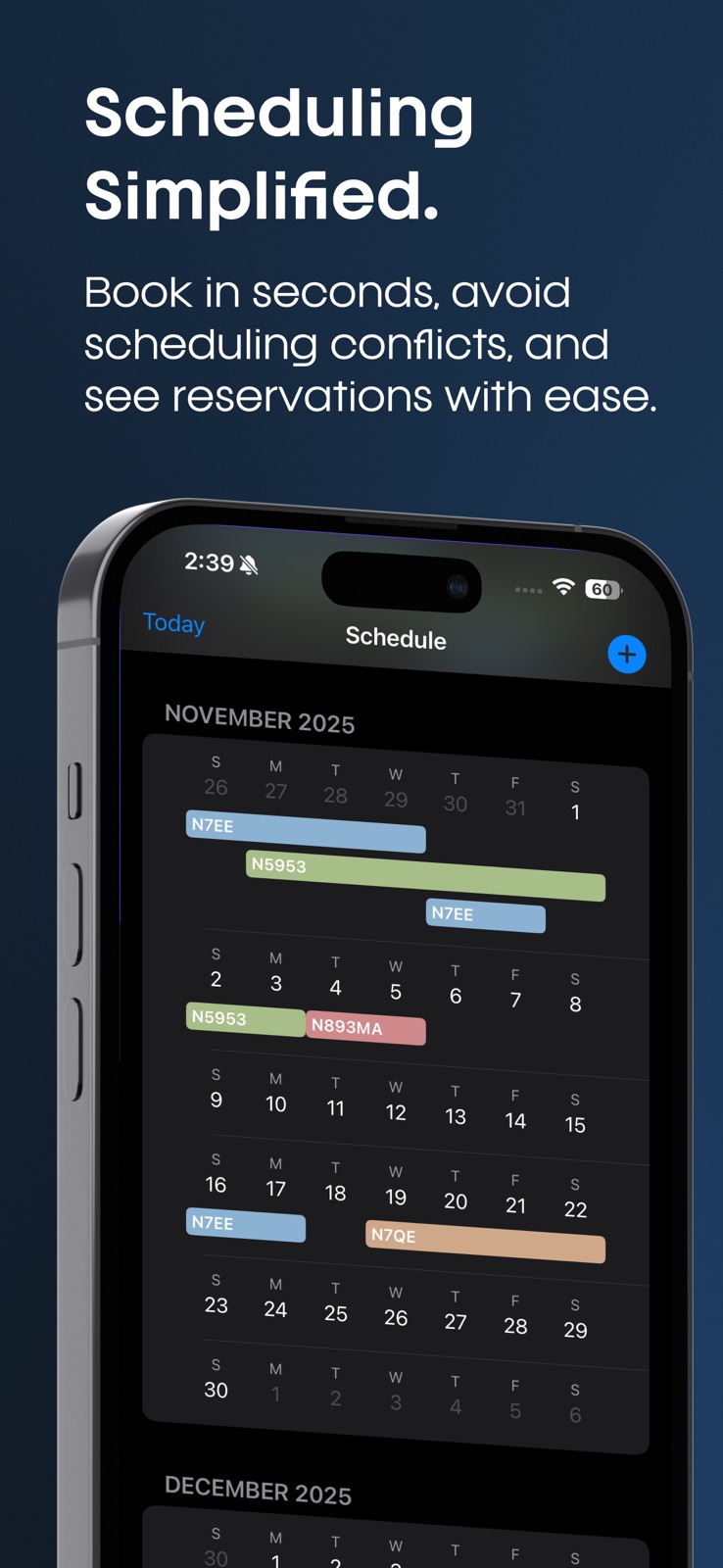
8 store screenshots



Pricing & paywalls
App Store
- Free
Ratings & reviews
App Store
-
5/5Just keeps getting better!
I ran across Flight Director on a Facebook add. As a professional pilot, tracking maintenance on my personal aircraft is of the highest importance to protect the safety of my family and my career. Not having every maintenance item up to date is inexcusable for a professional, especially in the eyes of the FAA. My son is using the plane to learn, and it needs to be safe and enjoyable for him as well. Being able to track the status of my plane, even when I travel for work, is a huge weight off my shoulders. The recent addition of tracking oil consumption and even fuel use is amazing! I had a few questions getting started they were all answered promptly, so the customer service has been great! I did a phone survey with them, at their request, and I genuinely believe that they were interested in feedback. It sounded like they are continuing development and I can’t wait to see how it improves. Absolutely worth the money for me, even as it stands today! We don’t really need the schedule feature, as we are just one family (1 pilot & 1 aspiring pilot), but I can see how this would be helpful for partnerships or a flying club. A+++ for a small aircraft owner!
Eyefly12 · 31 Jul 2026
-
5/5Best Flight Scheduling App
Have used this for a while now and really enjoy the ease of use. Multiple flight instructors have commented how easy it is to track mx and check-in & out flights. Perfect for what type of training we do. Great work and really enjoy the recent upgrades for the users!
NW Arkansas Pilot · 31 Jul 2026
-
5/5Easy to use
Great for my partnership, keeping everyone on the same page.
Z25t · 31 Jul 2026
-
5/5Just what we needed
This app is by far the easiest it’s been to manage reservations and mx for our fleet
Mcadfez · 31 Jul 2026
-
5/5Helped me get organized
Highly recommend!
Dont choose Arlo. · 31 Jul 2026
Privacy & accessibility
App Store
Privacy
- Data Linked to You — Analytics — Identifiers — User ID Developer declared
- Data Linked to You — Analytics — Usage Data — Product Interaction Developer declared
- Data Linked to You — App Functionality — Contact Info — Email Address Developer declared
- Data Linked to You — App Functionality — Contact Info — Name Developer declared
- Data Linked to You — App Functionality — Diagnostics — Crash Data Developer declared
- Data Linked to You — App Functionality — Diagnostics — Performance Data Developer declared
- Data Linked to You — App Functionality — Identifiers — User ID Developer declared
- Data Linked to You — Contact Info Developer declared
- Data Linked to You — Diagnostics Developer declared
- Data Linked to You — Identifiers Developer declared
- Data Linked to You — Usage Data Developer declared
Accessibility
No accessibility labels collected yet.
Versions
App Store
-
1.06
- New Squawks feature – log, view, and resolve Squawks directly from flights and airframes - Smarter maintenance tracking – airframes automatically show as grounded when overdue, with push notifications to all members - Improved MX reminders – now show hours or days remaining - Better flight logging – Adding airports is now optional, squawks can be added during flight creation - Made Reports & Analytics easier to access from Settings - Bug fixes & performance improvements
-
1.07
- Bug fixes
-
1.08
- Bug Fixes
-
1.09
- New Squawks feature – log, view, and resolve Squawks directly from flights and airframes - Smarter maintenance tracking – airframes automatically show as grounded when overdue, with push notifications to all members - Improved MX reminders – now show hours or days remaining - Better flight logging – Adding airports is now optional, squawks can be added during flight creation - Made Reports & Analytics easier to access from Settings - Bug fixes - Performance Improvements
-
1.10
- New Squawks feature – log, view, and resolve Squawks directly from flights and airframes - Smarter maintenance tracking – airframes automatically show as grounded when overdue, with push notifications to all members - Improved MX reminders – now show hours or days remaining - Better flight logging – Adding airports is now optional, squawks can be added during flight creation - Made Reports & Analytics easier to access from Settings - Bug fixes - Performance Improvements
-
1.11
- New Squawks feature – log, view, and resolve Squawks directly from flights and airframes - Smarter maintenance tracking – airframes automatically show as grounded when overdue, with push notifications to all members - Improved MX reminders – now show hours or days remaining - Better flight logging – Adding airports is now optional, squawks can be added during flight creation - Made Reports & Analytics easier to access from Settings - Bug fixes - Performance Improvements
-
1.12
- Log a flight easily from a Calendar Reservation - New Squawks feature – log, view, and resolve Squawks directly from flights and airframes - Smarter maintenance tracking – airframes automatically show as grounded when overdue, with push notifications to all members - Improved MX reminders – now show hours or days remaining - Better flight logging – Adding airports is now optional, squawks can be added during flight creation - Made Reports & Analytics easier to access from Settings - Bug fixes - Performance Improvements
-
1.13
- You no longer need to log flights in the app to take advantage of MX Tracking! Easily update airframe hours and get notified about your MX reminders. - Log a flight easily from a Calendar Reservation - New Squawks feature – log, view, and resolve Squawks directly from flights and airframes - Smarter maintenance tracking – airframes automatically show as grounded when overdue, with push notifications to all members - Improved MX reminders – now show hours or days remaining - Better flight logging – Adding airports is now optional, squawks can be added during flight creation - Made Reports & Analytics easier to access from Settings - Bug fixes - Performance Improvements
-
1.14
- Fixed a bug on Reporting that would show default date range as Last 30 Days but data would be Last 7 days - You can now mark a Flight Log as For Maintenance. Reports updated with Maintenance Flights. - You no longer need to log flights in the app to take advantage of MX Tracking! Easily update airframe hours and get notified about your MX reminders. - Log a flight easily from a Calendar Reservation - New Squawks feature – log, view, and resolve Squawks directly from flights and airframes - Smarter maintenance tracking – airframes automatically show as grounded when overdue, with push notifications to all members - Improved MX reminders – now show hours or days remaining - Better flight logging – Adding airports is now optional, squawks can be added during flight creation - Made Reports & Analytics easier to access from Settings - Bug fixes - Performance Improvements
-
1.15
- NEW! - Track Incremental MX items such as Landings, Engine Cycles and all other MX items directly in the Maintenance Tab or when logging a flight. - You can now mark a Flight Log as For Maintenance. Reports updated with Maintenance Flights. - You no longer need to log flights in the app to take advantage of MX Tracking! Easily update airframe hours and get notified about your MX reminders. - Log a flight easily from a Calendar Reservation - New Squawks feature – log, view, and resolve Squawks directly from flights and airframes - Smarter maintenance tracking – airframes automatically show as grounded when overdue, with push notifications to all members - Improved MX reminders – now show hours or days remaining - Better flight logging – Adding airports is now optional, squawks can be added during flight creation - Made Reports & Analytics easier to access from Settings - Bug fixes - Performance Improvements
-
1.16
- NEW! - Export Reports in just a tap - Flight Log Exports go to your account email. - NEW! - Track Incremental MX items such as Landings, Engine Cycles and all other MX items directly in the Maintenance Tab or when logging a flight. - You can now mark a Flight Log as For Maintenance. Reports updated with Maintenance Flights. - You no longer need to log flights in the app to take advantage of MX Tracking! Easily update airframe hours and get notified about your MX reminders. - Log a flight easily from a Calendar Reservation - New Squawks feature – log, view, and resolve Squawks directly from flights and airframes - Smarter maintenance tracking – airframes automatically show as grounded when overdue, with push notifications to all members - Improved MX reminders – now show hours or days remaining - Better flight logging – Adding airports is now optional, squawks can be added during flight creation - Made Reports & Analytics easier to access from Settings - Bug fixes - Performance Improvements
-
1.17
- Significant Improvements to Maintenance Tracking + Setup - Added AI-Suggest Maintenance Reminders - NEW! - Export Reports in just a tap - Flight Log Exports go to your account email. - NEW! - Track Incremental MX items such as Landings, Engine Cycles and all other MX items directly in the Maintenance Tab or when logging a flight. - You can now mark a Flight Log as For Maintenance. Reports updated with Maintenance Flights. - You no longer need to log flights in the app to take advantage of MX Tracking! Easily update airframe hours and get notified about your MX reminders. - Log a flight easily from a Calendar Reservation - New Squawks feature – log, view, and resolve Squawks directly from flights and airframes - Smarter maintenance tracking – airframes automatically show as grounded when overdue, with push notifications to all members - Improved MX reminders – now show hours or days remaining - Better flight logging – Adding airports is now optional, squawks can be added during flight creation - Made Reports & Analytics easier to access from Settings - Bug fixes - Performance Improvements
-
1.18
- NEW! Choose an Instructor on a Reservation - Significant Improvements to Maintenance Tracking + Setup - Added AI-Suggest Maintenance Reminders - NEW! - Export Reports in just a tap - Flight Log Exports go to your account email. - NEW! - Track Incremental MX items such as Landings, Engine Cycles and all other MX items directly in the Maintenance Tab or when logging a flight. - You can now mark a Flight Log as For Maintenance. Reports updated with Maintenance Flights. - You no longer need to log flights in the app to take advantage of MX Tracking! Easily update airframe hours and get notified about your MX reminders. - Log a flight easily from a Calendar Reservation - New Squawks feature – log, view, and resolve Squawks directly from flights and airframes - Smarter maintenance tracking – airframes automatically show as grounded when overdue, with push notifications to all members - Improved MX reminders – now show hours or days remaining - Better flight logging – Adding airports is now optional, squawks can be added during flight creation - Made Reports & Analytics easier to access from Settings - Bug fixes - Performance Improvements
-
1.19
-NEW! Sync Google or Outlook Calendar to your Airframe's Schedule - NEW! Choose an Instructor on a Reservation - Significant Improvements to Maintenance Tracking + Setup - Added AI-Suggest Maintenance Reminders - NEW! - Export Reports in just a tap - Flight Log Exports go to your account email. - NEW! - Track Incremental MX items such as Landings, Engine Cycles and all other MX items directly in the Maintenance Tab or when logging a flight. - You can now mark a Flight Log as For Maintenance. Reports updated with Maintenance Flights. - You no longer need to log flights in the app to take advantage of MX Tracking! Easily update airframe hours and get notified about your MX reminders. - Log a flight easily from a Calendar Reservation - New Squawks feature – log, view, and resolve Squawks directly from flights and airframes - Smarter maintenance tracking – airframes automatically show as grounded when overdue, with push notifications to all members - Improved MX reminders – now show hours or days remaining - Better flight logging – Adding airports is now optional, squawks can be added during flight creation - Made Reports & Analytics easier to access from Settings - Bug fixes - Performance Improvements
-
1.25
- NEW! Attribute hours on a flight log to a Billing Entity (such as an owner of the airframe) or split the hours between owners or pilots. Fuel and oil added also will be split and reflected in Reporting. - NEW! Track oil added, fuel added and fuel remaining when logging a flight. - NEW! Multi-Engine Support - Track Maintenance, Tach Time, Flight Logs and Detailed Reporting Per Engine for Multi-Engine Airframes - NEW! Categorize a flight log by personal, business, maintenance or dry-lease. - Detailed Reports are updated to reflect all of the new features. - NEW! Sync Google or Outlook Calendar to your Airframe's Schedule - NEW! Choose an Instructor on a Reservation - Significant Improvements to Maintenance Tracking + Setup - Added AI-Suggest Maintenance Reminders - NEW! - Export Reports in just a tap - Flight Log Exports go to your account email. - NEW! - Track Incremental MX items such as Landings, Engine Cycles and all other MX items directly in the Maintenance Tab or when logging a flight. - You can now mark a Flight Log as For Maintenance. Reports updated with Maintenance Flights. - You no longer need to log flights in the app to take advantage of MX Tracking! Easily update airframe hours and get notified about your MX reminders. - Log a flight easily from a Calendar Reservation - New Squawks feature – log, view, and resolve Squawks directly from flights and airframes - Smarter maintenance tracking – airframes automatically show as grounded when overdue, with push notifications to all members - Improved MX reminders – now show hours or days remaining - Better flight logging – Adding airports is now optional, squawks can be added during flight creation - Made Reports & Analytics easier to access from Settings - Bug fixes - Performance Improvements
-
1.26
- NEW! Attribute hours on a flight log to a Billing Entity (such as an owner of the airframe) or split the hours between owners or pilots. Fuel and oil added also will be split and reflected in Reporting. - NEW! Track oil added, fuel added and fuel remaining when logging a flight. - NEW! Multi-Engine Support - Track Maintenance, Tach Time, Flight Logs and Detailed Reporting Per Engine for Multi-Engine Airframes - NEW! Categorize a flight log by personal, business, maintenance or dry-lease. - Added Airframe filter to Flight Logs - Detailed Reports are updated to reflect all of the new features. - NEW! Sync Google or Outlook Calendar to your Airframe's Schedule - NEW! Choose an Instructor on a Reservation - Significant Improvements to Maintenance Tracking + Setup - Added AI-Suggest Maintenance Reminders - NEW! - Export Reports in just a tap - Flight Log Exports go to your account email. - NEW! - Track Incremental MX items such as Landings, Engine Cycles and all other MX items directly in the Maintenance Tab or when logging a flight. - You can now mark a Flight Log as For Maintenance. Reports updated with Maintenance Flights. - You no longer need to log flights in the app to take advantage of MX Tracking! Easily update airframe hours and get notified about your MX reminders. - Log a flight easily from a Calendar Reservation - New Squawks feature – log, view, and resolve Squawks directly from flights and airframes - Smarter maintenance tracking – airframes automatically show as grounded when overdue, with push notifications to all members - Improved MX reminders – now show hours or days remaining - Better flight logging – Adding airports is now optional, squawks can be added during flight creation - Made Reports & Analytics easier to access from Settings - Bug fixes - Performance Improvements
-
1.27
- NEW! Send invitations to your airframe in bulk + manage roles and remove members in bulk. Great for large clubs or flight schools! - NEW! Attribute hours on a flight log to a Billing Entity (such as an owner of the airframe) or split the hours between owners or pilots. Fuel and oil added also will be split and reflected in Reporting. - NEW! Track oil added, fuel added and fuel remaining when logging a flight. - NEW! Multi-Engine Support - Track Maintenance, Tach Time, Flight Logs and Detailed Reporting Per Engine for Multi-Engine Airframes - NEW! Categorize a flight log by personal, business, maintenance or dry-lease. - Added Airframe filter to Flight Logs - Detailed Reports are updated to reflect all of the new features. - NEW! Sync Google or Outlook Calendar to your Airframe's Schedule - NEW! Choose an Instructor on a Reservation - Significant Improvements to Maintenance Tracking + Setup - Added AI-Suggest Maintenance Reminders - NEW! - Export Reports in just a tap - Flight Log Exports go to your account email. - NEW! - Track Incremental MX items such as Landings, Engine Cycles and all other MX items directly in the Maintenance Tab or when logging a flight. - You can now mark a Flight Log as For Maintenance. Reports updated with Maintenance Flights. - You no longer need to log flights in the app to take advantage of MX Tracking! Easily update airframe hours and get notified about your MX reminders. - Log a flight easily from a Calendar Reservation - New Squawks feature – log, view, and resolve Squawks directly from flights and airframes - Smarter maintenance tracking – airframes automatically show as grounded when overdue, with push notifications to all members - Improved MX reminders – now show hours or days remaining - Better flight logging – Adding airports is now optional, squawks can be added during flight creation - Made Reports & Analytics easier to access from Settings - Bug fixes - Performance Improvements
-
1.28
- Fixed a bug causing some Flight Logs to be hidden when filtering by airframe - NEW! Send invitations to your airframe in bulk + manage roles and remove members in bulk. Great for large clubs or flight schools! - NEW! Attribute hours on a flight log to a Billing Entity (such as an owner of the airframe) or split the hours between owners or pilots. Fuel and oil added also will be split and reflected in Reporting. - NEW! Track oil added, fuel added and fuel remaining when logging a flight. - NEW! Multi-Engine Support - Track Maintenance, Tach Time, Flight Logs and Detailed Reporting Per Engine for Multi-Engine Airframes - NEW! Categorize a flight log by personal, business, maintenance or dry-lease. - Added Airframe filter to Flight Logs - Detailed Reports are updated to reflect all of the new features. - NEW! Sync Google or Outlook Calendar to your Airframe's Schedule - NEW! Choose an Instructor on a Reservation - Significant Improvements to Maintenance Tracking + Setup - Added AI-Suggest Maintenance Reminders - NEW! - Export Reports in just a tap - Flight Log Exports go to your account email. - NEW! - Track Incremental MX items such as Landings, Engine Cycles and all other MX items directly in the Maintenance Tab or when logging a flight. - You can now mark a Flight Log as For Maintenance. Reports updated with Maintenance Flights. - You no longer need to log flights in the app to take advantage of MX Tracking! Easily update airframe hours and get notified about your MX reminders. - Log a flight easily from a Calendar Reservation - New Squawks feature – log, view, and resolve Squawks directly from flights and airframes - Smarter maintenance tracking – airframes automatically show as grounded when overdue, with push notifications to all members - Improved MX reminders – now show hours or days remaining - Better flight logging – Adding airports is now optional, squawks can be added during flight creation - Made Reports & Analytics easier to access from Settings - Bug fixes - Performance Improvements
-
1.29
Our Biggest Update yet... Introducing Invoicing — automatic invoicing and expense tracking for your Partnership, Dry-Lease, Training & more! - Set up monthly or quarterly invoices in two minutes - Add your airframe's hourly rate and fixed expenses and FLT DIR handles the rest - Flight hours are tracked via Flight Logs - Track who's paid, who hasn't, and who's overdue at a glance - Automatic PDF invoices emailed to every member - Issue one-time charges for one-off costs like hangar repairs or unexpected expenses - Flight hours, dues, and shared costs — all handled. Tap the new Invoicing tab to get started. Recent Updates: - NEW! Send invitations to your airframe in bulk + manage roles and remove members in bulk. Great for large clubs or flight schools! - NEW! Attribute hours on a flight log to a Billing Entity (such as an owner of the airframe) or split the hours between owners or pilots. Fuel and oil added also will be split and reflected in Reporting. - NEW! Track oil added, fuel added and fuel remaining when logging a flight. - NEW! Multi-Engine Support - Track Maintenance, Tach Time, Flight Logs and Detailed Reporting Per Engine for Multi-Engine Airframes - NEW! Categorize a flight log by personal, business, maintenance or dry-lease. - Added Airframe filter to Flight Logs - Detailed Reports are updated to reflect all of the new features. - NEW! Sync Google or Outlook Calendar to your Airframe's Schedule - NEW! Choose an Instructor on a Reservation - Significant Improvements to Maintenance Tracking + Setup - Added AI-Suggest Maintenance Reminders - NEW! - Export Reports in just a tap - Flight Log Exports go to your account email. - NEW! - Track Incremental MX items such as Landings, Engine Cycles and all other MX items directly in the Maintenance Tab or when logging a flight. - You can now mark a Flight Log as For Maintenance. Reports updated with Maintenance Flights. - You no longer need to log flights in the app to take advantage of MX Tracking! Easily update airframe hours and get notified about your MX reminders. - Log a flight easily from a Calendar Reservation - New Squawks feature – log, view, and resolve Squawks directly from flights and airframes - Smarter maintenance tracking – airframes automatically show as grounded when overdue, with push notifications to all members - Improved MX reminders – now show hours or days remaining - Better flight logging – Adding airports is now optional, squawks can be added during flight creation - Made Reports & Analytics easier to access from Settings - Bug fixes - Performance Improvements
-
1.30
Our Biggest Update yet... Introducing Invoicing — automatic invoicing and expense tracking for your Partnership, Dry-Lease, Training & more! - Set up monthly or quarterly invoices in two minutes - Add your airframe's hourly rate and fixed expenses and FLT DIR handles the rest - Flight hours are tracked via Flight Logs - Track who's paid, who hasn't, and who's overdue at a glance - Automatic PDF invoices emailed to every member - Issue one-time charges for one-off costs like hangar repairs or unexpected expenses - Flight hours, dues, and shared costs — all handled. Tap the new Invoicing tab to get started. Recent Updates: - Upload documents, photos or videos to an Airframe for record keeping - Upload photos or videos when logging a Flight or recording a completed maintenance item - NEW! Send invitations to your airframe in bulk + manage roles and remove members in bulk. Great for large clubs or flight schools! - NEW! Attribute hours on a flight log to a Billing Entity (such as an owner of the airframe) or split the hours between owners or pilots. Fuel and oil added also will be split and reflected in Reporting. - NEW! Track oil added, fuel added and fuel remaining when logging a flight. - NEW! Multi-Engine Support - Track Maintenance, Tach Time, Flight Logs and Detailed Reporting Per Engine for Multi-Engine Airframes - NEW! Categorize a flight log by personal, business, maintenance or dry-lease. - Added Airframe filter to Flight Logs - Detailed Reports are updated to reflect all of the new features. - NEW! Sync Google or Outlook Calendar to your Airframe's Schedule - NEW! Choose an Instructor on a Reservation - Significant Improvements to Maintenance Tracking + Setup - Added AI-Suggest Maintenance Reminders - NEW! - Export Reports in just a tap - Flight Log Exports go to your account email. - NEW! - Track Incremental MX items such as Landings, Engine Cycles and all other MX items directly in the Maintenance Tab or when logging a flight. - You can now mark a Flight Log as For Maintenance. Reports updated with Maintenance Flights. - You no longer need to log flights in the app to take advantage of MX Tracking! Easily update airframe hours and get notified about your MX reminders. - Log a flight easily from a Calendar Reservation - New Squawks feature – log, view, and resolve Squawks directly from flights and airframes - Smarter maintenance tracking – airframes automatically show as grounded when overdue, with push notifications to all members - Improved MX reminders – now show hours or days remaining - Better flight logging – Adding airports is now optional, squawks can be added during flight creation - Made Reports & Analytics easier to access from Settings - Bug fixes - Performance Improvements
-
1.31
- Added a Weekly View option to the Calendar Tab Our Biggest Update yet... Introducing Invoicing — automatic invoicing and expense tracking for your Partnership, Dry-Lease, Training & more! - Set up monthly or quarterly invoices in two minutes - Add your airframe's hourly rate and fixed expenses and FLT DIR handles the rest - Flight hours are tracked via Flight Logs - Track who's paid, who hasn't, and who's overdue at a glance - Automatic PDF invoices emailed to every member - Issue one-time charges for one-off costs like hangar repairs or unexpected expenses - Flight hours, dues, and shared costs — all handled. Tap the new Invoicing tab to get started. Recent Updates: - Upload documents, photos or videos to an Airframe for record keeping - Upload photos or videos when logging a Flight or recording a completed maintenance item - NEW! Send invitations to your airframe in bulk + manage roles and remove members in bulk. Great for large clubs or flight schools! - NEW! Attribute hours on a flight log to a Billing Entity (such as an owner of the airframe) or split the hours between owners or pilots. Fuel and oil added also will be split and reflected in Reporting. - NEW! Track oil added, fuel added and fuel remaining when logging a flight. - NEW! Multi-Engine Support - Track Maintenance, Tach Time, Flight Logs and Detailed Reporting Per Engine for Multi-Engine Airframes - NEW! Categorize a flight log by personal, business, maintenance or dry-lease. - Added Airframe filter to Flight Logs - Detailed Reports are updated to reflect all of the new features. - NEW! Sync Google or Outlook Calendar to your Airframe's Schedule - NEW! Choose an Instructor on a Reservation - Significant Improvements to Maintenance Tracking + Setup - Added AI-Suggest Maintenance Reminders - NEW! - Export Reports in just a tap - Flight Log Exports go to your account email. - NEW! - Track Incremental MX items such as Landings, Engine Cycles and all other MX items directly in the Maintenance Tab or when logging a flight. - You can now mark a Flight Log as For Maintenance. Reports updated with Maintenance Flights. - You no longer need to log flights in the app to take advantage of MX Tracking! Easily update airframe hours and get notified about your MX reminders. - Log a flight easily from a Calendar Reservation - New Squawks feature – log, view, and resolve Squawks directly from flights and airframes - Smarter maintenance tracking – airframes automatically show as grounded when overdue, with push notifications to all members - Improved MX reminders – now show hours or days remaining - Better flight logging – Adding airports is now optional, squawks can be added during flight creation - Made Reports & Analytics easier to access from Settings - Bug fixes - Performance Improvements
-
1.32
- Invoicing Updates Our Biggest Update yet... Introducing Invoicing — automatic invoicing and expense tracking for your Partnership, Dry-Lease, Training & more! - Set up monthly or quarterly invoices in two minutes - Add your airframe's hourly rate and fixed expenses and FLT DIR handles the rest - Flight hours are tracked via Flight Logs - Track who's paid, who hasn't, and who's overdue at a glance - Automatic PDF invoices emailed to every member - Issue one-time charges for one-off costs like hangar repairs or unexpected expenses - Flight hours, dues, and shared costs — all handled. Tap the new Invoicing tab to get started. Recent Updates: - Upload documents, photos or videos to an Airframe for record keeping - Upload photos or videos when logging a Flight or recording a completed maintenance item - NEW! Send invitations to your airframe in bulk + manage roles and remove members in bulk. Great for large clubs or flight schools! - NEW! Attribute hours on a flight log to a Billing Entity (such as an owner of the airframe) or split the hours between owners or pilots. Fuel and oil added also will be split and reflected in Reporting. - NEW! Track oil added, fuel added and fuel remaining when logging a flight. - NEW! Multi-Engine Support - Track Maintenance, Tach Time, Flight Logs and Detailed Reporting Per Engine for Multi-Engine Airframes - NEW! Categorize a flight log by personal, business, maintenance or dry-lease. - Added Airframe filter to Flight Logs - Detailed Reports are updated to reflect all of the new features. - NEW! Sync Google or Outlook Calendar to your Airframe's Schedule - NEW! Choose an Instructor on a Reservation - Significant Improvements to Maintenance Tracking + Setup - Added AI-Suggest Maintenance Reminders - NEW! - Export Reports in just a tap - Flight Log Exports go to your account email. - NEW! - Track Incremental MX items such as Landings, Engine Cycles and all other MX items directly in the Maintenance Tab or when logging a flight. - You can now mark a Flight Log as For Maintenance. Reports updated with Maintenance Flights. - You no longer need to log flights in the app to take advantage of MX Tracking! Easily update airframe hours and get notified about your MX reminders. - Log a flight easily from a Calendar Reservation - New Squawks feature – log, view, and resolve Squawks directly from flights and airframes - Smarter maintenance tracking – airframes automatically show as grounded when overdue, with push notifications to all members - Improved MX reminders – now show hours or days remaining - Better flight logging – Adding airports is now optional, squawks can be added during flight creation - Made Reports & Analytics easier to access from Settings - Bug fixes - Performance Improvements
-
1.33
- Invoicing Updates Our Biggest Update yet... Introducing Invoicing — automatic invoicing and expense tracking for your Partnership, Dry-Lease, Training & more! - Set up monthly or quarterly invoices in two minutes - Add your airframe's hourly rate and fixed expenses and FLT DIR handles the rest - Flight hours are tracked via Flight Logs - Track who's paid, who hasn't, and who's overdue at a glance - Automatic PDF invoices emailed to every member - Issue one-time charges for one-off costs like hangar repairs or unexpected expenses - Flight hours, dues, and shared costs — all handled. Tap the new Invoicing tab to get started. Recent Updates: - Upload documents, photos or videos to an Airframe for record keeping - Upload photos or videos when logging a Flight or recording a completed maintenance item - NEW! Send invitations to your airframe in bulk + manage roles and remove members in bulk. Great for large clubs or flight schools! - NEW! Attribute hours on a flight log to a Billing Entity (such as an owner of the airframe) or split the hours between owners or pilots. Fuel and oil added also will be split and reflected in Reporting. - NEW! Track oil added, fuel added and fuel remaining when logging a flight. - NEW! Multi-Engine Support - Track Maintenance, Tach Time, Flight Logs and Detailed Reporting Per Engine for Multi-Engine Airframes - NEW! Categorize a flight log by personal, business, maintenance or dry-lease. - Added Airframe filter to Flight Logs - Detailed Reports are updated to reflect all of the new features. - NEW! Sync Google or Outlook Calendar to your Airframe's Schedule - NEW! Choose an Instructor on a Reservation - Significant Improvements to Maintenance Tracking + Setup - Added AI-Suggest Maintenance Reminders - NEW! - Export Reports in just a tap - Flight Log Exports go to your account email. - NEW! - Track Incremental MX items such as Landings, Engine Cycles and all other MX items directly in the Maintenance Tab or when logging a flight. - You can now mark a Flight Log as For Maintenance. Reports updated with Maintenance Flights. - You no longer need to log flights in the app to take advantage of MX Tracking! Easily update airframe hours and get notified about your MX reminders. - Log a flight easily from a Calendar Reservation - New Squawks feature – log, view, and resolve Squawks directly from flights and airframes - Smarter maintenance tracking – airframes automatically show as grounded when overdue, with push notifications to all members - Improved MX reminders – now show hours or days remaining - Better flight logging – Adding airports is now optional, squawks can be added during flight creation - Made Reports & Analytics easier to access from Settings - Bug fixes - Performance Improvements
-
1.34
Our Biggest Update yet... Introducing Invoicing — automatic invoicing and expense tracking for your Partnership, Dry-Lease, Training & more! - Set up monthly or quarterly invoices in two minutes - Add your airframe's hourly rate and fixed expenses and FLT DIR handles the rest - Flight hours are tracked via Flight Logs - Track who's paid, who hasn't, and who's overdue at a glance - Automatic PDF invoices emailed to every member - Issue one-time charges for one-off costs like hangar repairs or unexpected expenses - Flight hours, dues, and shared costs — all handled. Tap the new Invoicing tab to get started. Recent Updates: - Upload documents, photos or videos to an Airframe for record keeping - Upload photos or videos when logging a Flight or recording a completed maintenance item - NEW! Send invitations to your airframe in bulk + manage roles and remove members in bulk. Great for large clubs or flight schools! - NEW! Attribute hours on a flight log to a Billing Entity (such as an owner of the airframe) or split the hours between owners or pilots. Fuel and oil added also will be split and reflected in Reporting. - NEW! Track oil added, fuel added and fuel remaining when logging a flight. - NEW! Multi-Engine Support - Track Maintenance, Tach Time, Flight Logs and Detailed Reporting Per Engine for Multi-Engine Airframes - NEW! Categorize a flight log by personal, business, maintenance or dry-lease. - Added Airframe filter to Flight Logs - Detailed Reports are updated to reflect all of the new features. - NEW! Sync Google or Outlook Calendar to your Airframe's Schedule - NEW! Choose an Instructor on a Reservation - Significant Improvements to Maintenance Tracking + Setup - Added AI-Suggest Maintenance Reminders - NEW! - Export Reports in just a tap - Flight Log Exports go to your account email. - NEW! - Track Incremental MX items such as Landings, Engine Cycles and all other MX items directly in the Maintenance Tab or when logging a flight. - You can now mark a Flight Log as For Maintenance. Reports updated with Maintenance Flights. - You no longer need to log flights in the app to take advantage of MX Tracking! Easily update airframe hours and get notified about your MX reminders. - Log a flight easily from a Calendar Reservation - New Squawks feature – log, view, and resolve Squawks directly from flights and airframes - Smarter maintenance tracking – airframes automatically show as grounded when overdue, with push notifications to all members - Improved MX reminders – now show hours or days remaining - Better flight logging – Adding airports is now optional, squawks can be added during flight creation - Made Reports & Analytics easier to access from Settings - Bug fixes - Performance Improvements
-
1.35
· 7 Jul 2026
- You can now record a partial payment on an invoice - You can delete/void a credit before it's been applied to an invoice - You can unmark/reopen a paid invoice if something got recorded incorrectly Our Biggest Update yet... Introducing Invoicing — automatic invoicing and expense tracking for your Partnership, Dry-Lease, Training & more! - Set up monthly or quarterly invoices in two minutes - Add your airframe's hourly rate and fixed expenses and FLT DIR handles the rest - Flight hours are tracked via Flight Logs - Track who's paid, who hasn't, and who's overdue at a glance - Automatic PDF invoices emailed to every member - Issue one-time charges for one-off costs like hangar repairs or unexpected expenses - Flight hours, dues, and shared costs — all handled. Tap the new Invoicing tab to get started. Recent Updates: - Upload documents, photos or videos to an Airframe for record keeping - Upload photos or videos when logging a Flight or recording a completed maintenance item - NEW! Send invitations to your airframe in bulk + manage roles and remove members in bulk. Great for large clubs or flight schools! - NEW! Attribute hours on a flight log to a Billing Entity (such as an owner of the airframe) or split the hours between owners or pilots. Fuel and oil added also will be split and reflected in Reporting. - NEW! Track oil added, fuel added and fuel remaining when logging a flight. - NEW! Multi-Engine Support - Track Maintenance, Tach Time, Flight Logs and Detailed Reporting Per Engine for Multi-Engine Airframes - NEW! Categorize a flight log by personal, business, maintenance or dry-lease. - Added Airframe filter to Flight Logs - Detailed Reports are updated to reflect all of the new features. - NEW! Sync Google or Outlook Calendar to your Airframe's Schedule - NEW! Choose an Instructor on a Reservation - Significant Improvements to Maintenance Tracking + Setup - Added AI-Suggest Maintenance Reminders - NEW! - Export Reports in just a tap - Flight Log Exports go to your account email. - NEW! - Track Incremental MX items such as Landings, Engine Cycles and all other MX items directly in the Maintenance Tab or when logging a flight. - You can now mark a Flight Log as For Maintenance. Reports updated with Maintenance Flights. - You no longer need to log flights in the app to take advantage of MX Tracking! Easily update airframe hours and get notified about your MX reminders. - Log a flight easily from a Calendar Reservation - New Squawks feature – log, view, and resolve Squawks directly from flights and airframes - Smarter maintenance tracking – airframes automatically show as grounded when overdue, with push notifications to all members - Improved MX reminders – now show hours or days remaining - Better flight logging – Adding airports is now optional, squawks can be added during flight creation - Made Reports & Analytics easier to access from Settings - Bug fixes - Performance Improvements
Availability by market
- US
Data quality & evidence
- Page completeness
- Live store listing
- Last verified
- 31 Jul 2026
- Sources
- App Store
- Independent summary has not been published yet.