AppCorpus MCP gives your agent current app data, prices, screens, features and sources.
View JSON
GET /api/v3/apps/1512570906
{
  "app_id": 1512570906,
  "canonical_url": "https://appcorpus.com/apps/flowchart-designer-3-1512570906",
  "identity": {
    "name": "Flowchart Designer 3",
    "slug": "flowchart-designer-3",
    "developer": {
      "name": "光建 张",
      "url": "https://appcorpus.com/developers/developer-685-developer_97e480bd183547eda8c8b0e7d21e2af6"
    },
    "icon_url": "https://is1-ssl.mzstatic.com/image/thumb/Purple221/v4/23/ea/ab/23eaab8b-cfd6-646b-1734-5f27b100cf74/AppIcon-0-0-1x_U007emarketing-0-5-85-220.png/512x512bb.jpg",
    "stores": [
      "apple"
    ],
    "platforms": [
      "iphone",
      "ipad"
    ],
    "status": {
      "state": "active",
      "label": "Active",
      "last_checked": "2026-08-07",
      "last_checked_label": "7 Aug 2026",
      "banner": null,
      "region_note": null
    }
  },
  "listings": [
    {
      "store": "apple",
      "status": "ACTIVE",
      "url": "https://apps.apple.com/us/app/flowchart-designer-3/id1512570906?uo=4",
      "rating": 4.1,
      "rating_count": 109,
      "formatted_price": "Free",
      "is_free": true,
      "has_iap": true,
      "has_subscription": false,
      "version": "3.1.6",
      "updated": "2025-07-14",
      "currency": "USD"
    }
  ],
  "summary": {
    "one_liner": null,
    "summary": null,
    "best_for": [],
    "not_for": [],
    "status": "fallback",
    "at_a_glance": [
      "Free to download",
      "In-app purchases"
    ]
  },
  "categories": {
    "official": [
      "Graphics & Design",
      "Productivity"
    ],
    "appcorpus": [
      {
        "category_id": "graphics-design",
        "label": "Graphics & design",
        "url": "https://appcorpus.com/categories/graphics-design"
      },
      {
        "category_id": "productivity",
        "label": "Productivity",
        "url": "https://appcorpus.com/categories/productivity"
      }
    ]
  },
  "use_cases": [],
  "features": [
    {
      "capability_id": "family_sharing",
      "label": "Family Sharing",
      "availability": "yes",
      "access_level": "unknown",
      "scope": "App Store",
      "evidence": "Store published"
    },
    {
      "capability_id": "free_app",
      "label": "Free app",
      "availability": "yes",
      "access_level": "free",
      "scope": null,
      "evidence": "Store published"
    },
    {
      "capability_id": "in_app_purchases",
      "label": "In-app purchases",
      "availability": "yes",
      "access_level": "free_limited",
      "scope": null,
      "evidence": "Store published"
    }
  ],
  "pricing": [
    {
      "store": "apple",
      "formatted_price": "Free",
      "is_free": true,
      "has_iap": true,
      "has_subscription": false,
      "currency": "USD",
      "market": "us",
      "last_verified": "2026-08-07",
      "rows": [
        "Premium Shapes — $7.99"
      ]
    }
  ],
  "screens": [
    {
      "url": "https://is1-ssl.mzstatic.com/image/thumb/Purple211/v4/95/03/e9/9503e9ca-62b2-46d8-58fa-2e0b90838c16/tns.dehypdfa.png/1600x1600bb.jpg",
      "store": "apple",
      "platform": "ipad",
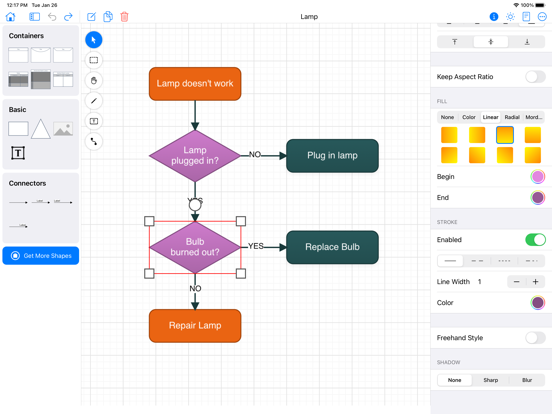
      "alt": "Flowchart Designer 3 ipad screenshot 1"
    },
    {
      "url": "https://is1-ssl.mzstatic.com/image/thumb/Purple221/v4/f9/33/1e/f9331e92-63bf-be4e-5d41-97e8975a4939/tns.qncypkby.png/552x414bb.png",
      "store": "apple",
      "platform": "ipad",
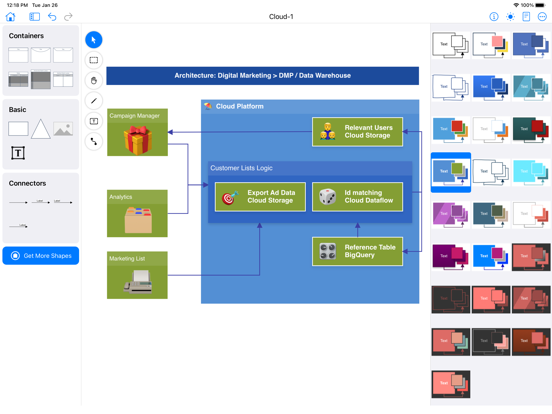
      "alt": "Flowchart Designer 3 ipad screenshot 2"
    },
    {
      "url": "https://is1-ssl.mzstatic.com/image/thumb/Purple211/v4/44/92/f8/4492f8c3-8616-c011-e297-974baf91f35e/tns.qxczdokw.png/1600x1600bb.jpg",
      "store": "apple",
      "platform": "ipad",
      "alt": "Flowchart Designer 3 ipad screenshot 3"
    },
    {
      "url": "https://is1-ssl.mzstatic.com/image/thumb/Purple211/v4/5b/76/bf/5b76bfd4-4498-4d89-9f4d-a44a7725aa68/tns.vpdimekh.png/552x414bb.png",
      "store": "apple",
      "platform": "ipad",
      "alt": "Flowchart Designer 3 ipad screenshot 4"
    },
    {
      "url": "https://is1-ssl.mzstatic.com/image/thumb/Purple221/v4/da/5d/4e/da5d4eda-96c2-eb92-6684-e8c29013f7ad/tns.pryiztkm.png/1600x1600bb.jpg",
      "store": "apple",
      "platform": "ipad",
      "alt": "Flowchart Designer 3 ipad screenshot 5"
    },
    {
      "url": "https://is1-ssl.mzstatic.com/image/thumb/Purple221/v4/fe/7b/01/fe7b01c3-61e6-40bf-65da-220e91c46fc4/tns.oomdkcyz.png/552x414bb.png",
      "store": "apple",
      "platform": "ipad",
      "alt": "Flowchart Designer 3 ipad screenshot 6"
    },
    {
      "url": "https://is1-ssl.mzstatic.com/image/thumb/Purple211/v4/49/34/bb/4934bbde-f926-bfd8-c2fb-d98d3f63de97/tns.tkrlwhyq.png/1600x1600bb.jpg",
      "store": "apple",
      "platform": "ipad",
      "alt": "Flowchart Designer 3 ipad screenshot 7"
    },
    {
      "url": "https://is1-ssl.mzstatic.com/image/thumb/Purple211/v4/1f/64/bd/1f64bdba-9b89-254b-52c8-5e7aa0ad1ec8/tns.tdzhbqll.png/552x414bb.png",
      "store": "apple",
      "platform": "ipad",
      "alt": "Flowchart Designer 3 ipad screenshot 8"
    },
    {
      "url": "https://is1-ssl.mzstatic.com/image/thumb/Purple211/v4/19/ac/5d/19ac5ddc-cc83-e5b2-7791-1d996ac0f80c/tns.ftnnvaox.png/1600x1600bb.jpg",
      "store": "apple",
      "platform": "ipad",
      "alt": "Flowchart Designer 3 ipad screenshot 9"
    },
    {
      "url": "https://is1-ssl.mzstatic.com/image/thumb/Purple211/v4/16/30/70/163070aa-3a0c-bfea-3a17-e70e9024a32b/tns.eidiclrl.png/552x414bb.png",
      "store": "apple",
      "platform": "ipad",
      "alt": "Flowchart Designer 3 ipad screenshot 10"
    },
    {
      "url": "https://is1-ssl.mzstatic.com/image/thumb/Purple221/v4/d6/97/9b/d6979b32-6886-871d-a59b-f1ec05856207/tns.xfdyjpgw.png/1600x1284bb.jpg",
      "store": "apple",
      "platform": "iphone",
      "alt": "Flowchart Designer 3 iphone screenshot 11"
    },
    {
      "url": "https://is1-ssl.mzstatic.com/image/thumb/Purple211/v4/77/7d/4b/777d4bcf-0564-2cea-5d86-e59dc4b420c0/tns.bqcloxea.png/1600x1284bb.jpg",
      "store": "apple",
      "platform": "iphone",
      "alt": "Flowchart Designer 3 iphone screenshot 12"
    },
    {
      "url": "https://is1-ssl.mzstatic.com/image/thumb/Purple211/v4/da/63/bc/da63bc8c-e6d7-3cd6-c9cc-a6a388dbc009/tns.nqdxsihq.png/1284x1600bb.jpg",
      "store": "apple",
      "platform": "iphone",
      "alt": "Flowchart Designer 3 iphone screenshot 13"
    },
    {
      "url": "https://is1-ssl.mzstatic.com/image/thumb/Purple211/v4/e4/e6/88/e4e688e1-4685-41df-c629-9c6318ec5984/tns.dcxziehb.png/1284x1600bb.jpg",
      "store": "apple",
      "platform": "iphone",
      "alt": "Flowchart Designer 3 iphone screenshot 14"
    },
    {
      "url": "https://is1-ssl.mzstatic.com/image/thumb/Purple221/v4/13/23/b2/1323b27c-9667-20b7-1b80-99a34e4262a5/tns.crweglyg.png/1600x1284bb.jpg",
      "store": "apple",
      "platform": "iphone",
      "alt": "Flowchart Designer 3 iphone screenshot 15"
    },
    {
      "url": "https://is1-ssl.mzstatic.com/image/thumb/Purple221/v4/22/dc/ff/22dcff1c-2207-67e0-2e4e-ed5496bbe96f/tns.hlmutqry.png/1284x1600bb.jpg",
      "store": "apple",
      "platform": "iphone",
      "alt": "Flowchart Designer 3 iphone screenshot 16"
    },
    {
      "url": "https://is1-ssl.mzstatic.com/image/thumb/Purple221/v4/6d/89/22/6d892221-1edd-98dd-c0e9-e1901f93a4c8/tns.gtclinkd.png/1284x1600bb.jpg",
      "store": "apple",
      "platform": "iphone",
      "alt": "Flowchart Designer 3 iphone screenshot 17"
    },
    {
      "url": "https://is1-ssl.mzstatic.com/image/thumb/Purple211/v4/31/9f/8a/319f8a3c-7c66-23c3-62ec-1bef05915790/tns.wrmftknm.png/1600x1284bb.jpg",
      "store": "apple",
      "platform": "iphone",
      "alt": "Flowchart Designer 3 iphone screenshot 18"
    },
    {
      "url": "https://is1-ssl.mzstatic.com/image/thumb/Purple113/v4/0f/96/42/0f9642c0-7da0-85bd-130e-884a595b996e/pr_source.png/1600x1600bb.jpg",
      "store": "apple",
      "platform": "mac",
      "alt": "Flowchart Designer 3 mac screenshot 19"
    },
    {
      "url": "https://is1-ssl.mzstatic.com/image/thumb/Purple113/v4/19/44/76/194476bb-3740-e7a3-8b46-fa5c91c63506/pr_source.png/1600x1600bb.jpg",
      "store": "apple",
      "platform": "mac",
      "alt": "Flowchart Designer 3 mac screenshot 20"
    },
    {
      "url": "https://is1-ssl.mzstatic.com/image/thumb/Purple123/v4/89/a7/7d/89a77de8-d766-8056-cff1-4db88ad96364/pr_source.png/1600x1600bb.jpg",
      "store": "apple",
      "platform": "mac",
      "alt": "Flowchart Designer 3 mac screenshot 21"
    },
    {
      "url": "https://is1-ssl.mzstatic.com/image/thumb/Purple123/v4/62/5b/f2/625bf28a-2bbf-3051-8d81-465043d8c162/pr_source.png/1600x1600bb.jpg",
      "store": "apple",
      "platform": "mac",
      "alt": "Flowchart Designer 3 mac screenshot 22"
    },
    {
      "url": "https://is1-ssl.mzstatic.com/image/thumb/Purple113/v4/95/60/95/956095f0-e976-753e-ae32-b109c916eec8/pr_source.png/1600x1600bb.jpg",
      "store": "apple",
      "platform": "mac",
      "alt": "Flowchart Designer 3 mac screenshot 23"
    }
  ],
  "ratings": [
    {
      "store": "apple",
      "average": 4.1,
      "count": 109,
      "market": "us",
      "observed_at": "2026-08-07",
      "reviews": [
        {
          "rating": 5,
          "title": "Did just what I needed",
          "body": "I needed to create a decision tree to analyze a situation. I checked the App Store for apps to create org charts and flow charts. There are so many! It's hard to know which to choose. I read a few reviews and descriptions, and decided to try Flowchart Designer 3. The app opens with a tutorial on how to start creating charts. The UI is straightforward. If you have used any kind of drawing app on the Mac, you will be familiar with it. The feature set in the free version is pretty limited, but that's OK. There are enough features to create basic flowcharts, org charts - and decision trees. People who complain that it's too limited have to remember that it's free. For a few more dollars you can unlock more features. I was able to get up to speed quickly, develop the decision tree, and submit it to the team for review. If I continue to use Flowchart Designer 3, I will probably pay to unlock the additional features.",
          "author": "CJO33333",
          "date": "7 Aug 2026"
        },
        {
          "rating": 5,
          "title": "easy to use Mac touch pad friendly",
          "body": "There are a few free flow chart and design apps for the iPad, and while they do the job for me, I was thrilled to discover a Mac-compatible alternative. That moment was the best of my life. This program is a pretty straightforward chart or flowchart, and I can use it on my iPad, iPhone, and Mac mini. It doesn't matter what approach to mind mapping you're trying to adopt. Dad has all the fundamental features necessary for easily producing a professional-looking flowchart. Obviously, I shelled out for the full version, and I couldn't be happier; please keep improving flow chart designer; it's a fantastic tool. ~ Robert Smith, policy Manager",
          "author": "chubby2600",
          "date": "7 Aug 2026"
        },
        {
          "rating": 4,
          "title": "Nearly perfect",
          "body": "This is a very powerful and intuitive tool for making a wide variety of great looking flow charts. The customization options are complete and easily accessible. Alignment, snap, line styles, colors, sizing - it’s all there. The only problem I’ve found is with text. For every object type including the text tool itself, the text alignment option (left, right, center, justify) is broken. If you ever de-center text you can never center it again because the center option does not work. Thankfully, center is the default so all text objects are initially centered. The fee for purchasing the full set of shapes is well worth the $7.99 one-time price. I hope the text alignment issue gets fixed, then this app will be perfect.",
          "author": "ItsCosmo",
          "date": "7 Aug 2026"
        },
        {
          "rating": 2,
          "title": "Just Kinda OK",
          "body": "Don't expect much from this app. First, it only comes with a few \"containers\" - i.e. rectangles, for shapes. You'd have to pay $8 for a very basic handful of additional shapes. There functionality problems as well. You can't (at least I couldn't find a way) to attach text to a Container. I had to create a seperate Text box and manually move it over the Container but then, you can't \"Group\" the text box and container so everytime you move something, you have to move both individually, realign them, center them, etc. Most of my time was spent repetitively moving and aligning boxes and text. Colors are pretty bad as well and the Themes don't work - the colors you expect are not what shows up. I chose a black background Container with white text and I got a purple gradient with black text. There's probably more I could comment on but I have to toss this app for something that doesn't waste my time doing over and over again. If you need a VERY basic flowchart - and I mean basic, this will give you something but it has a long way to go for it to be of any use. And the $8 is kind of an insult for what it does. Get your app functional before trying to soak us for a couple of bucks.",
          "author": "Bad_Company_2010",
          "date": "7 Aug 2026"
        },
        {
          "rating": 5,
          "title": "OMG FINALLY",
          "body": "I feel like I’ve been searching forever for a good flow charting app on the iPad. Every time I searched I found either things that had subscriptions or was a “mind mapper”. I don’t need anything that requires that many features and updates that I need monthly updates. So I should just be able to buy something. And I finally stumbled across Flowchart Designer 3 and it is perfect for my needs. I honestly could have gotten away with the free version but I wanted to support the developer and I encourage others to do the same.",
          "author": "ThatiPadGuy.com",
          "date": "7 Aug 2026"
        }
      ]
    }
  ],
  "privacy": [
    {
      "store": "apple",
      "declarations": [
        {
          "title": "Data Not Collected",
          "detail": "",
          "source": "Developer declared"
        }
      ],
      "accessibility": []
    }
  ],
  "changes": [
    {
      "store": "apple",
      "version": "3.0.0",
      "released_at": null,
      "notes": ""
    },
    {
      "store": "apple",
      "version": "3.0.1",
      "released_at": null,
      "notes": "Bug fixes."
    },
    {
      "store": "apple",
      "version": "3.0.2",
      "released_at": null,
      "notes": "Fixed a crash issue when saving documents."
    },
    {
      "store": "apple",
      "version": "3.1",
      "released_at": null,
      "notes": "Bug fixes."
    },
    {
      "store": "apple",
      "version": "3.1.1",
      "released_at": null,
      "notes": "Bug fixes."
    },
    {
      "store": "apple",
      "version": "3.1.2",
      "released_at": null,
      "notes": "UI improvement; Bug fixes."
    },
    {
      "store": "apple",
      "version": "3.1.3",
      "released_at": null,
      "notes": "Chinese localization added; UI improvement."
    },
    {
      "store": "apple",
      "version": "3.1.4",
      "released_at": null,
      "notes": "Fixed a crash issue."
    },
    {
      "store": "apple",
      "version": "3.1.5",
      "released_at": null,
      "notes": "Fixed the problem of not being able to create files."
    },
    {
      "store": "apple",
      "version": "3.1.6",
      "released_at": "2025-07-14",
      "notes": "Some issues fixed; Added new version update guide."
    }
  ],
  "alternatives": [
    {
      "app_id": 1164289776,
      "name": "OmniGraffle 3",
      "url": "https://appcorpus.com/apps/omnigraffle-3-1164289776",
      "reason": "Same category + similar ratings"
    },
    {
      "app_id": 1611358648,
      "name": "Fast Chart - Chart maker plus",
      "url": "https://appcorpus.com/apps/fast-chart-chart-maker-plus-1611358648",
      "reason": "Same category + similar ratings"
    },
    {
      "app_id": 582635628,
      "name": "Toolbox for Keynote: Templates",
      "url": "https://appcorpus.com/apps/toolbox-for-keynote-templates-582635628",
      "reason": "Same category + similar ratings"
    }
  ],
  "evidence_summary": {
    "index_state": "S1",
    "evidence_level": 1,
    "level_label": "Live store listing",
    "indexable": true,
    "last_verified_at": "2026-08-07",
    "unknown_fields": [
      "Independent summary has not been published yet."
    ],
    "sources": [
      "App Store"
    ]
  },
  "availability_markets": {
    "live": [
      "us"
    ],
    "selected": "us",
    "note": null
  },
  "feature_events": {
    "events": []
  },
  "features_slice": {
    "plans": [
      {
        "code": "premium-shapes",
        "label": "Premium Shapes",
        "kind": "unknown",
        "status": "store_listed",
        "prices": [
          {
            "storefront": "us",
            "formatted": "$7.99",
            "billing_period": null
          }
        ],
        "trial": null
      }
    ],
    "features": [],
    "unknown_features": [
      "family_sharing"
    ],
    "data_cutoff": "7 Aug 2026"
  }
}