
Quick verdict
- What it is
- Store information collected; independent summary not yet available.
- At a glance
-
- Free to download
- In-app purchases
Categories and search queries
Official categories
- Finance
- Productivity
AppCorpus categories
Key functions
| Function | Availability | Access | Scope | Evidence |
|---|---|---|---|---|
| Free app | Yes | Free | — | Store published |
| In-app purchases | Yes | Limited free | — | Store published |
Screens
App Store
4 store screenshots


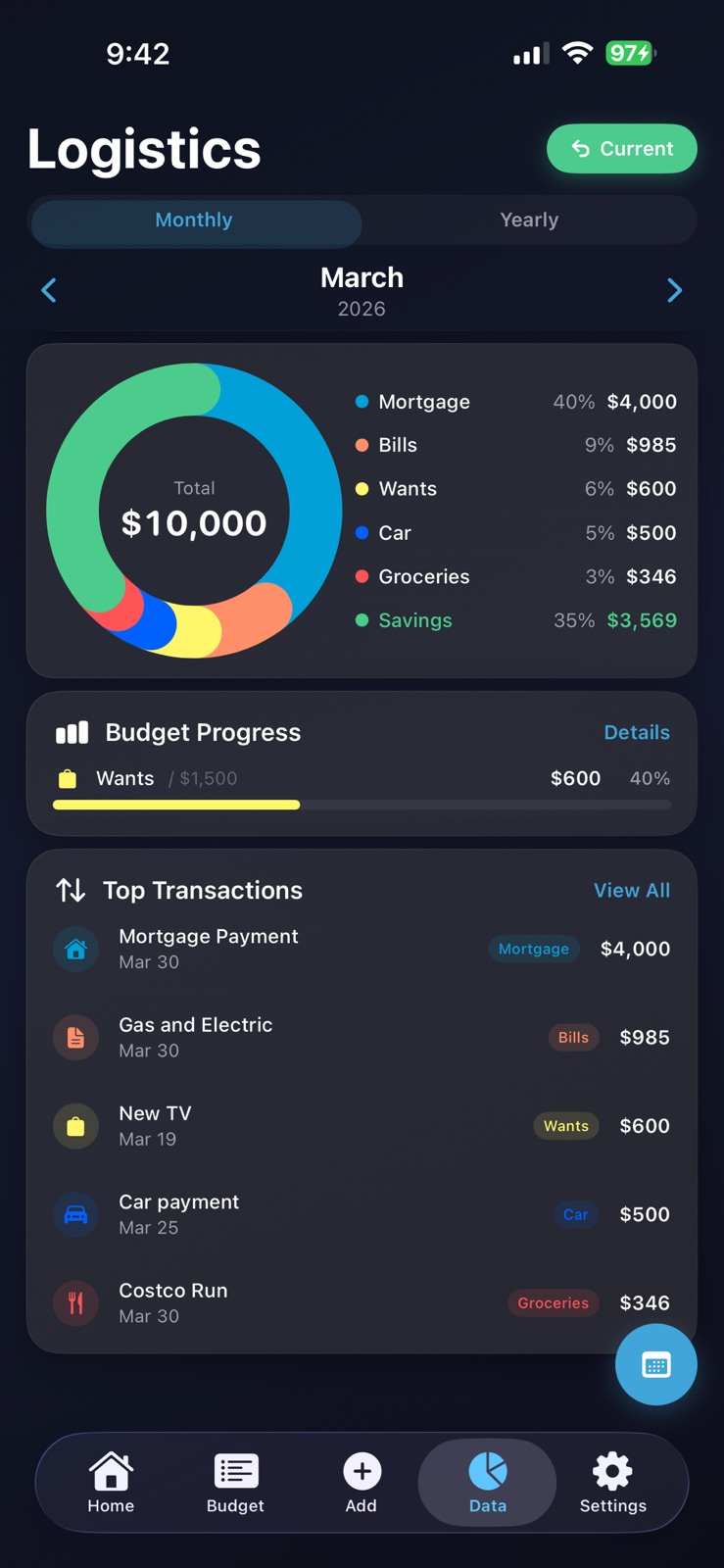

Pricing & paywalls
App Store
- Free to download
- In-app purchases
Ratings & reviews
App Store
-
5/5Super simple!
Clean user interface, intuitive, and not overwhelming! This is rare to find compared to other finance apps out there. Setting up my account took seconds and I immediately got an understanding of where my money was going. This app truly tracks and improves spending habits. Completely changed the way I see my income and the way I save!
Cookie613 · 31 Jul 2026
-
5/5What I’m looking for
FLOW makes budgeting super simple and stress-free. The app is clean, easy to use, and helps me actually understand where my money is going without overcomplicating things. I’ve been saving more just by staying consistent with it. Definitely a 5-star app—highly recommend.
AppCritic330 · 31 Jul 2026
-
5/5Extremely simple and detailed
This is the first app I can actually use to track my personal spendings. Most other apps are overly simplified and don't allow much customization. FLOW is the perfect balance of details, customization, and a simple user interface
Petersad44 · 31 Jul 2026
-
5/5User friendly, yet intuitive
I use to do all my budgeting on excel sheets, happy that I switched over to this app. It is easy on the eyes, has everything I need on it and gives me a solid breakdown of my spending. Really enjoying the export to PDF feature too!
Rita_R73 · 31 Jul 2026
-
5/5Flow overall app
App is built great and it’s very user friendly to use! 5 stars! ⭐️⭐️⭐️⭐️⭐️
Kjevans34 · 31 Jul 2026
Privacy & accessibility
App Store
Privacy
- Data Linked to You — App Functionality — Contact Info — Name Developer declared
- Data Linked to You — App Functionality — Financial Info — Other Financial Info Developer declared
- Data Linked to You — App Functionality — Identifiers — User ID Developer declared
- Data Linked to You — Contact Info Developer declared
- Data Linked to You — Financial Info Developer declared
- Data Linked to You — Identifiers Developer declared
Accessibility
No accessibility labels collected yet.
Versions
App Store
- 1.0
-
1.1
What's New in FLOW 1.1: - Recurring payments now auto-populate each month - Added pay day tracking for accurate paycheck calculations - Biweekly pay schedule now correctly detects bonus paycheck months - Improved layout scaling for all iPhone sizes - Categories now auto-capitalize for consistency - Dark mode optimized throughout - Bug fixes and performance improvements
-
1.2
⏺ What's New in FLOW v1.2 Flow Score & Achievements Introducing your Flow Score — a personal budgeting rating from 350 to 850, inspired by credit scores. Earn 31 achievements across Active Days, Logging, Time Tracked, Budget Discipline, Savings, and Diversity. Climb the ranks from Intern to Flow Master. Tap your profile card to view your progress. Budget Progress & Analytics - Set optional budgets per category and track spending with visual progress bars. Expand any category for a stock-style chart with monthly trends, Low/Avg/High stats, and time range filters (3M/6M/1Y/All). Top Transactions highlights your biggest non-recurring purchases each month — and top 10 for the year. Smarter Add Entry - Category chips now scroll horizontally showing all your categories. Placeholder text rotates with realistic examples matched to categories. Save resets everything instantly. Quality of Life - Categories settings redesigned with inline budget fields - Income always first with locked color - Chevron indicators on expandable sections - Input validation across all fields - View All on Top Transactions jumps to Budget tab
-
1.3
· 8 May 2026
What's New in FLOW v1.3 Yearly Breakdown - View your entire year at a glance. The new Yearly Breakdown detail page shows month-by-month Income, Spending, and Savings in one table, plus a scrollable category-by-category spending breakdown. Smarter Category Input - Type to live-filter your category list as you go. Tap a category chip and the full list stays visible so you can quickly switch. Bug Fixes & Polish - Savings goal edit now works in table view - Donut chart groups small categories as "Other Categories" to avoid conflicts with user categories - Pencil icons more visible across the app - Dollar amounts properly aligned in budget table view
Alternatives
- CashLens: Expense Tracker — Same category + similar ratings
Availability by market
- US
Data quality & evidence
- Page completeness
- Live store listing
- Last verified
- 31 Jul 2026
- Sources
- App Store
- Independent summary has not been published yet.