
FlightAware Flight Tracker
Track flights in real-time and receive status alerts
by FlightAware
iPhone · iPad
Quick verdict
- What it is
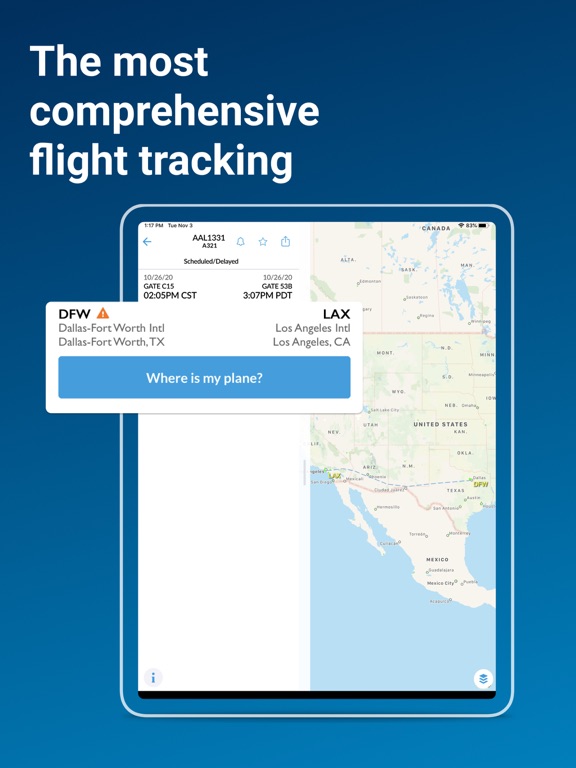
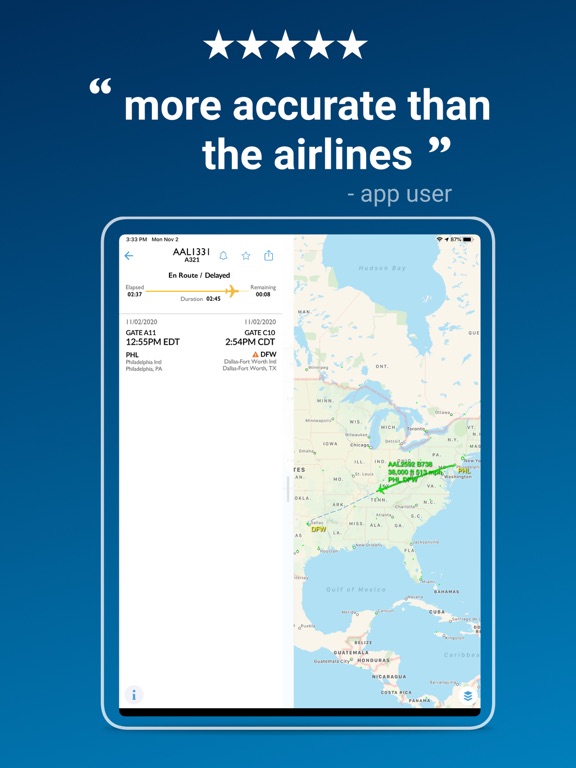
- FlightAware is a flight tracking app that provides real-time information on flight status, delays, and weather radar. It allows users to track planes, save favorite aircraft and airports, and set up alerts for flight changes.
- Best for
-
- frequent travelers
- aviation enthusiasts
- pilots
- At a glance
-
- Free to download
- In-app purchases
Categories and search queries
Official categories
- Travel
Apoku categories
Key functions
| Function | Availability | Access | Scope | Evidence |
|---|---|---|---|---|
| Free app | Yes | Free | Context-specific | Store published |
| In-app purchases | Yes | Limited free | Context-specific | Store published |
Screens
App Store
21 store screenshots


Pricing & paywalls
App Store
Shown for US
- Ad Remove - Monthly
- Aviator+ - Monthly
Ratings & reviews
App Store
Shown for US
-
5/5We got from MIA to FAI in one day thanks to Flight Aware!
We had a long 3 segment flight from MIA to FAI through DTW and SEA. We only made it through this app. I used it to track all our flights plus the inbound flights that had our planes as we had a tight connection in DTW. Using notifications it let me know all the statuses and told me before Delta did of delays. Our initial flight had a 2 hour weather related ground stop while we were sitting on it and we would miss our connection in DTW except Flight Aware kept updating me that our DTW-SEA flight kept getting pushed back due to delays so when we got there we made the flight as it got pushed back a few more times due to mechanical issues with the jetway. Except we would miss out SEA-FAI connection! Once again Flight Aware informed me before Delta of delays with our SEA-FAI flight and we ended up making it! Without Flight Aware I might have wrongly accepted Delta’s offers to reschedule a day later and would have missed parts of our scheduled events in Fairbanks!
FranciscoIV · 30 Oct 2026
-
4/5All good except for the update nag screen
Great app overall, but it has one incredibly annoying, erm, “feature” that I need to vent about. The app checks the App Store for updates at startup and, if an update is found, displays a nag screen about the update that you have to click through before proceeding, disrupting your workflow. For myself and the other 99% of iOS users who have Automatic Updates turned on for the very fact that we don’t want to—and shouldn’t have to, quite frankly—ever consciously think about updating apps and would rather have the OS do it for us automatically in the background at night, this manual update reminder is unnecessary and intrusive. None of my other apps are this OCD about updates. Relax already, the OS will update your app for us eventually. And, by the way, since the app apparently uses the App Store’s staged rollout option, whereby updates can take up to 7 days to reach 100% of users—to wit, I was only just today (Feb 22) auto updated to the Feb 15 release—displaying the update nag notice the instant the app is released makes this practice even more logic defying. If you insist on keeping this update screen, fine, but at least wait 8 days after the update is released to the App Store so that it is only seen by those who don’t use auto app updates.
Low Clearance · 30 Oct 2026
-
5/5Great for up to date info.
I have used the Flight Aware app for several years. I find it to be accurate (sometimes more so than the individual airlines) and informative. I can check the local airport(s) for delays which are not always apparent in other ways. For example a clear sunny day but flights being held at the point of origin due to weather (thunderstorms etc.). I know having experienced it my self that when you are sitting in the airport at the departure gate and the plane is there but you are told it is delayed due to weather and it is sunny where you are and at your destination you get frustrated. Flight Aware gives the information about the airport’s delays due to weather and I can check both the departure airport and destination with the weather overlay showing me what is happening. I also like being able to find my plane “Where is my plane now?”. I volunteer for a local non profit as a ‘taxi team driver’. Being able to track the flights I am meeting is a big help.
nlgess · 30 Oct 2026
-
5/5won’t set up notifications
UPDATE: I waited a bit and before I deleted the app, I tried it one more time - the issue seems to have been fixed and the app is working as advertised. I actually got responses from the developer regarding this, which I found impressive and surprising. Changing my rating from one star to 5. PREVIOUS REVIEW: app worked fine for awhile, but suddenly, it will not allow me to set up notifications for flights. When I try to set a notification for a flight, I get a message that “email to friends for single day only” (or something similar). I don’t have emails to friends set up in my settings, so the error message makes no sense to me. I have settings to just email to me to track flights I want to meet. I tried turning off even emails to me to reset to “send to my device”, but I still get the error message. Flight Tracker is a much more reliable app, and it has become my go-to app for tracking flights I need to meet. This one just doesn’t work anymore.
Fran70809 · 30 Oct 2026
-
5/5The good and the not so good
We us it mostly for our family members to track our personal plane. It’s a good app that needs more work. It sometimes works when we file Flight following, maybe we are doing something wrong? It always works when we file an IFR flight plan. The problem we have with the app is when we cancel IFR in the air if we do a visual approach the app stops tracking the flight and my loved ones wonder it we crashed cause it stops the tracking short of the landing. The other thing is that we can’t sneak away without the family being notified of when we are leaving and where we going. The great thing is my FBO uses the app to know when we’re are arriving at the airport so they can have my vehicle out on the tarmac running and waiting for us with the air or the heat running....love that use of your app! Keep up the great work.
31 Flyer · 30 Oct 2026
Privacy & accessibility
App Store
Privacy
- Data Linked to You — Analytics — Diagnostics — Other Diagnostic Data Developer declared
- Data Linked to You — Analytics — Identifiers — Device ID Developer declared
- Data Linked to You — Analytics — Identifiers — User ID Developer declared
- Data Linked to You — Analytics — Location — Coarse Location Developer declared
- Data Linked to You — Analytics — Search History Developer declared
- Data Linked to You — Analytics — Usage Data — Other Usage Data Developer declared
- Data Linked to You — Analytics — Usage Data — Product Interaction Developer declared
- Data Linked to You — Analytics — User Content — Other User Content Developer declared
- Data Linked to You — App Functionality — Contact Info — Email Address Developer declared
- Data Linked to You — App Functionality — Diagnostics — Other Diagnostic Data Developer declared
- Data Linked to You — App Functionality — Identifiers — Device ID Developer declared
- Data Linked to You — App Functionality — Identifiers — User ID Developer declared
- Data Linked to You — App Functionality — Location — Coarse Location Developer declared
- Data Linked to You — App Functionality — Location — Precise Location Developer declared
- Data Linked to You — App Functionality — Search History Developer declared
- Data Linked to You — App Functionality — User Content — Other User Content Developer declared
- Data Linked to You — Developer’s Advertising or Marketing — Contact Info — Email Address Developer declared
- Data Linked to You — Developer’s Advertising or Marketing — Contact Info — Name Developer declared
- Data Linked to You — Developer’s Advertising or Marketing — Diagnostics — Other Diagnostic Data Developer declared
- Data Linked to You — Developer’s Advertising or Marketing — Identifiers — Device ID Developer declared
- Data Linked to You — Developer’s Advertising or Marketing — Identifiers — User ID Developer declared
- Data Linked to You — Developer’s Advertising or Marketing — Location — Coarse Location Developer declared
- Data Linked to You — Developer’s Advertising or Marketing — Location — Precise Location Developer declared
- Data Linked to You — Developer’s Advertising or Marketing — Search History Developer declared
- Data Linked to You — Developer’s Advertising or Marketing — Usage Data — Advertising Data Developer declared
- Data Linked to You — Developer’s Advertising or Marketing — Usage Data — Product Interaction Developer declared
- Data Linked to You — Other Purposes — User Content — Customer Support Developer declared
- Data Linked to You — Product Personalization — Contact Info — Email Address Developer declared
- Data Linked to You — Product Personalization — Contact Info — Name Developer declared
- Data Linked to You — Product Personalization — Identifiers — User ID Developer declared
- Data Linked to You — Product Personalization — Location — Precise Location Developer declared
- Data Linked to You — Product Personalization — Search History Developer declared
- Data Linked to You — Product Personalization — User Content — Other User Content Developer declared
- Data Linked to You — Third-Party Advertising — Diagnostics — Other Diagnostic Data Developer declared
- Data Linked to You — Third-Party Advertising — Identifiers — Device ID Developer declared
- Data Linked to You — Third-Party Advertising — Location — Coarse Location Developer declared
- Data Linked to You — Third-Party Advertising — Search History Developer declared
- Data Linked to You — Third-Party Advertising — Usage Data — Advertising Data Developer declared
- Data Linked to You — Third-Party Advertising — Usage Data — Product Interaction Developer declared
- Data Linked to You — Contact Info Developer declared
- Data Linked to You — Diagnostics Developer declared
- Data Linked to You — Identifiers Developer declared
- Data Linked to You — Location Developer declared
- Data Linked to You — Search History Developer declared
- Data Linked to You — Usage Data Developer declared
- Data Linked to You — User Content Developer declared
- Data Not Linked to You — Analytics — Diagnostics — Crash Data Developer declared
- Data Not Linked to You — Analytics — Diagnostics — Performance Data Developer declared
- Data Not Linked to You — Analytics — Other Data — Other Data Types Developer declared
- Data Not Linked to You — App Functionality — Diagnostics — Crash Data Developer declared
- Data Not Linked to You — App Functionality — Other Data — Other Data Types Developer declared
- Data Not Linked to You — Developer’s Advertising or Marketing — Diagnostics — Performance Data Developer declared
- Data Not Linked to You — Third-Party Advertising — Diagnostics — Performance Data Developer declared
- Data Not Linked to You — Third-Party Advertising — Other Data — Other Data Types Developer declared
- Data Not Linked to You — Diagnostics Developer declared
- Data Not Linked to You — Other Data Developer declared
- Data Used to Track You — Diagnostics — Other Diagnostic Data Developer declared
- Data Used to Track You — Diagnostics Developer declared
- Data Used to Track You — Identifiers — Device ID Developer declared
- Data Used to Track You — Identifiers Developer declared
- Data Used to Track You — User Content — Other User Content Developer declared
- Data Used to Track You — User Content Developer declared
Accessibility
No accessibility labels collected yet.
Versions
App Store
-
6.20.2
Bug fixes and performance improvements
-
6.21.0
- New look for the My Account experience - You can now copy the list of waypoints on the Flight Information screen. Tap and hold to select the text and copy it. - Knots are shown as 'kt' instead of 'kn' in accordance with aviation custom - Other bug fixes and performance improvements
-
6.21.1
- Updated design for airport flight board filtering - Other bug fixes and performance improvements
-
6.22.0
Bug fixes and performance improvements
-
6.23.0
Bug fixes and performance improvements
-
6.23.1
Bug fixes and performance improvements
-
6.23.2
- Improved map behavior when larger text size is active - Other bug fixes and performance improvements
-
6.23.3
Bug fixes and performance improvements
-
6.23.4
Bug fixes and performance improvements
-
6.23.5
- Improved visibility of aircraft icons on map - Added origin/destination icons to airport labels on flight map - Other bug fixes and performance improvements
-
6.23.6
Bug fixes and performance improvements
-
6.23.7
- Helicopter icons on the map are now animated - Improved display to make it clearer when a flight has left the gate but not yet taken off - Fixed issue where gate info would sometimes not be displayed - Other bug fixes and performance improvements
-
6.24.0
- Improved the appearance of map datablock info in landscape mode on iPhone - More frequent status updates for flights that are taxiing before takeoff or after landing - Other bug fixes and performance improvements
-
6.25.0
Bug fixes and performance improvements
-
6.26.1
- The sheet on the main screen now defaults to the closed appearance, with a new setting to change the default - Added heading indicator to your location on the map - Other bug fixes and performance improvements
-
6.26.2
Bug fixes and performance improvements
-
6.26.3
We've heard your feedback. The "sheet" on the main screen of the app now defaults to the expanded appearance showing recent searches, just like it did before. If you prefer the collapsed appearance, showing more of the interactive map, you can adjust this by tapping the "3 dots" button, selecting "My Account", and visiting "Appearance" settings.
-
6.27.0
- We redesigned the map layer selector with a fresh new look and smoother interactions - Aviator+ and Enterprise WX members can now access additional advanced weather overlays - Other bug fixes and performance improvements
-
6.27.1
- We've added gate and runway annotations to airport maps. Zoom in for a more detailed view of airport layouts - Other bug fixes and performance improvements
-
6.27.2
Bug fixes and performance improvements
-
6.27.3
- We've improved the level of detail on the "Classic" base map style, especially when zoomed in to airports. - Other bug fixes and performance improvements.
-
6.27.4
Bug fixes and performance improvements
-
6.28.0
Bug fixes and performance improvements
-
6.28.1
Bug fixes and performance improvements
-
6.28.2
· 14 Jul 2026
Bug fixes and performance improvements
-
6.28.3
- You can now filter route search results to show either nonstop or one-stop flights. - Other bug fixes and performance improvements.
-
6.28.4
· 24 Aug 2026
- We've made accessibility improvements to the airport board screens. - Other bug fixes and performance improvements
-
6.28.5
· 25 Sep 2026
FlightAware Store: Gear up with official FlightAware t-shirts, hoodies, hats, and drinkware! Visit our new store link under Help & Support to rep your favorite flight tracker. Bug fixes and performance improvements.
Alternatives
- Flight Tracker + — Same category + similar ratings
- StaffTraveler — Same category + similar ratings
Availability by market
- US
Data quality & evidence
- Page completeness
- Apoku summary published
- Last verified
- 30 Oct 2026
- Sources
- App Store