
Quick verdict
- What it is
- Store information collected; an Apoku editorial summary is not yet published.
- At a glance
-
- Free to download
Categories and search queries
Official categories
- Business
- Productivity
Apoku categories
Key functions
| Function | Availability | Access | Scope | Evidence |
|---|---|---|---|---|
| Free app | Yes | Free | Context-specific | Store published |
Screens
App Store
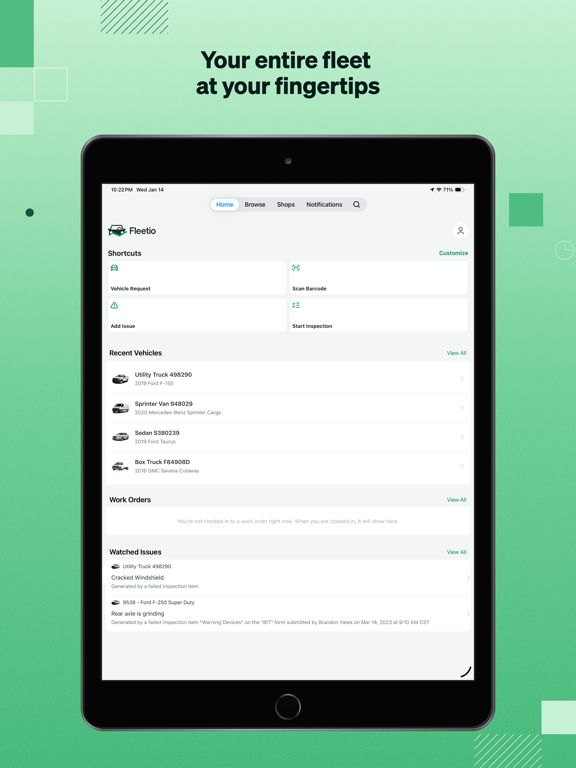
16 store screenshots



Pricing & paywalls
App Store
- Free to download
Ratings & reviews
App Store
-
1/5Trash
Forced to use this app for several months now. The people running the program clearly don’t know anything about what they’re doing. For example: no matter how many times you inspect the same vehicle old issues keep reappearing and you have to confirm the resolution every single time. As.a former IT professional, I know exactly what they’re doing wrong, and it amazes me that they keep doing the same stupid mistakes over and over. If I wasn’t forced to use this application, I would never use it again.
gfffbh · 4 Oct 2026
-
1/5Worst ever
This is by far the worst pre-trip app I’ve ever used. It’s extremely time consuming and difficult to use. Doesn’t work if you don’t have cell service too. The stupid app doesn’t even work right, if you’re looking in the instructions during a pre/post trip, most of the screens are blacked out or blank. Anyone paying for this piece of junk app needs to be fired. Big road is beats this app hands down. Whoever designed this app probably never drove truck before too. Worst app ever.
Truckin14 · 4 Oct 2026
-
5/5Great Product!!! Great Support!!!
Hands down the best fleet software out there! They listen and have implemented many suggestions. The addition of Ford to the shop integration is amazing. Push notifications are great. Support is always helpful and they do everything they can to help. Perfect solution for managing your fleet! Constantly making improvements to make it better. Would highly recommend...
Medic488 · 4 Oct 2026
-
4/5Inspection Issue & Signature
It’s a decent app for what I need. One issue I’ve always had is that the app will drop my saved signature every time I’m logged out of the app. I’ve used this app for two years and have never been able to retain my signature in the app after I log out. This only happens in the iOS version. Other platforms don’t have that problem. Also on the most recent update, it will not pull up the inspection forms when I choose from recent vehicles. I have to start a new inspection and search for my vehicle for it to work. Other than those issues, everything else works fine.
JayNemo54 · 4 Oct 2026
-
3/5Inspections reset before completion
Fleetio desktop is a great product, but the app needs work. My biggest complaint is that the inspections frequently close mid-inspection without saving progress. So I have to start over…sometimes multiple times for one inspection. The end result is that I often have to enter the data for an inspection after I have actually completed the process. The result is not only a lot of wasted time, but the report indicates that I completed my inspection in 15 seconds, which implies that the data is falsified. Also, there is no access to work orders through the app. Id like to be able to add and edit work orders through the app.
Blues Junkie · 4 Oct 2026
Privacy & accessibility
App Store
Privacy
- Data Linked to You — Analytics — Identifiers — Device ID Developer declared
- Data Linked to You — Analytics — Identifiers — User ID Developer declared
- Data Linked to You — Analytics — Usage Data — Product Interaction Developer declared
- Data Linked to You — App Functionality — Identifiers — Device ID Developer declared
- Data Linked to You — App Functionality — Identifiers — User ID Developer declared
- Data Linked to You — App Functionality — Location — Precise Location Developer declared
- Data Linked to You — Identifiers Developer declared
- Data Linked to You — Location Developer declared
- Data Linked to You — Usage Data Developer declared
- Data Not Linked to You — Analytics — Diagnostics — Crash Data Developer declared
- Data Not Linked to You — Diagnostics Developer declared
Accessibility
No accessibility labels collected yet.
Versions
App Store
-
7.10.0
What’s Improved? Consistent service details: Service Entry details now display correctly across all platforms, giving you clearer, more reliable records. Improved stability: We fixed several crashes for a smoother, more dependable app experience.
-
7.11.0
What’s Improved? • Personalize your dashboard: Manage and rearrange widgets in Fleetio Go. • Complete inspections more efficiently: Select parts, edit quantities, and add inventory adjustments during submission. • View clearer work order details: Service task costs and details now display more consistently. • Improved reliability: Fixes for meter entries, reservations, and UI issues. • Improved stability: Resolved crashes for a smoother app experience.
-
7.12.0
What’s Improved? • Manage work orders with fewer hiccups: Minor improvements help streamline your day-to-day workflow.
-
7.13.0
What’s Improved? • Quickly find and manage information with new custom fields, now organized into categories, in the Vehicle and Tool forms. • Capture more complete and accurate fuel data with a Smart Upload prompt that confirms odometer readings from receipts. • Enjoy a smoother experience with fixes to required field displays, part location labels on work orders, and currency symbols.
-
7.14.0
What’s New: • Operators can now cancel approved reservations directly in the app • Issues index now defaults to showing all issues (no longer just Open) What’s Improved: • Keyboard now auto-opens when editing meter values after validation alerts • Tool updates now reflect instantly on the search page • Fixed phone number formatting in text opt-in flow • Assignee field now correctly updates to “Unassigned” • Unit cost and subtotal display correctly for non-inventory parts • Improved empty state visuals for better clarity • Restored consistent button labeling across the app
-
7.15.0
Improvements • Improved in-app messaging with faster loading and a smoother, more reliable chat experience • Fixed an issue that prevented users with the right permissions from assigning vehicles. Assignments now work as expected
-
7.16.0
What’s Improved? Improved work order workflows: We’ve added clearer guidance and prompts when completing work orders and logging labor, helping ensure steps are done in the right order and reducing missed or incorrect entries. New messaging capabilities: You can now create and send messages directly within the app to communicate with our support team. Better consistency and performance: Fixes to inspection data, measurement units, and navigation improve overall accuracy and usability. Improved stability: We resolved UI bugs, flaky behavior, and behind-the-scenes issues for a smoother, more reliable experience.
-
7.17.0
In this release, we’ve made a number of improvements to help keep Fleetio Go running smoothly. What’s new: - Improved offline inspection messaging so tapping “Tap for more info” now takes you to the right screen when an inspection is waiting to upload. - Fixed an issue that could prevent newly created parts from appearing in the Parts list right away. - Updated service reminder workflows so only editable service entries are shown when resolving a reminder. - Added support for a new Parts location filtering feature. - Improved the app experience around banners and other on-screen messages. - Made general stability and reliability improvements throughout the app. We also fixed several issues behind the scenes to support a better overall experience.
-
7.18.0
What’s improved: * Get to work faster by opening Smart Uploads directly from a link * Improved French translations in Notification Settings for a clearer experience * More reliable tire installation and editing to keep maintenance accurate * Smoother barcode scanning and in-app workflows to reduce interruptions * Behind-the-scenes improvements for better performance and navigation * New Inspections module for a better user experience, with more enhancements coming soon
-
7.19.0
Improvements ° Newly created parts remain visible when you return to the Parts page, making it easier to confirm additions and keep inventory accurate without extra searching. ° More consistent notes and descriptions on work order line items help you quickly understand job details and reduce miscommunication with technicians. ° Improved reliability when uploading photos and documents ensures important records (like damage, receipts, or inspections) are captured without interruption. ° Ongoing app refinements and maintenance updates help keep everything running smoothly and efficiently day to day.
-
7.20.0
New Improvements: Improved navigation in Inspection Settings for a more consistent experience across iOS devices. Enhanced Home screen visibility handling so users see more relevant information while content loads. Fixed issues that could make parts harder to find or cause filters and search results to behave unexpectedly. Added more complete work order details, including support for custom fields and linked work order information on issues. Improved browsing with alphabetical sorting, updated Custom Record icons, and better singular/plural naming support. Made it easier to add parts as direct purchases when the needed part is not already in inventory. Improved automatic part location selection when creating subline items. Enhanced overall app stability and reliability with additional performance improvements.
-
7.22.0
This release includes improvements to work orders, issues, direct purchase parts, and inspections, along with several app stability and usability fixes. Highlights: - Added support for custom fields in Motor Pool reservations, including on forms and reservation details. - Improved issue handling so resolving an issue with a note works correctly on iPhone and iPad. - Added clearer guidance and behavior for work order line items linked to inspections, including better visibility into when a line item can be completed. - Expanded direct purchase part workflows so users can move between out-of-stock inventory items and direct purchase entry more easily. - Added a visual badge for direct purchase parts on work orders. - Improved issue creation from recent vehicles so the form behaves correctly when starting from the Home screen. - Fixed a problem that could cause vehicle searches in Shop Instructions to appear stuck when no results are found. - Improved inspection submission reliability and enhanced error details when submissions fail. - Reduced crashes when adding comments to a new issue. We also made a number of under-the-hood improvements to keep the app running smoothly and to support future updates.
-
7.23.0
What's Improved - Improved parts and work order screens so long location names are easier to read, helping you quickly find the right inventory location. - Updated inventory counts to display decimal quantities where needed, giving you more accurate inventory visibility. - Improved service task reminder cost handling so maintenance information stays more consistent throughout the app. - Enhanced direct purchase part editing with clearer messaging, making updates easier and reducing confusion. - Added connectivity monitoring improvements to help the app stay reliable and provide a more stable experience. We also made general fixes and improvements throughout the app.
-
7.28.0
What’s improved? * Fixed issues that could prevent drivers from starting inspections or disrupt offline inspection workflows. * Easier issue management with improved issue selection and more dependable form loading. * Smoother vendor and shop workflows, helping fleet managers keep maintenance moving. * Stability improvements and behind-the-scenes updates for a more reliable app experience.
-
7.3.0
What’s Improved? Smoother parts lookup: Parts search now resets properly when you return to the Parts page, making it easier to start a new search. More reliable service setup: Enhanced Service Tasks now automatically add their default parts as expected. Complete inspection access: All available inspection forms now appear immediately, no refresh required. Consistent contact visibility: Contact photo icons remain visible after adding comments. More dependable reminders: Comments are now saved when creating a new Service Reminder. Clearer work orders: Service Tasks and their linked parts and labor now display correctly on work orders. Accurate contact details: Selected countries are now saved and displayed correctly in contact addresses. Cleaner inspection status: Restarted inspections no longer appear as in progress or suggested. Fewer tire setup errors: An error that appeared when selecting tire positions has been removed.
-
7.30.0
What's improved * More reliable work order completion, with fixes to meter validation, parts and labor totals, and tax calculations. * Issue and document screens now display attachments, activity, and custom fields correctly. * Smoother inspections, with improved meter entries, form lists, and item visibility. * More reliable service reminders and service entries, with smoother navigation and saving. * Screens now better reflect your account settings, plus general stability and performance improvements.
-
7.31.0
What's improved * Faster, more dependable inspections — history loads quicker, results display correctly, and offline inspections upload reliably once you're back in range. * Avoid saving labor at the wrong rate — the app now confirms the labor rate when you switch to a different work order while tracking time. * Work order links now appear right away on the issue details screen, with smoother work order and service entry interactions throughout. * Edit screens for contacts, service entries, and custom records open more smoothly and consistently across devices. * Refinements to alerts, buttons, and forms for a more polished, reliable app experience.
-
7.32.0
What's improved * See where your vehicles are right now — last known location now shows live position, and you can tap to open it in Maps. * Faster, more reliable inspections with a refreshed inspection experience for numeric, date, pass/fail, and text items. * Smoother, more dependable work orders — cleaner details, more reliable editing, and fixes to service task selection and part scanning. * Quickly spot tire brands in the shop directory, plus a smoother notifications experience. * Stability improvements and fixes for a more reliable app experience.
-
7.33.0
What's improved * Find past inspections faster by searching your inspection history by vehicle name. * Auto-imported service line items now appear in the correct order, and shop filters show accurate counts. * Stability and memory improvements for more dependable inspections and fewer crashes.
-
7.34.0
What's improved * See and retry failed inspection uploads, so a completed inspection never sits stuck without you knowing. * Search inspection history by vehicle name to track down past inspections faster. * Service Documentation fields stay in view as you type, making work order details easier to enter. * Steadier inspections on photo-heavy forms, with fixes that keep long inspections from being interrupted. * Clearer notification settings, plus stability improvements for a more reliable app experience.
-
7.35.0
· 2 Sep 2026
* Smoother inspections from start to finish, with dependable meter photo capture and a keyboard Next that walks you through tire readings. * Pick the right inspection form faster — search now works, forms no longer repeat, and the History button is back. * Home and work orders stay put: the widget lists only open work orders, cleared filters stay cleared, and tapping a vehicle opens that vehicle. * A better fit on iPad, with the home screen adjusting on rotation and inspection photo options and keypads where you expect them. * Smaller fixes throughout, including Quick Add, Smart Upload on fuel entries, and shop ratings that no longer post twice.
-
7.36.0
What's improved * Meter readings are no longer required on work orders for vehicle types your account exempts. * Dates and times in inspection history now read correctly for your region. * Every screen follows your selected language, with translation fixes for Spanish and French. * Clearer vehicle location details, plus general polish for a more reliable app experience.
-
7.37.0
Bug fixes and performance improvements.
-
7.39.0
What's improved * Inspections are easier to read, with clearer instructions in dark mode, more legible comments, and saved signatures that display reliably offline. * Find the right vendor faster with clearer Premier badges, and open shop details smoothly in every supported language. * Motor Pool and Vehicle Request shortcuts and permissions now work as expected. * More accurate Spanish and French translations, and names and reasons now display as originally entered. * Stability improvements and behind-the-scenes updates for a more reliable app experience.
-
7.39.1
· 2 Oct 2026
What's improved * Fixed an issue that could close the app on the Home screen for Spanish and French users.
-
7.5.0
What’s Improved? Smoother browsing: Asset lists and the Browse tab load more reliably, with fewer interruptions and screen refreshes. More reliable inspections: Submitted and restarted inspections now show up correctly on both mobile and web, even when working offline. Faster issue updates: Issue status updates immediately after resolution, so you’re always seeing the latest information. Better offline inspections: The Start Inspection shortcut now appears consistently when offline inspections are enabled. Clearer contact details: Assigned vehicles, contact photos, and See all links now display correctly on contact records. Polished iOS 26 experience: Fixed visual glitches, layout issues, and SMS popover bugs for a smoother, more consistent look and feel. Clearer sign-in errors: Improved authentication error messages make it easier to understand and resolve sign-in issues.
-
7.6.0
What’s Improved? Reliable shortcuts: Inspections and other quick actions now stay visible, so you can get to key tasks faster without re-adding shortcuts. Cleaner contacts: We fixed several issues with contacts for smoother viewing and management. Clearer login help: More informative messages now appear if signing in to Fleetio Go fails, helping you resolve issues faster
-
7.8.0
What’s Improved • Shortcuts are now stable and won’t close unexpectedly or disappear while in use. • Saved signatures now show up when completing offline inspections, saving time. • Service Reminder completion dates now update correctly when closed. • Service Tasks can now be deleted from Service Entries without errors.
-
7.8.1
What’s Improved • Shortcuts are now stable and won’t close unexpectedly or disappear while in use. • Saved signatures now show up when completing offline inspections, saving time. • Service Reminder completion dates now update correctly when closed. • Service Tasks can now be deleted from Service Entries without errors. • Miscellaneous crashes resolved.
Alternatives
- Salesforce Field Service — Same category + similar ratings
- Empower, by ISN — Same category + similar ratings
Availability by market
- US
Data quality & evidence
- Page completeness
- Live store listing
- Last verified
- 4 Oct 2026
- Sources
- App Store
- Apoku editorial summary has not been published yet.