
Flavours cashier ( POS )
by Automated Cloud Company for Communications and Information Technology
iPhone · iPad
Quick verdict
- What it is
- Store information collected; independent summary not yet available.
- At a glance
-
- Free to download
Categories and search queries
Official categories
- Business
- Food & Drink
AppCorpus categories
Key functions
| Function | Availability | Access | Scope | Evidence |
|---|---|---|---|---|
| Apple Wallet | Yes | Free | App Store | Store published |
| Free app | Yes | Free | — | Store published |
Screens
App Store
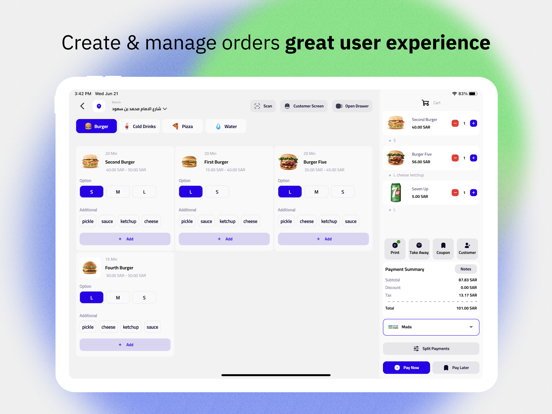
17 store screenshots



Pricing & paywalls
App Store
- Free
Ratings & reviews
App Store
No store reviews collected for App Store · US
Privacy & accessibility
App Store
Privacy
- Data Not Linked to You — App Functionality — Contact Info — Email Address Developer declared
- Data Not Linked to You — App Functionality — Contact Info — Name Developer declared
- Data Not Linked to You — App Functionality — Contact Info — Phone Number Developer declared
- Data Not Linked to You — Contact Info Developer declared
Accessibility
No accessibility labels collected yet.
Versions
App Store
-
3.10.0
## New Update Release ### Bug Fixes & Improvements * General bug fixes and performance improvements * Improved app opening speed and responsiveness * Enhanced user experience for offers ### Network & Communication * Optimized network communication on the same network ### Subscription & Discounts * Added subscription features * Added LoyaPro Discount option * Fixed local discount calculation issues ### Orders & Reports * Order status now included in daily reports * Warning for unpaid check before ending work ### Invoicing * New invoice setting options * Customer name now appears on invoices ### Point of Sale * Fixes on cash drawer function * Product list is now responsive
-
3.10.1
## Fixes & Improvements • General bug fixes and performance improvements. • Fixed Printer issue on iOS devices. • Fixed issues on Daily Report to ensure more accurate results. ## New Feature • Added Contact Us feature for easier support and communication.
-
3.10.10
• Fixed Printer Service Type issue • Improved Phone Prefix handling
-
3.10.11
* Fixed Printer Service Type issue * Added Raster option for Print as Image
-
3.10.7
*Bug Fixes & Improvements* • General performance enhancements and issue resolutions for a smoother and more reliable experience. • *Invoice Improvements:* Enhanced accuracy and refined formatting for clearer presentation. • *Return Order Fix:* Resolved issues affecting the return order functionality. • *Order Edit Fix:* Corrected errors related to order editing. • *Daily Report Fix:* Addressed issues with daily report generation and display. *New Feature* • *Local Network Screen:* Added a new interface for connecting and managing devices within a local network.
-
3.10.9
Enhancements & Fixes * Improved category selection when changing language. * Added support for generating and viewing PDF files on mobile. * Fixed all category titles and structures to fully support Arabic language. * Improved search results to correctly sort by date. * Enabled access to PDF files even without a configured printer. * Implemented a new user interface for the cash drawer. * Enabled the “Large Product” option on mobile. * Improved printer handling logic based on service type.
-
3.11.1
* Fixed issue on Invoice Printing * Added new Order Filter feature
-
3.11.10
## What's New ### Features - Added report attendance permission with enhanced user permission checks ### Fixes - Fixed OTP verification flow - Fixed forgot password input handling and overall flow - Improved receipt printing logic to correctly handle non-print scenarios ### Improvements - Code formatting and readability improvements across cashier report and order calculation services
-
3.11.11
- Improved attendance initialization and error handling for more reliable check-in/check-out flows - Enhanced attendance report data model for accurate reporting - Optimized printer configuration for better receipt output - Minor UI cleanup in cashier components
-
3.11.12
## New Features * **Tax Management** Easily manage and configure taxes directly within the app. ## Improvements & Fixes * Improved **Cashier Reports** with faster and more accurate local order retrieval using date range filtering. * Enhanced **Dashboard** monthly date range calculations for better reporting accuracy. * Improved **Attendance Management** and sync status handling in cashier components. ## Performance & Stability This update also includes general performance improvements and bug fixes to provide a smoother experience.
-
3.11.13
Features - **Schedule Management** — Configure open and close times for each branch session directly from Settings - **Next Day Sessions** — Sessions that run past midnight can now be marked as "next day" to avoid scheduling conflicts Bug Fixes - **Return Order** — Fixed return order not working correctly
-
3.11.14
### Features - **Stock Management** — Track and manage product stock directly from the cashier - **Product Notes** — Add notes to products when building an order - **VAT on Discounts** — Discounts now correctly account for VAT ### Improvements - **Order Sync** — More reliable local order handling and synchronization - **Product Storage** — Products now stored as individual rows in ObjectBox for faster, more reliable access - **Receipt Printing** — Enhanced receipt printing and order processing - **Attendance** — Attendance reporting updated to the new API structure
-
3.11.15
• Delivery orders: required customer info is now clearly marked and validated • Faster product search in the cashier • Backend changes (products, taxes, payments, discounts) now sync reliably without a restart • Cash drawer now respects user permissions • Clearer price details in cashier and order edit • Improved attendance and cashier reports • Fixed offer buttons being hidden on small screens
-
3.11.16
What's new in this update: • Logout protection — you'll now see a warning if you have unsynced orders before logging out, preventing accidental data loss. • Smarter branch selector — the branch list now opens with your active branch highlighted and scrolled into view, making switching faster. • Stability fixes — resolved crashes caused by missing data fields in cart and discount items.
-
3.11.17
This update makes receipt and kitchen printing more reliable, and improves branch, account, and reporting workflows. Printing • Invoices now print to the correct cashier's printer. • A clear message is shown when a printer can't be reached — no more technical errors. • The copy count is now saved when you edit a printer. • More reliable kitchen printing: one failed printer no longer blocks the others. • Added support for more Ethernet printers (EZPOS, TAPOS, PROPOS). • Removed duplicate receipt printing and improved pay-later receipts. Branch & account • The active branch name now appears in the cashier and order screens. • Switch branches from Settings → Switch Account, with a faster, clearer branch picker. Reports • The end-of-shift cashier report is now tied to your attendance. • Reports open on the Online tab and exclude in-progress orders from local reports. Plus performance and stability improvements.
-
3.11.19
· 30 Jul 2026
This update focuses on payment accuracy, order editing, and overall stability: • Split payments are now always charged correctly — amounts add up to the order total, are validated before checkout, and your chosen payment methods are kept when the total changes. • Safer checkout on unstable connections — a failed checkout is verified before retrying, so orders are never charged twice. • Paying an order later now always charges the price you entered, not the catalog price, and requires a payment method to be selected first. • Order editing now behaves the same as the cashier screen — variable-price items, the cart, and the top bar included. • Products with variable-price or weight-based add-ons now ask for the price or weight before being added to the cart, and all product options and add-ons stay fully visible instead of being cut off. • Payment reports show accurate per-method totals, and card payments no longer display "change due". • Numeric fields accept Arabic-Indic digits (٠–٩) everywhere, including cash and attendance entry. • Larger, easier-to-tap controls, clearer text, and faster loading of long product and order lists. • Fixed several crashes: barcode scanning, picking images from the gallery, loading product images on slow networks, the sales chart, and subscription settings — plus improved crash reporting overall.
-
3.11.2
* Added **Show / Hide toggle** for Completed and Waiting Orders on the Kitchen screen. * Fixed Table feature synchronization issue when another branch subscribes. * Improved overall performance and UI of the Kitchen screen. * Implemented proper handling for Maximum & Minimum limits on Additional items. * Enhanced performance and stability of the Secondary screen. * Fixed issue with Local Discount calculation.
-
3.11.5
New Features - LAN Sync — offline-first order synchronization between POS devices with market/branch isolation - Market Logo Sync — background sync for market logos with LogoMarket model - OPEN CX AI integration - Drawer functionality on order processing - Cashier report — show/hide products toggle for printing - Kitchen screen — show/hide completed & waiting orders - Shift scheduling on branch with schedule handling - Feature filter on product listing Fixes - Socket state & Neoleap payment - Duplicate order numbers on LAN sync - Attendance end-working flow - Table feature broken when another branch subscribes - Secondary screen display & online calculation - Discount local database - Bluetooth printing not completing - Printer shimmer on first open - Foreground service boot start - Add-ons minimum/maximum handling - Offers & database ID conflicts Changes - Improved offline mode
-
3.11.6
- Enhanced localization support across the app - Improved order detail sheet with better interaction and display - Enhanced report order view with order detail interaction - Integrated waiting orders module into cashier and orders - Expanded reporting capabilities with new API endpoints - Logo market background sync improvements - Fix Taxes Detail
-
3.11.7
- Enhanced synchronization features for improved data reliability - Improved reporting capabilities
-
3.11.8
- Improved order card UI with better mobile layout - Enhanced printer services with new report rendering and optimized Bluetooth printing - Added customer management features with Arabic product name support - Enhanced reporting with returned sales data and total sales by payment method - Improved permission management with dynamic feature handling and new edit route - Refactored attendance history response and updated report routing
-
3.11.9
### Fixes - Fixed payment method selection logic for more accurate order processing - Improved printer service formatting output - Fix SplitPayments Value ### Improvements - Permission settings now refresh user data automatically after update - Code readability improvements in cashier report and order calculation
-
3.9.10
Bug Fixes & Improvements - Resolved issues related to numeric formatting on currency fields. - Fixed status update logic in order management. - Corrected numeric display on invoices for better accuracy.
-
3.9.8
Fixes & Improvements - Fixed: Update Order functionality now works correctly in Offline Mode, ensuring seamless order updates even without an active internet connection. For any issues or feedback, please contact support.
-
3.9.9
Version 3.9.9 Release Notes Bug Fixes & Improvements - New Look on Order → Combined Not Synced and Synced Orders - Offline Mode Enhancements → More stable and reliable - New Riyal Font (Arabic Mode) → Updated and clearer currency font - Item Notes → Add notes to individual items - Bug Fixes → Delete product fixed → Edit printer fixed → Edit product image fixed → Loading stuck for new users fixed - Printer Improvements → Font size setting for kitchen printer added → Kitchen paper image improved - Cash Payment Method → More reliable and accurate
Alternatives
- نقاط بيع كاشيرك pos — Same category + similar ratings
- ZidPOS | زد كاشير — Same category + similar ratings
- Fatora: Invoice,Store,Cashier — Same category + similar ratings
Availability by market
- US
Data quality & evidence
- Page completeness
- Live store listing
- Last verified
- 7 Aug 2026
- Sources
- App Store
- Independent summary has not been published yet.