AppCorpus MCP gives your agent current app data, prices, screens, features and sources.
View JSON
GET /api/v3/apps/1272811862
{
  "app_id": 1272811862,
  "canonical_url": "https://appcorpus.com/apps/flashcards-by-qrayon-1272811862",
  "identity": {
    "name": "Flashcards by Qrayon",
    "slug": "flashcards-by-qrayon",
    "developer": {
      "name": "Qrayon, LLC",
      "url": "https://appcorpus.com/developers/qrayon-llc-developer_f4bffba5025cc92e5f9ee3f34e9a2bee"
    },
    "icon_url": "https://is1-ssl.mzstatic.com/image/thumb/Purple221/v4/7f/4f/a5/7f4fa5bf-51f0-eede-dcd2-9bb610225eb3/AppIcon-0-0-1x_U007emarketing-0-5-85-220.jpeg/512x512bb.jpg",
    "stores": [
      "apple"
    ],
    "platforms": [
      "iphone",
      "ipad"
    ],
    "status": {
      "state": "active",
      "label": "Active",
      "last_checked": "2026-08-06",
      "last_checked_label": "6 Aug 2026",
      "banner": null,
      "region_note": null
    }
  },
  "listings": [
    {
      "store": "apple",
      "status": "ACTIVE",
      "url": "https://apps.apple.com/us/app/flashcards-by-qrayon/id1272811862?uo=4",
      "rating": 4.6,
      "rating_count": 112,
      "formatted_price": "Free",
      "is_free": true,
      "has_iap": false,
      "has_subscription": false,
      "version": "1.5",
      "updated": "2025-07-30",
      "currency": "USD"
    }
  ],
  "summary": {
    "one_liner": null,
    "summary": null,
    "best_for": [],
    "not_for": [],
    "status": "fallback",
    "at_a_glance": [
      "Free to download"
    ]
  },
  "categories": {
    "official": [
      "Education",
      "Reference"
    ],
    "appcorpus": [
      {
        "category_id": "education",
        "label": "Education",
        "url": "https://appcorpus.com/categories/education"
      },
      {
        "category_id": "reference",
        "label": "Reference",
        "url": "https://appcorpus.com/categories/reference"
      }
    ]
  },
  "use_cases": [],
  "features": [
    {
      "capability_id": "free_app",
      "label": "Free app",
      "availability": "yes",
      "access_level": "free",
      "scope": null,
      "evidence": "Store published"
    }
  ],
  "pricing": [
    {
      "store": "apple",
      "formatted_price": "Free",
      "is_free": true,
      "has_iap": false,
      "has_subscription": false,
      "currency": "USD",
      "market": "us",
      "last_verified": "2026-08-06",
      "rows": [
        "Free"
      ]
    }
  ],
  "screens": [
    {
      "url": "https://is1-ssl.mzstatic.com/image/thumb/PurpleSource221/v4/5a/8c/90/5a8c9055-3ccc-fc26-23e2-220e5d8a2b28/master.jpg/1600x1600bb.jpg",
      "store": "apple",
      "platform": "ipad",
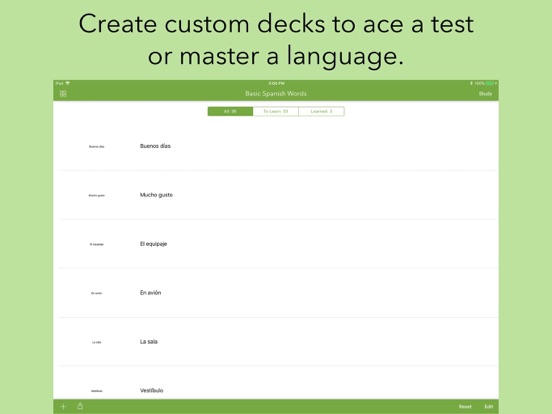
      "alt": "Flashcards by Qrayon ipad screenshot 1"
    },
    {
      "url": "https://is1-ssl.mzstatic.com/image/thumb/Purple211/v4/17/4b/5f/174b5ffd-e9c9-cc22-f152-11bd07d82d0f/pr_source.jpg/552x414bb.jpg",
      "store": "apple",
      "platform": "ipad",
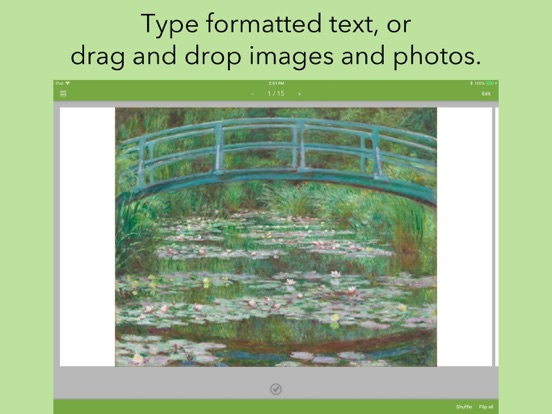
      "alt": "Flashcards by Qrayon ipad screenshot 2"
    },
    {
      "url": "https://is1-ssl.mzstatic.com/image/thumb/PurpleSource211/v4/58/ea/b0/58eab089-9987-ed5b-10f4-8ddcd216ad14/images.jpg/1600x1600bb.jpg",
      "store": "apple",
      "platform": "ipad",
      "alt": "Flashcards by Qrayon ipad screenshot 3"
    },
    {
      "url": "https://is1-ssl.mzstatic.com/image/thumb/Purple211/v4/e0/9e/10/e09e107d-d51f-ce3c-f83e-901147962211/pr_source.jpg/552x414bb.jpg",
      "store": "apple",
      "platform": "ipad",
      "alt": "Flashcards by Qrayon ipad screenshot 4"
    },
    {
      "url": "https://is1-ssl.mzstatic.com/image/thumb/PurpleSource221/v4/3e/05/6e/3e056ea5-ff84-7a13-29fb-95c58990af48/flip.jpg/1600x1600bb.jpg",
      "store": "apple",
      "platform": "ipad",
      "alt": "Flashcards by Qrayon ipad screenshot 5"
    },
    {
      "url": "https://is1-ssl.mzstatic.com/image/thumb/Purple211/v4/88/42/dd/8842dde1-07c8-0bcf-015b-23ed299332a7/pr_source.jpg/552x414bb.jpg",
      "store": "apple",
      "platform": "ipad",
      "alt": "Flashcards by Qrayon ipad screenshot 6"
    },
    {
      "url": "https://is1-ssl.mzstatic.com/image/thumb/PurpleSource211/v4/7b/70/3f/7b703f61-68d8-ff6a-42e7-2197278260ba/study.jpg/1600x1600bb.jpg",
      "store": "apple",
      "platform": "ipad",
      "alt": "Flashcards by Qrayon ipad screenshot 7"
    },
    {
      "url": "https://is1-ssl.mzstatic.com/image/thumb/Purple221/v4/ba/21/69/ba21694c-da88-1bcb-89a4-3bff61c00e5b/pr_source.jpg/552x414bb.jpg",
      "store": "apple",
      "platform": "ipad",
      "alt": "Flashcards by Qrayon ipad screenshot 8"
    },
    {
      "url": "https://is1-ssl.mzstatic.com/image/thumb/PurpleSource221/v4/a3/3b/15/a33b15de-bb11-6c37-efac-e926552eb7ce/sync.jpg/1600x1600bb.jpg",
      "store": "apple",
      "platform": "ipad",
      "alt": "Flashcards by Qrayon ipad screenshot 9"
    },
    {
      "url": "https://is1-ssl.mzstatic.com/image/thumb/Purple221/v4/06/91/c4/0691c4d2-10f2-957b-25b4-ffc0e8d57cbf/pr_source.jpg/552x414bb.jpg",
      "store": "apple",
      "platform": "ipad",
      "alt": "Flashcards by Qrayon ipad screenshot 10"
    },
    {
      "url": "https://is1-ssl.mzstatic.com/image/thumb/PurpleSource211/v4/0e/4d/03/0e4d0314-b427-fecd-f9a1-e0661937ee94/master.jpg/1320x1600bb.jpg",
      "store": "apple",
      "platform": "iphone",
      "alt": "Flashcards by Qrayon iphone screenshot 11"
    },
    {
      "url": "https://is1-ssl.mzstatic.com/image/thumb/PurpleSource221/v4/fe/de/85/fede8594-f1fe-2320-8b5e-a6681a6e29e4/images.jpg/1320x1600bb.jpg",
      "store": "apple",
      "platform": "iphone",
      "alt": "Flashcards by Qrayon iphone screenshot 12"
    },
    {
      "url": "https://is1-ssl.mzstatic.com/image/thumb/PurpleSource211/v4/3e/c6/2a/3ec62a1c-9d25-75c0-bfed-46051cf73c8b/flip.jpg/1320x1600bb.jpg",
      "store": "apple",
      "platform": "iphone",
      "alt": "Flashcards by Qrayon iphone screenshot 13"
    },
    {
      "url": "https://is1-ssl.mzstatic.com/image/thumb/PurpleSource221/v4/38/1e/dc/381edce4-4f1b-18b7-cf8a-8db9d7242063/study.jpg/1320x1600bb.jpg",
      "store": "apple",
      "platform": "iphone",
      "alt": "Flashcards by Qrayon iphone screenshot 14"
    },
    {
      "url": "https://is1-ssl.mzstatic.com/image/thumb/PurpleSource221/v4/b8/fc/10/b8fc10d6-23b5-b26d-d088-e12498072d6d/sync.jpg/1320x1600bb.jpg",
      "store": "apple",
      "platform": "iphone",
      "alt": "Flashcards by Qrayon iphone screenshot 15"
    }
  ],
  "ratings": [
    {
      "store": "apple",
      "average": 4.6,
      "count": 112,
      "market": "us",
      "observed_at": "2026-08-06",
      "reviews": [
        {
          "rating": 3,
          "title": "Great app with room for improvement",
          "body": "This app should be integrated with the cardflow app. I like how you have the option to review ”all”, “learned”, and “to learn” I find this feature very helpful when reviewing cards that I got wrong. The downside is that if you find an error in your cards you have to go back to cardflow, edit it there, then copy or upload to the iCloud again to be reloaded in this app...why not integrate it so it’s seamless? Also, this app doesn’t support handwriting new cards, only text. I would like to see features that further separate the cards into categories like “easy,” “medium,” or “hard.” That way it gives us users a different way to study. I would love to see a trend graph. Overall it works fine, there are minor lags but it’s not a dealbreaker. I hope the developers take our suggestions to heart because this truly is a great app.",
          "author": "Si0pao",
          "date": "6 Aug 2026"
        },
        {
          "rating": 3,
          "title": "Please add some functionality",
          "body": "I’m an owner and a big fan of your other app Cardflow+. Although that app has functionality that far outstrips basic flash card creation, flash card creation is primarily what I use it for. I learn best by handwriting my flash cards, but I can’t take my physical decks with me, and so your Cardflow+ fulfills a need. But there is no shortage of evidence that spaced repetition is one of the most effective ways of retaining information. Neither this app nor Cardflow+ use or give the option of using spaced repetition. The integration between the two apps is great, but please add spaced repetition to one of them. I will immediately change my rating, if that functionality is added.",
          "author": "tedwardtodward",
          "date": "6 Aug 2026"
        },
        {
          "rating": 3,
          "title": "Please Integrate!",
          "body": "I use your Cardflow+ app and have loved it. I like that I can mark my cards right or wrong on this app, but would be awesome if the two apps were integrated. Although I’m glad we currently have the option to do so, It’s a bit of a hassle to transfer the decks into FlashCards each time I add or make edits. Also, SPACED REPETITION would blow it out of the park. I hope to see these changes made in the near future because I love handwriting my flashcards and having them all on my iPad!",
          "author": "AlyLindsey18",
          "date": "6 Aug 2026"
        },
        {
          "rating": 2,
          "title": "Won’t save my card decks!",
          "body": "I love Cardflow enough to pay for the full version. I love being able to hand write my flash cards. I like the idea that it has a companion app to study. HOWEVER when I open flashcards, it has saved all kinds of PDFs that are NOT flash cards that the app dug up from the depths of my files somewhere. Weird. But most frustrating, flashcards won’t save the flashcards I do import! Every time I reenter the app, the flash cards are gone and I have to redo the export process from Cardflow into Flashcards. Annoying. And guess what all those random not flash card files...they are still there. Every time I reenter the app. Explain that one! Would love to have the random files NOT be in my recents and would love for my actual flash cards to REMAIN in the app. I hope this ca be fixed!",
          "author": "Kirakiraku",
          "date": "6 Aug 2026"
        },
        {
          "rating": 4,
          "title": "Not able to use written cards in flash",
          "body": "Hi, love the new update to cardflow but this FlashCards extension app only allows TEXT cards to be used like flash cards. When uploading my written cards it only shows one side of each card. The other side is just blank. I would really like to see this changed. There are so many people in my graduate program with new iPads that would like to use this. Please make it so that the written cards can be viewed front and back in the FlashCards app. Thank you, Caroline",
          "author": "clg2323",
          "date": "6 Aug 2026"
        }
      ]
    }
  ],
  "privacy": [
    {
      "store": "apple",
      "declarations": [
        {
          "title": "Data Not Linked to You",
          "detail": "Analytics — Diagnostics — Crash Data",
          "source": "Developer declared"
        },
        {
          "title": "Data Not Linked to You",
          "detail": "Analytics — Identifiers — Device ID",
          "source": "Developer declared"
        },
        {
          "title": "Data Not Linked to You",
          "detail": "Analytics — Usage Data — Product Interaction",
          "source": "Developer declared"
        },
        {
          "title": "Data Not Linked to You",
          "detail": "Diagnostics",
          "source": "Developer declared"
        },
        {
          "title": "Data Not Linked to You",
          "detail": "Identifiers",
          "source": "Developer declared"
        },
        {
          "title": "Data Not Linked to You",
          "detail": "Usage Data",
          "source": "Developer declared"
        }
      ],
      "accessibility": []
    }
  ],
  "changes": [
    {
      "store": "apple",
      "version": "1.0",
      "released_at": null,
      "notes": ""
    },
    {
      "store": "apple",
      "version": "1.1",
      "released_at": null,
      "notes": "+ Fixed an issue importing cards from Cardflow+ on some devices."
    },
    {
      "store": "apple",
      "version": "1.2",
      "released_at": null,
      "notes": "+ Fixed a bug that occasionally marked the incorrect cards when shuffled."
    },
    {
      "store": "apple",
      "version": "1.3",
      "released_at": null,
      "notes": "+ Fixed a text saving issue when creating new cards and inserting photos."
    },
    {
      "store": "apple",
      "version": "1.4",
      "released_at": null,
      "notes": "This update from Apple will improve the functionality of this app. No new features are included. + Zoom in and pan with 2 fingers. + IPhone X enhancements."
    },
    {
      "store": "apple",
      "version": "1.5",
      "released_at": "2025-07-30",
      "notes": "+ Updated for latest OS and devices"
    }
  ],
  "alternatives": [
    {
      "app_id": 1430950704,
      "name": "Flashcard Max",
      "url": "https://appcorpus.com/apps/flashcard-max-1430950704",
      "reason": "Same category + similar ratings"
    },
    {
      "app_id": 307842418,
      "name": "Flashcards Deluxe Lite",
      "url": "https://appcorpus.com/apps/flashcards-deluxe-lite-307842418",
      "reason": "Same category + similar ratings"
    }
  ],
  "evidence_summary": {
    "index_state": "S1",
    "evidence_level": 1,
    "level_label": "Live store listing",
    "indexable": true,
    "last_verified_at": "2026-08-06",
    "unknown_fields": [
      "Independent summary has not been published yet."
    ],
    "sources": [
      "App Store"
    ]
  },
  "availability_markets": {
    "live": [
      "us"
    ],
    "selected": "us",
    "note": null
  },
  "feature_events": {
    "events": []
  },
  "features_slice": {
    "plans": [
      {
        "code": "free",
        "label": "Free",
        "kind": "free",
        "status": "inferred",
        "prices": [],
        "trial": null
      }
    ],
    "features": [],
    "unknown_features": [],
    "data_cutoff": "6 Aug 2026"
  }
}