
Quick verdict
- What it is
- Store information collected; an Apoku editorial summary is not yet published.
- At a glance
-
- Free to download
- In-app purchases
Categories and search queries
Official categories
- Music
- Entertainment
Apoku categories
Key functions
| Function | Availability | Access | Scope | Evidence |
|---|---|---|---|---|
| Free app | Yes | Free | Context-specific | Store published |
| In-app purchases | Yes | Limited free | Context-specific | Store published |
| Family Sharing | Unknown | Unknown | Scope unknown | Store published |
Screens
App Store
20 store screenshots


Pricing & paywalls
App Store
- Free to download
- In-app purchases
Ratings & reviews
App Store
-
5/5Perfect for Hi-Res Audio and Cloud Streaming!
Flacbox is an absolute must-have for anyone serious about their music. The app supports all the high-res audio formats I use, like FLAC and ALAC, and it plays them perfectly. It’s so convenient to stream directly from my cloud storage—Google Drive, Dropbox, and even my NAS are all supported. This means I can access my entire high-quality music collection anytime, anywhere, without cluttering up my phone's storage. The offline mode is another lifesaver for when I’m traveling. I can download the tracks I want and listen without needing internet access. I also love the playlist management. It’s super easy to create and organize playlists, and the ability to set audio bookmarks is a great touch. It helps me keep track of specific parts in longer mixes or podcasts. One of the best things about Flacbox is that it can open almost any audio file format. No matter what file I throw at it, the app plays it smoothly without any hassle. If you care about high-quality audio and need a flexible player that works with cloud services, Flacbox is unbeatable!
badprogger · 31 Jul 2026
-
3/5Two issues
I have been using this app for my music projects recently, and I love it and think it is much superior to other similar programs, but there are two pretty big issues that are getting me. One: I have a lot of songs that "segue", or bleed into each other and are directly connected, and this app takes a few seconds to apparently "load" the next song. On Apple Music and other programs, seamless segues are allowed, but on Flacbox, there is a pause, which screws up the listening experience. Two: If I am inactive on the app for a day or so, my entire music library erases, and I have to reupload everything from my cloud drive. As soon as it is there, it reattaches the audio tags and assigns songs to their artists and albums, but it takes at least 15 minutes. Also, when I try to use the app on my phone, under the same account, I have to upload my entire music library, again, and wait for all the albums to be assigned. I haven't figured out a way to stop this so far. Both issues are really annoying, but otherwise the app works well. Please pay attention to this review, as I have reviewed the app multiple times stating the same issues, and I can't find a way to email/contact the creator. Thanks
thefourthcolour · 31 Jul 2026
-
5/5EQ works on iPad, SMB2 Win10 sharing
I can connect to file shares on my Win10 PC. This is amazing, since I WFH I can use my iPad to play MP3's or FLAC and not need to download files and use up my precious (paltry) 32GB of storage. [Any other app that claims SMB but hasn't been updated since 2018 won't let you authenticate with Windows. MS disabled SMB1 and the devs needed to update to SMB2 or SMB3; this app has kept up to date.] This app also has an EQ, this basically lets me use any halfway decent earphones and make them sound much better. Buying this app with EQ was much cheaper than buying high end wireless earphones. I've used EQ's for years with speakers to neutralize the room acoustics and love them with headphones too. The EQ sliders were missing on iPad but a few emails with the dev and they've got it working in the Dec 2020 build. The SMB (cloud) playback also seems less buggy, or my Wi-Fi is behaving. The app was pretty unforgiving of bad network connections, but this one hasn't crashed for hours. (Their MP3 EQ app has 3x retry options in the settings but the FLAC one doesn't.)
HawaiiMaui · 31 Jul 2026
-
5/5Supports a lot of formats but never seems to offline download anything from Dropbox or SMB
Well it seems to work albeit a bit slowly. I couldn’t get it to work with Dropbox though. When it syncs, it seems to work but it takes a long time. I mean…. Any sync action takes forever but I’m starting to think this is more an issue with iOS just not allowing it to run in the background to do all this. But even so, just to load a directory from the cloud took hours and accomplished very little. So I just got a flash drive, put all my music from Dropbox on it, and used Files to put it all on my phone. Works well now. So it’s a great player but don’t buy it for the cloud sync. It doesn’t seem worth it for that but most blame likely goes to iOS there. Edit 2: After having it play music for a few days and setting up the Dropbox sync, it synchronized everything. Guess it was the lack of background time it would get. But after it fully synched up, I used it in my CarPlay and it just sounds incredible. Really does. Only gripe is that I can’t find volume leveling but if it’s there, I will find it. If not, I’d highly request that it gets added. Sound quality makes me no longer want iTunes on this phone or Apple Music. This sounds so much better. Edit: seems I can see one problem and it’s that the app can’t be set to run in the background unless it’s actively playing music. iOS seems to put it to sleep so background tasks appear to pause even if plugged in. Coming from Windows Phone OS, we used to see this a lot there when msft would let its apps do maintenance tasks but no one else could. I’m guessing it’s a power management thing. Like here, I copied all the files to my phone directly and have it doing metadata reads. It pauses unless you’re on that settings screen and it’s playing music. Again, seems more like an OS thing which I hope the dev can get permission to allow it to run unpaused in the background as a dev option, but it seems not to be the app problem otherwise. Just a consequence of being limited by Apple
alissa914 · 31 Jul 2026
-
5/5Tried again and love it!
A little less than a year ago I started trying to stream my own (mostly high rez) music collection. I tried several of the obvious choices in the App Store, including Flacbox. It was all pretty frustrating and I gave up on it. Too much effort for buggy software, poor synchronization, missing songs, etc. Next I tried Roon and Roon Arc. That showed promise at first - but had much of the same problems only at a very high price point. I gave up on that too (I use an Aurender in my main (old fashioned 2 big speaker) system. A week or two ago I decided to try a few App Store solutions again to see if they might have become more viable. Flacbox was the clear winner and I’ve been working with it on both my iPhone and my iPad. I am thrilled with Flacbox v4.2! Look, nothing in this space is perfect yet. You need some patience and some time to re-download, re-sync, change song orders (with a great sort feature), etc. But now I have 125gb of uncompressed music on both my Apple devices and can use the online files (synced to my Google Drive) to replace downloads whenever I want (I haven’t streamed my online files much yet). Lastly, the Flacbox album display is beautiful. I highly recommend Flacbox and now just hope the app developer has a sustainable business model and keeps this app and future versions running like v4.2 does now.
jaa2023 · 31 Jul 2026
Privacy & accessibility
App Store
Privacy
- Data Linked to You — Analytics — Identifiers — Device ID Developer declared
- Data Linked to You — Analytics — Location — Coarse Location Developer declared
- Data Linked to You — Analytics — Usage Data — Advertising Data Developer declared
- Data Linked to You — Analytics — Usage Data — Product Interaction Developer declared
- Data Linked to You — App Functionality — Location — Coarse Location Developer declared
- Data Linked to You — App Functionality — Usage Data — Product Interaction Developer declared
- Data Linked to You — Developer’s Advertising or Marketing — Contact Info — Email Address Developer declared
- Data Linked to You — Developer’s Advertising or Marketing — Identifiers — Device ID Developer declared
- Data Linked to You — Developer’s Advertising or Marketing — Location — Coarse Location Developer declared
- Data Linked to You — Developer’s Advertising or Marketing — Usage Data — Advertising Data Developer declared
- Data Linked to You — Developer’s Advertising or Marketing — Usage Data — Product Interaction Developer declared
- Data Linked to You — Third-Party Advertising — Identifiers — Device ID Developer declared
- Data Linked to You — Third-Party Advertising — Location — Coarse Location Developer declared
- Data Linked to You — Third-Party Advertising — Usage Data — Advertising Data Developer declared
- Data Linked to You — Third-Party Advertising — Usage Data — Product Interaction Developer declared
- Data Linked to You — Contact Info Developer declared
- Data Linked to You — Identifiers Developer declared
- Data Linked to You — Location Developer declared
- Data Linked to You — Usage Data Developer declared
- Data Not Linked to You — Analytics — Diagnostics — Crash Data Developer declared
- Data Not Linked to You — Analytics — Diagnostics — Other Diagnostic Data Developer declared
- Data Not Linked to You — Analytics — Diagnostics — Performance Data Developer declared
- Data Not Linked to You — Analytics — Identifiers — User ID Developer declared
- Data Not Linked to You — Analytics — Purchases — Purchase History Developer declared
- Data Not Linked to You — App Functionality — Diagnostics — Crash Data Developer declared
- Data Not Linked to You — App Functionality — Diagnostics — Performance Data Developer declared
- Data Not Linked to You — Developer’s Advertising or Marketing — Diagnostics — Other Diagnostic Data Developer declared
- Data Not Linked to You — Developer’s Advertising or Marketing — Diagnostics — Performance Data Developer declared
- Data Not Linked to You — Third-Party Advertising — Diagnostics — Other Diagnostic Data Developer declared
- Data Not Linked to You — Third-Party Advertising — Diagnostics — Performance Data Developer declared
- Data Not Linked to You — Diagnostics Developer declared
- Data Not Linked to You — Identifiers Developer declared
- Data Not Linked to You — Purchases Developer declared
- Data Used to Track You — Identifiers — Device ID Developer declared
- Data Used to Track You — Identifiers Developer declared
Accessibility
- Dark Interface — SUPPORTED Store published
- VoiceOver — SUPPORTED Store published
Versions
App Store
-
5.2
Hello all, In our latest update, we fixed the app's incorrect duration display for large audio files and addressed UI issues on the audio player screen. Big thanks to everyone who helped identify and resolve these issues! Stay tuned for more updates, and share any feedback you have. Thank you!
-
5.3
Hello everyone, We're thrilled to present the latest app update, with new exciting features and improvements. Fixes in this version: - Fixed the issue where the document picker only allowed selecting one item at a time. - Resolved the crash occurring on iOS 13 devices during app launch. New features in this version: - Implemented songs list export to TXT, CSV, and M3U formats. You can export your albums, recently played songs, favorites, genres to CSV format and update playback history on scrobbler services like Last.fm. Additionally, you can export your playlists or M3U and listen to your songs on every device. - Implemented playlist import from M3U file to the music library. Now you don't need to create playlists manually if you already have them on your device. Just open 'Playlists' section in the app, tap three dots button in the top right corner, select 'Import playlist' menu item. - Added a songs/albums switcher to Genres section, allowing you to sort genres by albums. - Included the option to reconfigure disconnected storage, eliminating the need to recreate playlists. - Introduced sorting by bitrate and playback count in the context menu, enabling easy identification of the most played songs in your music library. - Added an info view to the audio player screen, displaying bitrate, sample rate, and audio format of the currently playing song. Please take a moment to share this app on your social media platforms. We appreciate your support.
-
5.4
Hello everyone, We're thrilled to present the latest app update, with new exciting features and improvements. New features: We've added support for additional cloud storage: Cloud Mail.ru, OpenDrive, and IceDrive. Now, you can enjoy ALBUM_ARTIST support. Automatic correction of metadata charset encoding for songs in the Music library and Audio tags editor. Introducing exclusive album support, giving you the option to display exclusive albums or compilation albums in the genre/composer/performer detail screen. ICY metadata parsing is now available. Enjoy a selection mode for songs/albums/genres and batch deletion operations. Easily switch between list and grid view in the collection detail screen. You can now import M3U playlists from a folder. We've expanded localization options and fixed existing localization files. Fixes: Addressed issues with iCloud Drive download and streaming. Streaming for M3U playlists has been fixed. Parallax view now works correctly on iPad screens. Artwork quality in the audio tags editor has been enhanced. Fixed the M3U playlist parser. Resolved issues with online folder selection for Music library sync. Animation in the audio player screen has been improved. Performance improvements for updating index titles with large content data. Duration presentation in the audio player screen has been fixed. Connectivity issues with HIDRIVE and MYDRIVE have been resolved. Top toolbar background updates now work smoothly during scrolling. Artwork loading has been optimized. Improved common metadata reading from audio files. Please take a moment to share this app on your social media platforms. We appreciate your support.
-
5.5
Hello everyone, We're thrilled to present the latest app update, with new exciting features and improvements. New features: - Added new purchase plans for the Premium version so you can choose a more optimal plan for you. - Added an audio volume slider to the main screen of the audio player. You can activate it in Settings - Audio Player - Personalization - Additional Elements - Audio Volume Slider. - Added new actions in the tag editor screen. You can configure the Tag Editor screen in Settings - Audio Tags Editor - Buttons on the main screen. - Added a reset equalizer presets action to default settings. To activate this feature, open Audio Equalizer - Tap on More Actions in the top left corner - Choose Reset All Configurations. - Improved tracks loading and added a new mechanism in settings so you have more options to configure song loading depending on the specifications of your cloud server. To activate, open Settings - Audio Player - Songs Loading: 'Use Direct URL' - When enabled, a direct URL will be used to load songs if the server supports it. We recommend enabling this feature if you are using DLNA or WebDAV connections. Fixes: - Fixed cloud service adding. - Fixed OneDrive server connection issues. - Fixed genres tag fetching from MP3 files. - Fixed metadata reading for some audio formats. - Fixed bookmarks screen for the now playing song. - Fixed metadata update for tracks after removing the album artist entry in the tag editor. - Fixed Dropbox and Google Drive connection issues. - Fixed M3U playlists parser. Please take a moment to share this app on your social media platforms. We appreciate your support.
-
5.6
Hey everyone, in this update, we’ve made some great improvements: • Added an automatic audio tags finder. • Added volume increase/decrease buttons for the volume slider. • Fixed connection issues with certain cloud servers. • Improved application performance. • Fixed application crashes. • Fixed the audio player restoring from the last media position. • Fixed the passcode screen appearing on app launch. • Fixed the resetting of audio equalizer presets. Please take a moment to share this app on your social media platforms. We appreciate your support.
-
5.7
Hello everyone, In this version, we: • Fixed metadata loading for some audio formats. • Fixed user interface issues for devices in landscape mode. • Implemented solo albums for given artists and composers. If you have two albums with the same name but different artists, go to the artist page and use the albums/songs switcher to show solo albums for the given artist. • Added select mode for playlists so now you can delete several playlists at once. • Added new actions in songs selection mode so now you can add selected songs to the audio player queue and playlists at once. Thanks for your feedback and support. If you have any questions, you can always contact us via email at [email protected] or through our website.
-
5.8
Hello everyone! In this update, we've added new cloud storage options and introduced several personalization features to enhance your experience. Here's a closer look at what's new: • TS File Format Support: Now you can play TS files directly in the app. • Minimal Audio Player Screen Style: Enjoy a full-screen album cover with a minimalistic design. Activate it in Settings > Audio Player > Personalization > Audio Player Screen Style. • Synology Drive Support: You can now connect to your Synology NAS server for fast, native access to your files. If you've enabled QuickConnectID in your server settings, you'll also be able to access your files from outside your home network. • New Album Cover Scrolling Styles: We've added Linear, Rotary, Cylinder, Wheel, CoverFlow, TimeMachine, and more to the audio player. Customize it in Settings > Audio Player > Personalization > Album Covers Scrolling Style. • Customizable List Cells: Perfect for smaller screens! Choose whether the app adjusts the height of list cells based on content, or show smaller icons to provide more space for text. You can enable this in Settings > Personalization > List Cells Style. • Drag and Drop in File Manager: Move files effortlessly with the new drag-and-drop gesture, available on the File Manager screen. • Improved Album Cover Loading: We've increased the loading speed for album and genre covers. • Cloud-Based Embedded Album Covers: Album covers for files stored in cloud services will now load correctly. Enable this in Settings > Music Library > Album Covers > Load Album Covers for Online Files. • iTunes Library Fix: We've fixed issues with loading album covers for tracks in your iTunes library. • Audio Format Information: Audio format details are now displayed in the title view on the audio player screen, improving the interface. • New Playback Control Customizations: Personalize the look of playback controls on the lock screen, main audio player screen, and status bar. Find these options in Settings > Audio Player > Personalization. • Ghost Files Bug Fix: Ghost files will no longer appear in the music library after saving changes in the tag editor. --- A big thank you to everyone who shared feature suggestions and bug reports! We also want to give a special shout-out to customers who provided localization corrections. As always, we're eager to hear your feedback. Send your thoughts to [email protected].
-
5.9
We’ve made some exciting updates and fixed issues to enhance your experience! - Fixed Synology Drive connection issues when using QuickConnect ID. - Added a "Limit Simultaneous Connections" option for Synology NAS to optimize performance and reduce server load. - Implemented dark and tint app icons to look great when the dynamic icons mode is enabled. - Fixed title update issues in the player screen. - Resolved playback issues for OPUS and OGG files. - Fixed track importing from DLNA servers when importing from folders that contain empty subfolders. - Moved song info back to the supplementary view above the artwork in the player screen. - Added thumbnail generation for online files - manage this feature in app settings. - Added folder archiving action to the file manager section of the app. - Added media collections archiving functionality, so you can now archive your playlists, albums, genres, and more. The destination ZIP file will include all tracks and a generated M3U file. - Updated file icons in the application with a modern style. - Fixed an issue where some tracks were not added to the playlist when adding from a connected cloud service. - Fixed cells flickering when selecting tracks in the player queue screen. - Fixed metadata and last played progress update for cells in the track list screen. - Fixed list cell layout in selection mode. - Fixed artwork presentation style feature. - Resolved some layout issues in the full-screen audio player. - Fixed CarPlay content loading issues. - Improved app performance by optimizing loading of app data. - Updated online server connection libraries for the latest fixes and security improvements. - Fixed some files being unplayable from Google Drive servers. - Fixed deadlocks during fast track switching in the audio player queue. - Optimized playback queue and paused all background tasks during song loading. - Fixed scope buttons on the search screen for a more user-friendly experience. - Increased the default number of playlists and connected cloud servers in the sidebar menu. - Added an "App Analytics" section in app settings where you can manage analytics and crash report data. If you have new ideas or suggestions, feel free to send us a message at [email protected]. If you like the app, feel free to share it on your social networks. This will motivate us to keep updating and improving it regularly. Enjoy the update!
-
6.0
Hello everyone, In this update: - We fixed connectivity issues with certain cloud services. - We fixed metadata reading for some audio formats. - We improved overall app performance. - We fixed some user interface bugs. If you enjoy the app, please take a moment to share it on your social media. Your support means a lot to us!
-
6.1
Hey everyone! In this update, we fixed some issues and improved app performance. We also added a new feature: the Dynamic Now Playing Widget. With this widget, you can control playback, add tracks to favorites, and create audio bookmarks right from your home screen. If you have the widget enabled, you can continue playback from where you left off by tapping the play button. The app will open in the background and start playing from the last saved position. We’re excited to add more widgets to make your experience even better! If you have ideas, please share them with us at [email protected].
-
6.2
Hi everyone! In this update, we’ve introduced new features and resolved various issues to improve your app experience. Here’s what’s new: - Added: - The ability to connect folders on your device for quick access to internal files. - Play All / Play Next / Play Later actions for multiple items in selection mode for albums, artists, playlists, and genres. - Separate timeout settings for skip backward and skip forward buttons. - Quick actions for the currently playing song in the player’s compact mode. - A mode change button in the compact player view to switch to fullscreen mode without scrolling through the main menu. - New sorting options for the audio player queue. - Fixed: - iCloud folder import errors for smoother file access. - An issue with importing tracks to playlists. - The playlist search issue. - DLNA connection issues when cellular mode is active. - Read-only mode for cloud servers. - A tag editor crash caused by files with incorrect tags. - Skip time buttons for widgets. - Updating recently opened files. - An issue with SynologyDrive upload operation. ***** Improved: - App performance when importing files stored on your device. - Metadata update speed for better efficiency. We’re always looking to improve! If you have any ideas or feedback, please email us at [email protected].
-
6.3
Hi everyone! We’re excited to share the latest update, which includes new features and important fixes. ### New Features: - Integrated Last.fm! Your recently played songs will now automatically upload to the Last.fm service after being played in the app. You can also view your playback stats and discover personalized recommendations. ### Fixes: - Resolved an issue with importing folders into playlists. - Fixed an error that occurred when importing files from iCloud Drive. Thank you for your continued feedback and support! If you have any questions or suggestions, don’t hesitate to contact us at [email protected].
-
6.4
Hello everyone! This update brings many improvements to make your app experience smoother and faster: • Improved playlist import for different formats • Fixed issues with importing files from your device • Fixed “Add to Favorites” on the lock screen • Improved Last.fm listening history sync • Fixed MEGA.NZ login with 2FA enabled • Fixed file opening issues from device storage • Updated pCloud SDK for better connection stability • New random sort option for playlists and queue • Refreshed app themes and visuals • Fixed playback tracking and scrubber accuracy • Added more sorting options in albums: by artist, album artist, composer, or genre • You can now hide track artworks in album details • Faster content loading in CarPlay Other fixes and updates: • Shuffle/Repeat UI now updates immediately • Fixed file sorting on DLNA servers • Quick search for year and rating added • New “Shuffle All” option for folders in file manager • Better folder loading and sorting in file views • Improved album navigation and metadata logic • Better support for file opening via “Open In” • New CarPlay settings screen • Option to disable images in CarPlay for faster performance • Improved playback resume position • Added “Play All” and “Shuffle All” to CarPlay folders • Larger buttons in widgets • Fixed unwanted CarPlay auto-play • Improved media library sync and performance • UI fixes for segment controls, search fields, themes, and playlist icons • Increased max playback speed to 4× • You can now open PDF and DOC files — perfect for musicians reading tabs • Fixed artwork colors in widgets (tinted desktop mode) • Fixed some playback issues Thanks for using our app and for all your feedback! Need help? Contact us: [email protected]
-
6.5
Hello everyone! This update includes important fixes and performance improvements. – Improved playback stability. – Fixed small interface bugs. – Fixed localization issues. – Fixed cloud connection issues. Thank you for using our app and sending feedback! Need help? Contact us: [email protected]
-
6.6
Hello everyone! This update includes important fixes and performance improvements. We’ve also resolved playback issues for certain audio formats. App translations have been improved as well. Thank you for using our app and sending us your feedback! Need help? Contact us: [email protected]
-
6.7
Hello everyone! We’ve made several important improvements in this update: • Fixed playback issues with some audio formats. • Improved overall app performance and speed. • Updated translations for a better experience in all supported languages. • Fixed iCloud Drive folder not opening in CarPlay. • Improved playback stability. • Resolved cloud connection problems — including MEGA.nz. • Fixed playlist loading issues. • Added support for online links — now you can add and stream your favorite radio stations directly in the app. Thank you for using our app and sharing your feedback — it really helps us improve! If you have any questions or need help, just reach out: [email protected]
-
6.8
Hello! This update brings important fixes and performance improvements: - Improved playback stability. - Better support for importing external M3U playlists. - Resolved an issue where tags editor actions were not visible. - Fixed problems when connecting to folders on your device. - Fixed localization issues. Thank you for using our app and sharing your valuable feedback! Need help? Contact us anytime at [email protected]
-
6.9
Hello! This update includes important fixes and performance improvements: - Fixed issues with connecting external folders - Fixed Subsonic DLNA connections - Improved DLNA directory operations - Added UPnP sorting options by bitrate and year - Fixed several crashes - Fixed 2FA authentication for Box cloud storage - Refined Wi-Fi Drive: added delete confirmation, larger view elements, and UI fixes for small screens Thank you for using our app and for sharing your valuable feedback! Need help? Contact us anytime at [email protected]
-
7.0
Hello everyone! This update brings our biggest user interface refresh yet — a modern, polished design that takes full advantage of the latest iOS features and makes navigation smoother than ever. Here’s what’s new: • Brand-new interface with improved layout and visuals • Mini player redesigned with new animations for iOS 26 • Added context menu for the mini player • Fixed parallax effect in the album detail view • Added gesture support to open and close the mini player Bug fixes and improvements: • Implemented file “Trash” instead of permanent delete for supported cloud and local storages • Fixed metadata loading for certain file types • Fixed iCloud playback issues • Fixed SMB folder navigation for names with umlauts • Fixed ID3 tag saving (now uses ID3v2.3 for better compatibility) Thank you for using our app and sharing your feedback! If you enjoy the update, please rate us on the App Store and share it with your friends. Need help? Contact us anytime at [email protected]
-
7.1
Hello everyone! We’ve continued improving the app to make it faster, more stable, and more enjoyable to use. Thank you to everyone who sent us bug reports, feedback, and feature suggestions — your input really helps! Here’s what’s new in this update: • Fixed several VoiceOver accessibility issues • Updated third-party libraries for better performance • Improved the main sidebar layout and navigation • Fixed mini-player animation glitches • Resolved occasional crashes • Fixed pCloud streaming issues • Corrected file list errors in the media library • Fixed tab bar height on some devices • Improved widget updates in the background Thank you for using our app and for sharing your feedback! If you enjoy this update, please rate us on the App Store and share it with your friends. Need help? Contact us anytime at [email protected]
-
7.2
Hello everyone! In this update, we fixed several issues reported by users and added useful improvements. New features: - Added Recently Deleted support. You can now restore deleted files in Local Files under Recently Deleted. - Added a new Show Info action in the file browser to view file details and status. Improvements and fixes: - Improved audio player queue performance when selecting a file from the media library. - Fixed an issue where incorrect files could appear in the media library. - Fixed the delete button behavior in the search bar. - Fixed an issue where playback progress was not shown for some streamed media files. - Improved the sleep timer. Playback now stops completely when the timer ends and does not continue in the background. Thank you for your continued support. If you have any questions or suggestions, please contact us at [email protected]
-
7.3
Hello everyone! In this update, we fixed several issues reported by users and added useful improvements. We also improved app performance and localization quality, and fixed issues with the WiFi Drive connection. Thank you for your continued support! If you have any questions or suggestions, feel free to contact us at [email protected].
-
7.4
Hi everyone! A big update is here. We rebuilt CarPlay from scratch and added more than 10 new ways to connect your music. NEW CONNECTIONS - Private clouds: Internxt and Proton Drive - Personal servers: QNAP, Nextcloud, Amazon S3 - Streaming servers: Plex, Subsonic, Navidrome, Jellyfin, Emby - New transfer methods: FTP, SFTP, NFS CARPLAY, FULLY REBUILT We redesigned CarPlay for safer and easier listening on the road: - Fast sorting to reach any song in moments - Color themes that fit different car interiors - A fresh Now Playing screen with new controls - See your full play queue at a glance - Jump through large libraries with a letter index - Faster loading, no more pauses OTHER IMPROVEMENTS - New look that matches Liquid Glass design - Updated network libraries for stronger connections - Fixed playback on some servers - New Home Screen widgets with better refresh - Translation fixes - Small polish based on your messages Thanks for choosing Flacbox! If the app makes your day better, a rating on the App Store really helps. Questions or problems? Write to [email protected] and a real person will reply.
-
7.5
Hi everyone! This update focuses on stability and performance. We've fixed crashes that affected some users on app launch and made playback more reliable across the board. STABILITY FIXES Fixed crashes on app start that affected some devices Improved overall app reliability and reduced memory usage Resolved freezes when opening large libraries PLAYBACK IMPROVEMENTS Smoother playback with fewer interruptions Faster track switching and seeking Better handling of unstable network connections Fixed audio glitches when switching between tracks More reliable background playback CONNECTION FIXES Improved reconnection after network drops Fixed authentication issues on some servers Better error handling for slow connections Updated network libraries for stronger, more stable links OTHER IMPROVEMENTS Small visual polish across the app Translation fixes General performance optimizations based on your feedback Thanks for choosing Flacbox! If the app makes your day better, a rating on the App Store really helps.
-
7.6
· 22 Jul 2026
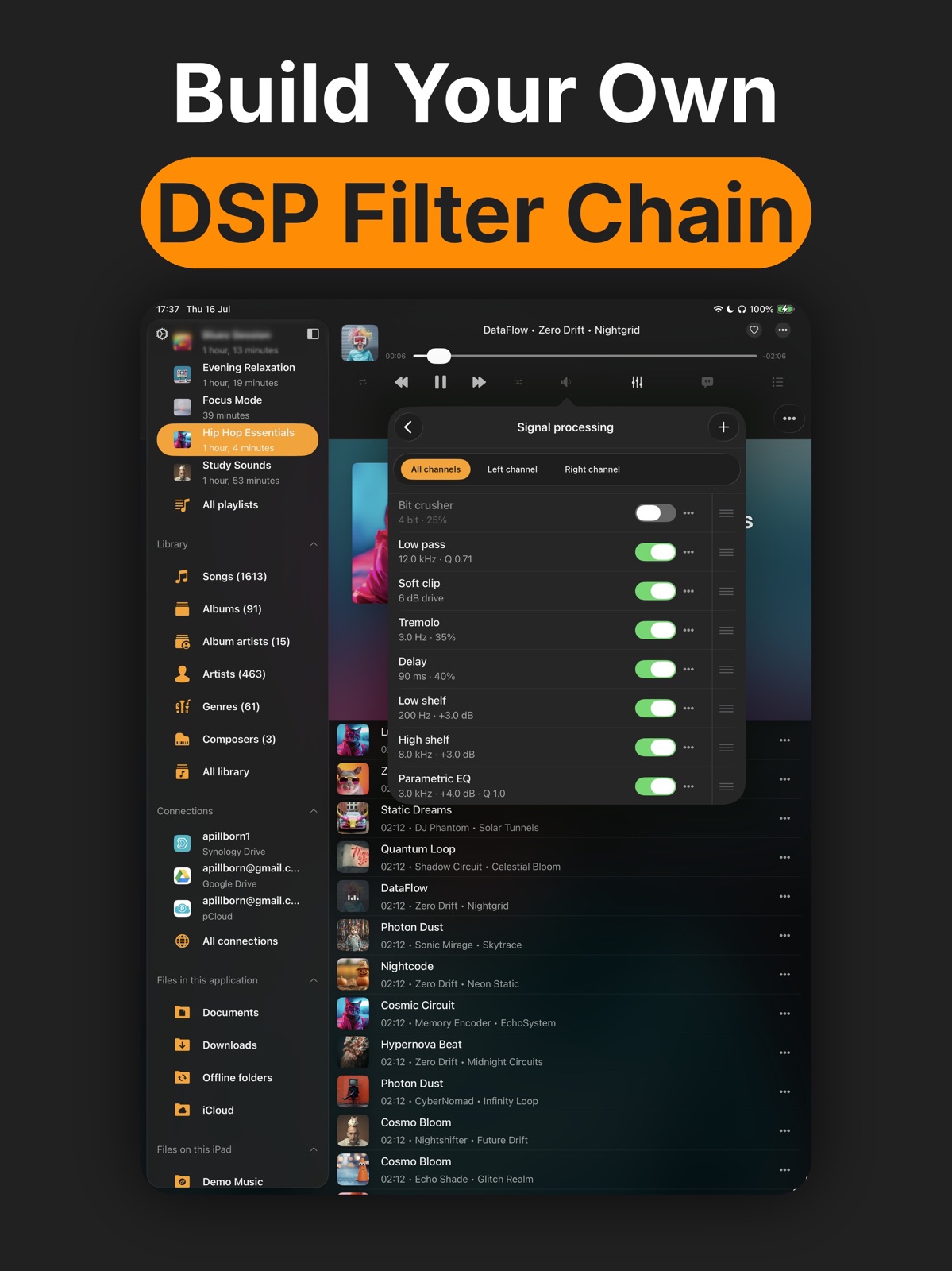
Hi everyone! This is our biggest update yet, built around a brand-new BASS audio engine for lossless and high-resolution listening. NEW BASS AUDIO ENGINE A professional playback core you can select as an alternative to the existing engine. It unlocks a full chain of real-time audio effects, DSP processing, and live visualization, and it adds playback of classic tracker and MOD music (MOD, XM, IT, S3M, MTM, UMX, MO3). It plays your existing library with high-quality resampling and precise pitch and tempo control. AUTOMATIC VOLUME LEVELING Loudness-based normalization keeps tracks from different albums at a consistent volume. Local files are pre-scanned so playback opens already leveled. NEW AUDIO EFFECTS SUITE Stack and tune studio-style processors in real time: reverb, delay, multi-tap echo, chorus, flanger, phaser, auto-wah, distortion, compressor, stereo rotation and crossfeed for a more natural headphone soundstage. Each effect has its own screen, presets and an instant on/off toggle. NEW DSP PROCESSOR Build your own signal chain from 14 real-time filters: gain, low-pass, high-pass, band-pass and notch filters, peaking, low-shelf and high-shelf EQ, soft-clip saturation, bit crusher, tremolo, delay, ring modulator and stereo width. Each has presets and an instant on/off toggle. REAL-TIME MUSIC VISUALIZER Full-screen animated visuals that react live to your music, with a large library of presets to choose from or let cycle. Available across the playback engines on all your devices, with a screen-sleep preventer so the show keeps going uninterrupted. REFRESHED DESIGN Redesigned audio effects and equalizer screens with modern sliders, glass-style visuals and a simplified presets mode, plus clearer organization of engines, effects and DSP. CARPLAY IMPROVEMENTS DSP settings on CarPlay, fixed artwork and Now settings and more accurate lock-screen, watchand car controls. Plus a more reliable streaming foundation, better file-type handling, broader localization, and many stability and performance fixes. Thank you for using Flacbox. Your music now sounds great and looks great, with a professional-grade engine, a full suite of effects and DSP filters, and a live visualizer to match. We can't wait for you to hear and see it.
Alternatives
- VOX – MP3 & FLAC Music Player — Same category + similar ratings
- Equalizer+ HD music player — Same category + similar ratings
Availability by market
- US
Data quality & evidence
- Page completeness
- Live store listing
- Last verified
- 31 Jul 2026
- Sources
- App Store
- Apoku editorial summary has not been published yet.