
Quick verdict
- What it is
- Store information collected; independent summary not yet available.
- At a glance
-
- From $4.99/mo
- Free to download
- In-app purchases
Categories and search queries
Official categories
- Navigation
- Utilities
AppCorpus categories
Key functions
| Function | Availability | Access | Scope | Evidence |
|---|---|---|---|---|
| Free app | Yes | Free | — | Store published |
| In-app purchases | Yes | Limited free | — | Store published |
Screens
App Store
12 store screenshots

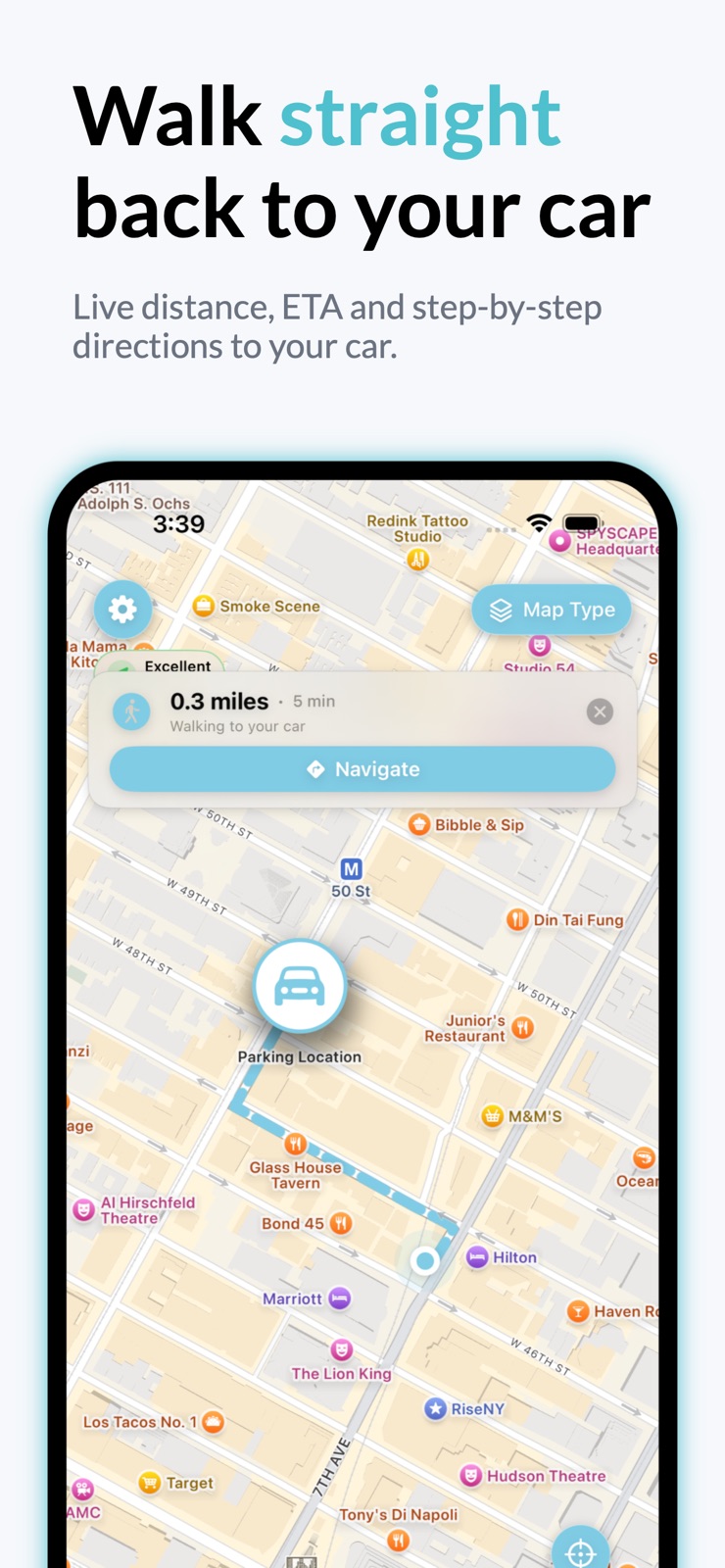


Pricing & paywalls
App Store
- Find My Car Premium Monthly — $2.99/week
- Find My Car Premium Monthly — $4.99/month
- Find My Car Premium Monthly — $19.99/year ($1.66/mo)
- Find My Car Premium Monthly — $24.99
- Coffee Supporter — $2.99
- Premium Supporter — $5.99
Ratings & reviews
App Store
-
5/5Edmund kilrow
I actually have a keychain but that I lose my keys all the time and this is awesome I don’t drive but I wish you could be it shows a diet like the building but the keychain I’m doing something wrong I think I got the name of that wrong I got down for Barney Mikey but that it looks like the same thing what you got it’s got the same exact line with a hole in the middle could you please send me a link or something I can activate this one please
ERKJR · 7 Aug 2026
-
1/5Used to be a very good app now it’s terrible
I had been using this app for years and worked great. Always reliable. Recently I went to an NFL game and after parking the car I marked its location on the app like I always did. When the game ended I turned on the app like I always did and followed its instructions. WRONG the Find my car app showed I was at the car’s location, but the car was no where near and I could tell I did not park there. An hour later and walking for what seemed miles I finally located my car. According to the app, my car was nowhere close to where I was standing. Thanks a lot Find my Car app! You’ve become useless! If you enjoy walking for hours looking for your car, get this app. If you’d like to find your car, don’t.
raymi0603 · 7 Aug 2026
-
5/5Official Old Fart
As an Official Old Fart, I love this app. The parking at the hospital is horrible, there are too few visual aids as the scenery has been homogenized, and there can be some distance to cover. I place a pin before I leave the car and the app faithfully guides me back.
2100 · 7 Aug 2026
-
1/5Fortunately I take a picture on my iPhone
This app is supposed to help me find my car. Unfortunately it’s telling me my car is three blocks over. The interface isn’t great. After dropping a marker you should me able to view the picture you took but instead when you tap on the marker it just gives you the option to take another picture. So this app does NOT help you find your car and you can’t easily find pictures and information about whatever you parked easily. That makes this app useless.
Jaybee12347 · 7 Aug 2026
-
5/5GOD SENT APP
I am so glad I found this App as it has shown me where my car truly went and actually is located. I lent my car out and was baffled how the entire tank went missing. It’s no longer a mystery. Thank you
4 zazaza · 7 Aug 2026
Privacy & accessibility
App Store
Privacy
- Data Linked to You — Analytics — Identifiers — Device ID Developer declared
- Data Linked to You — Developer’s Advertising or Marketing — Identifiers — Device ID Developer declared
- Data Linked to You — Identifiers Developer declared
- Data Not Linked to You — Analytics — Diagnostics — Crash Data Developer declared
- Data Not Linked to You — Analytics — Diagnostics — Performance Data Developer declared
- Data Not Linked to You — Analytics — Identifiers — User ID Developer declared
- Data Not Linked to You — Analytics — Location — Coarse Location Developer declared
- Data Not Linked to You — Analytics — Usage Data — Product Interaction Developer declared
- Data Not Linked to You — App Functionality — Usage Data — Product Interaction Developer declared
- Data Not Linked to You — Diagnostics Developer declared
- Data Not Linked to You — Identifiers Developer declared
- Data Not Linked to You — Location Developer declared
- Data Not Linked to You — Usage Data Developer declared
- Data Used to Track You — Identifiers — Device ID Developer declared
- Data Used to Track You — Identifiers Developer declared
Accessibility
No accessibility labels collected yet.
Versions
App Store
-
2.7.5
- bug fixes
-
2.7.6
- bug fixes
-
3.0
We’ve refreshed the design! Enjoy a cleaner, more modern look that makes finding your car even easier. More features are on the way – and I’d love your input! If you have ideas or suggestions, feel free to reach out via the support section in the app.
-
3.1
- Apple Watch Fixes
-
3.10.0
• Offline maps: when downloading an area you now see a live preview circle showing exactly which part of the map will be saved, so you know what's covered before tapping Download.
-
3.10.1
• Maps can now optionally orient toward your parked car in both online and offline mode. • The current location marker can show the direction your phone is pointing.
-
3.10.2
• Quicker access: open "Download Map" right from Settings when Offline OpenStreetMap is on. • Helpful nudge: turning on Offline mode now offers to save a map area so you're truly offline-ready. • Fix: duplicate CarPlay entries in Auto-Park are automatically merged.
-
3.10.3
• Quicker access: open "Download Map" right from Settings when Offline OpenStreetMap is on. • Helpful nudge: turning on Offline mode now offers to save a map area so you're truly offline-ready. • Fix: duplicate CarPlay entries in Auto-Park are automatically merged.
-
3.10.4
• Quicker access: open "Download Map" right from Settings when Offline OpenStreetMap is on. • Helpful nudge: turning on Offline mode now offers to save a map area so you're truly offline-ready. • Fix: duplicate CarPlay entries in Auto-Park are automatically merged.
-
3.10.5
• Quicker access: open "Download Map" right from Settings when Offline OpenStreetMap is on. • Helpful nudge: turning on Offline mode now offers to save a map area so you're truly offline-ready. • Fix: duplicate CarPlay entries in Auto-Park are automatically merged.
-
3.11.0
• Quicker access: open "Download Map" right from Settings when Offline OpenStreetMap is on. • Helpful nudge: turning on Offline mode now offers to save a map area so you're truly offline-ready. • Fix: duplicate CarPlay entries in Auto-Park are automatically merged.
-
3.12.0
• Redesigned Apple Watch app — save your spot, start a parking timer, and follow haptic compass guidance straight back to your car, right from your wrist. • New widgets — a Home Screen Quick Save button that saves your spot without opening the app, plus Lock Screen widgets and a large widget that shows your car on a map. • Parking Timer Live Activity — watch your meter countdown on the Lock Screen and in the Dynamic Island. • More polished translations across all supported languages. • New: Live Turn-by-Turn Navigation (Pro) — follow a guided, voice-assisted walking route straight back to your car, without leaving the app. • Smarter Auto-Park: your parking spot is now saved the moment you stop — right where you parked, not where you've already walked to. • Various performance and stability improvements.
-
3.13.0
• Redesigned Apple Watch app — save your spot, start a parking timer, and follow haptic compass guidance straight back to your car, right from your wrist. • New widgets — a Home Screen Quick Save button that saves your spot without opening the app, plus Lock Screen widgets and a large widget that shows your car on a map. • Parking Timer Live Activity — watch your meter countdown on the Lock Screen and in the Dynamic Island. • More polished translations across all supported languages. • New: Live Turn-by-Turn Navigation (Pro) — follow a guided, voice-assisted walking route straight back to your car, without leaving the app. • Smarter Auto-Park: your parking spot is now saved the moment you stop — right where you parked, not where you've already walked to. • Various performance and stability improvements.
-
3.13.1
· 20 Jun 2026
• Improved Auto-Park: no longer saves a parking spot when you exit a train, bus, or tram. — save your spot, start a parking timer, and follow haptic compass guidance straight back to your car, right from your wrist. • New widgets — a Home Screen Quick Save button that saves your spot without opening the app, plus Lock Screen widgets and a large widget that shows your car on a map. • Parking Timer Live Activity — watch your meter countdown on the Lock Screen and in the Dynamic Island. • More polished translations across all supported languages. • New: Live Turn-by-Turn Navigation (Pro) — follow a guided, voice-assisted walking route straight back to your car, without leaving the app. • Smarter Auto-Park: your parking spot is now saved the moment you stop — right where you parked, not where you've already walked to. • Various performance and stability improvements.
-
3.2
- Bug fixes
-
3.3
- bug fixes
-
3.4
- adding address to quick save widget
-
3.5
Bug fixes and performance improvements.
-
3.6
Bug fixes and performance improvements.
-
3.7
Bug fixes and performance improvements.
-
3.8
Find My Car 3.8 • Added automatic car parking detection using Bluetooth and motion detection. • If you like the app, please leave a review.
-
3.8.1
What's new in 3.8.1 • Auto-Park, your way: choose Bluetooth, movement, or both — and pick which Bluetooth/CarPlay devices count as your car, so AirPods never trigger a save. • Smarter parking detection: confidence-based saves, fewer false positives, and an automatic undo if you drive off right after a save. • Pin-perfect locations: parking spots now use a high-accuracy GPS burst at save time, landing within a few metres. • Live GPS accuracy indicator: a tappable badge on the map shows current accuracy, with a one-tap upgrade if iOS has reduced your location precision. • Reliability and performance improvements across the app.
-
3.9
What's new in 3.9 • Offline maps: when downloading an area you now see a live preview circle showing exactly which part of the map will be saved, so you know what's covered before tapping Download.
-
3.9.1
What's new in 3.9 • Offline maps: when downloading an area you now see a live preview circle showing exactly which part of the map will be saved, so you know what's covered before tapping Download.
-
3.9.2
What's new in 3.9 • Offline maps: when downloading an area you now see a live preview circle showing exactly which part of the map will be saved, so you know what's covered before tapping Download.
Alternatives
- Currency Exchange - Currenzy — Same category + similar ratings
- Find My Car with AR Tracker — Same category + similar ratings
- Landmark: Travel Tracker — Same category + similar ratings
- Packing List - Luggy — Same category + similar ratings
- Location Book - MyLocations — Same category + similar ratings
- Find My Car Parking Location — Same category + similar ratings
Availability by market
- US
Data quality & evidence
- Page completeness
- Live store listing
- Last verified
- 7 Aug 2026
- Sources
- App Store
- Independent summary has not been published yet.