
Quick verdict
- What it is
- Store information collected; an Apoku editorial summary is not yet published.
- At a glance
-
- Free to download
Categories and search queries
Official categories
- Photo & Video
Apoku categories
Key functions
| Function | Availability | Access | Scope | Evidence |
|---|---|---|---|---|
| Free app | Yes | Free | Context-specific | Store published |
Screens
App Store
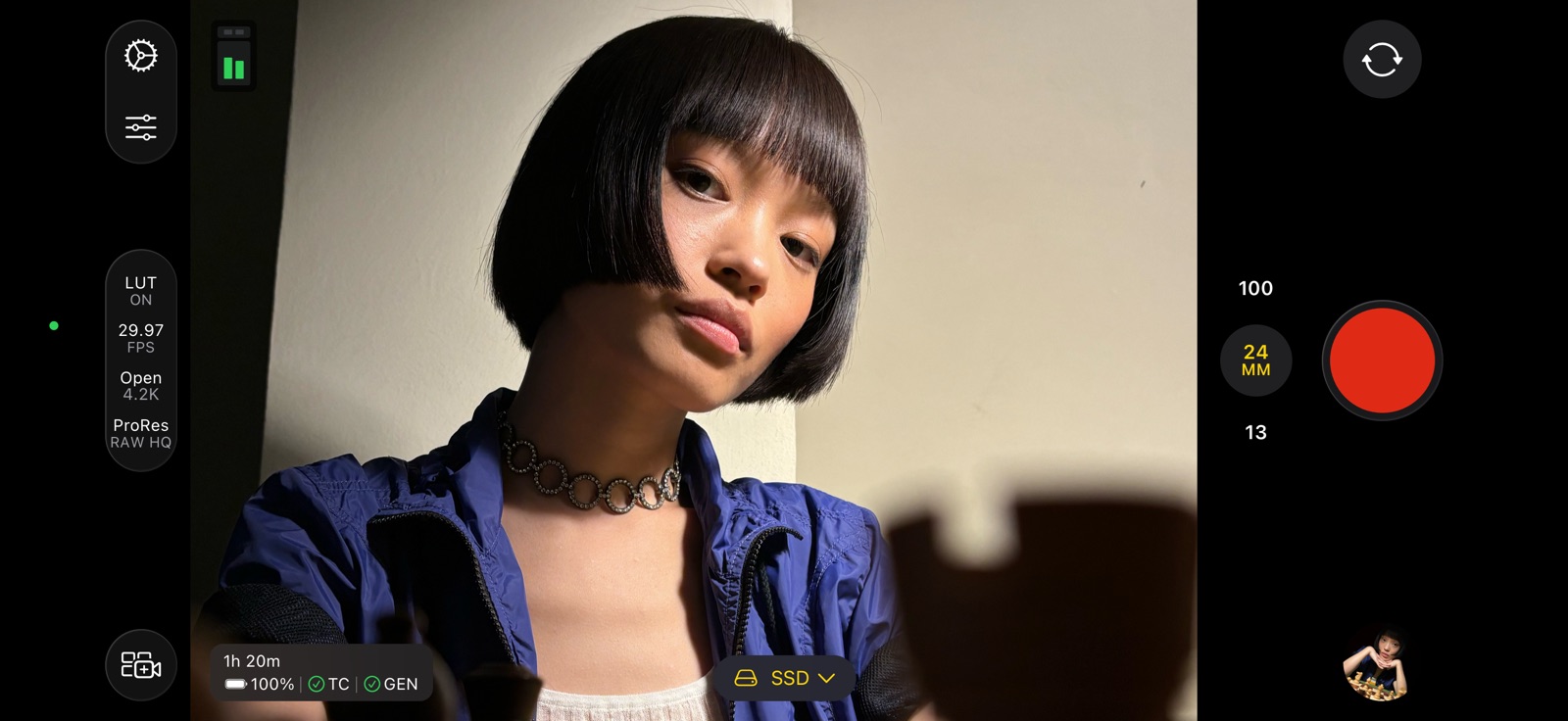
8 store screenshots


Pricing & paywalls
App Store
- Free to download
Ratings & reviews
App Store
-
5/5Cannot record to external drive any more
Update. Support promptly contacted me. Turns out app can no longer save to external APFS drive, but external ExFAT drive works fine (docs will be updated to reflect this). Would prefer APFS for various reasons but ExFAT works and now I can use external drive again. Really like HEVC Apple Log codec option for internal and external drive. Back to 5 stars app. —— After the last application update I get two entries under System Settings -> Files & Folders -> Final Cut Camera, one on and one off. I cannot turn the off to on. If I turn the one that is on to off then the second disappears. I can turn back on (only one entry remains). But as soon as I leave settings and go back to the app the second Off version of Final Cut Camera shows up in the off state in the Files & Folders. Inside the app I can only record to internal storage. Cannot select, allow, or record to external storage. Tried deleting app with setting in off and position and upon reinstallation the two On and Off entries show up again in Files & Folders. Hope this is fixed on an app update soon!
VicenteSilvestre · 31 Jul 2026
-
5/5Incredible. Better than Blackmagic Camera App let me explain.
If the developers are reading this kudos to you. This app is the real deal. Almost like magic. Aside from the amazing video features I’ve noticed the prores files are sharper and contain more data than other third party apps. This results in bigger file sizes but to me that doesn’t matter because I’m exporting to an SSD. I’ve noticed in post that I can push the image super far without the image breaking. This is incredible because this is matching some of my mirrorless cameras. I’ve done some comparisons between black magic, pearla and some other apps and they don’t even come close to Final Cut camera. A message to the developers I don’t know what kind of voodoo magic you’re doing. Keep doing it. I know that the iPhones are capable devices. If you can even somehow manage to pull off prores raw or some other raw codec such as cinema DNG I would literally put down $100 for this app or even contribute somehow. Keep up the great work!
stillwickedly · 31 Jul 2026
-
3/5Amazing app with a deal-breaker flaw… but easy fix to implement
This app is an amazing concept and has been executed very well overall. In fact, it’s so good that I have replaced the Camera shortcut on the Lock Screen of my 15 Pro Max with a shortcut to this app. Videos are simply easier to take in a way that looks good compared to the Camera app, thanks to the ability to finally force the phone to use the lens you choose (the stock Camera app is extremely reluctant to use the 5x telephoto lens to record video in all but the best lighting, and prefers to switch to a blurry, grainy crop of the main lens to gather more light). And there are several granular controls and indicators not available in the stock app that really help the experience. It’s overall really good. At the same time, it’s not perfect and there is a notable flaw that could be a major deal breaker. As of now the app will only save videos to a folder in the Files app called “Final Cut Camera”. What this app needs is the ability to choose the destination for saving video - such as, in my case, my camera roll in the Photos app. I’m not a pro and I don’t want my videos saved in a weird spot - I just want them in the regular old Photos app along with all my other shots. Finally, there are two more suggestions I have to improve, but these are not deal breakers. It would be nice to get an “auto FPS” setting similar to the stock Camera app, so that when enabled, the camera could reduce the frame rate to 24 FPS in very low light settings. Additionally, there’s no way to change the focal length after the video recording has started - it would be nice to still have access to the 13mm, 24mm, and 120mm buttons to be able to switch lenses mid-capture if necessary. If these issues are addressed, I will update my review to 5 stars immediately, as this app is a really good concept!
thatgoldscooter · 31 Jul 2026
-
5/5help
Can you do it to my app now and that app was great I’ve been using it for a long time but I can’t access my media anymore. I just keep saying no media and have to restart like just to get to my media so please can we fix this cause I need to edit my videos thank you. You have a nice day. I went back in the app and it deleted every single thing I’ve recorded on this app so we need to fix this cause this is a big problem because all my videos I’ve created. I need this fixed urgently because I don’t know how you can get everything back. I really need a way to figure this out because I feel like I put so much trust on loyalty into this app and they’re not giving me the results. I want it because of what it was working great everything was amazing but when I deleted everything like what app does that?
Pro gamer56477 · 31 Jul 2026
-
4/5So far, So good!
Camera is simply laid out and is easy to use, and is Very Economical when it comes to shooting in 4K; file sizes, that is, in comparison to other apps (Blackmagic, in particular, which is an unnecessary space hog). Also very easy to use digital zooms on all lenses, and for being a version 1.0 it is very ready to use right out of the box. Feels organic. If it needs anything it Needs a Level, and perhaps a separation of ISO from Shutter Speed elements, and perhaps an “add video to photo library” option and an optional function to combine zooms into one, like in the native camera app (but maybe that’s nitpicking, and not a pro type of thing) but so far, so good. Thanks Apple for another Great free app!👍
chegaro · 31 Jul 2026
Privacy & accessibility
App Store
Privacy
- Data Linked to You — App Functionality — Identifiers — Device ID Developer declared
- Data Linked to You — Identifiers Developer declared
- Data Not Linked to You — Analytics — Identifiers — User ID Developer declared
- Data Not Linked to You — Analytics — Other Data — Other Data Types Developer declared
- Data Not Linked to You — Analytics — Usage Data — Other Usage Data Developer declared
- Data Not Linked to You — Analytics — Usage Data — Product Interaction Developer declared
- Data Not Linked to You — Identifiers Developer declared
- Data Not Linked to You — Other Data Developer declared
- Data Not Linked to You — Usage Data Developer declared
Accessibility
No accessibility labels collected yet.
Versions
App Store
- 1.0
-
1.0.1
• Fixes an issue in Live Multicam sessions that prevented devices from appearing or connecting.
-
1.0.2
• Quickly start and stop recording with the volume button. • Click the Camera Control to easily start and stop recording with iPhone 16.
-
1.1
Final Cut Camera 1.1 includes the following features and enhancements: • Preview your Log video in SDR or HDR with the vibrancy of the original scene by enabling the Apple Log LUT while recording. (Requires iPhone 15 Pro or later.) • Record in Log and HEVC for increased flexibility and dynamic range combined with smaller file sizes. (Requires iPhone 15 Pro or later.) • Precisely compose your video using the level with tilt and roll indicators or crosshairs for overhead shots. • Capture high-quality 4K footage at up to 120 fps with iPhone 16 Pro and iPhone 16 Pro Max.
-
1.2
Final Cut Camera 1.2 includes the following features and enhancements: • Quickly switch to the 48 mm telephoto lens to capture the perfect shot. (Requires iPhone 14 Pro or later.) • Play back your Log videos in SDR or HDR with the vibrancy of the original scene by applying the Apple Log LUT. (Requires iPhone 15 Pro or later.) • Record videos in Spatial Audio for even more realistic and immersive sound. (Requires iPhone 16.) • Capture in 50 fps for additional editing flexibility and delivery options.
-
2.0
Final Cut Camera 2.0 includes the following features and enhancements: • Capture ProRes RAW in open gate for full-frame resolution and incredible editing performance.* • Record in high dynamic range and an even wider color gamut with Apple Log 2 in ProRes or HEVC.* • Easily enable timecode options including Time of Day, Record Run, or external timecode for precise identification of your footage. (Requires iOS 26.) • Genlock multiple video sources with precise frame alignment using a compatible sync generator.* • Quickly switch to the 200mm (8x) telephoto lens to capture the perfect shot.* • Dynamically adjust the video orientation to vertical or horizontal with the front-facing camera, regardless of how you hold your iPhone.* *Requires supported iPhone models.
-
2.0.1
• Includes support for 30 additional languages • Includes stability and performance improvements
-
2.2
• This update includes stability improvements and bug fixes
-
2.3
· 30 Jun 2026
• Use Clean HDMI Out to send a clean video feed without overlays to an external monitor or recorder so you can stay focused on the image being captured (requires iPhone 17 Pro) • Choose from ProRes 422 HQ, ProRes 422, or ProRes 422 LT for incredible video fidelity and editing performance, with more options to balance image quality and file size (requires iPhone 13 Pro or later) • Disable digital zoom to ensure every shot records at full optical resolution • Easily connect your iPhone to your Mac and import your media from Final Cut Camera into Final Cut Pro
Availability by market
- US
Data quality & evidence
- Page completeness
- Live store listing
- Last verified
- 31 Jul 2026
- Sources
- App Store
- Apoku editorial summary has not been published yet.