
Quick verdict
- What it is
- Store information collected; independent summary not yet available.
- At a glance
-
- Free to download
- In-app purchases
Categories and search queries
Official categories
- Utilities
AppCorpus categories
Key functions
| Function | Availability | Access | Scope | Evidence |
|---|---|---|---|---|
| Family Sharing | Yes | Unknown | App Store | Store published |
| Free app | Yes | Free | — | Store published |
| In-app purchases | Yes | Limited free | — | Store published |
Screens
App Store
17 store screenshots


Pricing & paywalls
App Store
- Lifetime Purchase — $14.99
Ratings & reviews
App Store
-
5/5By far the best one I’ve tried
I use this app every single day. I’m a commercial designer and regularly have to multiply and divide dimensions for my work and this app makes my life so much easier. I like that you can change the color and theme of the app as well to make it a little more fun and customizable. If you’re not familiar with these types of apps you’ll wanna play around with it to get the hang of it, but that’s to be expected. I picked it up quick and I know you’ll be happy with this app if you use it. Edit: I’ve been using the app going on 3 years now I believe? I STILL use this app every single day for my job and absolutely love it. To the developers, please don’t ever get rid of this app. I feel like every time I (rarely) fall in love with an app, it somehow gets removed from the App Store. This app is fantastic and I don’t want to ever not have it.
Christa Dub · 6 Aug 2026
-
5/5Best for woodworking
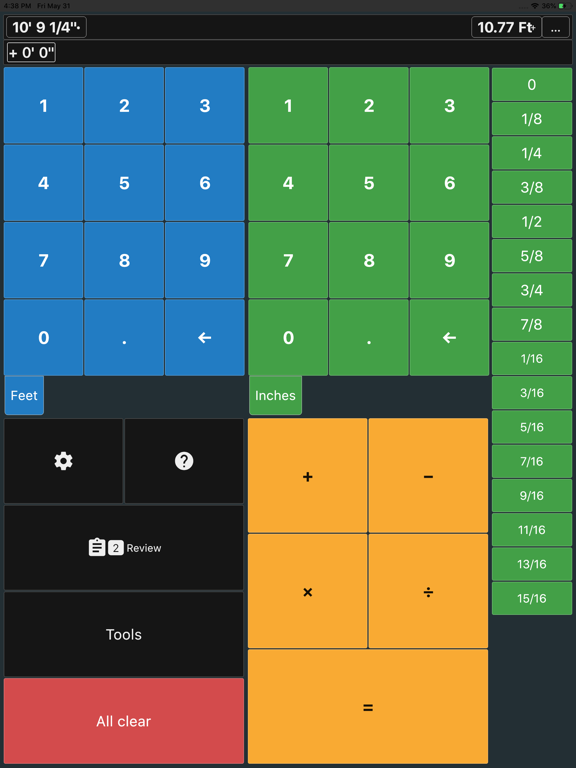
I really like this app. My go to calculator. At first I thought I would have to learn to live with the wood looking theme, but it’s changeable to 8 or so other colors I really like how you can limit the fractions to something on your ruler. You can have it get very precise or say have it round to the nearest 1/32nd or 1/16th. At the same time it shows you the decimal equivalent and you can cycle the result to centimeters, millimeters and more, then back, or not go to metric at all. The data entry is different than all the others I’ve tried. You enter the feet in the top section, inches in the section below that, and select the fraction from a scrolling menu. The scrolling fraction menu is configurable and limits fractions to those found on a ruler. You can change the imperial entries to metric and have imperial results and metric at the same time, or just one or the other. It has proven very handy for me working with it in split view on my iPad along side a set of plans. Very nice app, A+
57mink · 6 Aug 2026
-
4/5Everything I wanted and more but...
I’m in no way in the construction industry, but I am building a new house. Having just received the survey, I wanted to do some calculations on my current square footage, the overall length and width of my existing home etc... nothing major, purely low volume stuff. The app worked perfectly, doing everything I asked of it and allowing me to do more (the triangle calculator was handy for getting an idea of the size of my new homes roof)... tho (and maybe I missed it), I would have liked to be able to get a slope/pitch ratio from my input of the angle (I actually couldn’t get any of the pitch x/y buttons to work), minor detail as I’m setting my roof by the angle of my latitude for a solar PV array. One star is lost because I *wanted* to toss the few dollars your way for making just the right app available for me at just the right time. Problem is, every time I click on the “Remove ads” button the app crashes... this is a 6th gen iPad with the latest iOS installed so... no cookies for you. If there’s another way (a pay for, ad-free version on the AppStore say) do let me know as I really appreciate the effort that went into this !! While we’re at it, it’d be nice if we could change the font color as well as the bg color... I do love a black bg with green text for that old terminal feeling !!
grendelum · 6 Aug 2026
-
5/5Customer Support
When it comes to a computer or phone product, be it hardware or software, customer service doesn’t make the product work better but it is, in my opinion, what marks the creator or company as to whether they truly care about ‘the customer’. Customer support for this app is top notch! The developer deems it important enough to quickly reply when a customer has an issue or problem with the app. That says a lot to me! I’m no math whiz so this app has come in very handy when I’m attempting to create my latest woodwork or metal project. Thank you for a great little app! 🤓
15909oldretiredguy · 6 Aug 2026
-
5/5Great and Easy to Use
I am a CAD drafter/ detailer and I originally downloaded the free version and found myself using it constantly so I decided to buy the Lifetime version because I think it’s worth it. As you use it you start quickly understanding how it works. If I had to improve one thing it would be to make the fraction scroll buttons, all in different colors so they can be easily identified. 32nds in one color, 16th another color, 8th another, 4th another and 1/2 another. Other than that. Perfect.
Rigo 73 · 6 Aug 2026
Privacy & accessibility
App Store
Privacy
- Data Linked to You — Third-Party Advertising — Identifiers — Device ID Developer declared
- Data Linked to You — Third-Party Advertising — Usage Data — Advertising Data Developer declared
- Data Linked to You — Identifiers Developer declared
- Data Linked to You — Usage Data Developer declared
- Data Not Linked to You — Analytics — Diagnostics — Other Diagnostic Data Developer declared
- Data Not Linked to You — Analytics — Diagnostics — Performance Data Developer declared
- Data Not Linked to You — App Functionality — Diagnostics — Crash Data Developer declared
- Data Not Linked to You — Diagnostics Developer declared
- Data Used to Track You — Identifiers — Device ID Developer declared
- Data Used to Track You — Identifiers Developer declared
- Data Used to Track You — Usage Data — Advertising Data Developer declared
- Data Used to Track You — Usage Data Developer declared
Accessibility
No accessibility labels collected yet.
Versions
App Store
-
7.16.5
Monthly subscription option New Tool: Grid Layout Update: Floor Plan (Masonry, Paint, PDF update) Update: Triangle PDF Export Update: Stair Stringers (Fix PDF font bug) Update: Tile / Brick tool (fixed double grout edge case) Update: Concrete (PDF Export)
-
7.16.6
Minor Improvements
-
7.16.8
Minor Update - Arc layout output unit matches interval unit
-
7.16.9
More Translations Feature: Export Rake Wall to Cut List Fixed punch list PDF text wrapping Slope Tool Updated
-
7.17.1
Surveying Tool Group (Angles / DMS converter, Traverse & Closure adjustments, 3D Triangle / XYZ - Slope Distance - Bearing calculator) Custom floor plans included in PDF for Concrete Tool Updated Chords / Arcs tool, PDF Output
-
7.18.0
Improved startup time New tool: Area to Count (e.g. 350 square feet = 1 gallon of paint => 2 gallons of paint for 700 square feet) Update: Pipe Fitting tool Update: Rake Wall tool Update: Floor Plan tool
-
7.18.1
HVAC Tool Group Compound Miters Pressure Converter
-
7.18.2
New HVAC Tools (Friction loss, ACH, Load Calculator) Update Compound Miter (enabled decimal inputs for wall and spring angles) Update Stair Stringer (Overhang and Nosing)
-
7.18.4
Load Weight tool (pick plans / load plans) Utility pole spacing tool Shortcuts bar Bug fix on opening saved stair stringers Bug fix on changing units when editing a dimension on the review page
-
7.18.5
2D Cut List Optimizer 1D Cut List Optimizer HVAC Psychrometrics Calculator Paste from clipboard
-
7.18.6
2D Cut List Optimizer 1D Cut List Optimizer HVAC Psychrometrics Calculator Paste from clipboard
-
8.0.0
Updated UI
-
8.1.0
3D Models Cabinet Tool Group Pipe Fitting update Electric Wire Size Converter
-
8.1.1
3D Models and Cabinet Tools
-
8.2.0
3D Models Cabinet Tools Updated Unit Converter Minor improvements
-
8.3
Popup for new users Updated Stair Stringers (3D Models) Updated Pressure Converter (added units) Other minor updates
-
8.4
Framing Tool Group Updated Conduit Fill Calculator Added Electric Box Fill Calculator Updated Unit Converter Updated Area to Count Updated Concrete -> Concrete & Fill Updated Baluster / Fence tool Lock Screen Widget
-
8.5.0
Apple Business Manager edition New Tool Group - Steel / Fabrication New Tool Group - Welding New Tools for Pipe Fitting New Tool: Time Tracker New Tool: To Do List Added tax option to Punch Item expenses Bug fixes
-
8.6.1
New Tool: Bubble Level Update: Rafters (Improved UI, 3D Models, Ascending option for jack rafters, auto-calculated hip seat cut, PDF export) Update: Improved 2D Cut Optimizer Update: Cabinets option to export cut optimizer with PDF Bug fix: Notes popup cursor bug
-
8.7.0
Steel shapes lookup (I-beams, channels, tees, etc.) Motor FLC & Current tool Added Portuguese, German, and Russian Option to backup entries / tools Option for multiple time trackers in a single project.
-
8.7.1
Steel shapes lookup (I-beams, channels, tees, etc.) Motor FLC & Current tool Added Portuguese, German, and Russian Option to backup entries / tools Option for multiple time trackers in a single project. Fixed Export / Import
-
8.7.2
Updated Stair Stringer Updated 2D Cut List Optimizer
-
8.8.0
Butt Weld Elbow Takeout and Arcs Patch for Saved Stair Stringer
-
8.9.0
Invoices Tool Project Management Tool Group Fillet Weld Calculator DMS Calculator (add / subtract) Rafter update Baluster / Fence update Punch List update Updated Steel shapes PDF Exports for Equal Spacing, Baluster / Fence, T&G Deck Minor bug fixes
-
8.9.1
· 7 Apr 2026
Invoices Tool Project Management Tool Group Fillet Weld Calculator DMS Calculator (add / subtract) Rafter update Baluster / Fence update Punch List update Updated Steel shapes PDF Exports for Equal Spacing, Baluster / Fence, T&G Deck Minor bug fixes Input line bug fix for multiplication
Alternatives
- Construction Master Pro Calc — Same category + similar ratings
- Construction Master 5 Calc — Same category + similar ratings
- Construction Calculator — Same category + similar ratings
- Pipe Trades Pro Calc — Same category + similar ratings
- Measure Master Pro Calculator — Same category + similar ratings
- Concrete Calculator Plus — Same category + similar ratings
Availability by market
- US
Data quality & evidence
- Page completeness
- Live store listing
- Last verified
- 6 Aug 2026
- Sources
- App Store
- Independent summary has not been published yet.