
Quick verdict
- What it is
- Store information collected; independent summary not yet available.
- At a glance
-
- Free to download
Categories and search queries
Official categories
- Medical
- Health & Fitness
AppCorpus categories
Key functions
| Function | Availability | Access | Scope | Evidence |
|---|---|---|---|---|
| Free app | Yes | Free | — | Store published |
Screens
App Store
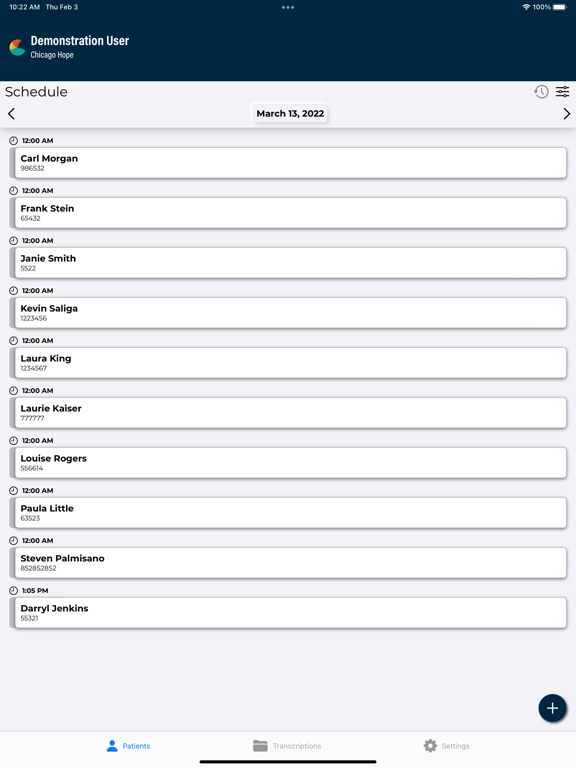
9 store screenshots



Pricing & paywalls
App Store
- Free
Ratings & reviews
App Store
-
4/5Don't upgrade
V 2.4 has a bug. Wait for next version.
Miradorrad · 6 Aug 2026
-
5/5Ingenious
Excellent app. Extremely handy. See this being a time saver.
Phillygirl2010 · 6 Aug 2026
-
5/5Excellent App
This app is awesome in it's simplistic design and practical efficiency. Highly recommended.
DanielJin · 6 Aug 2026
-
1/5pointless
I find this app pointless since I can't find a way to edit my dictations. I don't want to just "complete" them I want to be able to edit them first. Without being able to do this I still need my laptop so there is no point to this app. If I am missing the boat and there is a way to edit, PLEASE LET ME KNOW as I would love to be able to do this.
Hawkifann · 6 Aug 2026
-
2/5unprofessional-looking, space-wasting
The good: I like being able to do my dictations with my phone or iPad. I like the piecemeal uploading of each file, and the visual feedback that you get when the dictation is done or uploaded. The bad: The iPad app layout is poor. There is a ton of wasted space at the bottom of the screen. The slider bar, hold button, "upload" button, and Record and Stop buttons are too close together, resulting in frequent mis-hits. Suggestion: utilize the full screen of the iPad and make LARGE areas of the screen for starting or stopping dictation The app crashes frequently when moving between days on the schedule. If using the iPhone AND iPad apps, would be nice if the dictations sync'd between them, so you don't inadvertantly dictate the same patient on both devices. The ability to use a bluetooth headset with this app would be cool, but likely it's an Apple limitation, not EMDAT's fault.
mikee60369 · 6 Aug 2026
Privacy & accessibility
App Store
Privacy
- Data Linked to You — Analytics — Diagnostics — Crash Data Developer declared
- Data Linked to You — Analytics — Identifiers — Device ID Developer declared
- Data Linked to You — Analytics — Identifiers — User ID Developer declared
- Data Linked to You — Analytics — Location — Coarse Location Developer declared
- Data Linked to You — Analytics — User Content — Audio Data Developer declared
- Data Linked to You — App Functionality — Contact Info — Email Address Developer declared
- Data Linked to You — App Functionality — Diagnostics — Crash Data Developer declared
- Data Linked to You — App Functionality — Identifiers — Device ID Developer declared
- Data Linked to You — App Functionality — Identifiers — User ID Developer declared
- Data Linked to You — App Functionality — User Content — Audio Data Developer declared
- Data Linked to You — Contact Info Developer declared
- Data Linked to You — Diagnostics Developer declared
- Data Linked to You — Identifiers Developer declared
- Data Linked to You — Location Developer declared
- Data Linked to You — User Content Developer declared
- Data Not Linked to You — Analytics — Diagnostics — Performance Data Developer declared
- Data Not Linked to You — Analytics — Usage Data — Product Interaction Developer declared
- Data Not Linked to You — App Functionality — Diagnostics — Performance Data Developer declared
- Data Not Linked to You — Diagnostics Developer declared
- Data Not Linked to You — Usage Data Developer declared
Accessibility
No accessibility labels collected yet.
Versions
App Store
-
3.58
• Added enhanced Outpatient sorting options
-
3.59
• A New "Now" Button – Quickly select today’s date (and time when applicable) in date pickers on the Patients and My Notes tabs • Improved Sorting Options – Added a sort button to the Patients tab and moved sort settings to a new screen for both inpatient and outpatient modes
-
3.60
• Added Reset and Clear buttons to date pickers in Patients and My Notes Tabs for more control over date editing • Added Account Number to the inpatient encounter list • Added a search button to the top of the inpatient encounter list, with enhanced search functionality to be added in a future release
-
3.61
• Introduces support for multiple inpatient schedule resource codes and improves the inpatient search experience with a new Appointments tab, both as part of phase 1 enhancements.
-
3.62
• Fixed an issue where menu options were not displaying correctly in Inpatient mode. • User Fields 1–5 (custom fields set by your organization) can now be manually edited when creating a new ad hoc dictation. • Multiple Inpatient Schedule Resource Codes Phase 2: Multiple schedule resources can be selected at once and selected filters will be remembered for the next session. • Automatically returns to the last tab viewed in your previous session.
-
3.63
• The inpatient search now includes a new Patients tab to show all matching patient records, even those without a scheduled inpatient encounter, alongside a separate Appointments tab.
-
3.64
• Added a “+” button on the Inpatient Worklist screen to create a new dictation without first searching for a patient. You may optionally enter a patient identifier, but patient search is unavailable at this step. • From the Record screen, you can now search for and add referring associates and additional authenticators to be attached to the dictation.
-
3.65
• A clear button has been added to all editable text fields across the app. • Fixed an issue where updating a PID after creating an inpatient dictation through the search feature did not display the updated PID in the encounter screen. • Improved response time for large patient lists.
-
3.66
• Introduces Favorite Associates and Signers, making it easier to quickly select and manage your preferred contacts.
-
3.67
• View associate details in the Record screen and when managing favorites in Settings • Sort workflow folders in My Notes ascending or descending • New Remove Associates and Remove Signers buttons in the Record screen to quickly clear all
-
3.68
• Auto-copy associates now appear automatically in the Info tab of the Record screen when available for the user, patient, or appointment. • Additional signatures assigned to the provider are now displayed in the Info tab of the Record screen. • You can now mark primary associates directly in the Record screen. • The label Default Location has been changed in the Record screen to User Default Location to prevent confusion with client locations that share the same name. • Outpatient ad hoc dictations now display header fields for Patient Name (defaults to “New Dictation”), Patient ID, Gender, Birthdate, and Age.
-
3.69
• Added a pop-up notification to alert you when recording is paused due to an interruption.
-
3.70
• The mobile app now requires iOS 18 or later for new updates, while users on older devices can continue using the last version compatible with their operating system.
-
3.71
• Orders support — A new Orders tab is now available on the Patients tab (when supported by the selected document type), enabling users to review and select patient orders while creating a dictation. Orders associated with the selected appointment are automatically preselected, and users can deselect these or choose from other available orders as needed.
-
3.72
• Inpatient encounters can be hidden from the inpatient list, with a status filter for hidden encounters. • Floor, bed, and gender fields are now editable for inpatient and outpatient ad hoc dictations. • Favorites for document types and locations now use a star icon instead of check marks.
-
3.73
• Patient Letters can now be selected directly in the Record screen when supported by the selected document type and client configuration.
-
3.74
• Ad hoc dictations now support editing additional patient and appointment details, giving you more flexibility when creating notes without a scheduled encounter. New fields include Patient Name, Birthdate, Admit Date, and Discharge Date.
-
3.75
• Improved sorting by patient name to include ad hoc dictations with manually entered names alongside scheduled appointment dictations • Patient age display has been updated to show patients under 1 year in whole months, rounded down (e.g., 10m), including display of 0m when applicable • Added an audible alert when recording is paused • Recording can now continue while the app is in the background (requires user setting “Remain Logged In During Other Mobile Activity” to be enabled) • Fixed an issue where a patient’s date of birth could shift by one day due to time zone handling • Screenshots are now disabled to enhance patient privacy and confidentiality
-
3.76
• Added a Dictation Retention Policy setting in the Security section of the Settings tab, allowing users to choose how long encrypted dictations are stored locally after upload (up to 14 days); a future release will cap this based on the client’s configured retention policy or 14 days, whichever is less.
-
3.77
• Minor bug fixes
-
3.78
• Improved dictation retention handling. The app now retrieves and enforces the client’s dictation retention policy to automatically purge local audio when set below 14 days. Device Settings allow retention as low as 0 days. When the client policy is more restrictive than the device setting, the client policy takes precedence.
-
3.79
• Add and remove Associates and Additional Signers from the My Notes tab. Choose from favorite associates and signers or perform a search. Manage Favorites from Settings or while editing a note.
-
3.80
• Improved support for the Associate Type field to ensure values are properly retained across mobile workflows.
-
3.81
• Minor bug fixes
-
3.82
· 28 Jul 2026
• Minor bug fixes
Alternatives
- MD on Call — Same category + similar ratings
- QuickEM — Same category + similar ratings
- Cerner Camera Capture — Same category + similar ratings
- Lanthier — Same category + similar ratings
- PowerMic Mobile — Same category + similar ratings
Availability by market
- US
Data quality & evidence
- Page completeness
- Live store listing
- Last verified
- 6 Aug 2026
- Sources
- App Store
- Independent summary has not been published yet.