
Quick verdict
- What it is
- Store information collected; independent summary not yet available.
- At a glance
-
- Free to download
- In-app purchases
Categories and search queries
Official categories
- Weather
- Travel
AppCorpus categories
Key functions
| Function | Availability | Access | Scope | Evidence |
|---|---|---|---|---|
| Family Sharing | Yes | Unknown | App Store | Store published |
| Free app | Yes | Free | — | Store published |
| In-app purchases | Yes | Limited free | — | Store published |
Screens
App Store
8 store screenshots
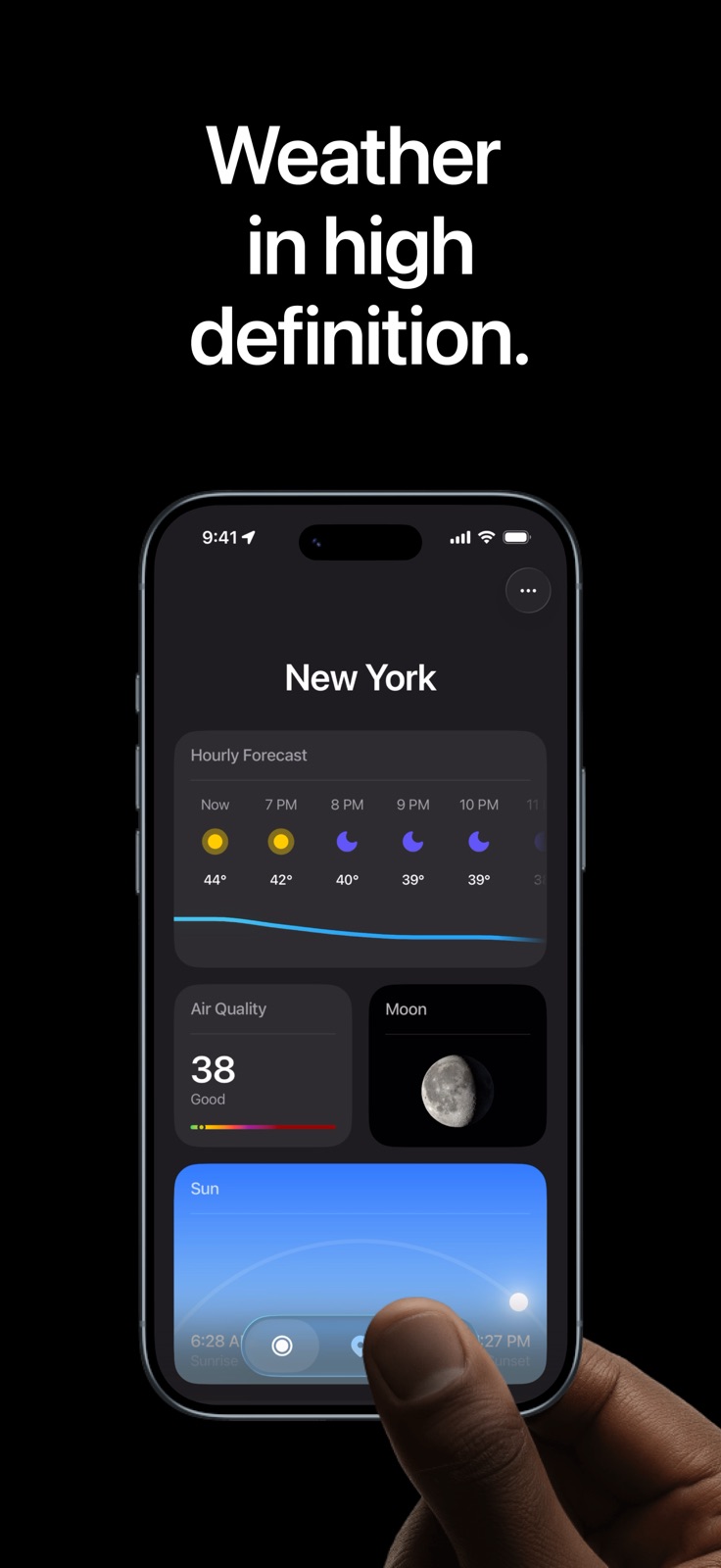


Pricing & paywalls
App Store
- Free to download
- In-app purchases
Ratings & reviews
App Store
-
5/5Already subscribed
I like the app, but it keeps asking me to subscribe and I'm already subscribed. It's very annoying to have to tell it that I'm already subscribed each time I open the app. I sent an email to your support email address but I never got a reply or a resolution to the issue. The one star (see Update below) is due to the problem, not the app itself. I'll update the review if and when it ever gets fixed. If I don't hear back soon, I'm gonna request a refund. Update: The developer got back to me and the issue has been resolved. I've updated the review from 1 to 5 stars. The main feature I like about this app is that I can view weather patterns for up to 12 hours in the future. I realize that weather is a very chaotic system, but this gives me a general idea of what to expect. Have that right?
SoloHikerGuy · 31 Jul 2026
-
2/5Thought it would be better
I don’t download tons of weather apps, in fact I have installed a total of zero. However, I kept seeing ads for this and thought it looked nice and the design was amazing. So I downloaded it and immediately regretted it. First of all, almost every time I opened the app I get asked to buy premium (which seems way too expensive but I’m probably just poor) which makes this already off to a bad start. Secondly, the only thing I ever use the Apple Weather app for is for the widgets. Using widgets is a no-brainer for me, and yet it tells me it is locked behind Premium. And I don’t know if it is my phone (iPhone 13 Mini) or the app, but it runs horribly. I can’t even scroll through the settings without it running way below 60fps (maybe around 30). I don’t see how I am expected to use all of the nice overlays and map visualizers if I can’t even use the menu smoothly?
fianalins · 31 Jul 2026
-
2/5Could be a LOT better
Hi Element devs! I have to say, as someone who used to use Dark Sky before Apple ruined it, this app has some SERIOUS potential!!! You guys are on the right track with this, but there’s some SEVERE bugs that prevent me from rating this higher than 2 stars. Firstly, the widgets don’t update in real time; you have to manually open the app for them to update as you change physical locations (for example, going to work or coming home). And secondly, the app seems to have trouble remembering that I have purchased the subscription, and it sometimes disables the widgets as a result, forcing me to open the app once again. When I do, it immediately throws the paywall in my face again, forcing me to tap the Restore Purchase button to make it go away and re-enable everything. It’s getting on my nerves now, so PLEASE fix this bug ASAP if you can! Thank you in advance!
MBCommandNerd · 31 Jul 2026
-
3/5Inferior information density
I expected more customization for visualizations for the daily or weekly views. In the daily view, you get a single graph line (temperature, precipitation chance, etc) along with cloud cover icons per hour. The view shows 6h on screen (at least on my iPhone 16). Compare to Carrot, where you see about a 15h window, and you get cloud cover, likely precipitation by hour, and one metric of your choice. In Carrot, can also toggle to report in 2h blocks, doubling your window on screen to 1.5d. This really helps you digest the mid term weather without having to check back. Also compare to Wunderground daily view, where you get about 4d’s worth of graph on screen, with temp and precipitation both shown as continuous metrics, and by-day summaries for high/low temp, cloud cover, precip chance and amount. I far prefer the denser information views. I would not consider switching to Element without some improvements to how 12-24h range forecast data is displayed. The current UX could work for someone who isn’t coming in with specific habits. But the ad I saw mentioned Dark Sky, may it rest in peace, so I had very high expectations.
kimbo305 · 31 Jul 2026
-
3/5Smooth interface, lacking features, hope there’s more to come
App is an overall smooth interface which is nice. Customizations are pretty good too. I’m not exactly used to the weather radar color scheme compared to every other radar/weather app I use so that will take some getting use to. For paying a subscription I’d expect more from the app. For some reason I was expecting a customized forecast for activities not just driving. Tell me good days and bad days for activities/events depending on conditions that I set (like weather underground used to have). I’d keep my subscription if it had that. Testing it out this week to see how fast and accurate it is.
BJackson21! · 31 Jul 2026
Privacy & accessibility
App Store
Privacy
- Data Not Linked to You — Analytics — Identifiers — Device ID Developer declared
- Data Not Linked to You — Analytics — Usage Data — Advertising Data Developer declared
- Data Not Linked to You — Analytics — Usage Data — Product Interaction Developer declared
- Data Not Linked to You — App Functionality — Diagnostics — Crash Data Developer declared
- Data Not Linked to You — App Functionality — Identifiers — Device ID Developer declared
- Data Not Linked to You — App Functionality — Location — Precise Location Developer declared
- Data Not Linked to You — Third-Party Advertising — Identifiers — Device ID Developer declared
- Data Not Linked to You — Third-Party Advertising — Usage Data — Advertising Data Developer declared
- Data Not Linked to You — Diagnostics Developer declared
- Data Not Linked to You — Identifiers Developer declared
- Data Not Linked to You — Location Developer declared
- Data Not Linked to You — Usage Data Developer declared
- Data Used to Track You — Identifiers — Device ID Developer declared
- Data Used to Track You — Identifiers Developer declared
- Data Used to Track You — Usage Data — Advertising Data Developer declared
- Data Used to Track You — Usage Data Developer declared
Accessibility
No accessibility labels collected yet.
Versions
App Store
-
1.10.0
What’s New in Element Weather in 1.10.0 • New wildfire radar layer – Track active wildfires directly on the map and stay informed as they evolve over time. Set custom notifications to receive updates on changes to fire activity. • New UV forecasts – UV now appears on its own map layer, in hourly forecasts, and in the 7‑day forecast so you can plan around peak sun exposure. • ElementAI severe weather assistant – Whether you're preparing for peak season or bracing for a storm, chat with ElementAI for quick answers on evacuation, routes, and insurance coverage—ready to share with family, friends, and neighbors.
-
1.11.0
What’s New in Element Weather in 1.11.0 • Air Quality Index – A new radar layer and expanded forecast views now include detailed AQI data for the next 5 days—including collapsed, expanded, and Lock Screen formats. • Next-Hour Precipitation – Live, hyper-local rain and snow forecasts, updated minute by minute, now available in the app and as a Live Activity on your Lock Screen. • Redesigned Precipitation Graphs – The expanded forecast now features improved precipitation charts with greater accuracy, clarity, and detail. • New Collapsed Forecast – Instantly view the next 24 hours and your 7-day outlook in one place. Designed to help you check the forecast faster, now set as the default.
-
1.12.0
What’s New in Element Weather 1.12.0 • Moon Phases – Track the lunar cycle at a glance to plan stargazing, evening activities, or just enjoy the night sky. • Pressure – Monitor pressure trends in the radar map, hourly, and daily forecasts to anticipate changing weather. • Visibility – See visibility conditions in the radar map, hourly, and daily forecasts to know when it’s clear for travel or outdoor plans. • Family Plans – Share the premium experience with your household. Element Premium now supports family sharing, so everyone can stay ahead of the weather together.
-
1.12.1
What’s new in Element Weather 1.12.1: Bug fixes and performance improvements - under-the-hood improvements to ensure a cleaner, more streamlined experience.
-
1.13.0
What’s New in Element Weather 1.13.0 • Liquid Glass – We’re excited to introduce early support for Apple’s Liquid Glass experience on iOS 26—bringing new depth and clarity to weather on iPhone. Built to feel light, fluid, and quietly intelligent, this update reflects our ongoing vision to make weather feel native to your device. • More Insight at a Glance – Weekly forecasts now include moon phases, sunrise and sunset times, and air quality—giving you a fuller view of the days ahead, all in one place. • Severe Weather Alerts for Canada – Real-time alerts are now available across Canada to help more users stay informed when conditions change. • Performance Refinements – Continued improvements under the hood to keep Element fast, smooth, and reliable.
-
1.13.1
What’s new in Element Weather 1.13.1: Bug fixes and performance improvements - under-the-hood improvements to ensure a cleaner, more streamlined experience.
-
1.13.2
What’s new in Element Weather 1.13.2: Bug fixes and performance improvements - under-the-hood improvements to ensure a cleaner, more streamlined experience.
-
1.13.3
What’s new in Element Weather 1.13.3: Bug fixes and performance improvements - under-the-hood improvements to ensure a cleaner, more streamlined experience.
-
1.14.0
What’s New in Element Weather 1.14.0 • Smoke Visualization – Wildfire and air quality layers now include smoke data, giving you a clearer view of conditions that impact breathing, travel, and safety. • Simplified Location Search – A streamlined experience for searching and managing saved locations—making it faster and easier to find and switch between places you care about. • Bug Fixes – Behind-the-scenes improvements to keep things running smoothly.
-
1.14.1
What’s new in Element Weather 1.14.1: Bug fixes and performance improvements - under-the-hood improvements to ensure a cleaner, more streamlined experience.
-
1.14.2
What’s new in Element Weather 1.14.2: Bug fixes and performance improvements - under-the-hood improvements to ensure a cleaner, more streamlined experience.
-
1.14.3
What’s new in Element Weather 1.14.3: Bug fixes and performance improvements - under-the-hood improvements to ensure a cleaner, more streamlined experience.
-
1.2
What’s new in Element Weather 1.2.0 - Home screen widgets: Keep an eye on the weather with our new customizable widgets, designed to deliver key information at a glance. - Expanded forecast cards: Experience a refreshed design with more detailed views of the forecast, making it easier to plan your day.
-
1.3
What’s new in Element Weather 1.3.0 • Expanded weather data coverage: We've integrated new data sources into the Element model, ensuring more accurate and comprehensive forecasts. • New ways to view the forecast: Calendar and 7-day collapsed views have been updated to give you a fresh, streamlined look at what’s ahead. • Performance enhancements: Improvements and bug fixes make Element more responsive than ever.
-
1.4.0
What’s New in Element Weather 1.4.0 • Improved radar contrast: We’ve enhanced map visibility in both light and dark mode for a clearer view, day or night. • Redesigned radar layers: A refreshed look for layers in Retina Radar brings better structure and clarity to your map experience. • New layer combinations: Related layers can now be grouped together for a more streamlined, customizable radar.
-
1.5.0
What’s new in Element Weather 1.5.0 • Sunrise & sunset forecast widgets – A new way to track the day’s light from dawn to dusk, now available in your custom forecast view. • New alert prioritization system – Stay informed when it counts with critical weather alerts now elevated to the top. • Performance enhancements – Under-the-hood improvements for a faster, more responsive experience.
-
1.6.0
What’s new in Element Weather 1.6.0 • New cloud cover layer – See the skies clearly: visualize cloud patterns directly on your map to better plan your day. • Optimizations to map bandwidth – We’ve reduced radar data usage behind the scenes to deliver a faster, more efficient experience—especially in low-bandwidth conditions. • Performance enhancements – Under-the-hood improvements for a faster, more responsive experience.
-
1.6.1
What’s new in Element Weather 1.6.1: Bug fixes and performance improvements - under-the-hood improvements to ensure a cleaner, more streamlined experience.
-
1.7.0
What’s New in Element Weather 1.7.0 • New home and lock screen widgets – Stay ahead at a glance: view hourly forecasts directly on your home and lock screens with beautifully designed, high-precision widgets. • Expanded international data access – US users can now explore weather conditions around the world with newly unlocked international data—perfect for travel planning and staying connected to global events. • Improved weather data reliability – We've enhanced how Element sources and verifies weather data, delivering more consistent, dependable forecasts when you need them most.
-
1.8.0
What’s new in Element Weather 1.8.0 • Hurricane and storm tracking – Just in time for storm season: track hurricanes and severe weather systems in real-time, with timely alerts to help you stay safe and prepared. • Daily widgets – We’ve added daily forecast widgets for your Home and Lock Screen—so the weather you care about is always where you check the most. • Supporting free access – To offer high-quality weather data at no cost, free users will now see thoughtfully placed ads that won’t interfere with the forecast. • Performance improvements – General speed and responsiveness enhancements to make Element faster and more seamless than ever.
-
1.8.1
What’s new in Element Weather 1.8.1: Bug fixes and performance improvements - under-the-hood improvements to ensure a cleaner, more streamlined experience.
-
1.9.0
What’s New in Element Weather 1.9.0 • ElementAI prediction for hurricanes – Our new forecast model combines trusted NWS data with Element’s own AI-driven hurricane engine to predict storm paths—moving beyond the traditional cone of uncertainty with a dynamic ensemble approach. • Refined color system – Maps and graphs now feature enhanced contrast and vibrancy, making weather data easier to see at a glance. • Playback, simplified – Explore the forecast timeline with a streamlined 24-hour view and improved controls. • In-app issue reporting – You can now report bugs or problems directly from the app, helping us improve Element faster and more effectively. • Stability and accuracy improvements – Fixes and performance enhancements for a smoother, more reliable experience.
-
1.9.1
What’s New in Element Weather 1.9.1 • ElementAI prediction for hurricanes – Our new forecast model combines trusted NWS data with Element’s own AI-driven hurricane engine to predict storm paths—moving beyond the traditional cone of uncertainty with a dynamic ensemble approach. • Refined color system – Maps and graphs now feature enhanced contrast and vibrancy, making weather data easier to see at a glance. • Playback, simplified – Explore the forecast timeline with a streamlined 24-hour view and improved controls. • In-app issue reporting – You can now report bugs or problems directly from the app, helping us improve Element faster and more effectively. • Stability and accuracy improvements – Fixes and performance enhancements for a smoother, more reliable experience.
-
2.0.0
Introducing Element 2.0 Element has been completely redesigned. A streamlined tab structure puts your forecast front and center, while deep customization lets you build the weather experience that's right for you. - Customizable Forecasts – Simplified summary cards with rich detail views. Choose what you see, how you see it, and in what order - Beautiful New Visuals – Improved color, contrast, and visualizations for better clarity at a glance - Dedicated Map – A full-screen map with powerful layers including precipitation, hurricanes, alert zones, smoke, and more - Tides – Detailed tide forecasts with daily and weekly views and a station picker to find tides near you - Streamlined Search – One place to switch locations, track hurricanes, wildfires, and find what you need
-
2.1.0
· 28 Apr 2026
Bug fixes and performance improvements - under-the-hood improvements to ensure a cleaner, more streamlined experience.
Alternatives
- Mercury Weather — Same category + similar ratings
- Local Weather: Forecast&Alert — Same category + similar ratings
Availability by market
- US
Data quality & evidence
- Page completeness
- Live store listing
- Last verified
- 31 Jul 2026
- Sources
- App Store
- Independent summary has not been published yet.