
Quick verdict
- What it is
- Store information collected; independent summary not yet available.
- At a glance
-
- Free download · core features require a paid plan
- In-app purchases
- From $11.99/mo
Categories and search queries
Official categories
- Photo & Video
- Productivity
AppCorpus categories
Key functions
| Function | Availability | Access | Scope | Evidence |
|---|---|---|---|---|
| Free app | Yes | Free | — | Store published |
| In-app purchases | Yes | Limited free | — | Store published |
| Subscription | Yes | Paid | — | Store published |
Screens
App Store
24 store screenshots


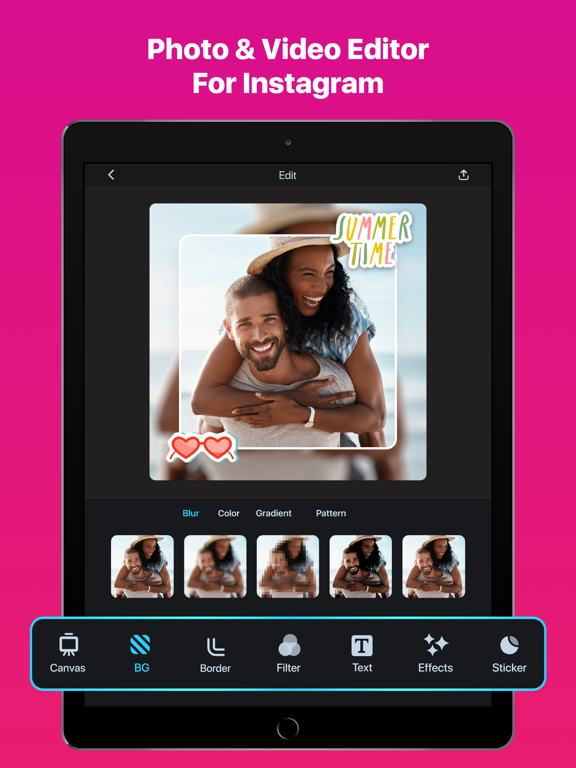

Pricing & paywalls
App Store
- Edit Up Premium — $11.99/month (derived from the IAP title)
Ratings & reviews
App Store
-
5/5⚠️⚠️DEVELOPER PLEASE READ ⚠️⚠️
helloo, so i’m actually here about your other app (Private Photo Album/ Calculator +) because ever since the new ios 14 update, i haven’t been able to open the app. it crashes with less than a second each time i try to open it, and i have very important photos that i really don’t wish to lose. ive tried to restart my phone, quit the app, almost everything. but im assuming now that it has something to do with bugs for the ios version since the last update was four years ago. i wasn’t even able to leave a review on that app which is why i’m here on this one. so if you read this, PLEASE update the Calculator + app. like i mentioned before, i have important photos that i don’t wish to lose.
zel11112 · 30 Aug 2026
-
2/5Worked amazing for the first photo, useless after
Worked awesome for the first photo. Then it would practically force me to subscribe. I got the skip button to skip the subscription, it shows me an ad. Alright, still fine if it’s free. I close out of the ad (it’s not a timed ad either) and it ignores the photo I selected, so I select a photo again, and the subscription screen is back, rinse, and repeat. Edit: Dev says it’s meant to demonstrate what you can do with the app. Fine, you could do that and maybe I’d pay $1.99 or whatever ONE TIME like similar apps that do the same thing, but a subscription like this isn’t worth it, I mean I could get Adobe for not much more I hear. Or, at least let the app remain functional for free users, if you’re going to throw that many ads at us. Otherwise it’s how your app gets uninstalled. I get wanting to be paid for your efforts, theres ad revenue for that and again, I’d possibly be willing to do a ONE TIME payment like any other similar app out there may ask for. This isn’t the way to go, though, and the reviews show it.
creepperklr2 · 30 Aug 2026
-
2/5Subscription only
This is probably a good app. It’s not obvious when you download that it has a demonstration mode of exactly one picture or video. After that, it presents a subscribe option from which you can not escape. It looks like you can simply skip it and edit another item. It even lets you start the second edit, but after you import your item, it puts up another subscribe window. This window also has a skip button. When you push it, however, whatever you imported is gone. This is implementation is perfect if you want to collect a bunch of angry reviews. Don’t tell anyone about the single image demo mode. Put a skip button on the subscription window. Allow the user to believe they can start a second edit. Put up another subscription window with a skip button, but then delete the users image. Leave the UI alive so the user might try again. Never explain what’s going on. I have some suggestions for how you can make the user experience worse. Feel free to contact me if you’d like to hear them.
Fracknut · 30 Aug 2026
-
1/5Pretends to be free but isn’t
Kind of ridiculous that it allows you one “photo”, without telling you it’s only one. Then you are forced to pay a outrageous subscription fee of $10 a month! What?! Just to resize a photo so Instagram doesn’t crop it? No way! Devs direct response to another review was “the one photo allotment was to show you what it can do”. That’s it! I’m a person that will gladly PAY a ONE TIME charge to buy the app, but the minute there’s a subscription fee, especially if it’s not even a reasonable one, that app goes out the door. Here’s a tip, besides avoiding this app, if you have a computer, you can do this yourself by pulling your image into any Adobe, paint, or photo program ( a lot of them are free or very low in price to OWN for years to come). Set your canvas to 4:3 aspect ratio (or for whatever site your posting on, look up their requirements). Even a basic $50 program that you will forever own like photoshop/ paint shop pro will be less expensive than $10/mo ($120/yr) and you never own it.
MunchyAngel · 30 Aug 2026
-
2/5Please fix your app for god sakes.
This app COULD be amazing, but I shouldn’t have to delete it and redownload it just to edit the next picture. When I download the app, I can pick a picture to edit and then save it. HOWEVER, in order for me to edit the next picture I literally have to delete and redownload the entire app over again because of your consistent adds and the fact that you almost like bully me into buying the trail. When I go to click on the next picture I want to edit or even click on anything else I’m the app, it immediately keeps popping up the trail for me to purchase. When I click the X, it then immediately pops up an add, and when I click the X off the add, it does the same thing over again- trail, then add, trail, then add. Forcing me to delete the app to move on to each individual picture. It’s ridiculous because this app has great features, and this is ruining everything about the app for me.
.t..l...c.... · 30 Aug 2026
Privacy & accessibility
App Store
Privacy
- Data Not Linked to You — Analytics — Diagnostics — Crash Data Developer declared
- Data Not Linked to You — Analytics — Diagnostics — Other Diagnostic Data Developer declared
- Data Not Linked to You — Analytics — Diagnostics — Performance Data Developer declared
- Data Not Linked to You — Analytics — Identifiers — Device ID Developer declared
- Data Not Linked to You — Analytics — Usage Data — Product Interaction Developer declared
- Data Not Linked to You — Third-Party Advertising — Diagnostics — Other Diagnostic Data Developer declared
- Data Not Linked to You — Third-Party Advertising — Identifiers — Device ID Developer declared
- Data Not Linked to You — Third-Party Advertising — Usage Data — Advertising Data Developer declared
- Data Not Linked to You — Third-Party Advertising — Usage Data — Product Interaction Developer declared
- Data Not Linked to You — Diagnostics Developer declared
- Data Not Linked to You — Identifiers Developer declared
- Data Not Linked to You — Usage Data Developer declared
- Data Used to Track You — Identifiers — Device ID Developer declared
- Data Used to Track You — Identifiers Developer declared
Accessibility
No accessibility labels collected yet.
Versions
App Store
-
2.10
Bugfix: Resolves crashes in Adjust features on iOS 18.
-
2.11
This version includes many new features: 1. Photo Collage Implementation 2. Image Resizer 3. AI Expander 4. AI Editing Tools: AI Enhancer, Image Upscale, Deblur Image, AI Denoise, Low-Light Enhance, Old Photos Restore, Face Restore. 5. Photo Picker optimization for handling a large number of photos in the gallery. Update your app regularly to always have all the new features!
-
2.12
This version includes: - support for saving in 8K with AI Upscale and other AI editing features.
-
2.13
This version includes: 1. AI Image Feature – Start with an image generated from your text prompts. 2. AI Cutout added for Shape Cut stickers. 3. New Picker implementation. 4. Blank Canvas added. 5. Blend feature implemented for PIP and Shape stickers. 6. Layer Screen updated (now divided into two sections). 7. UI changes for Canvas, Background, Border, Position, and Size menus. 8. Max resolution support (4K, 6K, 8K) added, depending on device memory. 9. Adjust and Filters can now be applied to multiple images simultaneously in the Collage feature. 10. Shape feature added in PIP Stickers.
-
2.14
This version introduces exciting new features and improvements: 1. AI Background Remover – Instantly remove backgrounds with just one click. 2. AI Object Remover – Erase any object by simply tapping on it with your finger. 3. Emoji Stickers – Now with new tools: blend, filter, and adjust for better customization. 4. Redesigned UI – A smoother, more intuitive experience. 5. Performance Improvements – Faster, more stable, and more reliable.
-
2.15
This version include minor UI and performance improvements.
-
2.16
This update includes: - Improved Remove Objects UI. - Redesigned Text-to-Image / Image-to-Image AI generation, now with Discovery integration. - New look for the text editor and text selection menu. - Added new Graphics shape sticker. - Introduced Focus feature for Image Stickers. - Bug fixes and other improvements.
-
2.17
This version includes: - Bug fixes.
-
2.18
This update includes: - Nano Banana image generation. - iOS 26 optimization.
-
2.4
We update the app regularly so we can make it better for you. This version includes: - “Redo Undo” functionality added at Photo editor. - Compatible for iOS 17 - Fixed crash issues and performance improved. Get the latest version & thanks for using No Crop.
-
2.5
We update the app regularly so we can make it better for you. This version includes: 1. Bug fix 2. Performance Improvements Get the latest version & thanks for using No Crop.
-
2.7
We're glad to introduce in this version: - Trendy Effects: Double Exposure, Split & Flip, Split Color, Rain Drop, Word Effect, Broken Glass, Face Crack & more. - Improved UI. - Drafts feature added. Please, update the app to get the new features available.
-
2.8
This version includes minor bug fixes to new effects added recently: - Trendy Effects: Double Exposure, Split & Flip, Split Color, Rain Drop, Word Effect, Broken Glass & more.
-
2.9
In this update we introduce the new features: 1. AI Cutout 2. PiP 3. Shape Cut Also it includes some performance Improvements and bug fixes. Always keep your app updated to have all latest features available.
-
3.0
We’re excited to introduce a major update packed with powerful new features: - New Nano Banana templates - Instagram Post & Story templates - Profile Avatar maker - AI Logo Maker - AI Sticker Maker - AI Tattoo Maker - AI T-Shirt Design - AI Avatar Maker - AI Image Generation We’ve renamed our app and are excited to introduce our new brand name: “Edit Up”. introduce you our new brandname: "Edit Up".
-
3.1
This update includes: - Fit/fill button added in the share creation page. - Bug fixes.
-
3.2
This version includes: 1. Performance improvements. 2. Bug fixes.
-
3.3
This version includes: 1. Performance improvements. 2. Bug fixes.
-
3.4
This version includes: 1. Performance improvements. 2. Bug fixes.
-
3.5
This version includes: 1. Feature enhancements. 2. Performance improvements. 3. Fixes for known bugs.
-
3.6
This version includes: 1. AI editing just got faster — Blur BG, Enhance, Remove Objects, and Expand now available directly in the main editor. 2. HD Photo feature introduced. 3. Known bug fixes.
-
3.7
This version includes: - Improved user interface for a better experience. - Enhanced performance and known bugs fixes.
-
3.8
This version includes: 1. Performance Improvements 2. Known Bugs Fixes
-
4.0
We’re excited to introduce this major update: 1. A completely redesigned Video Editor with powerful new features 2. Performance improvements 3. Bug fixes
-
4.1
· 22 Jul 2026
This version includes: - Template Search - Text Eraser - A smoother, more intuitive user flow - New font collections in the Text Editor - Performance improvements and bug fixes
-
4.2
· 20 Aug 2026
This version includes: - Edit Multiple Photos at Once: Apply edits simultaneously to multiple photos for a faster workflow and export them with ease. - Batch Background Removal: Remove backgrounds from multiple photos faster. - Bug Fixes & Improvements: We've fixed bugs and made performance and stability improvements for a smoother editing experience.
Alternatives
- No Crop - Square quick sized — Same category + similar ratings
- Square Fit Photo Video Editor — Same category + similar ratings
- No Crop Photo Video Resize — Same category + similar ratings
- InstaSize: AI Photo Editor — Same category + similar ratings
- Unblur - AI Photo Enhancer — Same category + similar ratings
- YouCam Enhance: AI Photo&Video — Same category + similar ratings
Availability by market
- US
Data quality & evidence
- Page completeness
- Live store listing
- Last verified
- 30 Aug 2026
- Sources
- App Store
- Independent summary has not been published yet.